UPDF
UPDF
 UPDF for Windows
 UPDF for Mac
 UPDF for iPhone/iPad
 UPDF for Android
 Nomostar
 UPDF AI Online
 UPDF Sign
 IvyCraft
 Edit PDF
 Annotate PDF
 Create PDF
 PDF Form
 Edit links
 Convert PDF
 OCR
OCR PDF to Word
 PDF to Image
 PDF to Excel
 Organize PDF
 Merge PDF
 Split PDF
 Crop PDF
 Rotate PDF
 Protect PDF
 Sign PDF
 Redact PDF
 Sanitize PDF
 Remove Security
 Read PDF
 UPDF Cloud
 Compress PDF
 Print PDF
 Batch Process
 About UPDF AI
 UPDF AI Solutions
 AI User Guide
 FAQ about UPDF AI
 Summarize PDF
 Translate PDF
 Chat with PDF
 Chat with AI
 Chat with image
 PDF to Mind Map
 Explain PDF
 PDF AI Tools
 Image AI Tools
 AI Chat Tools
 AI Writing Tools
 AI Study Tools
 AI Working Tools
 Other AI Tools
 AI Bookmark Generation
 AI Bookmark Summary
 AI Watermark Generation
 AI Background Generation
 AI Sticker Generation
 AI Stamp Generation
 AI Editing Suite
 UPDF Copilot
 AI Page Management
 AI Semantic Search
 PDF to Word
 PDF to Excel
 PDF to PowerPoint
 Enterprise Solution
 Enterprise Sign
 Enterprise AI
 Enterprise Plan
 Enterprise User Guide
 Enterprise Webinar
 IT
IT Education
 Construction
 Financial Service
 Healthcare
 Insurance
 Legal
Legal Manufacturing
 Government
 Researchers & PhDs
 Solopreneurs & Freelancers
 Lawyers & Legal Professionals
 Real Estate Agents & Brokers
 Education Solution
 Customer Stories
 User Guide
 UPDF Tricks
 FAQs
FAQs UPDF Reviews
 Download Center
 Blog
Blog Newsroom
 Tech Spec
 Updates
 UPDF vs. Adobe Acrobat
 UPDF vs. Foxit
 UPDF vs. PDF Expert

 UPDF AI
Explain PDF with AI Free Online
UPDF AI explains PDFs all in one place—whether you're reading, summarizing, translating, or more. It boosts your work efficiency and helps you understand unfamiliar concepts or text in PDFs. Simply upload PDF, copy and paste the term from the PDF, and let UPDF AI provide the explanation.
Powered by
 GPT-5 |
 DeepSeek R1
5000+ Reviews
 4.8
4.8
UPDF AI available on


 Desktop & mobile app

4M+ Users, 13M+Terms Explained, Trusted by Leading Medias:






How to Use UPDF AI to Explain PDF?
-
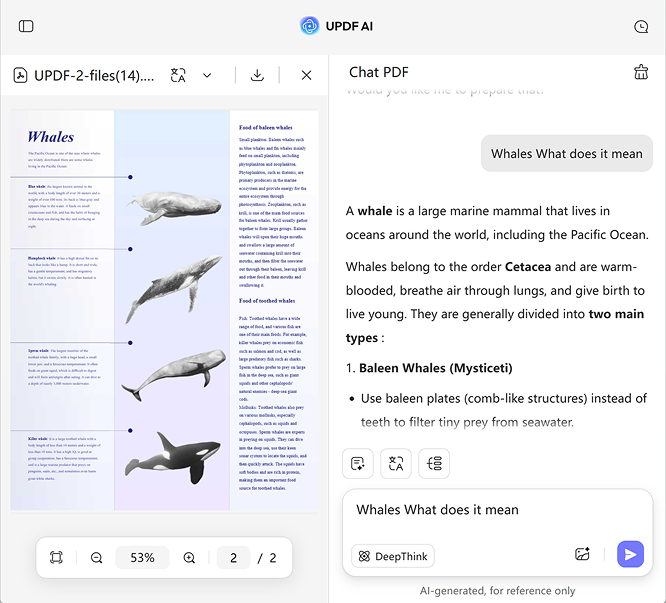
Click the Upload File icon to add your PDF to UPDF AI Online. Then, click Start Chat with PDF and highlight the terms you want AI to explain. Copy and paste the text into the UPDF AI chatbox and enter the prompt: “Explain for me” or “What does it mean?”.
-
Choose your AI model—by default, UPDF AI uses ChatGPT-5, but you can switch to DeepSeek R1 by clicking DeepThink.
-
Finally, click Send to get a detailed explanation of your selected terms. In seconds, you’ll receive clear, easy-to-understand explanations that help you fully comprehend the text.

Who Should Use UPDF AI to Explain PDF?
Students
Students often face complex textbooks, research papers, or academic articles in PDF format. With UPDF AI, difficult terms are explained clearly in seconds, helping students overcome reading obstacles, save time, and understand content faster, making studying more efficient and less frustrating.

Professionals
When reviewing reports, contracts, or technical documents, UPDF AI instantly explains difficult terms and complex content. It helps professionals grasp information quickly, improves understanding and reduces confusion, making it easier to analyze documents efficiently and make informed decisions without delays.

Researchers
Researchers often encounter scientific or technical PDFs filled with difficult or unfamiliar terms. With UPDF AI, these terms can be explained instantly, helping researchers understand complex content faster, and focus on analysis, making their study and research workflow more efficient and productive.

Why Use UPDF AI to Explain PDF?
Powered by ChatGPT 5 and DeepSeek R1
UPDF AI, powered by the latest models like ChatGPT 5 and DeepSeek R1, provides accurate explanations for your terms. You can easily switch between models to explore different perspectives and get the most satisfying, clear, and reliable results for your PDF content.
Real-Time PDF Term Assistance
UPDF AI lets you open and read your PDF on one side while explaining terms on the other. This way, you can understand difficult words or concepts instantly without disrupting your reading flow, making studying or reviewing documents faster and more efficient.
More Than Explain PDF File
Besides explaining PDF content, UPDF AI lets you summarize PDFs, translate them, convert PDFs into mind maps, chat with multiple PDF files, perform deep research, and search academic papers. It’s an all-in-one tool to boost productivity and simplify working with PDF documents.
UPDF AI vs. Other AI Tools to Explain PDF
UPDF AI
Other AI Tools
Free Version

AI Models
GPT-5 & Deepseek R1
ChatGPT 4 or ChatGPT 3o
Accuracy
98%
90%
Summarize PDF
PDF to Mind Map

Side by Side Translation
Translate by Page
Paper Search
Deep Research
Language Supported
100+
Less than 20
Platform Supported
Online, Windows, Mac, Android, iOS
Online
FAQs About Using UPDF AI to Explain PDF
Q1. Can I explain multiple terms from PDF at once?
Q2. Can UPDF AI explain diagrams in PDFs?
Q3. Is UPDF AI free to explain PDF?
Other Popular UPDF AI Tools