UPDF
UPDF
 UPDF for Windows
 UPDF for Mac
 UPDF for iPhone/iPad
 UPDF for Android
 UPDF AI Online
 UPDF Sign
 Edit PDF
 Annotate PDF
 Create PDF
 PDF Form
 Edit links
 Convert PDF
 OCR
OCR PDF to Word
 PDF to Image
 PDF to Excel
 Organize PDF
 Merge PDF
 Split PDF
 Crop PDF
 Rotate PDF
 Protect PDF
 Sign PDF
 Redact PDF
 Sanitize PDF
 Remove Security
 Read PDF
 UPDF Cloud
 Compress PDF
 Print PDF
 Batch Process
 About UPDF AI
 UPDF AI Solutions
 AI User Guide
 FAQ about UPDF AI
 Summarize PDF
 Translate PDF
 Chat with PDF
 Chat with AI
 Chat with image
 PDF to Mind Map
 Explain PDF
 PDF AI Tools
 Image AI Tools
 AI Chat Tools
 AI Writing Tools
 AI Study Tools
 AI Working Tools
 Other AI Tools
 AI Bookmark Generation
 AI Bookmark Summary
 AI Watermark Generation
 AI Background Generation
 AI Sticker Generation
 AI Stamp Generation
 AI Editing Suite
 UPDF Copilot
 AI Page Management
 AI Semantic Search
 PDF to Word
 PDF to Excel
 PDF to PowerPoint
 Enterprise Solution
 Enterprise Sign
 Enterprise AI
 Enterprise Plan
 Enterprise User Guide
 Enterprise Webinar
 Banking
 Healthcare
 Insurance
 Legal
Legal Manufacturing
 Government
 Education Solution
 Customer Stories
 User Guide
 UPDF Tricks
 FAQs
FAQs UPDF Reviews
 Download Center
 Blog
Blog Newsroom
 Tech Spec
 Updates
 UPDF vs. Adobe Acrobat
 UPDF vs. Foxit
 UPDF vs. PDF Expert

Many students feel that the LSAT is a hard test to prepare for, yet consistent practice with LSAT questions is the best method for better scores. These questions assist students become familiar with different types of reasoning and develop strategies under test conditions. LSAT study aids like sample tests and explanations have now been released in digital PDF files that can be easily sorted and read.
Digital tools like UPDF make LSAT prep more manageable by letting students organize, highlight, and take notes directly on PDFs. Its AI companion, UPDF AI, can summarize complex explanations, generate extra practice questions, and provide insights on challenging sections. With these features, students can focus their study time and support learning without getting lost in long documents.
Try UPDF and UPDF AI to turn LSAT PDFs into smarter practice.
Windows • macOS • iOS • Android 100% secure
Let's explore the key strategies for effective LSAT preparation:
- Work regularly with LSAT practice questions to build confidence.
- Use sample questions to learn from both correct and incorrect answers.
- Study under a timed environment to simulate the LSAT experience.
- Review explanations carefully to understand reasoning patterns.
- Track progress and focus on weaker sections for improvement.
Part 1. What are LSAT Practice Questions?
LSAT sample questions simulate the types of questions found on the official test to give students a way to strengthen their skills. These questions help you see what the exam tests and practice the same skills. They improve how you read, think, and solve problems to raise your score.
Types of LSAT Practice Questions
Before moving on, let's look at LSAT practice question types and what they test.
- Logical Reasoning: Short arguments appear here, and you answer questions about conclusions or reasoning problems. This type builds skills for understanding arguments, finding assumptions, and seeing what logically follows.
- Analytical Reasoning (Logic Games): You work with rules about ordering and grouping different items. It strengthens your ability to organize information, draw diagrams, and see what must or can happen.
- Reading Comprehension: Different subjects are provided, and you respond to questions about their thoughts. This type improves locating key details and understanding the writer's overall point.

Benefits of Consistent Practice
Regular practice with LSAT questions helps you recognize patterns and makes the exam feel less intimidating. Timed practice teaches you to manage your timing and give correct answers to questions under pressure conditions. Reviewing finished questions, incorrect ones, shows why right answers work, strengthens your understanding, and increases your performance over time.
Part 2. LSAT Sample Questions
These questions are practice items that copy the real exam's style, wording, and difficulty very closely. LSAT sample questions can be taken from past official exams or created by companies using the same testing standards. These questions show the kinds of arguments, passages, and logical tasks you will actually face.
In LSAT prep, sample questions help you experience the exam format and difficulty before test day. They let you test your current skills, then see exactly which areas need more focused work. Using them regularly makes the exam feel familiar, which can improve confidence and performance.

Tips for Using LSAT Sample Questions
Look at the simple tips below to get better results from every practice question you solve.
- Practice with timed sets that match real sections, so you build strong pacing and stamina.
- Check each question after you finish and try to understand your mistakes.
- Keep a small notebook for mistakes, writing question type, error reason, and a short, improved strategy.
- Focus extra practice on your weakest question types, instead of only repeating comfortable or easy questions.
- Use tools like UPDF to highlight important parts, add short notes, and organize PDF sample questions for easier review later.
Part 3. How Long is The LSAT?
When you prepare for the LSAT and want a high score, you must know how long is the LSAT. Let's look at the total test duration to help you decide how to use your time and energy in every section.
Test Duration and Section Breakdown
The LSAT has a set total time, with the multiple-choice sections together lasting about three hours. Knowing this timing helps you plan how many minutes to give each part of the test. Let's break down the main sections and their time limits.
- In the first scored section, you answer Logical Reasoning questions for 35 minutes.
- The Reading Comprehension section also gives you 35 minutes to finish.
- Another 35‑minute experimental section is included to try out new questions.
- LSAT Writing is a separate task that takes 35 minutes online.

Why Timed Practice is Important
Having discussed the test length, let's look at why timed practice matters for your LSAT prep.
- Timed practice trains you to finish sections on time without rushing at the last minute.
- Working with a clock shows how many questions you can safely attempt in each section.
- Regular timing drills help you stay calm under pressure and reduce careless mistakes.
- A set time routine in practice makes the real exam feel more familiar and controlled.
Using Tools to Improve LSAT Timing
Some students know the LSAT time limits but still lose control of the clock during practice. This can cause panic, skipped questions, and weak focus near the end of sections. UPDF AI can turn your LSAT practice questions PDF into timed sets that feel like a real exam, so you can train speed and time control in a safe way.
Part 4. LSAT Score Range
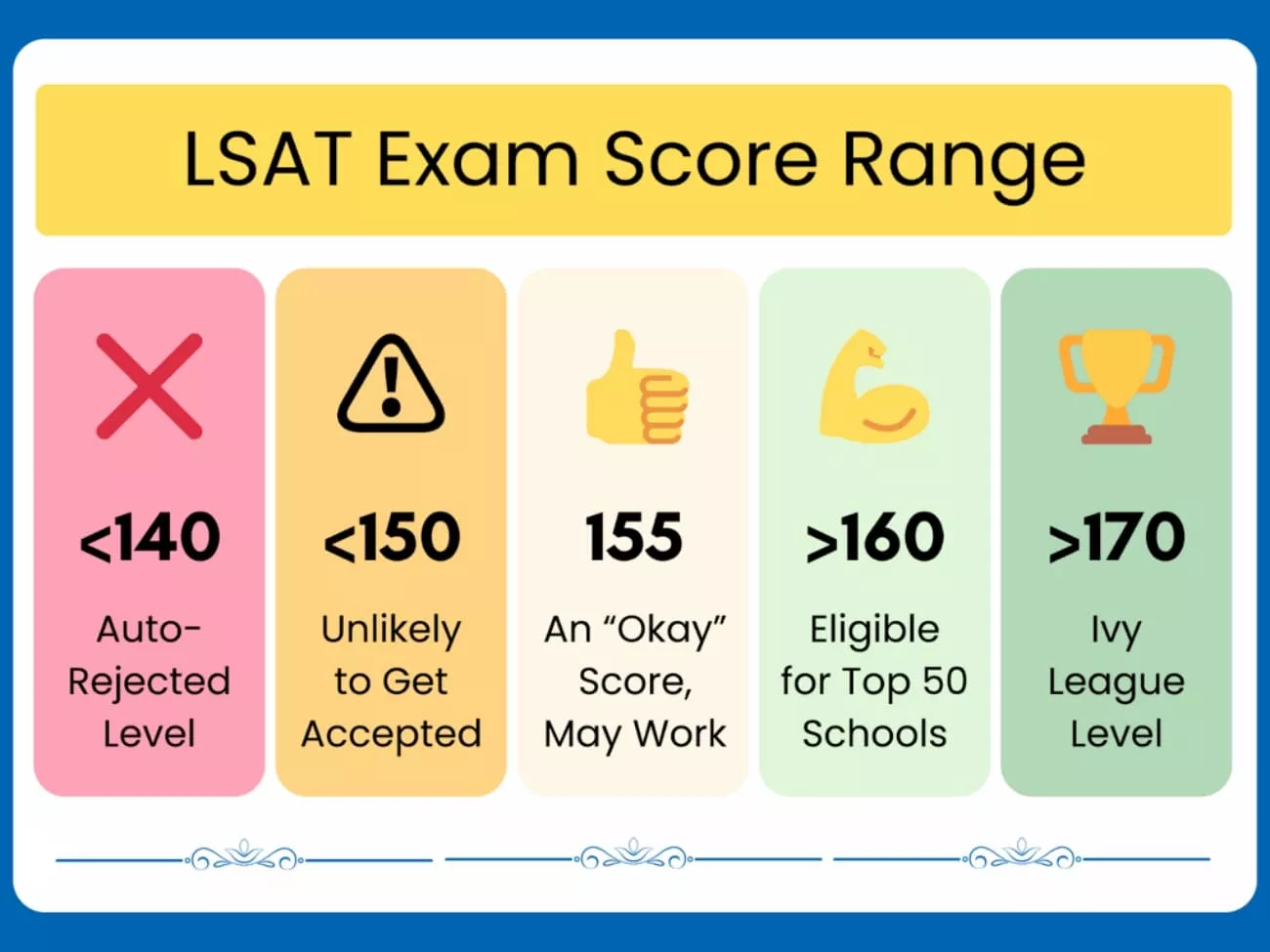
The LSAT is scored on a scale from 120 to 180, with higher numbers showing stronger performance. Law school's often report the middle score ranges for admitted students to help applicants understand how competitive their scores are. Now, let's look at how different LSAT score range levels are usually viewed.
- 120 to 139 shows serious difficulty with the test and may limit law school options.
- 140 to 149 is below average and often needs improvement for many accredited law programs.
- 150 to 159 is around average and can be acceptable at a range of schools.
- 160 to 169 is a strong range and competitive for many well-ranked law schools.
- 170 to 180 is an excellent range and competitive at the most selective law schools.
Why Small Score Gains Matter
Even a few extra LSAT points can move you into a higher score range that more schools prefer. A small increase can also make you closer to or above a school's typical scores for admitted students. Better scores can sometimes improve chances for scholarships, which makes law school more affordable.
Using AI for Targeted Practice
AI tools can also be optionally used to generate practice questions and help you focus on weak areas instead of guessing what to study.
Part 5. Bonus: How UPDF & UPDF AI Online Help With LSAT Preparation
Some students now prepare for the exams using digital resources like LSAT practice questions and explanations stored as PDFs. Organizing these files, marking points, and tracking errors becomes difficult when everything is scattered across folders. This is where UPDF comes in with one workspace to highlight, comment on, and sort all your LSAT prep materials easily.
Windows • macOS • iOS • Android 100% secure
Moreover, UPDF AI adds extra help directly inside the same workspace where you study and prepare. It can read LSAT content and then summarize explanations, clarify confusing parts, or create practice questions. Learners can use this AI through the app or through UPDF AI Online for custom practice sets.
Practical LSAT Use Cases
Now let's look at how UPDF helps you work with LSAT sample questions and prepare more efficiently.
1. Import LSAT PDFs
You can import all your LSAT practice tests and official materials directly into UPDF as PDF files. This keeps everything organized in one place instead of scattered across your computer or different apps.
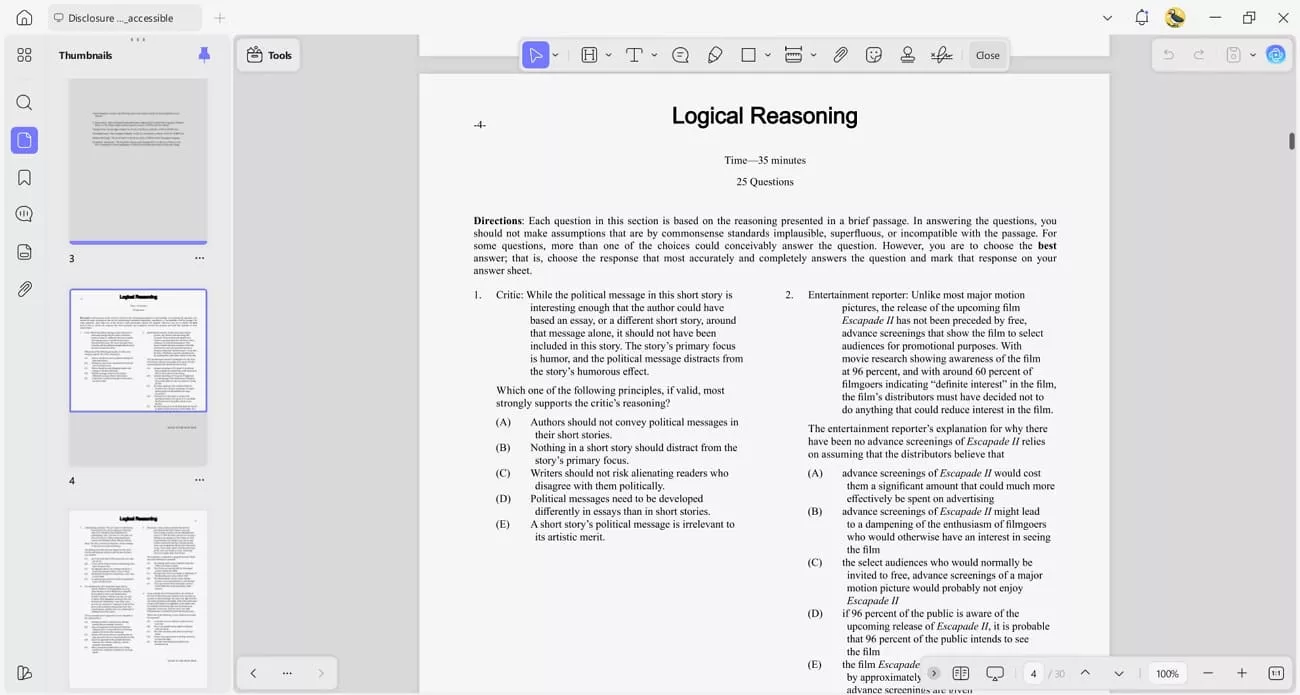
2. Annotate Question Types and Explanations
After reviewing, you can highlight key parts and add notes about the question type and reasoning. This helps you see patterns in your mistakes and understand what skills need more focus and practice.

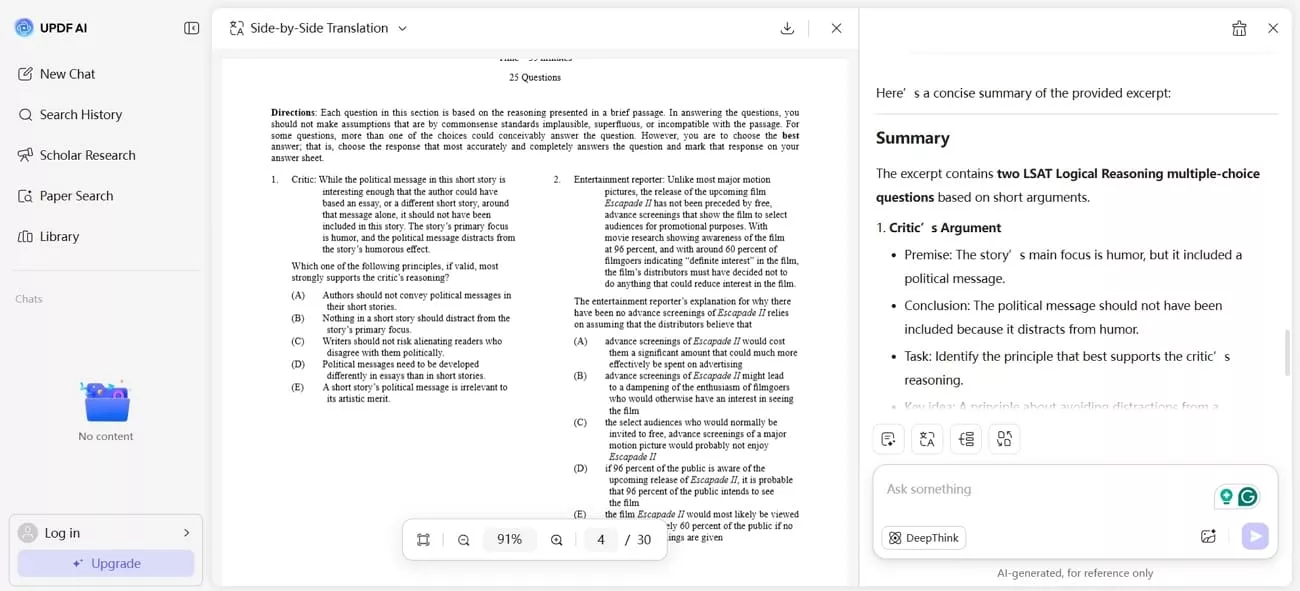
3. Summarize Explanations With UPDF AI Online
UPDF AI Online can read long answer explanations and create short, clear summaries that are easy to understand. This saves time and helps you grasp the core idea of why answers are right or wrong without reading everything again.
4. Generate AI Practice Questions For Reinforcement
UPDF AI Online can create new LSAT-style practice questions based on the materials and topics you are studying most. This gives you extra chances to practice specific question types and build confidence in weaker areas.

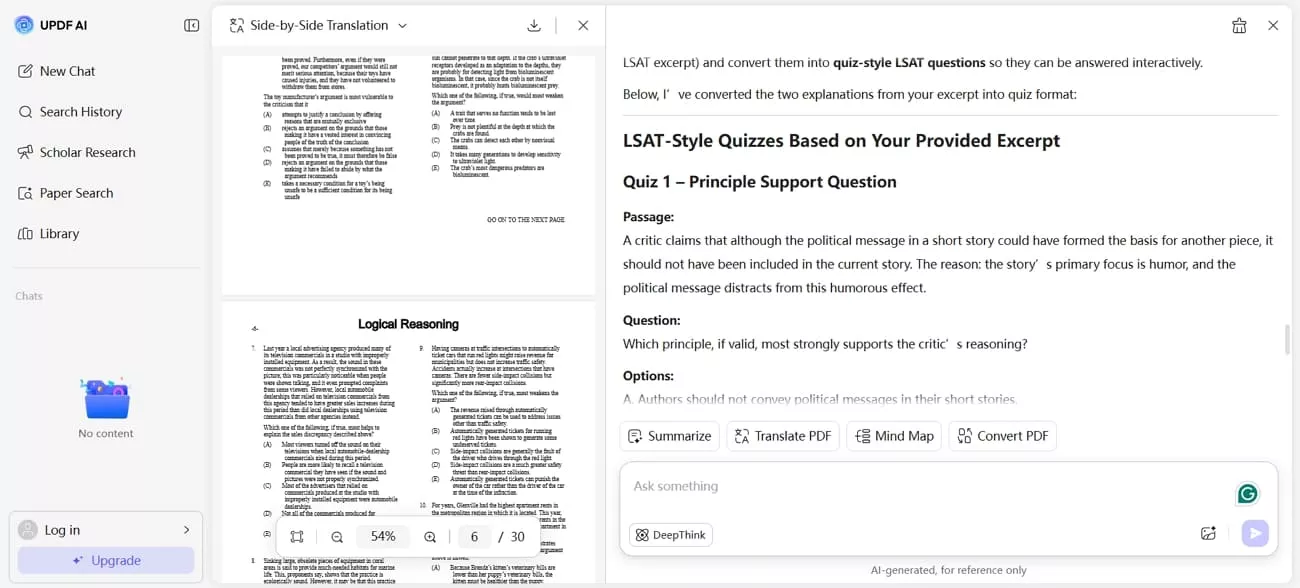
5. Convert Explanations Into Quizzes
UPDF AI Online's quiz generator can turn your practice materials into quizzes that feel like the real test. This helps you test yourself under pressure and measure whether you have truly mastered each skill and concept.
Conclusion
In conclusion, this guide covers how LSAT practice questions work helps students set clear goals and focus on steady improvement. This guide also explains how to practice, manage time, review mistakes, and interpret score ranges. Students looking to improve their LSAT study and manage digital materials can benefit from UPDF and UPDF AI Online.