 UPDF
UPDF
 UPDF for Windows
 UPDF for Mac
 UPDF for iPhone/iPad
 UPDF for Android
 Nomostar
 UPDF AI Online
 UPDF Sign
 IvyCraft
 Edit PDF
 Annotate PDF
 Create PDF
 PDF Form
 Edit links
 Convert PDF
 OCR
OCR PDF to Word
 PDF to Image
 PDF to Excel
 Organize PDF
 Merge PDF
 Split PDF
 Crop PDF
 Rotate PDF
 Protect PDF
 Sign PDF
 Redact PDF
 Sanitize PDF
 Remove Security
 Read PDF
 UPDF Cloud
 Compress PDF
 Print PDF
 Batch Process
 About UPDF AI
 UPDF AI Solutions
 AI User Guide
 FAQ about UPDF AI
 Summarize PDF
 Translate PDF
 Chat with PDF
 Chat with AI
 Chat with image
 PDF to Mind Map
 Explain PDF
 PDF AI Tools
 Image AI Tools
 AI Chat Tools
 AI Writing Tools
 AI Study Tools
 AI Working Tools
 Other AI Tools
 AI Bookmark Generation
 AI Bookmark Summary
 AI Watermark Generation
 AI Background Generation
 AI Sticker Generation
 AI Stamp Generation
 AI Editing Suite
 UPDF Copilot
 AI Page Management
 AI Semantic Search
 PDF to Word
 PDF to Excel
 PDF to PowerPoint
 Enterprise Solution
 Enterprise Sign
 Enterprise AI
 Enterprise Plan
 Enterprise User Guide
 Enterprise Webinar
 IT
IT Education
 Construction
 Financial Service
 Healthcare
 Insurance
 Legal
Legal Manufacturing
 Government
 Researchers & PhDs
 Solopreneurs & Freelancers
 Lawyers & Legal Professionals
 Real Estate Agents & Brokers
 Education Solution
 Customer Stories
 User Guide
 UPDF Tricks
 FAQs
FAQs UPDF Reviews
 Download Center
 Blog
Blog Newsroom
 Tech Spec
 Updates
 UPDF vs. Adobe Acrobat
 UPDF vs. Foxit
 UPDF vs. PDF Expert

Do you need to translate English PDFs to Greek for visa applications, immigration certification, business contracts, or academic use? But most platforms break PDF table layouts unfit for official use. Generic mistranslates professional terms, free tools limit usage and risk data leaks, especially with scanned English PDFs.
So, in this guide, we will discuss the best option - UPDF for translating the contents of PDFs from English to Greek with both online and offline solutions. Our guide covers methods for scanned as well as normal PDFs.
Windows • macOS • iOS • Android 100% secure
Part 1. Which Tool Suits You Best in Your Scenario?
Not every method handles Greek fonts equally well, and your choice depends on your privacy needs, budget, and document complexity. Here's how to decide which path is right for you.
| Your Scenario | What You Need | Recommended Path | Jump to |
|---|---|---|---|
| Quick translation, one file, non-sensitive, no cost | Fast, free, no signup | Online tool | Part 2 |
| Scanned English PDF | OCR + translation | Online tool with OCR or desktop software | Part 2 / Part 3 |
| Sensitive document — contracts, legal | Privacy, local processing | Desktop software | Part 3 |
| Need fluent, natural-sounding Greek | High translation quality | Desktop software | Part 3 |
Once you've identified your scenario, let's dive into the actual translation methods. For most users, the quickest and easiest path is an online tool — no installation required, often free, and accessible from any device. Here are the top online solutions for translating English PDFs to Greek, including what each tool does well and where it falls short.
Part 2. How to Translate PDF English to Greek Online Free
The table below compares the top online English-to-Greek PDF translators based on free access, OCR quality, layout preservation, Greek font support, file limits, and privacy.
| Tool | Free Access | English OCR | Layout Preservation | Greek Font Support | File Limits | Best For | Cons |
|---|---|---|---|---|---|---|---|
| UPDF AI | 100 free AI questions | ⭐⭐⭐⭐ | ⭐⭐⭐⭐ | ✅ | 10M | Ask AI for translation, no sign-up | Just 5 files free, no layout preservation, just text |
| Online Doc Translator | Free preview | ⚠️(Convert Scanned Text to Word) | ⭐⭐⭐⭐ | ✅ | — | Versatile document translation | The translation is inaccurate, too many ads |
| iLovePDF Translate | 1 document/day (free) | ⭐⭐⭐ | ⭐⭐⭐⭐ | ✅ | — | Full document translation with formatting | Limited free access, Searchable, not editable file after OCR, Paid for Advanced AI |
| Smallpdf | 2 tasks/day (free) | ⭐⭐⭐ | ⭐ | ✅ | — | Simple, no signup | Translate files into text, Searchable, not editable file after OCR |
| Linnk AI | Free preview | ⭐⭐⭐⭐ | ⭐⭐⭐ | ✅ | 20MB/50 pages | Academic and research documents | Limited free features, no editing features, need to sign up |
| Lekhak | Free preview | ⭐⭐⭐ | ⭐ | ✅ | 50 files, 200 MB (Need Credits) | Poorly scanned documents | Translate files into text, export as Word, not PDF, need to sign up |
| Google Translate | Unlimited (free) | ⭐⭐ | ⭐ | ⚠️ | 10MB / 300 pages | Short documents only | No OCR features and translate into text |
| Microsoft Translator | Unlimited (free) | ⭐⭐ | ⭐ | ✅ | — | Microsoft ecosystem integration | No OCR features and translate into text |
| ChatGPT | Free tier | ⭐⭐ | ⭐ | ✅ | — | Contextual translation | No OCR fe No direct PDF translation — requires copying and pasting text; no layout preservation |
| DeepL | Free tier (once a month) | ⭐⭐⭐⭐⭐ | ⭐⭐⭐⭐⭐ | ✅ | — | Premium translation quality | Free tier is limited; Pro version costs ~$20/month, need sign up |
A comparison using the table above reveals that UPDF AI delivers the strongest overall performance, excelling in areas such as free usage allowances, OCR support, translation accuracy, and formatting retention. While most of these online tools share a similar workflow—uploading the file, selecting the language, waiting for the translation, and exporting the result.
⚠️ Privacy Reminder: Online tools require uploading files to cloud servers. For sensitive documents — contracts, legal files, personal data — use desktop solutions below.
Part 3. How to Translate PDF English to Greek Offline Locally
Desktop software keeps your files on your own machine (no cloud upload) and offers the highest translation quality with full Greek font support.
| Tool | Pricing | OCR Built-in | Greek Font Support | Layout Preservation | Platform | Best For |
|---|---|---|---|---|---|---|
| Adobe Acrobat Pro | Subscription (~$240/year) | ✅ | ⭐⭐⭐⭐⭐ | ⭐⭐⭐⭐⭐ | Win, Mac | Industry standard, full control |
| UPDF | One-time ($79.99) | ✅ | ⭐⭐⭐⭐⭐ | ⭐⭐⭐⭐⭐ | Win, Mac, iOS, Android | Best value — one-time, cross-platform |
| DeepL Pro | Subscription (~$20/month) | ✅ | ⭐⭐⭐⭐⭐ | ⭐⭐⭐⭐⭐ | Web, Desktop | Premium translation quality |
| Foxit PDF Editor | Subscription (~$130/year) | ✅ | ⭐⭐⭐⭐ | ⭐⭐⭐⭐ | Win, Mac | Enterprise workflows |
UPDF excels at English-Greek PDF translation with native Greek font and accent support, layout-preserving AI translation, scan OCR, batch processing, and auto text reflow. Fully offline for data safety, cross-platform compatible, and a one-time low fee far cheaper than other tools. Let's check how to translate a PDF from English to Greek with UPDF in these three methods!
With the UPDF app, you can translate PDFs by copying content and converting them, and it even works for scanned files with its OCR feature. So, download UPDF on your computer and smartphone to translate your PDFs with ease.
Windows • macOS • iOS • Android 100% secure
Way 1. Translate PDF from English to Greek via Copying and Pasting
The first and most optimal method of translating your PDF content from English to Greek is with the help of Copy-Paste functionality. This method does have its restrictions for larger files.
With the UPDF app on your computer, you can easily translate your PDF contents with the following method.
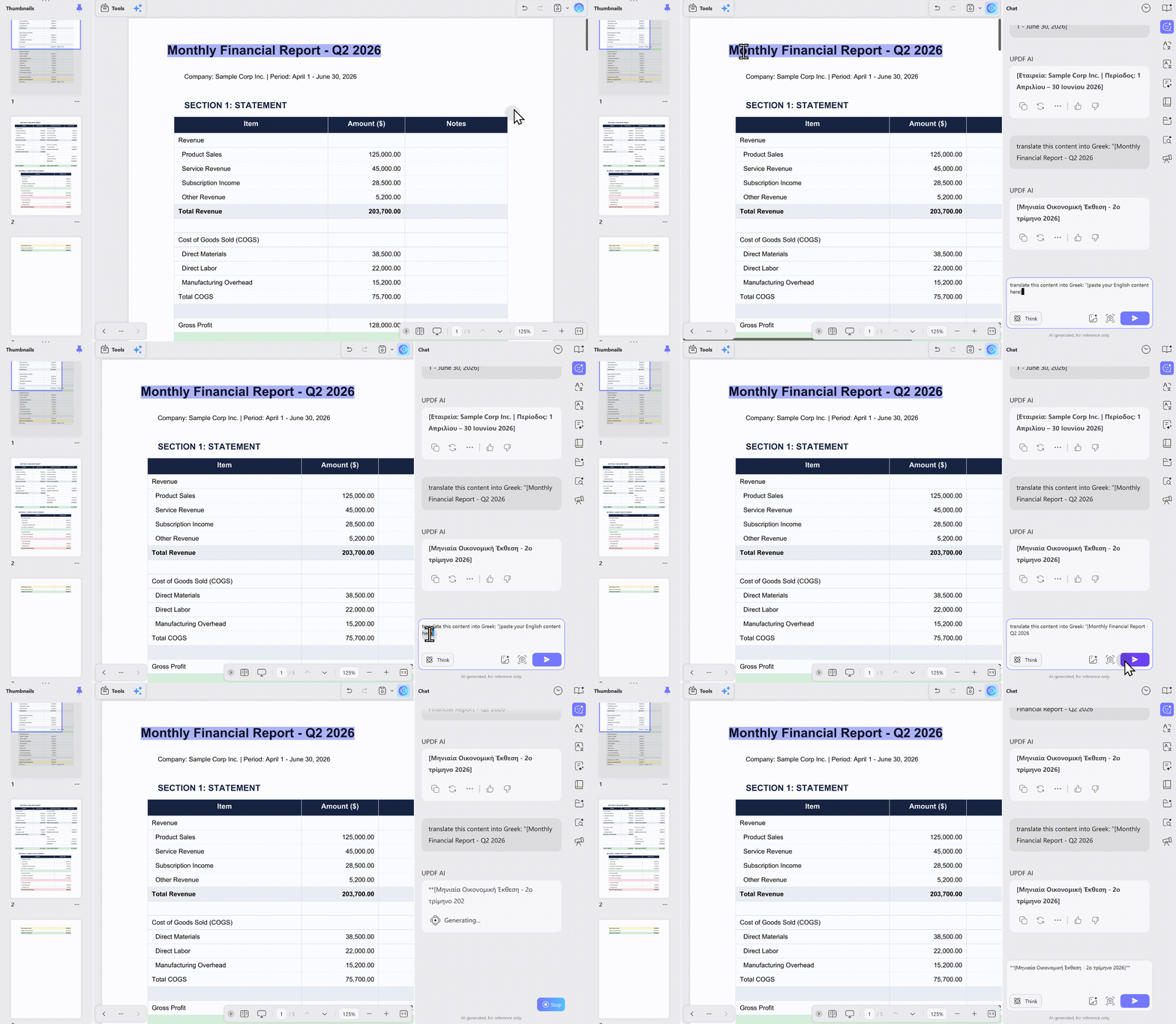
Step 1:
Run the UPDF application on your computer by clicking its desktop icon. Click “Open File” and select the file whose content you want to translate from “English to “Greek,” and click “Open" The file will now open, and you can select its text using your cursor and press “Cmd + C” on your computer keyboard to copy the selected content.
Step 2:
Click the “UPDF AI" button from the bottom right of the screen to access it and select the "Chat" option from the top. Now, type your prompt "translate this content into Greek: “[paste your English content here]” and press the "Send” button.
Step 3:
UPDF AI will now process your content and provide you with its translation instantly. If you like and want to use the content, you may click “Copy" otherwise, click the "Regenerate” button so that UPDF AI processes and translates the content again.
Way 2. Translate All Pages of PDF from English to Greek by Converting
If you have a large PDF document that has multiple pages, then translating that content by copying and pasting multiple smaller sections will not be the most efficient way. That's where you need a method to copy the whole content at once and then translate.
With UPDF’s file conversion features, you can efficiently convert English PDF documents’ content into Greek with the following steps:
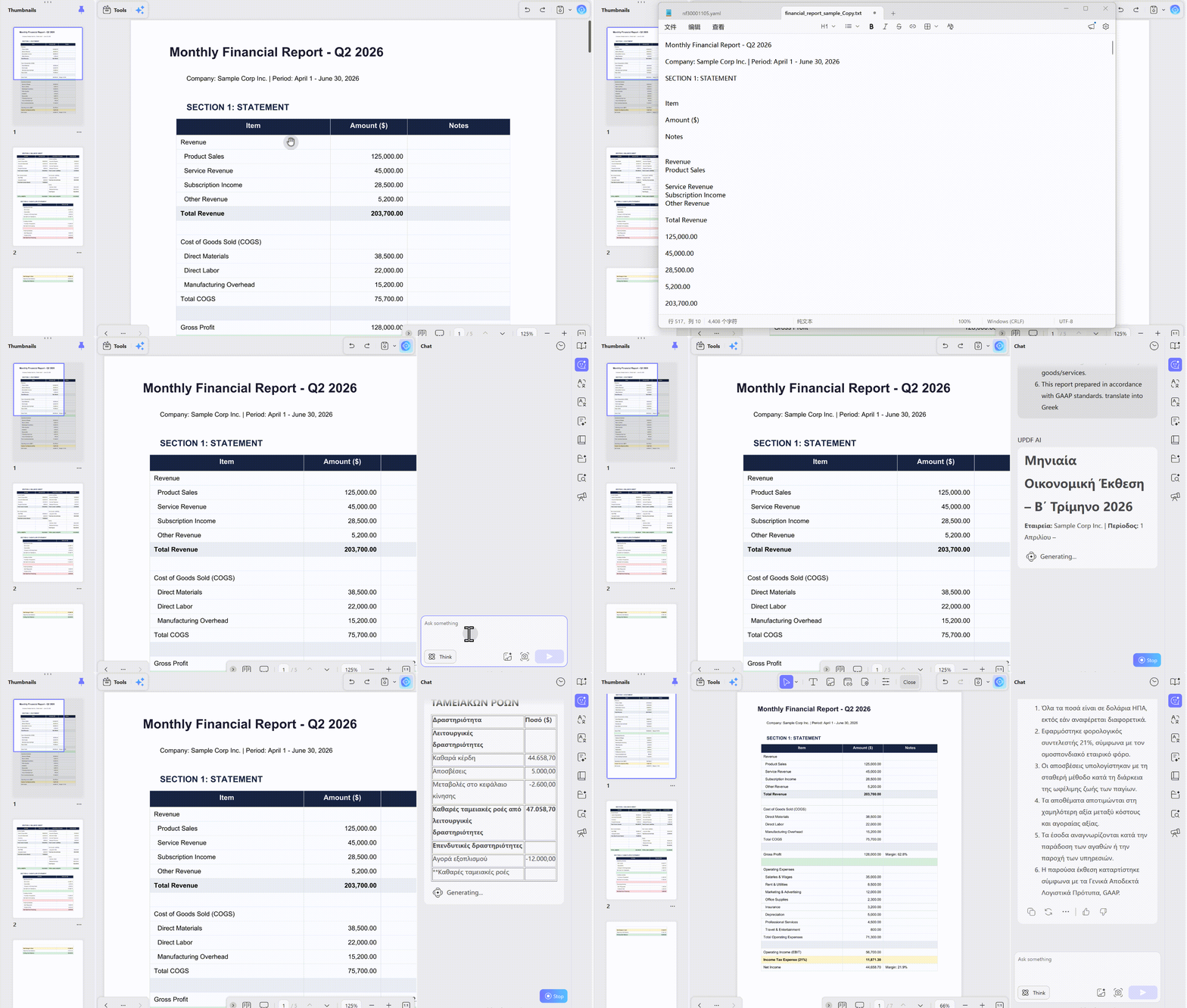
Step 1:
Click the desktop icon of UPDF on your computer to start this application, click the "Open File” button to select the desired PDF, then click “Open" so that the document opens in the UPDF interface. Now click "Export PDF” and select “Text” format. Click “Export” and follow the on-screen file saving steps to save the PDF content in Text form on your computer.
Step 2:
Open the text document converted by UPDF and press “Cmd + A” to select the whole content and “Cmd + C” to copy the selected content. Now, open “UPDF AI" in the UPDF App and select "Chat”. Type your prompt like “translate this content into Greek: "[paste your English content here]” and press “Send”.
Step 3:
UPDF will now process and translate your content into "Greek" in one go. You can click “Copy” to copy this translation on your clipboard or get another translation of the same content by clicking “Regenerate”. This way, the whole document will be translated into “Greek” in one go.
Way 3. Translate PDF from English to Greek via OCR
In some cases, you get pictures of text or scanned PDF documents that you need to translate from English to Greek. Well, when you are using the UPDF desktop application, you have nothing to worry about since the OCR feature can help you in this case.
Here are the detailed steps on how you can use the UPDF OCR feature to help you translate a PDF from English to Greek.
Step 1:
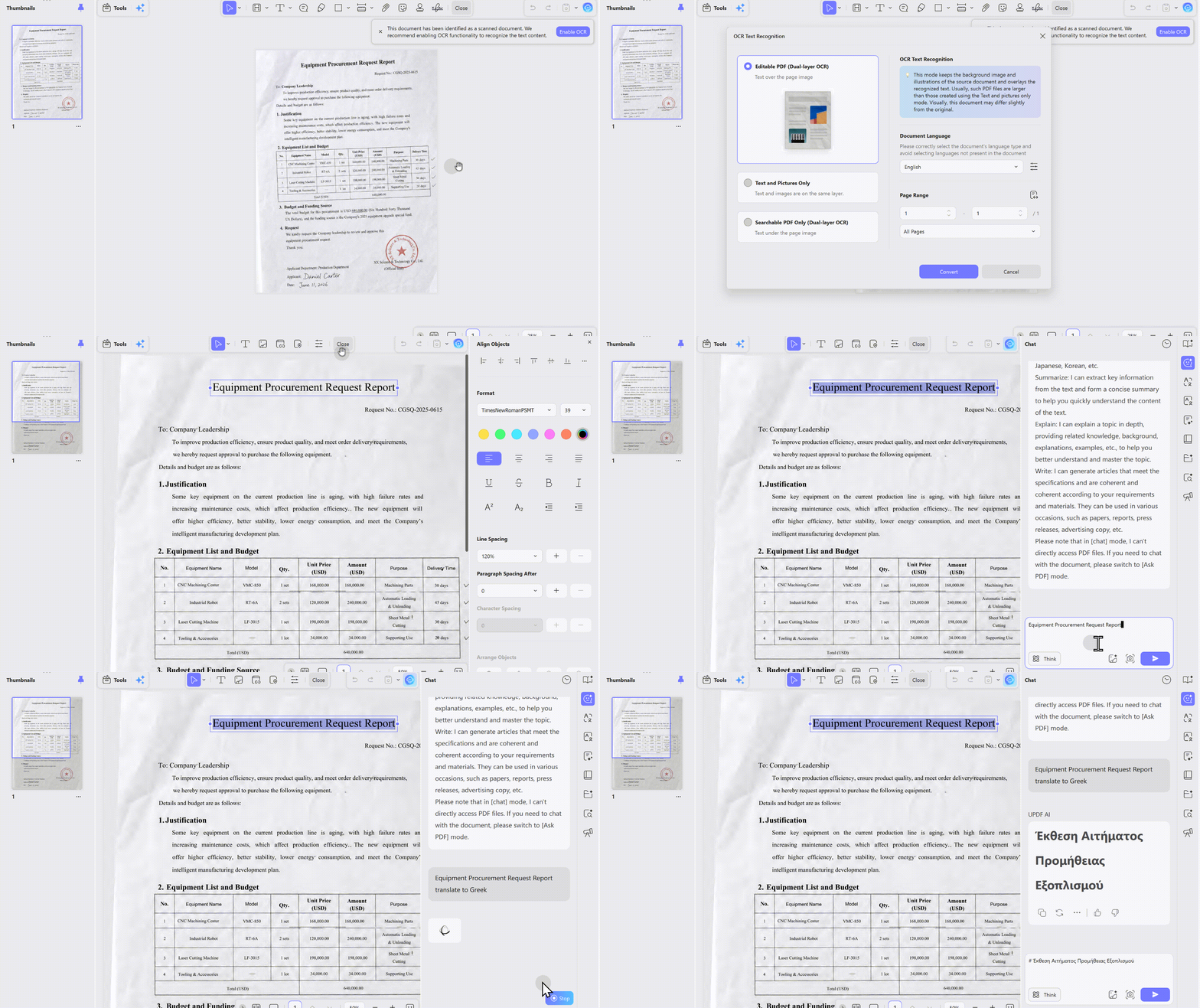
Start the UPDF desktop application and click "Open File” to select your scanned PDF document. Click “Open" and the scanned PDF will open in the UPDF interface. Now, click the "Recognize Text Using OCR" button from the top right and click the "Perform OCR" button to begin the process. Select a location to save the OCR file, then click "Save”
Step 2:
The OCR PDF document will open in a new tab in the UPDF application. Click to highlight and select the text from it, and press "Cmd + C" to copy your selected content. Now, click the "UPDF" button from the bottom right and select "Chat” then give your prompt “translate this content into Greek: “[paste your English content here]" and hit "Send”.
Step 3:
UPDF will instantly provide you with the Greek translation of your content from the scanned PDF document. Click "Copy” to copy that Greek translation to your clipboard or click “Regenerate” to get another translation of the same content from UPDF.
Moreover, you can also chat with UPDF AI to translate English to any other languages like Tagalog, Hindi, etc. To learn more about UPDF’s translating features, you can watch the video below. And if you want to know more about UPDF, you can read this review article.
FAQ
Can Google Translate translate English PDFs to Greek?
Yes — but with important limitations. Google Translate can translate PDFs up to 10MB and 300 pages, and it retains some layout. However, it often fails to preserve complex formatting like tables and multi-column layouts.
Why do Greek characters appear as question marks or garbled text?
This happens when the translation tool doesn't embed a font covering the full Greek character set. The rendering engine must embed a font that includes the 24-letter Greek alphabet and accent marks.
Is it safe to upload confidential English PDFs to online translators?
Online tools require uploading files to cloud servers. For contracts, legal documents, financial records, or personal data, use offline desktop software with local processing. UPDF offers secure, private translation options.
Why is Greek text expansion an issue when translating from English?
Greek translations typically run 15–30% longer than English source text. This can break tables, push text outside boxes, and disrupt layouts.
In The End
With the online and offline effective methods discussed in this guide, we hope that now you are clear on "how to translate PDF from English to Greek?". The good part is that you can use UPDF online or offline depending on your preferences, and by following the same methods, you can translate to and from any supported language.
So, visit UPDF AI online or download the UPDF application on your devices to make translating PDFs easier for you.
This guide covers everything you need to translate English PDFs to Greek. If you're looking for a more comprehensive walkthrough on PDF AI chat and document intelligence — summarizing, translating, extracting insights, and more — visit our full pillar guide: PDF AI Chat.
Windows • macOS • iOS • Android 100% secure








 Engelbert White
 Enola Miller
 Lizzy Lozano