 UPDF
UPDF
 UPDF for Windows
 UPDF for Mac
 UPDF for iPhone/iPad
 UPDF for Android
 Nomostar
 UPDF AI Online
 UPDF Sign
 IvyCraft
 Edit PDF
 Annotate PDF
 Create PDF
 PDF Form
 Edit links
 Convert PDF
 OCR
OCR PDF to Word
 PDF to Image
 PDF to Excel
 Organize PDF
 Merge PDF
 Split PDF
 Crop PDF
 Rotate PDF
 Protect PDF
 Sign PDF
 Redact PDF
 Sanitize PDF
 Remove Security
 Read PDF
 UPDF Cloud
 Compress PDF
 Print PDF
 Batch Process
 About UPDF AI
 UPDF AI Solutions
 AI User Guide
 FAQ about UPDF AI
 Summarize PDF
 Translate PDF
 Chat with PDF
 Chat with AI
 Chat with image
 PDF to Mind Map
 Explain PDF
 PDF AI Tools
 Image AI Tools
 AI Chat Tools
 AI Writing Tools
 AI Study Tools
 AI Working Tools
 Other AI Tools
 AI Bookmark Generation
 AI Bookmark Summary
 AI Watermark Generation
 AI Background Generation
 AI Sticker Generation
 AI Stamp Generation
 AI Editing Suite
 UPDF Copilot
 AI Page Management
 AI Semantic Search
 PDF to Word
 PDF to Excel
 PDF to PowerPoint
 Enterprise Solution
 Enterprise Sign
 Enterprise AI
 Enterprise Plan
 Enterprise User Guide
 Enterprise Webinar
 Banking
 Healthcare
 Insurance
 Legal
Legal Manufacturing
 Government
 Researchers & PhDs
 Solopreneurs & Freelancers
 Lawyers & Legal Professionals
 Real Estate Agents & Brokers
 Education Solution
 Customer Stories
 User Guide
 UPDF Tricks
 FAQs
FAQs UPDF Reviews
 Download Center
 Blog
Blog Newsroom
 Tech Spec
 Updates
 UPDF vs. Adobe Acrobat
 UPDF vs. Foxit
 UPDF vs. PDF Expert

Most people think estate planning is something to handle later. But the families who are best protected are those who started early, with the right planner by their side.
But what is an estate planner exactly? It is typically a licensed attorney or financial advisor who helps you transfer your assets smoothly, reduce tax burdens, and create trusts to reflect your wishes.
This article offers a complete guide on how to find an estate planner and what to expect from the planning process. However, before you sign any legally binding documents, UPDF can help you organize and secure your financial records for your very first appointment. Download and try it now.
Windows • macOS • iOS • Android 100% secure
Part 1. How to Find an Estate Planner Near You
To find a planner nearby, start by typing "estate planner near me" into Google. This can help you find local professionals who, while conveniently available, will also understand your state's unique estate and probate laws.
This is important because these laws differ significantly from state to state in both the US and the UK. Unlike a generic online service, a local attorney can help you minimize taxes and structure things properly to avoid probate court.
What to Look for in a Local Planner
Once you find an estate planner, look for the following factors to confirm if they are qualified to do the job.
- Credentials: An Accredited Estate Planner (AEP) designation will confirm advanced knowledge in estate planning. You can also check their official directory by ZIP code to verify the credential is active.
- Specialization: If you own significant assets or have dependents, prioritize someone with expertise in trusts and a background in taxes.
- Transparent fees: Ask for a complete written list of fees before you hire anyone. Understand what services are included and whether there will be extra charges later.
How Much Does It Cost to Plan an Estate?
The cost of estate planning depends on the complexity of your situation and the billing method. Common pricing includes hourly rates of $200 to $500 or flat fee packages of $1500 to $3500 for a complete estate plan. You may pay more if you own multiple properties, have a blended family, or need advanced tax planning.
Part 2. The 7 Steps in the Estate Planning Process
Once you find a qualified estate planner, you'll need to know what to expect from the actual process. Here are the seven steps that make up a complete estate planning process.
Step 1. Inventory your assets
Start by listing everything you own, such as real estate, bank accounts, and retirement funds. You'll also need to document any debts or liabilities to get a clear picture of your finances.
Doing all this on your own can feel overwhelming, especially when dealing with dozens of insurance policies and bank statements. To simplify things, you can use UPDF AI Online to summarize key figures from your PDFs.
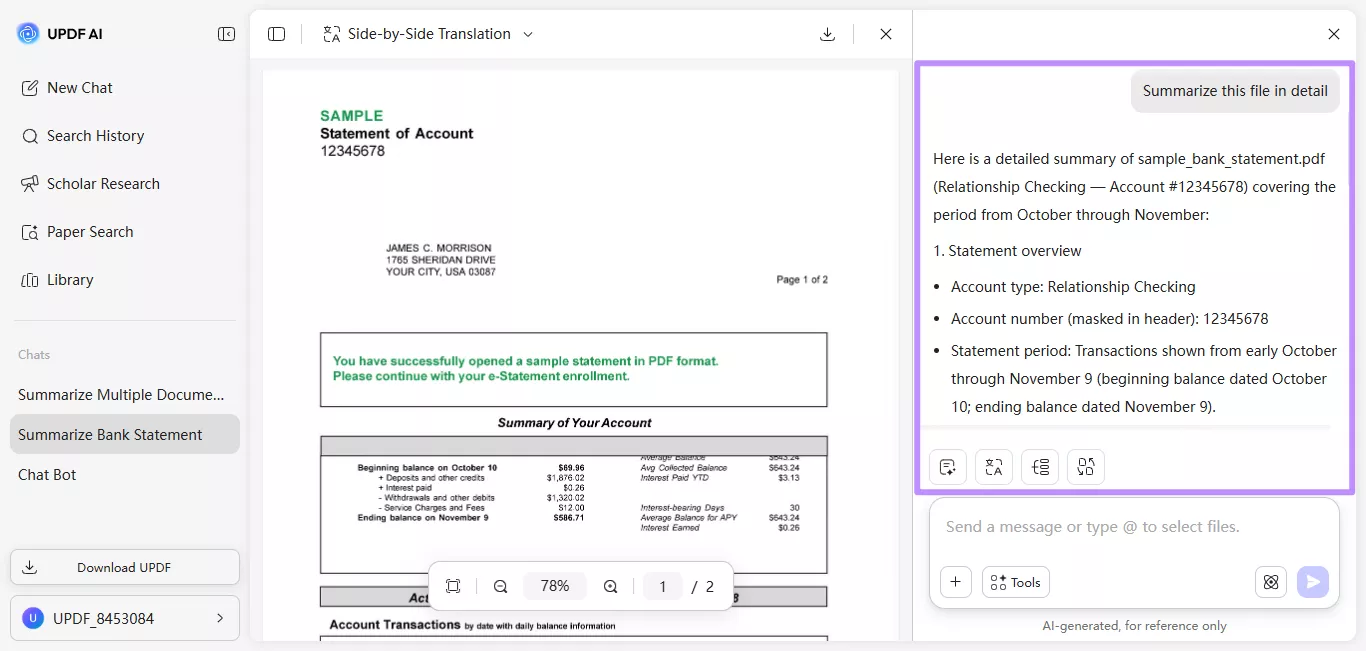
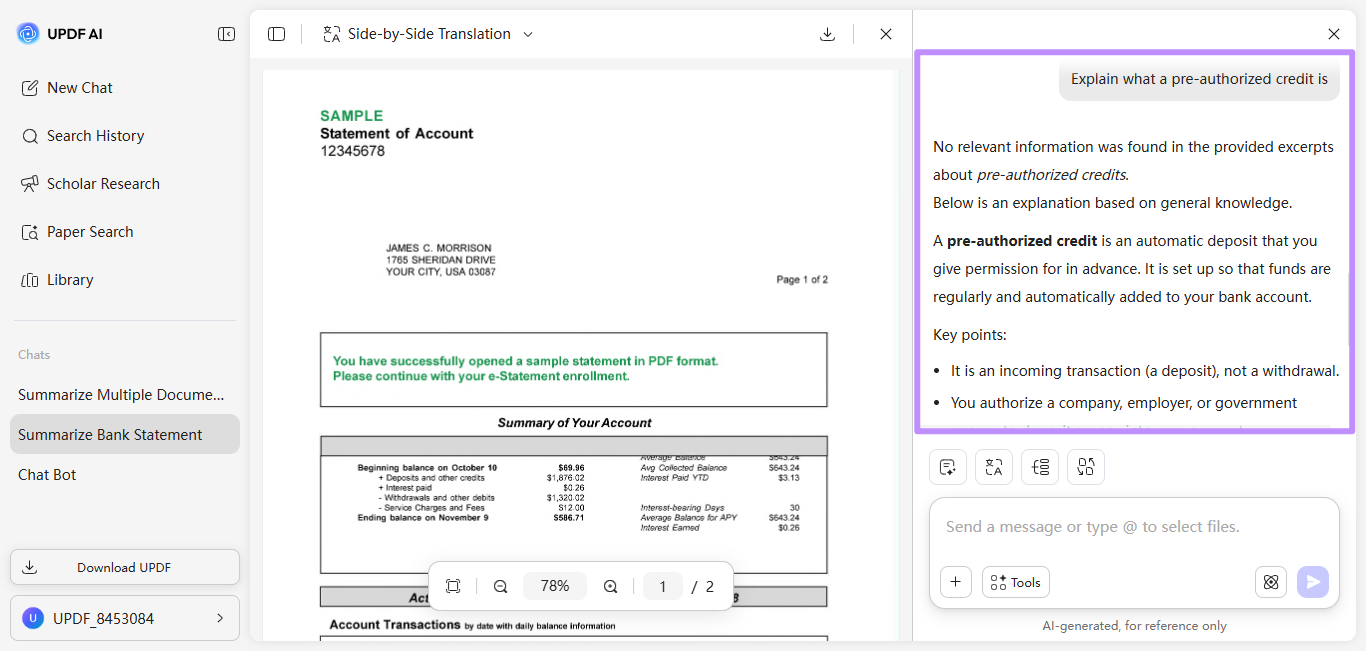
You can also ask direct questions to UPDF AI Online. The AI will provide simple explanations in seconds. This can reduce billable hours with your planner, since you will arrive already organized.
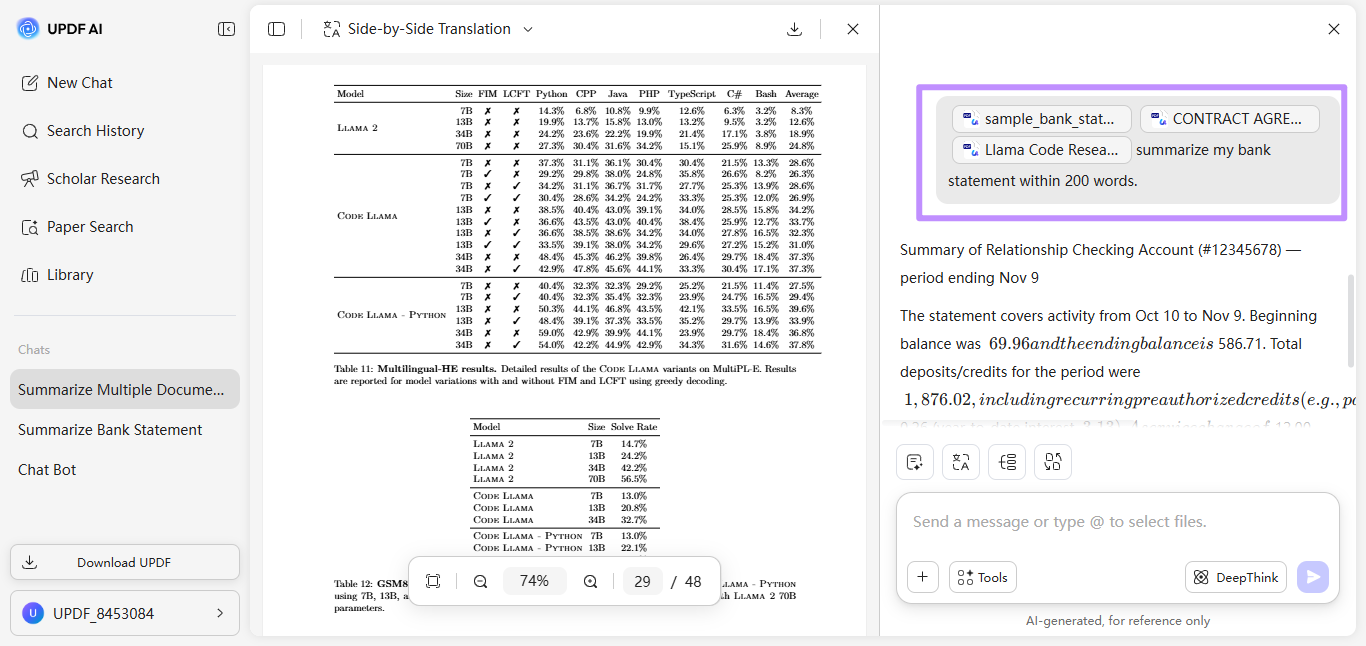
UPDF AI Online can also cross-reference multiple financial documents simultaneously. This helps you ensure that no asset is overlooked.
Step 2. Define your goals
Understand what your estate plan should accomplish. This could be reducing taxes, paying for a child's education, or dividing property fairly among heirs.
Step 3. Establish directives
Prepare documents that explain your wishes if you cannot speak for yourself. This may include a living will and a healthcare proxy.
Step 4. Draft your will
A will is one of the most important estate planning documents. It states who will receive your property after your death and can name guardians for minor children.
Step 5. Set up trusts if needed
A trust can control how and when assets are given to beneficiaries. It may also help your family avoid probate, which can be a long and expensive court process.
Step 6. Name beneficiaries and executors
Beneficiaries are the people who will receive your assets. In addition, you need to choose an executor to manage your will, a trustee to manage trusts, and an agent under power of attorney to handle financial or legal matters if you cannot do so yourself.
Step 7. Store and share your plan
Finally, you need to keep your estate planning documents in a private and secure space. Make sure the right people know where they are and how to access them in an emergency.
The entire estate planning process involves complex documentation. UPDF 2.5 includes 10 autonomous AI agents that help you work through this document-heavy process significantly faster. To learn more, you can watch this video on how AI agents can help you simplify complex documents.
Part 3. Beyond Paper: The Digital Future of Legal Documents
While estate planning still involves a lot of paperwork, today, many people sign and store documents digitally. For authentication purposes, you can sign important documents through electronic or digital signatures.
An electronic signature can be handwritten, typed, or a scanned image. In contrast, UPDF's Digital Signature uses certificate-based encryption to send, sign, and track documents securely. The certificate confirms that the document has not been tampered with and verifies the signer's identity. This type of verification is important for sensitive legal documents such as a Power of Attorney or a Trust deed.
Here's how to digitally sign in UPDF.
Step 1. Click the signature area and select "Create" from the pop-up window.
Windows • macOS • iOS • Android 100% secure
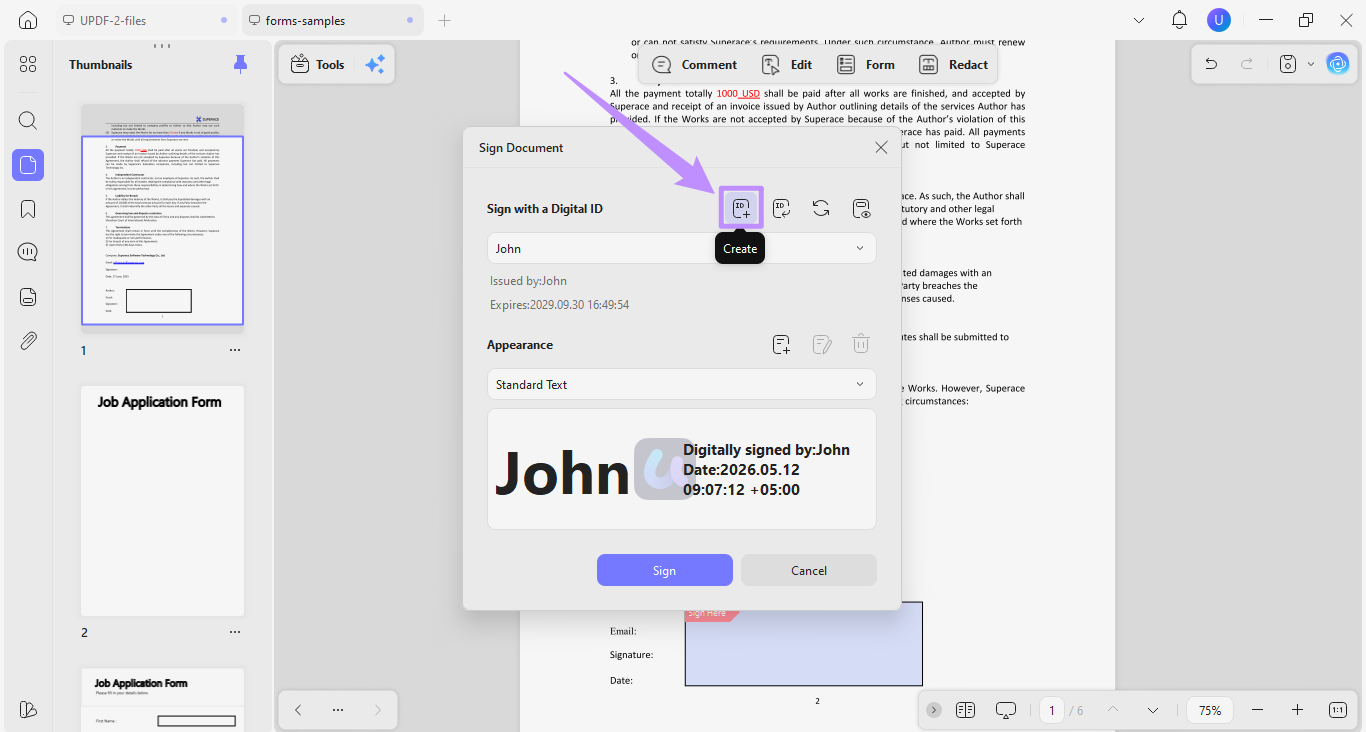
Step 2. Enter your name, address, organizational unit, and organization name. Then, click "OK."
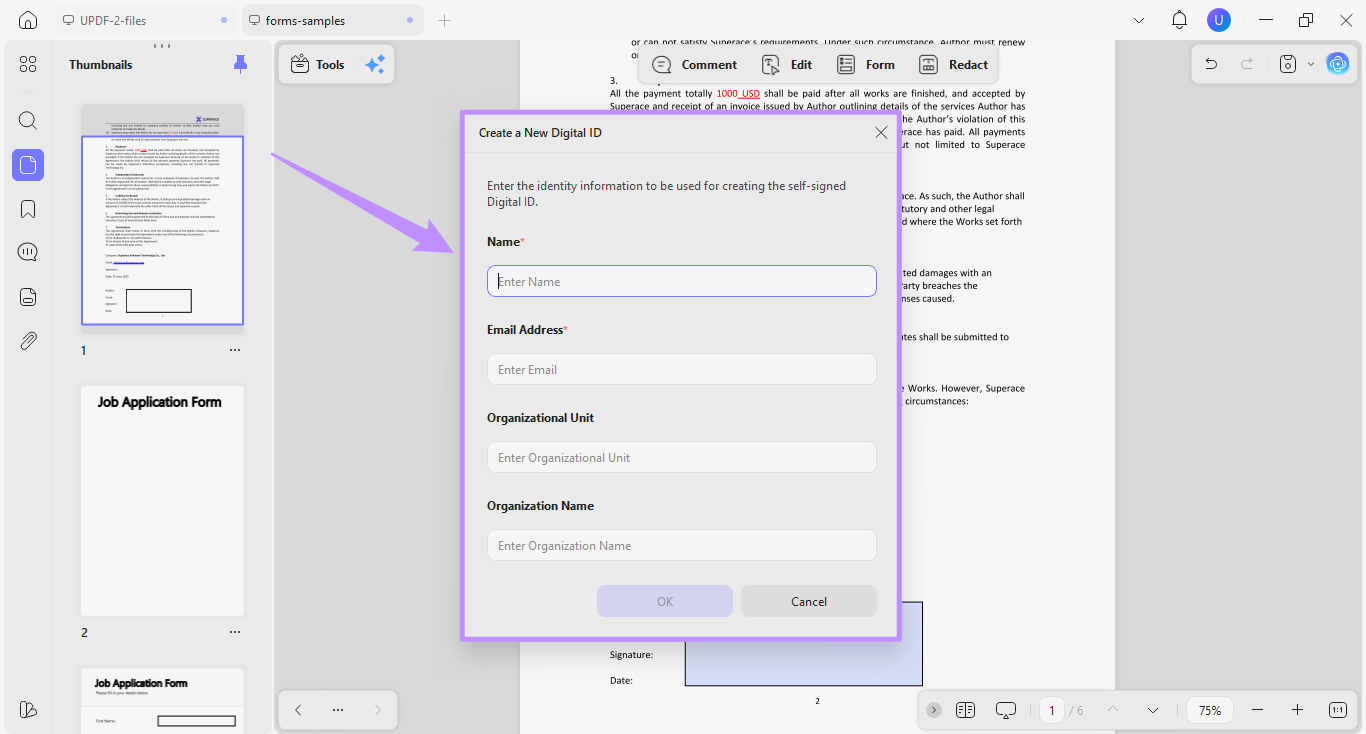
Step 3. Enter a password to protect your digital ID and click "OK." Finally, click "Sign" to add the signature to your document.
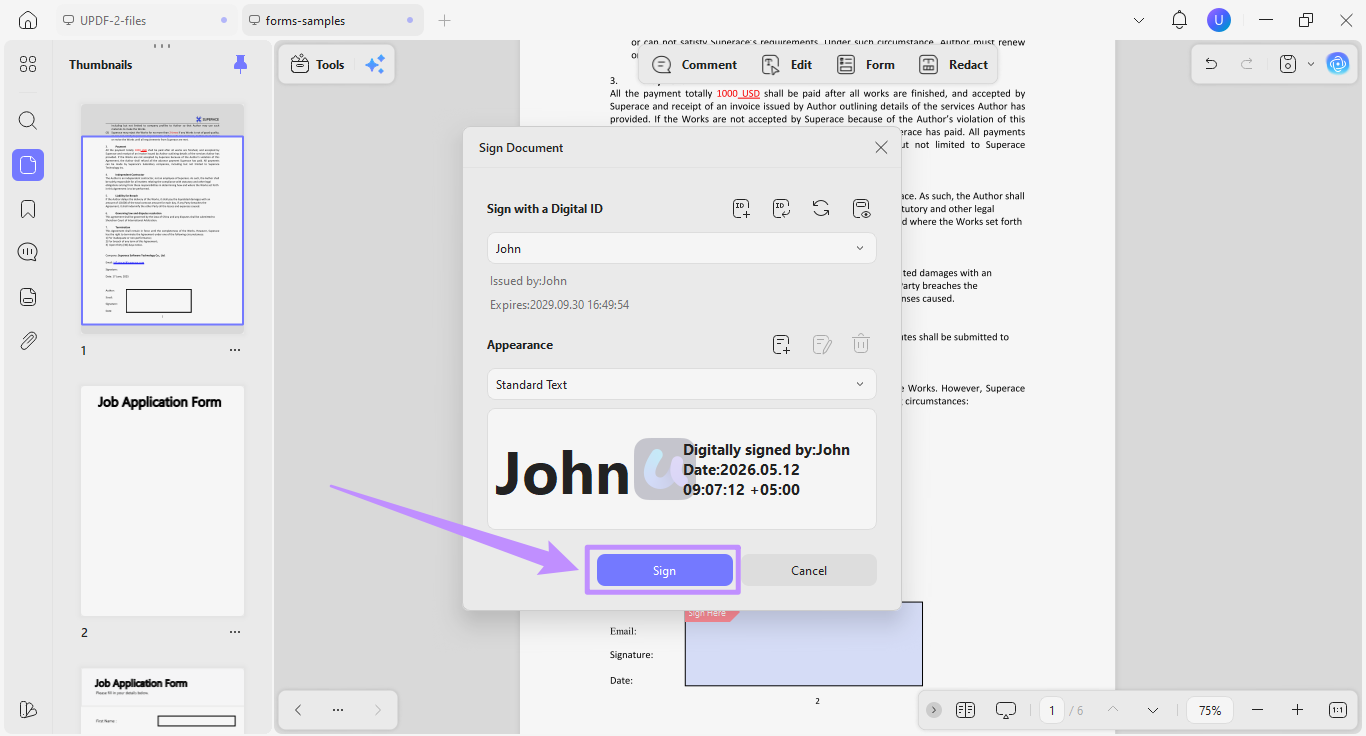
A digitally signed document sets the foundation of your entire estate plan, as your planner will need to execute these documents. So they should meet the authentication standards that can be defended in court.
What Exactly Does an Estate Planner Do?
An estate planner prepares, reviews, and executes the legal documents that give your plan its authority. These documents include wills, trust agreements, beneficiary designations, and directives. Because many planners use digital systems to create and sign these documents, the integrity of every signature directly affects the legal standing of the entire estate.
To learn more about how professionals secure their most sensitive files, you can read our Pro Workflow Guide.
Part 4. Advanced Strategies: The 5 by 5 Rule & Asset Protection
Some trust provisions, such as the 5 by 5 rule, can make your estate plan stronger and more flexible. In addition, you can use dedicated tools to organize and protect sensitive information in your documents.
What is the 5 by 5 rule in estate planning?
The 5 by 5 rule is a trust provision that allows a beneficiary to withdraw the greater of $5,000 or 5% of the trust's total value each year. This amount withdrawn is not treated as a taxable distribution or included in the beneficiary's estate. It simply allows beneficiaries controlled access to funds when needed.
Organizing and Protecting Your Documents
It is also important to keep your estate planning documents organized and secure. Trust papers, your will, financial records, and personal letters are often stored in different places. Combining them into one digital file can make things easier for your family later.
UPDF's desktop app simplifies this process with its page management features. You can use the "Merge" tool to combine everything into one "Legacy PDF."
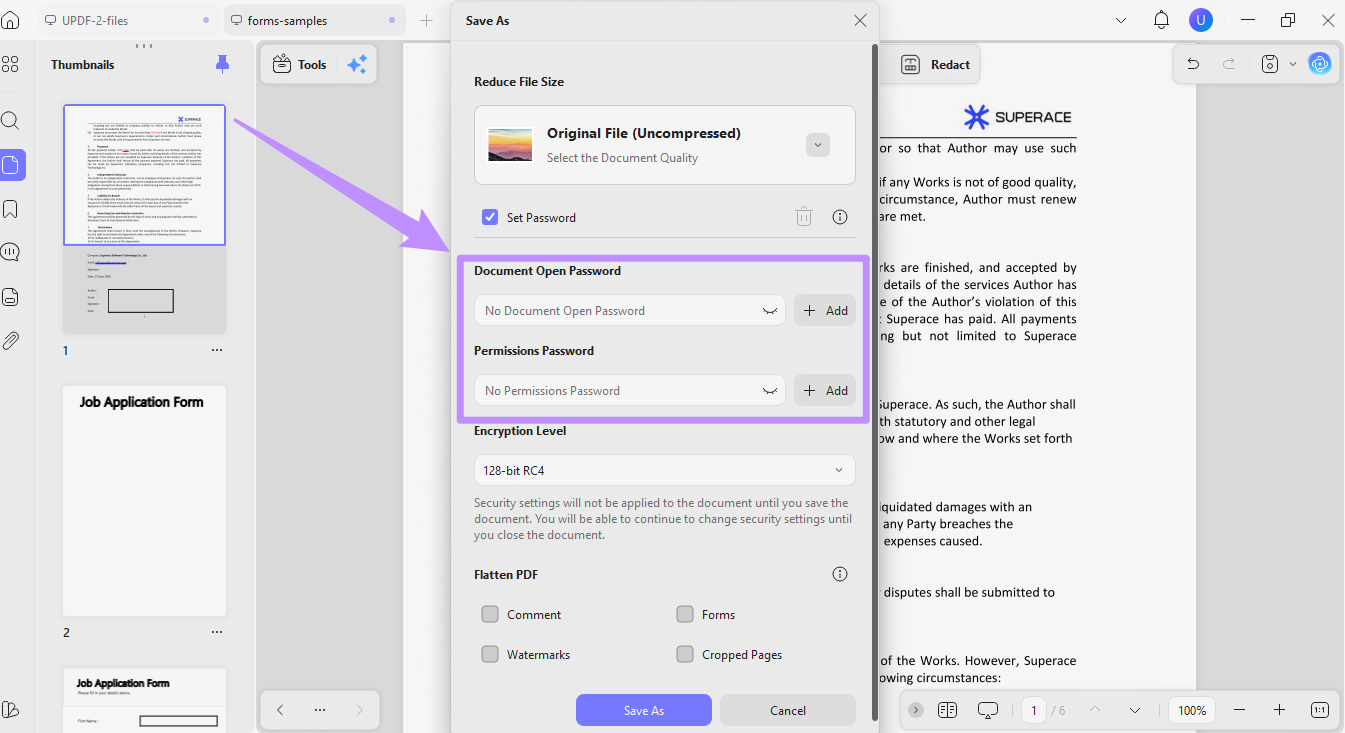
Once your PDF is created, you can use the "Protect Using Password" tool to add an open and permissions password. This way, only trusted people can access the PDF when the time comes.
Part 5. Security and Compliance for Sensitive Data
Your estate documents contain some of the most sensitive personal and financial information. General web-based AI tools often require you to upload files to third-party servers, which can expose your information.
Unlike online tools, UPDF's desktop app processes all files locally on your device. It also holds ISO 27001 certification, which is the internationally recognized standard for information security management. This means your estate documents stay secure under a verified level of data protection.
The good news is that you don't need to pay a hefty price to access this secure environment. UPDF offers a limited free trial to help you test all its features. Moreover, you can upgrade to the pro version at affordable price plans. View UPDF Individual and Enterprise Plans to understand your options.
FAQ: Common Estate Planning Hurdles
Q1: Can I do my own estate planning with AI?
Yes. You can use AI tools to organize documents, summarize policies, and prepare questions for your planner. However, only a qualified attorney can provide the legal review and execution that makes your plan effective.
Q2: How often should I update my estate plan?
You should review your plan every three to five years, and immediately after any major life event. This includes the birth or death of a family member, marriage, or divorce, which can all significantly change how you want your estate distributed.
Q3: Is a digital signature legally recognized for a will?
It depends on your jurisdiction. In the UK, wills still require a wet-ink signature, while several US states now recognize electronic wills under the Uniform Electronic Wills Act. Make sure to confirm current rules with your local estate attorney.
Conclusion
Estate planning is one of the most important steps you can take to protect your family and your legacy. You can start by finding a qualified local estate planner and understanding trust provisions like the 5 by 5 rule.
You will also need to ensure all your estate documents are organized and secured. UPDF makes this easy with AI-driven document analysis, digital signatures, and local processing that keeps your most sensitive files private. Give it a try. Download UPDF now to get started.
Windows • macOS • iOS • Android 100% secure









 Enola Miller
 Enola Davis
 Enid Brown
 Enrica Taylor