 UPDF
UPDF
 UPDF for Windows
 UPDF for Mac
 UPDF for iPhone/iPad
 UPDF for Android
 Nomostar
 UPDF AI Online
 UPDF Sign
 IvyCraft
 Edit PDF
 Annotate PDF
 Create PDF
 PDF Form
 Edit links
 Convert PDF
 OCR
OCR PDF to Word
 PDF to Image
 PDF to Excel
 Organize PDF
 Merge PDF
 Split PDF
 Crop PDF
 Rotate PDF
 Protect PDF
 Sign PDF
 Redact PDF
 Sanitize PDF
 Remove Security
 Read PDF
 UPDF Cloud
 Compress PDF
 Print PDF
 Batch Process
 About UPDF AI
 UPDF AI Solutions
 AI User Guide
 FAQ about UPDF AI
 Summarize PDF
 Translate PDF
 Chat with PDF
 Chat with AI
 Chat with image
 PDF to Mind Map
 Explain PDF
 PDF AI Tools
 Image AI Tools
 AI Chat Tools
 AI Writing Tools
 AI Study Tools
 AI Working Tools
 Other AI Tools
 AI Bookmark Generation
 AI Bookmark Summary
 AI Watermark Generation
 AI Background Generation
 AI Sticker Generation
 AI Stamp Generation
 AI Editing Suite
 UPDF Copilot
 AI Page Management
 AI Semantic Search
 PDF to Word
 PDF to Excel
 PDF to PowerPoint
 Enterprise Solution
 Enterprise Sign
 Enterprise AI
 Enterprise Plan
 Enterprise User Guide
 Enterprise Webinar
 IT
IT Education
 Construction
 Financial Service
 Healthcare
 Insurance
 Legal
Legal Manufacturing
 Government
 Researchers & PhDs
 Solopreneurs & Freelancers
 Lawyers & Legal Professionals
 Real Estate Agents & Brokers
 Education Solution
 Customer Stories
 User Guide
 UPDF Tricks
 FAQs
FAQs UPDF Reviews
 Download Center
 Blog
Blog Newsroom
 Tech Spec
 Updates
 UPDF vs. Adobe Acrobat
 UPDF vs. Foxit
 UPDF vs. PDF Expert

Quick Answer: To read a research paper efficiently, first decide what you need from it. Use three passes: scan the title, abstract, headings, figures, and conclusion; read the argument, methods, and evidence more carefully; then reconstruct and critique the study if it is central to your work. Take structured notes and verify every AI-generated summary against the original paper.
Research papers are not meant to be read like novels from the first word to the last. A better approach is to determine the paper's relevance first, then increase the depth of reading only when the evidence deserves your time. This guide explains how to read a research paper step by step, including how to evaluate each section, take useful notes, and handle difficult terminology or scanned PDFs.
If your papers are PDFs, UPDF can keep the whole workflow in one desktop app: discover related studies, read in tabs, highlight evidence, add notes, search long files, and ask AI to explain or summarize selected content. Download UPDF below if you want to follow the examples with your own paper.
Windows • macOS • iOS • Android 100% secure
1. Decide Why You Are Reading the Paper
Your purpose determines how deeply you need to read. Someone screening sources for a literature review does not need the same level of detail as a reviewer checking whether a method can be reproduced.
| Reading goal | What to focus on | Reasonable stopping point |
|---|---|---|
| Decide whether the paper is relevant | Title, abstract, headings, figures, conclusion | After the first pass if it does not answer your question |
| Understand the main contribution | Research question, argument, key evidence, limitations | After you can explain the study in your own words |
| Use the paper in an assignment or review | Claims, methods, data, related work, exact page references | After recording verified notes and citation details |
| Replicate or critique the study | Sampling, variables, procedures, analysis, assumptions, supplementary files | After reconstructing the study and checking whether the evidence supports the conclusion |
Before opening the PDF, write one question you want the paper to answer. This prevents unfamiliar terminology and side discussions from controlling your reading.
Reader's shortcut: If the title, abstract, figures, and conclusion do not help answer your question, stop after the first pass. Saving an irrelevant paper “just in case” creates a larger reading backlog without improving your research.
2. Understand the Structure of a Research Paper
Many empirical papers follow an IMRaD structure: Introduction, Methods, Results, and Discussion. Reviews, theoretical papers, conference papers, and papers in the humanities may organize their arguments differently, so use the table as a guide rather than a rigid rule.
| Section | Question to ask | What to record |
|---|---|---|
| Title and abstract | What problem, population, method, and result does the paper claim? | A one-sentence relevance decision |
| Introduction | What gap or research question motivates the study? | Research question and expected contribution |
| Related work | How does the paper differ from earlier studies? | Key sources and the claimed gap |
| Methods | Could the design answer the research question? | Sample, variables, procedure, measures, and assumptions |
| Results | What did the data actually show? | Key findings, uncertainty, and figures or tables |
| Discussion and conclusion | Do the interpretations match the results? | Implications, limitations, and future work |
| References | Which earlier or later papers should you follow? | Foundational, conflicting, and follow-up studies |
3. Use the Three-Pass Method
| Pass | Your task | Useful output |
|---|---|---|
| First pass | Screen the paper and map its structure | Keep, discard, or save for later |
| Second pass | Trace the main argument, method, and evidence | A reliable summary with questions |
| Third pass | Reconstruct, compare, and critique | A defensible evaluation you can use in research |
Computer scientist S. Keshav's three-pass approach is a practical way to control reading depth. Each pass has a different goal, so you do not spend hours closely reading a paper that cannot help you.
Pass 1: Get the Big Picture
- Read the title, abstract, and introduction.
- Scan headings, figures, tables, and captions.
- Read the conclusion and glance at the references.
- Answer the five Cs: category, context, correctness, contributions, and clarity.
At the end of this pass, decide whether to stop, save the paper for later, or continue. A first pass can often be completed in several minutes, but dense or unfamiliar papers may take longer.
Pass 2: Understand the Argument and Evidence
Read more carefully without getting stuck on every detail. Mark the main claim, study design, comparison baseline, important figures, and the evidence connecting results to conclusions. Note unfamiliar concepts and check whether the authors acknowledge major limitations. Do not yet spend excessive time reproducing every calculation or proof.
Pass 3: Reconstruct and Critique the Study
Use this pass only for papers central to your project. Try to reproduce the author's reasoning without looking at the text, inspect assumptions, compare the method with plausible alternatives, and identify unsupported inferences. For empirical work, ask whether the sample, measurements, statistical analysis, and reporting are strong enough to support the claim.
4. How to Read Each Section Critically
Use one question throughout: “What evidence would have to be true for me to accept this claim?” This keeps critical reading focused on the connection between the research question, method, data, and conclusion.
Abstract and Introduction
Treat the abstract as a map, not proof. Identify the research question, population or dataset, method, and claimed result. In the introduction, separate the established background from the authors' motivation and their promised contribution.
Methods
Check who or what was studied, how observations were selected, what variables were measured, which controls or baselines were used, and whether the procedure is detailed enough to assess. A sophisticated analysis cannot repair a sample or measurement that does not represent the research question.
Results, Figures, and Tables
Read figure captions before the surrounding discussion. Check axes, units, sample sizes, uncertainty intervals, and excluded data. Distinguish statistical significance from practical importance, and distinguish correlation from a demonstrated causal relationship.
Discussion, Limitations, and Conclusion
Compare each important conclusion with the result that supports it. Look for claims that extend beyond the studied population, timeframe, or conditions. Then record both author-stated limitations and limitations you identify yourself.
5. Find Better Papers Before You Read Them in Depth
Reading efficiently starts before the first PDF is opened. In the current Windows or macOS desktop client, open UPDF AI from the home interface, then choose the research tool that matches your starting point.
| If you already have... | Use | What you should get |
|---|---|---|
| A topic, title, DOI, or PMID | Paper Search | A filtered list of papers to screen |
| A broad research question | Scholar Research | A structured topic overview with sources to verify |
| A PDF you need to understand | Chat with PDF and annotation tools | Verified notes tied to the original document |
Use Paper Search to Build a Focused Reading List
UPDF AI Paper Search is most useful when you can describe what you want precisely. In the desktop client, open UPDF AI, choose Paper Search, and then select a mode:
- Keyword mode: Enter a topic, exact paper title, DOI, or PMID. Use this when you want a conventional results list.
- AI mode: Ask a research question. Use it when your topic is clear but the best search terms are not.

Do not read the results from top to bottom immediately. First filter by publication year, field of study, relevance, citation count, and PDF availability. Then inspect the title, abstract, metadata, and concise summary. Save only papers that match your research question, population or dataset, and required type of evidence.
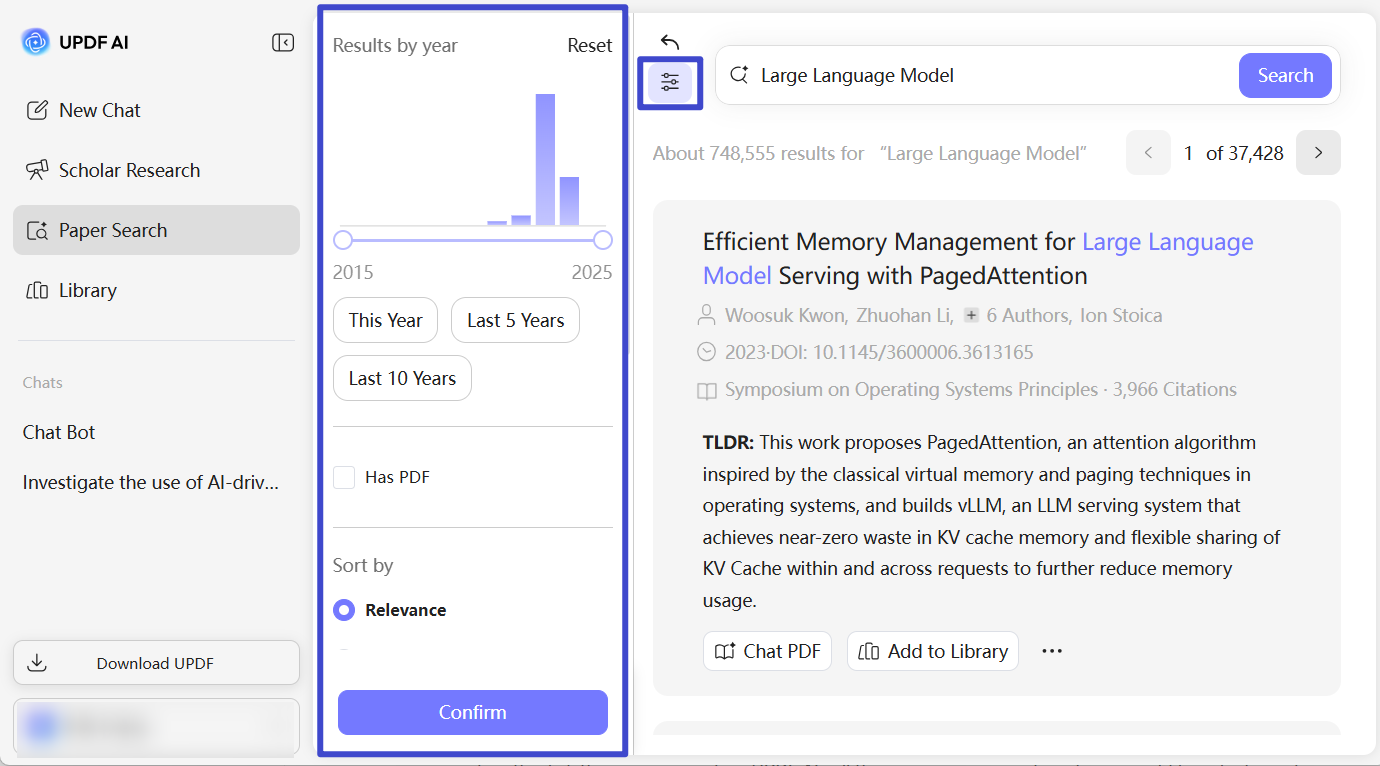
Useful result: Finish Paper Search with a shortlist, not a long bookmarks folder. For each saved paper, record one sentence explaining why it deserves a first pass.
Use Scholar Research to Map an Unfamiliar Topic
Choose Scholar Research in the desktop client's UPDF AI workspace when your starting point is a broad question. Enter the topic, choose Standard for a faster overview or High Quality for wider coverage, and answer the clarifying questions. Be specific about the population, timeframe, discipline, and intended output; these constraints make the resulting literature map more useful.
Scholar Research searches across multiple papers and organizes the findings into a structured report with citations and references. Use the report to identify themes, disagreements, influential sources, and gaps—not as a finished literature review. Open the cited papers, confirm that each source supports the associated statement, and note whether the full text or only metadata was available.
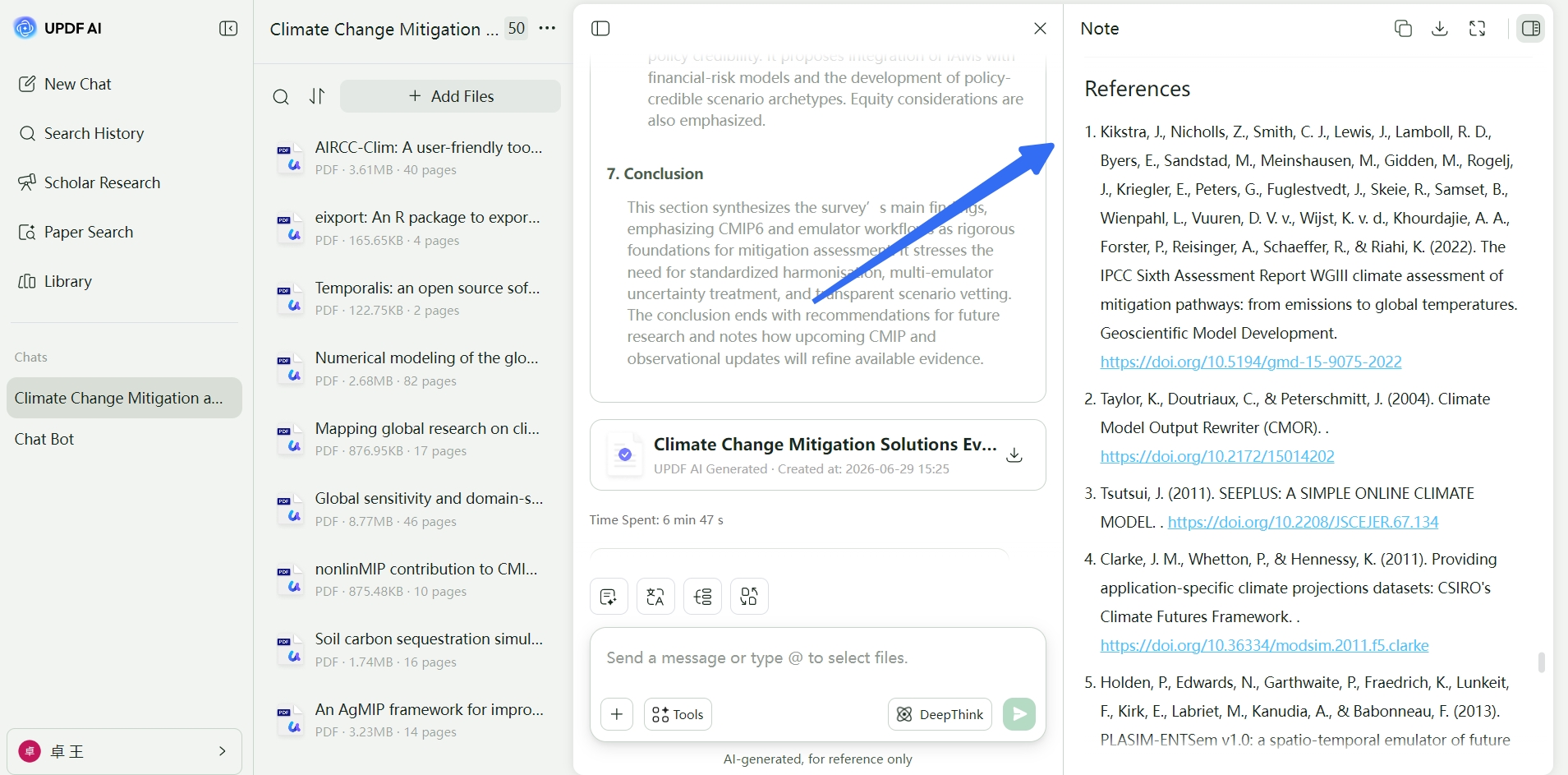
Example Scholar Research request: “Map peer-reviewed studies published since 2020 on retrieval-augmented generation in medical question answering. Separate clinical evaluations from benchmark studies, identify datasets and limitations, and provide sources for every major claim.”
Together, Paper Search and Scholar Research move you from a broad topic to a defensible reading list. Once the key PDFs are identified, continue in UPDF to read, annotate, compare, and question them. Download the desktop app below to try the complete research-to-reading workflow.
Windows • macOS • iOS • Android 100% secure
6. A Practical Research-Paper Reading Workflow in UPDF
Consider the real paper Attention Is All You Need. You do not need a machine-learning background to apply the workflow below; the point is to separate screening, comprehension, and verification.
For this example, the final output should be more than a collection of highlights. Aim to produce a one-paragraph summary, a short evidence table, two limitations, and one question for follow-up reading.
- Open the PDF in UPDF and set a purpose. For example: “I want to understand the paper's main architecture and the evidence that it improves machine translation.” Write this question in a comment on the first page so it remains visible while you read.
- Complete the first pass. Scan the abstract, headings, architecture figure, result tables, conclusion, and references. Decide whether the paper is relevant enough for another pass.
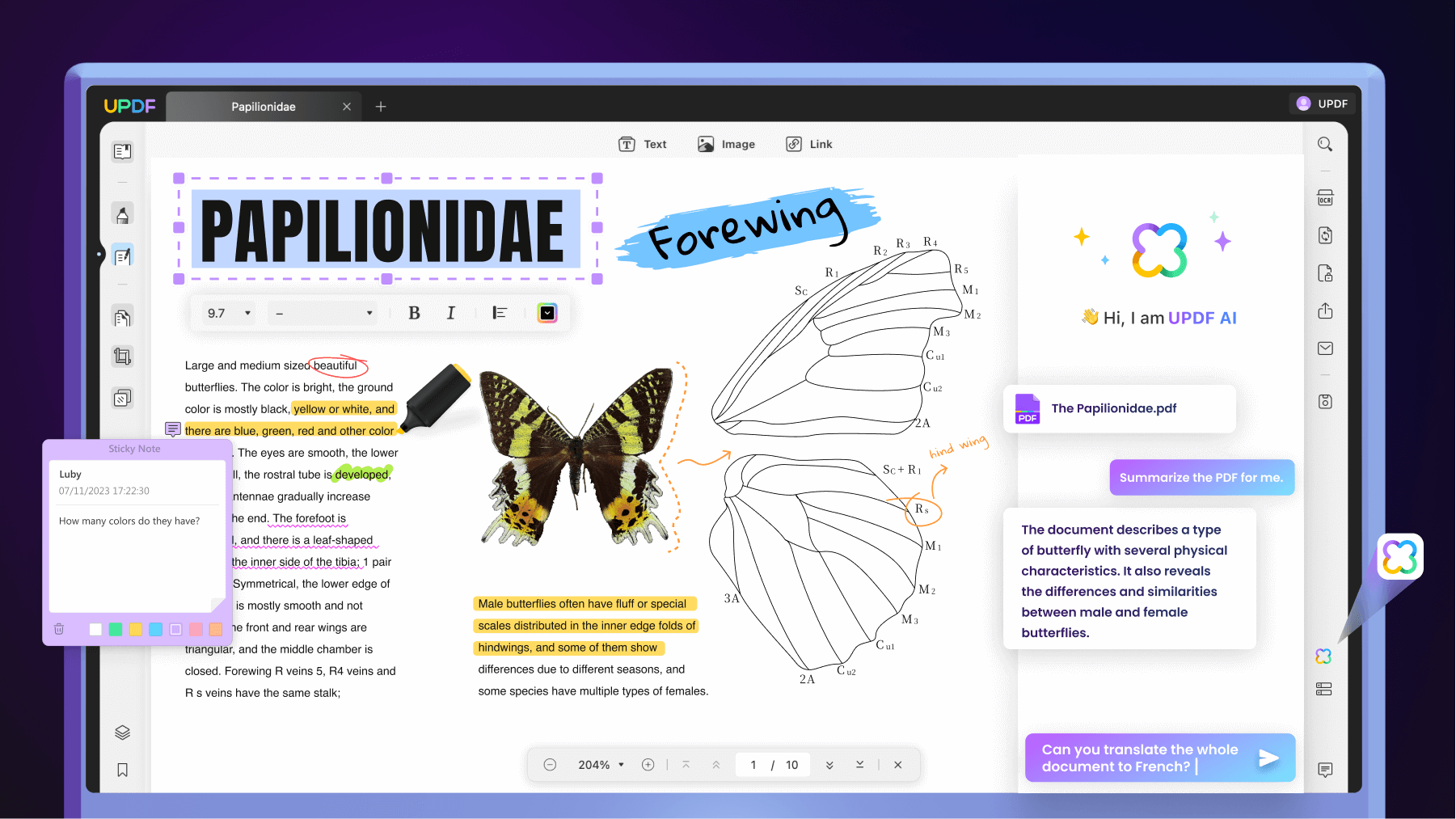
- Annotate by function. Highlight the research problem, mark the main contribution in another color, and attach comments to assumptions or terms you need to investigate. See the broader guide to annotating a PDF if you want a repeatable color system.
- Use AI on bounded questions. Ask UPDF AI to explain a selected paragraph, summarize the method section, or compare two stated components. Specific prompts produce more useful notes than “Explain this paper.” These UPDF AI prompt examples can help you frame the request.
- Verify before recording a claim. Return to the exact paragraph, figure, or table. Check numbers and qualifiers yourself and record the page or section. AI helps you navigate the paper; it is not the source you should cite.
- Finish with your own synthesis. Write the question, contribution, method, evidence, limitations, and relevance in your own words.
7. Research-Paper Note Template
Best practice: Complete the template from memory immediately after a reading pass, then reopen the paper to correct omissions and attach page references. This reveals what you actually understood.
Keep notes short enough to compare across papers. Copy this template into your notebook or a UPDF comment:
Full citation:
Why I opened this paper:
Research question:
Main contribution:
Study design / data:
Key results and page numbers:
Important figure or table:
Authors' limitations:
My concerns or unanswered questions:
Relationship to other papers:
How I may use it:
Write “not reported” when a field is absent. Do not fill gaps with a guess, and keep direct quotations visually separate from your paraphrases.
8. What to Do When a Research Paper Is Difficult
- Unfamiliar terminology: Read the surrounding paragraph first, then consult a textbook, glossary, or authoritative review. Ask AI to explain the selected term in context, but verify technical definitions.
- Dense equations: Identify what each variable represents, the assumptions, and what the equation is used to predict. You may not need to reproduce every derivation.
- Complex figures: Rewrite the caption as a question, identify axes and comparison groups, then state only what the plotted data shows.
- Scanned or image-only paper: Use OCR for scanned PDFs to create searchable text before searching, copying, or asking document-level questions.
- Paper in another language: Translate a selected passage first, then compare important terminology and claims with the source text.
- Missing context: Follow the foundational references cited in the introduction and newer papers that cite the study.
Know When to Stop
Stop after the first pass when the paper does not match your question, uses an irrelevant population or dataset, lacks accessible evidence, or repeats work you already understand. Stop after the second pass when you can explain the contribution and evidence well enough for your task. Continue to a third pass only when the paper is central to a decision, review, replication, or critique.
9. Research-Paper Reading Checklist
- I know why I am reading this paper.
- I can state the research question and main contribution.
- I understand the study design, data, and comparison baseline.
- I checked the key figures or tables rather than relying on the abstract.
- I separated results from the authors' interpretation.
- I recorded limitations and unanswered questions.
- My notes include page or section references.
- I verified AI-assisted explanations against the original PDF.
FAQs About Reading Research Papers
1. How Long Does It Take to Read a Research Paper?
It depends on your purpose and familiarity with the field. A relevance check may take only several minutes, while a careful second pass can take much longer. Reconstructing methods, calculations, or assumptions for a central paper may require hours. Stop when you have enough verified information for your task.
2. What Order Should I Read a Research Paper In?
Start with the title, abstract, headings, figures, conclusion, and references. If the paper is relevant, read the introduction, methods, results, and discussion more carefully. This order helps you understand the map before working through details.
3. Can AI Read a Research Paper for Me?
AI can help summarize sections, explain terminology, locate information, and compare selected passages, but it can omit qualifiers or produce an incorrect interpretation. Use it as a reading assistant and verify every important statement against the original paper.
4. How Can I Remember What I Read?
Use a consistent note template, record the research question and evidence in your own words, attach page references, and compare the paper with related studies. Revisiting a short synthesis is more effective than rereading unstructured highlights.
5. How Do I Read Papers for a Literature Review?
Screen broadly, group papers by research question or method, and extract the same fields from each study. Compare findings, methods, populations, and limitations rather than summarizing papers one by one. Follow reference and citation links to identify foundational and newer work.
Conclusion
Knowing how to read a research paper is mainly about controlling depth. Screen first, read the evidence second, and reserve a full critical reconstruction for papers that matter to your work. Structured notes make the result reusable, while source checks keep AI-assisted reading accurate.
For a smoother desktop workflow, UPDF combines Paper Search and Scholar Research with PDF reading, annotation, OCR, and AI-assisted explanation in one app. Download it free, test the three-pass method with a paper in your field, and keep the original source—not the AI response—at the center of your research.
Windows • macOS • iOS • Android 100% secure







 Enola Miller
 Idham Wijaya

 Enid Brown