 UPDF
UPDF
 UPDF for Windows
 UPDF for Mac
 UPDF for iPhone/iPad
 UPDF for Android
 UPDF AI Online
 UPDF Sign
 Edit PDF
 Annotate PDF
 Create PDF
 PDF Form
 Edit links
 Convert PDF
 OCR
OCR PDF to Word
 PDF to Image
 PDF to Excel
 Organize PDF
 Merge PDF
 Split PDF
 Crop PDF
 Rotate PDF
 Protect PDF
 Sign PDF
 Redact PDF
 Sanitize PDF
 Remove Security
 Read PDF
 UPDF Cloud
 Compress PDF
 Print PDF
 Batch Process
 About UPDF AI
 UPDF AI Solutions
 AI User Guide
 FAQ about UPDF AI
 Summarize PDF
 Translate PDF
 Chat with PDF
 Chat with AI
 Chat with image
 PDF to Mind Map
 Explain PDF
 PDF AI Tools
 Image AI Tools
 AI Chat Tools
 AI Writing Tools
 AI Study Tools
 AI Working Tools
 Other AI Tools
 AI Bookmark Generation
 AI Bookmark Summary
 AI Watermark Generation
 AI Background Generation
 AI Sticker Generation
 AI Stamp Generation
 AI Editing Suite
 UPDF Copilot
 AI Page Management
 AI Semantic Search
 PDF to Word
 PDF to Excel
 PDF to PowerPoint
 Enterprise Solution
 Enterprise Sign
 Enterprise AI
 Enterprise Plan
 Enterprise User Guide
 Enterprise Webinar
 Banking
 Healthcare
 Insurance
 Legal
Legal Manufacturing
 Government
 Education Solution
 Customer Stories
 User Guide
 UPDF Tricks
 FAQs
FAQs UPDF Reviews
 Download Center
 Blog
Blog Newsroom
 Tech Spec
 Updates
 UPDF vs. Adobe Acrobat
 UPDF vs. Foxit
 UPDF vs. PDF Expert

When I first discovered Research4Life, I recognized its immense value for researchers in developing regions facing barriers from paywalled academic content. It opens doors to journals and databases that would otherwise remain inaccessible for institutions lacking strong funding. However, access alone is never enough, because organizing and understanding large volumes of academic research consistently requires significant time.
In this article, I explain how it works and how I use it for academic research. As a bonus, I’ll also share how UPDF AI Paper Search improves my workflow and helps me understand research more effectively. Interested readers can click the button below to try it for free.
Part 1. What Research4Life is?
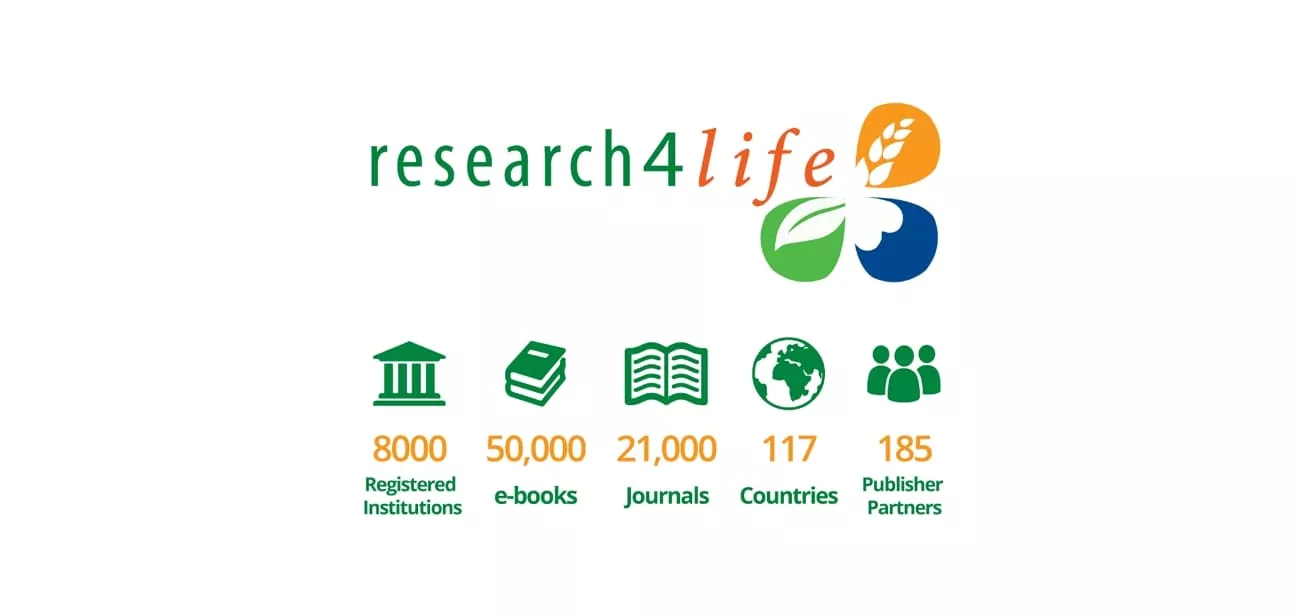
Through my research, I learned that it operates as a public-private partnership aiming to reduce knowledge gaps between high-income and low-income countries. From my perspective, Research4Life focuses on scientific research accessible to institutions in eligible regions. I see this approach empowering hospitals and research centers to overcome financial barriers to scholarly information globally.
Mission and Purpose
Before learning about Research4Life login, I realized it supports education and research through free and low-cost access. From my experience, the program prioritizes fields shaping development outcomes, including health, agriculture, environment, and law. I found this focus helps institutions address real-world challenges while building stronger academic and professional capacities.
Instead of acting as a publisher, I see Research4Life serving as a gateway connecting eligible institutions to trusted publishers. Using this model, I was able to access Elsevier and JSTOR with some other trustworthy sources. It ensures I use authoritative research legally while respecting copyright rules and publisher licensing agreements.
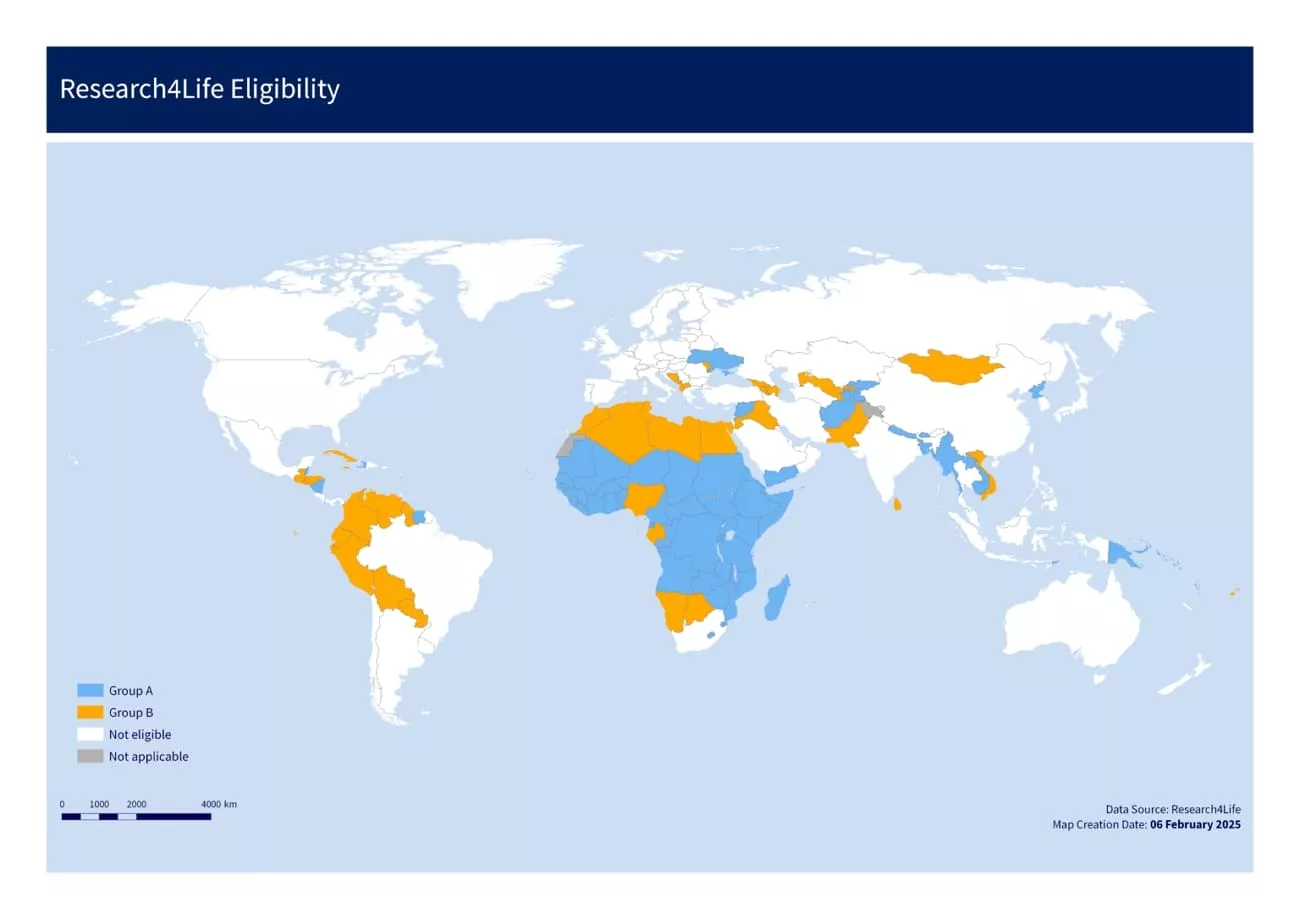
Research4Life Eligible Countries
Access to Research4Life depends on institutional eligibility rather than individual users, ensuring organizations receive proper authorization before using the platform. I discovered that this system helps institutions manage resources while extending access to multiple researchers simultaneously.
Eligibility for institutions is categorized into two main groups based on access level and affordability. I found this structure practical because approved institutions provide seamless access to all affiliated users without individual fees. To clarify the access levels, let's break them down into two main groups that determine whether institutions receive free or low-cost access.
Group A. Institutions in this group can access all Research4Life resources completely free.
Group B. Institutions in this group pay a small annual fee to access research materials affordably while supporting global knowledge sharing.
Pricing Plans
Research4Life does not sell subscriptions to individuals, and pricing is determined at the institutional level. Look at the table below to explore the pricing plans for different eligible institutions.
| Group | Access Type | Cost Details |
| Group A | Free | Free trial lasts 6 months, after which payment is required to continue access. |
| Group B | Low-cost | $1500/institution/calendar year from January to December regardless of payment month. |
Website Traffic And Reach
It serves millions of users worldwide, especially in Africa, South Asia, Latin America, and Southeast Asia, receiving 188,850 monthly visits. The platform receives consistent academic traffic due to its role as a primary access point for journals like PubMed Central and ScienceDirect in eligible regions.
Part 2. How to Access Research4Life?
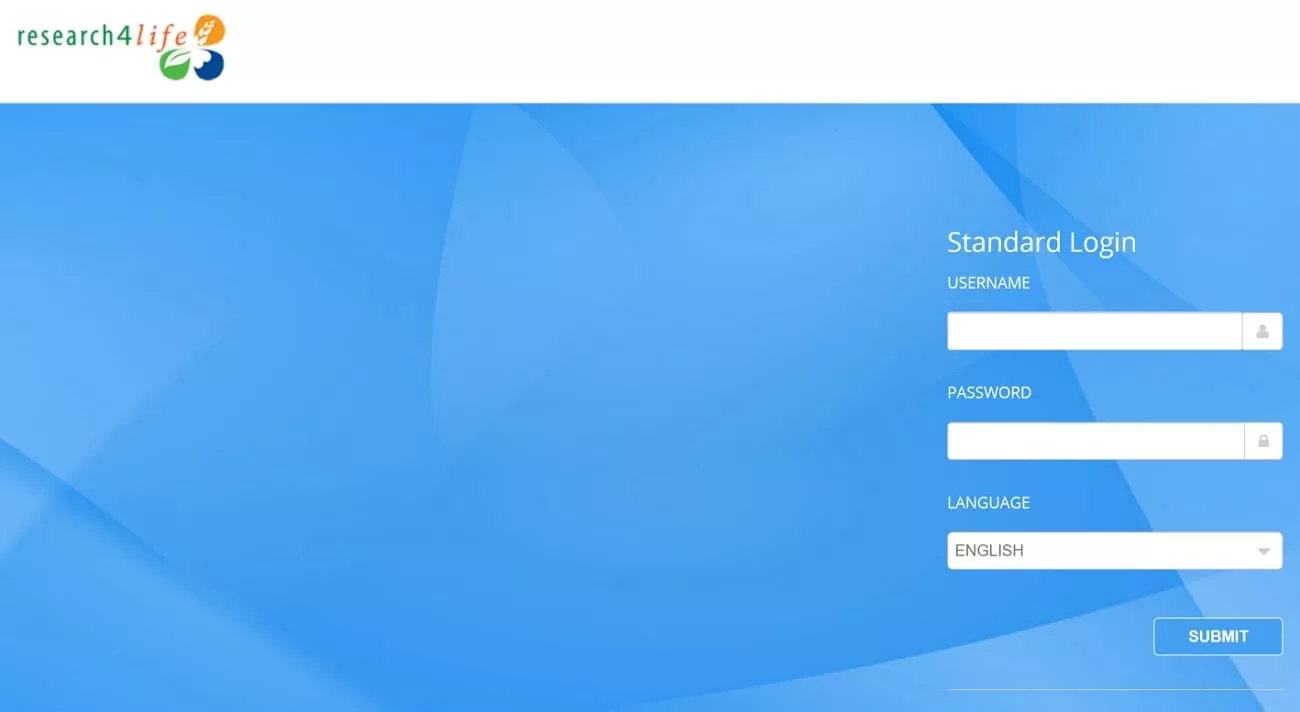
To start researching, the first step was to complete my Research4Life login through an eligible institution. Let’s explore the two main ways I access the platform for academic research.
Method 1. Through University or School Library Login
Logging in through a university or school library provides credentials that grant direct access to all Research4Life content subscribed to or authorized by the institution. This method eliminates the need for individual accounts and integrates smoothly with other academic tools. Users can search, read, and download journals or books without restrictions, ensuring a streamlined research workflow.
Method 2. Through Direct Institutional IP Address
Access via a direct institutional IP address allows automatic recognition of the institution’s network, granting entry to certain Research4Life resources without manual login. Some publishers use this method only so users can access journals and articles while working on campus. This approach provides uninterrupted access to Research4Life content and allows research across multiple databases.
Typical Research4Life Workflow
After logging into Research4Life, follow the steps below to find research papers and stay organized:
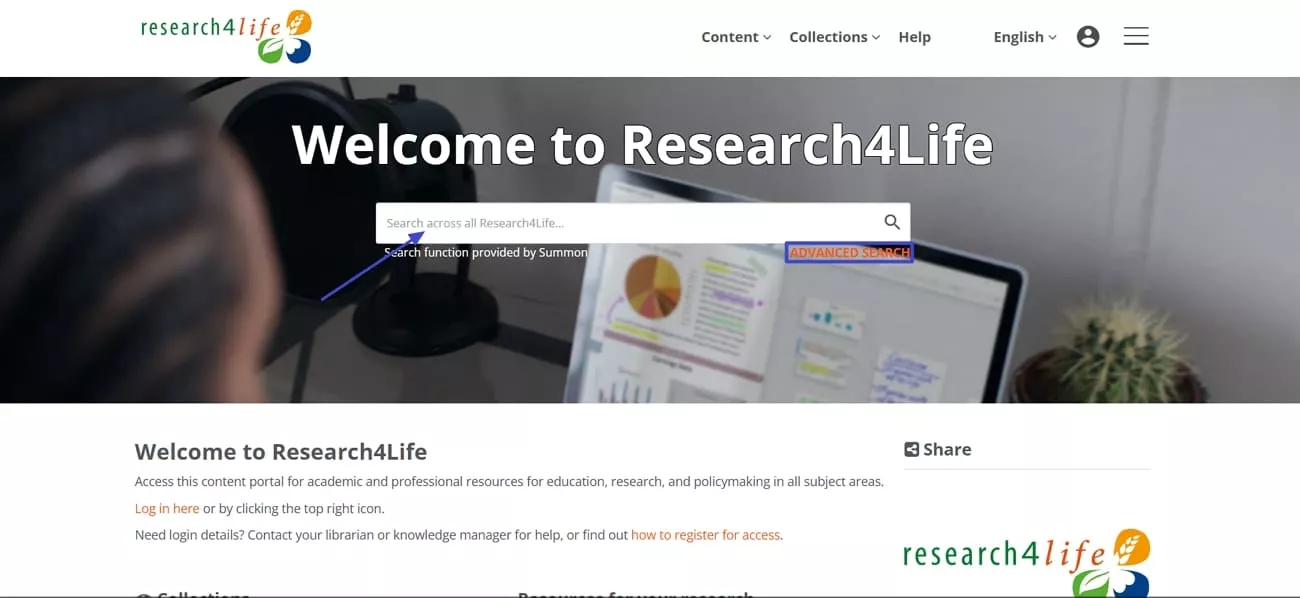
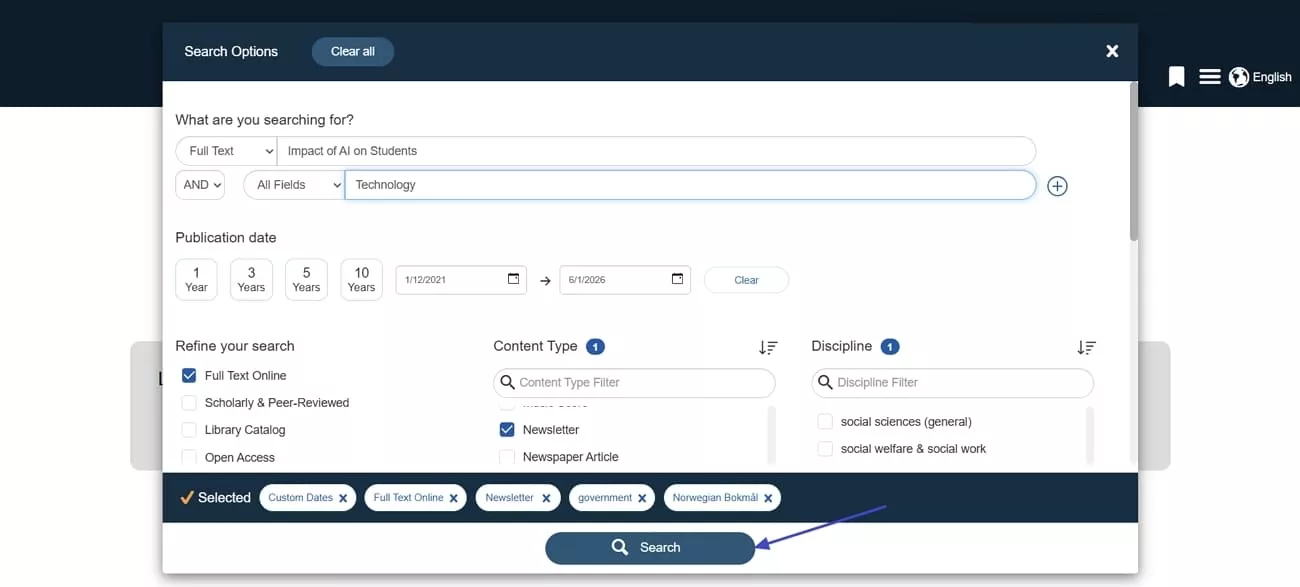
Step 1. Once you access the portal interface, enter keywords in the search bar or press the “Advanced Search” option for precise research papers.
Step 2. After accessing the “Advanced Search” interface, apply filters such as publisher, publication year, and subject collection. Next, press the “Search” button begin searching.
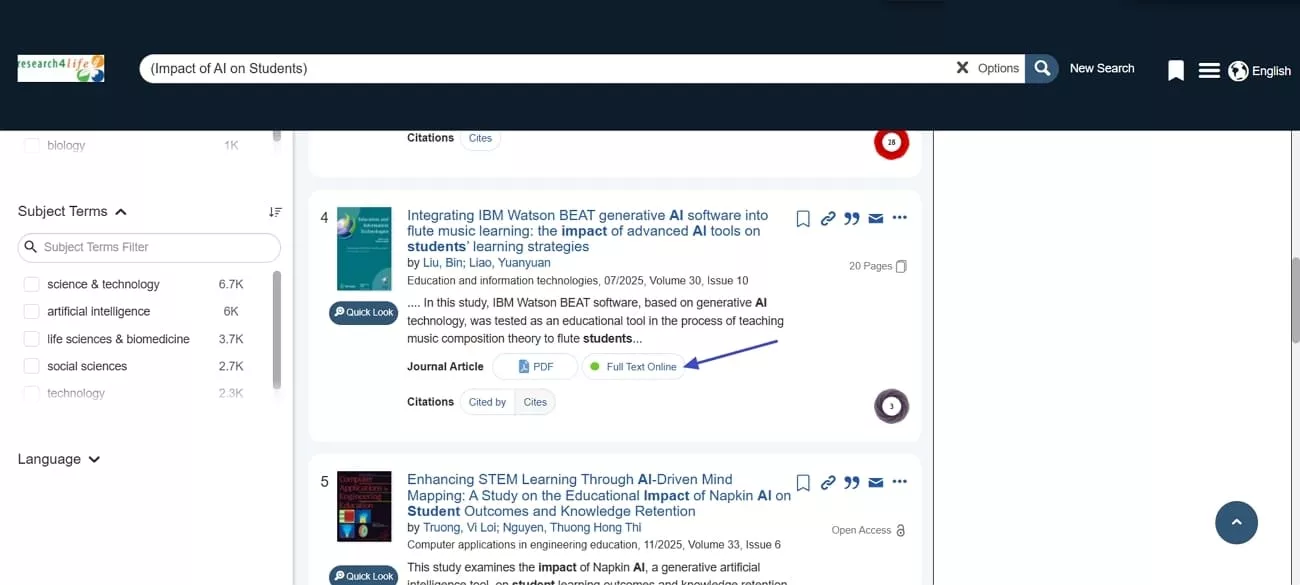
Step 3. Afterwards, press the “Full Text Online” option to read the full study online.
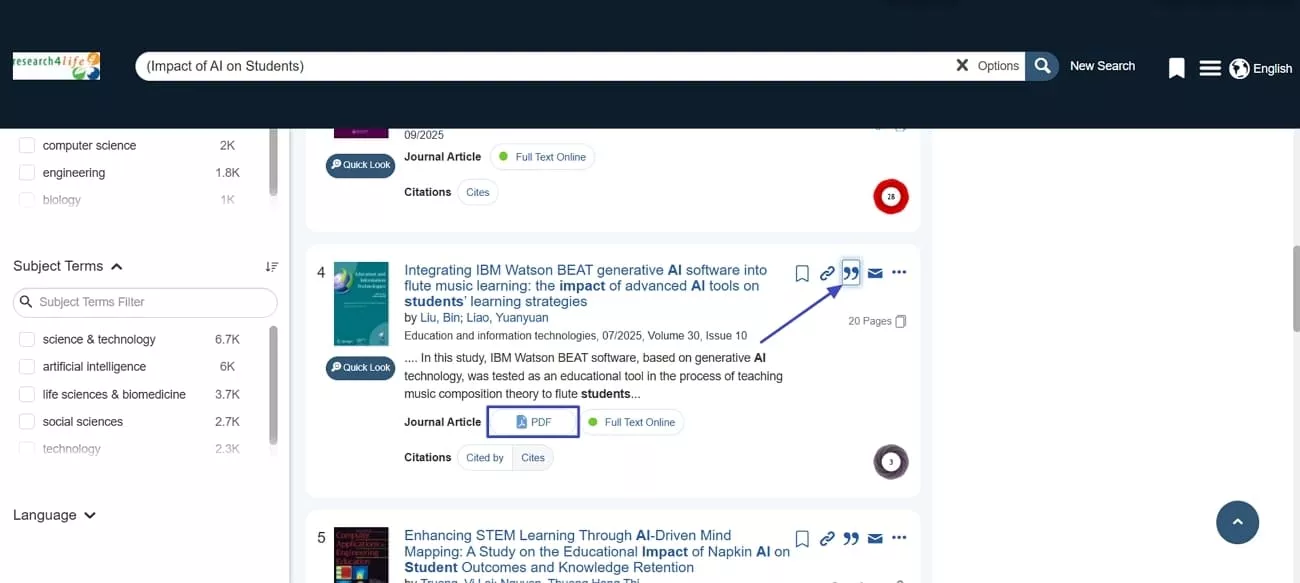
Step 4. Once you complete studying the entire article, press the “PDF” button to download a copy of article. Lastly, click the “Cite this Item” icon to cite it.
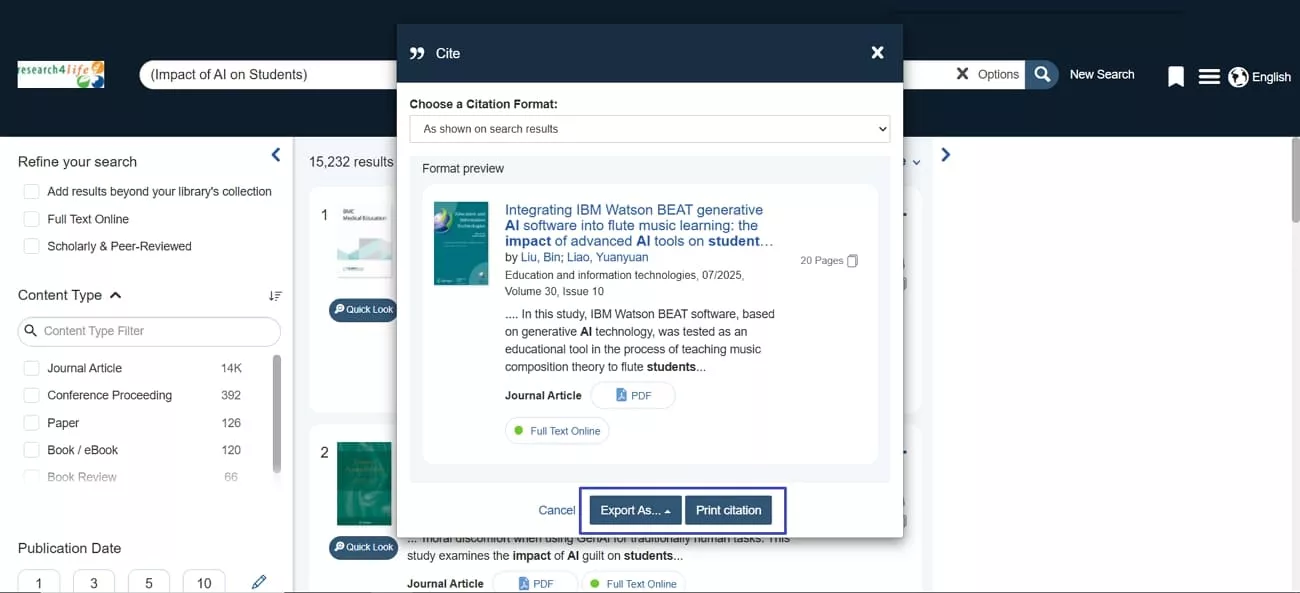
Step 5. In the pop-up window, choose the citation format and press the “Print Citation” button to export citations.
What You Can Access Through Research4Life
While using this platform, I gain access to a wide range of peer-reviewed journals and databases. The platform provides content across multiple disciplines, which makes it easier to conduct research in my field without worrying about paywalls. Look at how the platform organizes its resources into specialized collections and provides access to institutions in eligible Research4Life countries.
- HINARI: Offers health and biomedical research articles from leading medical journals, supporting public health and medical studies.
- AGORA: Provides access to agriculture and food science publications, helping researchers explore sustainable farming and crop management.
- OARE: Focuses on environmental science and related disciplines, offering papers on climate change, ecology, and conservation.
- ARDI: Covers applied science, technology, and innovation, providing research for industry development and technological progress.
- GOALI: Delivers legal and policy research materials, supporting studies in law, governance, and justice initiatives.

With these collections, I can explore literature relevant to my research, read articles online, and download PDFs for future projects. Each collection is curated by leading publishers and guarantees the quality and credibility of all available resources.
While it excels at curated access, its search experience is still traditional. It works best when I already know what I’m looking for. For question-driven discovery, I rely on newer AI-powered tools like UPDF AI Paper Search, which complements it and helps me find relevant research faster.
Part 3. From Traditional Access to Smarter AI Research Tools
Many research papers I work with are scattered across different platforms, and I needed a way to manage them. This is where UPDF comes in as a companion to help me find, organize, and access academic papers. With the UPDF AI Paper Search feature, I can explore and store my papers in one place to save time and effort.
Moreover, UPDF AI Paper Search alongside Research4Life improved my workflow by letting me explore papers from multiple sources at once. With a single platform, I can access summaries and keep track of relevant studies across devices. This makes it much easier to continue my work without switching between tools or losing track of important papers.
What UPDF AI Paper Search Offers
I rely on UPDF AI Paper Search because it combines powerful search, smart organization, and AI-assisted tools to make research faster and easier. Now, let's take a closer look at what it offers to support my research workflow.
1. Two Search Modes: UPDF AI Paper Search offers two search modes for exploring and discovering academic research. Standard keyword search helps me find relevant studies across multiple academic databases.
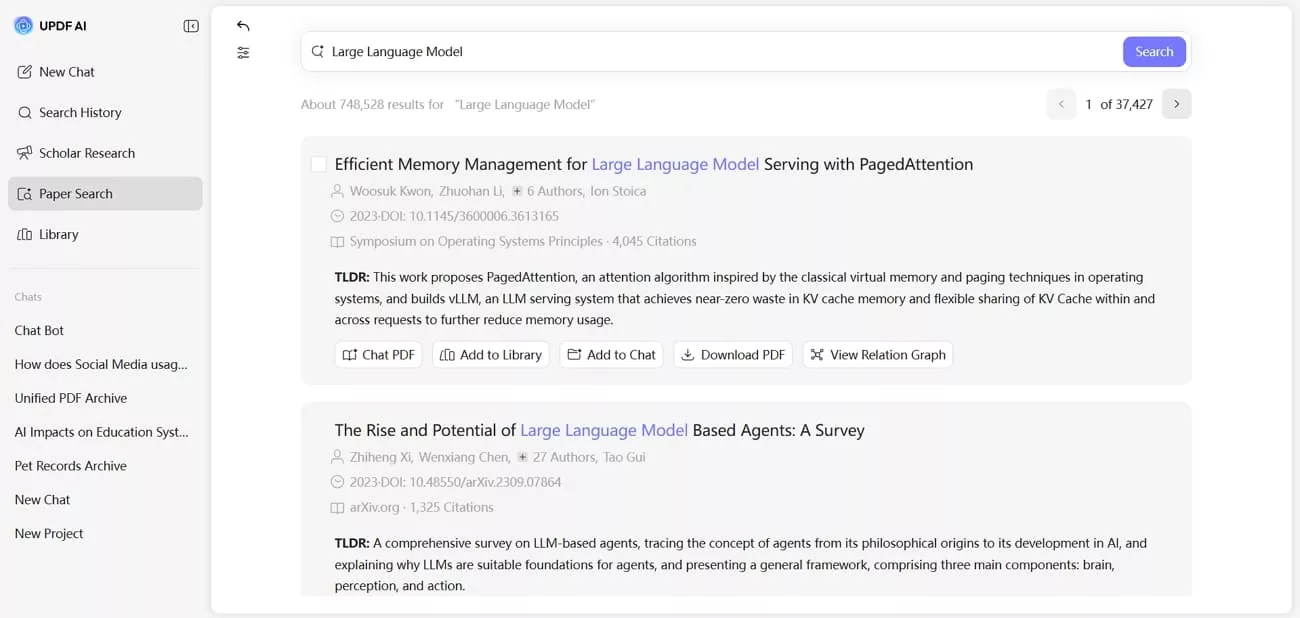
DeepThink mode lets me ask research questions and receive answers supported by citations.
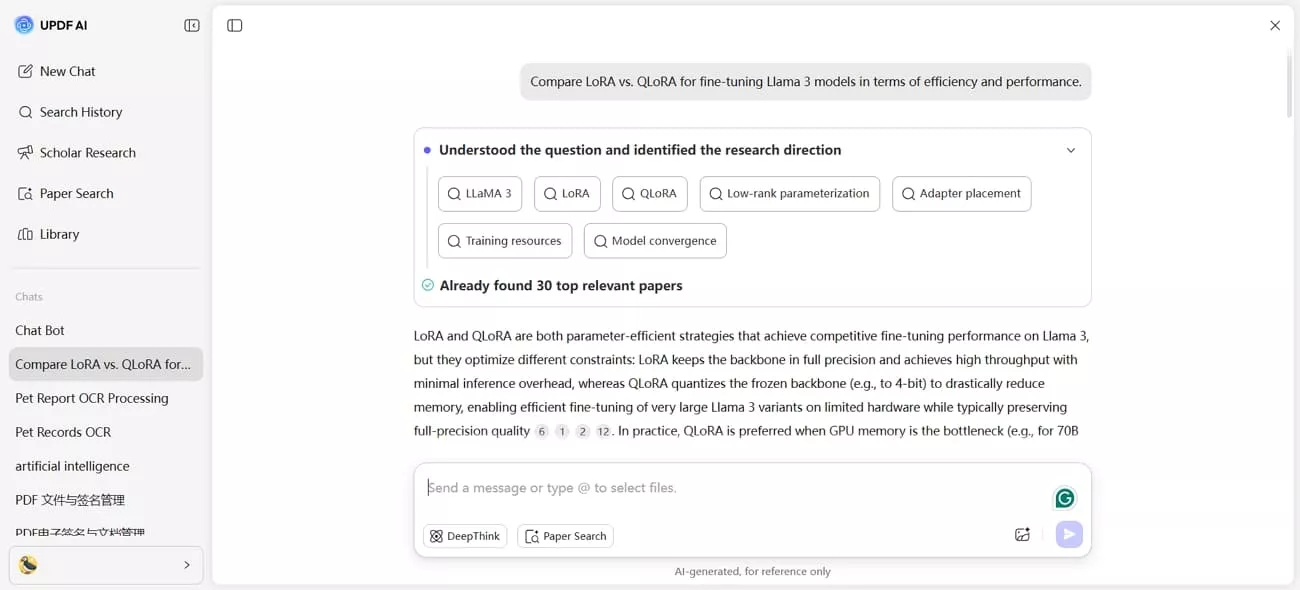
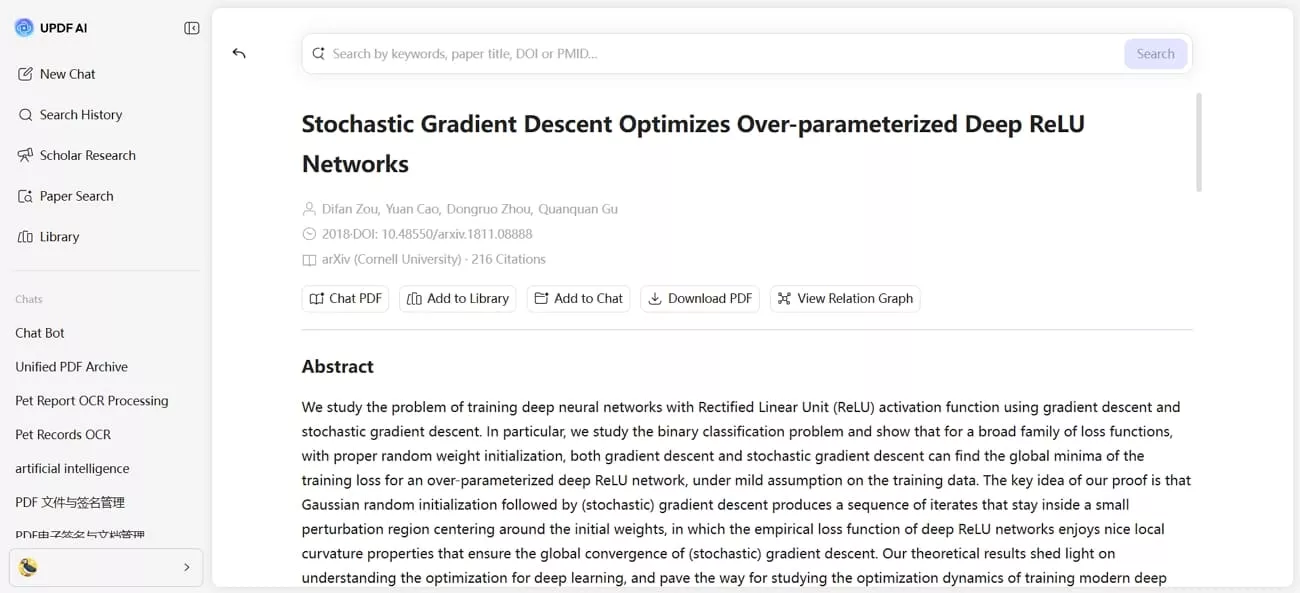
2. Extensive Paper Search: I can search across more than 220 million academic papers using keywords, paper titles, DOI, or PMID.
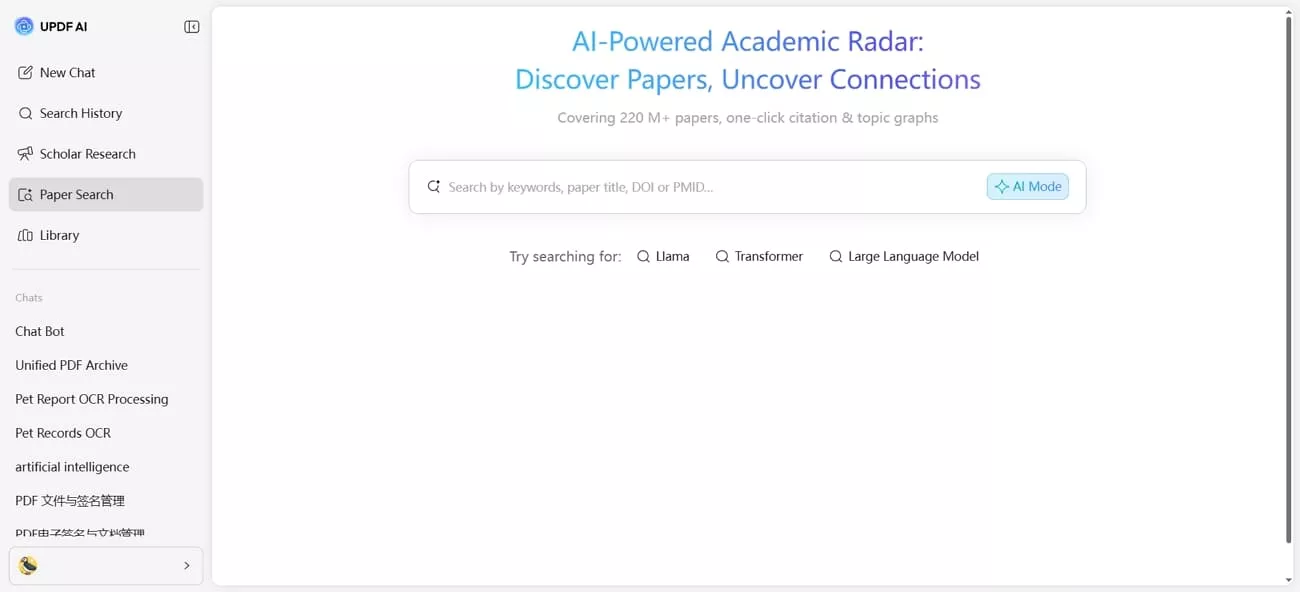
3. Quick Summaries: The platform shows rich paper metadata along with AI-generated summaries to help me judge the relevance of each paper.
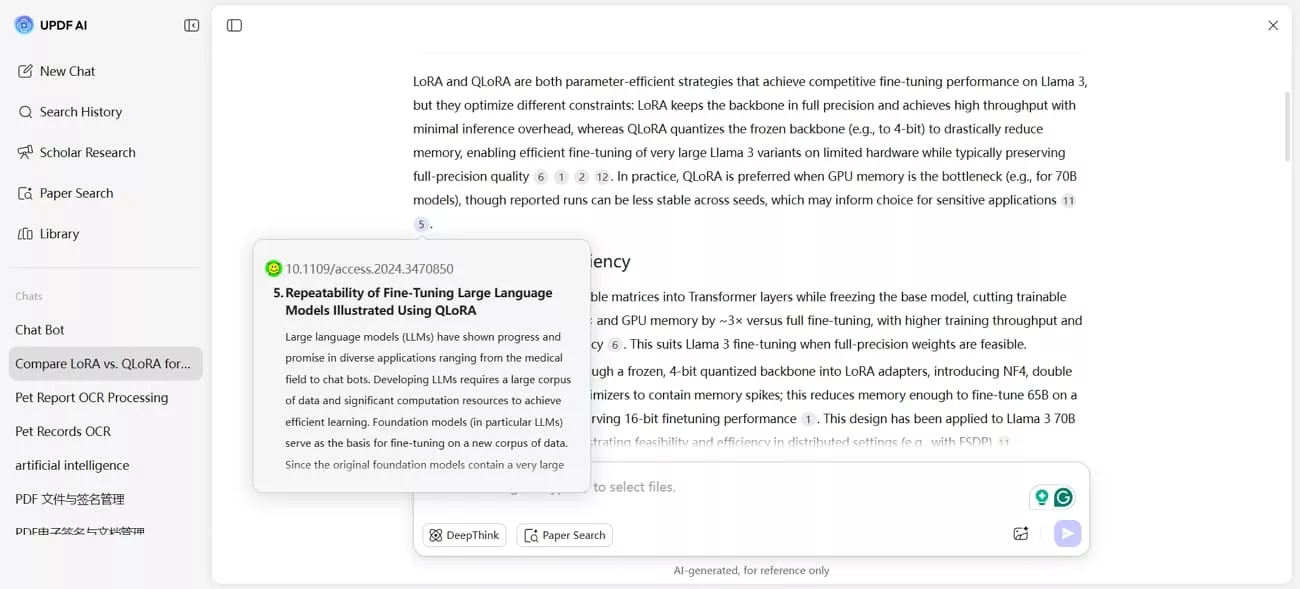
4. Advanced Filters: Filters for year, field of study, open-access PDFs, and citation graphs allow me to focus on the most relevant literature.
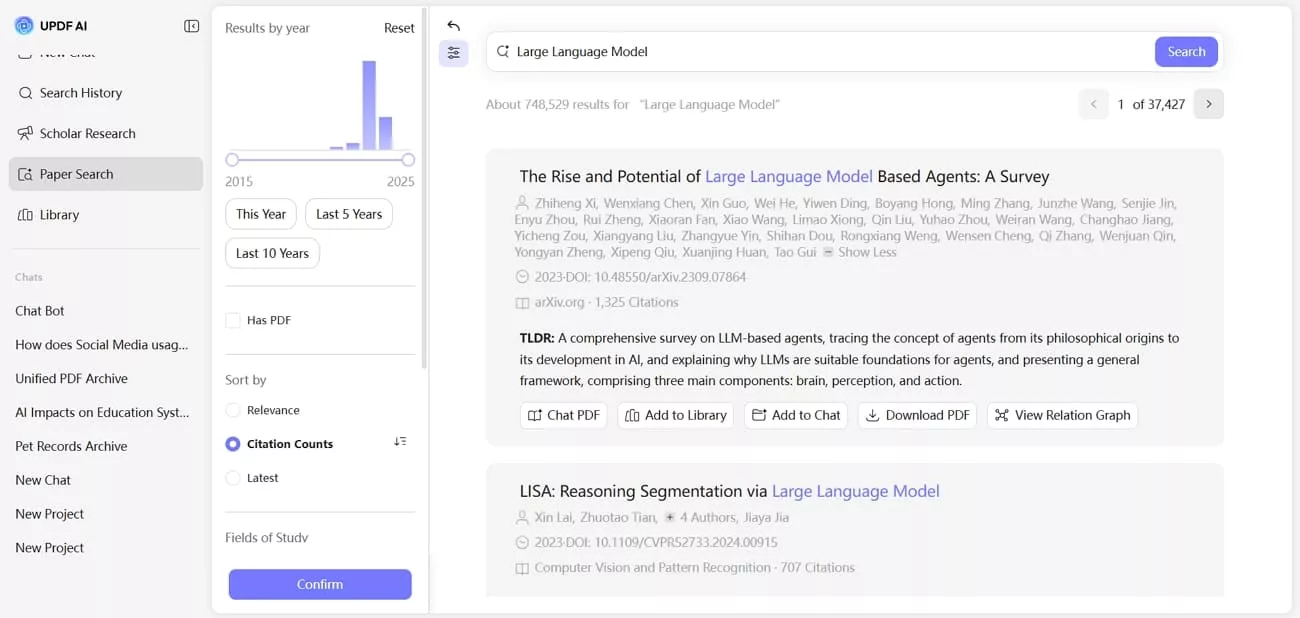
5. Research Paper Hub: UPDF integrates library management, add-to-chat, relation graphs, and chat PDF features to make deeper research question answering easier. I can also download open-access versions of specific articles for offline reading, reference management, and easier study workflow.
Research4Life vs. UPDF AI Paper Search
After I completed UPDF AI Paper Search and Research4Life login, I compared them side-by-side and found some insights. Look at the table below to understand how they differ in purpose, content coverage, and research support.
| Aspect | Research4Life | UPDF AI Paper Search |
| Main Purpose | Institutional program for affordable scholarly access in LMICs. | Individual AI‑driven search and reading assistant inside UPDF. |
| Search Style | Traditional database and publisher‑site searching. | Topic/keyword AI search with filters and instant insight extraction. |
| Content Coverage | 85000 journals, books, and databases via publishers. | 220M+ academic papers indexed. |
| AI Functionality | No native AI; relies on external tools. | Built‑in summaries, Q&A, literature‑review support, and more. |
| Document Interaction | Standard PDF access via publishers and local tools. | Chat with PDFs, AI summaries, annotations |
| Cost Model | Free and low‑cost to eligible institutions in target countries. | Free tier with limits; paid AI subscriptions for heavier use. |
The differences discussed above help me approach tasks, depending on my research goals. Research4Life provides curated, reliable content, while UPDF AI Paper Search allows broader exploration and AI-assisted insights. For me, these tools work as companions that work together to improve my research workflow.
Conclusion
In conclusion, this article explained how Research4Life provides affordable access to journals, books, and databases for eligible institutions. While the platform offers curated content, managing and exploring large volumes of research still requires additional support. If you want faster discovery, organized reading, and AI-assisted insights across multiple devices, UPDF AI Paper Search is the ideal companion to use.






 Enola Miller
 Enya Moore


 Lizzy Lozano