 UPDF
UPDF
 UPDF for Windows
 UPDF for Mac
 UPDF for iPhone/iPad
 UPDF for Android
 UPDF AI Online
 UPDF Sign
 IvyCraft
 Edit PDF
 Annotate PDF
 Create PDF
 PDF Form
 Edit links
 Convert PDF
 OCR
OCR PDF to Word
 PDF to Image
 PDF to Excel
 Organize PDF
 Merge PDF
 Split PDF
 Crop PDF
 Rotate PDF
 Protect PDF
 Sign PDF
 Redact PDF
 Sanitize PDF
 Remove Security
 Read PDF
 UPDF Cloud
 Compress PDF
 Print PDF
 Batch Process
 About UPDF AI
 UPDF AI Solutions
 AI User Guide
 FAQ about UPDF AI
 Summarize PDF
 Translate PDF
 Chat with PDF
 Chat with AI
 Chat with image
 PDF to Mind Map
 Explain PDF
 PDF AI Tools
 Image AI Tools
 AI Chat Tools
 AI Writing Tools
 AI Study Tools
 AI Working Tools
 Other AI Tools
 AI Bookmark Generation
 AI Bookmark Summary
 AI Watermark Generation
 AI Background Generation
 AI Sticker Generation
 AI Stamp Generation
 AI Editing Suite
 UPDF Copilot
 AI Page Management
 AI Semantic Search
 PDF to Word
 PDF to Excel
 PDF to PowerPoint
 Enterprise Solution
 Enterprise Sign
 Enterprise AI
 Enterprise Plan
 Enterprise User Guide
 Enterprise Webinar
 Banking
 Healthcare
 Insurance
 Legal
Legal Manufacturing
 Government
 Education Solution
 Customer Stories
 User Guide
 UPDF Tricks
 FAQs
FAQs UPDF Reviews
 Download Center
 Blog
Blog Newsroom
 Tech Spec
 Updates
 UPDF vs. Adobe Acrobat
 UPDF vs. Foxit
 UPDF vs. PDF Expert

ACSM files are the format you have when you try to download an eBook from a digital library or online store. Essentially, they aren't actual e-books, but Adobe Content Server Message license files designed to protect digital rights (DRM). Because of this, ACSM files are completely incompatible with standard e-readers, tablets, or mobile devices, forcing you to stay locked inside Adobe's ecosystem.
If you want to read your books freely, you must convert these files into standard PDFs to make the content universally compatible with all your tools and devices. In this article, we will discuss the best ways to convert ACSM to PDF, including quick online methods and the official offline method using Adobe software.
Reddit Community Tip
Windows • macOS • iOS • Android 100% secure
By downloading UPDF for free, you can instantly organize your converted books, highlight key passages, and use smart tools to polish formatting.
- If you want a quick, web-based solution, jump straight to Part 1 for Online Methods (No Adobe Required).
- If you prefer a secure, official route, see Part 2 for the Adobe Digital Editions Walkthrough.
- Ready to clean up, auto-bookmark, or sync your e-books across your phone and PC? Check out Part 3 for the Ultimate eBook Advantage.
Part 1. How to Convert ACSM to PDF Without Adobe? (2 Methods)
Converting your ACSM files to PDF files with Adobe software on your PC. It can be a time-consuming and tedious process. If you don't have any confidential information in your ACSM file and you don't have any issues uploading your file to online third-party converters, then you can follow the 2 methods discussed below:
Way 1. Convert ACSM File to PDF Free Online with ACSMConverter
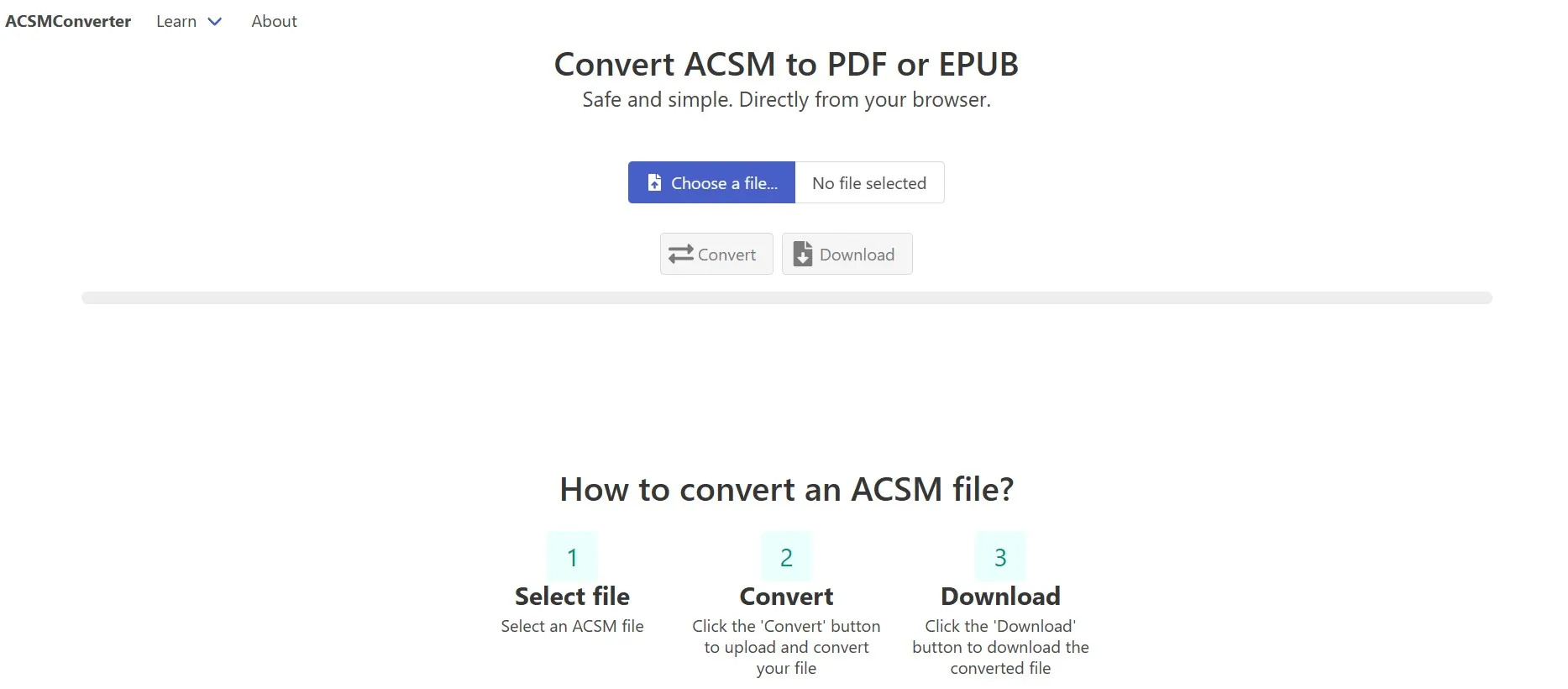
The First method for converting ACSM files online is using ACSMConverter. It is an online tool that allows effortless conversion of your file. It is a safe tool since your ACSM files are never stored here. Moreover, you don't need any installation or registration. The process is very easy, with 1 step to convert your files as follows:
Go to ACSMConverter website on your browser and click "Choose a File" to upload ACSM then click "Convert" and once your conversion is complete, you can download using "Download" button.
Way 2. Convert ACSM File to PDF Online with AnyConv
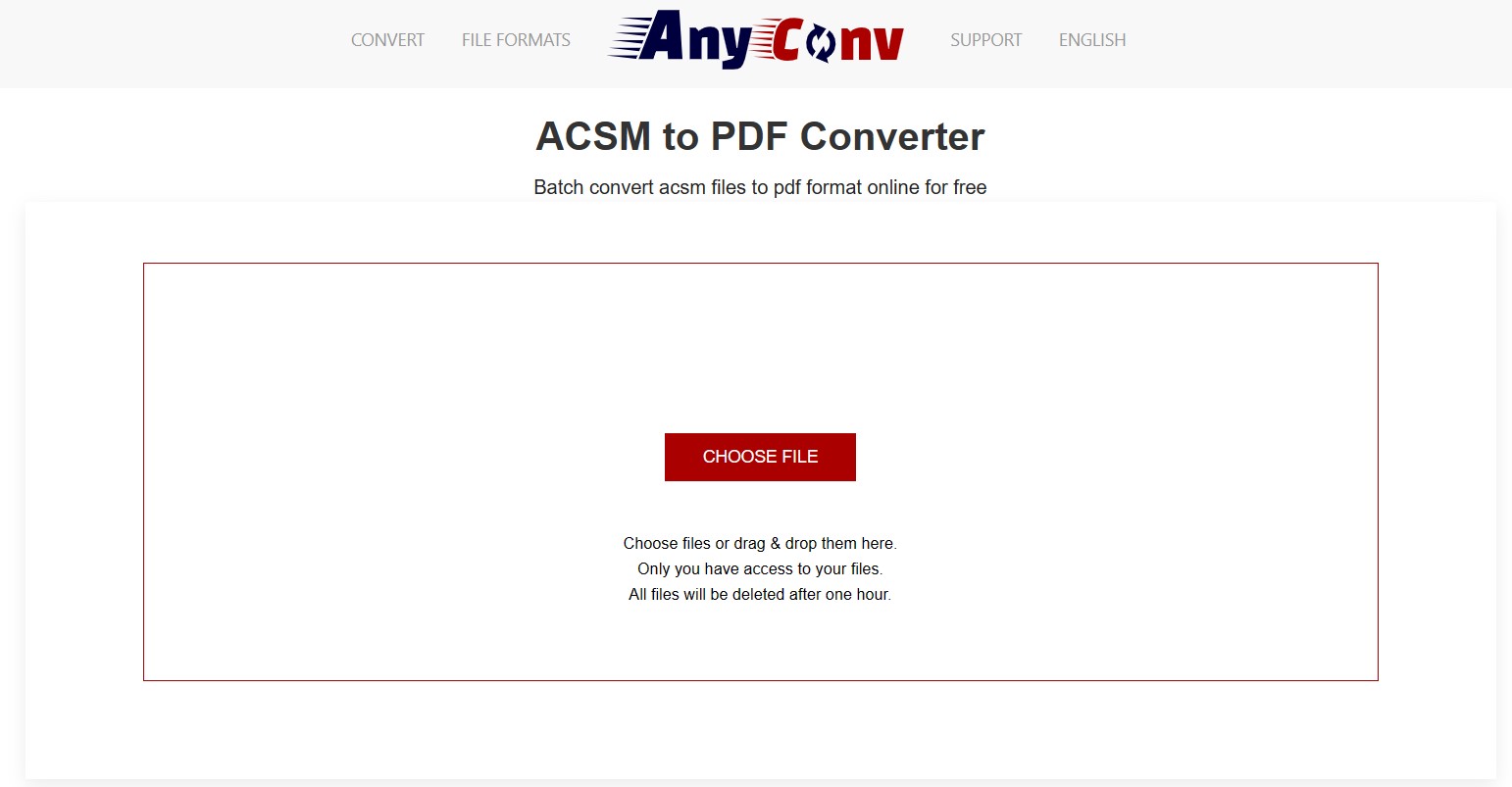
Another reliable online tool that you may use for this conversion is AnyConv. It supports multiple conversions, and converting ACSM files is one of them. There is one limitation, and that is the maximum file size per conversion capped at 100MB. Apart from that, you get a very easy experience with one simple step as follows:
After you open AnyConv ACSM to PDF converter online, you can click "Choose File" to upload your ACSM file then click "Convert" to convert it to PDF that may take a few seconds. Finally, you will click "Download" and save PDF to your offline storage.
Part 2. How to Convert ACSM to PDF With Adobe?
ACSM files are Adobe Content Server Message files that are used with Adobe's Digital Editions tool for licensing devices and downloading eBooks on them. So, if you want a way to convert these files to PDF with the safest, most reliable, and offline method that does not involve using any third-party tool, then this part is for you.
Transfer ACSM to PDF With Adobe Digital Editions
Adobe Digital Editions is the official tool for this conversion, and it makes the process very easy with a few simple steps. However, it is essential to download Digital Editions tool on your device for this method to work with the following steps:
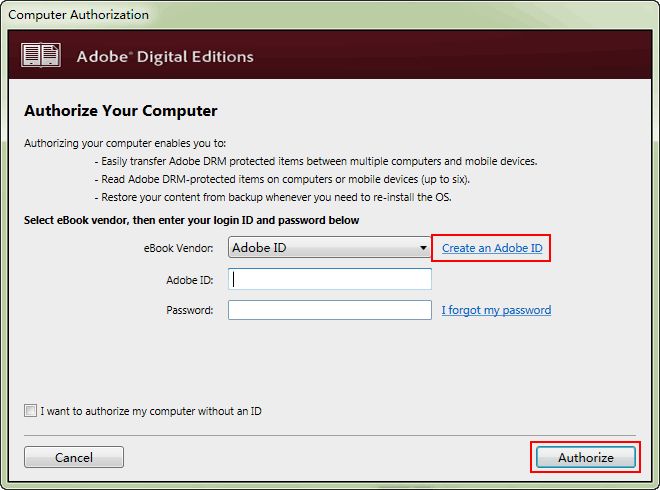
Step 1: Start Digital Editions tool then click "Help" > "Authorize" and provide your details before you click "Authorize" button.
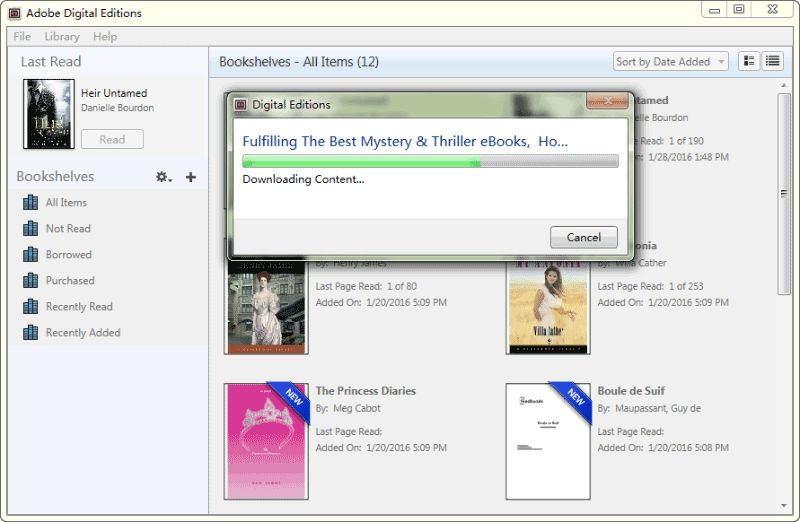
Step 2: Open location that has the ACSM file in File explorer, right click and select "Adobe Digital Editions" in "Open With" menu. The file will be open and automatically downloaded in PDF format. This PDF file will be present in "My digital editions" folders inside "Documents" folder on your PC.
Part 3. How to Clean Up and Read Your Converted eBooks Safely
Converted ACSM files often suffer from messy layouts, missing navigational menus, or broken text formatting. UPDF acts as your "eBook restoration tool" to give you a premium reading experience:
Windows • macOS • iOS • Android 100% secure
- Generate Lost Table of Contents: Converted books frequently lose their chapter navigation. UPDF’s AI Bookmark Feature automatically scans the text hierarchy to recreate a perfect, clickable chapter tree in one click.
- Fix Layout & Margin Errors: Scanned or poorly converted PDFs can have flipped pages, bad margins, or blank sheets. The AI Page Management Agent detects and auto-fixes layout orientation and structural bugs instantly.
- Smooth Dark Mode & Eye Protection: Say goodbye to Adobe Digital Editions' outdated interface. UPDF provides comfortable eye-protection themes, customizable backgrounds, and smooth rendering for heavy 1000-page novels.
This review of UPDF gives you an in-depth, detailed overview of UPDF's power and usability.
UPDF also enables you to edit converted PDF documents from AZW3, PDF from IPYNB, Image, JOSON, MP3, and other formats. Download UPDF for editing your ACSM files after converting them to PDF and enjoy all other features.
Part 4. FAQS About ACSM
Q1. How Do I Open an ACSM File Online?
ACSM files can only be opened with the Adobe Digital Editions app. If you need to open them online, you can use the ACSMConverter to convert the ACSM file to PDF files online, then, use the online PDF reader like SmallPDF to open the converted PDF files.
Q2. Can Adobe Acrobat read ACSM?
No, Adobe Acrobat can't open ACSM files by itself. ACSM files aren't real eBooks. They are license files that let you get the eBook from a digital library after buying it online. To read the words in an ACSM file, you must use Adobe Digital Editions to download your book to PDF or EPUB format, then open it using Adobe Acrobat.
Q3. How Do I Convert ACSM to PDF on iPhone?
On iPhone, convert ACSM to PDF using an app that works with these files. Try Adobe Digital Editions. Open the ACSM file in the app, and it will get you the eBook as EPUB or PDF. If the eBook is in EPUB format, use an app to change it to PDF. Open the changed PDF on your iPhone without any issues.
Q2. How do I convert ACSM to PDF online without software?
If you don’t mind uploading non-confidential books to third-party servers, you can use web-based platforms like ACSMConverter or AnyConv. Simply drop your file into their browser interface, click convert, and download the output PDF in seconds.
Final Thoughts
Converting your files from ACSM to PDF format can make it possible to view the content on multiple devices. It even gives you offline usage access, and you enjoy all the other benefits that you get with other PDF documents. That means that you may need to edit the contents of that PDF after conversion, and UPDF is the right tool for that.
UPDF brings all the editing features that you will need with that file, and you can enjoy these on Smartphones and PCs after downloading the UPDF app here.
Windows • macOS • iOS • Android 100% secure




 Enola Miller
 Enola Davis
 Enid Brown

 Engelbert White