 UPDF
UPDF
 UPDF for Windows
 UPDF for Mac
 UPDF for iPhone/iPad
 UPDF for Android
 Nomostar
 UPDF AI Online
 UPDF Sign
 IvyCraft
 Edit PDF
 Annotate PDF
 Create PDF
 PDF Form
 Edit links
 Convert PDF
 OCR
OCR PDF to Word
 PDF to Image
 PDF to Excel
 Organize PDF
 Merge PDF
 Split PDF
 Crop PDF
 Rotate PDF
 Protect PDF
 Sign PDF
 Redact PDF
 Sanitize PDF
 Remove Security
 Read PDF
 UPDF Cloud
 Compress PDF
 Print PDF
 Batch Process
 About UPDF AI
 UPDF AI Solutions
 AI User Guide
 FAQ about UPDF AI
 Summarize PDF
 Translate PDF
 Chat with PDF
 Chat with AI
 Chat with image
 PDF to Mind Map
 Explain PDF
 PDF AI Tools
 Image AI Tools
 AI Chat Tools
 AI Writing Tools
 AI Study Tools
 AI Working Tools
 Other AI Tools
 AI Bookmark Generation
 AI Bookmark Summary
 AI Watermark Generation
 AI Background Generation
 AI Sticker Generation
 AI Stamp Generation
 AI Editing Suite
 UPDF Copilot
 AI Page Management
 AI Semantic Search
 PDF to Word
 PDF to Excel
 PDF to PowerPoint
 Enterprise Solution
 Enterprise Sign
 Enterprise AI
 Enterprise Plan
 Enterprise User Guide
 Enterprise Webinar
 IT
IT Education
 Construction
 Financial Service
 Healthcare
 Insurance
 Legal
Legal Manufacturing
 Government
 Researchers & PhDs
 Solopreneurs & Freelancers
 Lawyers & Legal Professionals
 Real Estate Agents & Brokers
 Education Solution
 Customer Stories
 User Guide
 UPDF Tricks
 FAQs
FAQs UPDF Reviews
 Download Center
 Blog
Blog Newsroom
 Tech Spec
 Updates
 UPDF vs. Adobe Acrobat
 UPDF vs. Foxit
 UPDF vs. PDF Expert

Knowt AI PDF Summarizer offers quick summaries that turn lengthy documents into digestible learning notes for learners who feel exhausted using traditional methods that require endless manual reading and note-taking. But some users get annoyed by occasional AI inaccuracies and monthly usage caps, and relatively complex PDF editing problems.
Yet UPDF provides more advanced PDF tools like OCR, translation, and AI bookmarks and more accurate summaries. This guide explains everything about Knowt AI and a better alternative - UPDF .
Windows • macOS • iOS • Android 100% secure
Part 1. A Detailed Breakdown of Knowt AI PDF Summarizer
An AI-backed learning platform designed to simplify studying by turning long documents into clear summaries. Knowt AI also lets users generate interactive flashcards automatically to help them review key points faster. The platform reports over 7M users across top schools and currently holds a 2.3 out of 5 rating on Trustpilot.
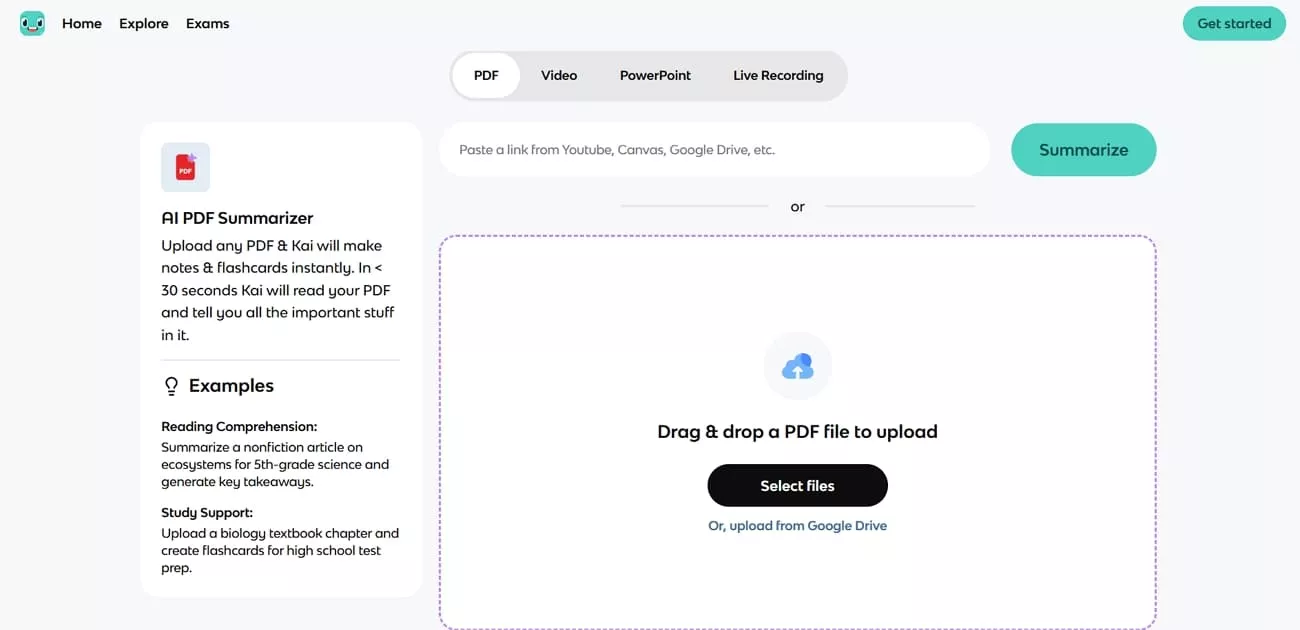
Despite mixed reviews, many learners still appreciate its accurate summarization for daily academic use. Knowt continues to gain popularity because it saves time, reduces manual effort, and makes learning effective.
Core Features
Now, let’s explore how Knowt’s PDF Summarizer AI free tool helps students turn long readings into clear, study-ready notes:
- Practice Test: Automatically builds 10 focused practice questions from uploaded PDFs to help learners test their understanding quickly.
- AI Flashcard Generation: Instantly converts uploaded class notes, PDFs, and lecture links into flashcards, saving massive time on preparation.
- Video-to-Notes: Transcribes lecture videos, summarizes key points, and turns them into organized notes for easier review.
- Kai: Personal Study Assistant: Provides personalized study help, answering questions, suggesting materials, and guiding revision based on uploaded content.
- Chat & Ask Questions with AI: Lets learners ask questions about their materials and receive clear, contextual answers in real time.
Supported Input Formats
Knowt supports common study materials like PDFs, typed notes, text documents, lecture links, and video content uploads. These formats work seamlessly with features such as practice tests, AI flashcards, video-to-notes conversion, and AI chat. This flexibility helps learners quickly feed different study materials into Knowt without extra editing, copying, and complicated setup.
Technical Principles
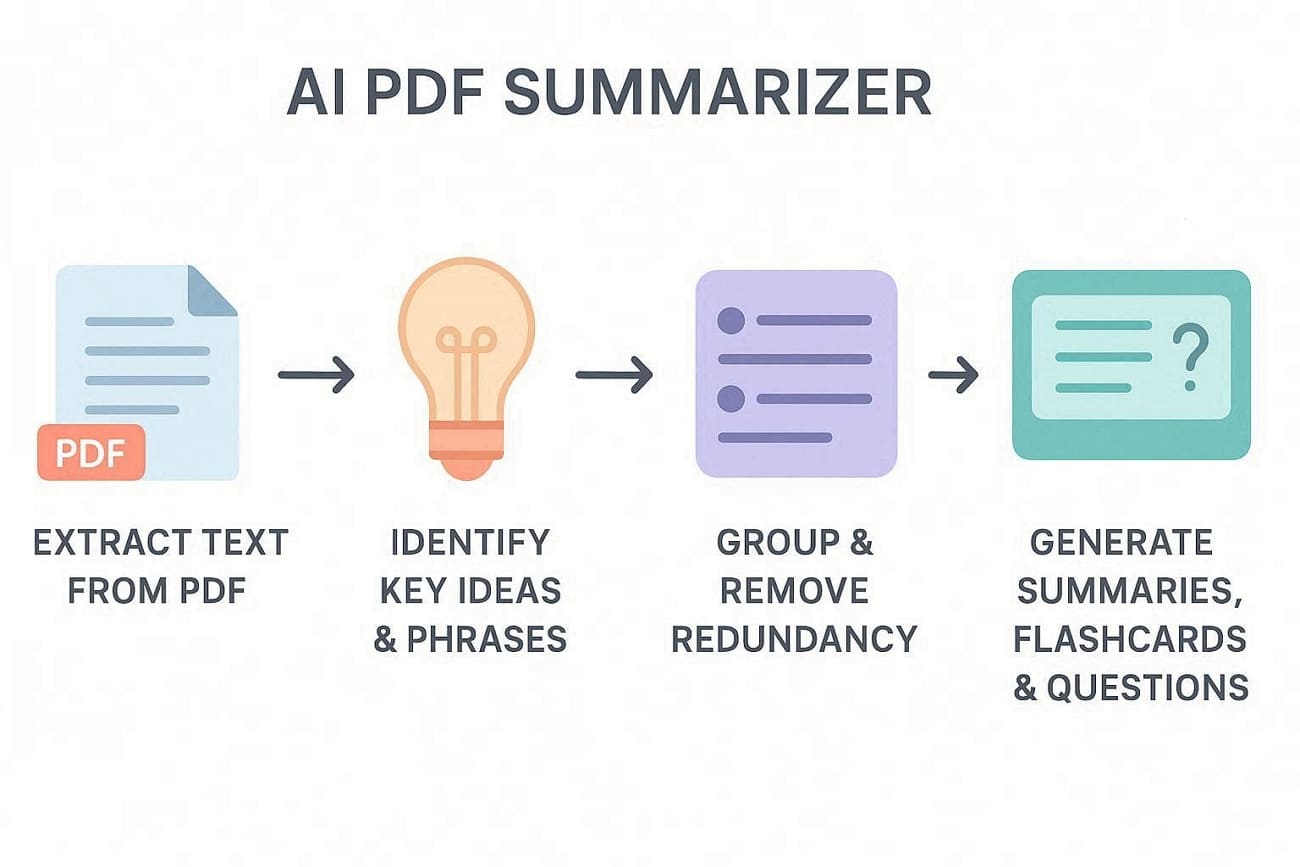
Having explored the features, we now explain in simple words how Knowt AI PDF Summarizer processes content:
- First, the system reads text from PDFs, then converts everything into a structured format.
- Next, it finds key ideas and important phrases, then highlights information that are most useful for learning.
- After that, related points are grouped together, and then repeated details are removed.
- Finally, selected information becomes summaries, flashcards, and practice questions for learners.
Payment Models and Pricing
Now, look at the table below to understand how Knowt’s free and paid pricing works:
| Plan | Price | Best For | What Comes in |
| Basic | Free | Most students | Create notes & flashcards |
| Ultra (Monthly) | $24.99/month | Short-term intensive use | Unlimited Kai, AI generation features |
| Ultra (Annual) | $149.99/year | Long-term users | Same Ultra features as monthly |
Pros and Cons of Knowt AI PDF Summarizer
After reviewing the pricing model, let's see how this PDF summarizer AI free tool balances value and limitations.
Pros
- Turns long study materials into quick summaries and flashcards in one place.
- Supports PDFs and video links to give learners flexibility with content.
- Simple interface that most students can understand without a long learning curve.
Cons
- Free plan has strict limits that feel restrictive for heavy daily studying.
- Lacks advanced PDF tools like editing, OCR, and strong page management.
- Not suitable for users who need deep PDF management with strong study features.
UPDF AI vs. Knowt AI PDF Summarizer
For users thinking about which tool fits best, look at the table below to compare UPDF AI and Knowt AI in terms of features and value:
| Aspect | Knowt AI PDF Summarizer | UPDF |
| Main Focus | Study help: summaries and flashcards | All-in-one PDF work and AI assistance |
| PDF Capabilities | Basic reading and summarizing | Advanced editing, OCR, annotations, AI bookmarks |
| Study Tools | Flashcards, practice tests, video-to-notes | AI summaries, explanations, translations, mind-map, bookmark summaries |
Part 2. Step-by-Step Guide to Use Knowt AI PDF Summarizer
Many learners feel unsure about how to start using Knowt AI PDF Summarizer in everyday study routines. Some users also want a clear walkthrough before trusting any AI tool with important class materials. So, follow the steps below to understand how to use this summarizing feature:
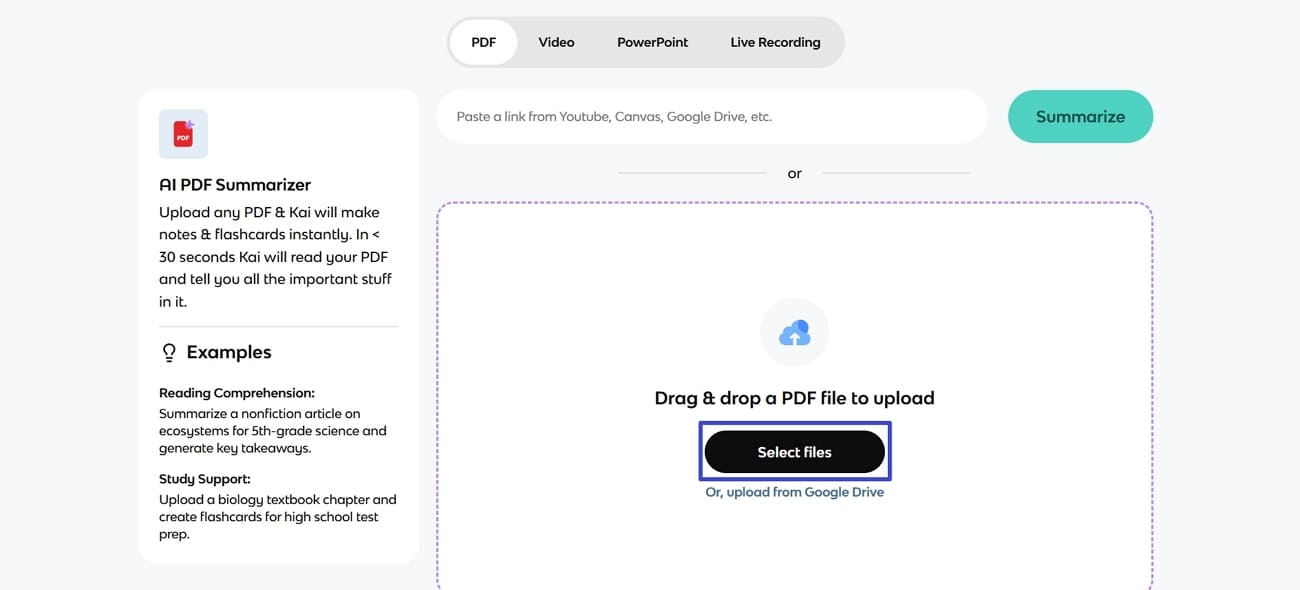
Step 1. Once you enter the AI PDF Summarizer interface, click the “Select Files” button to upload a PDF. Alternatively, you can also access files by pasting a Google Drive link in the URL box.
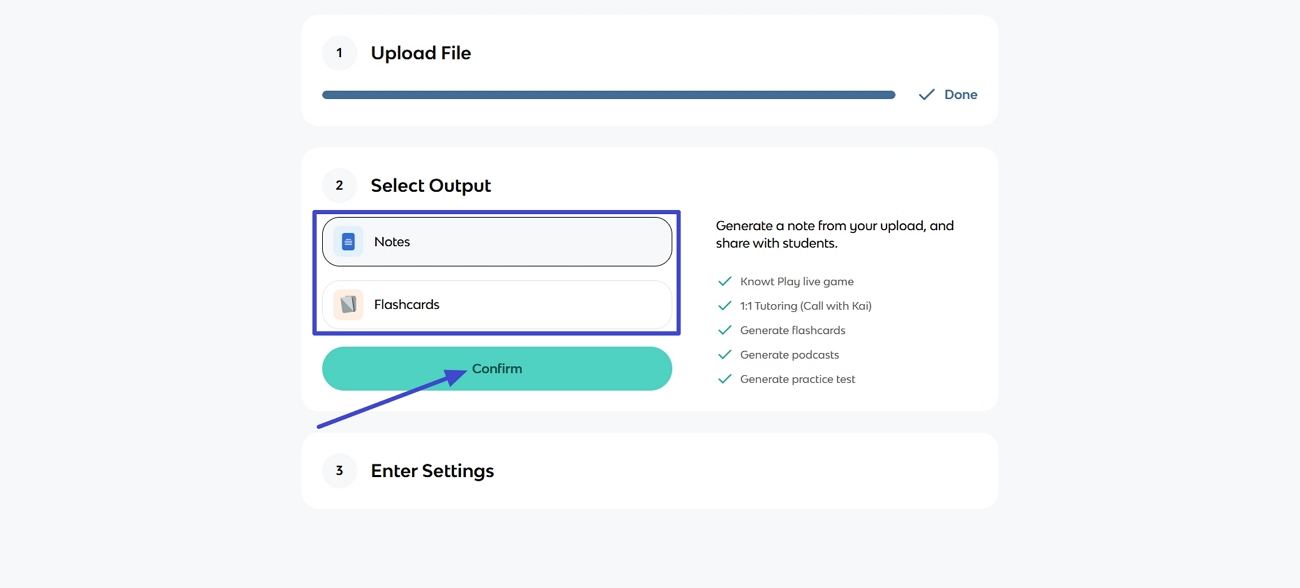
Step 2. Next, select the “Notes” or “Flashcards” output type you want and click the “Confirm” button.
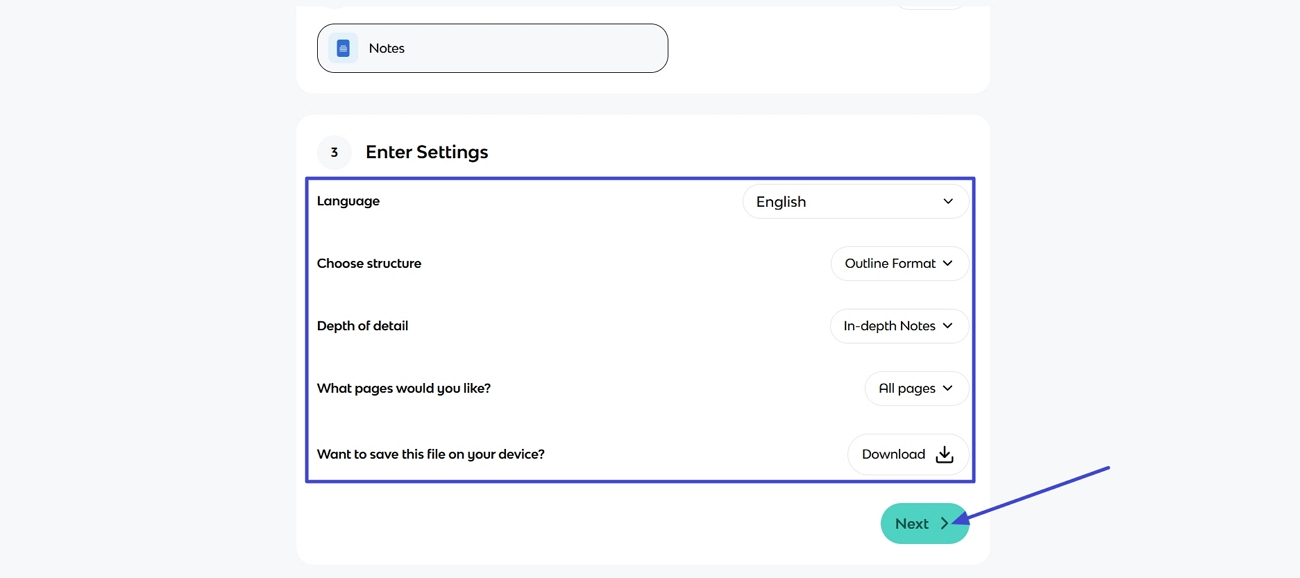
Step 3. Afterward, select the Summary Language, Structure, and other settings. Once done, click the “Next” button to begin the generation process.
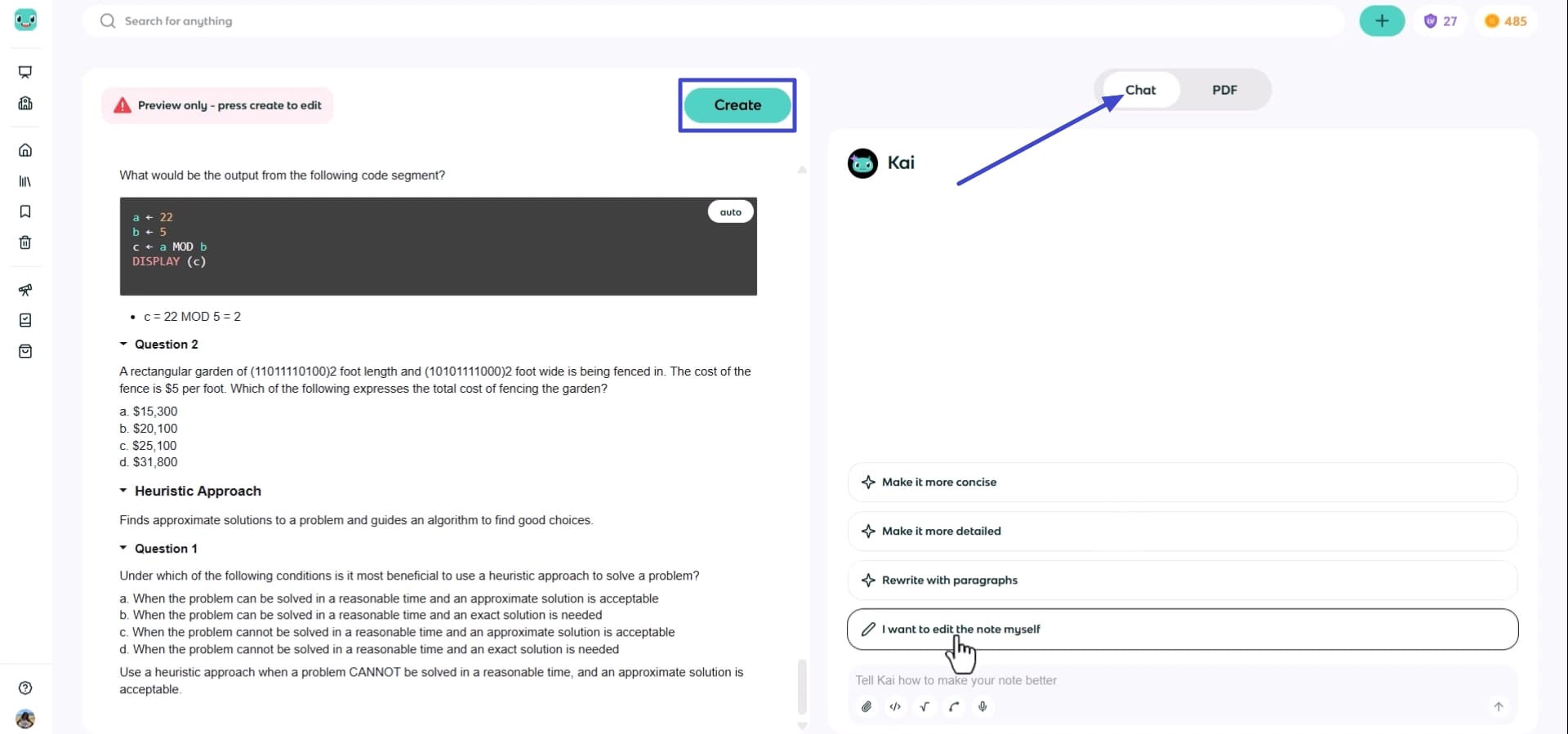
Step 4. Once the summary is generated, use the “Chat” feature to make it more concise or detailed. After the summary is finalized, press the “Create” button to save the summary outside the class or create a new class for it.
Part 3. Best Alternative to Knowt AI PDF Summarizer - UPDF
Many users feel disappointed with Knowt due to limited customizations and strict free‑plan usage caps, and start searching for a better PDF Summarizer AI alternative. This is where UPDF AI comes in with fast page management and batch PDF management tools, you can use this tool online, but a smarter choice is the offline bundle of professional PDF management UPDF Pro + AI .
UPDF Pro lets you drag and drop pages, split documents, and merge multiple class PDFs into one file and other basic but powerful editing functions. The bundle can help you auto-generate bookmarks and summarize bookmarks, create custom stickers, wallpapers and stamps, AI-powered editing, text refinement, and tone rewriting provide a better experience for reading and editing PDFs. Many more exciting features await your exploration.
Students and teachers can highlight key lines, underline formulas, and add color‑coded comments beside important explanations. Other than that, you can also edit existing text in the PDF and insert new paragraphs without the original source files. It also offers a built-in UPDF AI chat assistant that lets AI work on your PDFs.
Windows • macOS • iOS • Android 100% secure
UPDF AI Features
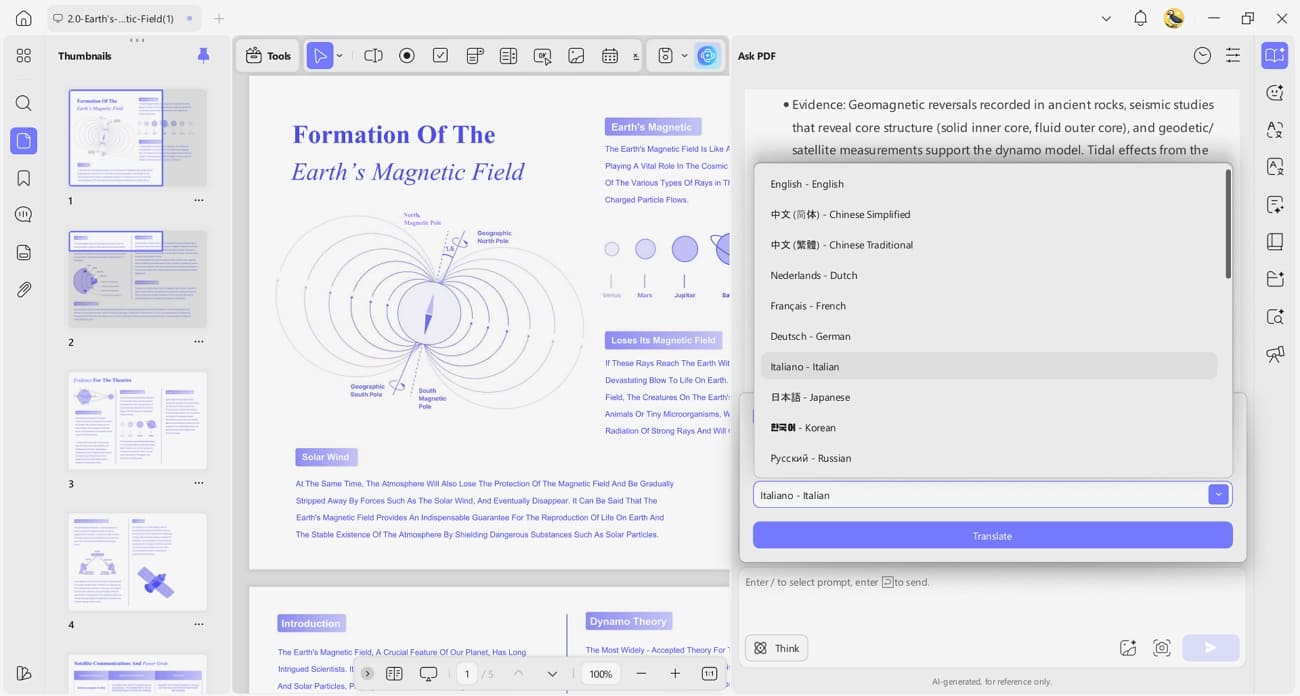
1. PDF Translate: Instantly translates your PDF content into 26 languages, keeping the original layout easy to read.
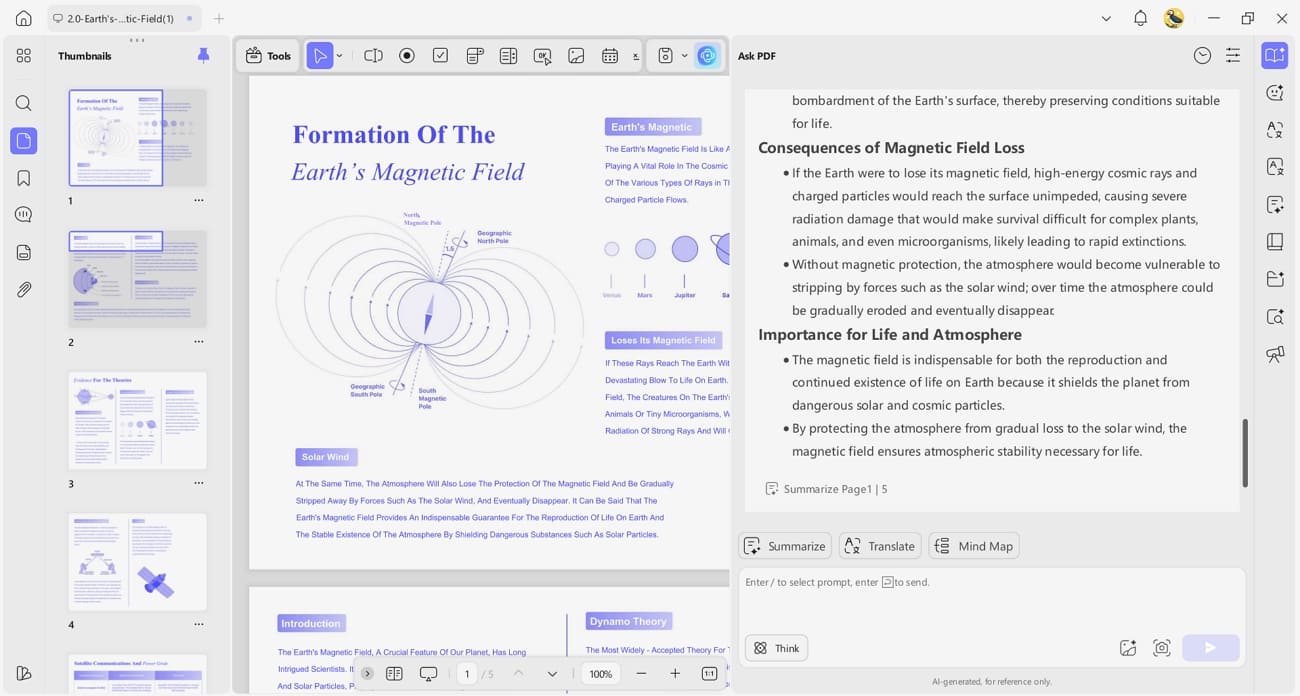
2. Summarize PDF: Quickly creates clear, short summaries of long PDFs so you understand the main ideas faster.
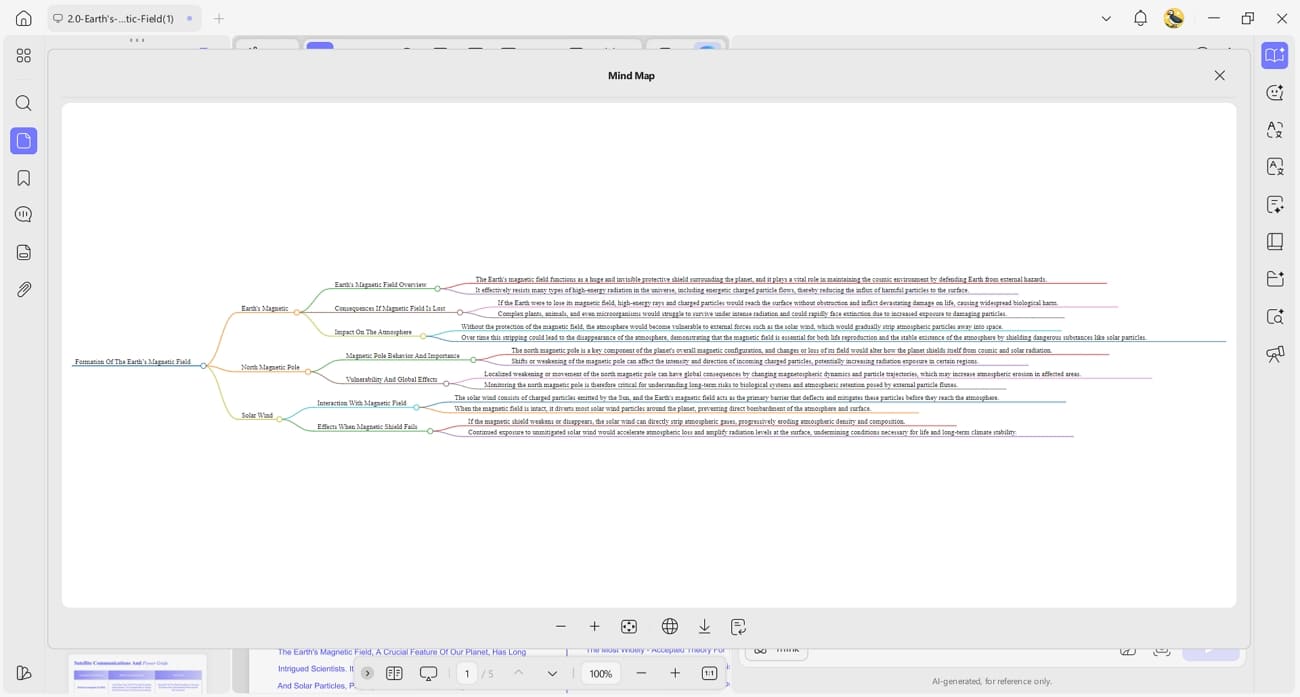
3. PDF to Mind Map: Converts your PDF contents into a visual mind map to help you review and memorize better.
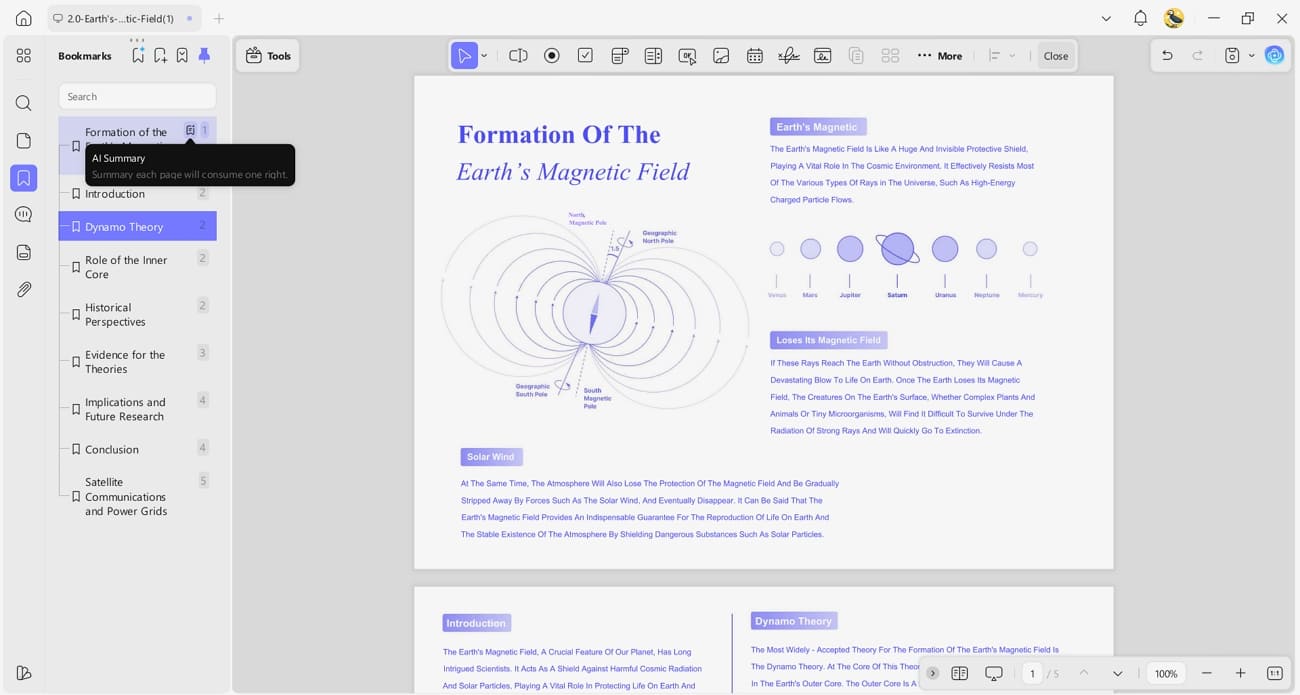
4. AI Bookmark: Automatically generates smart bookmarks and writes short summaries for each section to simplify navigation.
Recommended UPDF AI Plans for Education
Unlike many PDF Summarizer AI free tools, UPDF offers dedicated plans for educational individuals and institutions. Now, look at the table below to quickly see which UPDF AI plan best matches your study needs:
| User Type | Recommended Plan | Price | Key Benefits |
| Students with Light & Heavy Use | UPDF Pro + AI | $99.99/year/user on 4 devices | Unlimited AI features, DeepSeek (R1) |
| Teachers and Educators | UPDF Enterprise + AI | $118.00/year/user on 4 devices | Unlimited AI features, 24/7 technical support, License management dashboard |
Conclusion
In conclusion, Knowt AI PDF Summarizer helps students turn long readings into simpler notes, but its scope remains narrow. UPDF goes further by combining summarization, translation, bookmarks, and deep PDF editing in one workspace. If you want faster, richer study workflows, UPDF - AI PDF Summarizer is the smarter upgrade for everyday studying and serious exam prep.
Windows • macOS • iOS • Android 100% secure








 Lizzy Lozano
 Enola Miller
- Dry_Expression_6300