UPDF
UPDF
 UPDF for Windows
 UPDF for Mac
 UPDF for iPhone/iPad
 UPDF for Android
 UPDF AI Online
 UPDF Sign
 Edit PDF
 Annotate PDF
 Create PDF
 PDF Form
 Edit links
 Convert PDF
 OCR
OCR PDF to Word
 PDF to Image
 PDF to Excel
 Organize PDF
 Merge PDF
 Split PDF
 Crop PDF
 Rotate PDF
 Protect PDF
 Sign PDF
 Redact PDF
 Sanitize PDF
 Remove Security
 Read PDF
 UPDF Cloud
 Compress PDF
 Print PDF
 Batch Process
 About UPDF AI
 UPDF AI Solutions
 AI User Guide
 FAQ about UPDF AI
 Summarize PDF
 Translate PDF
 Chat with PDF
 Chat with AI
 Chat with image
 PDF to Mind Map
 Explain PDF
 PDF AI Tools
 Image AI Tools
 AI Chat Tools
 AI Writing Tools
 AI Study Tools
 AI Working Tools
 Other AI Tools
 PDF to Word
 PDF to Excel
 PDF to PowerPoint
 Enterprise Solution
 Enterprise Sign
 Enterprise AI
 Enterprise Plan
 Enterprise User Guide
 Enterprise Webinar
 Banking
 Healthcare
 Insurance
 Legal
Legal Manufacturing
 Government
 Education Solution
 Customer Stories
 User Guide
 UPDF Tricks
 FAQs
FAQs UPDF Reviews
 Download Center
 Blog
Blog Newsroom
 Tech Spec
 Updates
 UPDF vs. Adobe Acrobat
 UPDF vs. Foxit
 UPDF vs. PDF Expert

You're beginning a new research project and face an overwhelming number of articles and papers. A literature search strategy helps you systematically find, evaluate, and organize relevant sources efficiently. In academic research, having a clear strategy ensures your work is thorough, credible, and grounded in existing knowledge.
It's not just about searching; it's about following a systematic and repeatable process that can be refined and replicated for future projects. Tools like UPDF AI Online make this easier by summarizing papers and highlighting key insights. Read this article till the end to learn how to improve your research workflow today with UPDF AI Online.
Part 1. Mastering the Core Steps of a Literature Search Strategy
Developing a successful literature search strategy requires following a structured process. Each step ensures your research is thorough, organized, and meaningful. Here's a breakdown of the core steps:
- Defining Research Questions: Start by clearly formulating the questions your research seeks to answer. Well-defined questions guide your search, making it more focused and efficient.
- Identifying Relevant Literature: Use databases, journals, and digital libraries to locate sources that match your research focus. This literature search strategy step ensures you gather materials that are credible and directly applicable.
- Screening and Filtering Papers: Evaluate abstracts, keywords, and publication dates to narrow down your list of sources. Filtering helps eliminate irrelevant or low-quality studies early in the process.
- Critical Reading and Evaluation: Analyze each selected paper carefully, assessing methodology, results, and reliability. This ensures you base your work on high-quality and trustworthy evidence.
- Synthesizing Findings: Synthesizing allows you to build a coherent narrative and strengthen your research conclusions.

Part 2. The Biggest Challenge in Literature Search Today
Finding relevant, high-quality literature has become increasingly complex due to the sheer volume of publications and diverse sources. Researchers often struggle to filter out irrelevant or low-quality papers while ensuring a comprehensive search. Here are some of the biggest challenges:
- Information Overload: The rapid growth of academic publications makes it difficult to keep up with the latest research. Sorting through countless papers can be time-consuming and overwhelming.
- Quality and Credibility Assessment: Not all sources are reliable or peer-reviewed, making it hard to distinguish trustworthy studies. Critical evaluation is essential to avoid basing research on flawed evidence.
- Inefficient Search Strategies: Without a clear plan, searches can return irrelevant results or miss key studies. Developing a systematic and repeatable literature search strategy is crucial to save time and effort.
- Multi-Disciplinary Complexity: Research spanning multiple fields requires searching across different databases and journals. Integrating findings from diverse areas adds an extra layer of difficulty.
Part 3. Revolutionizing Research: How AI Transforms Literature Search Strategies
As literature searches grow more complex, integrating AI can transform how researchers find and analyze information. AI tools streamline the process by quickly processing large volumes of papers, extracting essential points, and highlighting connections across studies.
Rapid Paper Understanding
AI can scan entire articles in seconds, summarizing content to save researchers' time. This allows you to grasp the main ideas without reading every detail while executing literature searching strategies.
Key Point Extraction
Important findings, statistics, and conclusions are automatically identified. AI ensures that critical insights are not overlooked.
Cross-Paper Comparison
AI can detect patterns, similarities, and contradictions across multiple sources. This helps synthesize findings efficiently and identify research gaps.
UPDF AI Online is a prime example of an AI-powered solution that supports these tasks. It quickly scans academic papers, extracting key points, summaries, and essential data, saving hours of manual reading. With its ability to compare insights across multiple documents, it helps identify patterns, contradictions, and research gaps efficiently.
The platform also organizes findings systematically, ensuring a repeatable and structured workflow for any project. Ideal for students, academics, and professionals, UPDF AI Online transforms how research is conducted, making it faster, smarter, and more accurate. Start streamlining your literature review today with UPDF AI Online.
Part 4. Leveraging UPDF AI Online Throughout Your Literature Search Workflow
As literature searches become more complex, using AI tools like UPDF AI Online can streamline each stage of the workflow. By integrating AI, researchers can save time, improve accuracy, and maintain a systematic approach from start to finish. Here's how UPDF AI Online supports every stage of a literature search strategy:
1. Screening
AI-generated summaries allow researchers to quickly judge the relevance of papers. This helps filter out unrelated studies without spending hours on initial reading.
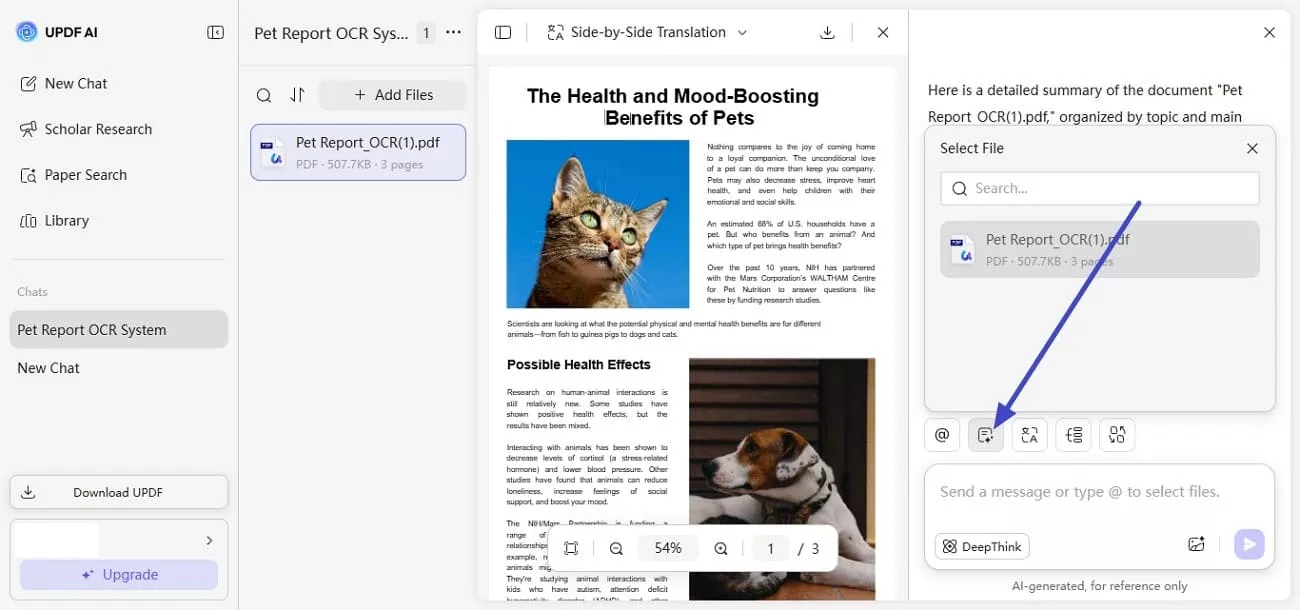
2. Reading
Users can ask questions directly to PDFs, making it easier to extract specific information. This interactive approach enhances comprehension and speeds up the reading process.
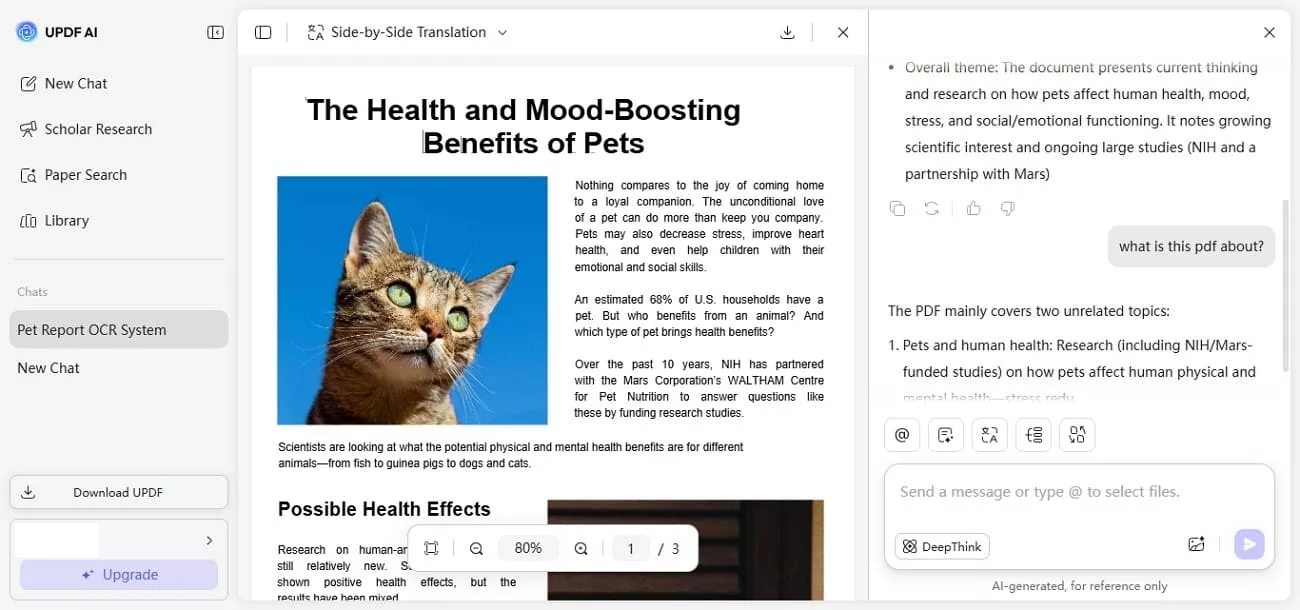
3. Evaluation
UPDF AI Online highlights methods, limitations, and key findings, helping assess the quality and reliability of each source using DeepThink feature. This ensures your research is grounded in credible evidence.

4. Synthesis
The tool provides structured summaries and visual aids like mind maps. This facilitates combining insights across multiple papers, helping to identify patterns and build a coherent narrative efficiently.

Part 5. Practical Workflow Example: Using UPDF AI Online for Literature Search
Use Case: Imagine you are a graduate student preparing a research paper on the health and mood boosting benefits of pets. You need to collect, organize, and summarize the latest studies efficiently.
Step 1. Gather and Upload
Collect all relevant research papers, articles, and reports on pets and their health. Then upload them directly into UPDF AI Online's PDF management system to centralize your sources in one workspace.

Alternatively, if you don't have relevant papers on your local device, you can use UPDF AI Online's Paper Search feature to find sources, add them directly to your library, and chat with them later.
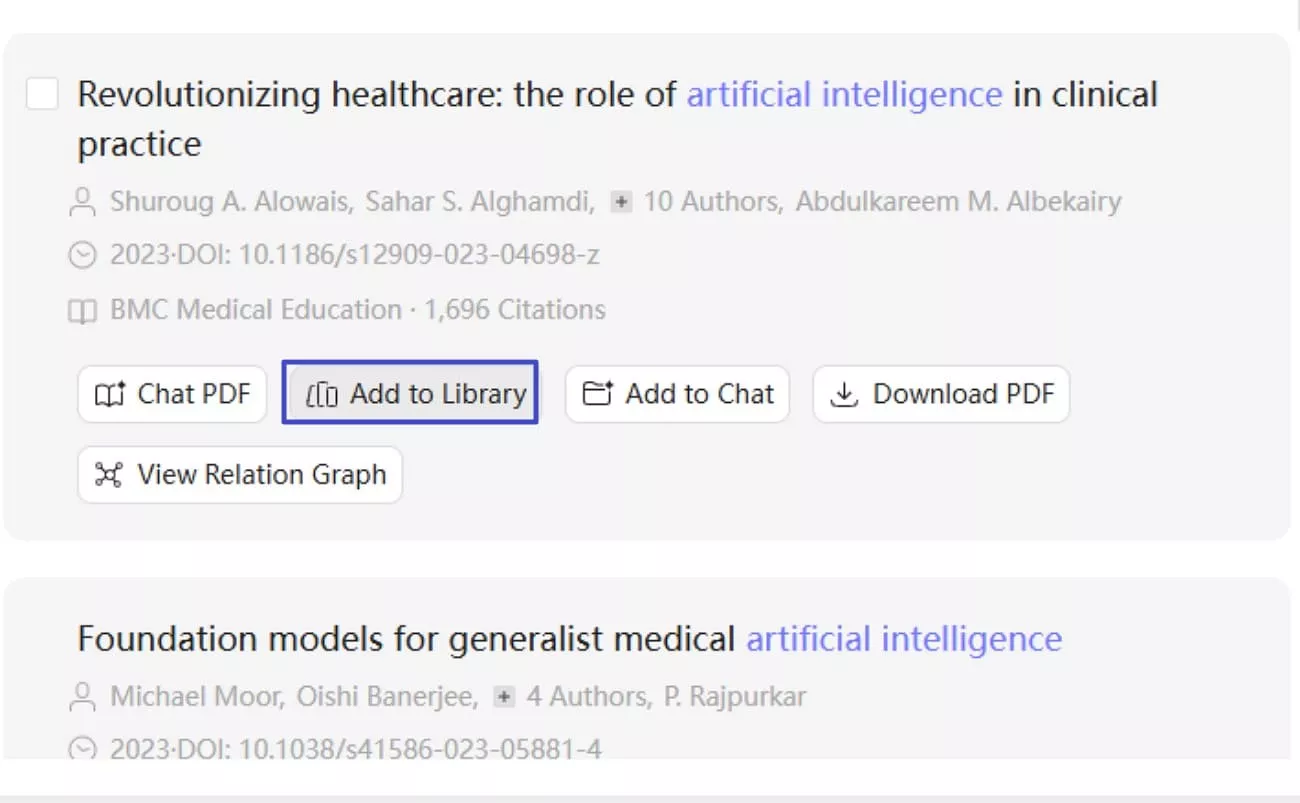
Step 2. Summarize Each Paper
Use UPDF AI Online's AI Summary feature to extract key points such as objectives, methodologies, results, and conclusions. This helps you quickly understand each study without reading the full documents.
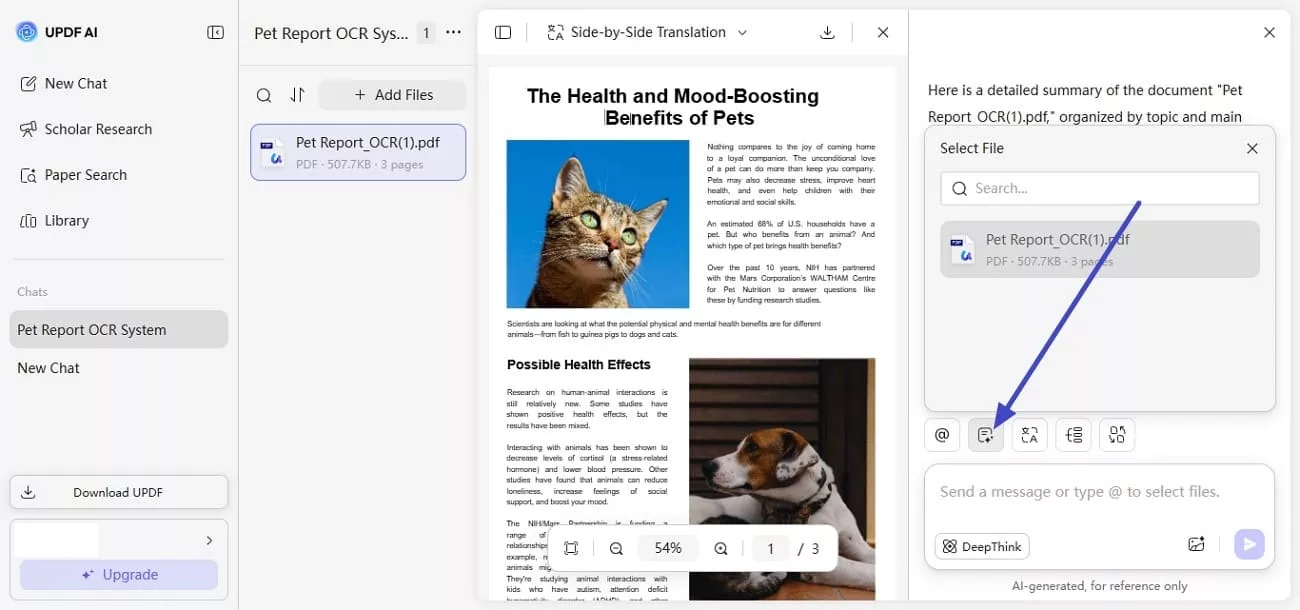
Step 3. Extract Keywords & Themes
Leverage UPDF AI Online for keyword extraction to highlight important terms like "stress," "anxiety," and "loneliness," making it easy to spot recurring themes and focus areas across multiple studies.

Step 4. Compare Findings Across Studies
Apply UPDF AI Online for insight and analysis to compare results, methodologies, and sample sizes across papers. This feature helps uncover patterns, contradictions, and gaps in existing research efficiently.
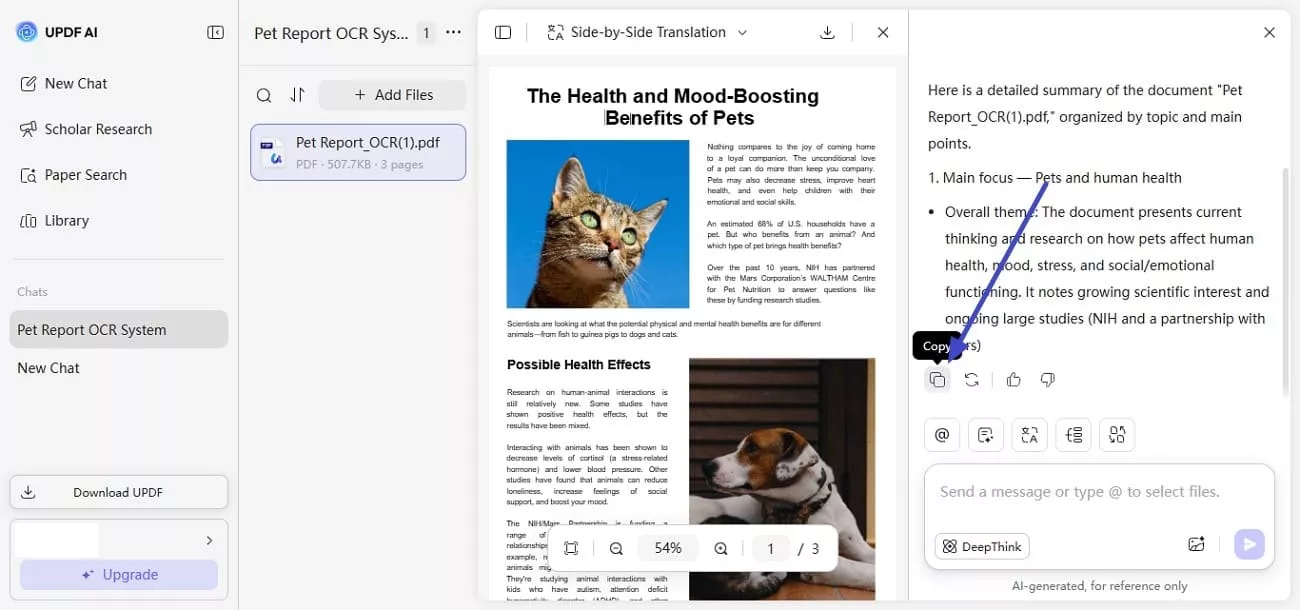
Step 5. Copy & Integrate into Your Research
Finally, copy your organized summaries via UPDF AI Online, making them ready to be seamlessly incorporated into your research paper.
Conclusion
To wrap it up, this article provided a detailed, step-by-step guide on how to conduct an efficient literature search strategy using UPDF AI Online. Using this workflow, researchers can save time and focus on analysis rather than manual searching. With its AI-powered features, UPDF AI Online simplifies the entire process, making the literature review more accurate. For anyone looking to streamline their research workflow, UPDF AI Online is an indispensable tool.









 Lizzy Lozano
 Delia Meyer
 Engelbert White