UPDF
UPDF
 UPDF for Windows
 UPDF for Mac
 UPDF for iPhone/iPad
 UPDF for Android
 Nomostar
 UPDF AI Online
 UPDF Sign
 IvyCraft
 Edit PDF
 Annotate PDF
 Create PDF
 PDF Form
 Edit links
 Convert PDF
 OCR
OCR PDF to Word
 PDF to Image
 PDF to Excel
 Organize PDF
 Merge PDF
 Split PDF
 Crop PDF
 Rotate PDF
 Protect PDF
 Sign PDF
 Redact PDF
 Sanitize PDF
 Remove Security
 Read PDF
 UPDF Cloud
 Compress PDF
 Print PDF
 Batch Process
 About UPDF AI
 UPDF AI Solutions
 AI User Guide
 FAQ about UPDF AI
 Summarize PDF
 Translate PDF
 Chat with PDF
 Chat with AI
 Chat with image
 PDF to Mind Map
 Explain PDF
 PDF AI Tools
 Image AI Tools
 AI Chat Tools
 AI Writing Tools
 AI Study Tools
 AI Working Tools
 Other AI Tools
 AI Bookmark Generation
 AI Bookmark Summary
 AI Watermark Generation
 AI Background Generation
 AI Sticker Generation
 AI Stamp Generation
 AI Editing Suite
 UPDF Copilot
 AI Page Management
 AI Semantic Search
 PDF to Word
 PDF to Excel
 PDF to PowerPoint
 Enterprise Solution
 Enterprise Sign
 Enterprise AI
 Enterprise Plan
 Enterprise User Guide
 Enterprise Webinar
 IT
IT Education
 Construction
 Financial Service
 Healthcare
 Insurance
 Legal
Legal Manufacturing
 Government
 Researchers & PhDs
 Solopreneurs & Freelancers
 Lawyers & Legal Professionals
 Real Estate Agents & Brokers
 Education Solution
 Customer Stories
 User Guide
 UPDF Tricks
 FAQs
FAQs UPDF Reviews
 Download Center
 Blog
Blog Newsroom
 Tech Spec
 Updates
 UPDF vs. Adobe Acrobat
 UPDF vs. Foxit
 UPDF vs. PDF Expert

Quick Answer
If you've ever been asked to sign a document online, you've probably encountered the terms "electronic signature" and "digital signature." Most people use them interchangeably — but they are not the same. Understanding the difference between electronic signatures and digital signatures matters for security, legal compliance, and choosing the right tool for your documents.
In this guide, you'll learn what is an electronic signature, what is a digital signature, how each one works, when to use which, and how to add both to a PDF. Whether you're asking "what is e signature" for the first time or comparing solutions for your business, this article covers everything you need.
Electronic and digital signatures are also a part of the innovation and play a vital role in authenticating and securing documents. But what are the features that make them apart? What are the key differences between them? If you also find these terms identical, then this article is for you. It also helps you to learn how to add an electronic signature and digital signature in PDF using UPDF. Download it and begin to sign your PDF now!
Windows • macOS • iOS • Android 100% secure
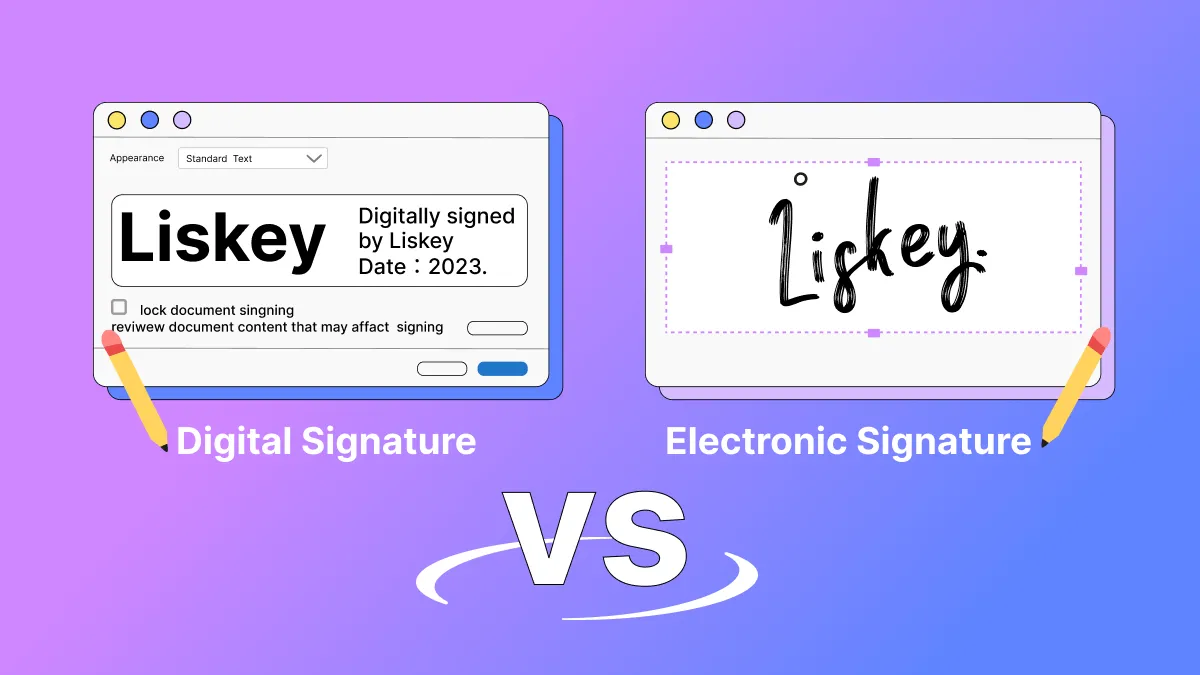
Part 1: What Is an Electronic Signature? What Is a Digital Signature? [Definition Guide]
1. What is an Electronic Signature?
If you're wondering what is an electronic signature, the answer is broader than you might expect. The US Federal ESIGN Act defines electronic signatures as:
"Electronic sound, symbol, or process, attached to or logically associated with a contract or other record and executed or adopted by a person with the intent to sign the record."
This means an electronic signature — also called an e-signature or e signature — is not always a picture of your handwritten name. It can be:
- A typed name at the end of an email or document
- A scanned image of your handwritten signature
- A unique symbol or mark drawn on a touchscreen
- Clicking an "I Agree" or "Accept" button
- A voice recording or verbal confirmation
The main purpose of electronic signatures is the same as wet signatures: to demonstrate a person's will to agree. The difference is that electronic signatures are applied to electronically transmitted forms, documents, contracts, or agreements.
What is e signature in practical terms? It is the digital equivalent of signing a paper document — a legal concept focused on capturing intent, not necessarily on technical security.
Best for
2. What is a Digital Signature?
A digital signature is a kind of electronic signature, but with a critical difference: it is designed to secure the document, not just record intent.
Digital signatures embed a cryptographic fingerprint into the document and encrypt it. If anyone tries to tamper with the file after signing, the digital signature becomes invalid. This makes digital signatures far more secure than basic electronic signatures.
A digital signature uses a certificate-based Digital ID to identify the person signing a document. It relies on Public Key Infrastructure (PKI) and cryptographic algorithms to:
- Ensure the authenticity of the document and its source
- Authenticate the signer's personal identity
- Assure the document's information has not been changed
Warning

Bonus Tip
Part 2: How Do Electronic Signatures and Digital Signatures Work?
1. How Does an Electronic Signature Work?
lectronic signatures work on the same principle as wet signatures, but through electronic means. The process generally follows these steps:
- You receive a document and verify your identity (name, email, ID number, or multi-factor authentication).
- You apply your signature using a stylus, finger on a touchscreen, typed name, or uploaded image.
- The system binds the signature to your identity and timestamps the action.
- The signed document is returned with a record of who signed and when.
Two components are essential for electronic signatures to be valid:
- The signer's consent to sign
- Confirmation that the documents or records are correct
Verification technologies are used to ensure signatures are authentic and secure. For higher-risk transactions, electronic signatures can also use multi-factor authentication.
Tip
2. How Does a Digital Signature Work?
Digital signatures work using a private and public key authentication framework. Their core job is to prove that a document has not changed since it was signed.
Here is how the process works step by step:
- A mathematical algorithm creates a unique hash (digital fingerprint) of the document.
- The hash is encrypted using the sender's private key.
- The encrypted hash, along with signer information, is bundled into a digital certificate issued by a trusted Certificate Authority (CA).
- The recipient decrypts the hash using the sender's public key and compares it to a newly calculated hash of the received document.
- If the hashes match, the signature is valid. If not, the document was tampered with.
For example, if Brad signs an agreement to sell his services as a writer to a content agency, he signs with his private key. When the agency receives it, they decrypt the document using Brad's public key. If the key does not match, the signature is invalid — meaning either the document was altered or the signature is forged.
PKI requires that keys are stored securely. Safe digital signing requires providers to meet PKI standards and use a reliable Certificate Authority.
Pro Tip
Part 3: When to Use an Electronic Signature vs. a Digital Signature
When to Use an Electronic Signature?
Electronic signatures have replaced handwritten signatures in most day-to-day business operations. If you are asking "what is electronic signature used for," here are the most common applications:
- Sales contracts and client agreements
- HR and employee onboarding documents
- Loan applications and financial contracts
- Non-disclosure agreements (NDAs)
- Internal approvals and purchase orders
- Any contract or agreement that requires a person's consent
Electronic signatures are ideal when speed and convenience matter more than cryptographic security.
Best for
When to Use a Digital Signature?
Use a digital signature when document security, identity verification, and tamper-proofing are critical. Common scenarios include:
- Sending or receiving secure emails that are digitally signed
- Making high-value or regulated online transactions
- Identifying people involved in secure financial or government processes
- Filing income tax returns or other official e-filings
- Digitally signing and authenticating Word or Excel documents
- Healthcare records, legal filings, and government contracts
Warning
Part 4: How to Add Electronic and Digital Signatures to a PDF
If your goal is to sign PDF documents, the right tool depends on whether you need an electronic signature or a digital signature. UPDF supports both methods.
How to Add an Electronic Signature in PDF
UPDF allows you to add electronic signatures by drawing, typing, or uploading an image. You can also change the color of your e-signatures for better visibility.
You can add e-signs to your documents by following the steps:
- Step 1: Download UPDF from the button below. Open UPDF and on its main interface, click on the "Open File" button. Browse the PDF file from your computer in which you want to add an e-signature. Upload it in the tool.
Windows • macOS • iOS • Android 100% secure
- Step 2: After the PDF file has been uploaded in UPDF, click on the "Comment" option in "Tools". It will open a list of different annotating options. From that list, click on the "Signature" icon and select "Create" to add an e-sign.
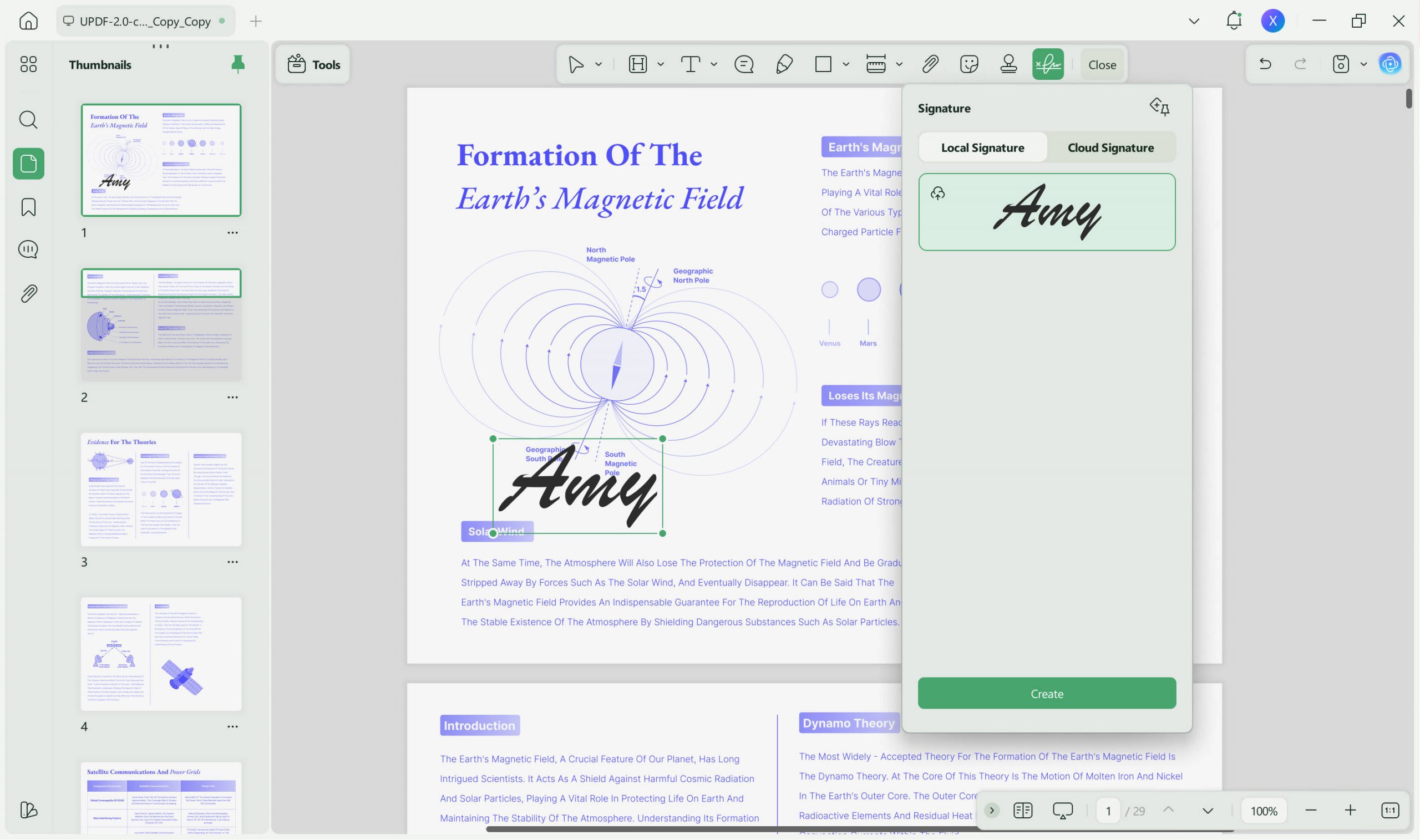
- Step 3: After that, you can create your signature according to your choice. Sign PDF with this tool. You can either choose to type with a keyboard or draw with a mouse or trackpad. Moreover, you can also select an image to use as a signature.
- Step 4: Once you have selected your desired option. You can create an electronic signature and then apply it to add it to the document. You can also choose to save the created signature to cloud in order to re-use it on other devices such as Mac/Windows computers, iPhone/iPad, and Android.
Tip: Save your most-used signature to UPDF Cloud so you can sign documents on any device without recreating it each time.
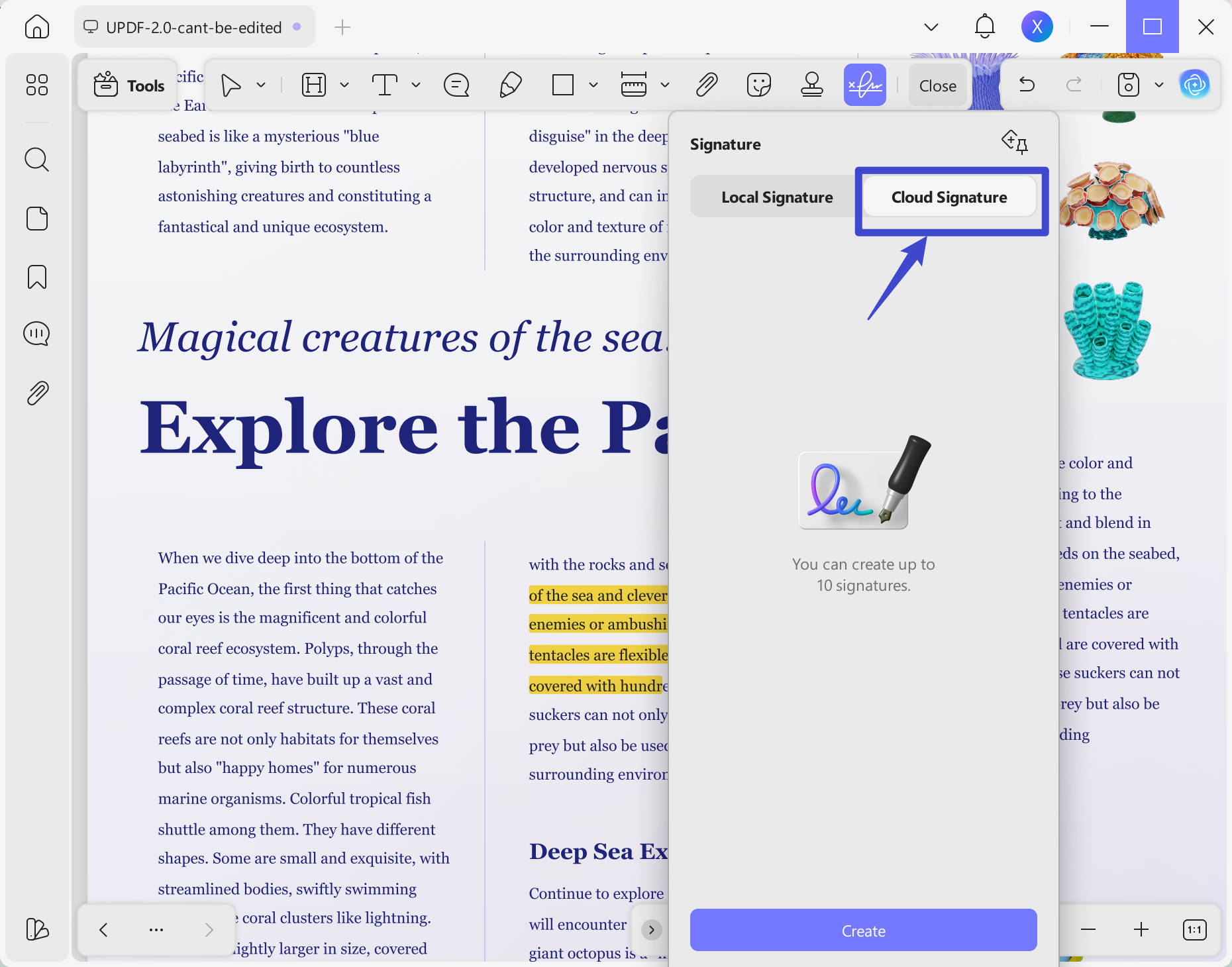
This is how UPDF allows you to add electronic signatures in a PDF. You can benefit from its amazing features.
Windows • macOS • iOS • Android 100% secure
How to Add a Digital Signature in PDF?
There are many solutions available to add a digital signature to a PDF file. However, UPDF is among the best digital signature service providers. It supports digital signatures by simply placing a field for them on the form.
You can add a digital signature in PDF using UPDF by following the below steps:
Step 1: Launch UPDF and open the PDF you want to sign digitally. Once opened, enter the "Form" section in "Tools" from the left panel.
Step 2: Click the "Digital Signature" on the top toolbar and click anywhere in the document to add a field. You can customize this field however you want, tweaking its size and other parameters.
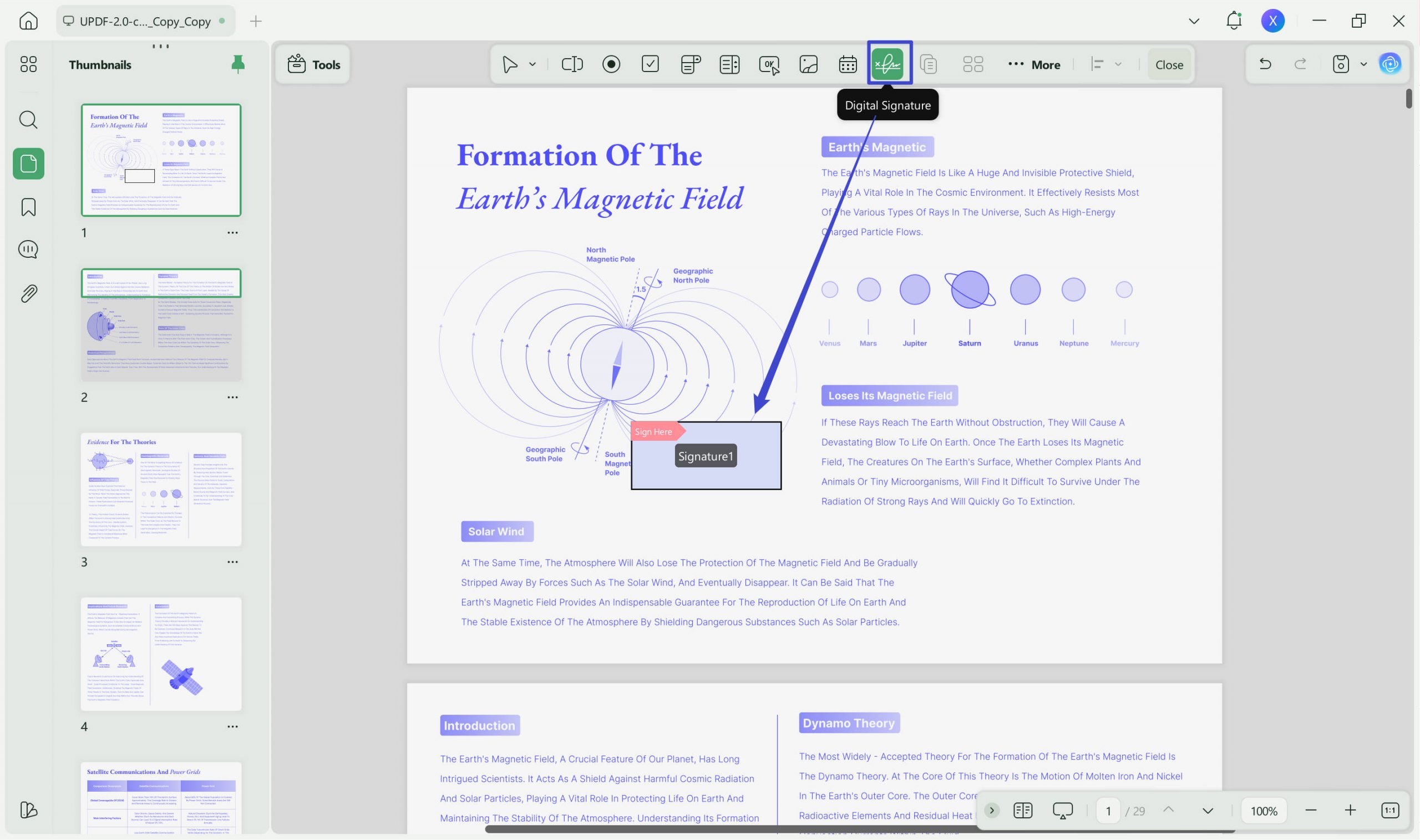
Step 3: Enter the "Preview" mode by hitting the icon in the top right corner. Here, you can add your digital signature by double-clicking the added field.
Step 4: In the Sign window, you can import a digital ID from your local storage by clicking the Import icon. Remember that you will need to enter a password to validate your identity. Alternatively, you can create a new ID by clicking the Create icon and adding the required personal information. You can save your newly created ID for future use.
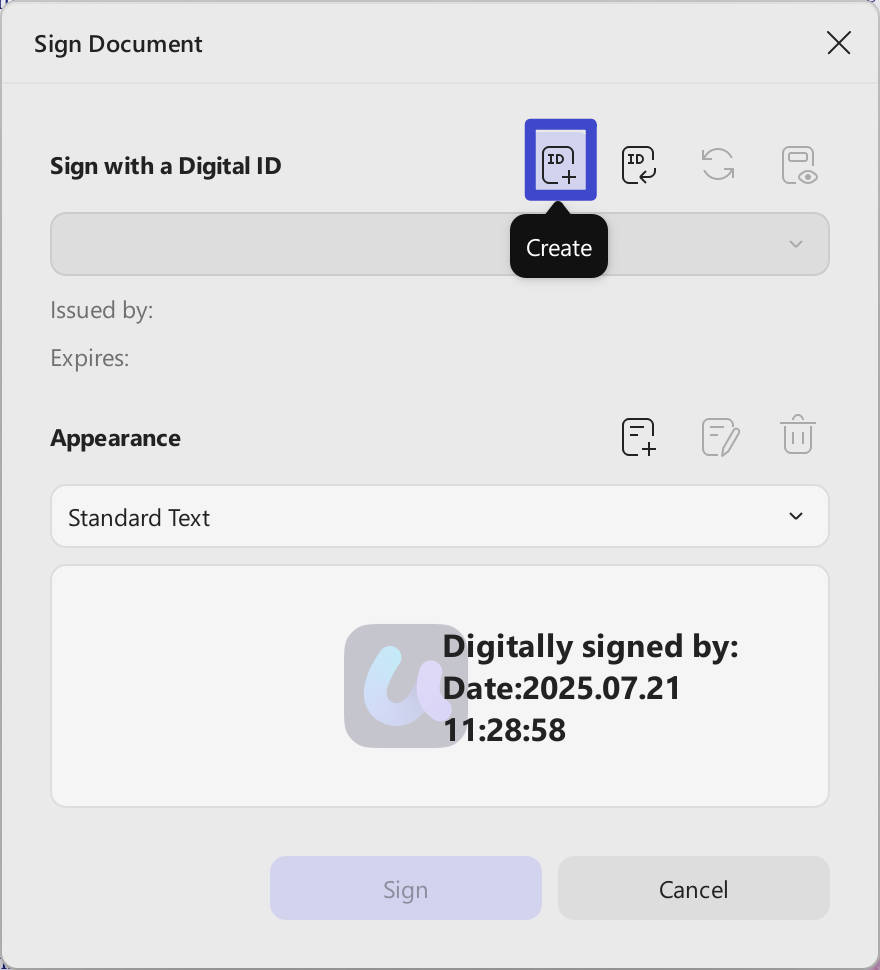
Step 5: Once done, hit the "Sign" button to add your imported or created digital signature to the opened PDF file.
Best for
Once you have signed, you can preview the signature to authenticate it and after that send the signed document to the authorities. And as we've mentioned above, you can also use UPDF Sign to sign your documents digitally. It is a Docusign alternative that enables users to send, sign, and track PDFs.
Advantages of UPDF:
- It has a unique and delightful user interface.
- Effortless PDF annotating tools like highlight, squiggly, underline, text comment, text box, text callout, sticky note, sticker, stamp, etc.
- Three different ways to add electronic signatures.
- Compatible with Windows, Mac, Android, and iOS.
- It can not only add and create electronic signatures to PDF, but also can edit PDF text, images, and links.
- This blazing-fast PDF organizer can help you organize large-sized PDF documents and eBooks in no time. It allows you to insert, delete, rotate, extract, and split the pages.
- The OCR feature of this tool is quite powerful and converts scanned documents into editable and searchable ones without damaging the file's content. It supports 38 OCR languages and 3 layers for making any file type editable.
Recently, UPDF released its AI features, and it is easy for you to summarize a 100-page PDF in minutes, translate it into any language, explain terms, and even make you ask any questions about your PDF document. Download it now and you can get 30 free questions!
Windows • macOS • iOS • Android 100% secure
Part 5: Digital Signature VS. Electronic Signature - Key Differences
While digital signatures and electronic signatures might seem identical to many people, there are significant key differences between both of them. Let's have a look at these key differences.
| Feature | Digital Signature | Electronic Signature |
|---|---|---|
| Primary Purpose | Secure the document against tampering | Verify the signer's intent to agree |
| Technology | PKI, cryptographic hash, digital certificate | Typed name, image, symbol, click-to-sign |
| Identity Verification | Verified by a trusted Certificate Authority (CA) | Usually verified by email, ID, or vendor |
| Tamper Evidence | Cryptographic — any change invalidates the signature | Limited or none for basic e-signatures |
| Legal Defensibility | Strongest; provides non-repudiation | Legally binding under ESIGN/eIDAS, but weaker in disputes |
| Types | Adobe PDF, Microsoft digital signatures | Basic, click-to-sign, advanced, qualified |
| Authorization | Authorized by certification authorities | Authorized by participating parties or vendors |
| Audit Trail | Built-in cryptographic audit log | May include IP/timestamp logs depending on provider |
Some Other Key Differences
- Electronic signatures come in multiple types. Under the EU eIDAS regulation, there are three levels:
- Simple Electronic Signature (SES): Basic data like a checkbox or email signature. Good for low-risk use.
- Advanced Electronic Signature (AES): Uniquely linked to the signer and capable of identifying them.
- Qualified Electronic Signature (QES): The highest standard. Created with a qualified device and based on a qualified certificate. Equivalent to a handwritten signature in the EU.
- Digital signatures are authorized by government or non-government certification authorities. Electronic signatures are authorized by the parties involved or specific vendors.
- The main goal of a digital signature is to encrypt and secure a document. The main goal of an electronic signature is to verify intent.
- Digital signatures include cryptographic audit logs that prove whether changes were made. Electronic signatures rely on provider-generated logs, which vary in reliability.
- Digital signatures are more reliable and harder to tamper with. Electronic signatures are easier to use but more susceptible to forgery if they lack multi-factor authentication.
Warning
These were some key differences between digital signatures and electronic signatures. There are also other major differences between them. Now you know how digital signatures are different from electronic signatures and how you can use them in your documents. If you want to secure documents, you can use digital signatures. On the contrary, electronic signatures can be used for verification purposes only.
FAQ
Are digital signatures more secure than electronic signatures?
Yes. Digital signatures use PKI encryption and certificate-based verification to authenticate signers and detect tampering. Basic electronic signatures (like typed names) do not have built-in tamper protection and are easier to forge.
Are both electronic signatures and digital signatures legally binding?
Yes, both can be legally binding. In the US, the ESIGN Act and UETA recognize electronic signatures. In the EU, eIDAS provides a legal framework. However, digital signatures offer stronger evidence in court because they provide cryptographic proof of identity and document integrity.
When should I use a digital signature instead of an electronic signature?
Use a digital signature for high-value contracts, regulated documents (financial, healthcare, legal), government filings, or any situation where document authenticity might be challenged. Use an electronic signature for everyday agreements, internal approvals, and low-risk transactions.
Can electronic signatures be forged?
Basic electronic signatures — such as typed names or pasted images — can be relatively easy to forge because they lack cryptographic binding. Digital signatures are extremely difficult to forge due to their use of private keys and Certificate Authority verification.
Is a digital signature the same as an electronic signature?
No, but every digital signature is a type of electronic signature. The reverse is not true: not every electronic signature uses the encryption and certificate infrastructure that defines a digital signature.
What is an electronic signature in simple terms?
An electronic signature is any electronic mark — a typed name, drawn symbol, or click — that shows you agree to a document. It is the digital version of signing your name on paper.
What is a digital signature in simple terms?
A digital signature is a secure, encrypted electronic signature that proves who you are and guarantees the document has not been altered after you signed it.
Do I need special software to create a digital signature?
Yes. Creating a digital signature requires a Digital ID (digital certificate) issued by a Certificate Authority. Tools like UPDF, Adobe Acrobat, and dedicated PKI providers support this process. Electronic signatures can often be created with any basic PDF editor or e-signature app.
Conclusion
With a clear overview of what is an electronic signature, what is a digital signature, and the key differences between them, you can now choose the right one for your needs.
Electronic signatures offer speed and convenience for everyday business transactions. Digital signatures provide the cryptographic security and legal defensibility required for sensitive, high-stakes, or regulated documents.
If you need a single tool that handles both — from quick electronic signatures to certificate-based digital signatures — UPDF gives you both in one platform across Windows, Mac, iOS, and Android.
Windows • macOS • iOS • Android 100% secure








 Engelbert White

 Enya Moore
 Enid Brown