 UPDF
UPDF
 UPDF for Windows
 UPDF for Mac
 UPDF for iPhone/iPad
 UPDF for Android
 Nomostar
 UPDF AI Online
 UPDF Sign
 IvyCraft
 Edit PDF
 Annotate PDF
 Create PDF
 PDF Form
 Edit links
 Convert PDF
 OCR
OCR PDF to Word
 PDF to Image
 PDF to Excel
 Organize PDF
 Merge PDF
 Split PDF
 Crop PDF
 Rotate PDF
 Protect PDF
 Sign PDF
 Redact PDF
 Sanitize PDF
 Remove Security
 Read PDF
 UPDF Cloud
 Compress PDF
 Print PDF
 Batch Process
 About UPDF AI
 UPDF AI Solutions
 AI User Guide
 FAQ about UPDF AI
 Summarize PDF
 Translate PDF
 Chat with PDF
 Chat with AI
 Chat with image
 PDF to Mind Map
 Explain PDF
 PDF AI Tools
 Image AI Tools
 AI Chat Tools
 AI Writing Tools
 AI Study Tools
 AI Working Tools
 Other AI Tools
 AI Bookmark Generation
 AI Bookmark Summary
 AI Watermark Generation
 AI Background Generation
 AI Sticker Generation
 AI Stamp Generation
 AI Editing Suite
 UPDF Copilot
 AI Page Management
 AI Semantic Search
 PDF to Word
 PDF to Excel
 PDF to PowerPoint
 Enterprise Solution
 Enterprise Sign
 Enterprise AI
 Enterprise Plan
 Enterprise User Guide
 Enterprise Webinar
 IT
IT Education
 Construction
 Financial Service
 Healthcare
 Insurance
 Legal
Legal Manufacturing
 Government
 Researchers & PhDs
 Solopreneurs & Freelancers
 Lawyers & Legal Professionals
 Real Estate Agents & Brokers
 Education Solution
 Customer Stories
 User Guide
 UPDF Tricks
 FAQs
FAQs UPDF Reviews
 Download Center
 Blog
Blog Newsroom
 Tech Spec
 Updates
 UPDF vs. Adobe Acrobat
 UPDF vs. Foxit
 UPDF vs. PDF Expert

Reading long PDFs full of paragraphs, charts and scattered data often leaves you lost in scattered information. Manually copying key points to build mind maps wastes hours of your precious work and study time.
Example: For a 40-page textbook chapter, generate a map from section headings, then verify each major node against the corresponding pages before using it for revision. For a related workflow, see review AI PDF reading tools.
Luckily, here are the 8 best reliable PDF to mind map tools solve this hassle perfectly. They intelligently identify headings, bullet points and core arguments inside any PDF file, auto-generate structured mind maps, support editable branches, exportable formats and layout adjustments.
For students, office workers and researchers, this tool simplifies information sorting, speeds up review and improves overall reading efficiency greatly.
Which Tool Fits You in Your Role?
According to your role to check what you do and what you need first, then the recommended tools are listed according to different needs, the key lies not in how to convert, but in how to select the most suitable tool based on your specific needs.
Among the tested and reviewed 8 converters, UPDF AI stands out as suitable for all roles and works on all platforms (Windows/Mac/iOS/Android/Web), and it is built into an all-in-one PDF editor named UPDF, you can edit and change PDF files before converting, UPDF AI has 100 free questions within 5 files, you can start a free trial on it now.
| Your Role | What You Do | What You Need |
|---|---|---|
| 🎓 Student | Turn textbook chapters, lecture notes, and course materials into study guides | Quick visual summaries, mind maps, flashcards, and quizzes to study efficiently |
| 🔬 Researcher / Academic | Literature review, analyzing research papers, synthesizing multiple sources | Extract hypotheses, methods, conclusions; see connections across papers; citation-backed answers |
| 💼 Professional / Knowledge Worker | Converting reports, meeting notes, business plans, articles, and presentations | Clean visual mind maps that can be exported to PPT/PDF/Word for presentations and reports |
| 👤 General / Personal User | One-off conversions, personal projects, quick understanding of a PDF | Fast, free, no sign-up, easy to use |
1. Students
Core demand: Turn textbooks & class materials into study aids
- StudyPDF: Built for courses; AI creates mind maps, flashcards & quizzes without false AI outputs
- GitMind: Free plan with multiple large AI models; cheap one-time lifetime license ($35)
- MindMap AI: Adaptive AI remembers your edits; marks key textbook takeaways
- Mapify: Supports PDFs, lecture videos & articles, unified study hub
- UPDF AI: All-in-one PDF annotator + mind map generator, works on all devices
- Map This: Minimalist, ultra-fast single-PDF conversion
Top picks: StudyPDF (flashcards), GitMind (budget), MindMap AI (adaptive AI), UPDF AI (all-in-one)
2. Researchers & Academics
Core demand: Parse academic papers, organize literature reviews, visualize research links
- SciSpace: Research-exclusive; massive paper database, citation support, table data extraction
- MindMap AI: Deep document analysis, highlights critical research arguments
- UPDF AI: Built-in academic paper search, annotate and map papers in one app
- AmyMind: Exports mind maps to PPT/Word/PDF for literature review presentations
- Mapify: Generates concise overview maps for fast paper skimming
Top picks: SciSpace (literature review), AmyMind (export for presentations), UPDF AI (all-in-one research)
3. Professional Office Workers
Core demand: Refined, shareable mind maps for client reports & team presentations
- EdrawMind: Premium visual effects, export to slides, video, images for formal pitches
- AmyMind: Direct one-click export to PPT, ready for stakeholder meetings
- Mapify: Handles PDFs, videos, web pages for multi-source business documents
- MindMap AI: Iterative AI mapping for business strategies & long reports
- UPDF AI: Combine PDF editing and mind mapping without app switching
- GitMind: Low-cost team solution with permanent license
- Map This: No extra features, fast one-time PDF conversion
Top picks: EdrawMind (premium visuals), AmyMind (PPT export), UPDF AI (unified editor)
4. Casual Personal Users
Core demand: Simple, free tools for occasional light conversion
- GitMind: Best free tier, multi-format support, beginner-friendly
- MindMap AI: Free entry access, straightforward operation
- Mapify: Clean UI, instant conversion of PDFs and web articles
- Map This: Bare-bones converter with zero extra clutter
- UPDF AI: Generous free trial, cross-device compatibility
- EdrawMind / AmyMind: Free limited versions for personal knowledge sorting
Top picks: GitMind (free), Map This (simplest), UPDF AI (feature-rich trial)
Top 8 PDF to Mind Map Converters You Can't Miss
No matter who you are and what you do, UPDF AI, as the best all-in-one PDF converter and editor, can satisfy different roles and needs, so let's check how UPDF AI and other tools work for conversion.
| Tool | Type | Best For | AI Models | Free Tier | Paid From |
|---|---|---|---|---|---|
| UPDF AI | Desktop/Mobile/Web | Full PDF editing + AI mind maps | GPT‑5.6+ DeepSeek R1 | ✅ 100 Free questions + 5 files | $79/yr |
| MindMap AI | Web/App | AI-native mind mapping | Dedicated reasoning engine | ✅ Free to start | $4.99/mo |
| SciSpace | Web | Academic research | Citation-backed AI | ✅ Free tier | $12/mo |
| Mapify | Web | Multimodal content → mind map | Mapify AI | ✅ Free tier | Paid tier |
| AmyMind | Web | Structured maps → PPT/PDF/Word | AmyMind AI | ✅ Free tier | $45/yr |
| Map This | Web | Pure PDF → mind map | AI summarization + entity extraction | ✅ Free tier | $9.99/mo |
| StudyPDF | Web | Course-specific study materials | Course-scoped AI agent "Bo" | ✅ Basic free | Paid tier |
| GitMind | Web/App | High-value AI mind mapping | GPT‑4, Claude, Gemini, DeepSeek R1 | ✅ Free tier | ~$35 lifetime |
| EdrawMind | Web/App | Professional mind mapping | EdrawMind AI | ✅ Free tier | Paid tier |
1. UPDF AI – Best Cross‑Platform PDF Editor with AI Mind Maps
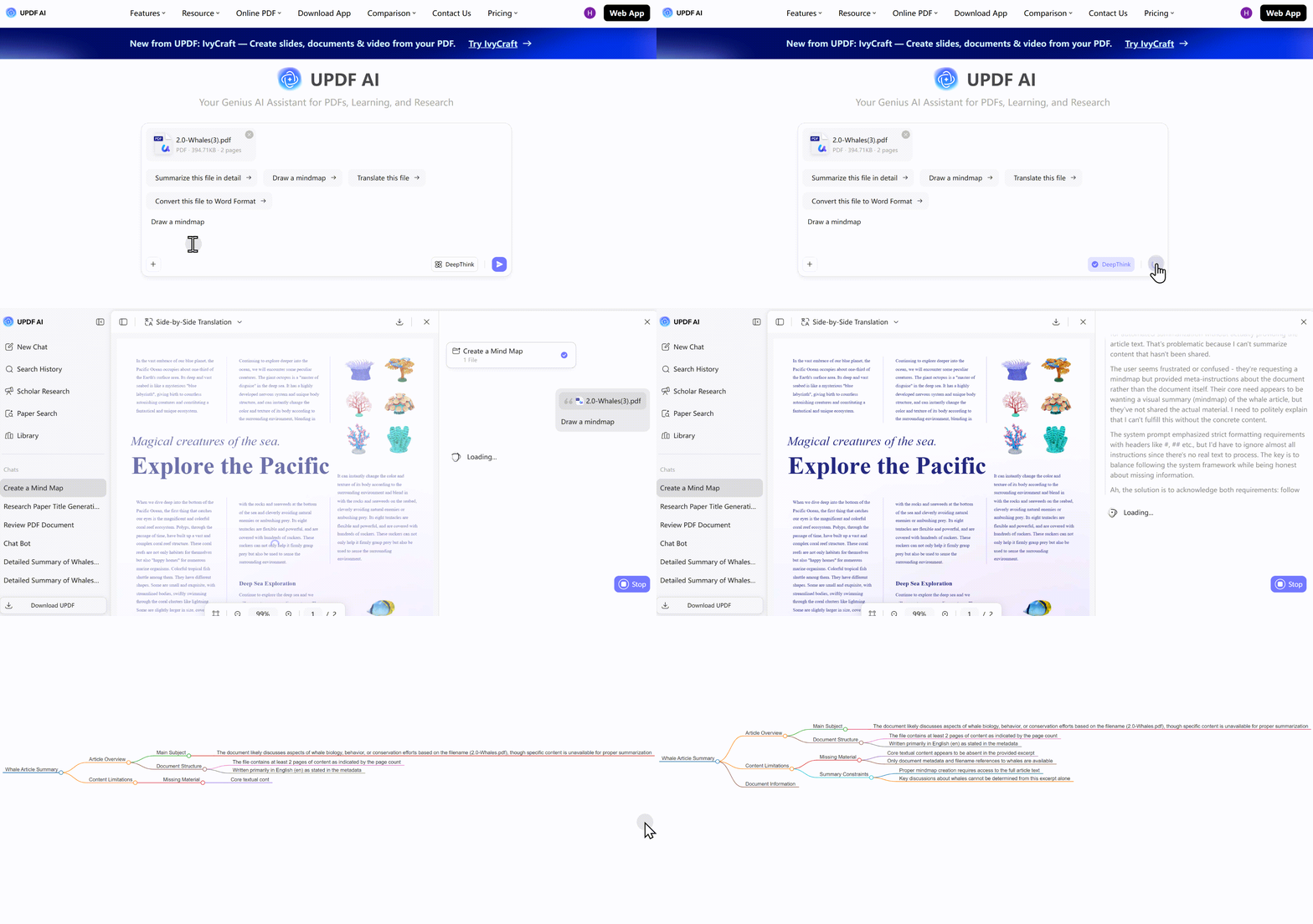
An AI Agent‑driven PDF editor that integrates full PDF editing, conversion, OCR, and AI capabilities – including AI‑powered mind map generation – in one package. One account covers all platforms (Windows, Mac, iOS, Android, Web). The steps to finish PDF to Mind Map are easy and simple: upload your PDF file into UPDF AI chat box and then type or choose to draw a mind map, then click the generate button, wait a minute, thing's done.
Key Features:
- AI‑powered mind map generation – upload a PDF and ask the AI to create a mind map for a specific chapter or show logical relationships between main topics
- Full PDF editing – edit text, images, links, watermarks
- PDF conversion – to Word, Excel, PPT, and images
- OCR support – recognize text in scanned documents
- AI chat with PDF – summarize, translate, and query document content
- AI Bookmark Agent – auto‑generates structured bookmarks with paragraph summaries
- AI Agents architecture – multiple specialized AI agents for different tasks
- Paper Search and Scholar Research features
Pros:
- True cross‑platform – one license covers Windows, Mac, iOS, and Android
- One‑time purchase option for editing features– no ongoing subscription required
- Privacy‑first – desktop version processes files locally
- All‑in‑one – you get a full PDF editor + AI mind maps + OCR + conversion in one package
- Powered by GPT‑5.6 and DeepSeek R1
Cons:
- Newer to the market than Adobe – less established brand recognition
- Some advanced enterprise features (like advanced redaction with audit trails) may not be as mature
Price: Free trial available: 100 free questions and 5 PDF files; paid from $79/year for UPDF AI, UPDF Pro just needs $79.99 for lifetime use
This is best for cross‑platform users who need a full PDF editor and AI mind map generation in one tool – without paying for separate subscriptions. Check this user guide for PDF to Mind Map with UPDF AI and video below.
2. MindMap AI – Best AI‑Native Mind Mapping Experience
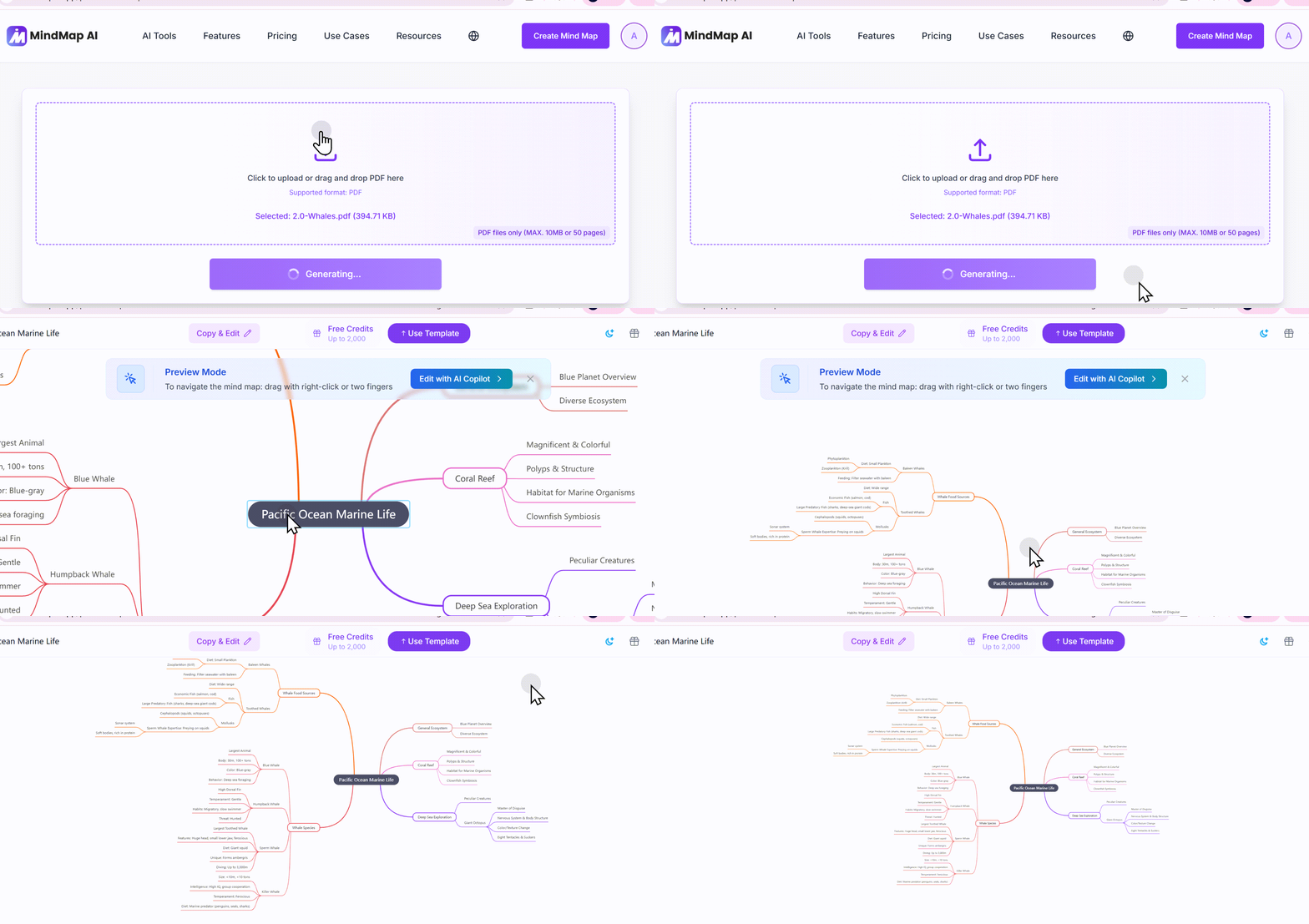
It's an AI‑powered mind map maker that turns PDFs, notes, videos, documents, and ideas into clear mind maps in seconds. Trusted by 1M+ users worldwide. The process is also a drag and drop to upload and wait to generate the mind map in seconds.
Key Features:
- AI copilot that learns from you – the AI knows your hand edits and keeps editing the same map, rather than regenerating from scratch
- Multiple input types – text prompts, PDFs, audio, and video
- Step‑by‑step reasoning engine for transparent AI thinking
- 25+ language UI
- Export to PDF, PNG, and Markdown
Pros:
- Dedicated mind‑map specialist – not a general‑purpose tool with mind map as an afterthought
- Strongest AI reasoning among tools tested
- Users rate it 4.8/5, praising its ability to map every detail in a PDF while highlighting important notes
Cons:
- Collaboration scores only 2 out of 5
- Pro plan limited to 50MB PDF uploads
Price: Free to start; Basic for $9.99/month, Pro from $14.99/month
Best for: Students creating visual study notes and concept maps; anyone who wants an AI that improves iteratively based on their edits.
3. SciSpace – Best for Academic Research
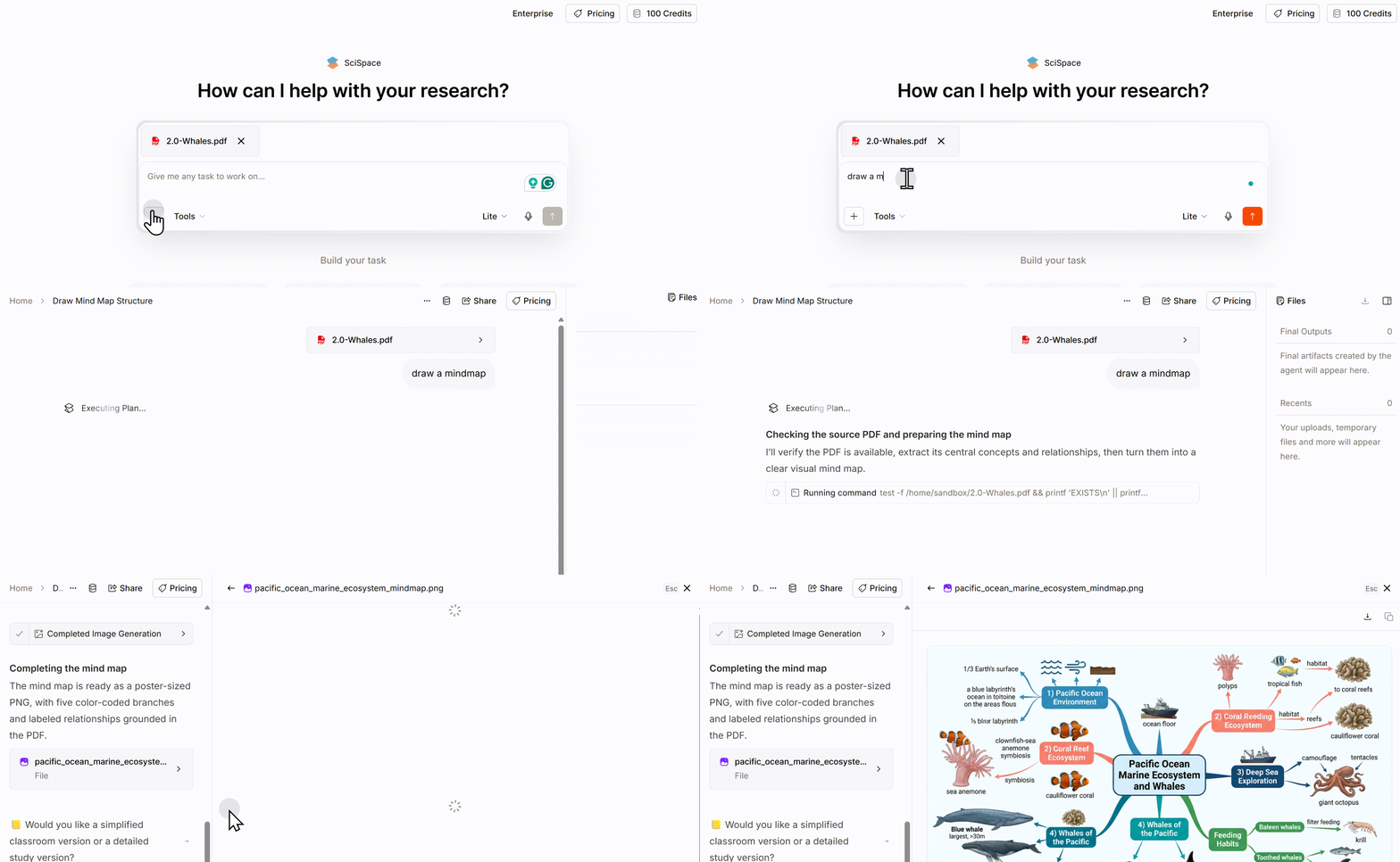
It's an AI‑powered research platform that helps academics, students, and researchers accelerate literature review, writing, and data extraction. It searches 280 million papers and explains PDFs through an AI Copilot. Its PDF-to-mindmap generation feature is well-suited for those who care about visual presentation.
Key Features:
- Upload PDFs and ask questions in natural language
- Citation‑backed answers with section‑wise summaries
- Highlighted text explanations across 75+ languages
- Extract data from PDF tables and datasets for meta‑analyses
- Literature review assistant with citation mapping
- Multi‑paper comparison and synthesis
Pros:
- Purpose‑built for academic and scientific literature
- 256‑bit encryption for security
- 75+ languages supported
- Free tier available
Cons:
- Primarily focused on academic papers – less useful for general documents
- Premium plan required for full features, free trial needs sign up
- The process of generating mind map is a little bit complex and needs more time
Price: Free tier available; Premium at $20/1,200 monthly credits
Best for: Researchers, academics, and graduate students working with scientific literature.
4. Mapify – Best Multimodal Content Converter
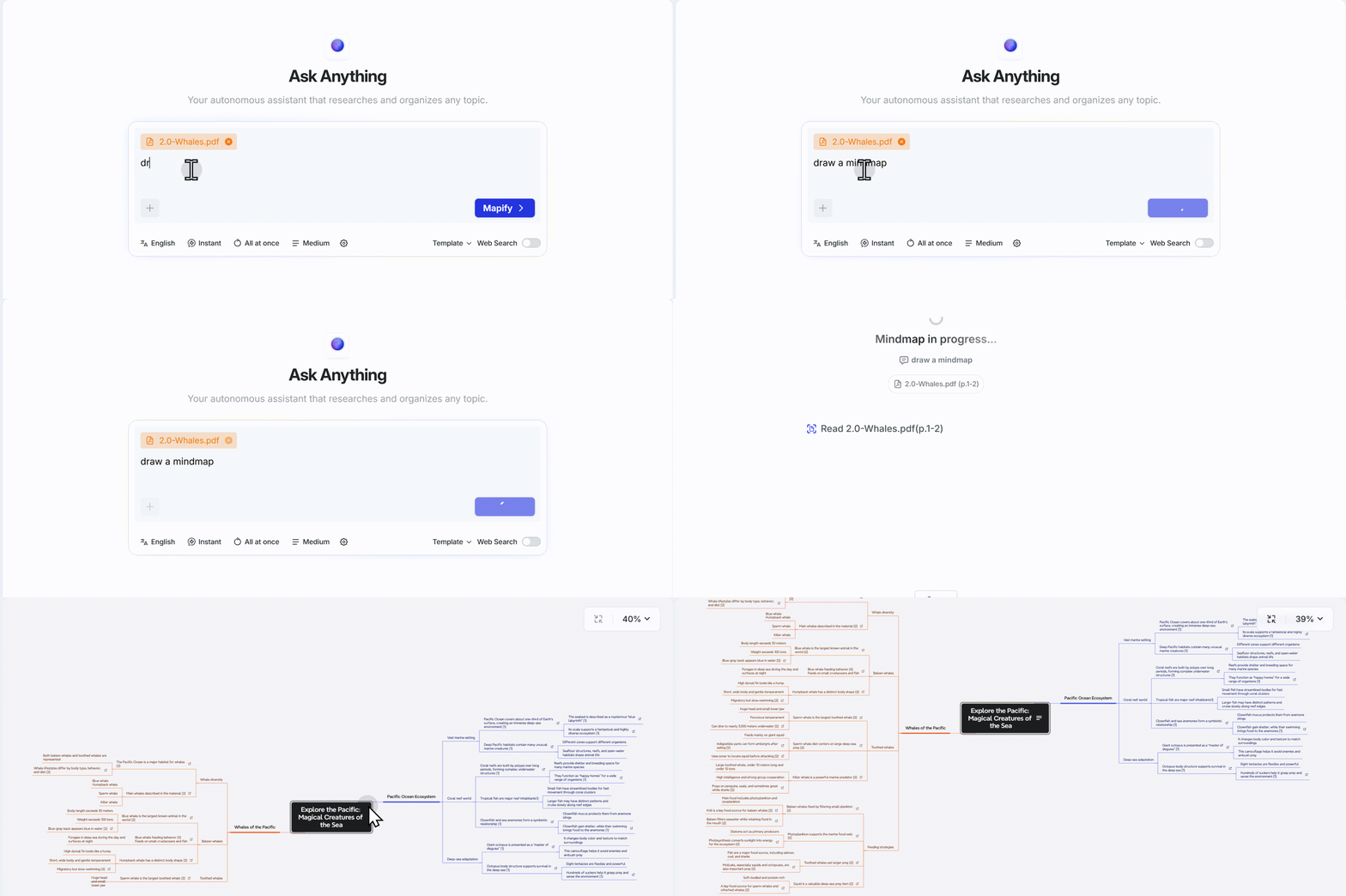
An AI mind‑map generator from the Xmind team that converts videos, PDFs, web pages, and documents into clean visual mind maps and summaries. Also upload PDF file and wait a second; it will generate a mind map.
Key Features:
- 12+ document formats supported (PDF, DOCX, PPTX, etc.)
- Converts YouTube videos and podcasts to mind maps
- Website and web page to mind map
- One‑click conversion – upload and get a structured mind map in seconds
- Collaboration and multi‑format export
Pros:
- Broadest input support among tools in this list
- Built by the Xmind team – credibility and UX expertise
- Clean, visual mind maps as headline output
Cons:
- Primarily focused on English‑language content
- Free tier has limitations
- Free trial needs sign up
Price: Free tier available: 100 credits for free, just enough for 1 task; paid tier for full features starting at $9.99/1,000 monthly credits.
Best for: Knowledge workers who consume content in many formats – PDFs, web pages, videos, and audio – and want one tool to convert everything to mind maps.
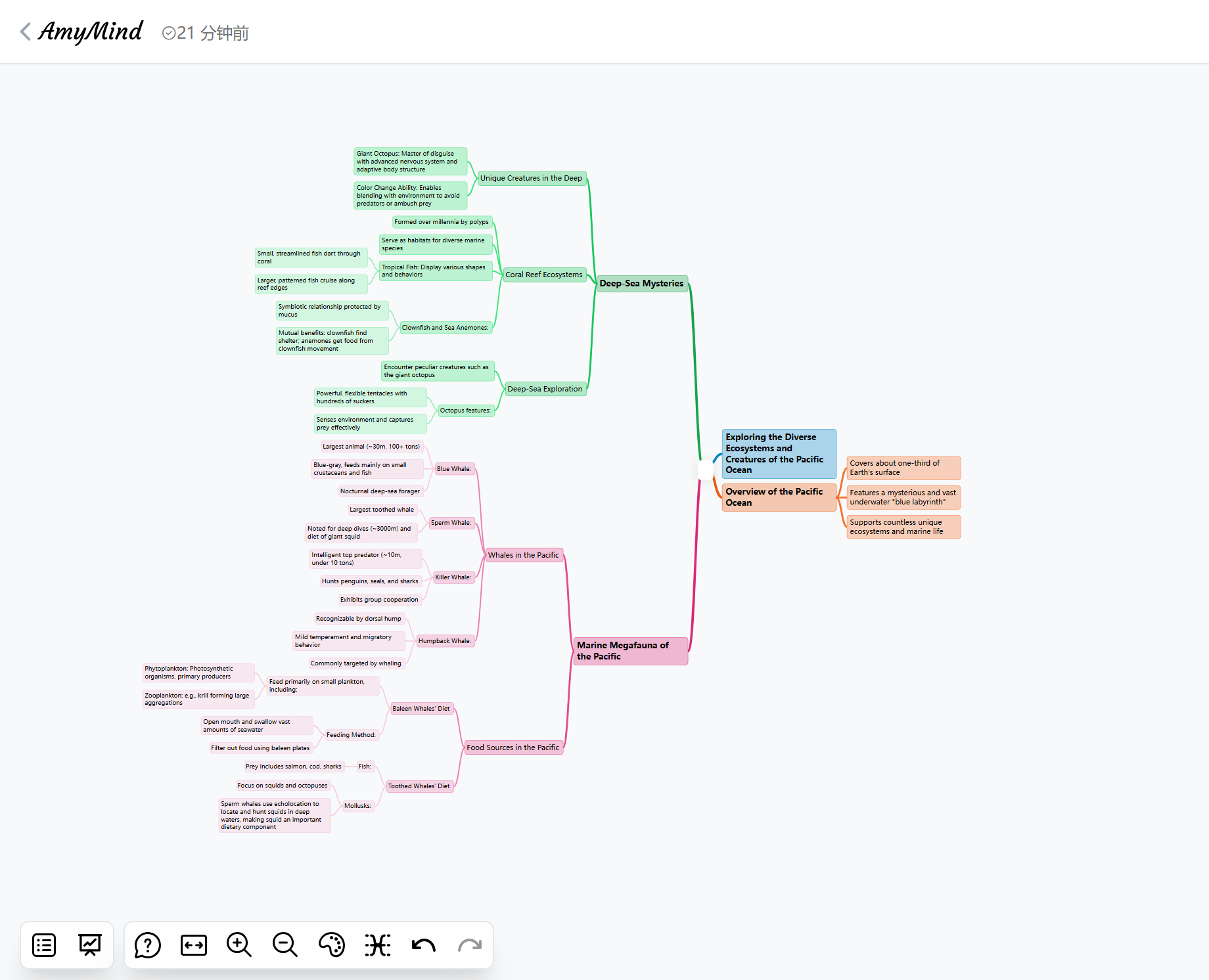
5. AmyMind – Best for Structured Maps with Rich Export Options
What it is: An AI‑powered mind mapping and visual thinking tool that converts unstructured text, markdown files, and various documents into clear, visual mind maps.
Key Features:
- Upload PDF/Word/Markdown/TXT – AI extracts chapter titles and key arguments to generate tree‑structured mind maps
- Adjustable "parsing depth" slider to control detail granularity
- Export to PowerPoint, PDF, and Word – a standout capability
- Also exports to PNG, Markdown, and Freemind formats
Pros:
- Best export options – take your mind map directly into a presentation or document
- Clean, structured output – focuses on hierarchical relationships
- Useful for research papers, business reports, manuals, and long reading packs
Cons:
- Cloud‑based – not suitable for sensitive documents
- Less focused on AI chat/interaction – more about document → map conversion
Price: Free tier available; Pro from $45/year: 500 AI Actions per day
Best for: Professionals who need to turn PDFs into presentation‑ready mind maps for PowerPoint or Word.
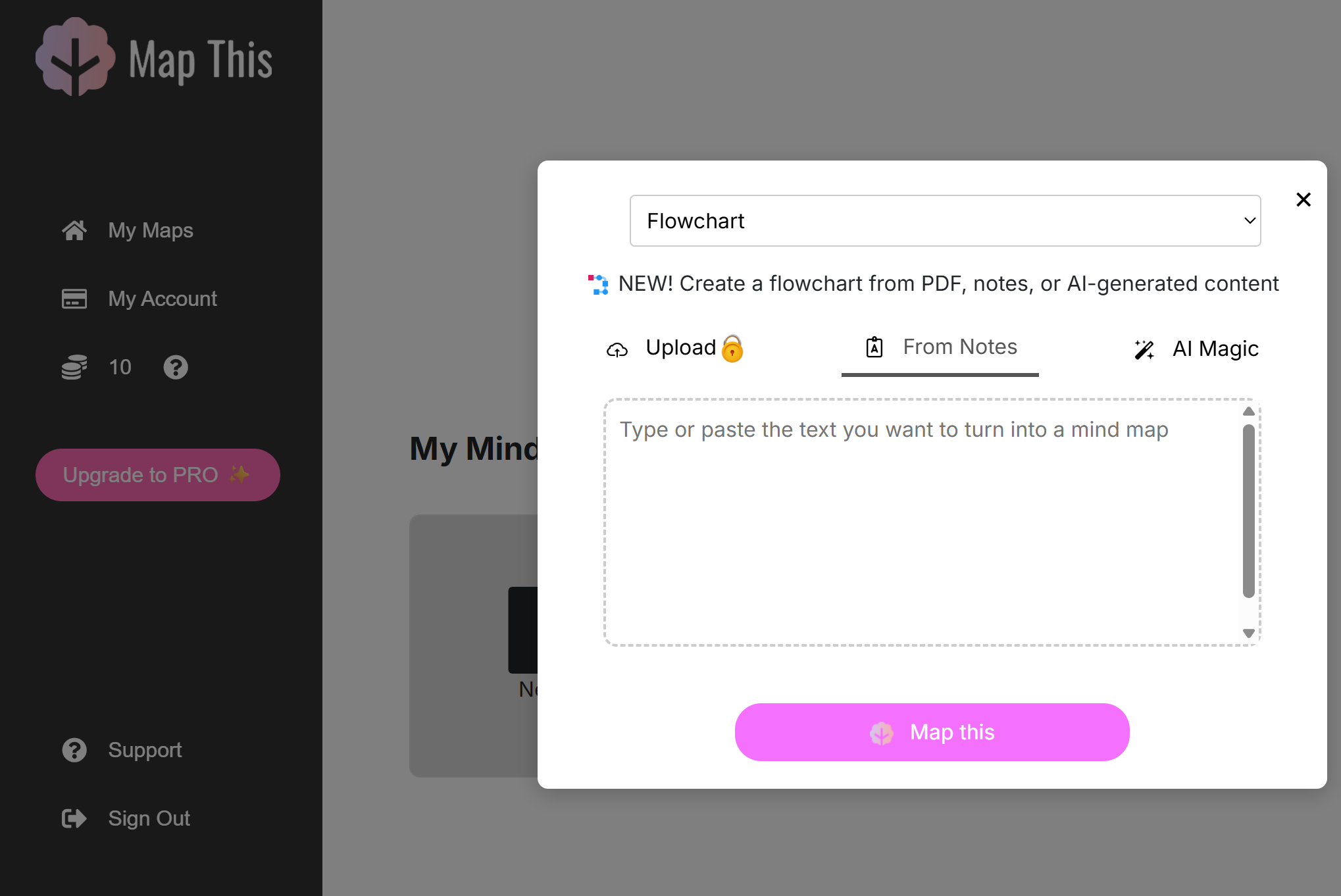
6. Map This – Best Pure PDF‑to‑Mind‑Map Converter
What it is: An innovative AI‑powered mind mapping tool that converts PDF documents into visually engaging and interactive mind maps.
Key Features:
- Dedicated PDF‑to‑mind‑map – no distractions, just PDF conversion
- AI‑powered summarization and entity extraction
- Interactive mind map editing
- Export to PNG, PDF, SVG, and Markdown
- Collaboration and sharing
- Pro plan supports up to 100‑page PDFs
Pros:
- Most focused tool – if you only need PDF → mind map, this is it
- Clean, simple interface
- Supports collaboration
Cons:
- Limited to PDF input – no video/audio/website support
- Pro plan required for larger PDFs (>100 pages)
Price: Free tier available: 10 credits for free use/~2 mindmaps; Pro from $5.99 for 250 monthly credits: ~50 mindmaps
Best for: Users who only need to convert PDFs to mind maps and don't need video, audio, or web page support.
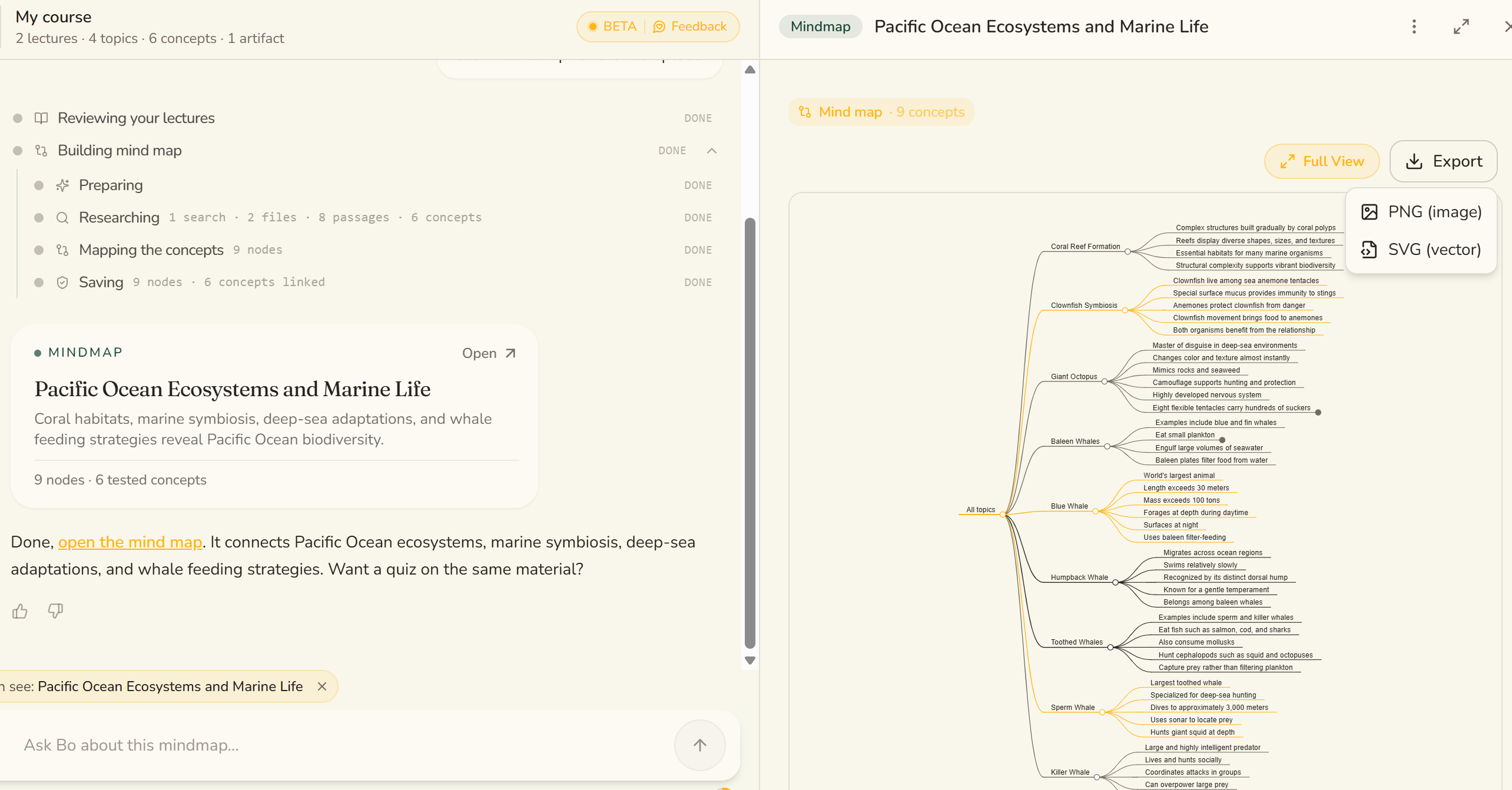
7. StudyPDF – Best Course‑Scoped AI Study Agent
What it is: A course‑scoped AI study agent called "Bo" that answers only from your uploaded course material – not from the open internet.
Key Features:
- Course‑scoped AI – Bo only uses your material, not random web sources
- Auto‑generated mind maps – visual concept maps drawn from your uploaded course
- AI flashcards and exam generation
- Built specifically for your course
Pros:
- Most focused on education – designed for students, not general knowledge workers
- No internet hallucinations – Bo only answers from your material
- Generates multiple study materials from one upload – mind maps, flashcards, quizzes
Cons:
- Limited to academic/study use cases
- Less useful for business or professional documents
Price: Basic features free
Best for: Students who want to turn course materials into mind maps, flashcards, and quizzes – all from one upload.
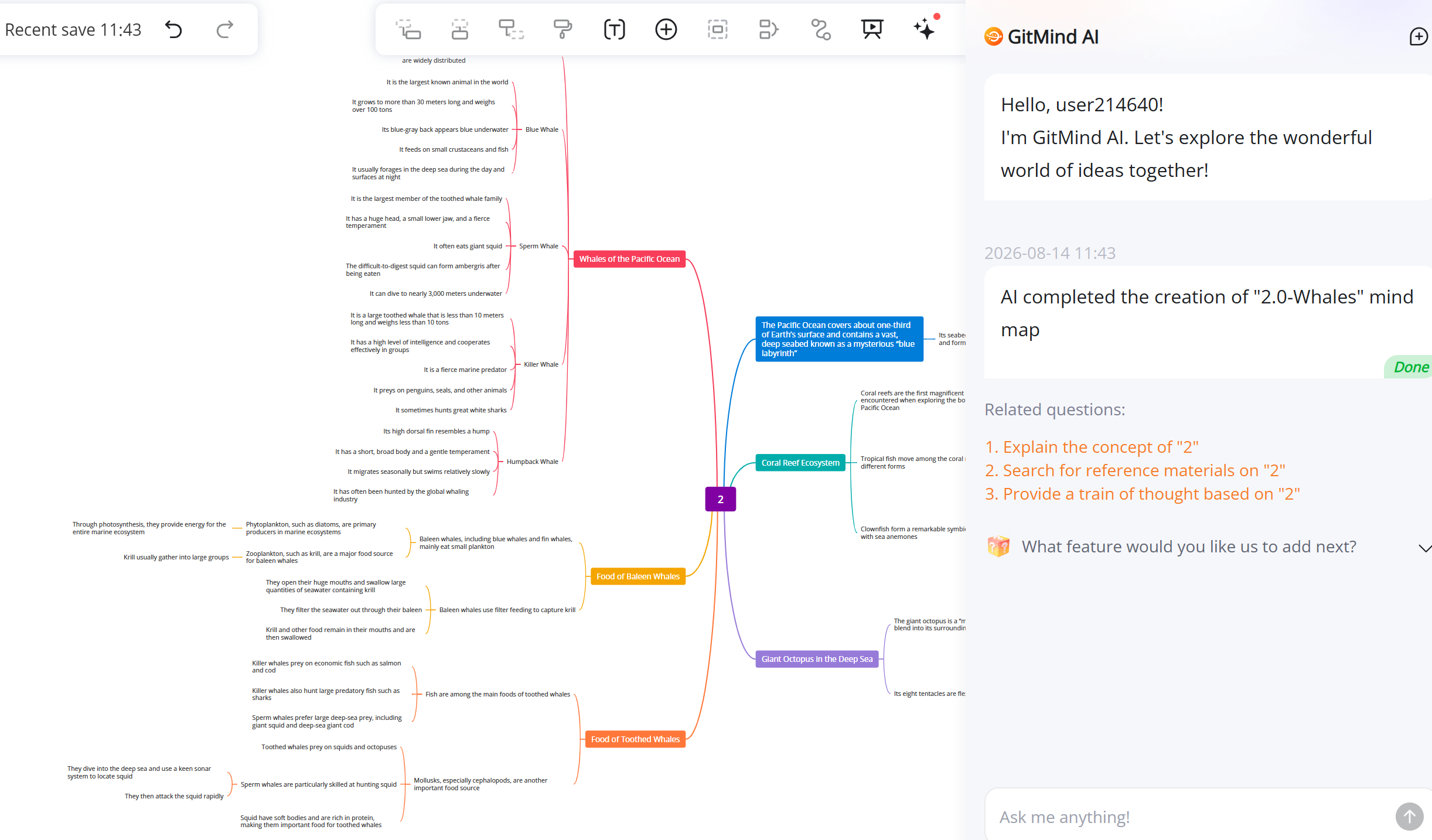
8. GitMind – Best Value AI Mind Mapping Tool
What it is: An AI‑powered workspace that transforms PDFs, YouTube videos, audio files, images, and web content into structured mind maps and summaries.
Key Features:
- Multiple AI models – built on GPT‑4, Claude, Gemini, and DeepSeek R1
- PDF summarizer – extract essential points and transform into structured visual maps
- Supports PDF, YouTube, audio, images, web content
- Cross‑platform – works on web and mobile
Pros:
- Excellent value – lifetime subscription available for ~$35
- Uses the latest AI models – GPT‑5.4 and Claude 4.6
- Free tier is generous enough to get started
- Multi‑modal AI parsing – reads and processes multiple source types
Cons:
- Cloud‑based – not for sensitive documents
- Some advanced features require paid plan
Price: Free tier available; lifetime subscription from ~$35
Best for: Budget‑conscious users who want a powerful, multi‑modal AI mind mapping tool with a one‑time payment option.
Why Would You Turn a PDF into a Mind Map?
You might be wondering: "Why bother? Can't I just read the PDF?"
Here's why PDF‑to‑mind‑map is worth your time:
1. Comprehension at a Glance
A PDF is linear – you read from top to bottom. A mind map is hierarchical – you see the main topic, subtopics, and their relationships in one glance. This is especially valuable for dense documents like research papers, textbooks, and business reports.
2. Visual Learning = Better Retention
Visual learning engages different cognitive processes than reading. Spatial relationships – seeing how ideas connect on a page – are easier to remember than linear text. This is why mind maps are so effective for studying.
3. Time Savings
Reading a 50‑page PDF takes hours. An AI‑generated mind map takes seconds. You get the gist without reading everything – then you can dive deeper into specific sections that matter.
4. Multi‑Source Synthesis
If you're working with multiple PDFs – a literature review, for example – mind maps help you see connections across sources that you might miss reading each paper in isolation.
5. From Passive Reading to Active Learning
Reading is passive. Creating (or reviewing) a mind map is active – you engage with the structure, question relationships, and build mental models. This is why mind maps are a core study technique.
FAQ – Quick Answers
Can AI create a mind map from a long PDF?
Yes, though long files may need to be processed by chapter or section. A focused source usually produces a clearer map.
How do I verify an AI-generated PDF mind map?
Check each major branch against the source pages, correct missing relationships, and add page references for important claims.
Can I create a mind map from a scanned PDF?
Yes, if OCR first makes the scan searchable. Verify headings and technical terms before generating the map.
Conclusion
If you're not sure where to start, try GitMind or MindMap AI first – both have generous free tiers and let you experience AI‑powered PDF‑to‑mind‑map conversion without commitment. For privacy and full PDF editing, UPDF is the most cost‑effective upgrade – one license covers all your devices and gives you a full PDF editor plus AI mind maps.






 Enola Miller
 Engelbert White
 Grace Curry

 Enid Brown