UPDF
UPDF
 UPDF for Windows
 UPDF for Mac
 UPDF for iPhone/iPad
 UPDF for Android
 UPDF AI Online
 UPDF Sign
 Edit PDF
 Annotate PDF
 Create PDF
 PDF Form
 Edit links
 Convert PDF
 OCR
OCR PDF to Word
 PDF to Image
 PDF to Excel
 Organize PDF
 Merge PDF
 Split PDF
 Crop PDF
 Rotate PDF
 Protect PDF
 Sign PDF
 Redact PDF
 Sanitize PDF
 Remove Security
 Read PDF
 UPDF Cloud
 Compress PDF
 Print PDF
 Batch Process
 About UPDF AI
 UPDF AI Solutions
 AI User Guide
 FAQ about UPDF AI
 Summarize PDF
 Translate PDF
 Chat with PDF
 Chat with AI
 Chat with image
 PDF to Mind Map
 Explain PDF
 PDF AI Tools
 Image AI Tools
 AI Chat Tools
 AI Writing Tools
 AI Study Tools
 AI Working Tools
 Other AI Tools
 AI Bookmark Generation
 AI Bookmark Summary
 AI Watermark Generation
 AI Background Generation
 AI Sticker Generation
 AI Stamp Generation
 AI Editing Suite
 UPDF Copilot
 AI Page Management
 AI Semantic Search
 PDF to Word
 PDF to Excel
 PDF to PowerPoint
 Enterprise Solution
 Enterprise Sign
 Enterprise AI
 Enterprise Plan
 Enterprise User Guide
 Enterprise Webinar
 Banking
 Healthcare
 Insurance
 Legal
Legal Manufacturing
 Government
 Education Solution
 Customer Stories
 User Guide
 UPDF Tricks
 FAQs
FAQs UPDF Reviews
 Download Center
 Blog
Blog Newsroom
 Tech Spec
 Updates
 UPDF vs. Adobe Acrobat
 UPDF vs. Foxit
 UPDF vs. PDF Expert

Preparing for the SAT can feel overwhelming, especially when students are unsure how colleges actually evaluate their scores. Many test takers focus on doing as many practice questions as possible without fully understanding how score ranges, section balance, and time limits affect their final results. At the same time, SAT prep today often involves juggling multiple digital materials—practice tests, answer explanations, and strategy guides, most of which come in PDF format.
To stay organized and make sense of all this information, students need a more efficient way to read and review their SAT materials. Tools like UPDF help by allowing students to open, highlight, annotate, and organize all their SAT PDFs in one place, so they can focus on understanding the content instead of managing files. When paired with UPDF AI Online, students can go a step further by summarizing long explanations, analyzing practice questions, and even generating additional SAT-style exercises to reinforce weak areas.
Download UPDF to organize and study your SAT PDFs more efficiently.
Windows • macOS • iOS • Android 100% secure
In this guide, you'll:
- Understand how SAT scores are evaluated by colleges
- Learn how long the SAT is and why timing affects performance
- Identify realistic score targets based on admissions benchmarks
This guide ultimately explains what is a good SAT score and outlines practical ways to approach SAT preparation with confidence.
Part 1. What is a Good SAT Score? Is 900 a Good Score for the SAT?
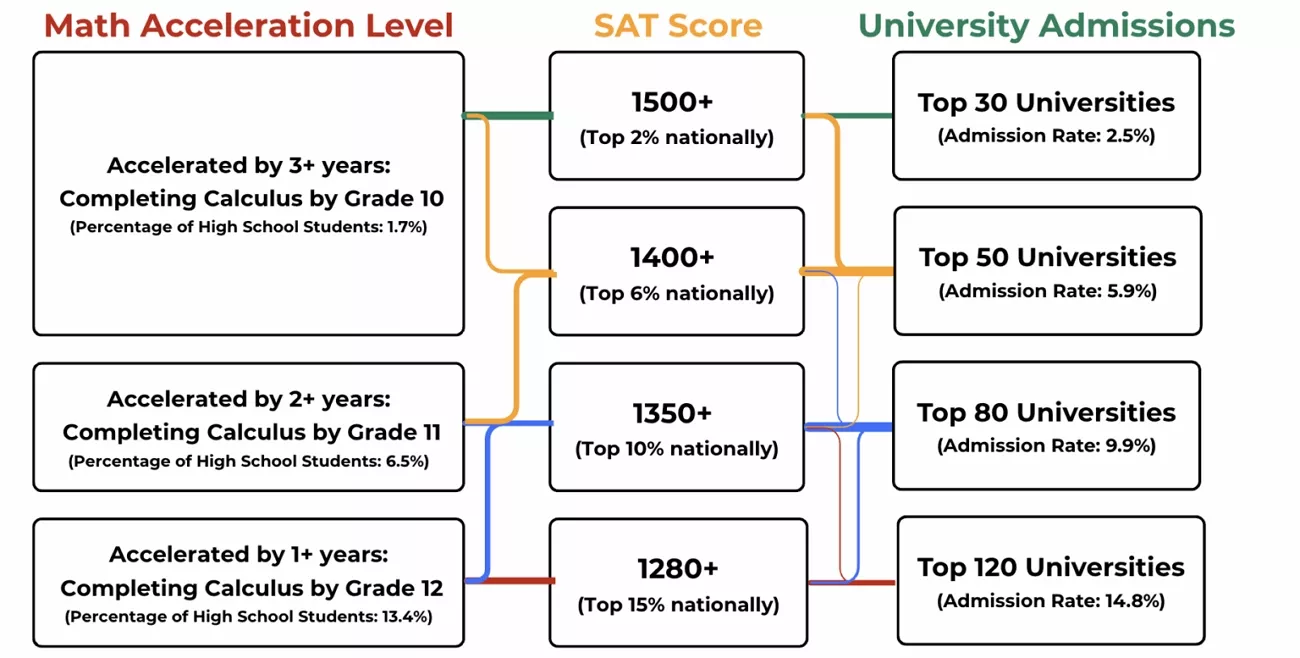
The SAT has two main parts: "Reading and Writing," and "Math." Each part has a score from 200 to 800 on your score report. These two scores join to give one total score from 400 to 1600. Colleges look at both parts to see strong and weak skill areas. A high score in one part does not fix a very low score.

College Score Expectations
Now, we will understand how score requirements differ across institution types before planning where to apply.
- Community Colleges and Schools: Accept students with SAT scores below 1000 and provide broad access and opportunities for many applicants.
- Public Universities: Often consider scores in the 1100–1250 range as meeting typical academic requirements for many campuses.
- Selected Universities: Commonly look for SAT scores above about 1300 to keep higher academic standards and stronger competition among applicants.
- Competitive STEM and Business Programs: Usually expect especially strong Math scores, often well above the overall average, to show solid analytical and technical skills.
Interpreting Score Ranges
After understanding what a good SAT score is, let's look at how scores can be grouped into general ranges.
- Below 900: Scores in this range are low, and students may need a lot of improvement to reach college entry levels.
- 900 - 1090: Students with scores in this range are below average and can find it hard to get into many four-year universities.
- 1100 - 1290: In this range, scores are average or a bit higher, and students can apply to many public universities and normal programs.
- 1300 - 1490: Scores in this band are strong, and students have a good chance at many selective colleges and tough programs.
- 1500 - 1600: Students who score in this top range show very high skill in study, and this helps a lot for entry to top universities.
This helps clarify whether a score like 900 is simply a starting point or significantly below average.
How to Set Personal Target Scores
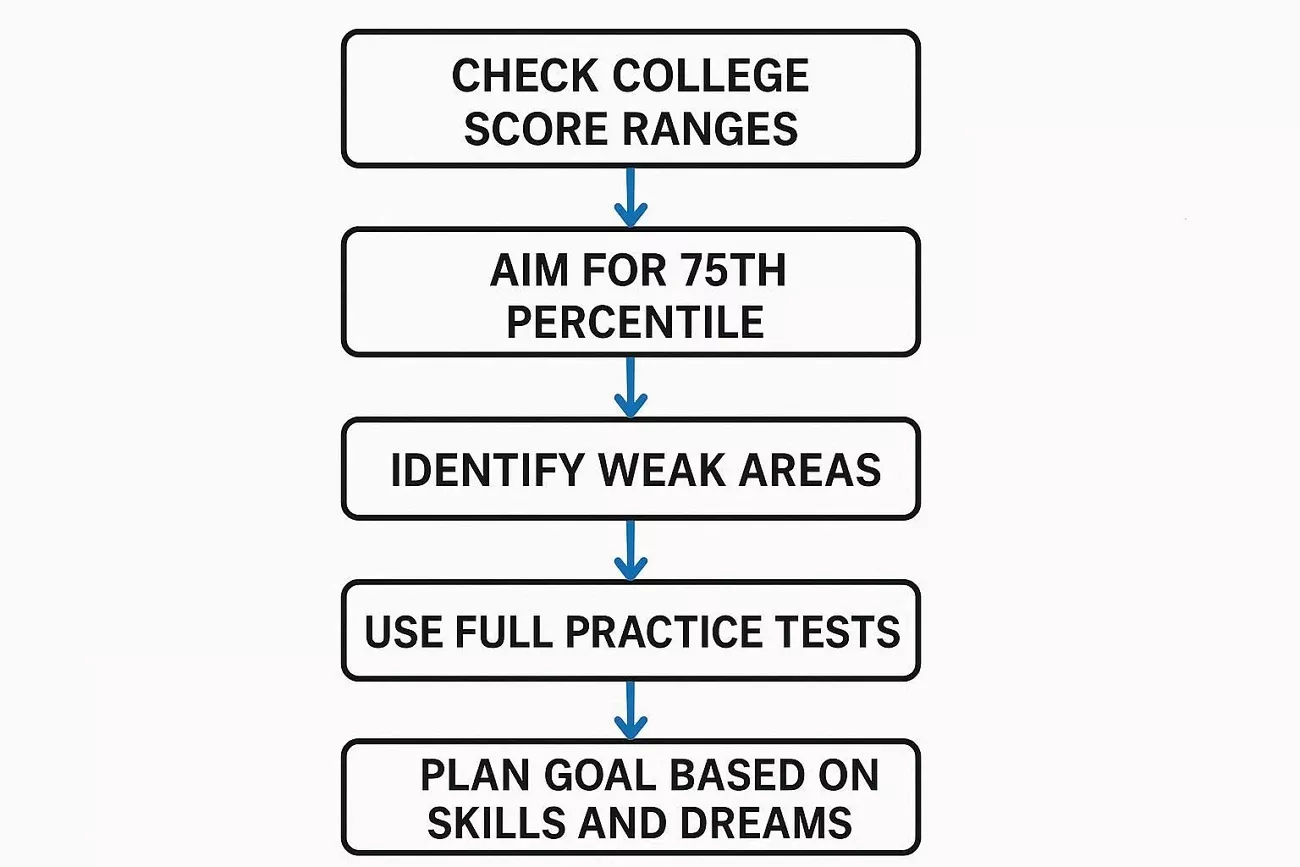
Before answering the question "How long is the SAT?", use the steps below to set clear goals.
- Check the score range for each college you want to apply to.
- Aim for scores near the 75th percentile to boost admission chances.
- Find weak parts in Math or Reading and practice them more.
- Use full practice tests to watch progress and fix test plans.
- Plan in this way so your goal matches your skills and dreams.
Part 2. How Long is the SAT Exam?
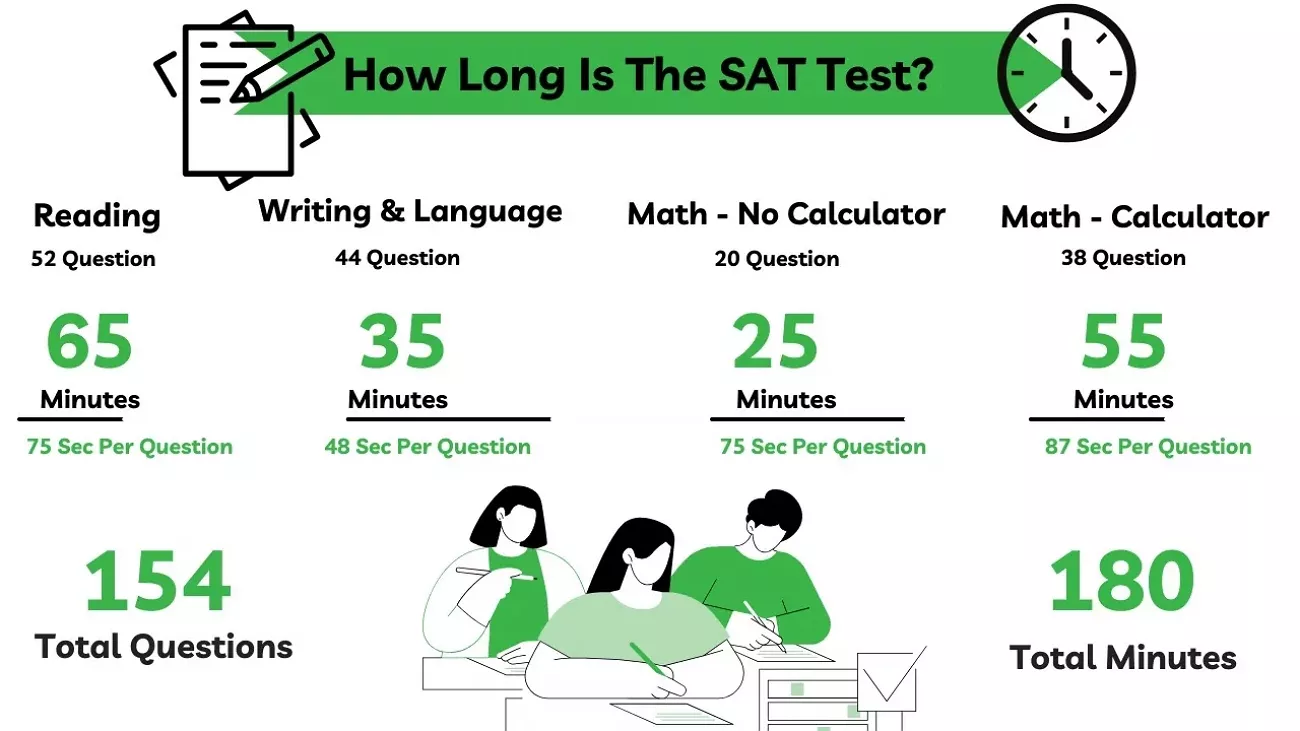
While planning your SAT preparation and pacing for what is a good SAT score, understanding the test length is important. Let's look at the total test duration and the time allocated for each section.
Total Test Duration
The SAT has a fixed total time that is split across its sections, and students must finish each part within the set time limit. Each part has its own set time, and students should learn how many minutes they get for all parts for a good plan. This clear timing structure helps you determine how many minutes to allocate to each question in each section.
Why Timing and Pacing Matter
After understanding the test length, let's understand how time control can affect your score.
- Good timing helps you answer more questions without rushing and can raise your score.
- Poor pacing can lead to simple mistakes that lower your score even on easy questions.
- Spending too long on one hard question can leave easier questions unanswered at the end.
- A clear time plan for each part keeps you calm and focused during the whole test.
How Smart Tools Can Help
Part 3. Extended Reading: How UPDF & UPDF AI Online Help You Prepare
Many students rely on digital SAT materials, including practice tests, answer explanations, and strategy guides. As these files pile up, it becomes harder to keep track of mistakes, review key concepts, and stay organized across different study sessions.
UPDF helps streamline this process by letting students store, read, highlight, and annotate all their SAT PDFs in one place. Instead of switching between multiple files and apps, students can mark important questions, record notes, and organize materials by topic or difficulty, making review sessions more focused and efficient.
Building on this, UPDF AI provides additional support for SAT study. It can summarize long explanations, analyze practice questions, and generate new SAT-style exercises based on what a student is reviewing. These AI features are available both inside the UPDF app and through UPDF AI Online, allowing students to reinforce weak areas and create targeted practice without manually searching through their materials. You can access UPDF's features for free by clicking the button below.
Windows • macOS • iOS • Android 100% secure
Practical UPDF Use Cases While Preparing SAT
Reaching "what is a good SAT score" depends on how well students review practice tests and manage study resources. Let's look at practical UPDF use cases during SAT preparation.
Import SAT Practice Materials Into One Workspace
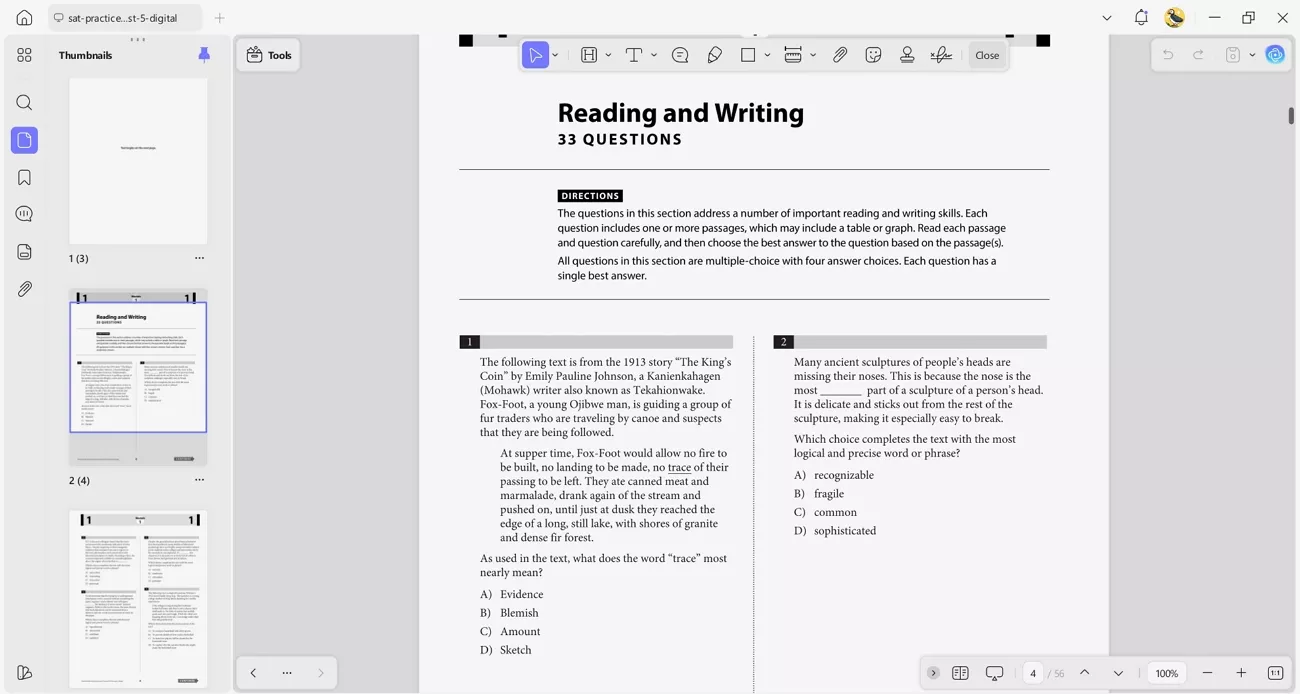
Students often use official SAT PDFs, full-length practice tests, and multiple strategy guides from different sources. UPDF allows all these materials to be imported to a single workspace. Keeping everything in one place makes it easier to switch between tests, explanations, and reference guides without wasting time searching for files.
Annotate and Organize Study Materials With UPDF
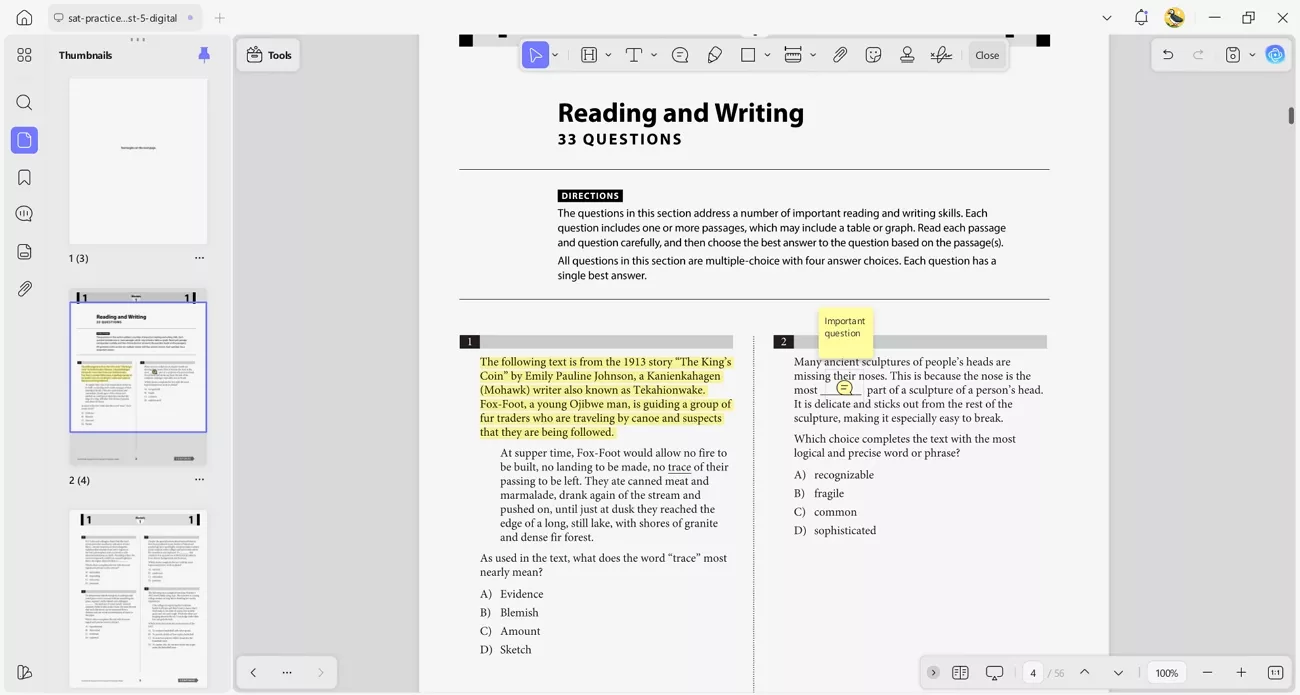
UPDF enables students to interact actively with SAT materials rather than passively read them. Users can highlight different question types, add notes on recurring mistakes, and mark questions for review. PDFs can also be grouped by topic or difficulty level, which helps students focus on specific weaknesses during revision sessions.
Use UPDF AI Online For Smarter Review
This helps students move beyond passive reading and focus on understanding, practice, and skill improvement.
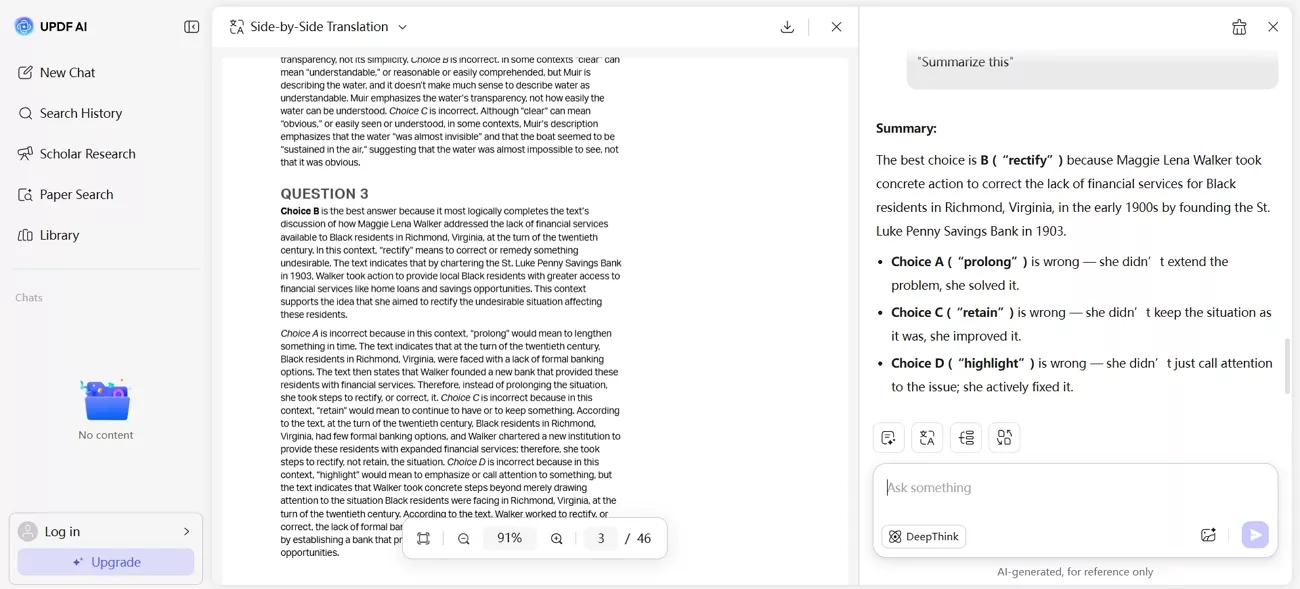
- Summarize Answer Explanations: UPDF AI Online condenses lengthy explanations into clear summaries, enabling students to understand solutions more quickly and revise.
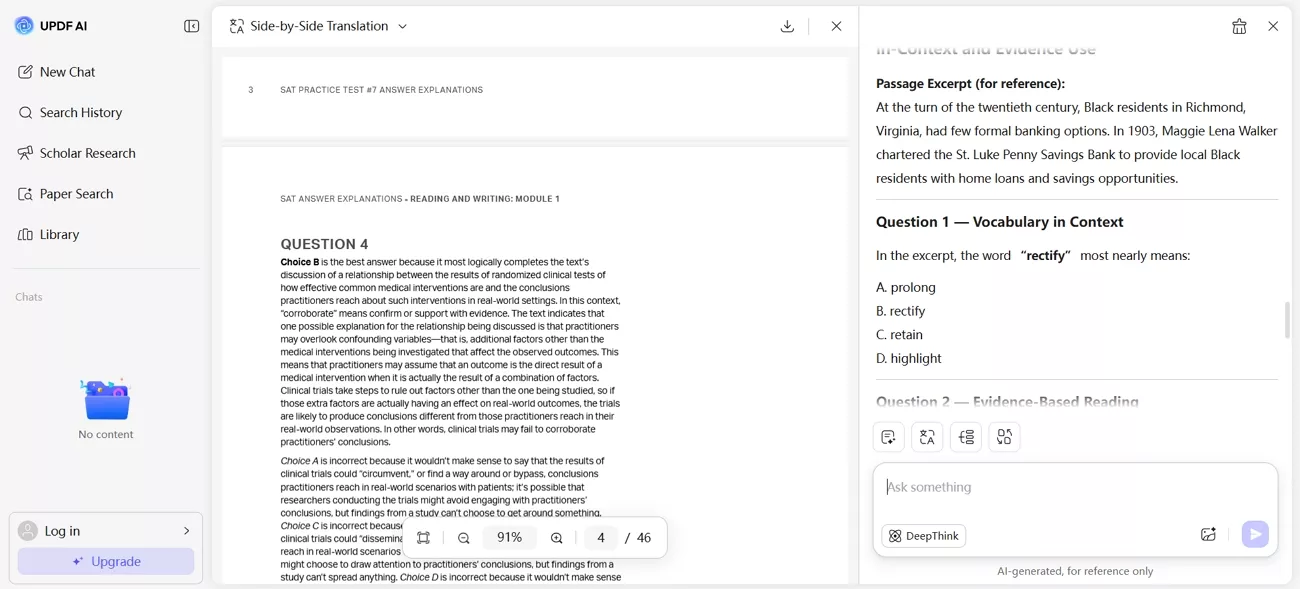
- Generate Extra Practice Questions: Additional SAT-style questions are created for weak areas to support focused practice and steady improvement.
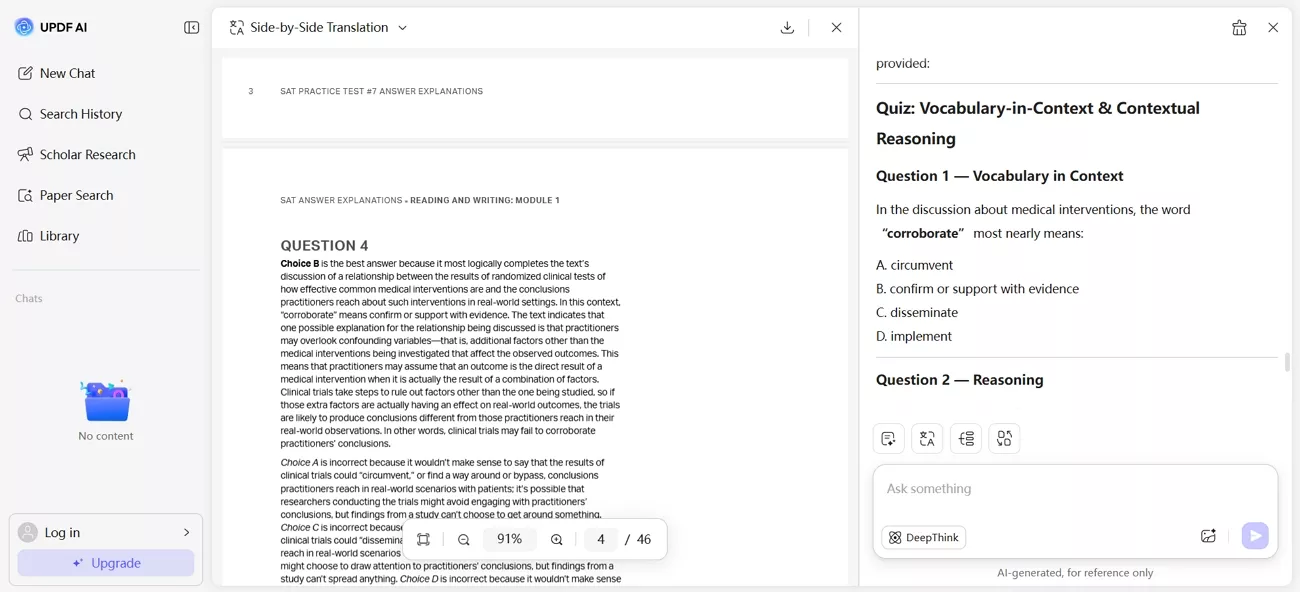
- Convert Explanations Into Quizzes: Short quizzes are formed from explanations to test understanding and reinforce concepts through active recall.
If you want a more organized and effective SAT study process, UPDF and UPDF AI Online can help manage your preparation. Use these tools to practice, review, and stay focused on improving your SAT performance.
Part 4. Tips for Using SAT Practice Materials Effectively
Students who frequently ask, "How long is the SAT exam?" should plan practice that matches real timing and test pressure by looking at the tips below.
- Use Official Tests: Choose official SAT practice tests because they copy real questions and have much better timing than random worksheets.
- Training with Timer: Always use a timer that matches the real section times to build a natural pacing rhythm.
- Check Mistakes: After the practice, overturn all the wrong answers and take a brief note as to the specific error.
- Repeat Weak Areas: Find question types you miss often and do extra short drills on them until your accuracy clearly improves.
- Use Smart Study Tools: Use tools like UPDF AI to turn PDF practice tests into timed quizzes that mirror real conditions.
Conclusion
In summary, understanding what is a good SAT score helps students set realistic goals and focus on steady improvement. This guide shows how to organize practice materials, track progress, and review weak areas efficiently. If you want to study smarter, manage your SAT PDFs effectively, and create targeted practice for better results, use UPDF and UPDF AI.
Windows • macOS • iOS • Android 100% secure











 Italo Rossi