 UPDF
UPDF
 UPDF for Windows
 UPDF for Mac
 UPDF for iPhone/iPad
 UPDF for Android
 UPDF AI Online
 UPDF Sign
 IvyCraft
 Edit PDF
 Annotate PDF
 Create PDF
 PDF Form
 Edit links
 Convert PDF
 OCR
OCR PDF to Word
 PDF to Image
 PDF to Excel
 Organize PDF
 Merge PDF
 Split PDF
 Crop PDF
 Rotate PDF
 Protect PDF
 Sign PDF
 Redact PDF
 Sanitize PDF
 Remove Security
 Read PDF
 UPDF Cloud
 Compress PDF
 Print PDF
 Batch Process
 About UPDF AI
 UPDF AI Solutions
 AI User Guide
 FAQ about UPDF AI
 Summarize PDF
 Translate PDF
 Chat with PDF
 Chat with AI
 Chat with image
 PDF to Mind Map
 Explain PDF
 PDF AI Tools
 Image AI Tools
 AI Chat Tools
 AI Writing Tools
 AI Study Tools
 AI Working Tools
 Other AI Tools
 AI Bookmark Generation
 AI Bookmark Summary
 AI Watermark Generation
 AI Background Generation
 AI Sticker Generation
 AI Stamp Generation
 AI Editing Suite
 UPDF Copilot
 AI Page Management
 AI Semantic Search
 PDF to Word
 PDF to Excel
 PDF to PowerPoint
 Enterprise Solution
 Enterprise Sign
 Enterprise AI
 Enterprise Plan
 Enterprise User Guide
 Enterprise Webinar
 Banking
 Healthcare
 Insurance
 Legal
Legal Manufacturing
 Government
 Education Solution
 Customer Stories
 User Guide
 UPDF Tricks
 FAQs
FAQs UPDF Reviews
 Download Center
 Blog
Blog Newsroom
 Tech Spec
 Updates
 UPDF vs. Adobe Acrobat
 UPDF vs. Foxit
 UPDF vs. PDF Expert

In the modern era, students and researchers struggle with grammatical errors when producing academic work on time. To address these issues, many students and researchers leverage Scribbr by uploading their documents online. They upload their educational records to the platform and pick the services they need. Scribbr helps users by reviewing their text, identifying errors, and providing better suggestions.
In this article, we examine how Scribbr works and its primary benefits for improving academic writing and citation organization. We will also demonstrate how UPDF enables rapid summarization and analysis of academic PDFs within a broader workflow.
Windows • macOS • iOS • Android 100% secure
Part 1. What Scribbr Offers? Everything You Should Know About It
After understanding the problems people often have with grammar and citations, let's discuss the solution that users opt for. Most users opt for Scribbr, which is an academic support platform with services and tools to improve the quality and integrity of student and researcher writing. It helps users in producing original academic essays, theses, and dissertations.
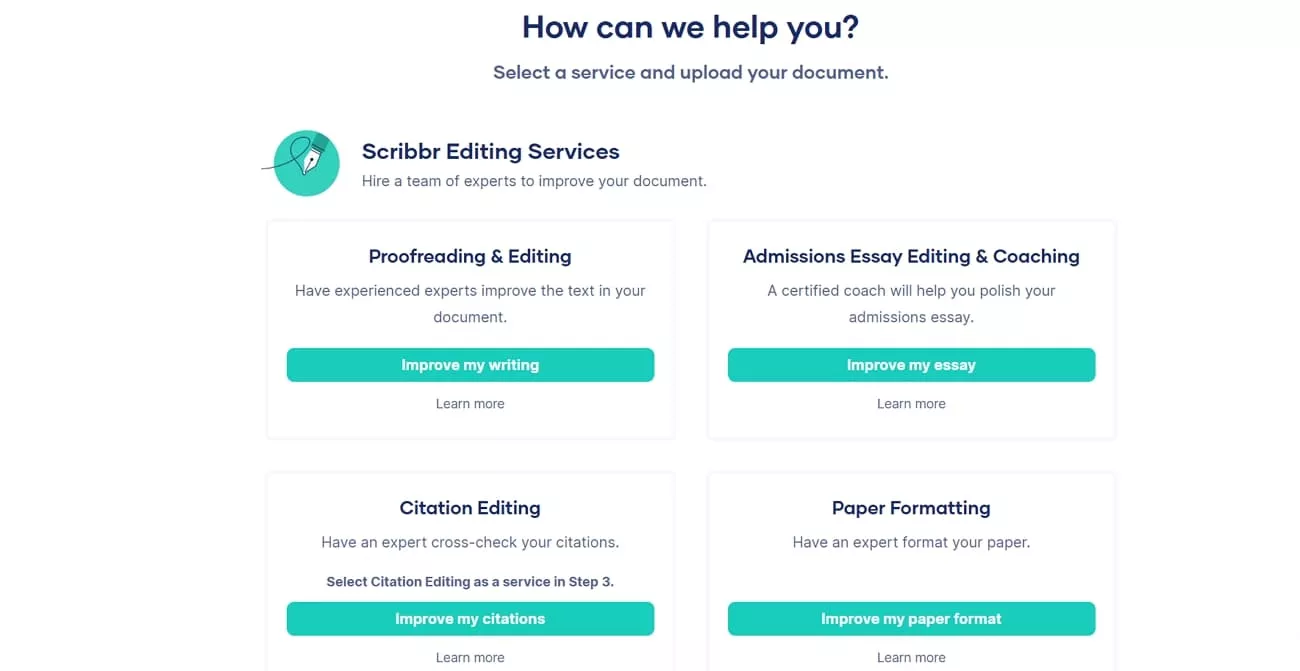
Core Features
Let's look at Scribbr's core features and see how each one helps users improve their academic work.
1. Academic Proofreading
Academic proofreading helps users produce clearer, more polished writing that teachers understand easily. As errors in grammar and spelling are removed, sentences read smoothly, and the work appears stronger.
2. Plagiarism Checking
Before submitting their work, users can check for parts that match other sources too closely. When the report highlights these sections, they get a chance to change wording or add citations.
3. Citation Generators
Instead of memorizing complex rules, users rely on citation tools to build correct references. Because sources are formatted in styles like APA and MLA, their papers look accurate and organized.
Pricing Plans of Scribbr
After reviewing the most demanding features of Scribbr, let's explore the pricing plans so you can choose the service that best fits your academic needs.
| Service | Plan/Size | Pricing Model | Pricing (USD) |
| Plagiarism Checker | Small document (7,500 words) | Pay per check | $19.95 |
| Plagiarism Checker | Normal (7,500–50,000 words) | Pay per check | $29.95 |
| Plagiarism Checker | Large (50,000+ words) | Pay per check | $39.95 |
| Human Proofreading & Editing | Any word count | Pay per word | From ~$0.017/word |
| AI Grammar/ Proofreading | 30‑day access | Subscription-style | Around $9.95 |
| Citation Generator | All use | Free | $0 |
Ratings on Different Platforms
- Trustpilot: 4.5/5
- GetApp: 4.5/5
- Capterra: 4.5/5
Pros and Cons of Scibbr
For the right decision, we will take a closer look at the main pros and cons of using Scribbr.
Pros:
- Professional editors help improve the grammar and academic writing quality of content.
- Detailed feedback helps users better understand mistakes and learn from them.
- Plagiarism checker offers reliable similarity reports for academic safety.
- Citation tools save time and reduce errors in reference lists.
Cons:
- Services can be expensive for students with limited budgets.
- Plagiarism checks and editing are usually paid separately, increasing the cost.
- Turnaround time may be slower during busy academic seasons.
- The platform mainly suits academic writing, not creative or casual content.
Best Companion of Scribbr
Alongside Scribbr, UPDF works as a companion tool that focuses on reading and managing academic PDFs rather than editing the language itself. It helps users open long research papers, search within them, and quickly jump to the sections or keywords they need for their projects.
Users can also highlight, comment, and annotate directly on PDFs to mark important ideas and arguments. This makes it easier to organize notes and group related information in one place. Users can also track their sources clearly before improving the text later with Scribbr.
Windows • macOS • iOS • Android 100% secure
Part 2. How Scribbr Works (Step-by-Step Process)
Now that we have explored the features and benefits offered by Scribbr, let's take a detailed look at how it works step by step:
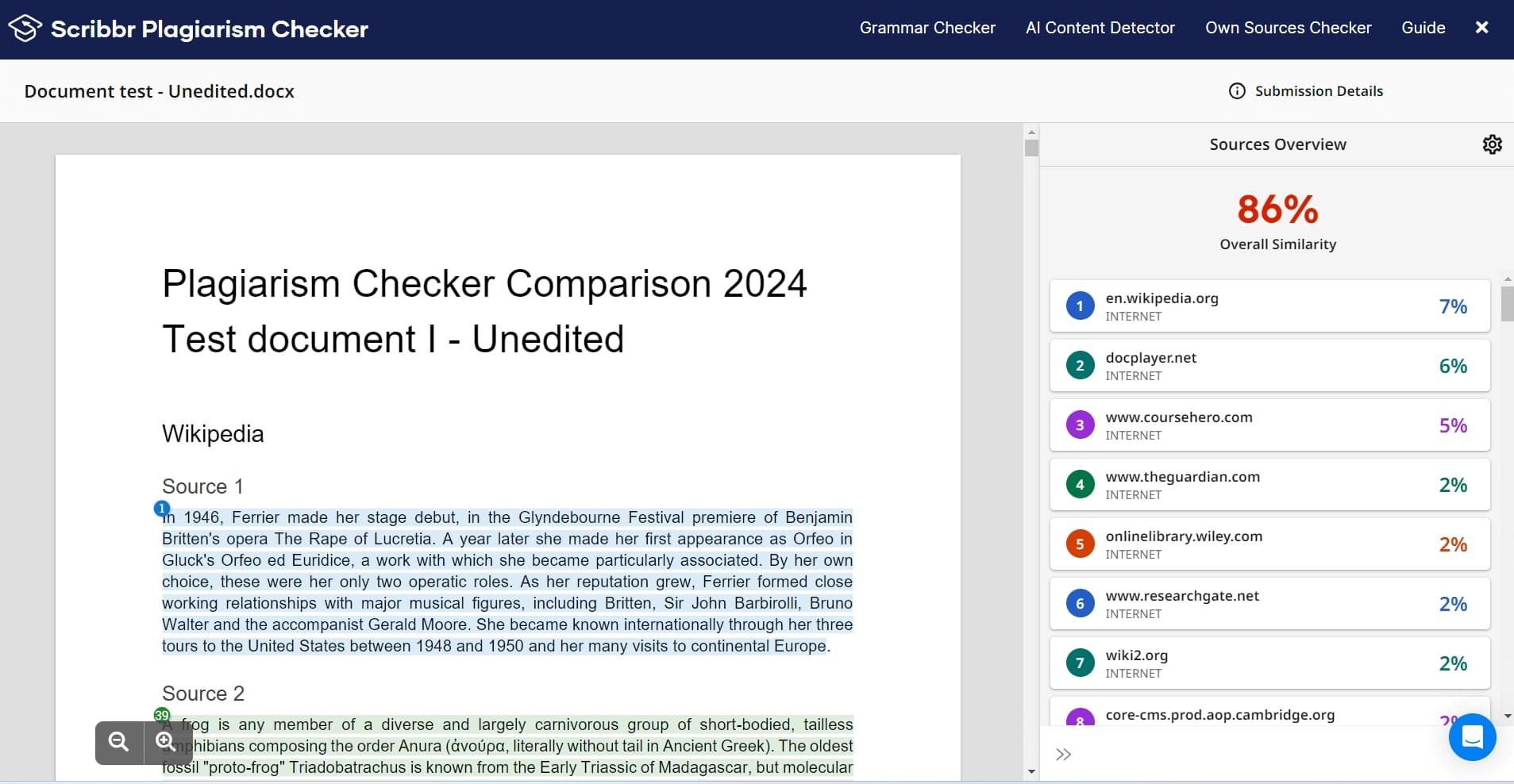
Step 1. First, access the "Plagiarism Checker" from the landing page and hit the "Upload Document" button to upload your document. A PhD candidate can upload a dissertation chapter and select "Academic Editing.
Step 2. Next, you'll get a detailed report with the plagiarism score of your document.
Step 3. Afterwards, access the "AI Detector" tool and hit the "Detect AI" button after pasting your content. This is especially useful for students checking their essays or researchers ensuring their work maintains originality before submission.
Step 4. Once the AI is detected, hit the "Refine With Paragraphraser" option in the bottom left corner to refine your content.
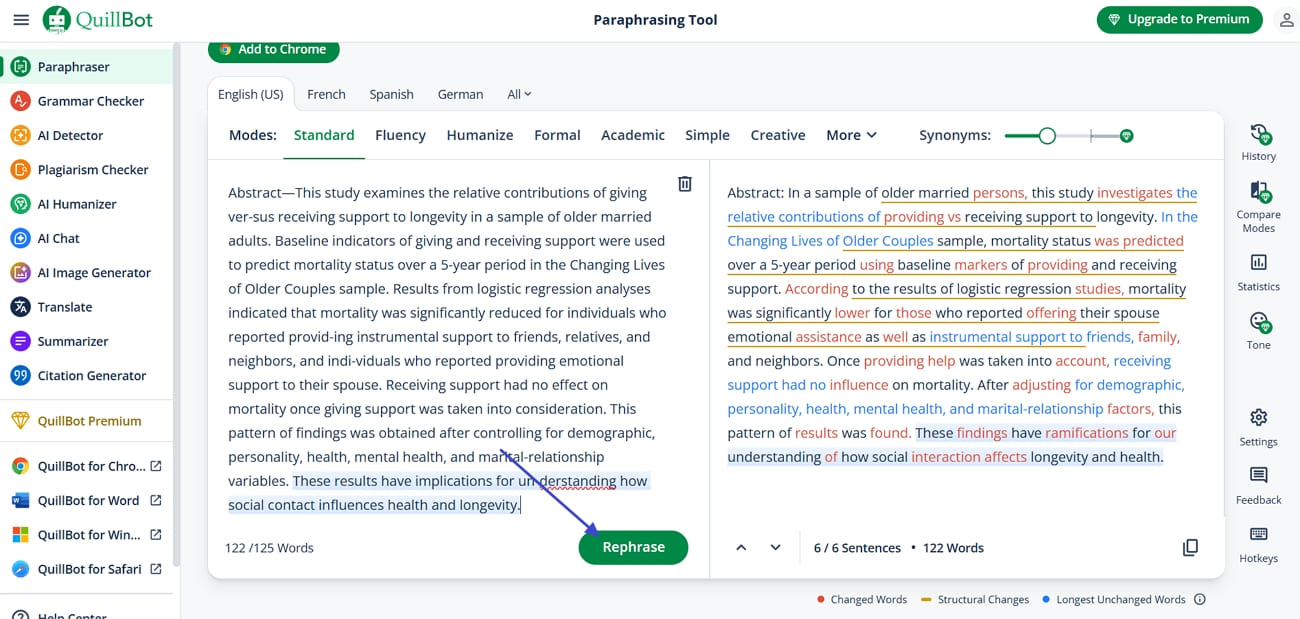
Step 5. Afterwards, paste the content again in the designated field and hit the "Rephrase" button below to paraphrase the content. Users use this tool to improve sentence clarity and avoid accidental plagiarism in their work.
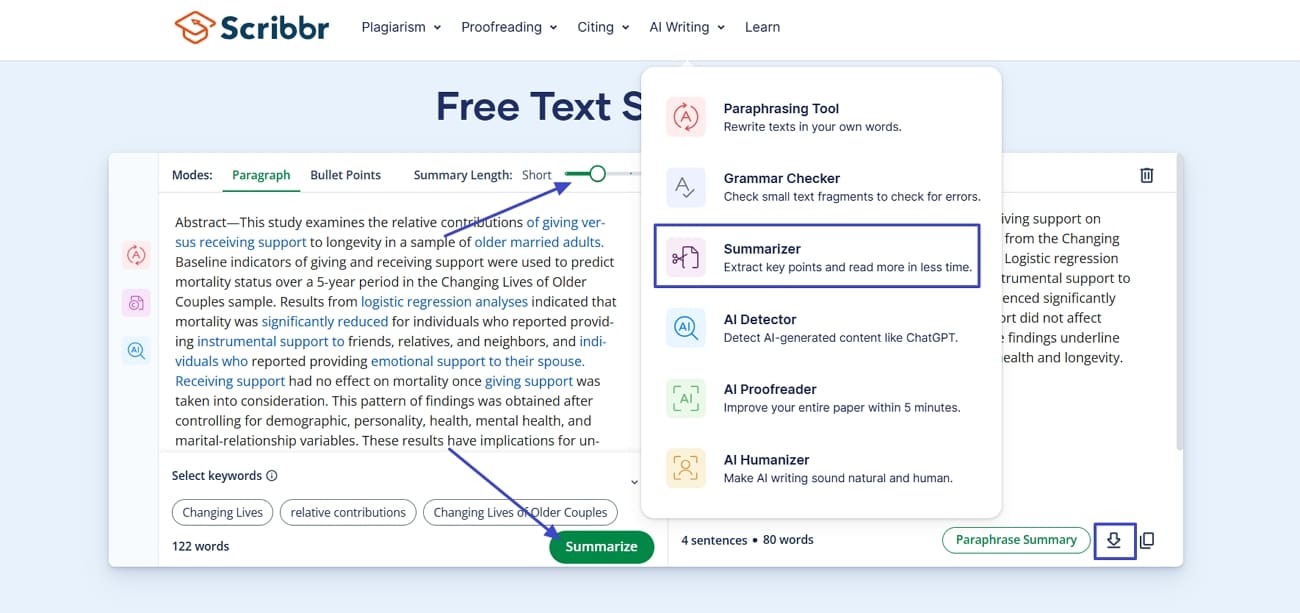
Step 6. Next, if you want to summarize your content, hit the "Summarizer" tool from the menu and paste the content. Next, use the slider to select the length, then click the "Summarize" button. Users can also click the "Export" icon to download the summary as a DOCX file. Users can quickly condense long papers into easy summaries.
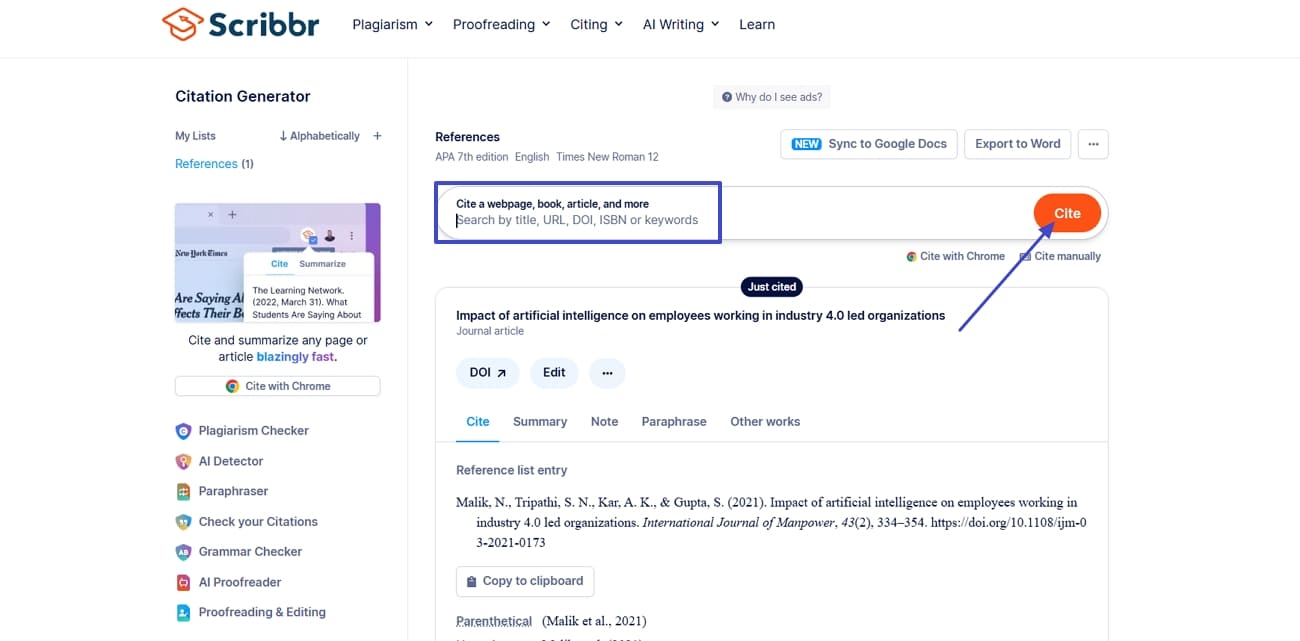
Step 7. To generate citations, enter the topic in the designated field and hit the "Cite" button to create accurate references automatically. This tool allows students and researchers to make citations to essays and research papers.
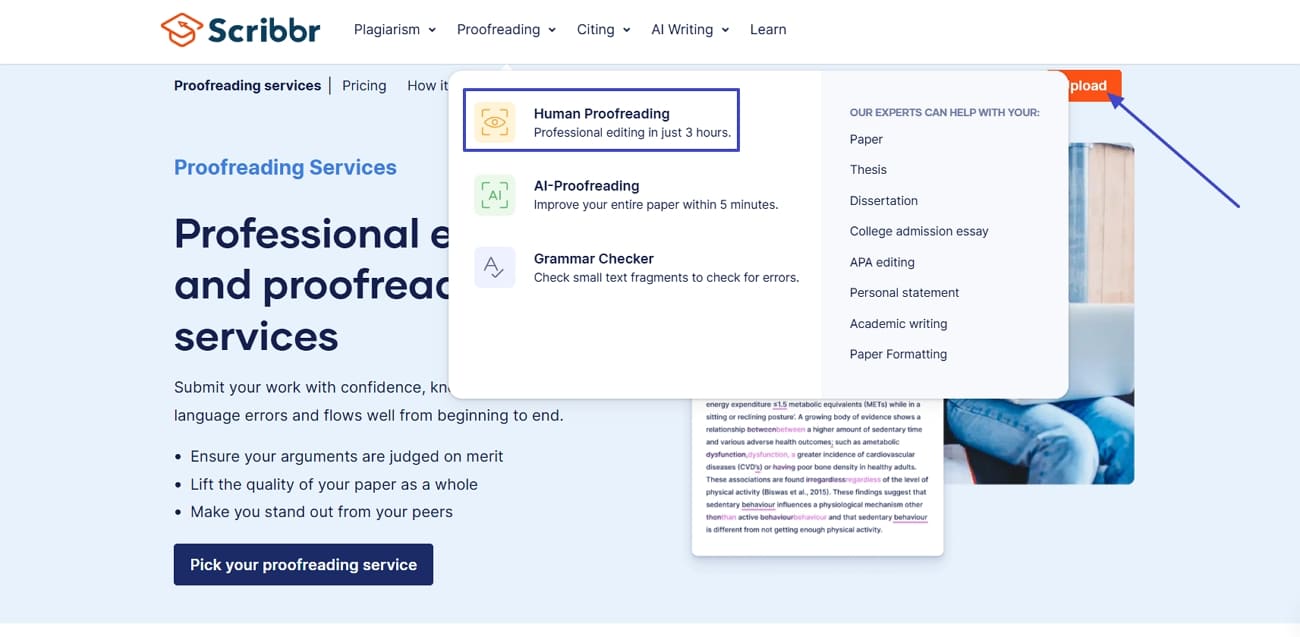
Step 8. After using all AI-powered services, you can also use human services to proofread your content. Hit the "Human Proofreading" option and click the "Upload" button to upload your document. Afterwards, choose a deadline and proceed with the payment to get your document proofread.
Part 3. How UPDF Supports a Smoother Academic Workflow
As discussed above, using UPDF with Scribbr can improve writing quality, citations, and manuscript accuracy. It helps users manage, edit, and analyze academic PDFs to streamline research workflows. These tools make it easier to handle full research articles, lengthy study materials, and multiple document sources during the research process.
Moreover, UPDF supports batch processing to help users convert, rename, or organize multiple PDFs at once. This feature saves significant time when managing large collections of academic files.
Windows • macOS • iOS • Android 100% secure
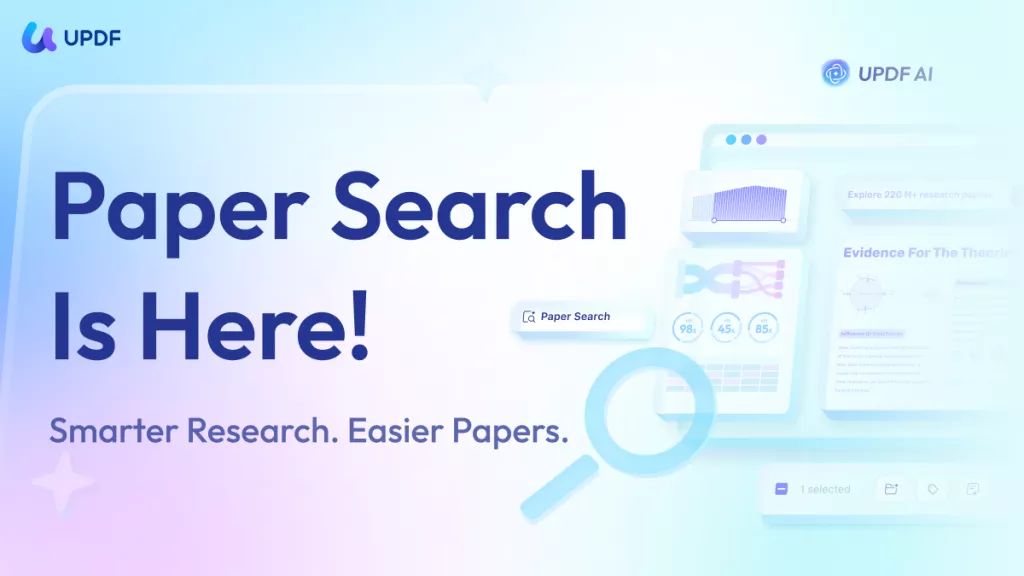
Besides, the AI assistant of UPDF can read PDF for quick summries, translation, and more. The online version can even help with searching papers and writing literature reviews in seconds.
Key Features
- Edit PDF: Users can refine academic PDFs by adjusting text, font size, color, and spacing to follow university or journal formatting guidelines. They can also crop or resize figures, tables, and diagrams so research content appears readable and professionally arranged on each page.
- Annotate The PDF: With UPDF, researchers can highlight critical theories and definitions, as well as add comments and sticky notes for reminders and supervisor feedback. Shapes, markups, and signatures support peer review, approval workflows, and structured note-taking directly on articles and dissertations.
- Batch Merge: The batch merge feature lets users combine multiple chapters, articles, or data appendices into a single, organized academic PDF. Page size and orientation settings help ensure the final document aligns with submission rules for theses, dissertations, and conference papers.
- AI Summarization: UPDF AI can turn long research articles and literature reviews into structured summaries. This helps students quickly grasp key arguments, methods, and findings, making it easier to prepare outlines, related work sections, or revision notes for exams and writing projects.
- Translate The PDF: Helps users work with academic PDFs in more than 14 languages to access and understand foreign-language articles. This is useful for reading international studies, comparing research across countries, and integrating non-English sources into literature reviews and academic assignments.
Conclusion
To conclude, Scribbr helps improve academic writing with proofreading, plagiarism checking, and citation support. In this article, we explored how Scribbr works and how users can benefit from its tools. We also discussed how UPDF helps edit and summarize academic PDFs to streamline the research workflow. For anyone looking to improve the quality of their educational documents, the tools outlined above are worth trying.
Windows • macOS • iOS • Android 100% secure







 Enola Miller
 Enid Brown
 Delia Meyer

 Enrica Taylor
-Reddit