UPDF
UPDF
 UPDF for Windows
 UPDF for Mac
 UPDF for iPhone/iPad
 UPDF for Android
 UPDF AI Online
 UPDF Sign
 Edit PDF
 Annotate PDF
 Create PDF
 PDF Form
 Edit links
 Convert PDF
 OCR
OCR PDF to Word
 PDF to Image
 PDF to Excel
 Organize PDF
 Merge PDF
 Split PDF
 Crop PDF
 Rotate PDF
 Protect PDF
 Sign PDF
 Redact PDF
 Sanitize PDF
 Remove Security
 Read PDF
 UPDF Cloud
 Compress PDF
 Print PDF
 Batch Process
 About UPDF AI
 UPDF AI Solutions
 AI User Guide
 FAQ about UPDF AI
 Summarize PDF
 Translate PDF
 Chat with PDF
 Chat with AI
 Chat with image
 PDF to Mind Map
 Explain PDF
 PDF AI Tools
 Image AI Tools
 AI Chat Tools
 AI Writing Tools
 AI Study Tools
 AI Working Tools
 Other AI Tools
 PDF to Word
 PDF to Excel
 PDF to PowerPoint
 Enterprise Solution
 Enterprise Sign
 Enterprise AI
 Enterprise Plan
 Enterprise User Guide
 Enterprise Webinar
 Banking
 Healthcare
 Insurance
 Legal
Legal Manufacturing
 Government
 Education Solution
 Customer Stories
 User Guide
 UPDF Tricks
 FAQs
FAQs UPDF Reviews
 Download Center
 Blog
Blog Newsroom
 Tech Spec
 Updates
 UPDF vs. Adobe Acrobat
 UPDF vs. Foxit
 UPDF vs. PDF Expert

Whether for business, education, or research, Hypotenuse AI PDF Summarizer helps users stay informed without sifting through endless pages. The result is faster decision-making, improved productivity, and a stress-free approach to handling extensive PDFs, all with just a few clicks.
While Hypotenuse AI offers quick summaries for documents under 32MB and 200,000 characters, UPDF AI provides a more complete online solution for Max File Size: 100 MB. If you choose to use this tool offline within a professional PDF editor, users can summarize, read, annotate, and translate PDFs in one place, making document management easier and more efficient. In this article, we will learn everything about Hypotenuse AI PDF Summarizer and its best alternative.
Part 1. What is Hypotenuse AI PDF Summarizer?
Hypotenuse AI is an AI-powered content generation platform designed to help businesses and marketers create high-quality digital content quickly. It can produce blog posts, product descriptions, marketing copy, and other written materials while maintaining a consistent brand voice. The platform also helps enrich product data and streamline ecommerce workflows with automation.
Within this platform, the AI PDF Summarizer works as a built-in tool that analyzes long PDF documents and converts them into concise summaries. This feature helps users quickly extract key insights from reports, research papers, or business documents without reading the entire file.
Core Functionalities
- Extract Key Points from Documents: It identifies the most important sentences, concepts, and conclusions from reports, research papers, and studies.
- Ask Questions About the PDF: Users can ask specific questions about the document to get deeper insights or explanations about certain sections.
- Generate Summaries in Multiple Formats: The tool allows summaries to be formatted as paragraphs, bullet points, or structured sections for easier reading.
- Analyze Tables, Figures, and Data: The summarizer can extract insights from tables, statistics, and figures contained in the document.
Technical Principles and Limitations
Before using any AI summarization tool, it is important to understand how the technology works and where its boundaries lie. The following section explains the key technical principles behind Hypotenuse AI PDF Summarizer and the limitations users should be aware of:
Technical Principles
- AI-Based Text Analysis: The summarizer uses artificial intelligence to read and analyze the full content of a PDF document before generating a condensed version highlighting the most important details.
- Machine Learning Models: AI summarization systems rely on machine-learning models trained on large datasets to interpret document text and produce a coherent summary.
- Keyword and Topic Detection: The system identifies frequently used words, phrases, and themes to determine the main subject of the document and prioritize key information.
- Relevance Scoring of Sentences: The AI evaluates sentences based on importance, structure, and placement in the document to decide which content should appear in the final summary.
Limitations
- Accuracy Still Requires Verification: AI-generated content may sometimes include outdated or incorrect information, so users often need to double-check important details.
- Performance with Long Content: Some AI writing tools, including Hypotenuse AI in testing, can struggle with very long documents, occasionally producing repetitive or less focused output.
- Limited Interpretation of Non-Text Elements: While the tool can analyze tables or figures to some extent, visual elements like complex charts may not always be interpreted perfectly.
- Subscription Limits for Full Access: The tool allows summarizing a limited number of files during the trial, and continued use requires a paid plan.

Pros
- Besides PDFs, the tool can also summarize DOCX and TXT files for broader document compatibility.
- Hypotenuse AI PDF Summarizer analyzes facts and numbers in the document to generate conclusions or potential discussion ideas.
- Users can ask the AI to expand the summary or focus on specific subtopics within the PDF.
Cons
- The summarizer can analyze only up to 200,000 characters, meaning very long documents may not be fully processed.
- Uploaded documents must be under 32MB, which restricts very large PDFs from being processed.
- AI summarization tools may occasionally generate inaccurate or misinterpreted information.
Ratings and Reviews
User Ratings: 5/5
User Reviews
“Very effective tool in working with text (especially summarizing) but also generating images from short prompts.”
“A nice addition to your writing toolbox.”
“The bulk generation UI is slightly harder to use than the rest The HypoChat feature was slower than the other features from time to time The text rewrite had a varying efficacy”
Comparison Between Top AI PDF Summarizer
Before choosing a PDF summarizer, it helps to compare multiple tools side-by-side. Each platform differs in pricing, supported inputs, and AI capabilities. The following comparison highlights Hypotenuse AI PDF Summarizer with oter tools so that you can quickly see how they perform across different key factors:
| Features | Hypotenuse AI PDF Summarizer | UPDF AI | Knowt AI PDF Summarizer | NoteGPT |
| Free Quota | 2 PDFs during trial | 7 days free trial with UPDF Pro | Free to start | 15 free quotas per month |
| Input Method | Upload PDF, DOCX, or TXT | Import PDF, DOCX, TXT, | Upload PDF or import from sources like Google Drive | Upload PDF or other content formats |
| Output Method | Paragraph or bullet summaries | Text summary, mind map, bookmarks, structured outline | Notes, flashcards, key takeaways | Summaries, mind maps, notes, transcripts |
| Key Features | Extract key points, analyze tables and figures, and expand summaries | Page-range summarization, OCR for scanned PDFs, batch PDF summarization, multilingual summaries | AI notes generation, flashcards, learning summaries, and AI Q&A for study material | AI chat, PDF summarization, YouTube/video summarization, presentation generation |
| Price | Basic: Custom Pro: Custom Enterprise: Custom | UPDF Pro: $49.99 / Year $79.99 /lifetime AI Assistant: {{price.en.individuals.ai_annual}} /Year | For students: Ultra: $24.99/month For teachers: Ultra: $24.99/month | Pro: $9 /month Unlimited: $19.92 /month Max: $69 /month |
Part 2. How to Use Hypotenuse AI PDF Summarizer?
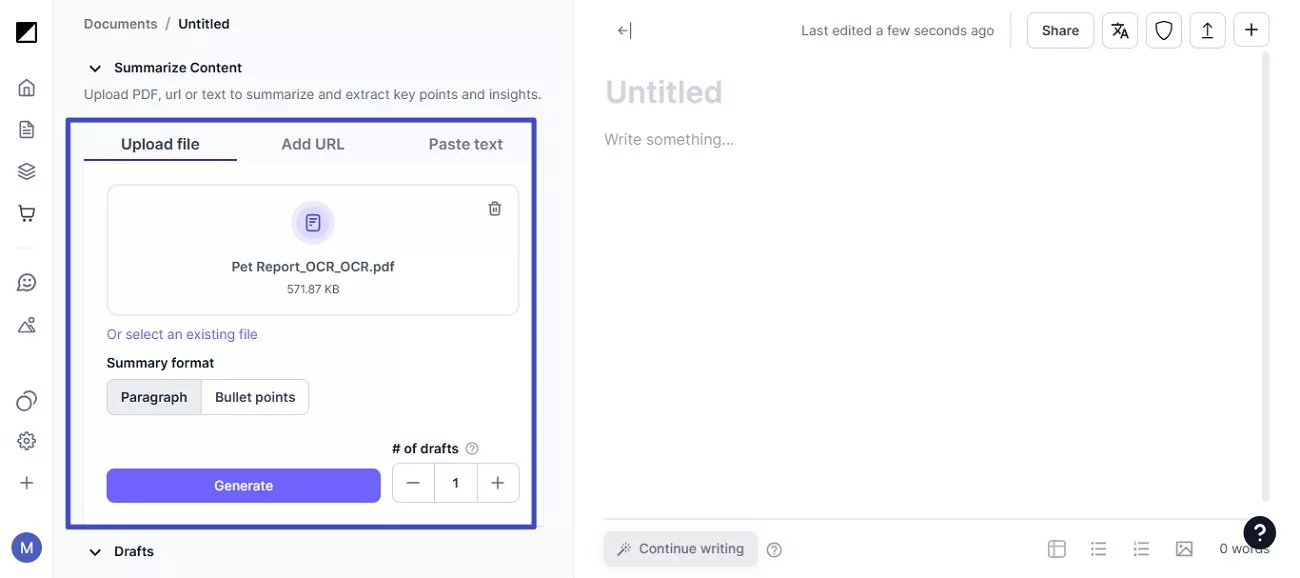
Having learned about Hypotenuse AI in detail, let us have a look at the step-by-step guide on how to use it for PDF summarization: Step 1. After accessing the tool on your browser, upload your document. Once the document is uploaded, select the Summary Format from Bullet or Paragraph and hit the “Generate” button to begin.
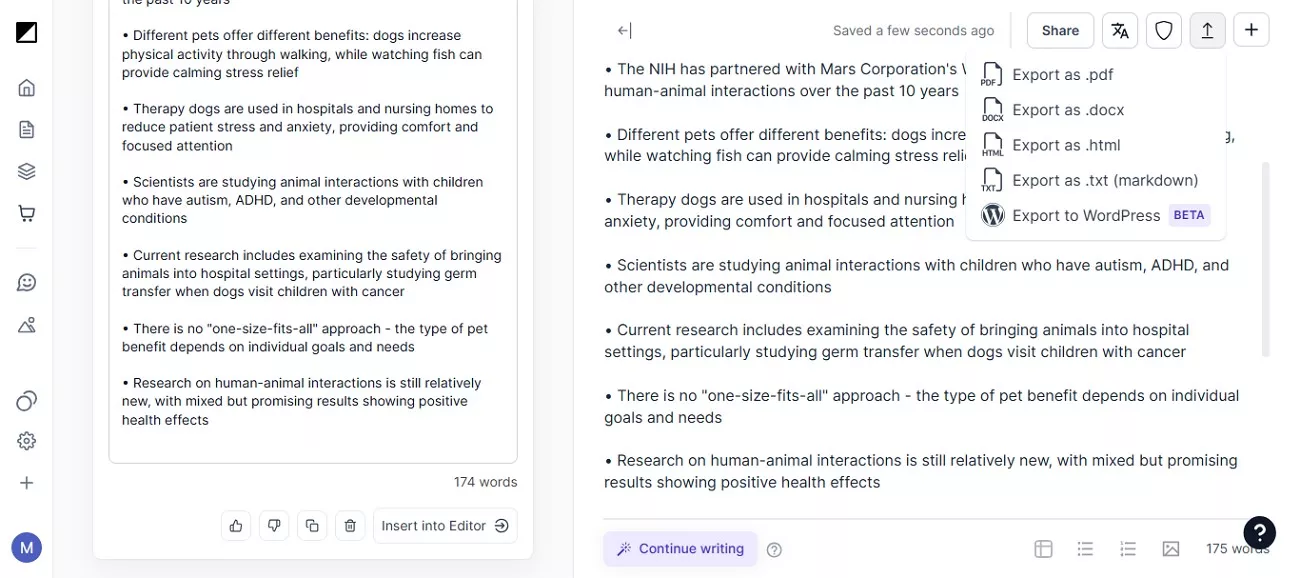
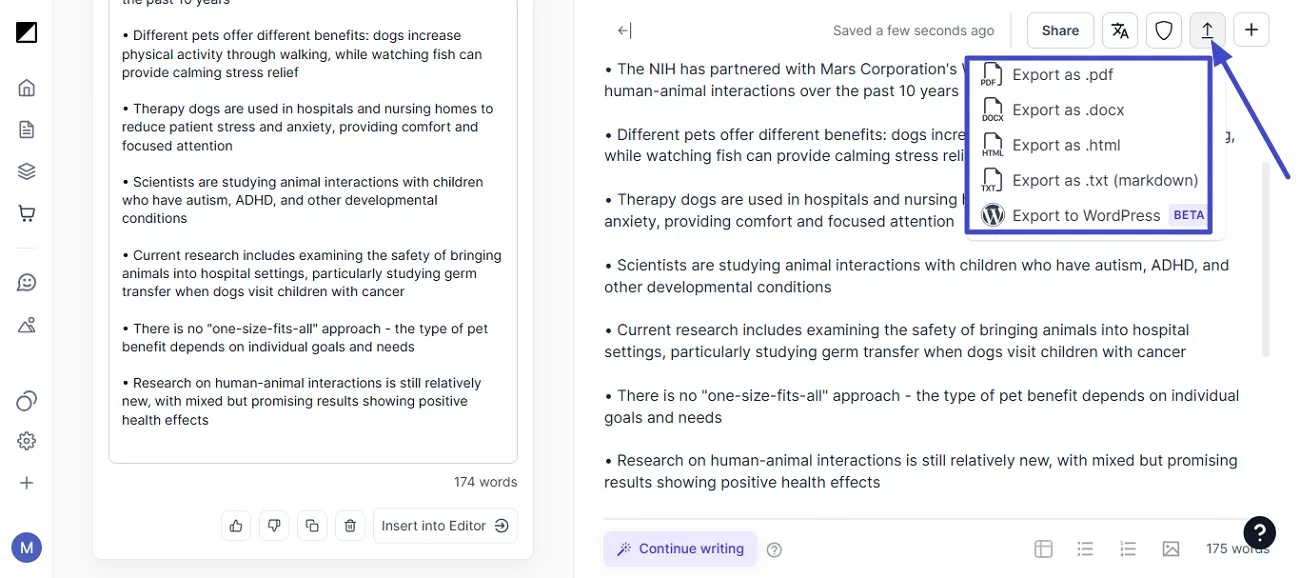
Step 3. When the summary is generated, preview it in the editor and make changes to the text according to your preferences. When you are satisfied with the results, press the “Export” icon and select the format to save the results to your device.
Part 3. Alternative to Hypotenuse AI PDF Summarizer
UPDF AI is an advanced AI-powered PDF assistant integrated into the UPDF document management platform. The platform is also available to be accessed online for quick PDF summarization. It helps users analyze, summarize, translate, and interact with PDF documents using modern AI models. Unlike basic summarization tools, UPDF AI works directly inside a full PDF editor, allowing users to read and process documents in one place. The tool supports multiple platforms, including Windows, macOS, iOS, Android, and web browsers, making it accessible anywhere. With features such as page-range summarization and AI chat with documents, this Hypotenuse AI PDF Summarizer alternative provides a comprehensive solution for managing and understanding complex PDFs. In addition, the tool allows users to summarize selected text or entire documents, giving them flexibility when working with long reports, research papers, or business files.
Coherent Features
- Batch PDF Summarization: Users can upload multiple PDFs simultaneously and generate summaries for several documents at once.
- Mind Map Generation: Instead of plain text summaries, UPDF AI can convert documents into structured mind maps for easier visualization.
- Multilingual Summaries: The tool can generate summaries in multiple languages, enabling users to work with documents written in different languages.
- OCR for Scanned PDFs: UPDF AI can analyze scanned documents and images by using OCR technology before summarizing them.
- Structured Research Paper Summaries: For academic documents, the tool can generate structured summaries including sections like methodology, keywords, and research gaps.
- Text Selection Summaries: Users can highlight specific parts of a PDF and request a summary of only that content.
Why UPDF AI Is a Better Alternative to Hypotenuse AI PDF Summarizer
- All-in-One PDF Platform: Unlike Hypotenuse AI, which mainly focuses on content generation, UPDF combines AI summarization with a complete PDF editor and document management system.
- Advanced PDF Interaction: Users can chat with PDFs, highlight sections, and summarize selected text rather than summarizing the whole document only.
- Handles Scanned Documents: With built-in OCR support, UPDF AI can analyze scanned PDFs and images, which many simple summarizers cannot process effectively.
- Flexible Summarization Options: UPDF allows summarizing by page range, specific text selection, or entire documents, providing more control over output.
- Visualization Tools: The ability to convert summaries into mind maps makes it easier to understand complex documents.
Comprehensive Steps for Summarizing a PDF with UPDF
As discussed, UPDF provides a complete solution to summarize and manage your documents effortlessly. To learn how to generate a summary of your PDF using this Hypotenuse AI PDF Summarizer alternative, read the steps provided below:
Step 1. Import Document Chat with PDF
To begin, launch UPDF on your device and import your document to the tool's interface. Next, click on the "UPDF AI" icon. Press "Ask PDF" and click on the "Chat With PDF" button.
Step 2. Choose Summarize Feature
Once the PDF is added for chat, click the “Summarize” option located within the interface.
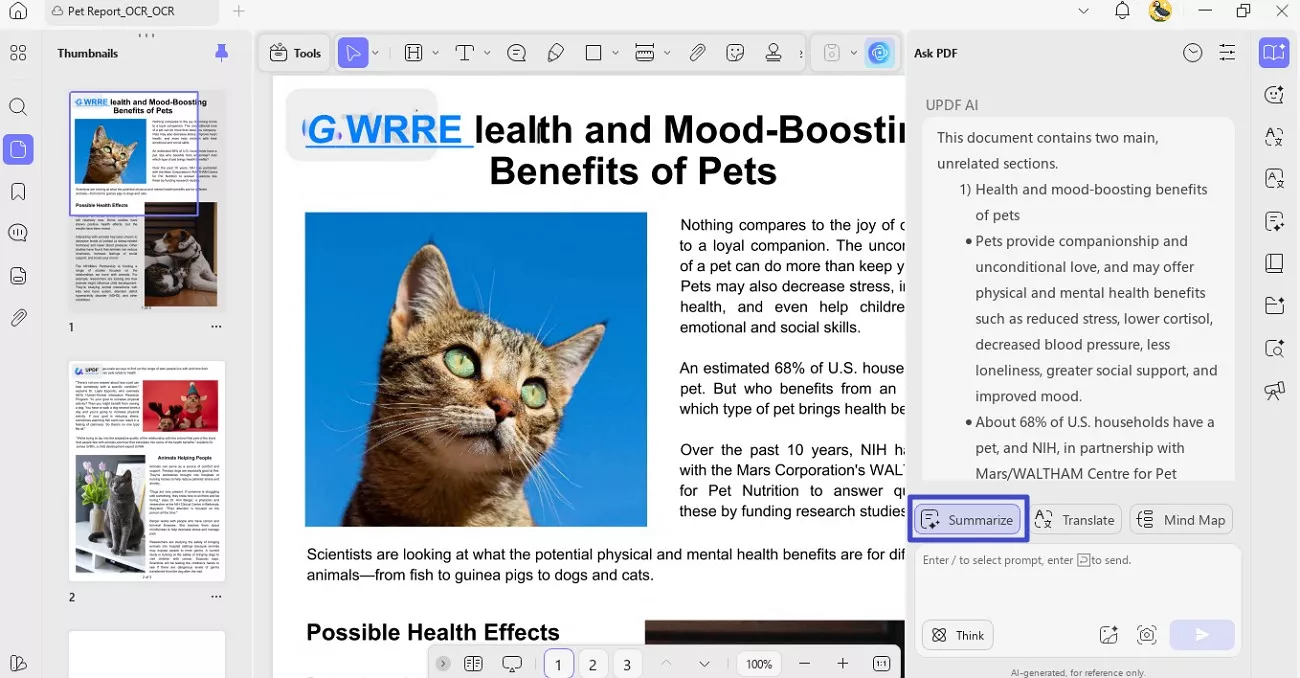
Step 3. Select Page and Summarize
Next, select the page range of the document for which you want to create a summary and hit the “Summarize” button to start generating the summary.
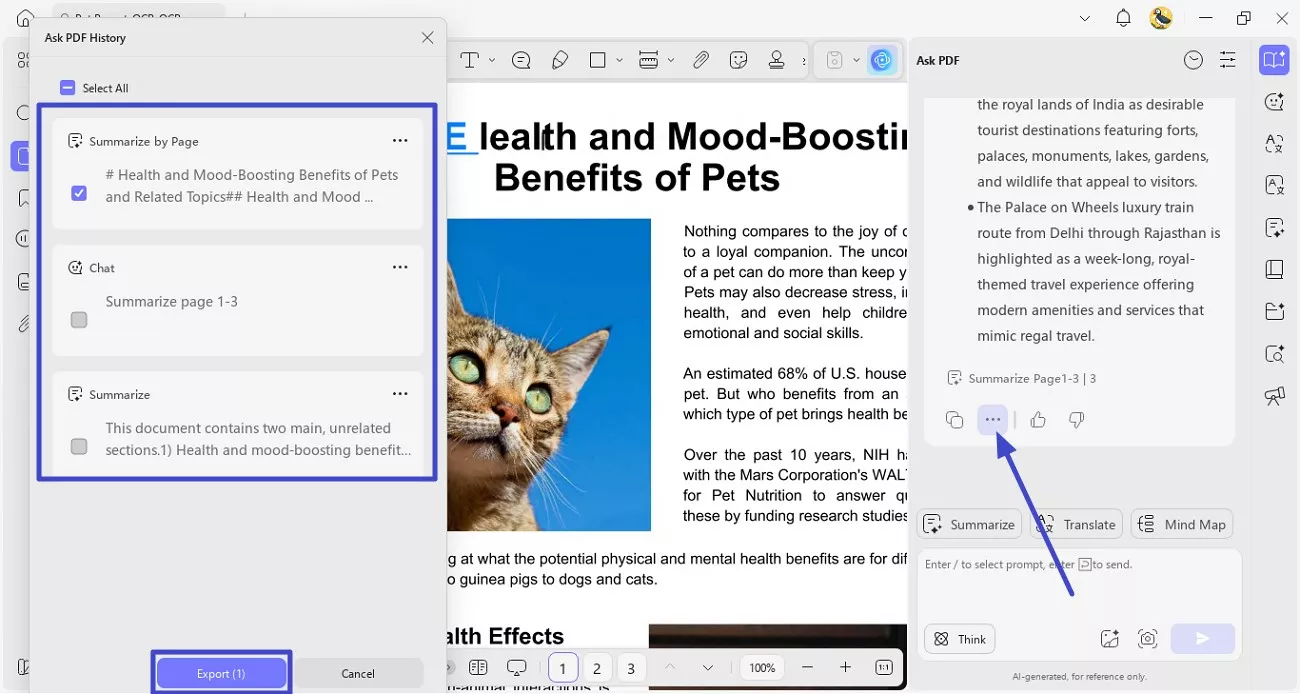
Step 4. Export Generated Summary
After the summary is successfully generated, click the “Three Dots” icon and press the “Export” option. Next, select whether you want to export the summary by page or chat from the options provided and press “Export” to successfully save it to your device.
Conclusion
To sum it up, this article provided a detailed review of Hypotenuse AI PDF Summarizer, covering its features, technical principles, limitations, and overall usability. While it offers a quick way to generate summaries from PDF documents, users looking for more advanced capabilities may prefer a more comprehensive solution.
UPDF AI PDF Summarizer stands out as a strong alternative because it not only summarizes PDFs but also allows users to chat with documents, translate content, and manage files within a complete PDF editing environment.








 Lizzy Lozano
 Engelbert White
 Enola Miller