 UPDF
UPDF
 UPDF for Windows
 UPDF for Mac
 UPDF for iPhone/iPad
 UPDF for Android
 UPDF AI Online
 UPDF Sign
 Edit PDF
 Annotate PDF
 Create PDF
 PDF Form
 Edit links
 Convert PDF
 OCR
OCR PDF to Word
 PDF to Image
 PDF to Excel
 Organize PDF
 Merge PDF
 Split PDF
 Crop PDF
 Rotate PDF
 Protect PDF
 Sign PDF
 Redact PDF
 Sanitize PDF
 Remove Security
 Read PDF
 UPDF Cloud
 Compress PDF
 Print PDF
 Batch Process
 About UPDF AI
 UPDF AI Solutions
 AI User Guide
 FAQ about UPDF AI
 Summarize PDF
 Translate PDF
 Chat with PDF
 Chat with AI
 Chat with image
 PDF to Mind Map
 Explain PDF
 PDF AI Tools
 Image AI Tools
 AI Chat Tools
 AI Writing Tools
 AI Study Tools
 AI Working Tools
 Other AI Tools
 AI Bookmark Generation
 AI Bookmark Summary
 AI Watermark Generation
 AI Background Generation
 AI Sticker Generation
 AI Stamp Generation
 AI Editing Suite
 UPDF Copilot
 AI Page Management
 AI Semantic Search
 PDF to Word
 PDF to Excel
 PDF to PowerPoint
 Enterprise Solution
 Enterprise Sign
 Enterprise AI
 Enterprise Plan
 Enterprise User Guide
 Enterprise Webinar
 Banking
 Healthcare
 Insurance
 Legal
Legal Manufacturing
 Government
 Education Solution
 Customer Stories
 User Guide
 UPDF Tricks
 FAQs
FAQs UPDF Reviews
 Download Center
 Blog
Blog Newsroom
 Tech Spec
 Updates
 UPDF vs. Adobe Acrobat
 UPDF vs. Foxit
 UPDF vs. PDF Expert

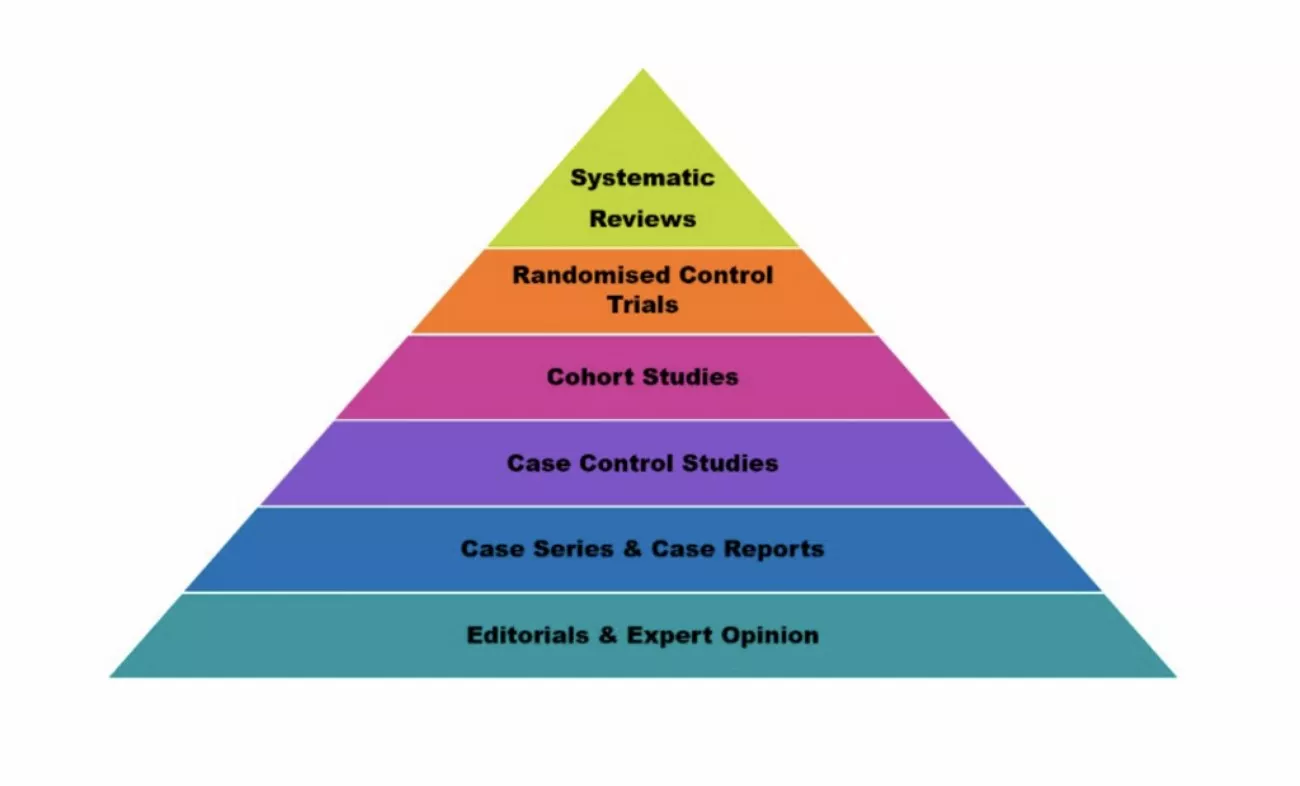
In today's fast-paced research environment, understanding the evidence hierarchy is crucial. This framework ranks study types based on the reliability and strength of their findings, guiding researchers toward the most credible sources. As the volume of scientific literature grows, synthesizing research efficiently has become more critical than ever to make informed decisions. At the top of this hierarchy are Systematic Reviews (SRs) and Meta-Analyses (MAs).
Both are widely regarded as gold standards for summarizing and evaluating multiple studies. While a systematic review carefully collects and critically appraises all relevant studies on a topic, a meta-analysis goes further by statistically combining results. Read the article till the end to learn about Systematic Review vs Meta-Analysis. For those managing large research reports, tools like UPDF and UPDF AI simplify the process. You can download UPDF and try it for free.
Windows • macOS • iOS • Android 100% secure
Part 1. Systematic Review vs. Meta-Analysis: The Core Differences
Before diving into the specific differences between a systematic review and a meta-analysis, it's important to understand what a systematic review is. The section below covers all the essential details about these approaches, which you can use:
What is a Systematic Review?
A Systematic Review is a structured, rigorous research method that identifies, appraises, and synthesizes all relevant studies on a specific research question. It follows predefined protocols to minimize bias, ensures comprehensive literature coverage, and critically evaluates study quality. Unlike traditional reviews, systematic reviews provide reproducible, transparent, and evidence-based conclusions. This serves as a foundational tool for you in evidence-based practice and forms the basis for meta-analyses when quantitative synthesis is required.
What is Meta-Analysis?
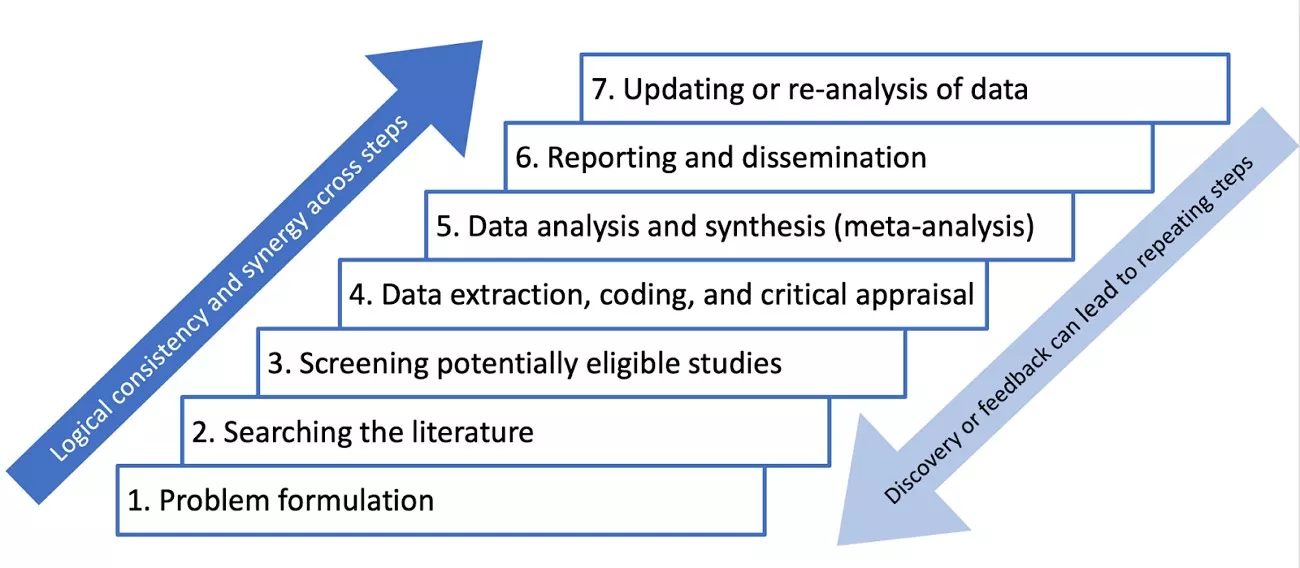
A Meta-Analysis is a quantitative research method that statistically combines results from multiple independent studies addressing the same research question. It follows a systematic review to ensure high-quality, unbiased data and uses mathematical techniques to estimate overall effect sizes. Moreover, it identifies patterns and increases the precision of conclusions. Meta-analysis provides stronger evidence than individual studies alone, enabling you to detect trends and support evidence-based decision-making.
Relationship Between Systematic Review and Meta-Analysis
In systematic review vs. meta-analysis, meta-analysis is typically conducted within the framework of a systematic review. While a systematic review identifies and synthesizes all relevant studies, a meta-analysis goes a step further by statistically combining the quantitative results from those studies.
In other words, every meta-analysis relies on a systematic review for rigorous study selection and quality assessment, but not every systematic review includes a meta-analysis. Together, they provide comprehensive, high-level evidence that strengthens conclusions and supports informed decision-making in research and clinical practice.
Quick-Reference Comparison: Systematic Review vs. Meta-Analysis
To make the difference between meta-analysis and systematic review clearer for you, the table below summarizes their key aspects:
| Feature | Systematic Review | Meta-Analysis |
| Goal | Critically synthesize all relevant studies on a research question. | Statistically combine quantitative results from multiple studies. |
| Data Type | Qualitative and quantitative. | Quantitative only. |
| Method | Comprehensive literature search, study selection, and quality appraisal. | Statistical pooling of effect sizes following systematic review. |
| Output | Narrative summary, evidence tables. | Forest plot, overall effect estimates, statistical analysis. |
Part 2. Step-by-Step AI-Enhanced Workflow (The Integration Phase)
If you are wondering what a system review is, managing a systematic review and meta-analysis involves dozens or hundreds of PDFs containing complex data. Traditional workflows can be time-consuming and prone to oversight, particularly when screening studies. By integrating UPDF and UPDF AI, you can streamline these phases with precision and efficiency. Features like AI Summarizing help quickly grasp core findings.
Moreover, high-precision OCR converts scanned tables into editable data, and annotation tools facilitate cross-team verification. These tools ensure that critical insights are captured accurately while minimizing manual effort.
Step-by-Step Guide for Enhanced Workflow
Below is a step-by-step guide highlighting key challenges and UPDF efficiency solutions:
Step 1: Scoping & Screening (The Eligibility Phase)
Challenge: High volume of PDFs to screen against PICO criteria in systematic review vs. meta-analysis.
Solution: Use UPDF's AI Summarizing feature to instantly extract core findings, saving hours of manual reading. If you do not know how to use the AI summarize feature of UPDF, read the steps provided below:
Step 1. Import the PDF File
Begin by launching the tool on your device and importing the PDF document to the device's interface using the "Open File" option.
Windows • macOS • iOS • Android 100% secure
Step 2. Choose the AI Summarize Feature
Once the document is imported, head to the AI icon on the right and click on it. Choose the "Summarize" option from the toolbar to open the chatbox. Now, copy the text from the document and paste it within the chatbox. Press the "Send "button to let the tool generate the summary.

Step 3. Review the Generated Summary
After the summary is successfully generated, review the key points within the interface and press the "Copy" icon to copy.

Step 2: Quality Assessment & Critical Appraisal
Challenge: Understanding complex methodologies and identifying "Risk of Bias" when learning what a systematic review is.
Solution: Utilize UPDF's AI Explaining tool and Annotation features. Follow the steps provided below to learn how to use this feature of UPDF:
AI Explaining:
Step 1. Import Document Choose AI Explain
Once you have launched the tool on your device and imported the document, head to the "Ask PDF" option on the right. Now, type in the prompt for asking the tool to explain the document.

Step 2. Review and Copy Results
When the results are generated within the chat interface, regenerate them if required. Conversely, press the "Copy" icon to copy and paste the results wherever you want.

Annotate Document:
Step 1. Import Document Access Comments Features
After you have launched the tool, import the document into the tool's interface. Now, click on the "Tools" option located in the top-left corner and press "Comment" from the expanded menu.

Step 2. Select Annotation Option
Next, select the type of annotation from the floating toolbar at the top. For instance, you select the "Highlighter", drag the cursor over the text that you want to highlight. Once done, add the note along the highlight as per your preferences.

Step 3: Systematic Data Extraction
Challenge: Pulling numerical data (Mean, SD, n) from legacy or scanned PDFs when learning systematic review vs. meta-analysis.
Solution: Leverage UPDF's high-precision OCR for accurate extraction. The final step for you is to extract the data from the scanned document. Here is how you can do it with UPDF:
Step 1. Choose OCR Function
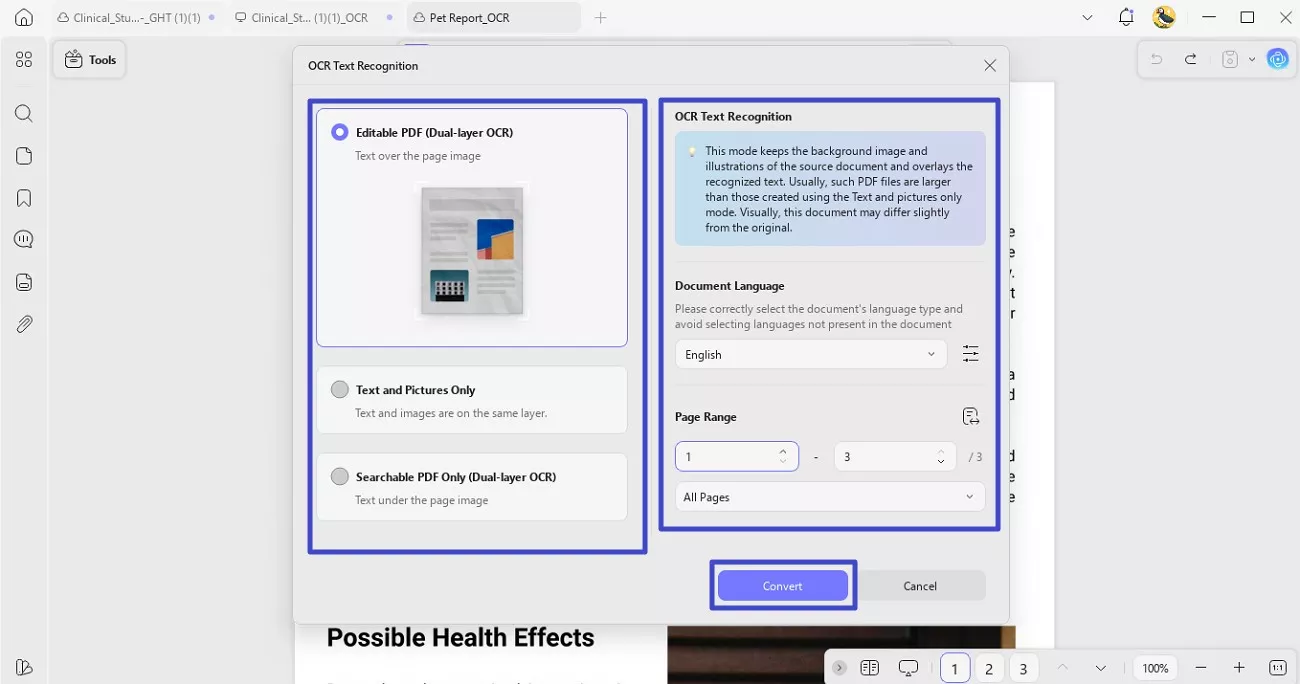
After you have imported the document successfully to the tool's interface, head to the "Tools" section and press the OCR option.

Step 2. Select the Mode and Language
Next, choose the OCR mode from the options provided and select the language of the document. Now, choose the page range and hit the "Convert" button to let the tool extract the data.
Step 3. Review the Extracted data
Once the OCR is performed, the text within the document becomes editable. Extract and edit the data within the document according to your preferences.

Upgrade for Unlimited Research Power
Part 3. Statistical Synthesis: Conducting the Meta-Analysis
After understanding the fundamental differences between a systematic review and a meta-analysis, the next step is to explore how data from multiple studies are quantitatively combined. This statistical synthesis allows you to derive more precise conclusions, assess consistency across studies, and identify overall trends. Key concepts in this process include heterogeneity, which measures variability among study results, and effect sizes, which standardize outcomes for meaningful comparison.
What is Heterogeneity?
It refers to the variation or differences in study outcomes included in a meta-analysis. High heterogeneity indicates that study results differ significantly, requiring careful interpretation and sometimes subgroup or sensitivity analyses to explain variability.
Effect Sizes
A standardized measure that quantifies the magnitude of an intervention or association across studies. Common metrics include Cohen's d, odds ratios, and risk ratios, allowing results from different studies to be directly compared and pooled.
Organizing and managing this large volume of research is essential. Tools like UPDF Cloud help researchers keep their library of analyzed papers accessible, annotated, and structured across devices. This helps in streamlining the entire meta-analysis workflow.
Conclusion
In summary, understanding systematic review vs. meta-analysis is essential for researchers seeking high-quality, evidence-based insights. Systematic reviews rigorously identify and evaluate studies, while meta-analyses quantitatively synthesize data to reveal overarching trends.
Integrating AI-powered tools like UPDF and UPDF AI transforms this complex workflow into a more efficient, accurate, and organized process, from screening and appraisal to data extraction and synthesis. With features like AI Summarizing, OCR, annotation, and cloud collaboration, UPDF ensures that researchers can focus on analysis rather than paperwork. Try UPDF for free to streamline your systematic reviews and meta-analyses with ease and precision.
Windows • macOS • iOS • Android 100% secure













 Enola Miller