 UPDF
UPDF
 UPDF for Windows
 UPDF for Mac
 UPDF for iPhone/iPad
 UPDF for Android
 Nomostar
 UPDF AI Online
 UPDF Sign
 IvyCraft
 Edit PDF
 Annotate PDF
 Create PDF
 PDF Form
 Edit links
 Convert PDF
 OCR
OCR PDF to Word
 PDF to Image
 PDF to Excel
 Organize PDF
 Merge PDF
 Split PDF
 Crop PDF
 Rotate PDF
 Protect PDF
 Sign PDF
 Redact PDF
 Sanitize PDF
 Remove Security
 Read PDF
 UPDF Cloud
 Compress PDF
 Print PDF
 Batch Process
 About UPDF AI
 UPDF AI Solutions
 AI User Guide
 FAQ about UPDF AI
 Summarize PDF
 Translate PDF
 Chat with PDF
 Chat with AI
 Chat with image
 PDF to Mind Map
 Explain PDF
 PDF AI Tools
 Image AI Tools
 AI Chat Tools
 AI Writing Tools
 AI Study Tools
 AI Working Tools
 Other AI Tools
 AI Bookmark Generation
 AI Bookmark Summary
 AI Watermark Generation
 AI Background Generation
 AI Sticker Generation
 AI Stamp Generation
 AI Editing Suite
 UPDF Copilot
 AI Page Management
 AI Semantic Search
 PDF to Word
 PDF to Excel
 PDF to PowerPoint
 Enterprise Solution
 Enterprise Sign
 Enterprise AI
 Enterprise Plan
 Enterprise User Guide
 Enterprise Webinar
 IT
IT Education
 Construction
 Financial Service
 Healthcare
 Insurance
 Legal
Legal Manufacturing
 Government
 Researchers & PhDs
 Solopreneurs & Freelancers
 Lawyers & Legal Professionals
 Real Estate Agents & Brokers
 Education Solution
 Customer Stories
 User Guide
 UPDF Tricks
 FAQs
FAQs UPDF Reviews
 Download Center
 Blog
Blog Newsroom
 Tech Spec
 Updates
 UPDF vs. Adobe Acrobat
 UPDF vs. Foxit
 UPDF vs. PDF Expert

What if you send your resume to dozens of jobs and hear nothing back? Since this is the frustrating part of the job hunt, note that a good resume checker is essential to get past the screening system. Many users have shared this concern on Reddit and have asked others to review their resumes. This is because most scanners only point out what's wrong, not help fix it, and they say:
As this can force you to rewrite your resume, experts on Reddit say that you need to beat ATS keyword filters. In addition, it's crucial to beat weak bullet points into achievements that grab the recruiter's attention. As the best resume checker can cater to this need, review this guide to compare the top 7 options in 2026.
Job Seeker's Routing Matrix: Find Your Perfect Resume Tool in 3 Seconds
If you are not sure where to start or you need a quick answer, review the given situations to pick an ideal resume checker:
| Your Situation | Best Tool to Use |
| I just finished my draft and need an absolute score with a thorough ATS keyword gap analysis. | Resume Worded or Jobscan |
| I have a PDF resume and want to check suggestions AND rewrite/edit the text without ruining my layout. | UPDF |
| I am starting completely from scratch and need a scanner built into a builder. | MyPerfectResume |
| I have one specific job posting and need to match my resume word-for-word against it. | Jobscan |
| I'm a designer or PM who wants my resume to look polished while still passing ATS checks. | Enhancv |
| I'm applying to many different roles and need to track keyword matches across categories. | SkillSyncer |
| I just need to clean up buzzwords, clichés, and long-winded sentences. | CVWolf |
Top List Resume Checker Platform Reviews
Besides the quick answer, go through the 7 mentioned resume checkers if you want to know about them in detail:
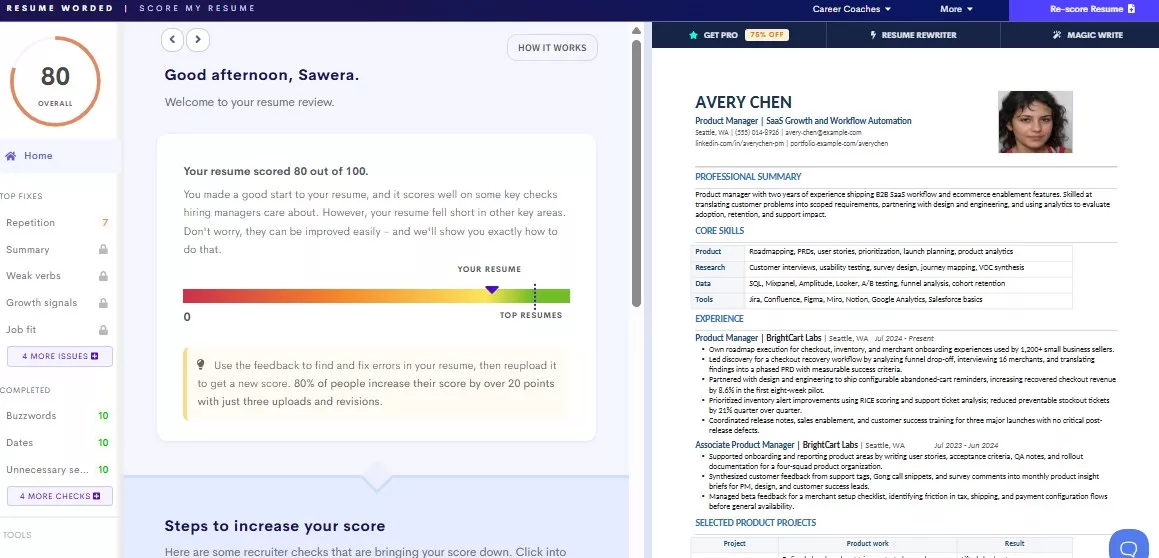
#1 Resume Worded — The Industry Gold Standard for ATS Scoring
Best For:
This tool is the industry gold standard for ATS scoring that helps resumes get through automated screening. After you upload a resume, it scores impact, style, readability, and keyword usage in seconds. You can pick 3 detail levels, get line feedback, and use "Next" or "Previous" suggestions. It also gives LinkedIn tips, but editing features are basic, so major changes need another tool.
Real User Feedback & Reputation
Global Rating
- Trustpilot: 4.5/5
Pros:
- Gives an instant ATS compatibility score.
- The score dashboard is easy to understand.
Cons:
- For unlimited review, you need a paid plan.
- No built-in editing or rewriting tool.
#2 UPDF — The Ultimate Destination for "AI Diagnostics + Live PDF Refinement
Best For: Users who want to edit and fix resume issues in the same window.
When you need a solution to get an AI report to later edit in the same window, UPDF stands out. Its AI tool lets you rewrite or optimize your resume, whether you highlight a single line or a complete PDF. Nonetheless, when you use the Chat With PDF tool, you can adjust the AI tone or writing style for rewrites. Moreover, you can trigger the AI Editing Agent menu to polish highlighted text.
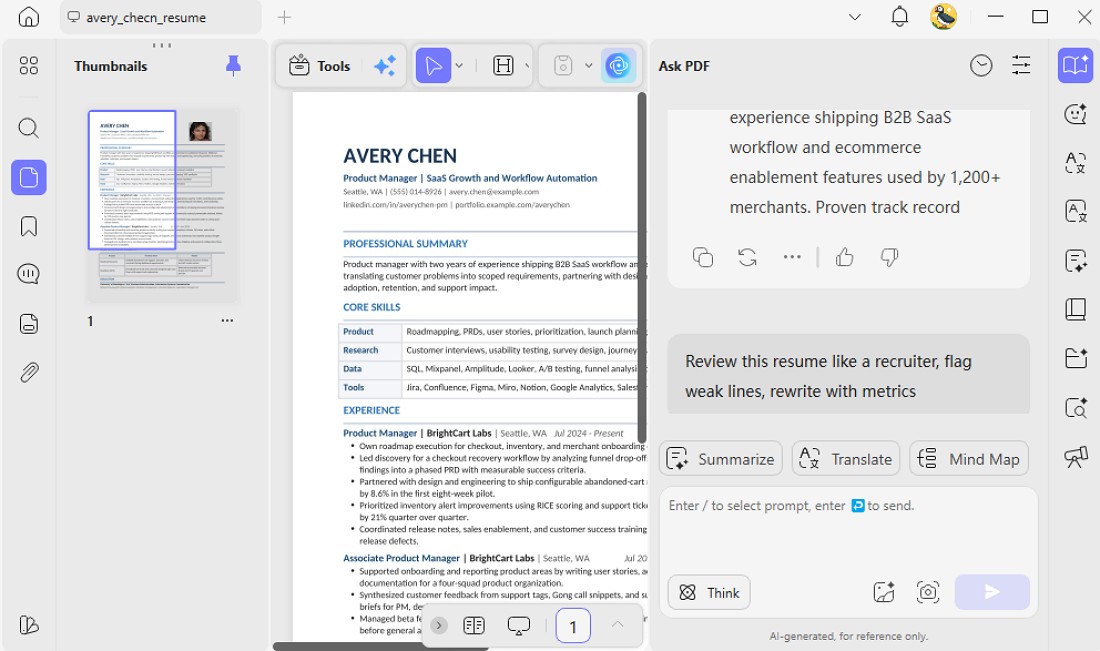
UPDF's AI can also analyze the ATS score and the keyword management and suggest minor or major edits. After the analysis, you can review the report and highlight any weak sentences to rewrite or improve them. Since other PDF AI tools lack this ability, the PDF layout will be preserved, and the steps are guided below in detail:
Global Prompt Engineering
Step 1. Open the PDF resume in UPDF, then click the UPDF AI tab in the top-right corner.
Windows • macOS • iOS • Android 100% secure
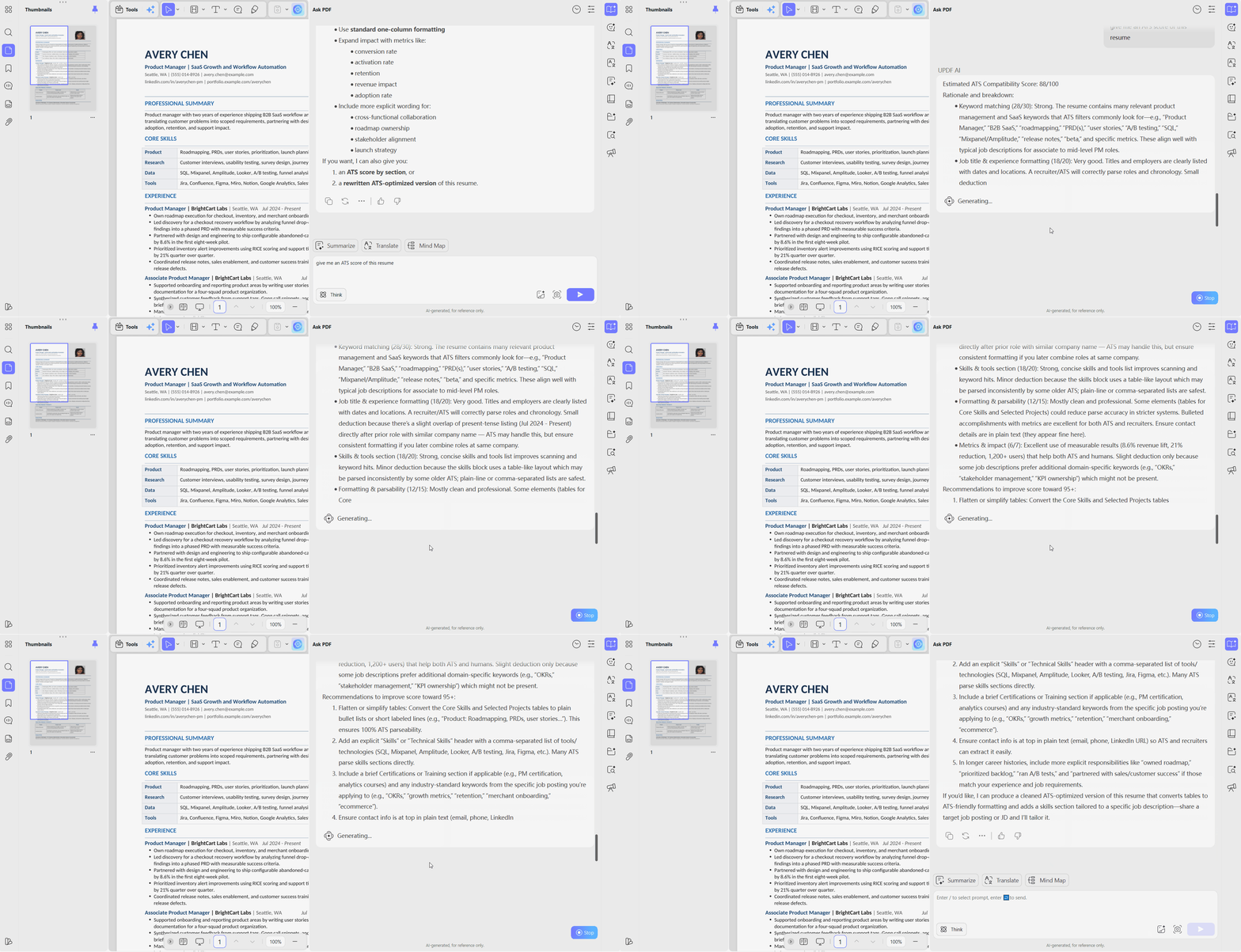
Step 2. In the chat box, ask for the ATS score by giving the prompt "ATS score for this resume" and pressing the "Send" icon.
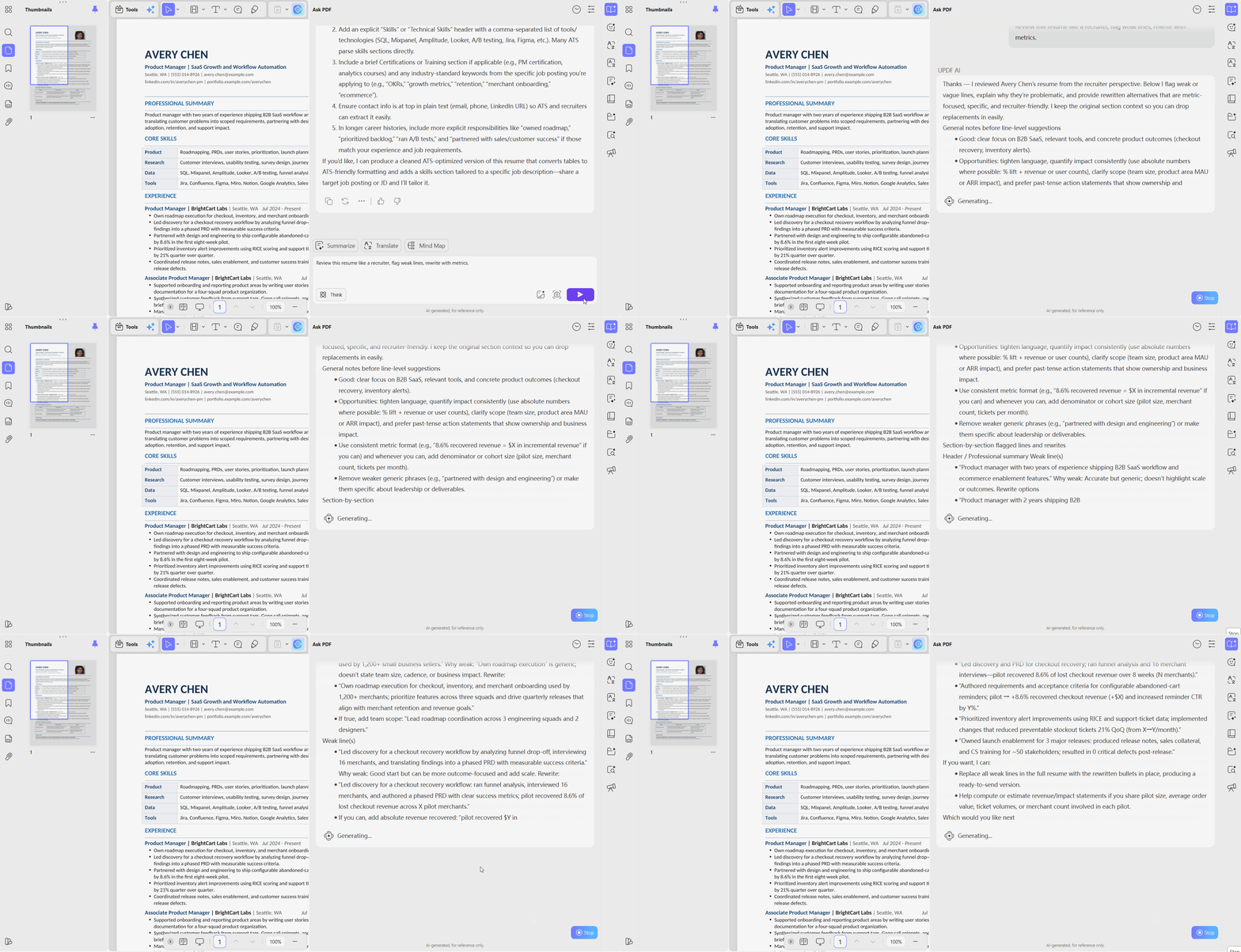
Step 3. After that, type "Review this resume like a recruiter, flag weak lines, rewrite with metrics." prompt for a detailed resume review.
In-Line Document Refinement
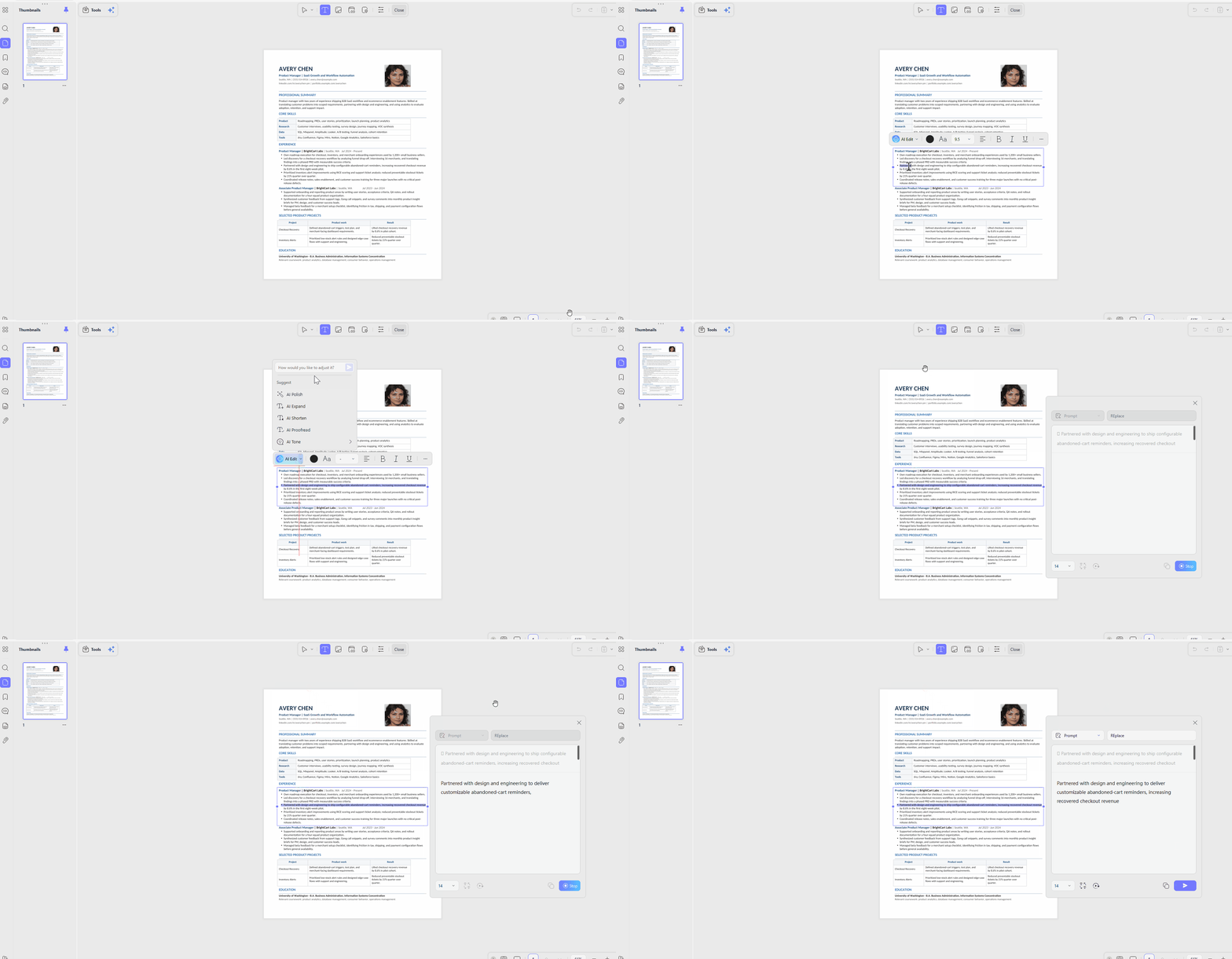
Instructions. After opening a PDF, highlight any weak lines and use the "AI Edit" agent and type "Replace" or "Rewrite" to rewrite them with better clarity and readability. Then, click the "Replace" button to apply the improved sentences to your resume.
Expert Hands-On Review
This setup is a serious time-saver for fixing resumes inside one window. After an AI check, you highlight weak sentences, apply AI Edit, and instantly replace wording. Then switch to the built-in AI resume PDF reader to see your resume as recruiters do.
Value-Add Template Placement
If you have tried any other resume checker and your layout is broken or beyond repair, you can choose the preferred template from UPDF's template center for resume. Since they are free and can be filled out within UPDF, you can easily customize them to suit your experience and career goals.
#3 Jobscan — The Best 1:1 Keyword Matching Optimizer
Best For:
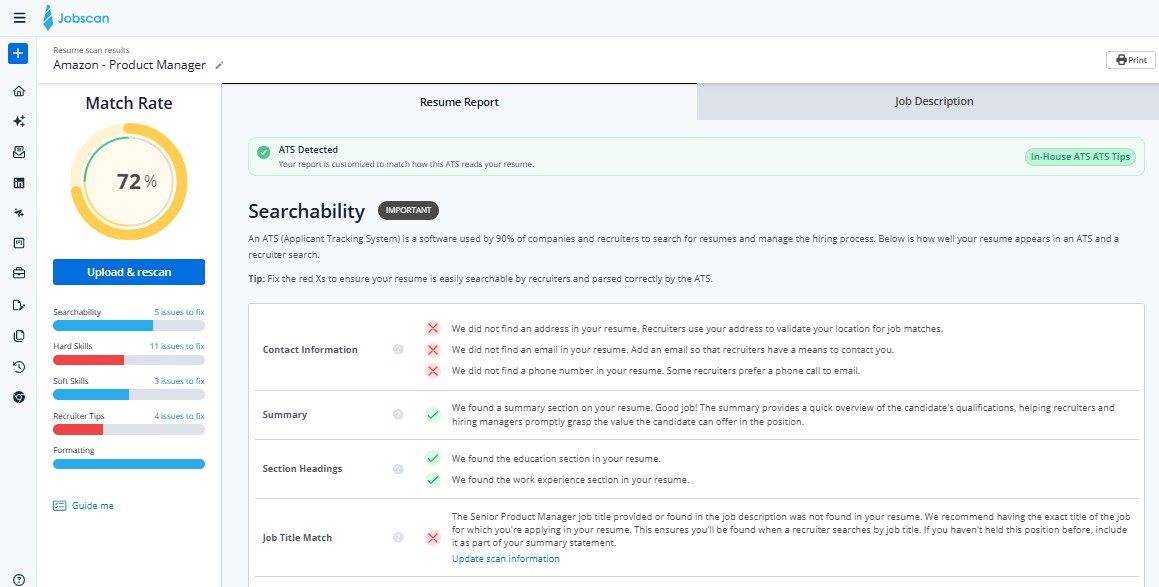
After a resume is scanned against a target role, Jobscan generates a detailed ATS score report and clearly highlights missing keywords. Its AI Optimization tools enable quick edits, letting users "Accept" or "Reject" suggestions, though one‑click changes can sometimes disrupt resume layout. Auto Apply and job‑match features then help locate suitable roles and submit tailored applications with less manual effort overall.
Real User Feedback & Reputation
Global Rating
Trustpilot: 4.3/5
Pros:
- Identifies both hard and soft skill gaps.
- Shows precise percentage for targeted jobs.
Cons:
- No built-in tool to rewrite resume lines.
- Requires a job description for each separate scan.
#4 MyPerfectResume — Best for Structural & Formatting Compliance
Best For:
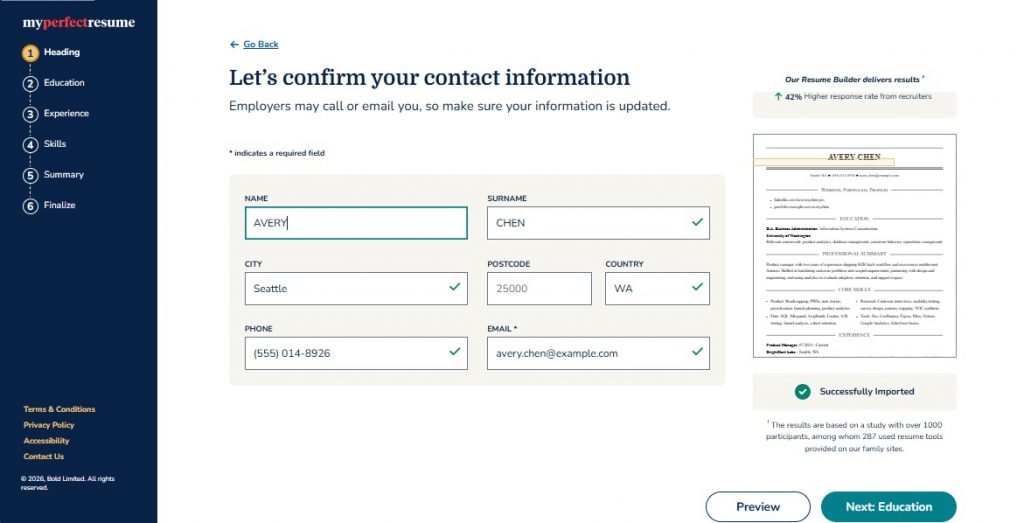
This is a resume builder with pre‑made templates used to create and import resumes in multiple formats. Instead of score‑based reviews, MyPerfectResume surfaces basic suggestions, highlights strong sections, and flags formatting or structure issues during editing. Templates can be customized manually or updated with built‑in content suggestions, which sometimes feel overwhelming or confusing for beginners.
Real User Feedback & Reputation
Global Rating
Trustpilot: 4.6/5
Pros:
- Wide template library for different industries.
- Good to catch structural formatting mistakes.
Cons:
- Resume download is tied to the paid plan.
- Less focused on deep ATS keyword analysis.
#5 Enhancv — Best for Visual Balance & Section Layout Auditing
Best For:
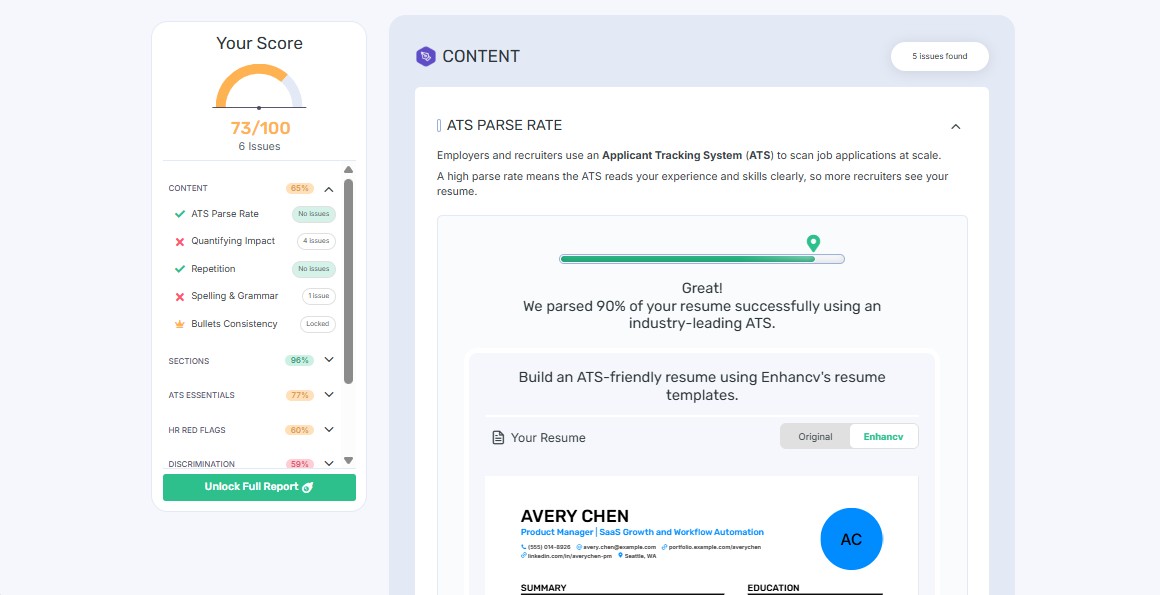
Enhancv lets you either build a resume from scratch or upload an existing file for AI‑powered resume checker feedback. Uploading a PDF or DOC resume up to 2 MB triggers a match report showing ATS score, layout issues, and suggested fixes. After seeing the report, you can tweak sections, apply template changes, and download an updated ATS‑friendly resume on paid plans.
Real User Feedback & Reputation
Global Rating
Trustpilot: 4.6/5
Pros:
- Analyze white space and section visibility well.
- Good for creative and design-focused industries.
Cons:
- The score scan takes too long.
- Can be pricier than the other resume builders.
#6 SkillSyncer — Best for Mass-Volume Applicants Managing Multiple Roles
Best For:
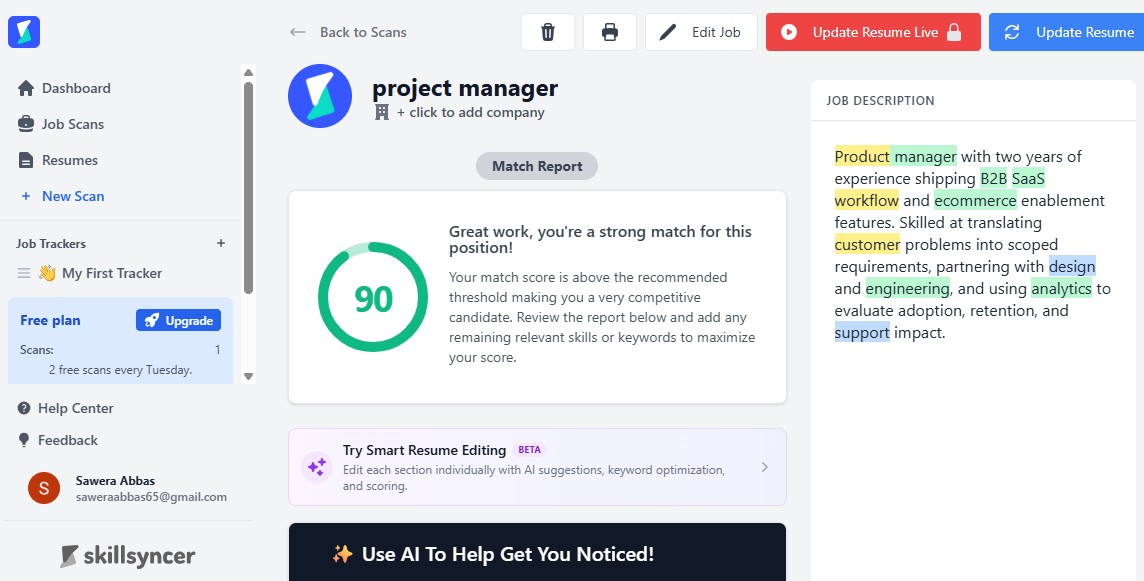
Inside the dashboard, SkillSyncer shows how many job scans and applications have been run through its resume and ATS checker. For each scan, you can upload a resume file, paste in a detailed job description, and add any extra role details. Within seconds, the match report flags missing hard and soft skills, so you can update bullet points before applying.
Real User Feedback & Reputation
Global Rating
Trustpilot: 4.8/5
Pros:
- Good for managing high-volume job applications.
- Tracks keyword matches across multiple job categories.
Cons:
- No tool to edit or rewrite the resume lines.
- Limited free scans before the upgrade.
#7 CVWolf — The Cleanest AI-Powered Grammar & Cliché Sieve
Best For:
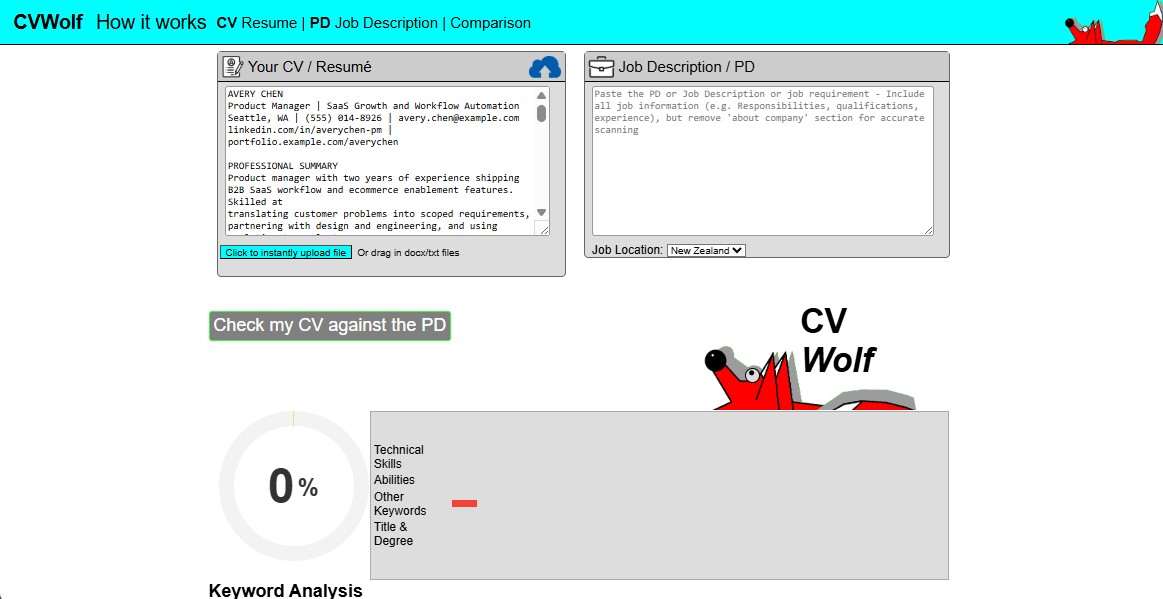
To start, you upload a TXT or PDF resume, paste the job description, and let CVWolf scan everything. Instead of deep ATS scoring, it scans your resume for clichés, buzzwords, passive phrasing, and sentences that weaken impact. The interface shows a distraction‑free text view where you accept, reject, or rewrite flagged lines to improve clarity and tone.
Real User Feedback & Reputation
Global Rating
Trustpilot: 4.2/5
Pros:
- Easy for beginners to understand and use.
- Fast scanning with clear, simple suggestions.
Cons:
- Doesn't check formatting or ATS compatibility deeply.
- No visual or layout analysis included.
Hidden ATS Secrets Scanners Won't Tell You
Now, you can know what the best resume checker is that you can use in 2026. To be cautious, this section further explains some metrics that such checkers may miss, and your resume can be rejected by an ATS.
- Two-Column Layouts Confuse ATS Systems: Medium reports that 75% of resumes are rejected by the ATS before they reach human recruiters. This is because many older ATS systems read resumes from left to right and line by line. So, if your resume has two columns, the system will mix the text from both sides into one confusing sentence. Thus, it's best to stick with a simple, single-column resume layout to make your resume ATS-friendly.
- Graphic Skill Bars Don't Count: If you use the star ratings or progress bars to show your skills, the ATS scan will not read them. To the system, it will look like you have no skills at all, so always write your skills as plain text instead.
- Don't Hide Contact Info in Headers or Footers: When you put the phone number, email, or portfolio links inside the header or footer, it might not look neat. Not just that, many ATS tools skip over these sections completely, and this can make it seem like you didn't add the details. Hence, it's best to include such information in the main body of your resume to improve your ATS score.
The Ultimate Resume Checker Comparison Matrix
Once you adhere to the mentioned precautionary measure, review the mentioned table to pick the best resume checker for you:
| Resume Checker Tool | ATS Quantitative Scoring? | Primary Operational Focus | Software Delivery | Standout Feature | Templates Included | Free Plan Available |
| Resume Worded | Yes | Comprehensive metrics and verb auditing | Web-based | Detailed structural analysis | No | Limited |
| UPDF AI | Detailed text feedback | Real-time, live editing and text rewriting | Secure Desktop | In-line AI text replacement without layout disruption | Yes | Yes |
| Jobscan | Yes | Target-specific job description matching | Web-based | Extracts precise hard/soft skills | No | Limited |
| MyPerfectResume | No (Guided Checks) | Resume building from scratch | Web-based | Pre-written, job-specific bullet phrases | Yes | Limited |
| Enhancv | No (Visual Audit) | Visual balance and design-driven layout | Web-based | Predicts recruiter eye-tracking flow | Yes | Limited |
| SkillSyncer | Yes | Multi-role keyword tracking dashboard | Web-based | Pipeline view for bulk applications | No | Limited |
| CVWolf | No (Text Feedback) | Grammar, cliché, and wordiness cleanup | Web-based | Clean, ChatGPT-style sentence rewrites | No | Limited |
Conclusion & Conversion Loop
The need to pick the right resume checker depends on what you actually need. Tools like Resume Worded and Jobscan are ideal to get a clear numerical score and to compare your resume against the job. MyPerfectResume and Enhancv are helpful if you're starting from scratch and want a polished resume layout.
However, if the issue is not just knowing the issue but fixing it without any layout changes, UPDF AI meets the need. This AI resume PDF reader combines diagnosis and editing in one place and lets you rewrite lines without manual hassle. So, install UPDF to get everything in one place so you won't have to bounce between a scanner and a separate editor.
Windows • macOS • iOS • Android 100% secure








 Enola Miller
 Enid Brown
 Lizzy Lozano
