 UPDF
UPDF
 UPDF for Windows
 UPDF for Mac
 UPDF for iPhone/iPad
 UPDF for Android
 Nomostar
 UPDF AI Online
 UPDF Sign
 IvyCraft
 Edit PDF
 Annotate PDF
 Create PDF
 PDF Form
 Edit links
 Convert PDF
 OCR
OCR PDF to Word
 PDF to Image
 PDF to Excel
 Organize PDF
 Merge PDF
 Split PDF
 Crop PDF
 Rotate PDF
 Protect PDF
 Sign PDF
 Redact PDF
 Sanitize PDF
 Remove Security
 Read PDF
 UPDF Cloud
 Compress PDF
 Print PDF
 Batch Process
 About UPDF AI
 UPDF AI Solutions
 AI User Guide
 FAQ about UPDF AI
 Summarize PDF
 Translate PDF
 Chat with PDF
 Chat with AI
 Chat with image
 PDF to Mind Map
 Explain PDF
 PDF AI Tools
 Image AI Tools
 AI Chat Tools
 AI Writing Tools
 AI Study Tools
 AI Working Tools
 Other AI Tools
 AI Bookmark Generation
 AI Bookmark Summary
 AI Watermark Generation
 AI Background Generation
 AI Sticker Generation
 AI Stamp Generation
 AI Editing Suite
 UPDF Copilot
 AI Page Management
 AI Semantic Search
 PDF to Word
 PDF to Excel
 PDF to PowerPoint
 Enterprise Solution
 Enterprise Sign
 Enterprise AI
 Enterprise Plan
 Enterprise User Guide
 Enterprise Webinar
 Banking
 Healthcare
 Insurance
 Legal
Legal Manufacturing
 Government
 Researchers & PhDs
 Solopreneurs & Freelancers
 Lawyers & Legal Professionals
 Real Estate Agents & Brokers
 Education Solution
 Customer Stories
 User Guide
 UPDF Tricks
 FAQs
FAQs UPDF Reviews
 Download Center
 Blog
Blog Newsroom
 Tech Spec
 Updates
 UPDF vs. Adobe Acrobat
 UPDF vs. Foxit
 UPDF vs. PDF Expert

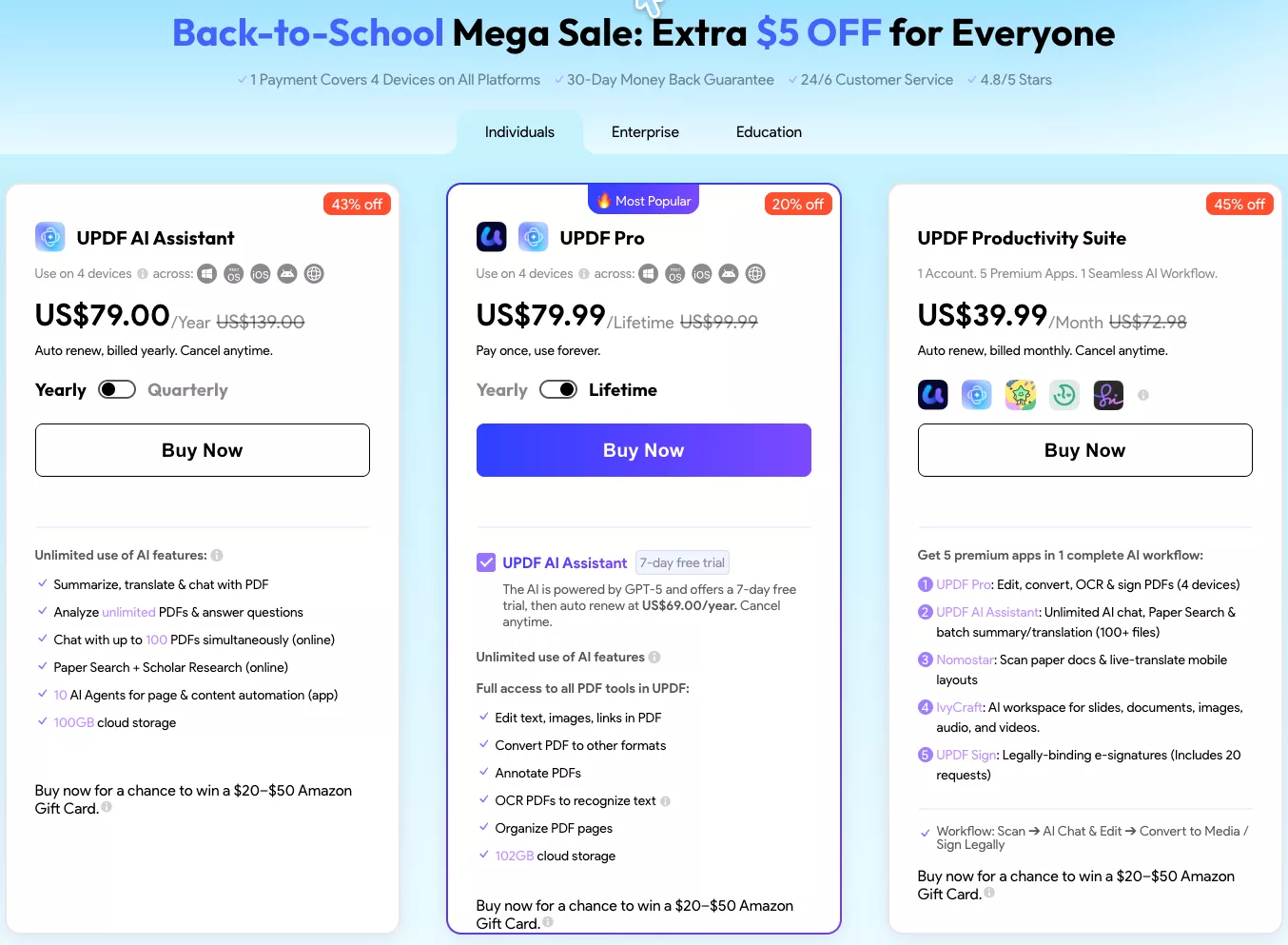
If you're tired of juggling multiple PDF tools or paying recurring subscriptions, the UPDF lifetime deal offers a permanent solution. With a one-time purchase of US$79.99, you get a lifetime license that unlocks all PDF editing, conversion, AI, and cloud features—no renewals, no hidden fees.
In this guide, I'll break down the UPDF lifetime price, what's included in the license, and why the one-time payment model makes sense for long-term productivity in 2026.
Back-to-School Mega Sale: Get an extra $5 OFF the UPDF Pro Lifetime Plan at checkout. Limited time—pay once at US$79.99 and own all PDF tools forever. No subscription required for core Pro features.
Windows • macOS • iOS • Android 100% secure
Part 1. What Is UPDF Lifetime?
The UPDF lifetime deal is a one-time purchase that permanently unlocks all core and premium features of UPDF. With the lifetime plan, users gain access to UPDF's complete toolkit, including PDF editing, annotation, OCR text recognition, file conversion, page organization, compression, form filling, redaction, and AI-powered features.
Unlike traditional PDF software subscriptions, this plan removes all recurring charges, so you pay once and get access to advanced tools forever. These lifetime licenses explicitly include lifetime updates to the software at no extra charge, so you continue to receive new versions and features while the product is maintained.
Key Advantages of UPDF Lifetime
Before I explain how to buy the lifetime subscription, here are the advantages that make this plan a long-term choice for managing PDFs.
- Full PDF Toolkit Unlocked: Edit text, images, and links in PDFs; convert to other formats; annotate; OCR text recognition; organize pages; and get 102GB cloud storage—all included permanently with the lifetime license.
- AI Assistant Trial: The lifetime plan includes a 7-day free trial of the UPDF AI Assistant (GPT-5.6 and Deepseek R1 powered). After the trial, it auto-renews at US$69.00/year if you choose to keep it. You can cancel anytime. This gives you time to test summarize, translate, chat with PDFs, Paper Search, and 10 AI Agents before committing to the AI add-on.
- Cross-Platform: One lifetime license covers 4 devices across Windows, macOS, iOS, and Android.
- Complete PDF Workspace Unlocked: Get advanced editing, annotations, page management, form building, conversions to and from Office formats, OCR, and batch tools all under the lifetime plan.
- Ongoing Feature Growth: Your lifetime plan keeps getting new core PDF features and improvements over time, so the tool stays modern and powerful.
- Built-In Cloud and Sync: Lifetime users get UPDF Cloud storage to sync files and settings, so the same documents are always available across your devices.
- Fixed Ownership: Once you activate the lifetime plan, your access to these tools and updates is permanently tied to your account.
Download UPDF on your device, sign up for a free account, and test the basic features. When ready, choose the Lifetime UPDF Pro plan on the official pricing page, apply any available discount, and activate it on your devices.
Why UPDF Lifetime Is Worth It vs Annual Plan
Before signing up for a subscription, I had two plans in my bucket list that were the UPDF lifetime plan and the Annual UPDF Pro plan. Both offered access to the same core PDF tools, but their pricing structures and long-term benefits differed.
Comparison Between UPDF Lifetime vs. UPDF Annual Plan
To decide which plan suits you the best, I have compared the UPDF annual plan and lifetime plan in terms of price, access, updates, and long-term value. The price below is the regular price, now there's a $10 discount on the website for the new launch of UPDF 2.5!
| Item | UPDF Pro Annual Plan | UPDF Pro Lifetime Plan |
| Price | $49.99 | $79.99 |
| Payment Type | Auto-renew yearly | Single payment, no renewals |
| Duration of Access | Stops when you stop paying | Permanent access |
| Feature Updates | Available only while subscription is active | Included for product lifetime license |
| Budget Planning | Recurring yearly software expense | One-time investment, easier to budget long term |
Note:
Why Choosing UPDF Lifetime Plan Makes More Sense
Having compared both plans side-by-side, now I'll share why UPDF lifetime deal was a more worthy purchase for me.
- The lifetime price quickly balances out after a few years of regular use and removes the need for ongoing renewals.
- If you compare against the UPDF Productivity Suite (US$39.99/month = US$479.88/year), the Lifetime PDF toolkit plus AI Assistant subscription is still significantly cheaper for personal use.
- Access stays active regardless of card changes or billing issues, so important documents are never blocked by payment problems.
- One permanent license keeps the same PDF editor and settings consistent across devices, which avoids constant app switches and reconfiguration.
- Core features continue receiving updates under the same license, so the tool keeps improving without needing separate upgrade purchases.
- Once you activate the lifetime plan, PDF software stops being a recurring decision and allows you to focus fully on actual work.
If you plan to use UPDF for more than a short period and want your tools to stay unlocked, check out the Lifetime plan. On the other hand, Annual Pro plan makes sense if you only need full power for a limited time.
Part 3. UPDF Lifetime for Enterprise
For office or team use, UPDF offers an Enterprise Lifetime Plan at US$129.00 per user. Each user gets a permanent license covering 3 devices across Windows, Mac, iOS, Android, and Web, plus 20GB cloud storage per user. The plan includes a flexible license management dashboard, 24/7 dedicated enterprise support with fast-response SLA, and future feature updates exclusive for enterprise clients. Volume discounts are available—contact sales for a custom quote.
Buy UPDF Enterprise Lifetime Plan Now >>
| Attribute | Details |
| Price | US$129.00/user |
| Payment Type | One-time fee, no renewals |
| Number of Users | 1 to 30+ (volume discounts available) |
| Devices per User | 1 desktop + 2 mobiles at a time |
| Cloud Storage | 20GB per user |
| AI Assistant | Optional add-on at US$69.00/year per user |
| Support | 24/7 dedicated enterprise support + fast response SLA |
| Updates | Future feature updates + exclusive enterprise roadmap |
Part 4. Frequently Asked Questions About UPDF Lifetime
1. What is the difference between UPDF Lifetime and Productivity Suite?
The Individual Lifetime plan (US$79.99 one-time) gives you permanent UPDF Pro PDF tools for personal use. The Productivity Suite (US$39.99/month) is a monthly subscription bundling UPDF Pro, AI Assistant, Nomostar, IvyCraft, and UPDF Sign. For PDF-only users, the individual Lifetime plan is far cheaper long-term.
2. What does the UPDF Enterprise Lifetime Plan include?
The Enterprise Lifetime Plan is US$129.00 per user (was US$159.00) as a one-time fee. Each user gets full PDF editing tools, a flexible license management dashboard, 3 devices across all platforms, 20GB cloud storage, 24/7 enterprise support, and exclusive future updates. The AI Assistant is available as an optional add-on at US$69.00/year per user. Volume discounts apply for teams of 10 or more—contact sales for pricing.
3. Does UPDF lifetime include AI features?
The lifetime plan includes a 7-day free trial of the UPDF AI Assistant. After the trial, it auto-renews at US$69.00/year if you choose to keep it. Core PDF editing, OCR, and conversion are fully included with no extra cost.
4. What is included in the UPDF lifetime license?
Full PDF editing, annotation, OCR, conversion to Office formats, form filling, page organization, redaction, and 102GB cloud storage across 4 devices (Windows, macOS, iOS, Android).
5. Does UPDF lifetime include future updates?
Yes. Lifetime licenses include all core feature updates and version upgrades for the lifetime of the product at no extra cost.
6. Can I get a refund on UPDF lifetime?
Yes. UPDF offers a 30-day money-back guarantee on the lifetime plan, so you can buy risk-free.
Conclusion
To wrap up, this article explored why the UPDF lifetime deal stands out for anyone needing a robust, permanent PDF solution. Unlike juggling subscriptions, a single purchase unlocks powerful editing, conversion, AI, and cloud sync features, all updated for life.
If you want a one-time solution for personal document work, check out the UPDF Individual Lifetime plan. However, if the goal is to equip a whole team with long-term PDF tools, check the Enterprise Lifetime plan designed for multiple users and shared business workflows. Buy the UPDF Lifetime License now to lock in the one-time price before the Back-to-School sale ends.
Windows • macOS • iOS • Android 100% secure









 Enola Miller
 Engelbert White
 Lizzy Lozano