 UPDF
UPDF
 UPDF for Windows
 UPDF for Mac
 UPDF for iPhone/iPad
 UPDF for Android
 UPDF AI Online
 UPDF Sign
 Edit PDF
 Annotate PDF
 Create PDF
 PDF Form
 Edit links
 Convert PDF
 OCR
OCR PDF to Word
 PDF to Image
 PDF to Excel
 Organize PDF
 Merge PDF
 Split PDF
 Crop PDF
 Rotate PDF
 Protect PDF
 Sign PDF
 Redact PDF
 Sanitize PDF
 Remove Security
 Read PDF
 UPDF Cloud
 Compress PDF
 Print PDF
 Batch Process
 About UPDF AI
 UPDF AI Solutions
 AI User Guide
 FAQ about UPDF AI
 Summarize PDF
 Translate PDF
 Chat with PDF
 Chat with AI
 Chat with image
 PDF to Mind Map
 Explain PDF
 PDF AI Tools
 Image AI Tools
 AI Chat Tools
 AI Writing Tools
 AI Study Tools
 AI Working Tools
 Other AI Tools
 AI Bookmark Generation
 AI Bookmark Summary
 AI Watermark Generation
 AI Background Generation
 AI Sticker Generation
 AI Stamp Generation
 AI Editing Suite
 UPDF Copilot
 AI Page Management
 AI Semantic Search
 PDF to Word
 PDF to Excel
 PDF to PowerPoint
 Enterprise Solution
 Enterprise Sign
 Enterprise AI
 Enterprise Plan
 Enterprise User Guide
 Enterprise Webinar
 Banking
 Healthcare
 Insurance
 Legal
Legal Manufacturing
 Government
 Education Solution
 Customer Stories
 User Guide
 UPDF Tricks
 FAQs
FAQs UPDF Reviews
 Download Center
 Blog
Blog Newsroom
 Tech Spec
 Updates
 UPDF vs. Adobe Acrobat
 UPDF vs. Foxit
 UPDF vs. PDF Expert

I’ve been testing AI tools almost every day, and one question keeps coming up: Claude Opus 4.5 vs Gemini 3 — which one should I use? Both models are powerful, both promise better reasoning, and both claim to boost productivity. But when you actually sit down and work with them, the differences become clearer.
In this article, I’ll share my personal experience using Claude Opus 4.5 and Gemini 3. I’ll break down their features, pricing, strengths, and real-world use cases. I’ll also explain how my document workflow improved significantly once I combined these AI models with UPDF AI, especially when converting AI-generated content into clean, professional PDF reports. If you’re trying to choose the right AI model or turn content into clean, professional PDF reports, stick with me until the end—you’ll see why UPDF( dedicated processing tool) became my go-to for editing, converting, and polishing PDF reports.
Windows • macOS • iOS • Android 100% secure
Part 1. Claude Opus 4.5 vs Gemini 3
When I started comparing Claude Opus 4.5 vs Gemini 3, I quickly realized that these two models are built with very different goals in mind. Both are advanced AI systems designed to help with writing, reasoning, coding, and analysis. But once I actually used them in real tasks, the differences became much clearer.
What Is Claude, and What Is Gemini?
Claude is developed by Anthropic, a company that focuses strongly on AI safety, reasoning quality, and long-context understanding. Claude Opus 4.5 is their most capable model so far. From my experience, Claude feels like an AI designed for deep thinking. It’s careful with answers, structured in explanations, and very strong when handling complex or long inputs.
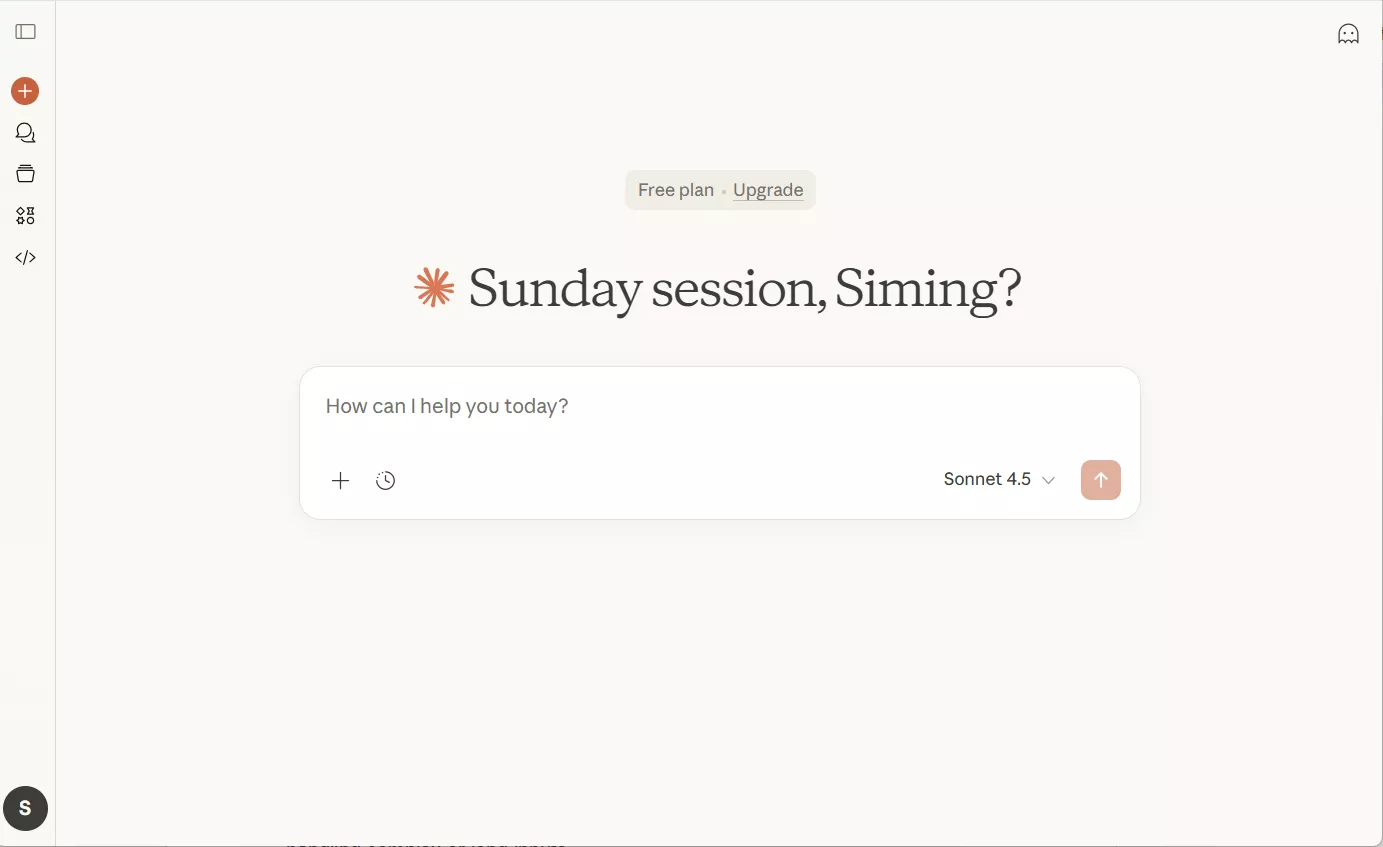
Gemini 3, on the other hand, is Google’s latest AI model, and it’s deeply connected to Google’s ecosystem. Gemini is Google’s multimodal AI. The Gemini 3 Pro launched with a massive 1 million tokens of context window, dominating vision tasks and general knowledge. It’s designed for multimodal reasoning—text, images, audio, and video—making it versatile for creative and analytical work, especially when paired with Google tools like Docs, Sheets, and Drive. When I use Gemini, it feels faster and more flexible.

Improvements in Claude Opus 4.5
Claude Opus 4.5 comes with several noticeable improvements, especially for everyday professional work. One of the biggest upgrades I noticed is reasoning stability. Claude is much better at following instructions without drifting off topic. When I ask for step-by-step explanations, it stays consistent from start to finish.
Another major improvement is long-context handling. Claude Opus 4.5 can process longer documents without losing memory of earlier sections. I have used it to analyze full reports, long PDFs, and even multi-chapter drafts, and it keeps the context surprisingly well.
Apart from that, Opus 4.5 reaches similar outcomes with fewer tokens, upto 65% less in some coding tasks compared to previous versions. It also processes dense visual information, such a diagrams and complex layouts, more accurately. It can build spreadsheets from scratch with working formulas.
For me, these improvements make Claude feel more reliable when accuracy and clarity really matter.
What’s New With Gemini 3?
In November , Google officially launched Gemini 3. It focuses heavily on multimodal intelligence. It can natively process text, images, audio, and video. This is something I noticed right away. For example, Gemini is very good at analyzing screenshots, charts, or mixed media content without needing extra steps.
Another major improvement is massive context capacity. Gemini 3 supports much larger context windows, which makes it ideal for analyzing huge files, logs, or datasets. I have found it especially useful when working with long spreadsheets or combined documents stored in Google Drive. Gemini 3 has also become smarter in solving complex math, deep coding, and expert technical reasoning abilities.
In simple terms, Claude feels thoughtful and expert, like a research partner, while Gemini feels more like a powerful everyday general AI assistant.
Accessing both tools is straightforward:
- I use Claude Opus 4.5 through https://claude.ai/new
- I access Gemini 3 via https://gemini.google.com/app
Both are browser-based, so I didn’t need to install anything. Gemini also integrates directly into Google services, which can be a big advantage if you already use Google Docs and Gmail.
Pricing Plans Comparison
Pricing plays a big role in choosing between these two models, especially for professionals.
Here’s a simplified comparison based on current plans:
| Feature | Claude Opus 4.5 | Gemini 3 |
| Free Access | Limited | Limited |
| Paid Plan | $20/month (Claude Pro) | $20/month (Google One AI) |
| API Input Cost | $5 per 1M tokens | $2 per 1M tokens |
| API Output Cost | $25 per 1M tokens | $12 per 1M tokens |
| Best For | Deep Work | Everyday use |
| Mothly Cost | Higher | Slightly lower |
When it comes to Opus 4.5 pricing, Claude is clearly positioned as a premium model. It costs more on the API side, but the trade-off is stronger reasoning and better long-form performance.
Market Presence and Adoption
From a market perspective, both models are growing fast, but in different ways. I have found that the competition between Claude and Gemini isn’t just about technical specs or pricing — it’s also about real-world adoption, growth trends, and how businesses and users are responding to each platform.
Claude models are gaining significant traction in enterprise AI use, especially among developers and technical teams.
A major market survey by technology.org reported that Claude holds around 32% of the enterprise AI market, overtaking even OpenAI in some businesses. Claude dominates in developer-focused use cases, especially coding tasks. In these categories, Claude commands over 40% market share.
However, Anthropic Claude holds a global share of approximately 2.1% in the Language Models category. Its enterprise and professional footprint is much larger and growing.
Claude has strong adoption among:
- Developers
- Writers
- Researchers
- Technical professionals
Many companies use Claude for internal documentation, coding assistance, and analysis tasks.
In Contrast, Gemini benefits massively from Google’s ecosystem. According to market data, Gemini adoption is accelerating quickly (averages around 650 million monthly active users, having grown rapidly from about 450 million users earlier in the year) because it’s built into Google products that millions of people already use, including AI Overviews in search, the Gemini app, and integrations in Gmail, Docs, and other Google services. This gives Gemini a huge advantage in reach and visibility.
In short, Claude excels in enterprise, technical, and professional use cases such as businesses, developers, and teams that need deep reasoning, coding accuracy, and reliable performance. Gemini excels in consumer adoption and ecosystem integration.
The difference in positioning makes Claude and Gemini appeal to somewhat different audiences, even though they are both advanced AI models.
Part 2. Why is Claude Opus 4.5 the best model in the world (claimed by Claude)?
Claude openly claims that Opus 4.5 is the best model in the world for coding and hard tasks right now. After using it extensively, I understand why they say that.
1. Frontier Reasoning and Problem Solving
First, its reasoning feels more reliable. Claude Opus 4.5 shows very deep logical reasoning compared to earlier models. When I ask complex questions like drafting a research paper or debugging code, it produces structured, reliable outputs. Claude also explains how it arrives at an answer. That builds trust for me. That’s not common in all large models.
2. More Efficient Yet More Capable
One of the most impressive points from the official system information is how Opus 4.5 balances the tradeoff between power and cost. It uses fewer computing tokens for many tasks — meaning it’s more efficient — while still performing at or above peak benchmarks on coding, reasoning, and autonomous task execution. For developers and heavy users like me, that translates into faster results and lower cost per task compared with past model generations.
3. Strong Coding and Agent Capabilities
In real-world engineering tests (like SWE-bench Verified used to measure the ability of AI models), Claude Opus 4.5 scores extremely high with a score of 80.9% — above many competing AI models, which measures its ability to solve real-world GitHub issues.
In my own testing, I saw that it can generate, analyze, and refactor code well, even across multiple files and contexts without getting lost. When I gave both models a buggy Python script, Claude didn't just fix the bug but refactored the entire code to be more efficient.
4. Long-Context Understanding and Multistep Tasks
Unlike some models that falter once you give them long documents, Claude Opus 4.5 handles extended context very well. Whether I have pasted entire reports, research papers, and PDFs, Claude still keeps track of everything without getting confused a major improvement over earlier models.
Key strengths I noticed:
- Very strong logical reasoning and problem-solving
- Fewer hallucinations compared to earlier models
- It maintains a consistent tone, logic, and structure
This doesn’t mean it’s perfect; other models may outperform in certain narrow areas or for specific use cases, but for dependent tasks that require more reasoning, coding, and professional workflows, Claude Opus 4.5 is extremely strong.
Part 3. When To Use Claude Opus 4.5 And Gemini 3?
The main question that arises is When to Use Claude Opus 4.5 and Gemini 3? Let me tell you that it is less about which model is “better” overall and more about when each one fits your actual work. After going through hands-on tests, watching detailed walkthroughs, and reading real user comments and opinions, I think I have noticed some major yet interesting points.
When Claude Opus 4.5 Is The Better Choice
From my experience and from what many users pointed out in the discussions, Claude Opus 4.5 performs best in scenarios where depth and structure matter more than speed. Many users think that Claude is a little calmer and helps with long-form tasks.
Another strong use case is UI and frontend generation. When asked to generate frontend layouts, Claude’s output included stylish and smooth transition elements.
Claude also excels in professional environments where accuracy matters, such as academic drafts and client-facing reports. If I know I’ll be refining the output into a polished PDF or long document later, Claude is usually my first choice.
When Gemini 3 Makes More Sense
Gemini 3 clearly stands out when speed, flexibility are your main focus. Because I have noticed that when I need quick summaries or fast answers, it does not require a detailed prompt.
It’s also a solid choice when working across Google’s ecosystem, especially for users already embedded in Docs, Sheets, or Slides.
However, Gemini’s outputs can sometimes be lighter on detail or skip deeper explanations. That doesn’t make it weaker—it just means it’s better suited for rapid workflows, not necessarily final drafts.
Part 4. A Practical Walkthrough: Actual Things I can do
After understanding the model and theoretical strengths of Claude Opus 4.5 and Gemini 3, I wanted to move beyond benchmarks and explore how these models perform in real-world usage. To do this, I followed a series of tests that I normally use AI models for. The focus here was on generating code for me (such as code for the frontend), clarity of output, following instructions, and consistency across multiple prompts.
Test 1: Frontend UI Generation Using Claude Opus 4.5 Vs Gemini 3
For the first real-world test, I focused on something that I have tried using other models in the past: frontend UI generation. Both Claude Opus 4.5 and Gemini 3 were given the same prompt to generate a basic frontend layout.
When I reviewed the output from Claude Opus 4.5, the result felt noticeably more polished. The generated frontend included smoother transition effects, better spacing consistency, and more thoughtful use of interactive elements such as hover states, button animations, and subtle UI feedback.
Gemini 3 also produced a functional frontend layout, and it performed well in terms of speed and basic responsiveness. However, it lacked some refinement in transition elements and interactive behaviors. For example, hover effects and animations were simpler, etc.
Test 2: Instruction Following And Output Control
Next, I tested how well each model follows detailed instructions. That is what I have learned from many YouTubers when they try to compare different AI models. So, I deliberately included constraints such as word limits, tone requirements, and formatting rules. Claude Opus 4.5 showed stronger results. It respected structure, tone, and constraints with more focus. This consistency is especially valuable when generating long-form reports or client-ready documents.
Test 3: Complex Reasoning And Explanation Depth
There is a thinking mode in both these models, and now there is a test to check which models do complex reasoning and better thinking. Claude Opus 4.5 immediately stood out with a more structured breakdown. I noticed that it tends to think in layers, explaining not just the “what” but also the “why” behind each step. This makes Claude feel more suitable for analytical writing, research assistance, and technical documentation.
Gemini 3, on the other hand, responded faster and delivered a more concise explanation, but from my perspective, Gemini 3 is better optimized for quick insights.
Part 5. Creating Polished PDF Reports Using UPDF With Claude Or Gemini
Once the AI-generated content is ready, the next challenge is transforming it into a professional, well-structured PDF. This is where UPDF becomes extremely valuable. I often use Claude or Gemini to generate content drafts and then rely on UPDF to finalize, organize, and polish the output into professional reports.UPDF allows users to take AI-generated text, spreadsheets, or documents and convert them into clean, readable, and shareable PDFs.
Windows • macOS • iOS • Android 100% secure
Let me take you through some steps with an illustration showing how to do it:
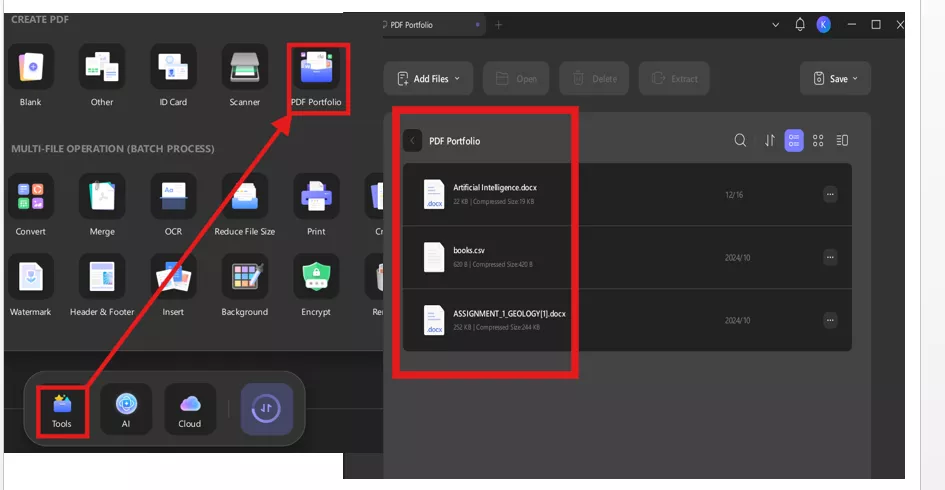
A. Create PDF Portfolio
Creating a PDF portfolio in UPDF allows me to combine multiple AI-generated documents into a single, professional package. This is especially useful when I generate reports using Claude or Gemini across different files. UPDF preserves formatting while keeping everything organized in one portfolio. It’s best because it can complete this process in a single go.
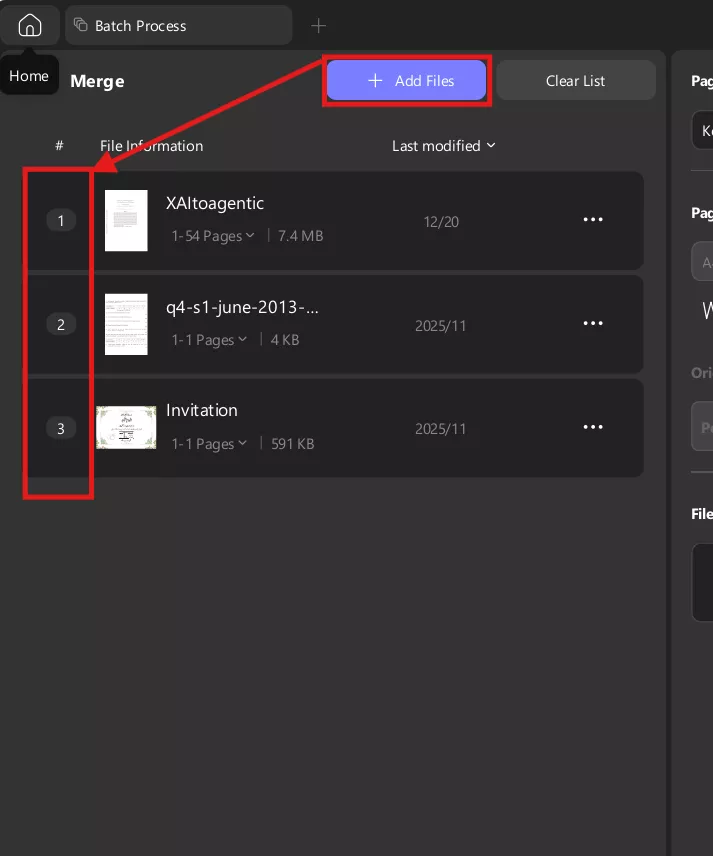
B. Batch Merge
Batch Merge saves significant time when I work with multiple AI outputs. Instead of merging files one by one, UPDF lets me combine dozens of documents at once. This is perfect when Claude or Gemini generates separate sections that need final assembly. The process is fast, accurate, and formatting remains intact.
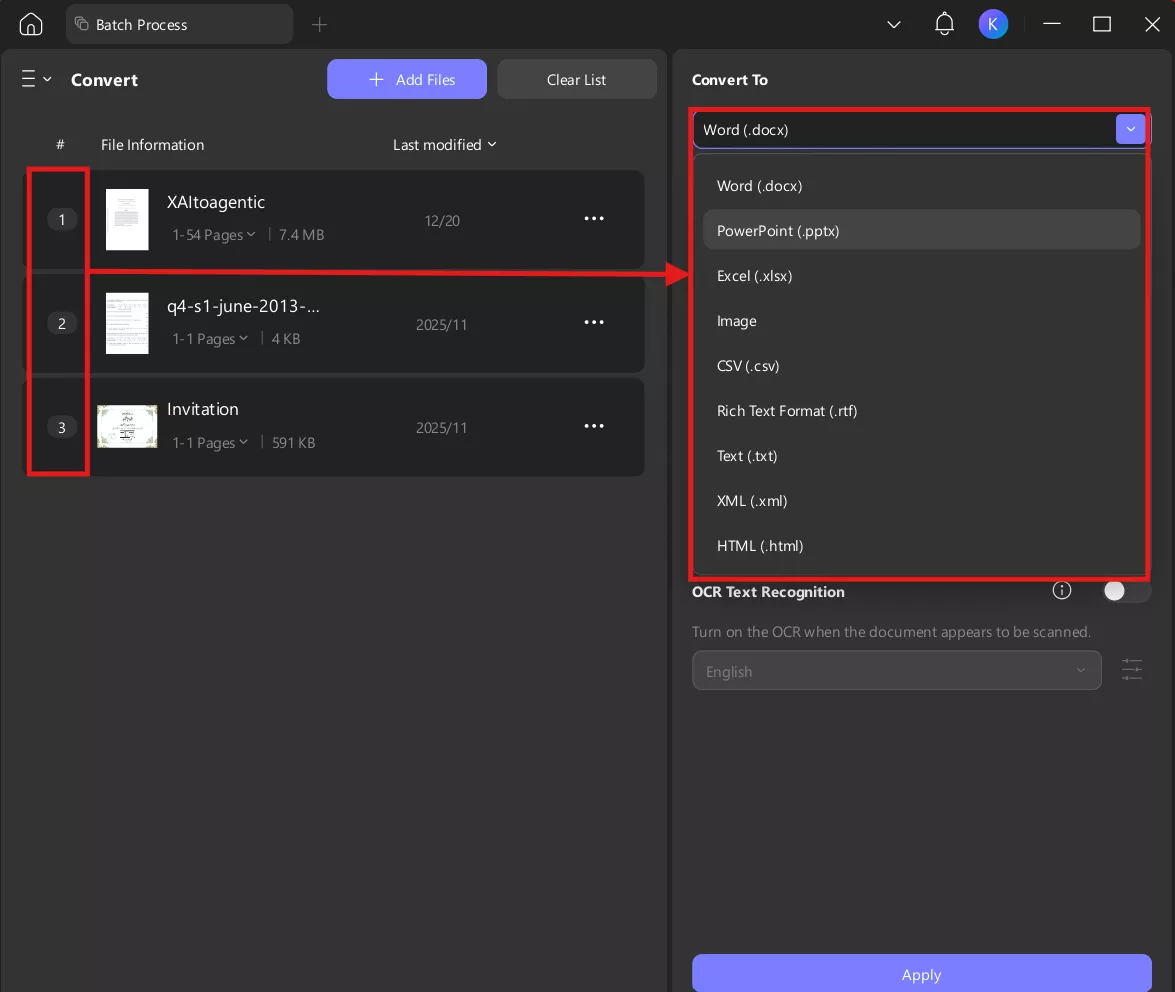
UPDF allows conversion from Word, Excel, PowerPoint, and images into PDF. I often generate drafts using AI in DOCX format and then convert them instantly. The conversion quality is high, with layouts preserved accurately. This ensures my model-generated content looks awesome
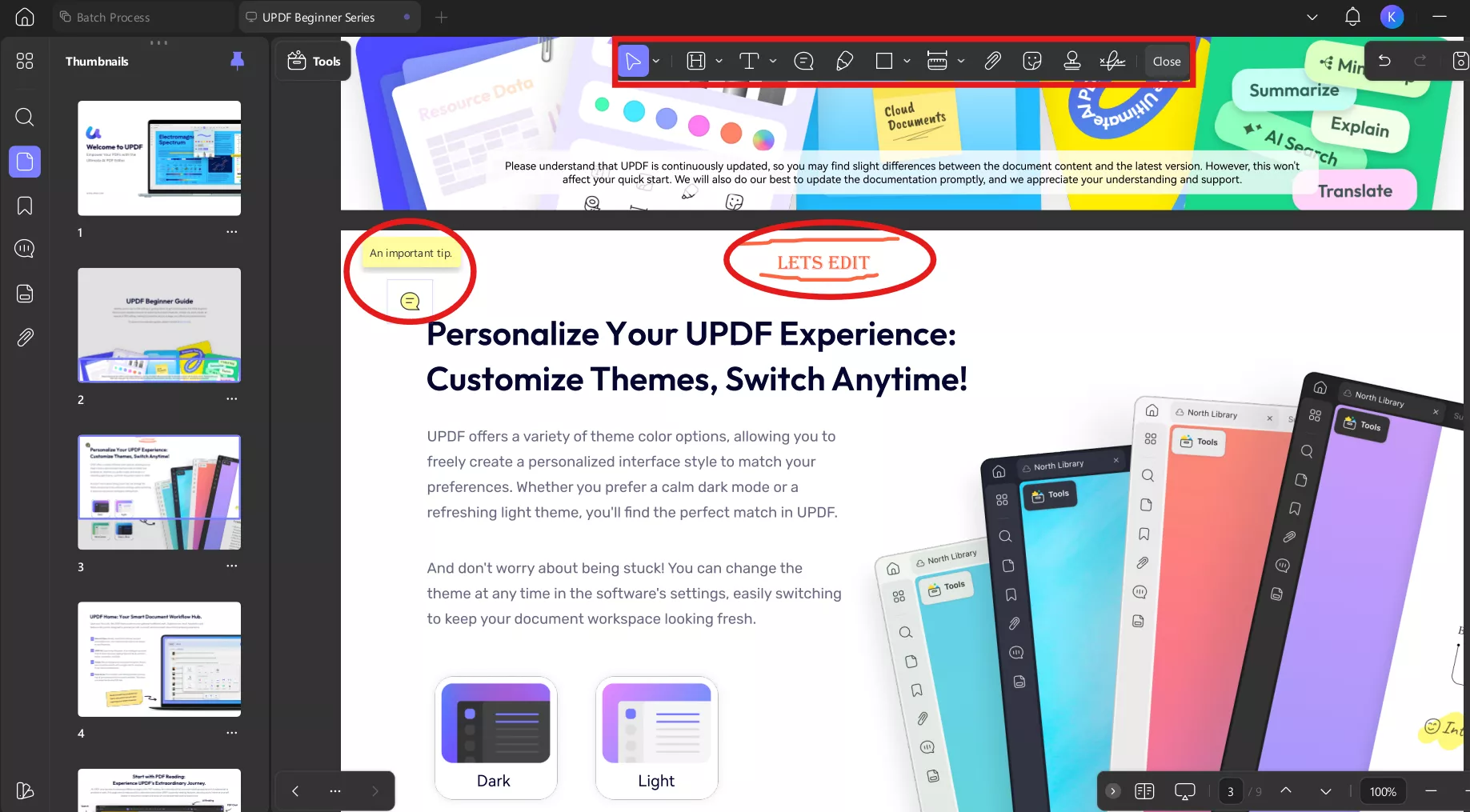
D. Edit PDFs
Editing PDFs becomes an irritating step after you have generated content. Because PDF editing is mostly very limited. However, UPDF lets me directly edit text, adjust formatting, and fix errors inside PDFs. This avoids the need to go back to source files repeatedly. Before this, I used multiple third-party apps for different purposes, but now UPDF has made everything easy.
E. Organize PDFs
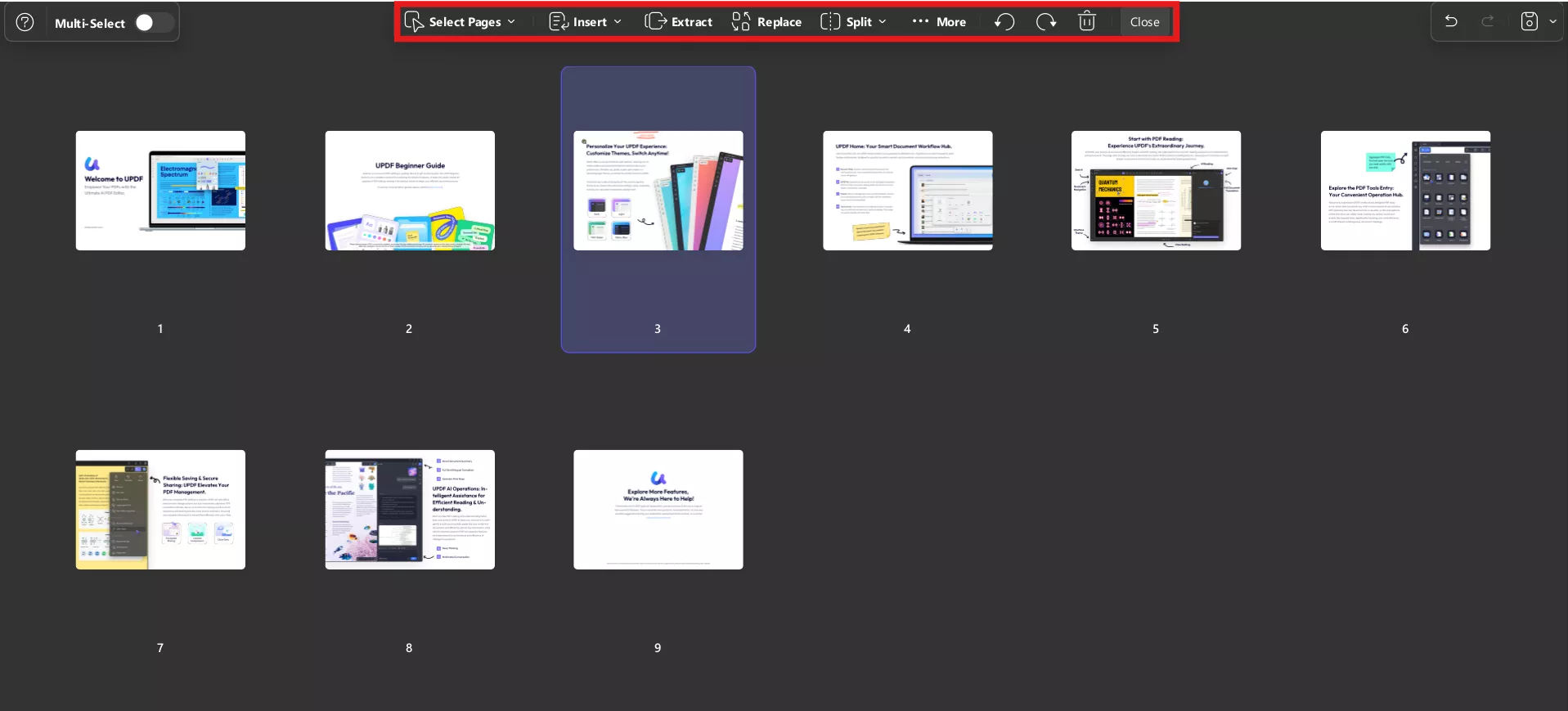
UPDF makes it easy to reorder pages, delete unnecessary sections, or insert new pages. When working with long reports created using Claude or Gemini, this feature helps maintain logical flow. I can quickly restructure content without breaking formatting. It’s ideal for final document refinement.
F. Add Header And Footer
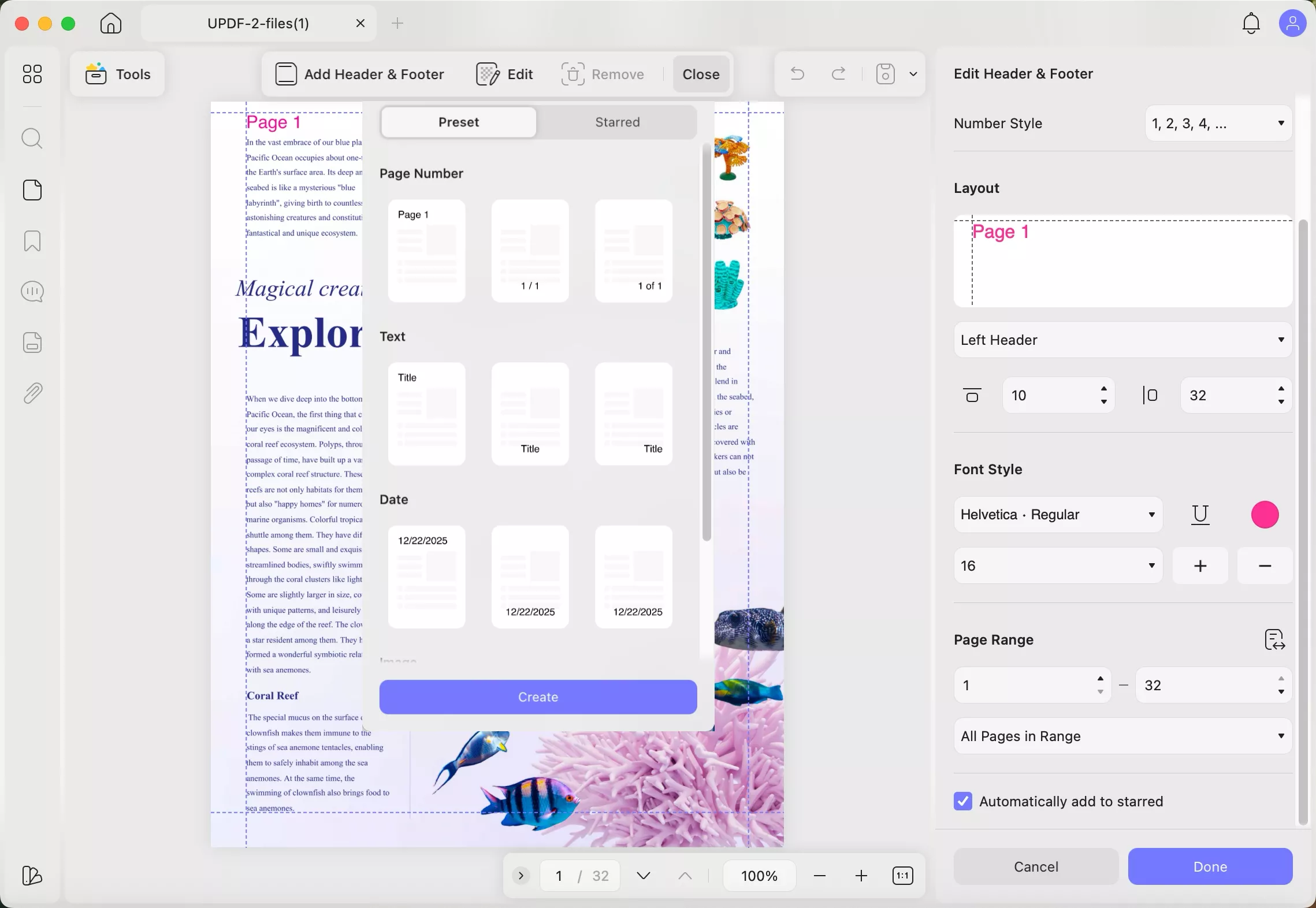
Adding headers and footers looks professional. I often include document titles, dates, or page numbers using UPDF. This is particularly useful for AI-generated reports that need a formal presentation. The process is simple, so don't worry about it.
G. Add Watermark
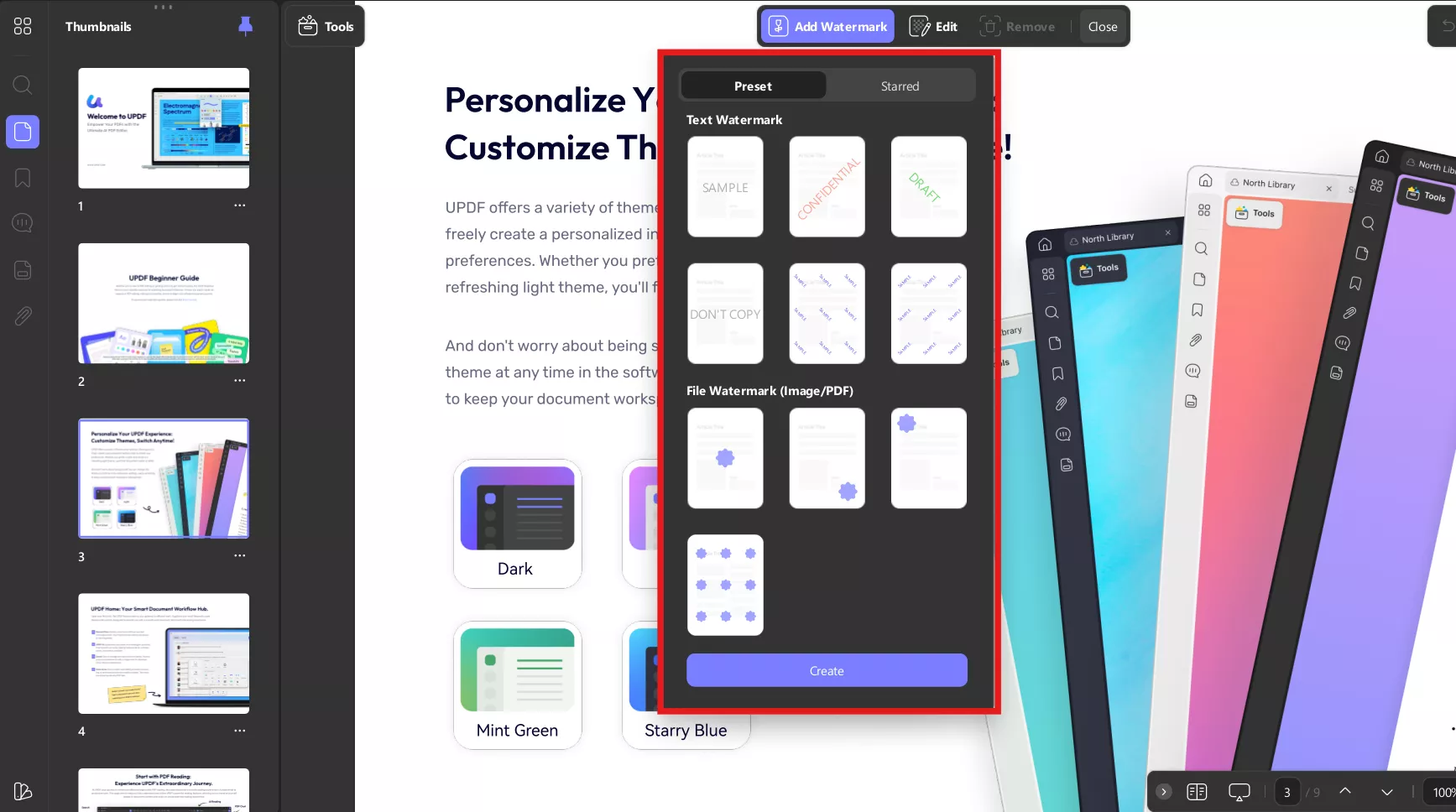
Watermarks help protect intellectual property. When sharing AI-generated documents, I add watermarks such as “Draft” or “Confidential” using UPDF. This ensures content is clearly labeled and protected. It may seem a small task, but it is very helpful from my personal experience.
Windows • macOS • iOS • Android 100% secure
Conclusion
From my experience, Claude Opus 4.5 performs really well in structured reasoning, instruction accuracy, and professional writing, while Gemini 3 is great in speed, creativity, and conversational tasks. However, I have also shared some technical tests so you can compare them more easily. The real power emerges when these AI tools are combined with UPDF to transform drafts into polished, client-ready PDFs. I strongly recommend UPDF whenever I encounter PDF-related tasks.
Windows • macOS • iOS • Android 100% secure
Disclaimer
This article is intended for informational and educational purposes. The opinions presented are based on testing and publicly available data as of January 2026. Readers should perform their own research before making any purchase decisions.







 Lizzy Lozano
 Engelbert White


 Enya Moore