UPDF
UPDF
 UPDF for Windows
 UPDF for Mac
 UPDF for iPhone/iPad
 UPDF for Android
 UPDF AI Online
 UPDF Sign
 Edit PDF
 Annotate PDF
 Create PDF
 PDF Form
 Edit links
 Convert PDF
 OCR
OCR PDF to Word
 PDF to Image
 PDF to Excel
 Organize PDF
 Merge PDF
 Split PDF
 Crop PDF
 Rotate PDF
 Protect PDF
 Sign PDF
 Redact PDF
 Sanitize PDF
 Remove Security
 Read PDF
 UPDF Cloud
 Compress PDF
 Print PDF
 Batch Process
 About UPDF AI
 UPDF AI Solutions
 AI User Guide
 FAQ about UPDF AI
 Summarize PDF
 Translate PDF
 Chat with PDF
 Chat with AI
 Chat with image
 PDF to Mind Map
 Explain PDF
 PDF AI Tools
 Image AI Tools
 AI Chat Tools
 AI Writing Tools
 AI Study Tools
 AI Working Tools
 Other AI Tools
 PDF to Word
 PDF to Excel
 PDF to PowerPoint
 Enterprise Solution
 Enterprise Sign
 Enterprise AI
 Enterprise Plan
 Enterprise User Guide
 Enterprise Webinar
 Banking
 Healthcare
 Insurance
 Legal
Legal Manufacturing
 Government
 Education Solution
 Customer Stories
 User Guide
 UPDF Tricks
 FAQs
FAQs UPDF Reviews
 Download Center
 Blog
Blog Newsroom
 Tech Spec
 Updates
 UPDF vs. Adobe Acrobat
 UPDF vs. Foxit
 UPDF vs. PDF Expert

Koncile is an AI-powered document extraction tool built for finance and audit workflows. It converts invoices, statements, and reports into structured data you can validate and export. Keep reading to see how I set it up, verify key fields, and generate audit-ready outputs.
Moreover, efficient office operations need extraction plus document control, so UPDF fits perfectly beside Koncile. I review files, add notes, and package records in UPDF before final submission. Download UPDF to keep every report organized, searchable, and ready for auditors.
Windows • macOS • iOS • Android 100% secure
Part 1. What Is Koncile
Koncile is an AI-powered Intelligent Document Processing platform designed to turn unstructured files into structured data. It combines an OCR engine with large language models, aiming to go beyond “character reading” to understand layouts and fields. The platform is positioned to handle documents such as invoices, bank statements, contracts, quotations, and identity documents, where data is in unpredictable formats.
What makes Koncile AI different from basic OCR tools is its emphasis on extraction schemas and structured outputs. Instead of producing only text, Koncile supports exporting extracted results to formats teams can actually use, such as CSV/XLSX and JSON.
In practice, Koncile OCR targets the “last mile” problem, like extracting fields and line items from PDFs and images without manual retyping. That is why it is often used when tables vary widely between suppliers, or when documents arrive as scans and screenshots.
Part 2. What Is Koncile Used For
I think of Koncile as a “data engine” for finance workflows. Its core value shows up when a team needs consistent extraction at scale and wants to feed downstream tools. Thus, below are a few common use cases of the Koncile:
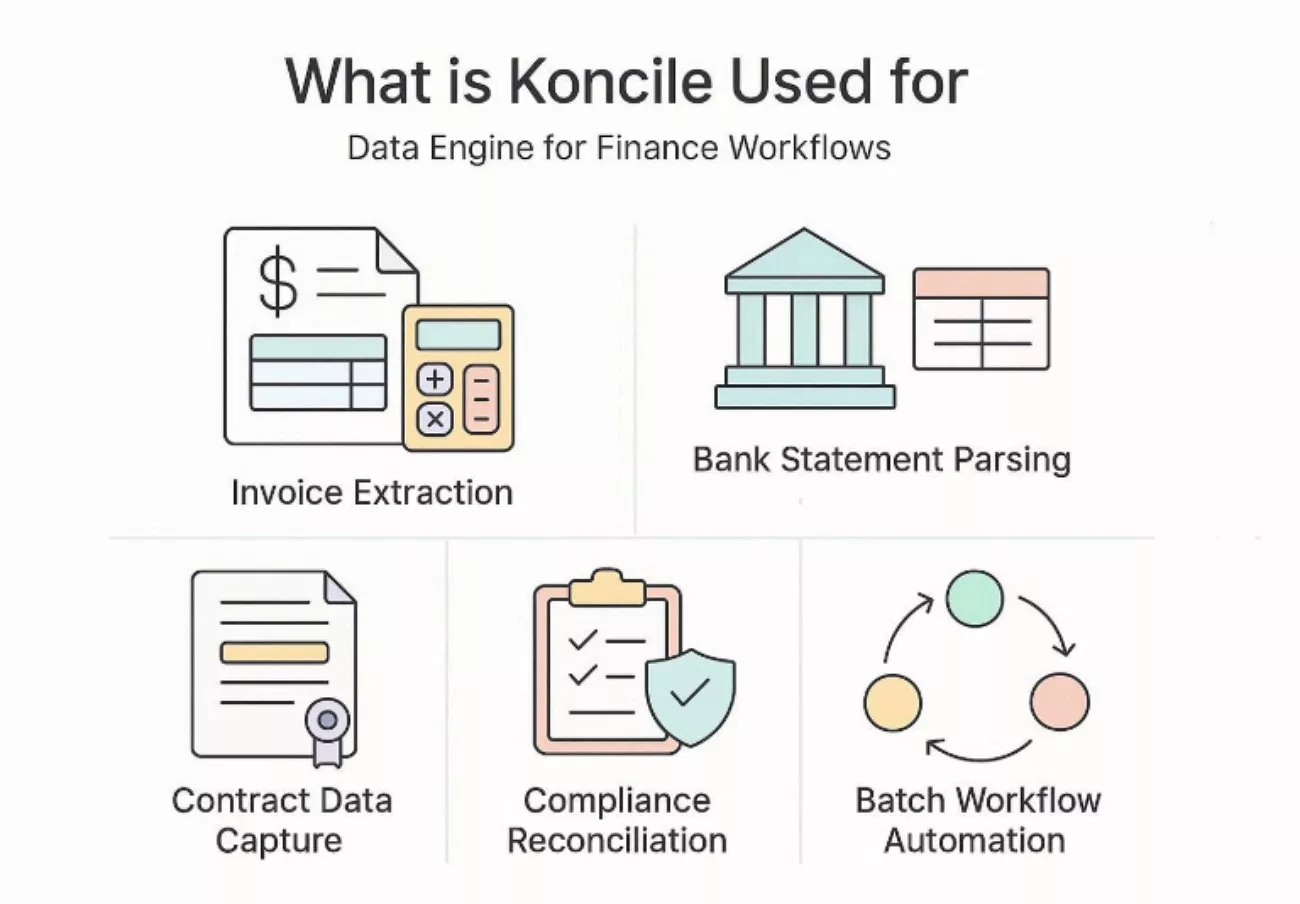
- Invoice Extraction: Koncile captures totals, dates, vendors, and line-items from invoices accurately. It exports clean fields into Excel or JSON for faster downstream processing.
- Bank Statement Parsing: Koncile extracts transactions, balances, and account details from bank statements reliably. It reduces manual copy work and improves consistency for reporting workflows.
- Contract Data Capture: Koncile identifies key clauses, parties, dates, and payment terms inside contracts. It converts unstructured legal text into structured fields for tracking and review.
- Compliance Reconciliation: Koncile standardizes extracted fields to support matching and audit checks efficiently. It helps detect missing values, inconsistencies, and exceptions before approval stages.
- Batch Workflow Automation: Koncile processes large document batches using templates and repeatable extraction rules. It supports exports and integrations that reduce manual handling across finance systems.
Part 3. How To Get Started With Koncile
Koncile’s docs provide a beginner-friendly “three-minute test” flow that is easy to follow in the Koncile Getting Started Editor. The quickest path is importing a document, letting the tool classify it, then reviewing extracted data, as shown in the Identity document extraction example. Next, adhere to the steps below to see how to get started with Koncile AI:
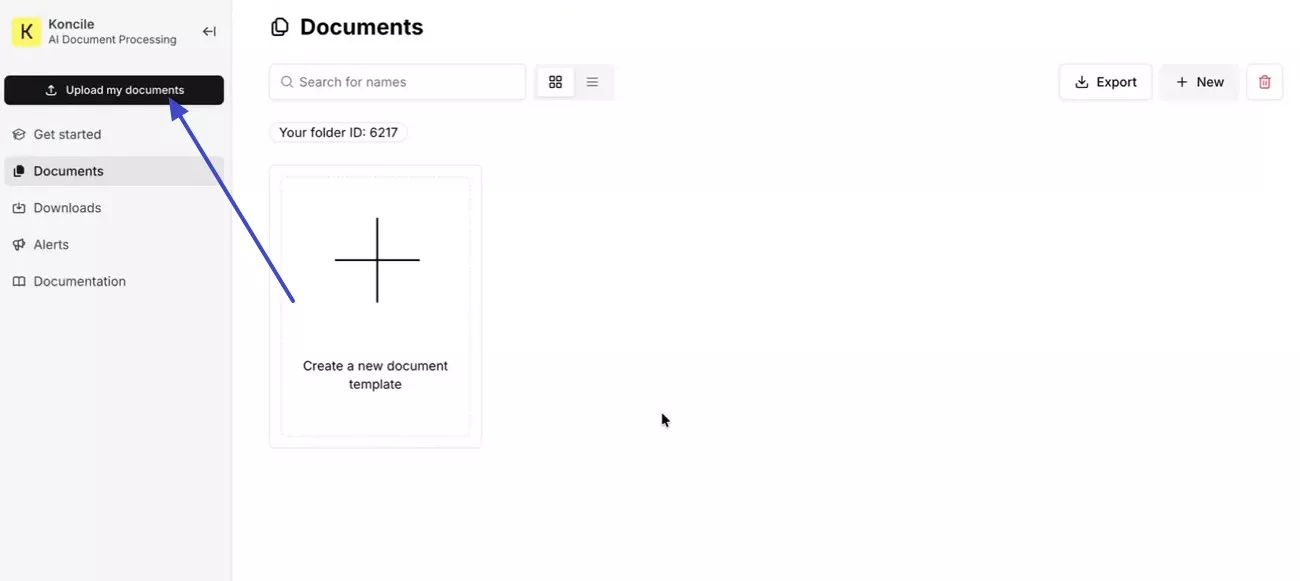
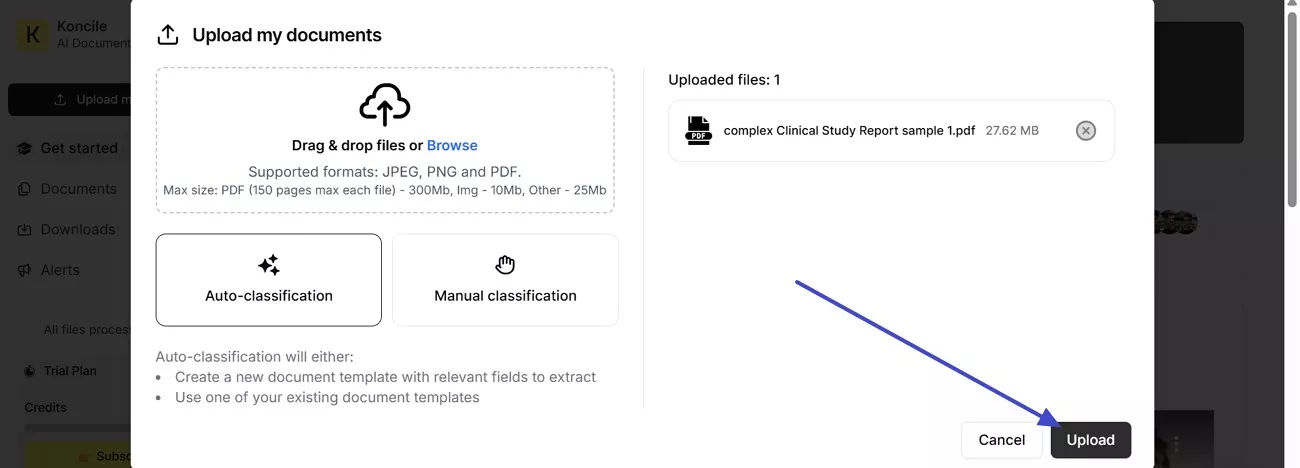
Step 1. To start, I use the “Upload my documents” button to add a file to Koncile and proceed.
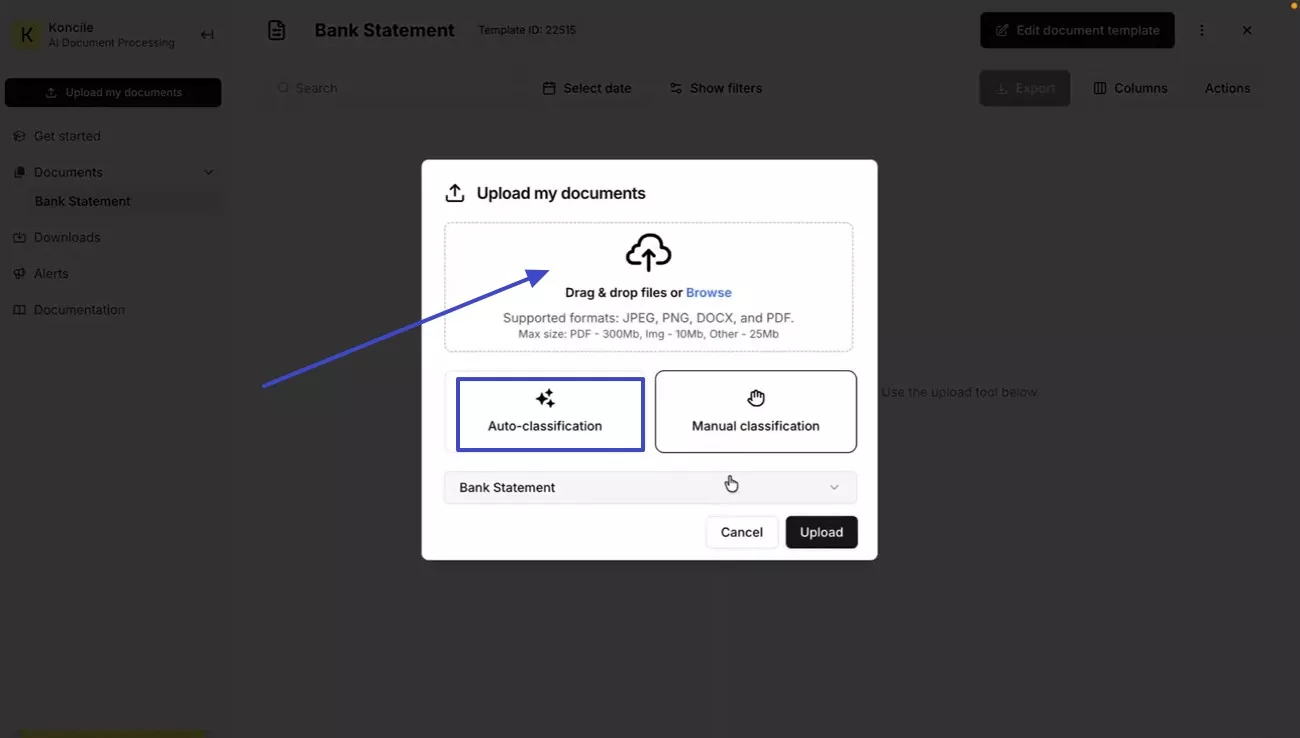
Step 2. Next, I “drag and drop” the file, then choose “Automatic classification” to let Koncile select an appropriate template.
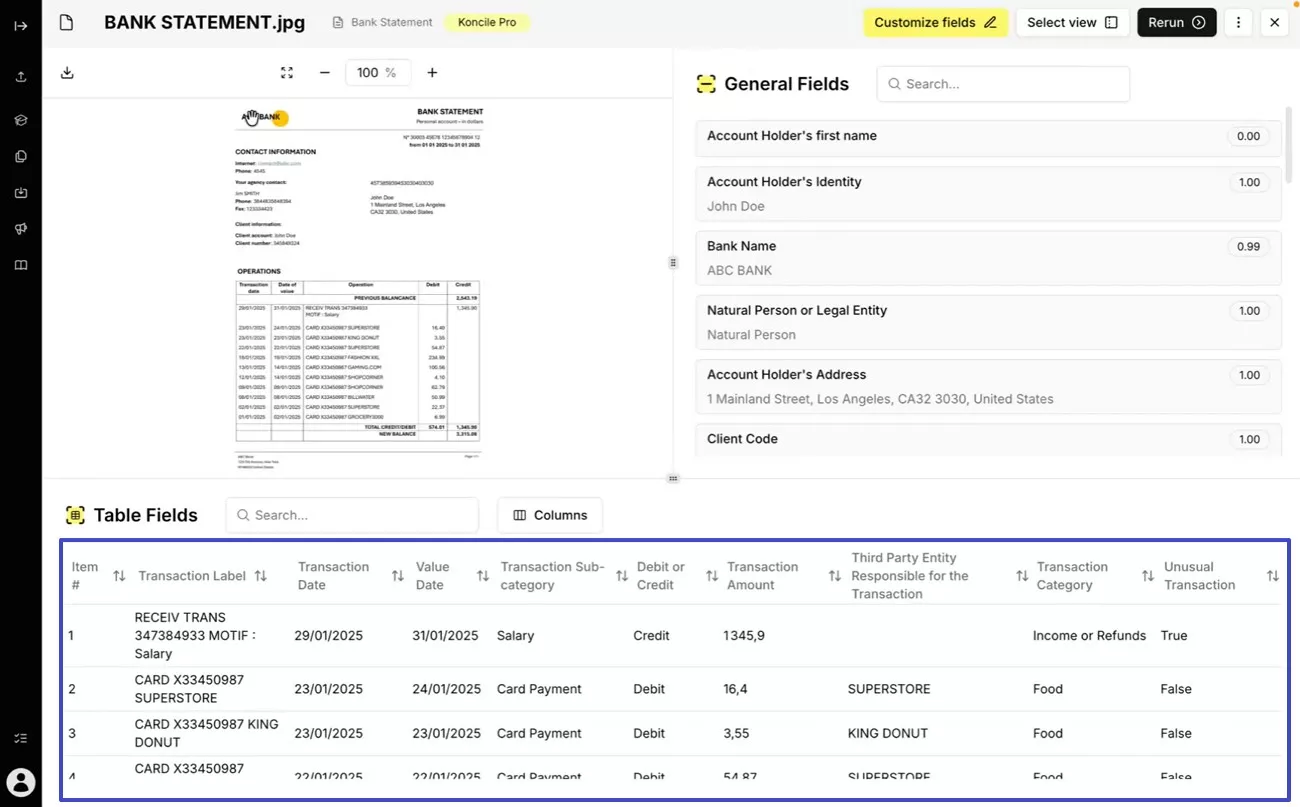
Step 3. Afterwards, open the newly created document template, select your file, and view the “Extracted fields”.
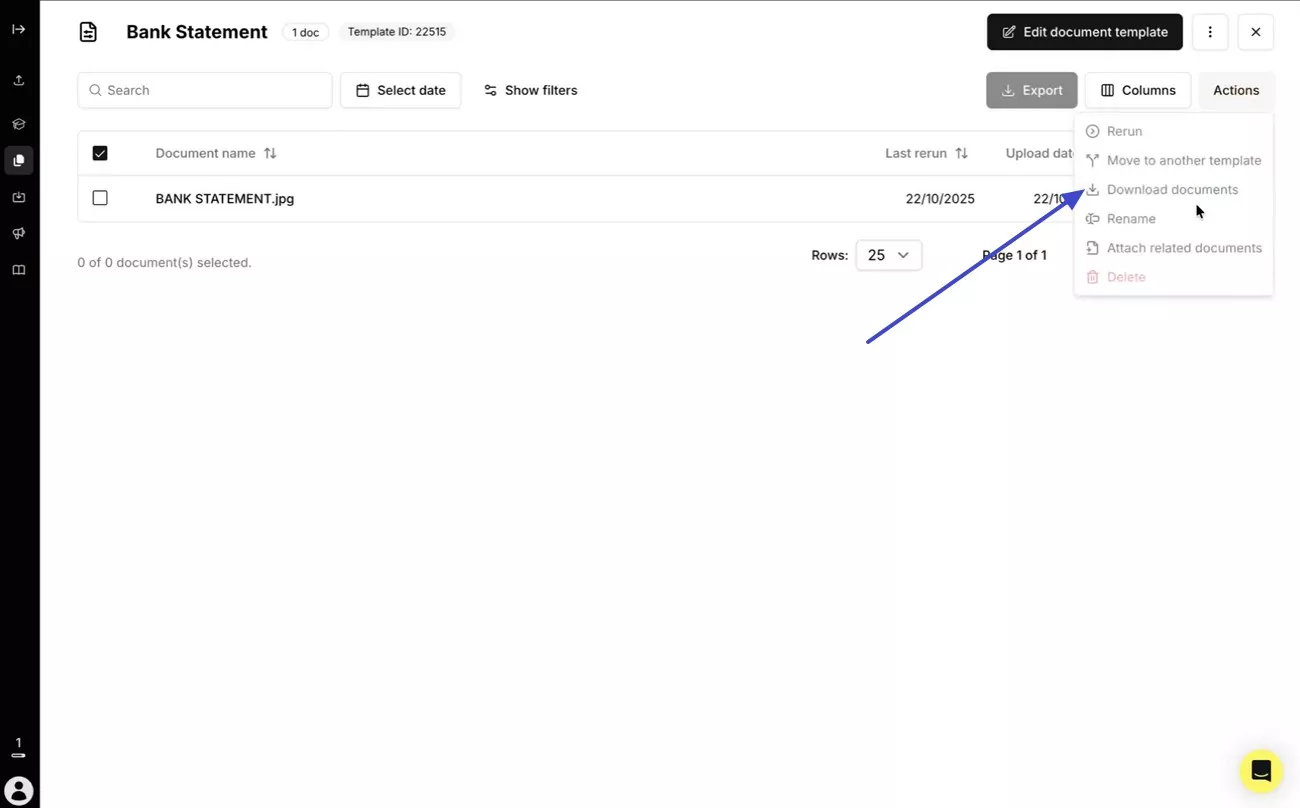
Step 4. Lastly, choose the “Download document” option from the options at the top right corner to save the extracted information.
Part 4. Pricing Plans And Free Tier
Koncile keeps pricing simple at the entry level, then scales by monthly credits as volume grows. The free tier works for quick validation, while paid plans make sense once extraction becomes weekly. Review the table below to see the pricing plans and free tier for Koncile:
| Plans | Monthly Price | Best Fit |
| Free (20 credits) | €0 | Testing and small pilots |
| Starter (500 credits) | €129 /month | Regular invoice and statement exports |
| Advanced (1,000 credits) | €199 /month | API access and higher volume workflows |
| Advanced (1,500 credits) | €289 /month | Larger teams need faster throughput |
| Advanced (2,000 credits) | €379 /month | Frequent batch processing and reconciliation |
| Advanced (2,500 credits) | €459 /month | Heavy monthly operations and integrations |
| Advanced (3,000 credits) | €539 /month | High-volume extraction with predictable spend |
| Advanced (5,000 credits) | €799 /month | Enterprise-like volume without a custom quote |
| Enterprise | Custom | Custom SLA, integration support, large scale |
Part 5. How Does It Perform In Practical Use
For practical performance, I focus on two signals: extraction accuracy and time-to-output. Koncile’s own product messaging references an “average extraction success rate” and emphasizes reliability on complex documents, especially those containing tables and line-items.On speed, Koncile describes processing time as generally fast, while also noting that timing varies with document quality, complexity, and the amount of information requested. That variability is realistic in finance, where one “invoice” might be a clean PDF or a noisy scan.
Pros:
- Exports to Excel or JSON reduce manual handoffs across teams.
- Templates and schemas keep extraction outputs consistent across batches.
- Claims include no data training and encryption-related protections.
- Batch processing speeds repetitive uploads and reduces spreadsheet fatigue.
Cons:
- Complex documents need schema tuning for stable extraction results.
- Small teams may find credit costs high for sporadic usage.
- Low-quality scans can reduce accuracy and increase review time.
Part 6. UPDF Vs. Koncile — Boundaries And Complementarity
Koncile and UPDF solve different problems, and that is exactly why they work well together. When I separate their roles, my workflow stays clean, predictable, and secure. Below are the positioning differences of Koncile AI and UPDF:
- Koncile is a data engine that extracts information from PDFs and pushes it into structured outputs such as spreadsheets and JSON. That is the heart of Koncile AI for audit and finance automation.
- While UPDF is a document hub for reviewing, annotating, editing, redacting, and organizing PDFs, its core features are available on the official UPDF. Its comprehensive toolset covers nearly all the essential functions you’d expect from Acrobat Pro, but at a more affordable and cost-effective price.
Windows • macOS • iOS • Android 100% secure
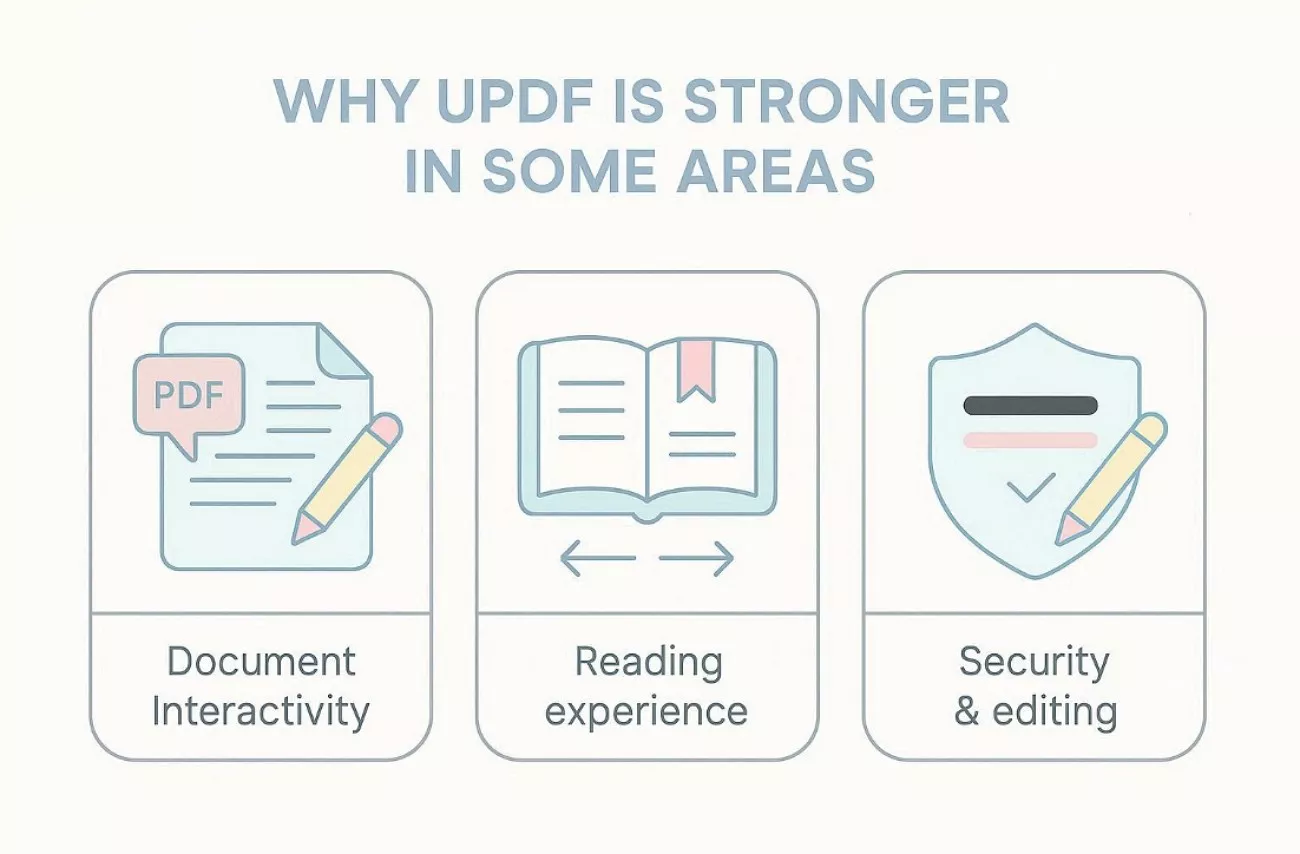
Why UPDF is Stronger in Some Areas
With Koncile handling extraction, attention shifts to what happens inside the PDF. The points below explain where UPDF adds stronger control for review, security, and daily document work:
Document Interactivity
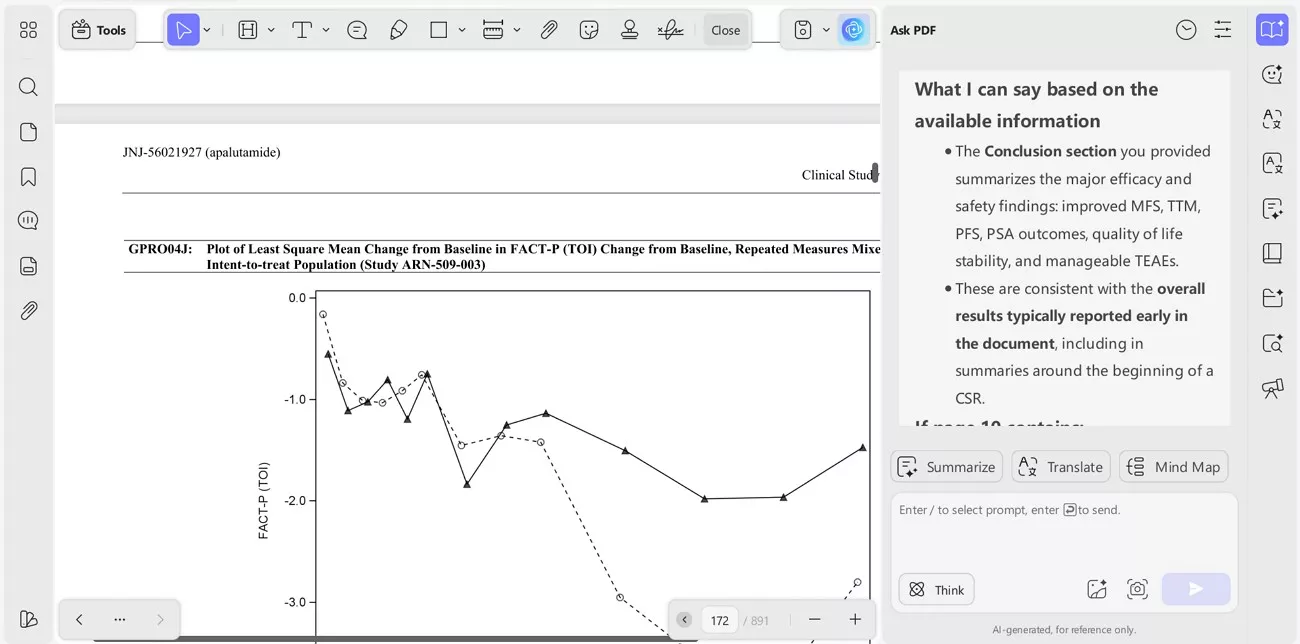
Koncile focuses on extracting fields and tables into structured outputs for analysis. With UPDF, I can read, annotate, and question what the report actually claims. I can ask whether the conclusion matches the results tables, then verify the logic. That cross-sectional reasoning goes beyond extraction and supports stronger decision-making.
Reading Experience
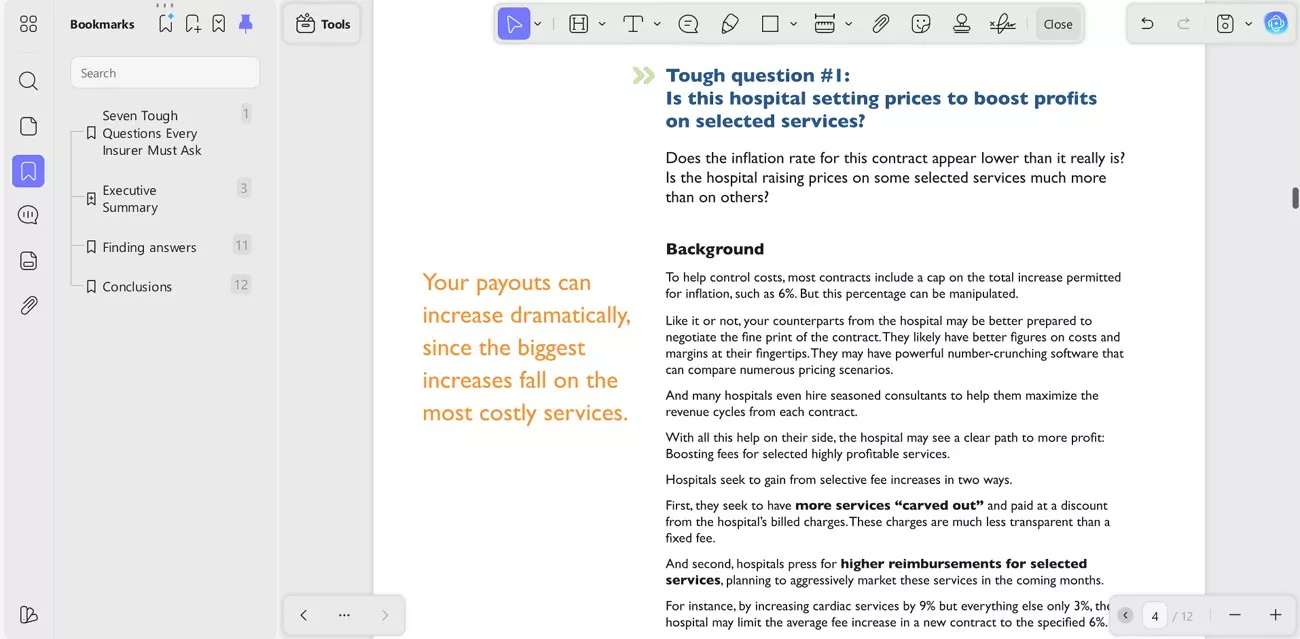
In long PDFs, navigation becomes a productivity feature rather than a nice extra. UPDF helps me mark key chapters, jump between sections, and keep context intact. Bookmarks and structured navigation reduce backtracking across hundreds of pages during review. A pure extraction engine cannot replace this reading layer for comprehension and validation.
Security & Editing
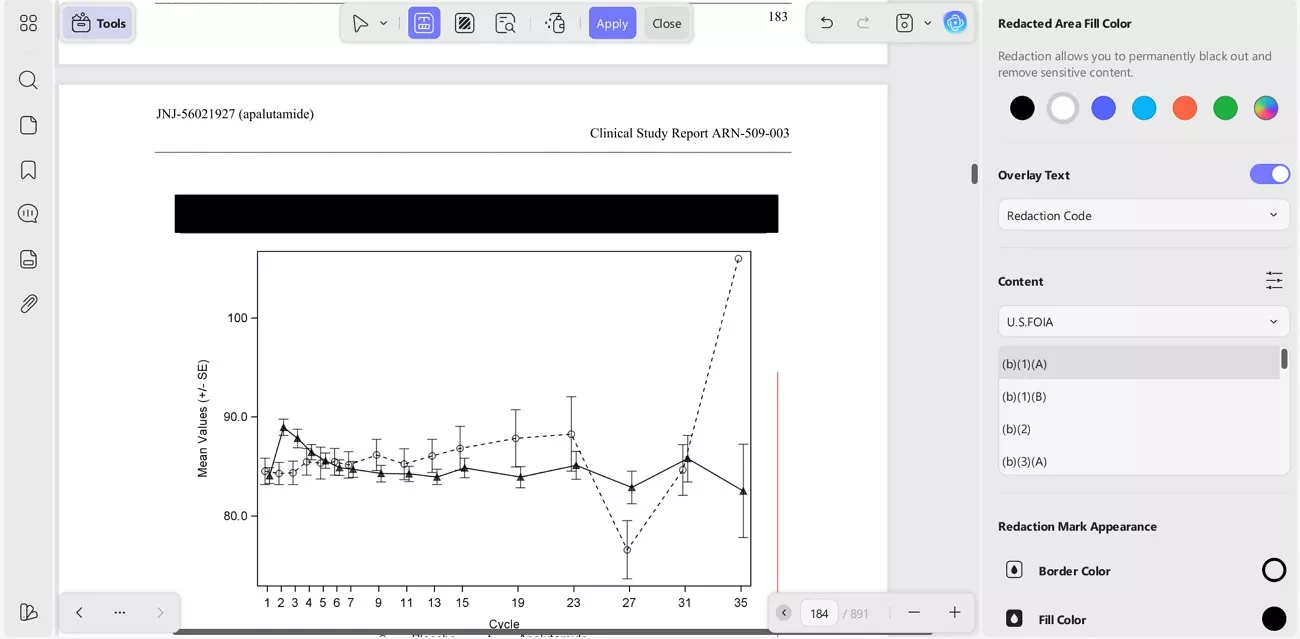
Before sending documents to Koncile OCR, sensitive content often needs protection first. I frequently redact identifiers, remove confidential numbers, and correct typos inside the PDF. These edits prevent corrupted extraction results and reduce costly reruns during audits. This preparation also strengthens compliance by controlling what data leaves the document.
Windows • macOS • iOS • Android 100% secure
The Perfect Workflow: A Real-World Demo of 1 + 1 > 2
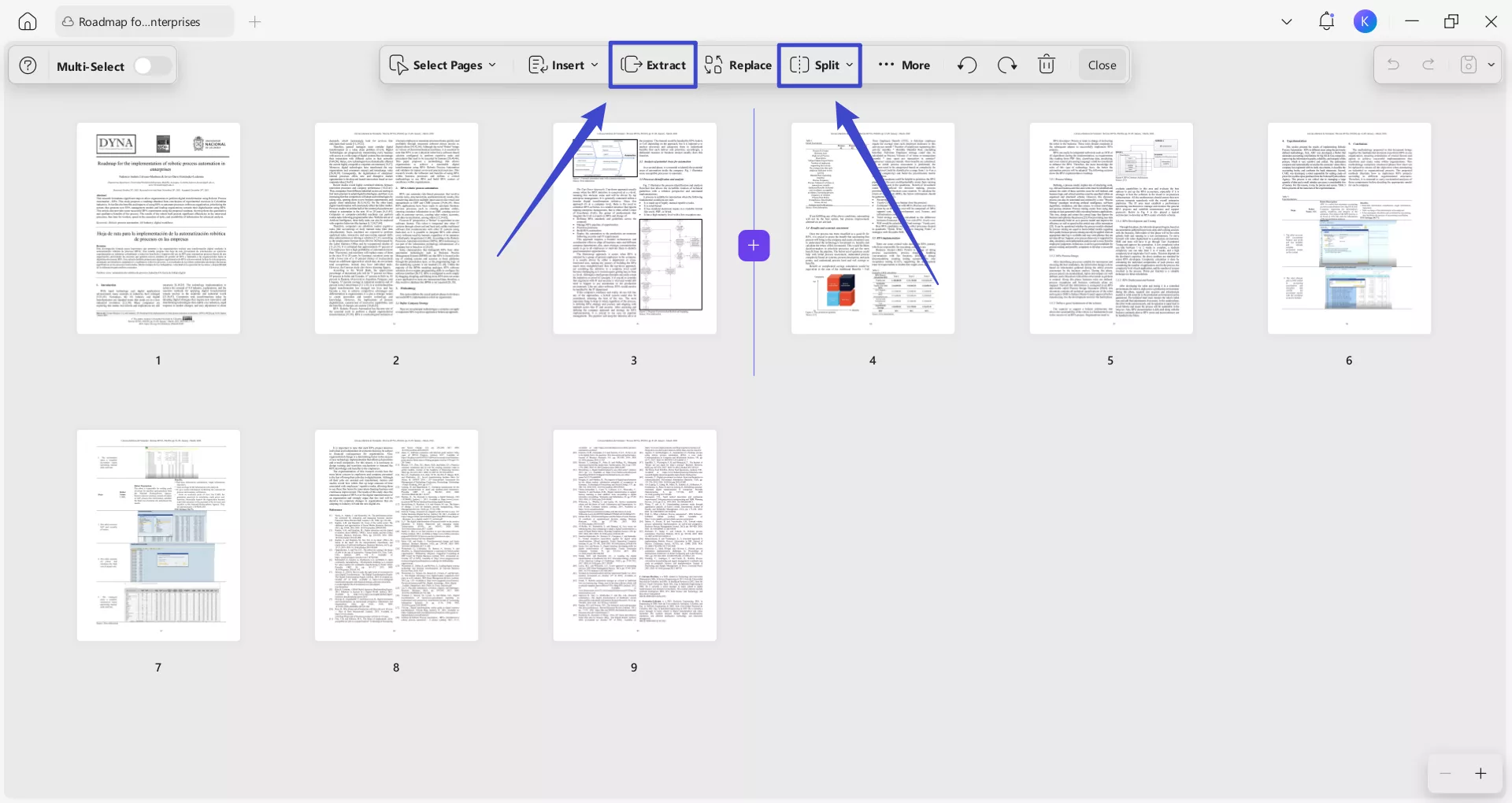
UPDF prepares the report, so Koncile extracts only the important tables. In UPDF, I use the “Organize” panel’s Split/Extract feature to pull out only the relevant pages as a new PDF. This workflow saves time, reduces errors, and keeps analysis focused because I upload only selected pages to Koncile.
Step 1 (UPDF): Read And Map The Report Fast
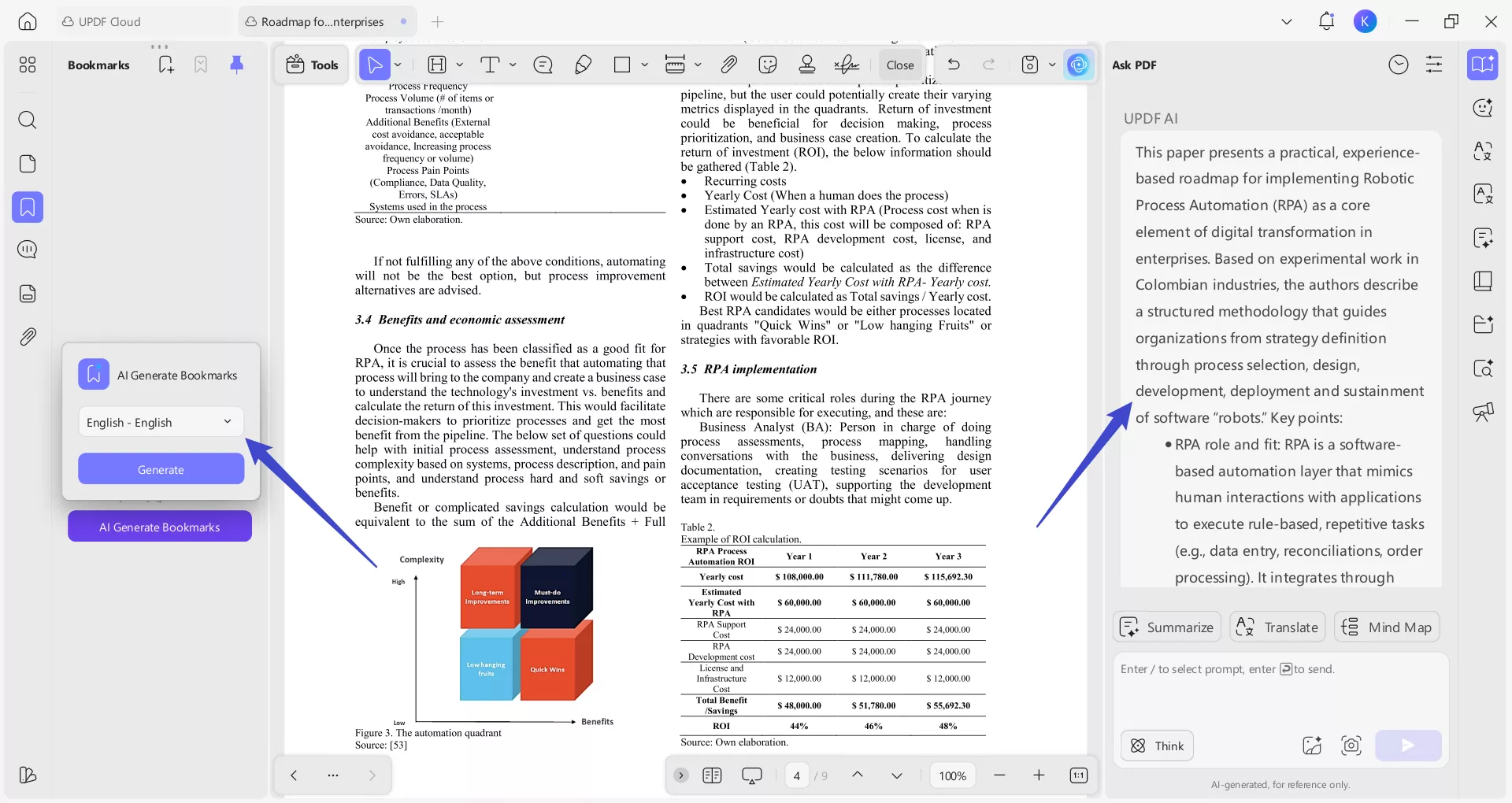
To start, I open the report in UPDF and summarize the study background quickly. Afterwards, I used the “UPDF AI Generated Bookmark” feature to mark endpoints, results sections, and note where key statistics appear.
Step 2 (UPDF): Export Only The Table-Heavy Pages
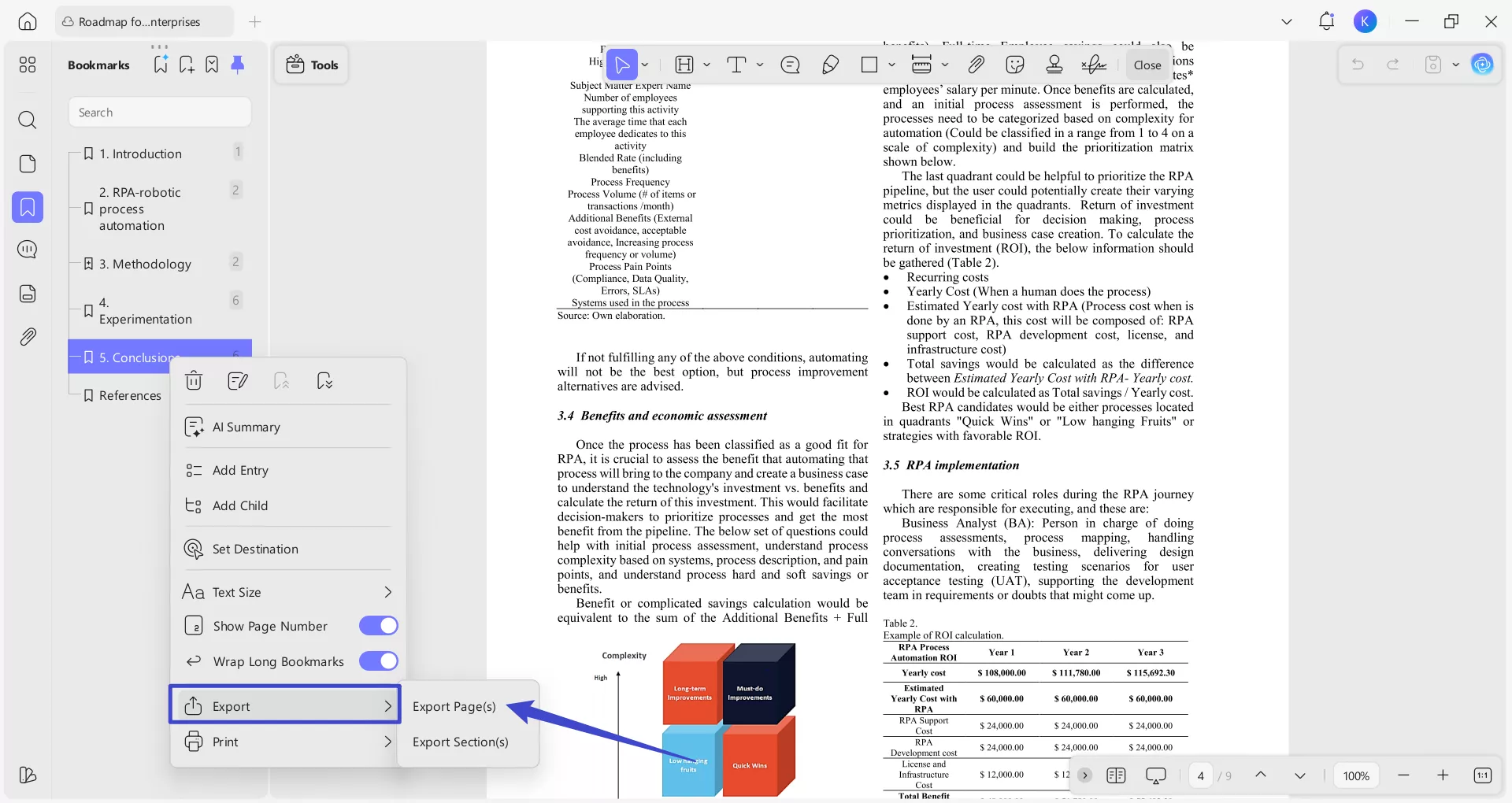
Next, I right-click on the “Bookmark” to further select the “Export” option. Afterwards from the export popup menu pick the “Export Pages” option to export only table heavy pages.
Alternatively, I can extract or split only the specific pages I need using the “Organize Pages” feature in UPDF.
Step 3 (Koncile): Convert Tables Into Excel For Analysis
Afterwards, I upload only the exported table pages into Koncile for extraction. I convert line items and repeated fields into Excel for analysis.
Windows • macOS • iOS • Android 100% secure
Conclusion of The Demo
In a word, UPDF handles text structure and logic inside the PDF during review. On the other hand, Koncile handles dense tables and structured extraction at scale for analysis.
Why I Still Treat UPDF as the Long-Term Base Tool
Even when Koncile is used weekly, a daily PDF utility remains essential. UPDF delivers long-term cost effectiveness through editing, review, collaboration, and secure sharing. It becomes the reliable home base for every PDF task. Meanwhile, Koncile stays the heavy-duty data weapon for extraction and structured outputs.
Conclusion
To conclude, Koncile streamlines extraction for invoices, statements, and table-heavy finance documents. Using Koncile AI can reduce retyping and support consistent audit-ready outputs. Still, extraction alone is not the full workflow, because review, redaction, and packaging must happen before submission.
That is why I keep UPDF as the daily PDF home base beside Koncile. UPDF helps me review files, protect sensitive data, and organize records with fewer delays and reruns. If a long-term productivity tool is needed for everyday document control, download UPDF and build the workflow around it.
Windows • macOS • iOS • Android 100% secure






 Enrica Taylor