 UPDF
UPDF
 UPDF for Windows
 UPDF for Mac
 UPDF for iPhone/iPad
 UPDF for Android
 UPDF AI Online
 UPDF Sign
 Edit PDF
 Annotate PDF
 Create PDF
 PDF Form
 Edit links
 Convert PDF
 OCR
OCR PDF to Word
 PDF to Image
 PDF to Excel
 Organize PDF
 Merge PDF
 Split PDF
 Crop PDF
 Rotate PDF
 Protect PDF
 Sign PDF
 Redact PDF
 Sanitize PDF
 Remove Security
 Read PDF
 UPDF Cloud
 Compress PDF
 Print PDF
 Batch Process
 About UPDF AI
 UPDF AI Solutions
 AI User Guide
 FAQ about UPDF AI
 Summarize PDF
 Translate PDF
 Chat with PDF
 Chat with AI
 Chat with image
 PDF to Mind Map
 Explain PDF
 PDF AI Tools
 Image AI Tools
 AI Chat Tools
 AI Writing Tools
 AI Study Tools
 AI Working Tools
 Other AI Tools
 PDF to Word
 PDF to Excel
 PDF to PowerPoint
 Enterprise Solution
 Enterprise Sign
 Enterprise AI
 Enterprise Plan
 Enterprise User Guide
 Enterprise Webinar
 Banking
 Healthcare
 Insurance
 Legal
Legal Manufacturing
 Government
 Education Solution
 Customer Stories
 User Guide
 UPDF Tricks
 FAQs
FAQs UPDF Reviews
 Download Center
 Blog
Blog Newsroom
 Tech Spec
 Updates
 UPDF vs. Adobe Acrobat
 UPDF vs. Foxit
 UPDF vs. PDF Expert

Love Japanese manga but can’t read Japanese? That’s a common struggle among many manga fans.
While Japanese manga has a global fanbase, many great titles are only available in Japanese. This can be frustrating. Fortunately, with the right tools, you can translate manga yourself.
In this guide, we’ll review the best Japanese manga translators, explain how they work, and compare their features to help you choose the right one for your needs.
Let’s get started.
Part 1. Best Japanese Manga Translators
This section will introduce you to the top 6 tools to translate manga on desktop, mobile, and online. Let’s explore these one by one!
1. UPDF on Windows and Mac
UPDF is the best Japanese manga translator for Windows, Mac, iOS and Android. Whether you’re working with image-based manga or a PDF with embedded pictures, UPDF’s OCR tool easily recognizes and lets you translate the text.
You can translate all the pages at once or select specific ones to translate. Also, it doesn’t change the original text layout to give you a seamless reading experience.
For text that’s difficult to translate, UPDF’s screenshot tool and built-in AI assistant let you capture and translate it easily.
So, if you’re a manga fan, UPDF is the tool you need to read your favorite stories in any language. So, download it to get started now. You can do the first 100 tasks entirely free!
Windows • macOS • iOS • Android 100% secure
Here’s how to translate Japanese manga using UPDF.
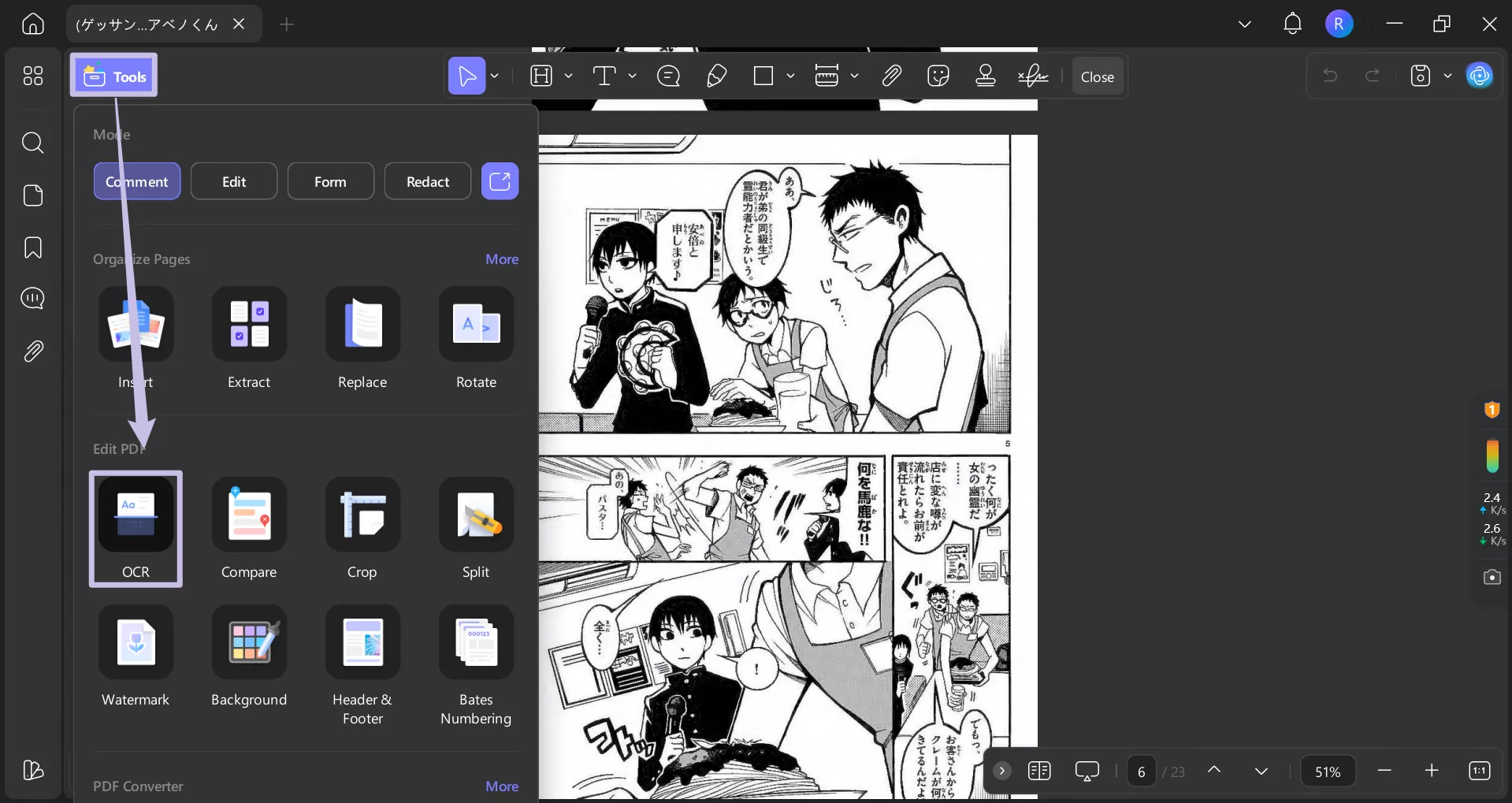
- Open your Manga PDF in UPDF. Then click “OCR” in the “Tools” panel.
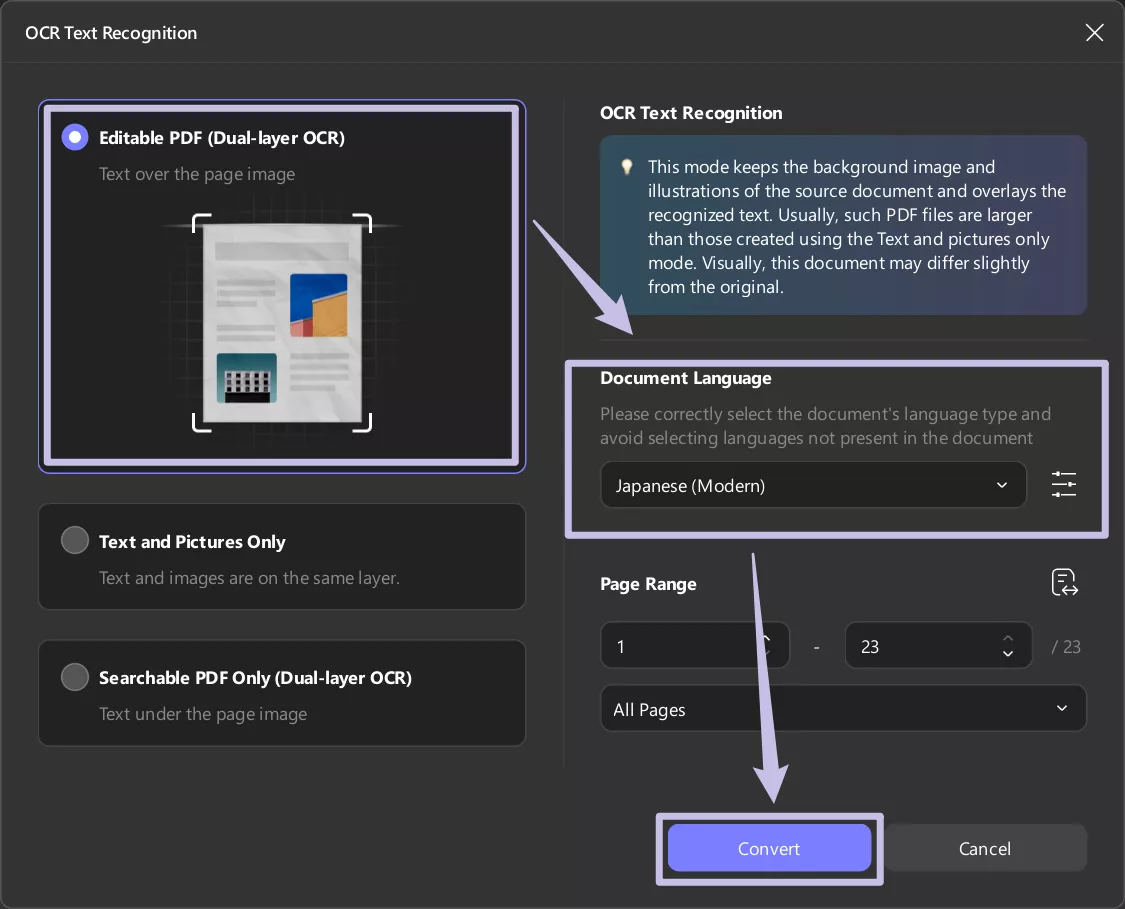
- Select “Editable PDF.” Choose the document language as Japanese and select a specific page range. Then, click “Perform OCR.”
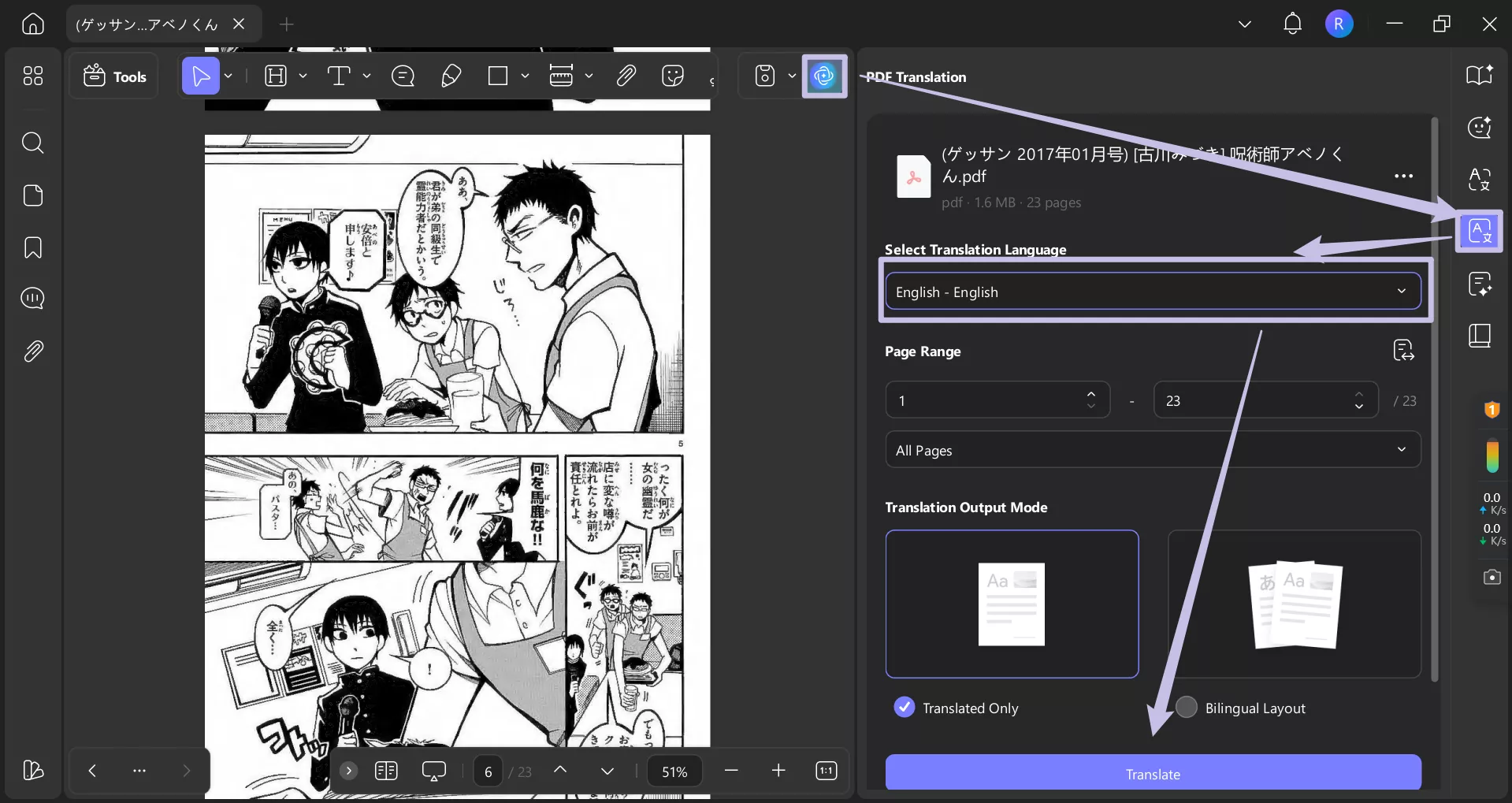
- The converted PDF will now open in UPDF. Select the “AI” icon and click “PDF Translation”.
- Select the translation language and page range. Then, click “Translate.”
- If some part of the text isn’t translated, simply click “Chat” from the right menu list. Click the “Screenshot” icon at the bottom.
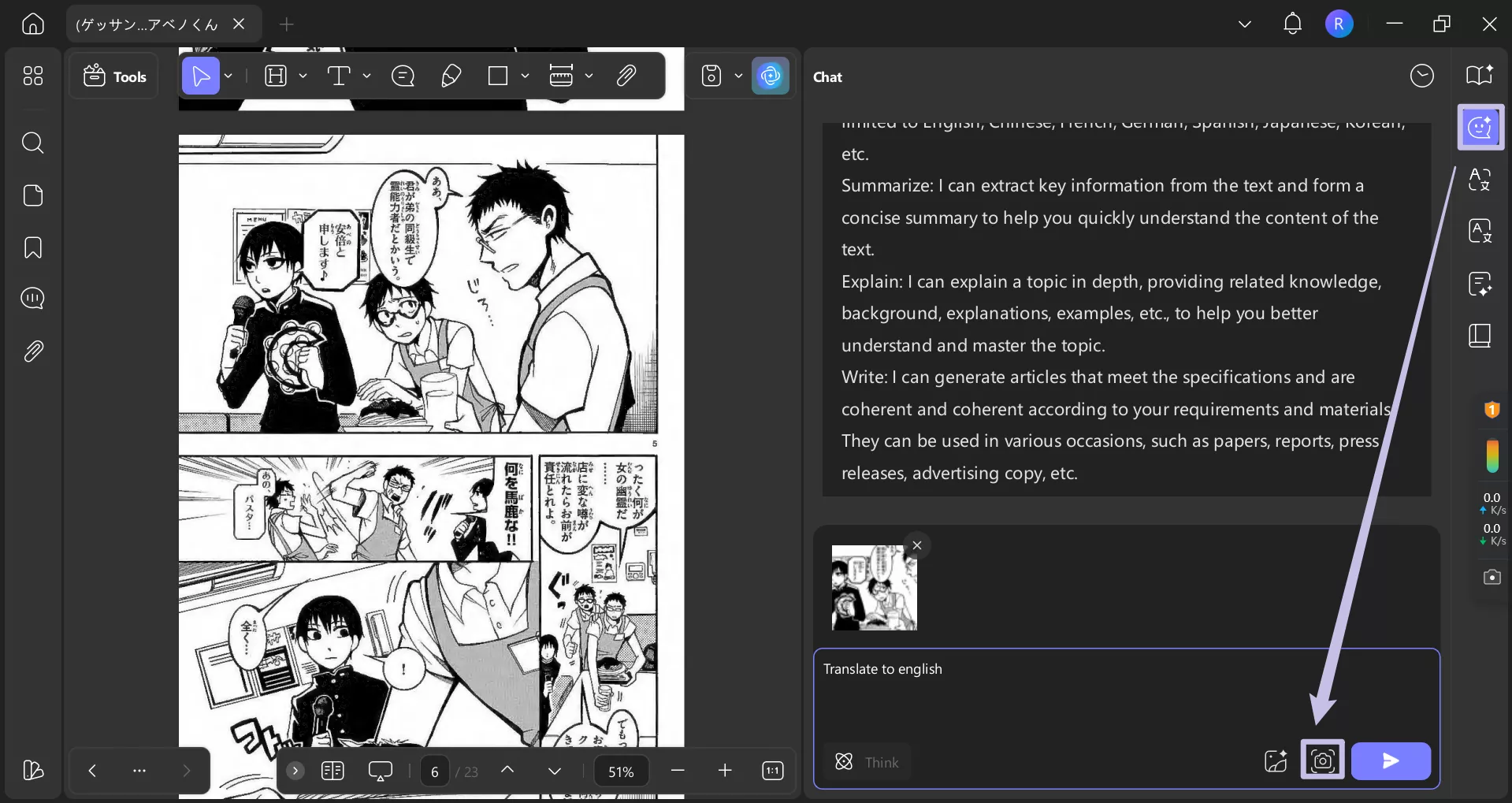
- Take a screenshot of the text. It will automatically be sent to UPDF AI. Then, ask UPDF AI to translate the text in the image.
Free Version:
- Test all features
- watermarks
- Analyze 5 files, ask 100 questions with AI
Paid Version:
- UPDF Pro: $39.99/Year, $69.99/Lifetime
- AI Assistant: $79.00/Year, $29.00/Quarter
Formats Supported:
PDF, JPG, PNG, GIF, BMP, TIFF, Docx, Excel, PPT, Visio, CAJ, and more.
Accuracy:
UPDF and its AI provide precise translations, even from blurry text.
Beyond this, UPDF has much more to offer. Buy it at a cheap price today to experience all the features firsthand. Download UPDF via the button below to try it now.
Windows • macOS • iOS • Android 100% secure
2. Bubble Translator on Android
Bubble Screen Translate is a screen overlay Japanese manga translator app that can convert any on-screen Japanese text into over 100 languages.
To use it.
- Open the app and select the source and translation languages.
- Select “Comic Mode – Vertical” as the translation mode and press “Start.”
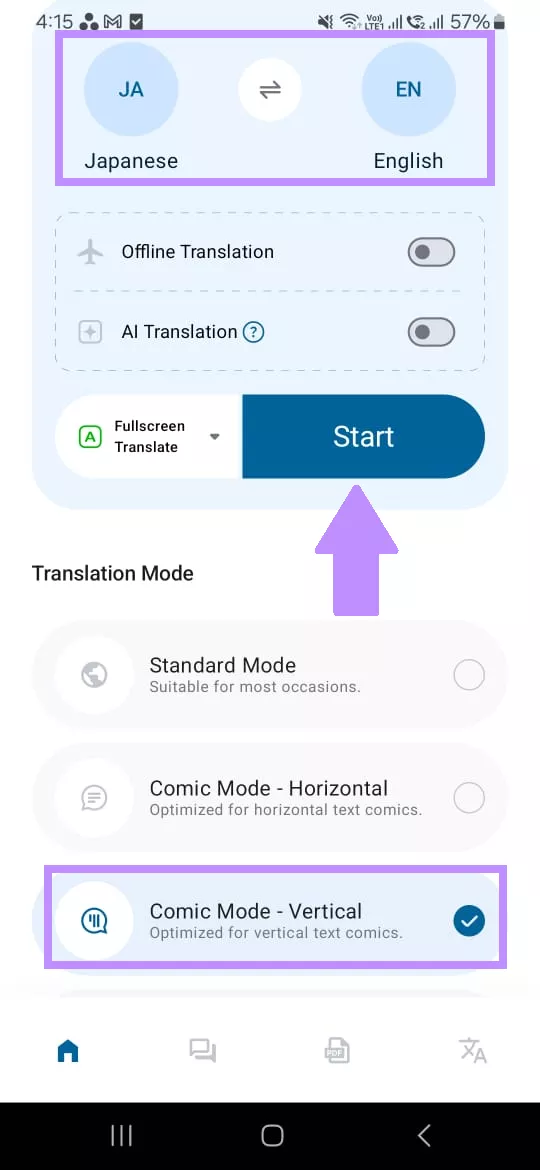
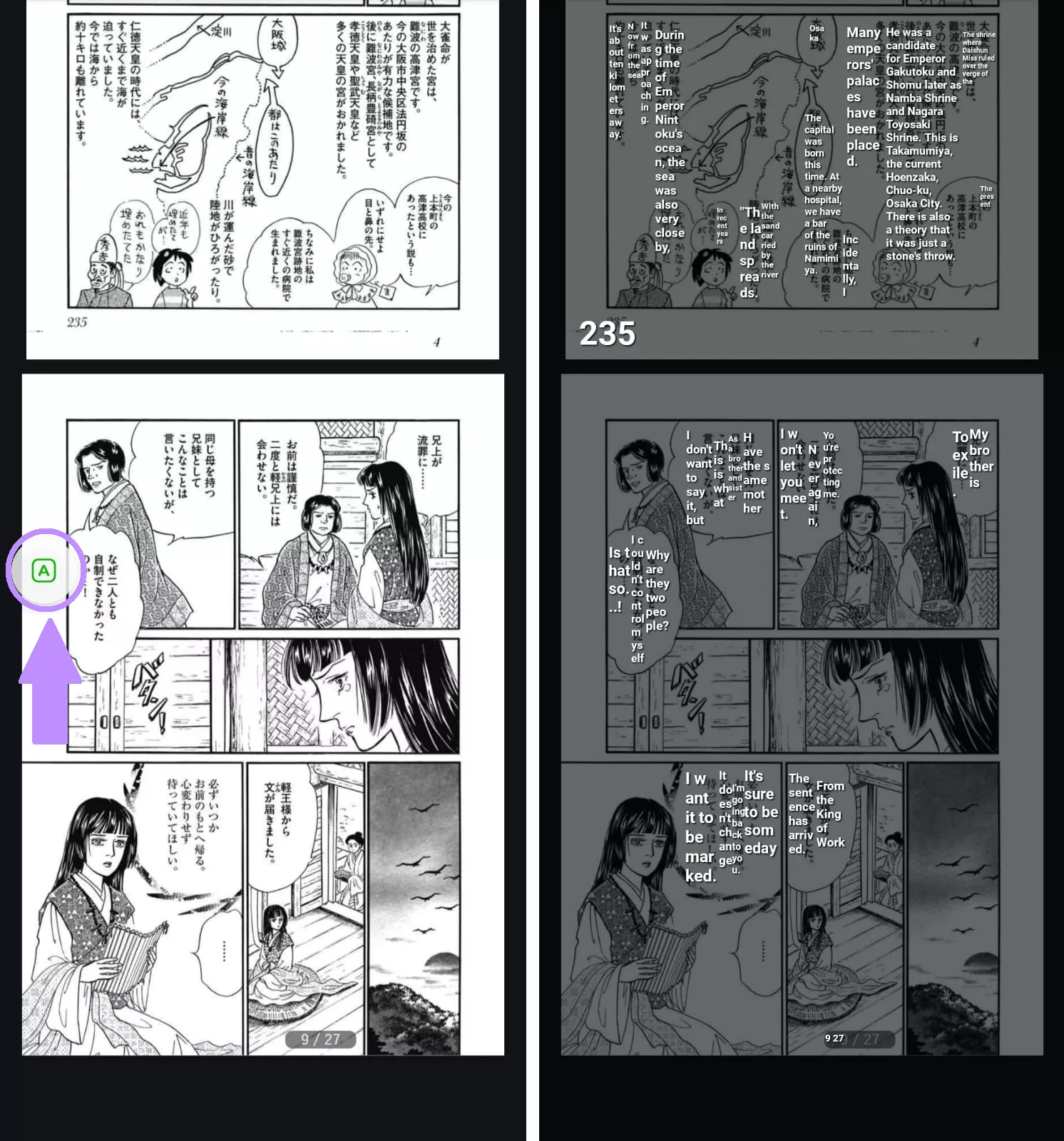
- Open the manga and tap on the floating bubble to translate text.
Free Version:
- Ads
- Limited features.
Paid Version:
In-app purchases for $25/year. The price may vary for specific regions.
Formats Supported:
All formats that can be opened on an Android.
Accuracy:
Japanese translation isn’t accurate. It fails to understand the emotional depth and context of the language.
3. Ichigo Reader Online Japanese Manga Translator
Ichigo Reader uses 7 AI models for translation, of which only the GPT-4o mini model is free for a limited time. It also offers a mobile app and a Japanese manga translator extension for Chrome.
Here’s how it works.
- Go to Ichigo Reader’s official website and click “Try it.”
- Select files to upload. The platform will directly download the translated file, which you can open and view.

Free Version:
GP4-o mini, 20 image uploads total
Paid Version:
Tier 1 ($5.99/Monthly): Deepseek v3, Gemini Flash 2.5 models, more OCR languages, 300 image uploads/hour
Tier 2 ($19.99/Monthly): Grok 3, GPT-4o, Gemini Pro 2.5, Claude Sonnet 3.5 models, 150 Tier 2 image translations/hour, English OCR, No watermark
Formats Supported:
PDF, Zip, and image files.
Accuracy:
It rephrases things a bit and does not maintain the original structure.
4. Manga Translator by Wiryaimd on Android
It's another Japanese manga translator app for Android with support for over 60 languages. You can translate images and any visible text on screen.
To use it:
- Open the app. Select your source and target languages.
- Select whether to translate using Google, DeepL, or GPT-3.
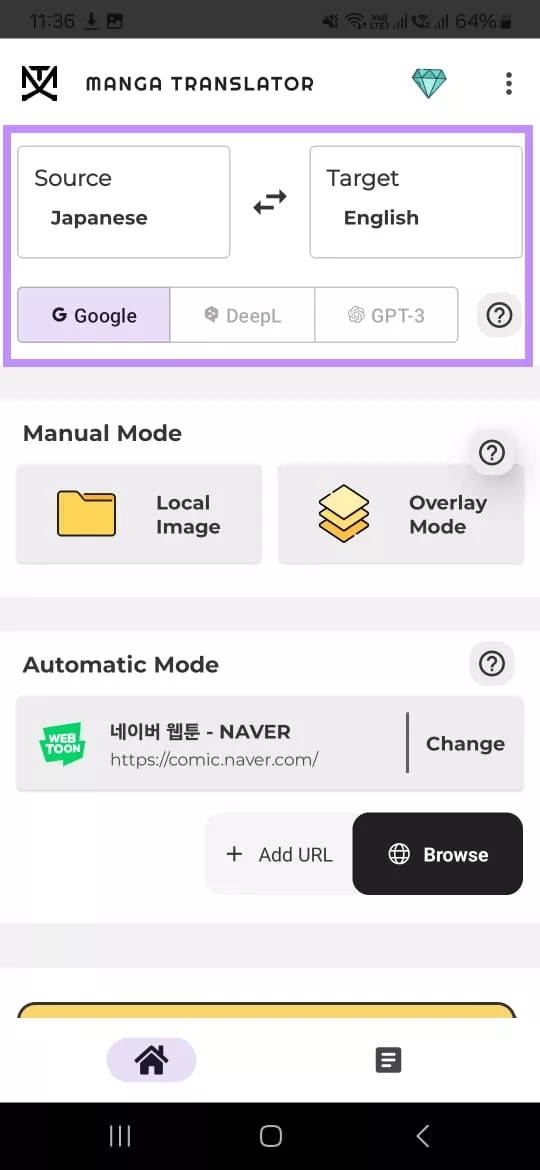
- Press “Local Image” to upload your images. Then, tap “Process.”
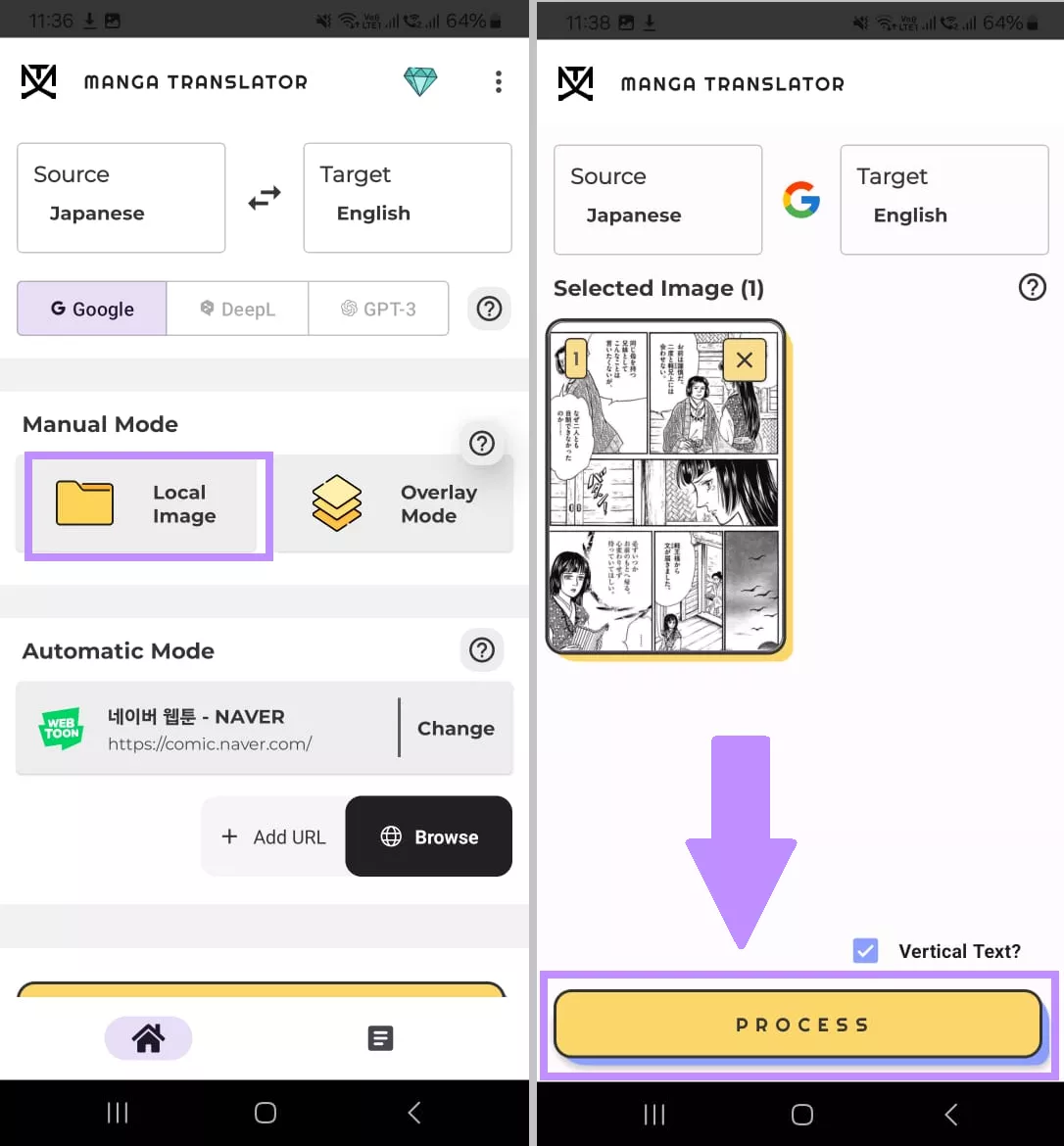
- Alternatively, turn on ”Screen Overlay” to translate any text from your screen.
Free Version:
- Ads.
- 30 images/day
- Google Translate.
Paid Version:
In-app purchases for additional features.
Formats Supported:
JPG, PNG, and any visible text on screen.
Accuracy:
It requires high-definition images to recognize all the text for accurate translation.
5. Yandex Translate
Yandex is a free online Japanese manga translator that lets you convert Japanese into almost 100 different languages. It supports translating manga by images, files, and websites.
Here, let’s see how to translate Japanese manga from an image using it.
- Go to the Yandex translation page. Select a source and target language from the top.
- Upload your image files to the platform. You can also paste the image URL.
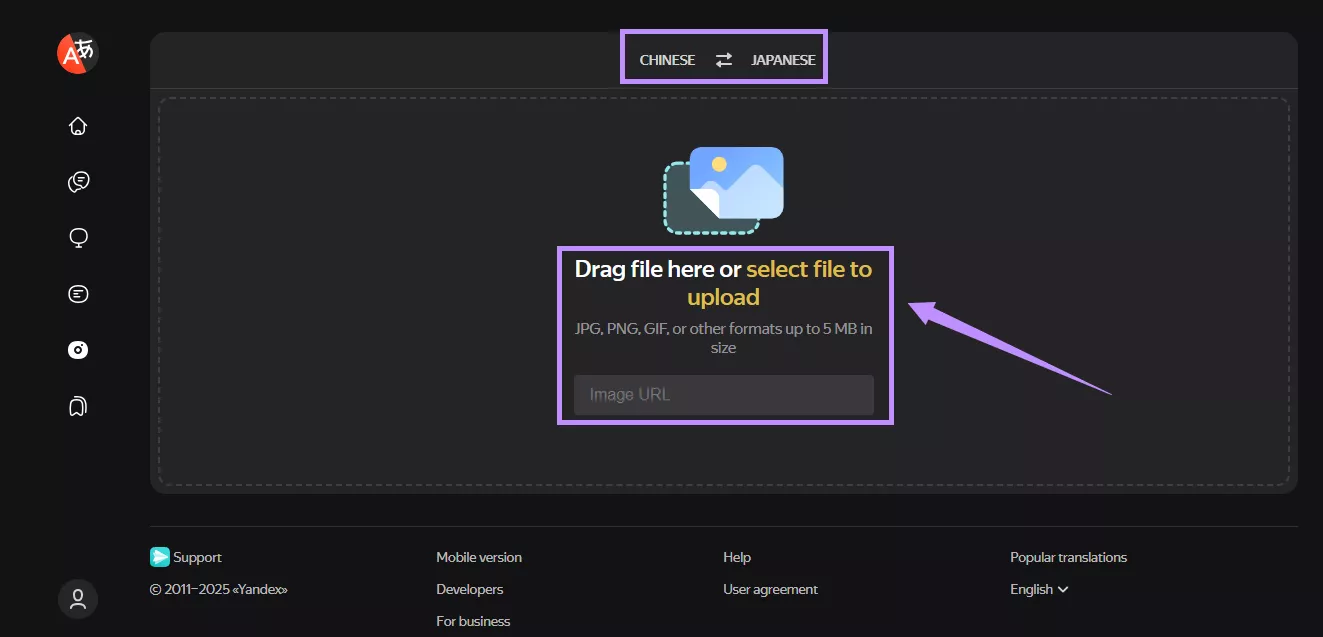
- You can view the translated file once it is done. Then, click the “Download” icon at the top right to save it.
Free Version:
15 MB document, 5 MB images, 10000 text characters.
Paid Version:
Paid API for text translation with a cost calculated based on the characters.
Formats Supported:
JPG, PNG, GIF, DOCX, DOC, PDF, Excel, PPT, PPTX, and webpages.
Accuracy:
The platform failed to recognize the Japanese text in the image and PDF.
6. Scan Translator
Scan Translator offers accurate and high-quality translations for manga or manwha with AI-powered tool uses APIs from Deepl and Google Vision to deliver the best results.
Try it now.
1. Visit the website of Scan Translator. Select a source and target language from the top.
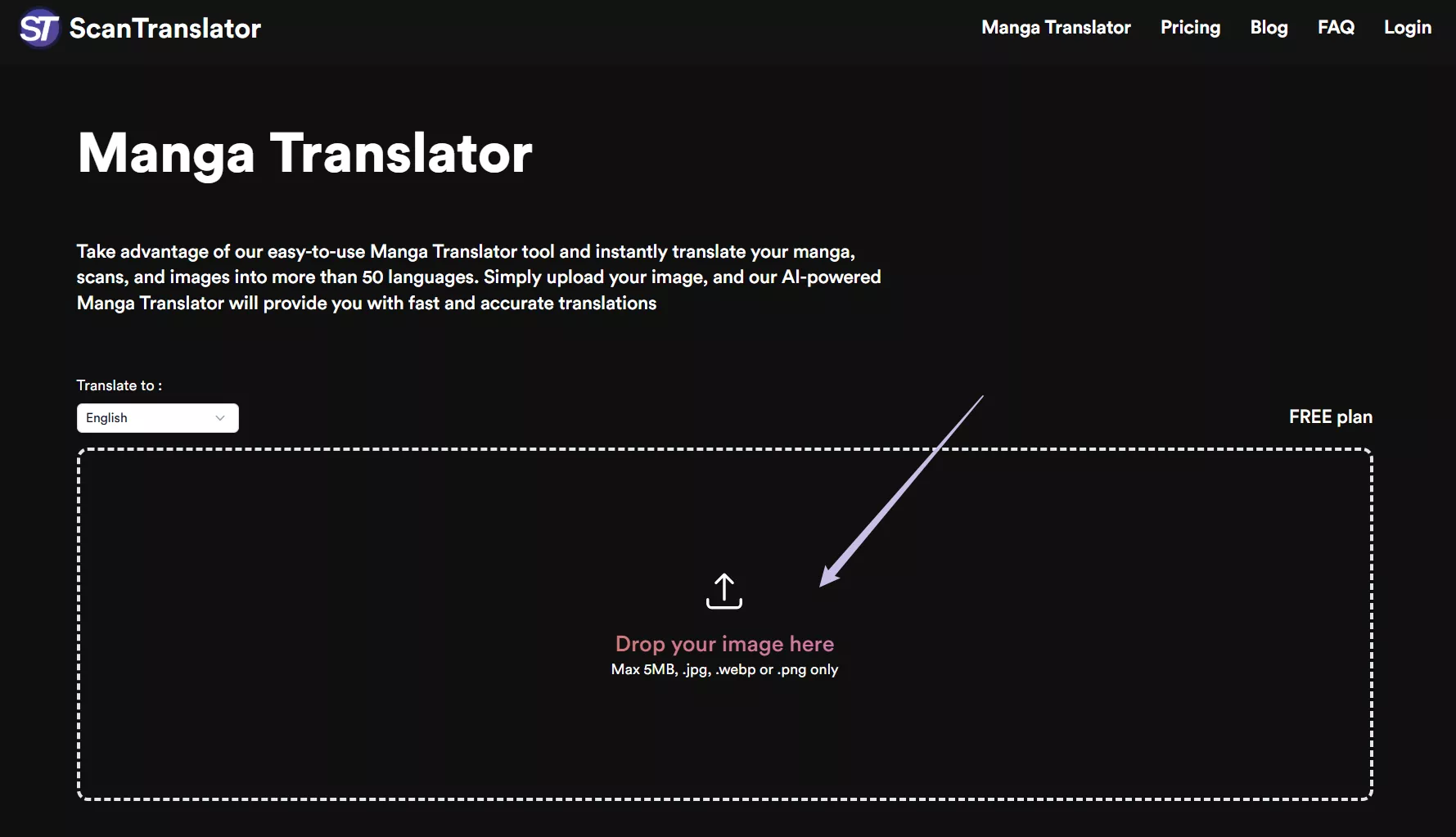
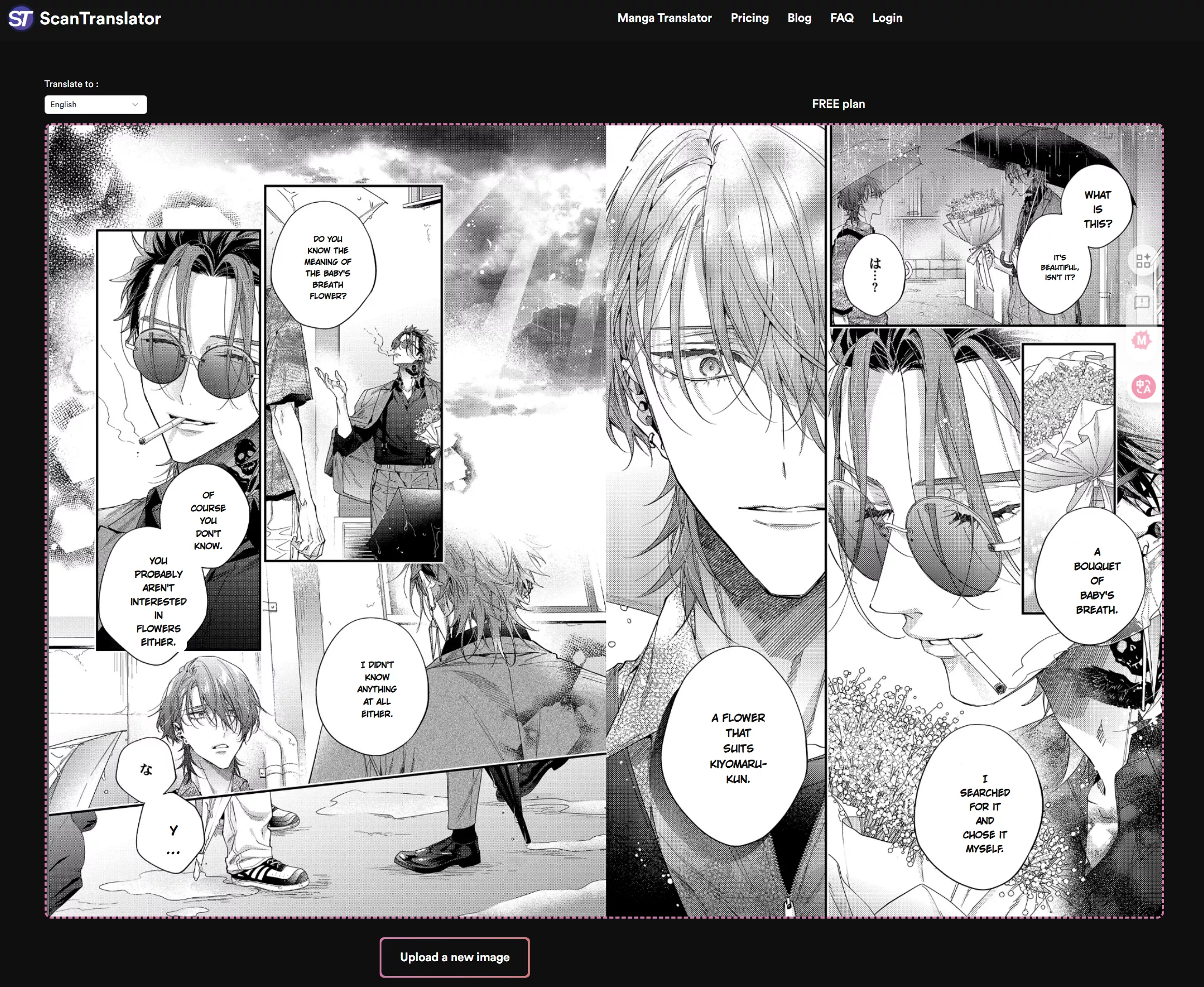
2. After uploading your images, it can swiftly translate manga for you.
Free Version:
- 30 free credits/week
Paid Version:
Basic: $5.83/Monthly
Premium: $11.67/Monthly
Formats Supported:
JPG, WEBP, PNG only.
Accuracy:
It can perfectly handle almost all the text in images though failed to translate the modal particle.
Part 2. Which One Tool is Better?
Don’t know which Japanese manga translator to go for? Here’s a detailed comparison to help you make a smart decision!
| Aspects | UPDF | Bubble Translator | Ichigo Reader | Manga Translator by Wiryaimd | Yandex Translate | Scan Translator |
| Platform | Windows, Mac, iOS, Android | Android | Online, Android | Android | Online | Online |
| Translation Method | OCR + AI assistant | Screen overlay | AI models | AI models, Google Translate | Machine translation | Deepl |
| Formats Supported | PDFs, JPG, PNG, GIF, BMP, TIFF, Docx, Excel, PPT, Visio, CAJ, and more. | All visible on Android screen | PDF, ZIP, JPG, PNG | JPG and PNG, All visible on Android screen | JPG, PNG, GIF, DOC, DOCX, PDF, XLS, XLSX, PPT, PPTX, and webpages. | JPG, WEBP, PNG |
| Free | Free to test all features | Not all features can be tested | Limited access | Limited access | Limited access | Limited access |
| Paid | UPDF Pro: $39.99/Year, $69.99/Lifetime AI Assistant: $79.00/Year, $29.00/Quarter | In-app purchases | Tier 1: $5.99/Monthly Tier 2: $19.99/Monthly | In-app purchases | Custom pricing for API | Basic: $5.83/Monthly Premium: $11.67/Monthly |
| Accuracy | Very high | Moderate | Decent | Moderate | Not very accurate | Very high |
As you can see, UPDF is the best choice for translating Japanese manga. Its accurate OCR and AI translation deliver the most accurate results. A lifetime license and plenty of powerful PDF tools are a plus!
Part 3. Your Best Manga PDF Reader-UPDF!
After translating your manga, are you looking for a manga reader that can give you a perfect experience? Then you definitely shouldn't miss UPDF. It is the best free manga PDF reader. Not only can it let you read manga , but it can also enhance your experience with many practical features. Next, let me introduce it to you.
Windows • macOS • iOS • Android 100% secure
Here are some other features that make UPDF the ideal manga PDF reader:
- Easy PDF Viewing: You can read your manga PDFs with smooth scrolling and page transitions.
- Various Display Views: UPDF allows you to change the display views, such as single-page, double-page, and cover-page views.
- Annotation Tools: You can also take notes, highlight essential panels, add comments, and use stickers to personalize your PDF mangas.
- UPDF Cloud: This feature can stores your manga PDF files and allows you to access them across all your connected devices.
- UPDF AI: Powered by ChatGPT-5 and DeepSeek, this AI assistant can help you to summarize, translate and even provide the background of the author.
If you want to know more about the UPDF features, read the comprehensive review article. You can also watch the video below to see UPDF in action.
Want a Cleaner Reading Interface?
Final Words
Whether you want to read your favorite stories on your phone, desktop, or online, these Japanese manga translators have you covered. While all these are useful, UPDF excels with more accurate results and multiple translation methods. It also offers a free trial. Download and try it now.
Windows • macOS • iOS • Android 100% secure




 Enola Miller
 Enola Davis
 Grace Curry
