UPDF
UPDF
 UPDF for Windows
 UPDF for Mac
 UPDF for iPhone/iPad
 UPDF for Android
 Nomostar
 UPDF AI Online
 UPDF Sign
 IvyCraft
 Edit PDF
 Annotate PDF
 Create PDF
 PDF Form
 Edit links
 Convert PDF
 OCR
OCR PDF to Word
 PDF to Image
 PDF to Excel
 Organize PDF
 Merge PDF
 Split PDF
 Crop PDF
 Rotate PDF
 Protect PDF
 Sign PDF
 Redact PDF
 Sanitize PDF
 Remove Security
 Read PDF
 UPDF Cloud
 Compress PDF
 Print PDF
 Batch Process
 About UPDF AI
 UPDF AI Solutions
 AI User Guide
 FAQ about UPDF AI
 Summarize PDF
 Translate PDF
 Chat with PDF
 Chat with AI
 Chat with image
 PDF to Mind Map
 Explain PDF
 PDF AI Tools
 Image AI Tools
 AI Chat Tools
 AI Writing Tools
 AI Study Tools
 AI Working Tools
 Other AI Tools
 AI Bookmark Generation
 AI Bookmark Summary
 AI Watermark Generation
 AI Background Generation
 AI Sticker Generation
 AI Stamp Generation
 AI Editing Suite
 UPDF Copilot
 AI Page Management
 AI Semantic Search
 PDF to Word
 PDF to Excel
 PDF to PowerPoint
 Enterprise Solution
 Enterprise Sign
 Enterprise AI
 Enterprise Plan
 Enterprise User Guide
 Enterprise Webinar
 IT
IT Education
 Construction
 Financial Service
 Healthcare
 Insurance
 Legal
Legal Manufacturing
 Government
 Researchers & PhDs
 Solopreneurs & Freelancers
 Lawyers & Legal Professionals
 Real Estate Agents & Brokers
 Education Solution
 Customer Stories
 User Guide
 UPDF Tricks
 FAQs
FAQs UPDF Reviews
 Download Center
 Blog
Blog Newsroom
 Tech Spec
 Updates
 UPDF vs. Adobe Acrobat
 UPDF vs. Foxit
 UPDF vs. PDF Expert

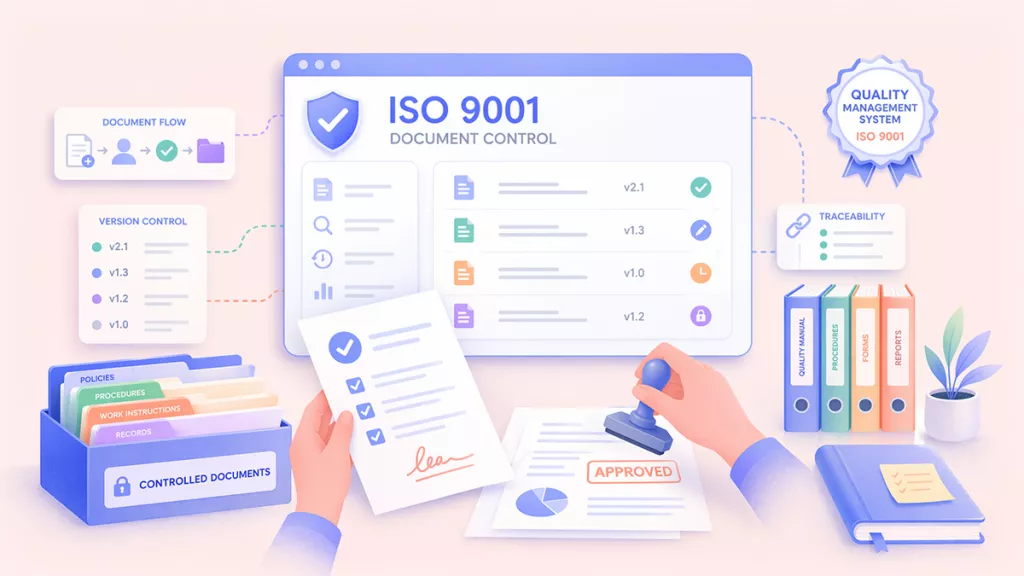
ISO 9001:2015 Clause 7.5 requires you to manage a document's full lifecycle. This includes creating, reviewing, approving, and finally distributing them to the right people.
However, many teams misunderstand this requirement. As a result, poor document control is one of the most common reasons organizations fail audits.
Therefore, in this article, I will clarify the core requirements of ISO 9001 document control and the tools that can help you meet them.
One example is UPDF, a PDF software that is certified under ISO 27001. It helps compliance teams organize, standardize, and secure documents before they are reviewed by auditors. You can download it now to test its features.
Windows • macOS • iOS • Android 100% secure
Part 1. ISO 9001 Document Control Requirements: A 2026 Checklist
ISO 9001 requires that all documented information in your quality management system (QMS) stays available, usable, and protected throughout its entire lifecycle.
Here are its four key requirements for ISO 9001 document control.
1. Identification:
Every controlled document must include a clear title, the date it was created or revised, the author's name, and a unique reference number. This helps avoid confusion and trace who created or approved the document.
2. Review and Approval:
Your QMS must ensure that qualified personnel review and approve documents before they are issued. This helps confirm that each one is fit for its intended purpose. Digital signatures with role-based access controls provide a secure, traceable record of approval, which is exactly what auditors look for under Clause 7.5.2.
3. Distribution:
Employees must have access to the latest approved version of each document at the point of use, such as on a shop floor terminal or internal document system. At the same time, outdated versions must be removed or clearly marked as obsolete.
4. Retention:
Finally, your records must remain readable over time. This can be possible by saving files in PDF/A format. This helps ensure that the files can still be opened years later, even if the software or operating system changes.
These requirements are simple in theory, but problems can still occur in daily practice. In my experience helping firms through Q2 audits, the biggest gap shows up when a technician is following a procedure printed six months ago that has already been updated twice. This situation alone can lead to a major nonconformance during an audit.
Part 2. Top ISO Document Control Software for Teams
When choosing the best ISO document control software, you'll need to consider your team's size, compliance demands, and budget. Here are two options you can try.
1. MasterControl (For Large-scale Enterprise QMS Integration)
MasterControl QMS is a full-featured quality management system that helps companies manage and automate key quality processes. These include document control, audit management, corrective and preventive actions (CAPA), and employee training.
The platform controls each document based on user roles, so each person can only access what they are authorized to see. Moreover, it keeps a complete audit trail that records who created, reviewed, approved, or changed a document, along with the date and time.
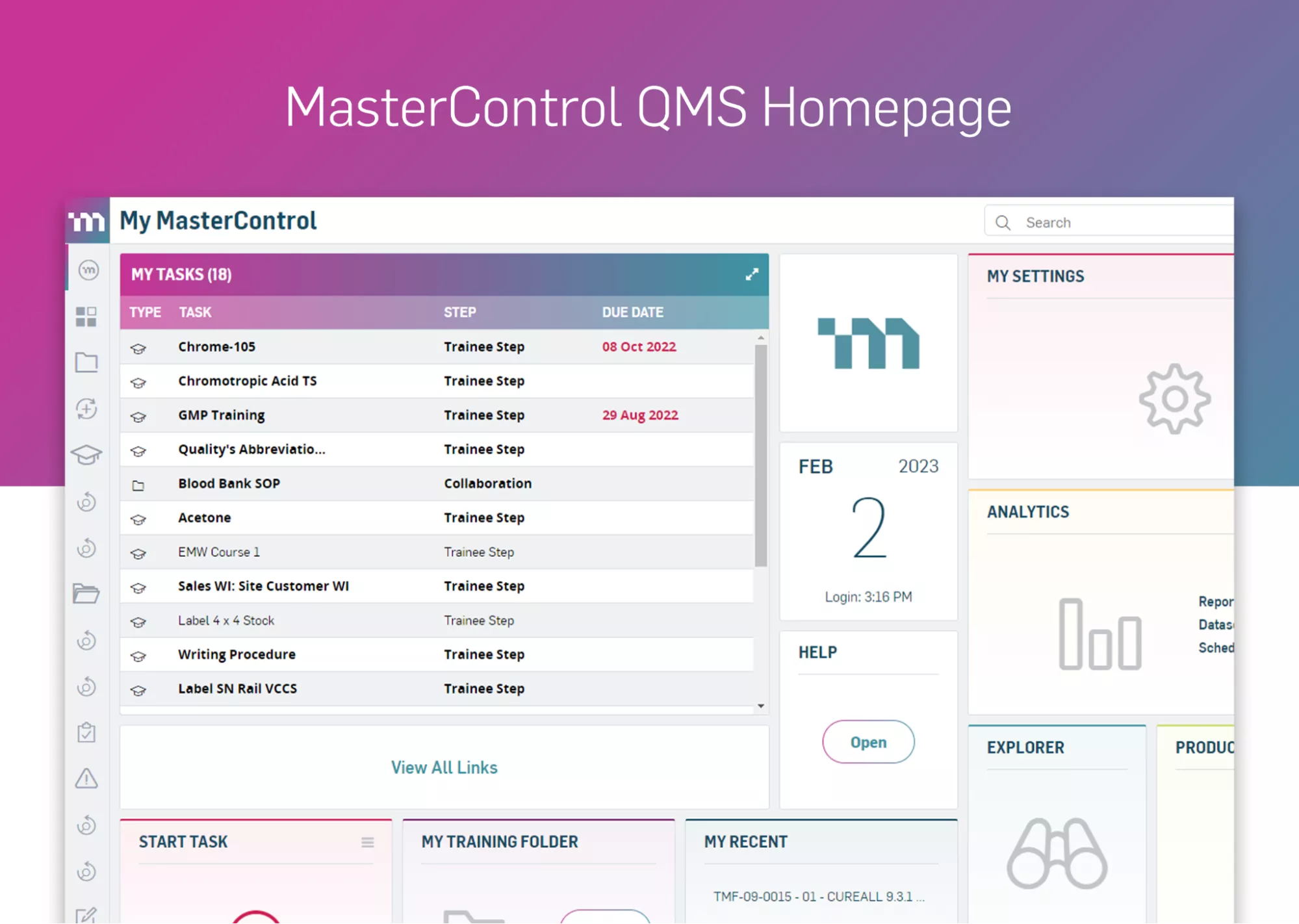
Key Features:
- End-to-end document control with automatic versioning and audit readiness
- Role-based access with full audit trails (user, date, and changes tracked)
- AI-powered document management for productivity.
- All quality processes (CAPA, training, events) in one system
- Centralized document storage for easy audit access
2. UPDF Enterprise (The Modern Choice for Agile Teams)
UPDF is a comprehensive PDF editor that includes all the tools a compliance team needs in one platform. These include PDF editing, annotation, conversion, OCR, form building, e-signatures, and AI-powered document analysis.
It combines all these features in a modern and minimal interface. So, you can execute any task without needing specialized training. The interface is intentionally designed with a refreshing color palette to help your team work more productively.
UPDF also supports Azure SSO deployment and works across Windows, macOS, iOS, and Android under a single license. These features make it the best ISO document control software for distributed auditing teams without a complex setup.
You can download UPDF and try it out for free first, or purchase enterprise licenses directly.
Windows • macOS • iOS • Android 100% secure
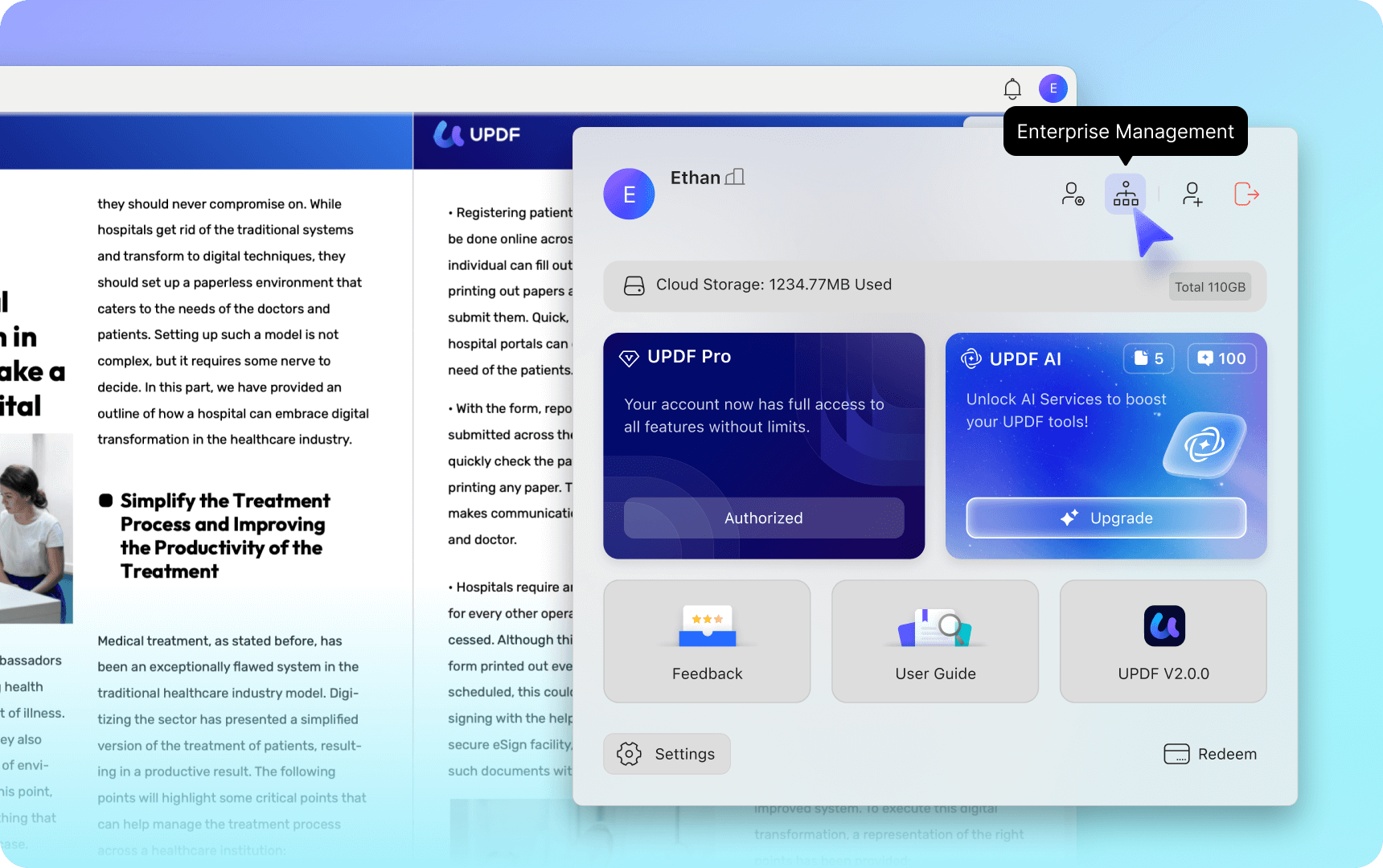
Key Features:
- Admin Console: The Enterprise Management Dashboard allows admins to assign, reassign, and deactivate licenses across the entire team.
- Lifetime Value: UPDF's Enterprise Lifetime Plan requires a one-time payment. After purchase, all team members get full access to every feature without any monthly or annual fees. The license also includes ongoing updates at no extra cost.
- Special Offer: If you buy 6 or more enterprise licenses, you can qualify for volume discounts. This reduces the overall cost and makes it a practical option for larger compliance teams.
- Performance Insight: UPDF can easily handle large and complex documents with a size of over 2 GB. Moreover, it takes up 90% less RAM storage than Adobe Acrobat. So, you can keep multiple tabs open without any performance issues.
Bonus Tip
If you're curious how UPDF compares to legacy tools in real workflows, you can read our PDF Efficiency Report to learn more.
Part 3. The Optimized Compliance Workflow: From Draft to Audit
In compliance workflows, teams need to cross-check information with official ISO guidelines and then apply them to their documents. UPDF provides teams with an all-in-one solution to meet these needs. Here are the steps.
Step 1: Research & Cross-Referencing:
UPDF's built-in AI assistant can help you analyze multiple old ISO manuals and find gaps in new SOPs. To do this:
- Launch UPDF and click "Open File" to import your PDF. Once opened, click "UPDF AI" from the top right and choose the "Chat Project" mode. (Notice, if you prefer using UPDF's AI without installation, you can click the button below to sign up for its online version.)
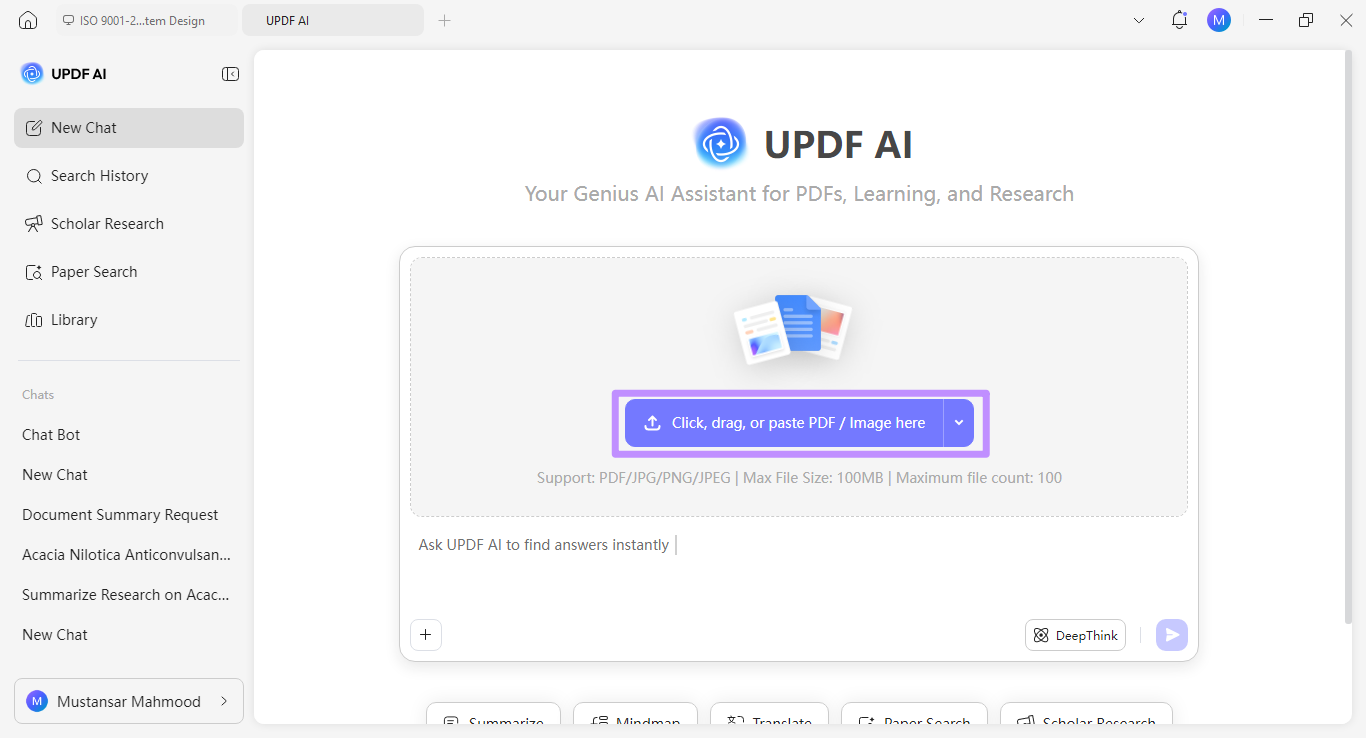
- Click the blue upload button to import the latest and old ISO manuals.
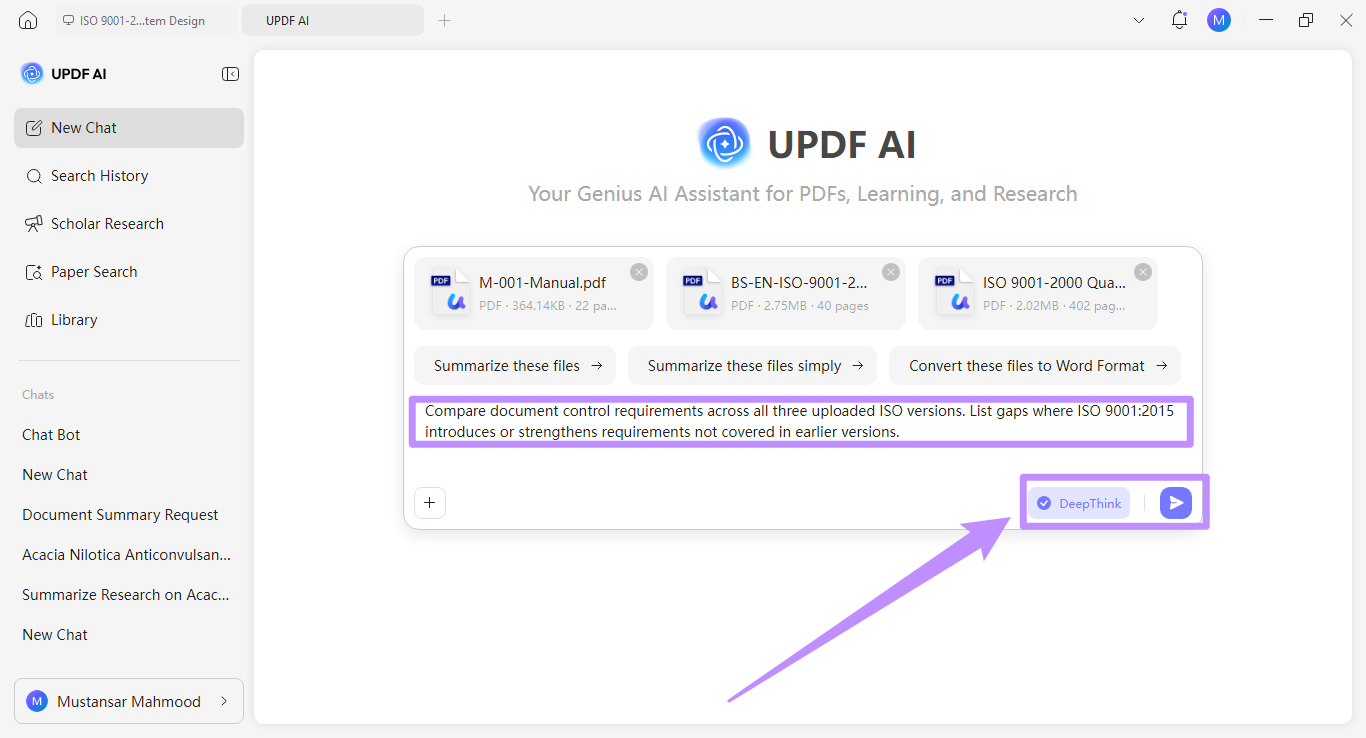
- Write a prompt asking UPDF AI to identify gaps in new SEPs. For example, "Compare document control requirements across all three uploaded ISO versions. List gaps where ISO 9001:2015 introduces or strengthens requirements not covered in earlier versions."
- Enable "DeepThink" for more detailed analysis of documents. Then click "Send."
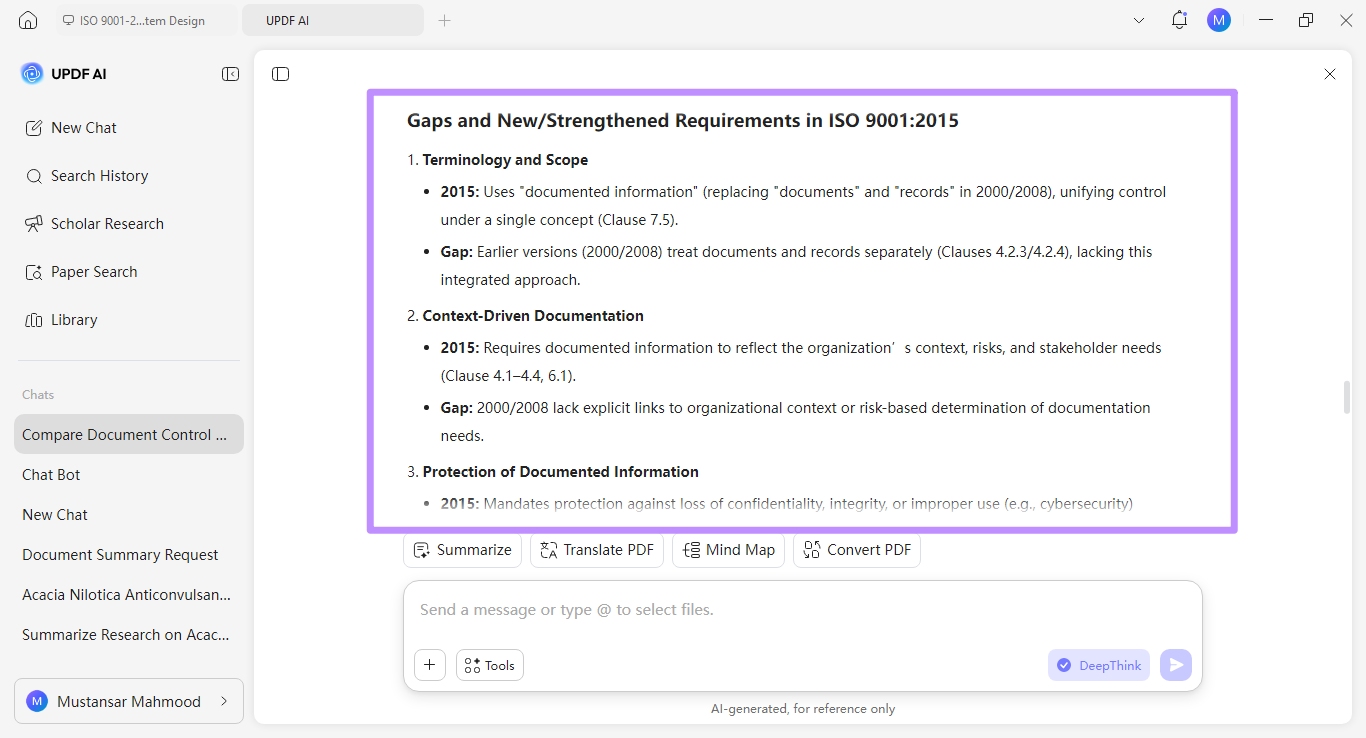
- The AI will analyze the documents and list all gaps in a well-structured response.
Step 2: Standardization & Archiving:
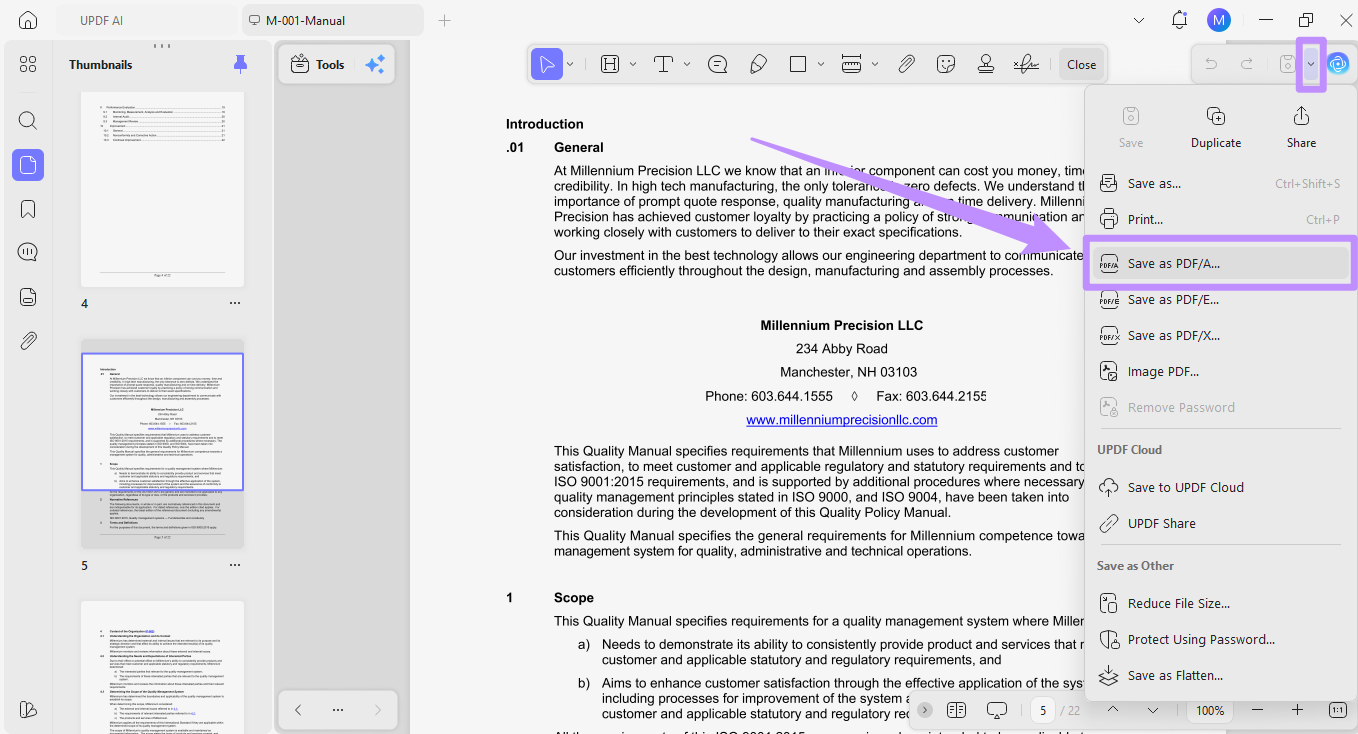
- Click the down arrow in the top right and choose "Save As PDF/A." Then choose a location to store the file.
Step 3: Security & Batch Processing:
UPDF also allows you to add Bates numbering to multiple documents and redact PII data from sensitive documents before sharing files.
Bates Numbering:
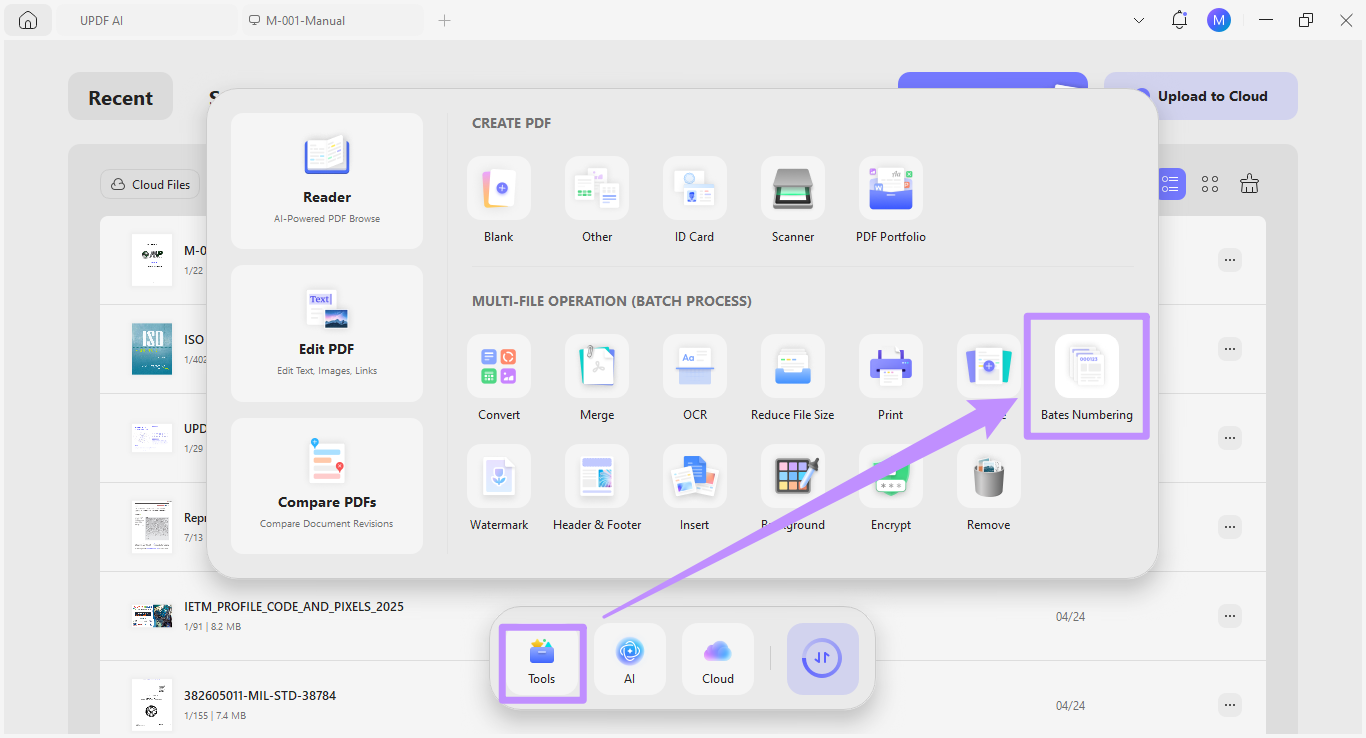
- Click on "Tools" from the Home interface and choose "Bates Numbering" under Multi-File Operation (Batch Process).
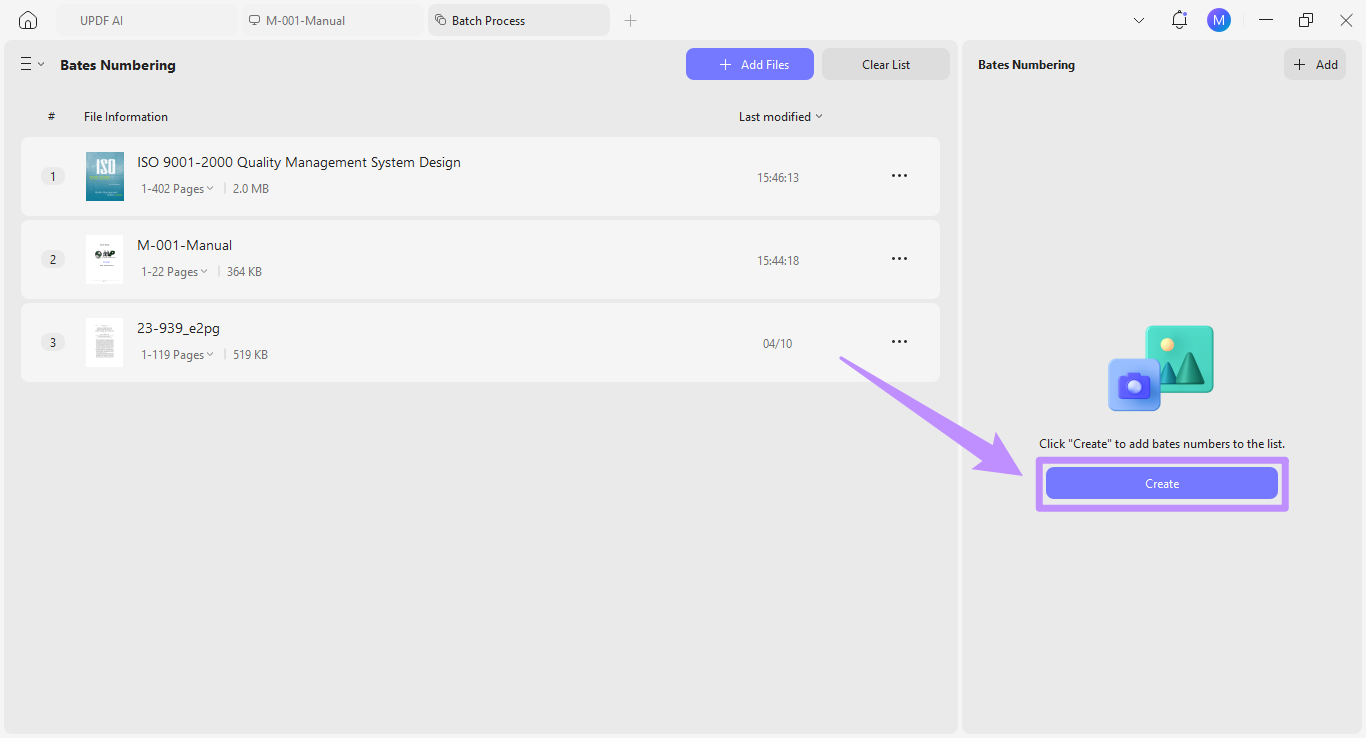
- Click "Add Files" to import several PDFs at once. Once all are uploaded, click "Create" from the right.
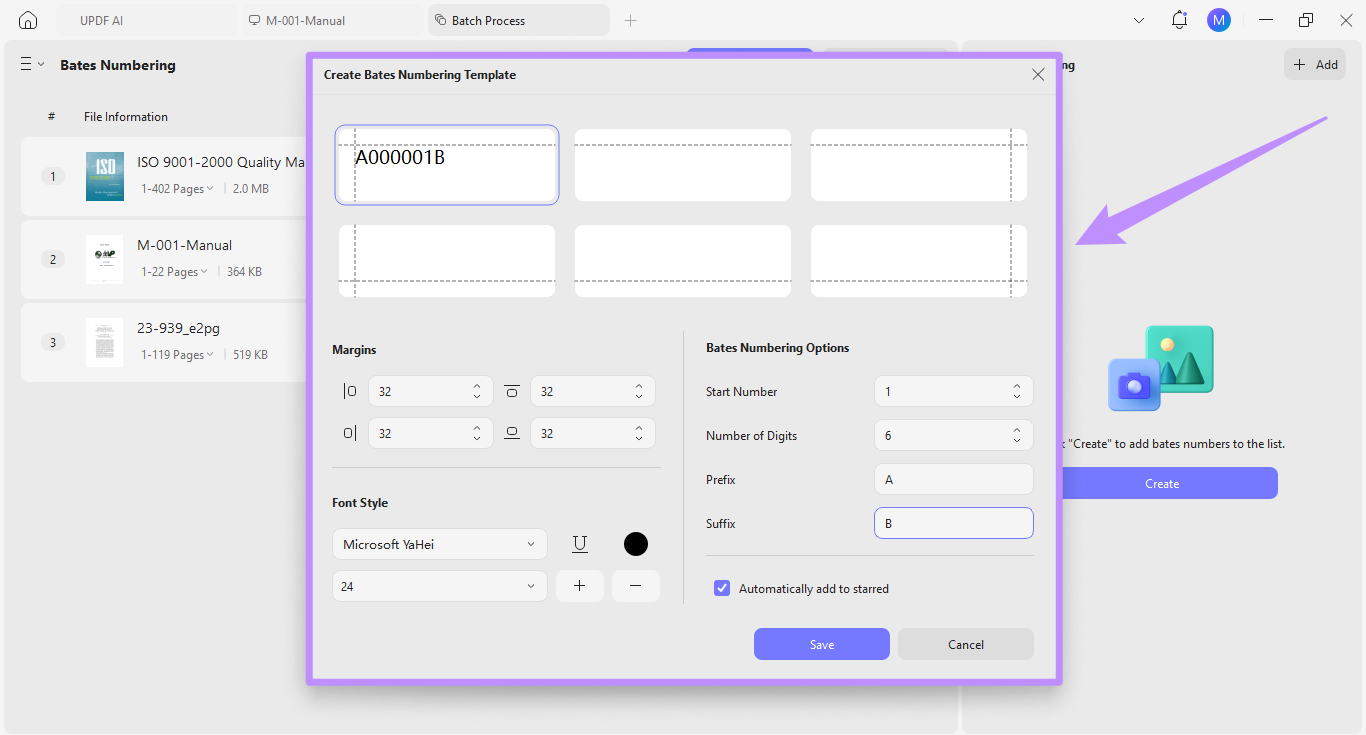
- From the new window, customize your Bates numbering template. You can select the start number, number of digits to add, prefix, and suffix as needed.
- You can also adjust margins, font style, color, size, and more. Once done, click "Save."
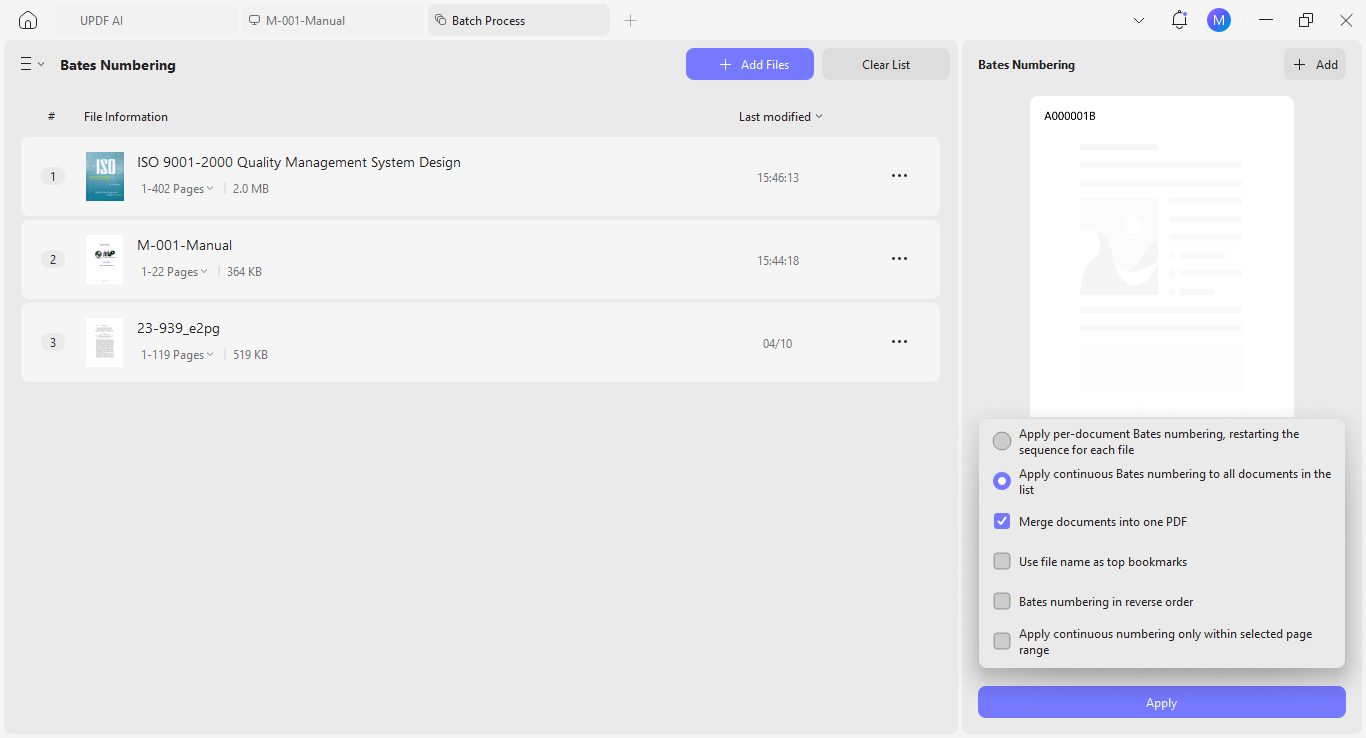
- Select how you want to apply the Bates Numbering. Then, click "Apply" and save all numbered documents on your device.
Redaction:
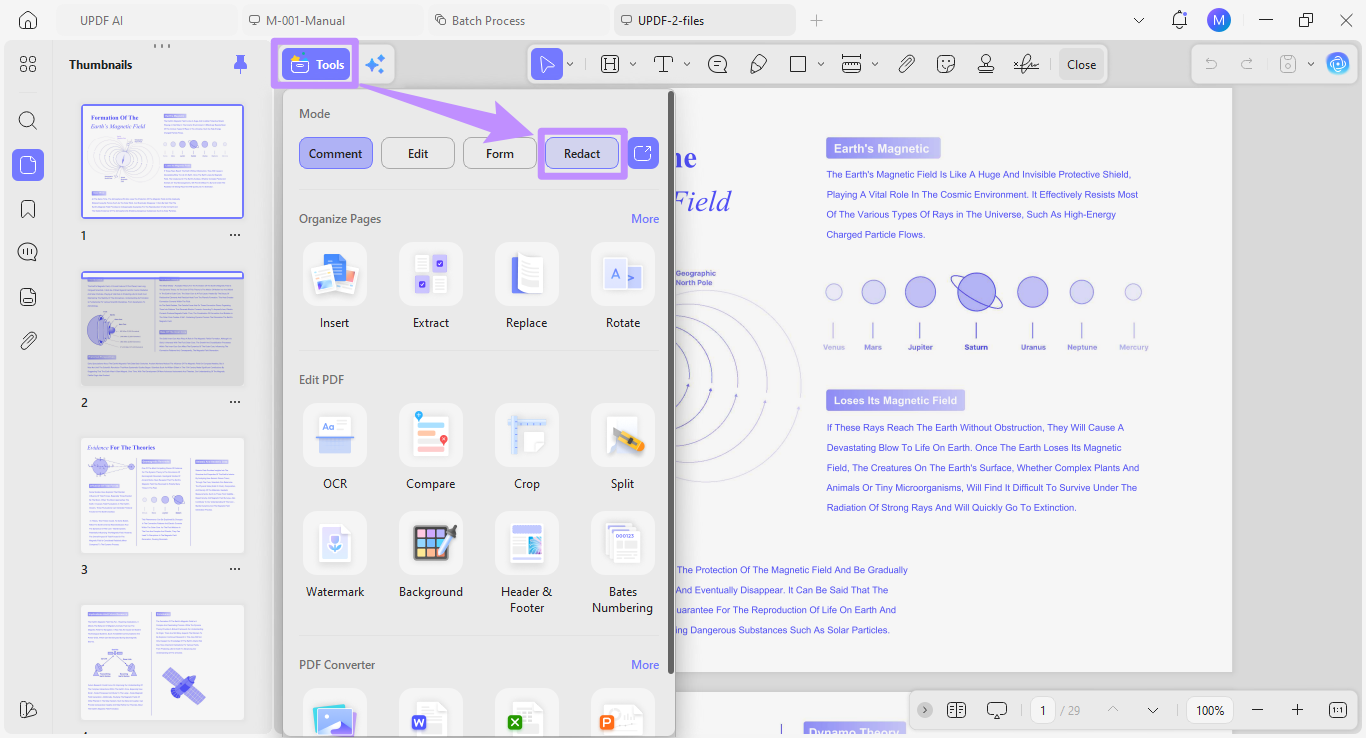
- Open your desired PDF and click "Tools" from the top. Then choose the "Redact" mode.
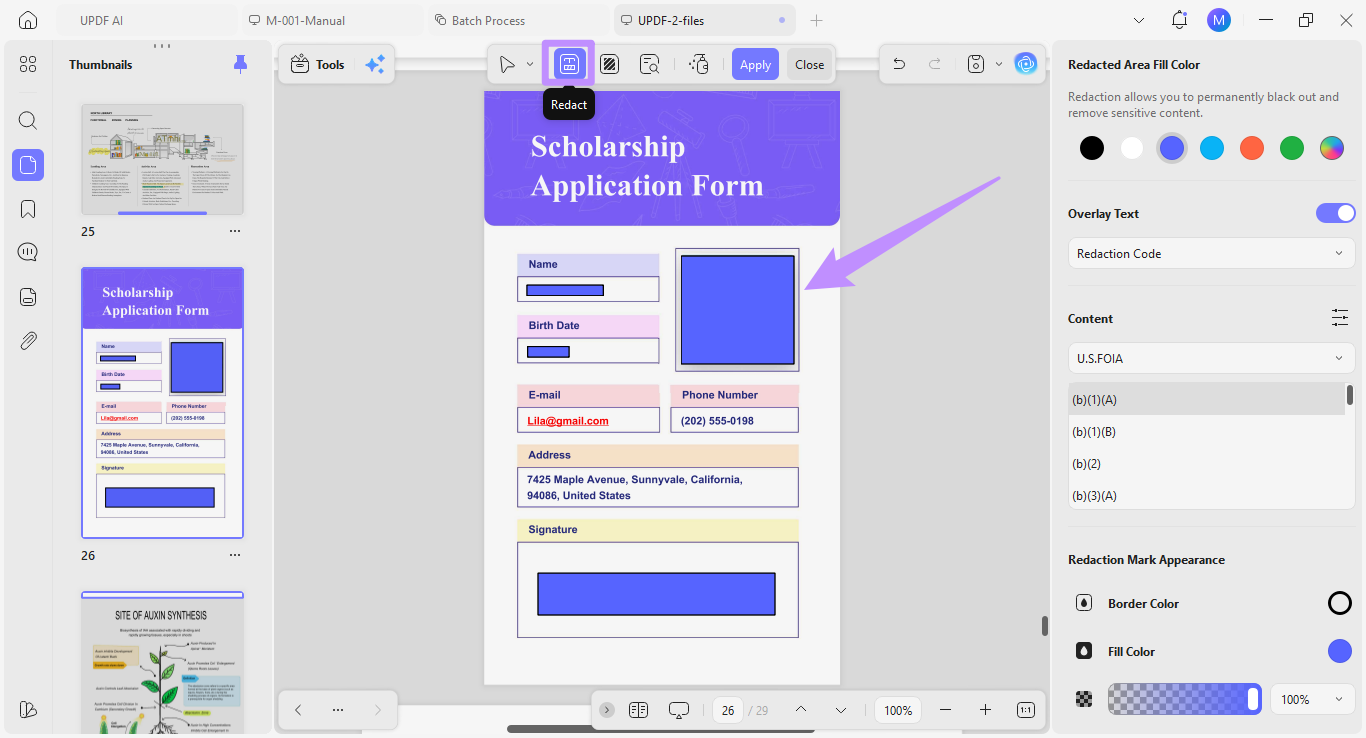
From the top, select how you want to redact your PDF. You can choose:
- Redact: highlight text, images, or any areas for redaction.
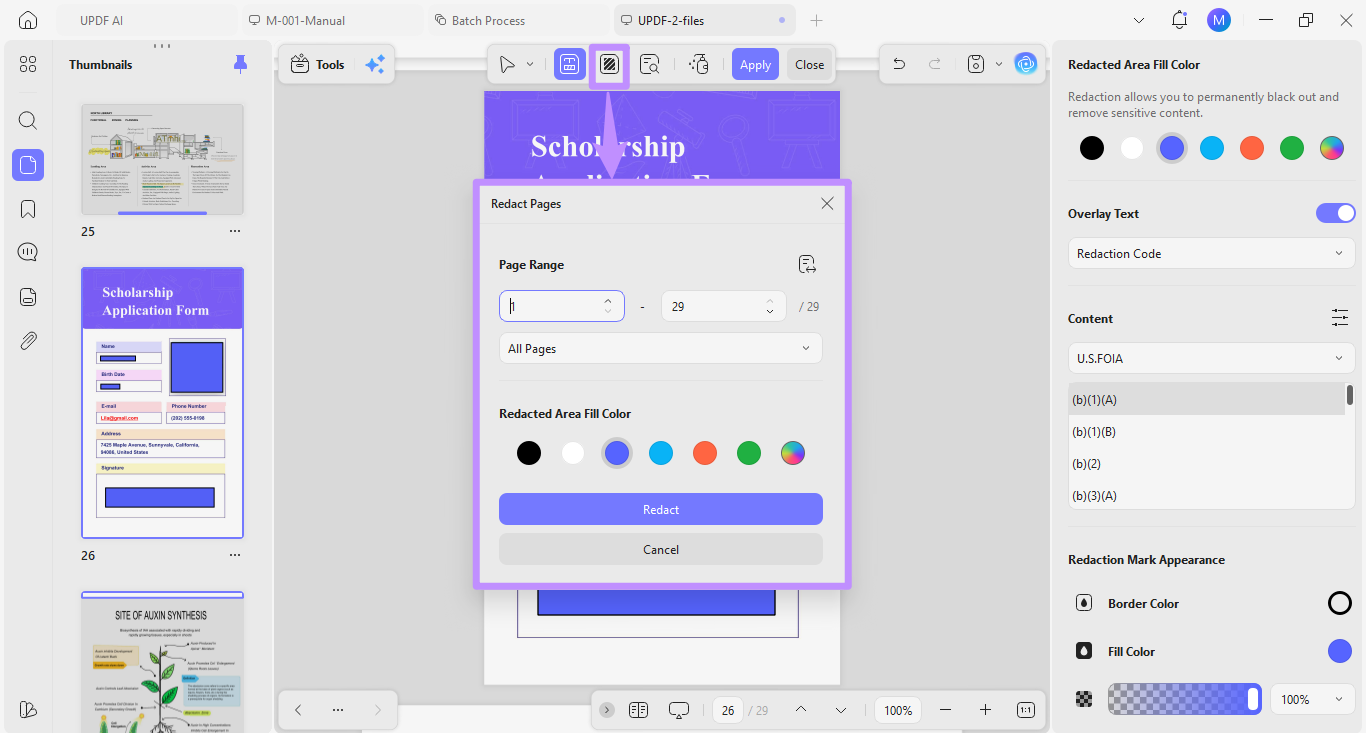
- Redact Pages: Define a page range to redact entire pages.
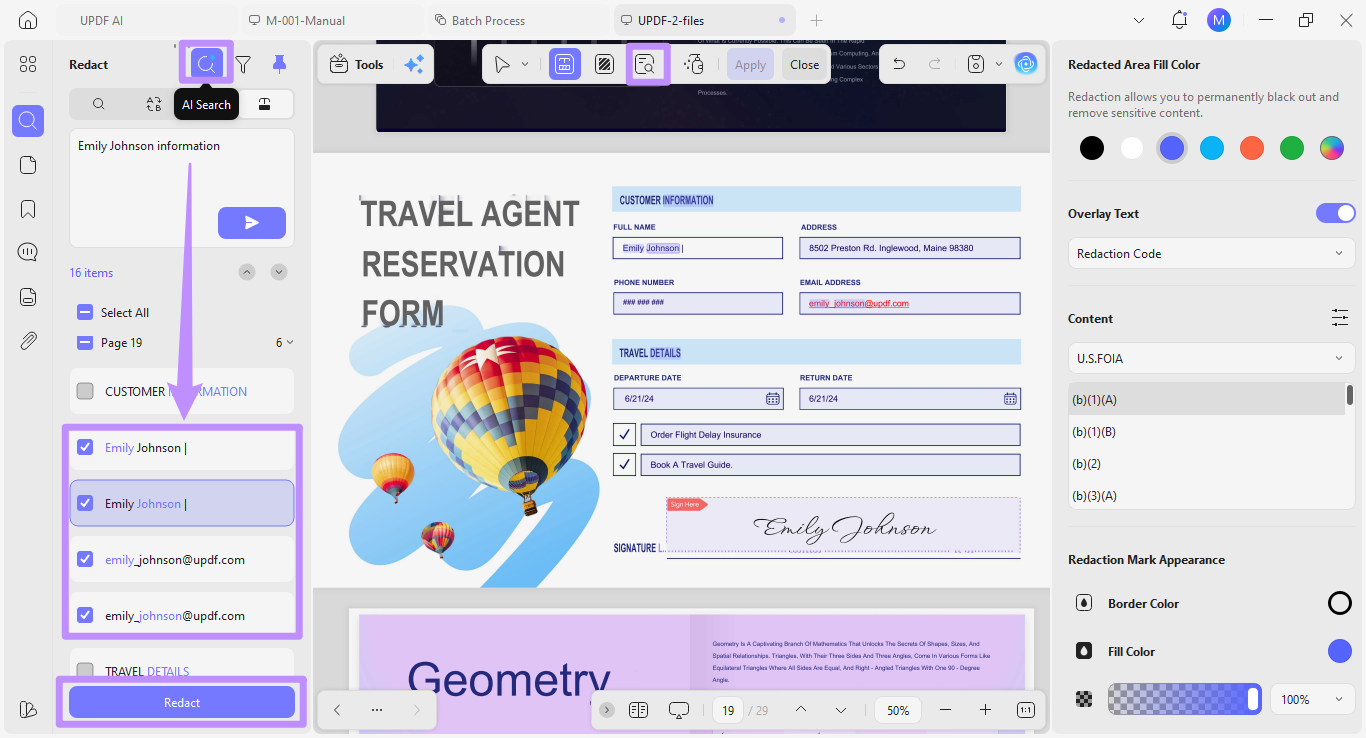
- Search & Redact: Search for specific keywords or semantic synonyms using "AI Search." Then, select desired matches for redaction.
Step 4: Professional Validation:
To use this process across a team, you need a consistent setup. Our Professional Workflow Guide explains how to apply this method step by step and why many teams use it for auditing work.
You can also watch the UPDF 2.5 New Features Video to see how its AI tools help you complete tasks more productively.
You do not have to rely on what we say. Independent reviewers also consistently recommend UPDF. Writer and technology reviewer Nicholas Rossis ranked UPDF as a top alternative to Adobe Acrobat because of its wide range of features and reliable performance.
FAQs
Q1. Can we use basic cloud drives for ISO 9001?
No. Basic cloud drives like Google Drive lack version control enforcement, access permissions tied to document status, and audit trails. As ISO 9001 Clause 7.5 requires all three, it's best to avoid them.
Q2. Is a lifetime license better for compliance software?
Yes, a lifetime license is great for long-term compliance work. It removes renew process that could leave your team without access during an audit cycle. Also, it locks in your toolset without worries of recurring costs affecting your software decisions.
Q3. How does the Admin Console help in an audit?
The Admin Console gives auditors a clean chain of custody. Administrators can instantly show who holds active licenses, revoke access for former employees, and confirm that only approved users handled controlled documents from one dashboard.
Q4. What are the 6 documents required by ISO 9001?
The 6 mandatory procedures actually belong to ISO 9001:2008. These include document control, record control, internal audits, nonconforming product control, corrective actions, and preventive actions. ISO 9001:2015 replaced them with four mandatory documents and 18 required records.
Conclusion
ISO 9001 document control is a complete lifecycle process that requires clear identification, controlled sharing, secure storage, and audit-ready formatting at every stage. UPDF brings every tool needed for this workflow into one platform and at a fraction of the cost of legacy tools. It includes AI-powered gap analysis, PDF/A conversion, Bates numbering, and redaction. This makes it perfect for teams that take compliance seriously. Download and try it now.
Windows • macOS • iOS • Android 100% secure







 Enrica Taylor
 Engelbert White