UPDF
UPDF
 UPDF for Windows
 UPDF for Mac
 UPDF for iPhone/iPad
 UPDF for Android
 UPDF AI Online
 UPDF Sign
 Edit PDF
 Annotate PDF
 Create PDF
 PDF Form
 Edit links
 Convert PDF
 OCR
OCR PDF to Word
 PDF to Image
 PDF to Excel
 Organize PDF
 Merge PDF
 Split PDF
 Crop PDF
 Rotate PDF
 Protect PDF
 Sign PDF
 Redact PDF
 Sanitize PDF
 Remove Security
 Read PDF
 UPDF Cloud
 Compress PDF
 Print PDF
 Batch Process
 About UPDF AI
 UPDF AI Solutions
 AI User Guide
 FAQ about UPDF AI
 Summarize PDF
 Translate PDF
 Chat with PDF
 Chat with AI
 Chat with image
 PDF to Mind Map
 Explain PDF
 PDF AI Tools
 Image AI Tools
 AI Chat Tools
 AI Writing Tools
 AI Study Tools
 AI Working Tools
 Other AI Tools
 AI Bookmark Generation
 AI Bookmark Summary
 AI Watermark Generation
 AI Background Generation
 AI Sticker Generation
 AI Stamp Generation
 AI Editing Suite
 UPDF Copilot
 AI Page Management
 AI Semantic Search
 PDF to Word
 PDF to Excel
 PDF to PowerPoint
 Enterprise Solution
 Enterprise Sign
 Enterprise AI
 Enterprise Plan
 Enterprise User Guide
 Enterprise Webinar
 Banking
 Healthcare
 Insurance
 Legal
Legal Manufacturing
 Government
 Education Solution
 Customer Stories
 User Guide
 UPDF Tricks
 FAQs
FAQs UPDF Reviews
 Download Center
 Blog
Blog Newsroom
 Tech Spec
 Updates
 UPDF vs. Adobe Acrobat
 UPDF vs. Foxit
 UPDF vs. PDF Expert

If you rely on AI tools when working, you must know the frustration of juggling multiple AI agents for different tasks. Sider AI solves this problem by bringing major AI models into one platform. It's the go-to tool for students and professionals for quick AI help when browsing.
But is Sider.ai reliable? And how does it actually work? This guide answers these questions with a detailed review of the Sider AI extension and its web app. It also includes my hands-on experience using the tool.
Overall, Sider is a good choice for everyday AI assistance. But if you need a more powerful solution for document-based work, UPDF AI Online is a better option. It is also seamlessly integrated into UPDF - a full PDF editor. So, you can manage and analyze documents in one place. Download UPDF now to get started! Or click the button below to try the online AI without installation!
Part 1. What Is Sider AI?
Sider AI is an all-in-one AI assistant that helps you chat, read, research, and translate content. It works both as a browser extension and as a standalone AI platform. At its core, Sider works as a collection of AI models. These include GPT, Claude, Gemini, Grok, DeepSeek, and more. You can access this tool across all platforms, including online, Windows, Mac, Android, and iOS. Moreover, the extension is available for major browsers like Chrome, Edge, and Safari.
Part 2. Key Features of Sider AI
Sider AI offers an extensive range of features that make it easy to consume online content faster. Let's look at some of these.
- Deep Reading: Deep reading tools let you summarize, clarify concepts, and identify assumptions. The supported files include PDF, DOC, webpage, and more.
- Deep Research: Search webpages and scholarly publications with a comprehensive report. You can convert the report into an interactive document with visual data.
- AI Slides: It allows you to generate presentation slides from a prompt. You can personalize the slides for a specific audience and visual style.
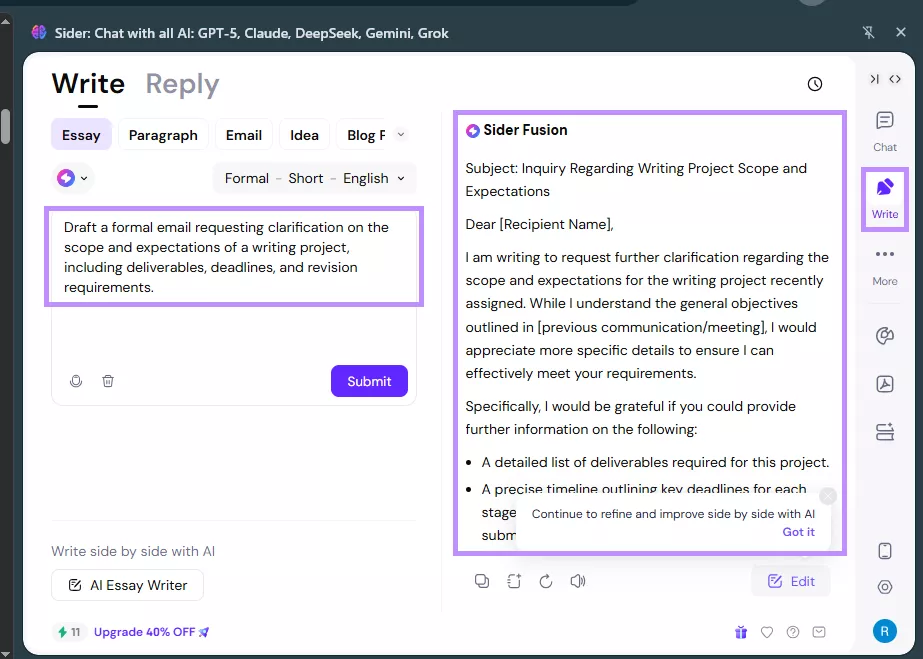
- AI Writer: It generates essays, paragraphs, emails, blog posts, and more. You can customize their language, tone, and length as needed.
- Translation Tools: Sider can detect text from webpages, PDFs, and images for translation to over 50 languages.
- Web Creator Sider allows you to generate a brand new website from text prompts. You can preview the modify its elements as needed.
- YouTube Video Tools: Sider AI extension can generate text-based summaries of YouTube videos. The video shortener tool extracts key highlights in video format.
Part 3. My Hands-On Experience with Sider AI
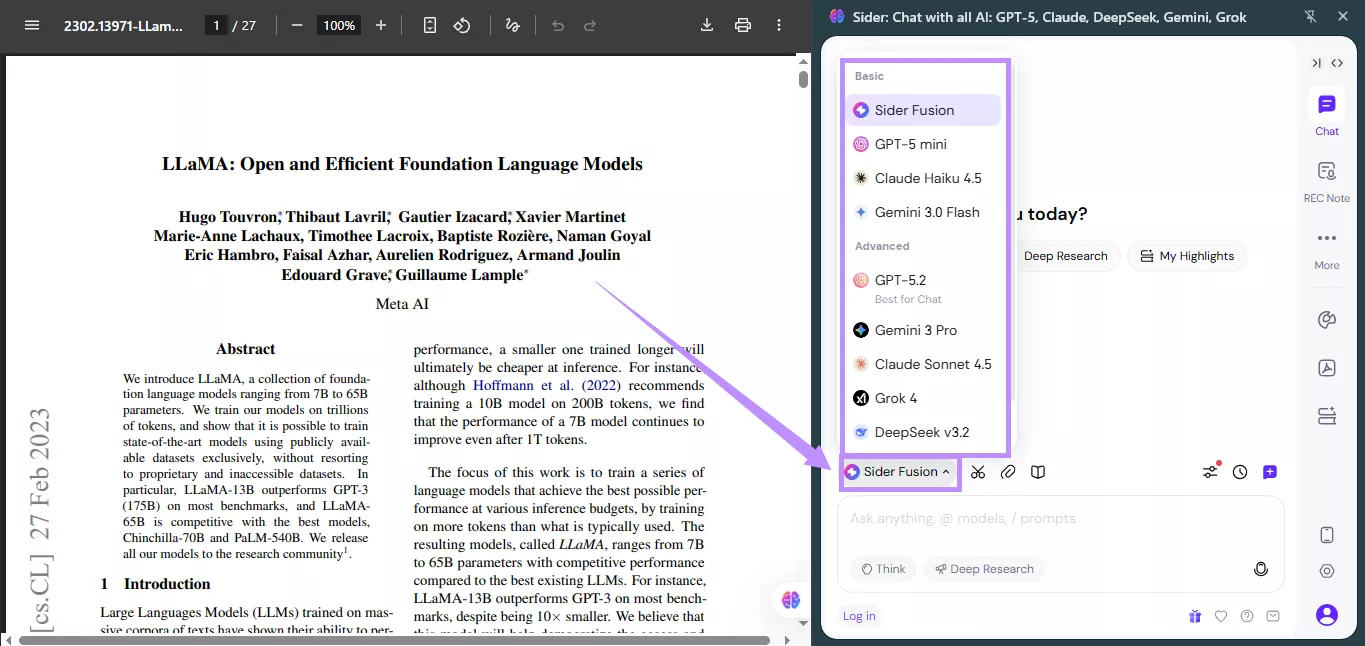
Over the past few days, I used the Sider AI extension to become familiar with its features. Getting started was pretty straightforward. After installing and signing in, a Sider AI icon appeared at the bottom right of my screen. Once I clicked on it, a sidebar with a chat interface opened. From there, I could select a specific AI model from the "Sider Fusion" menu.
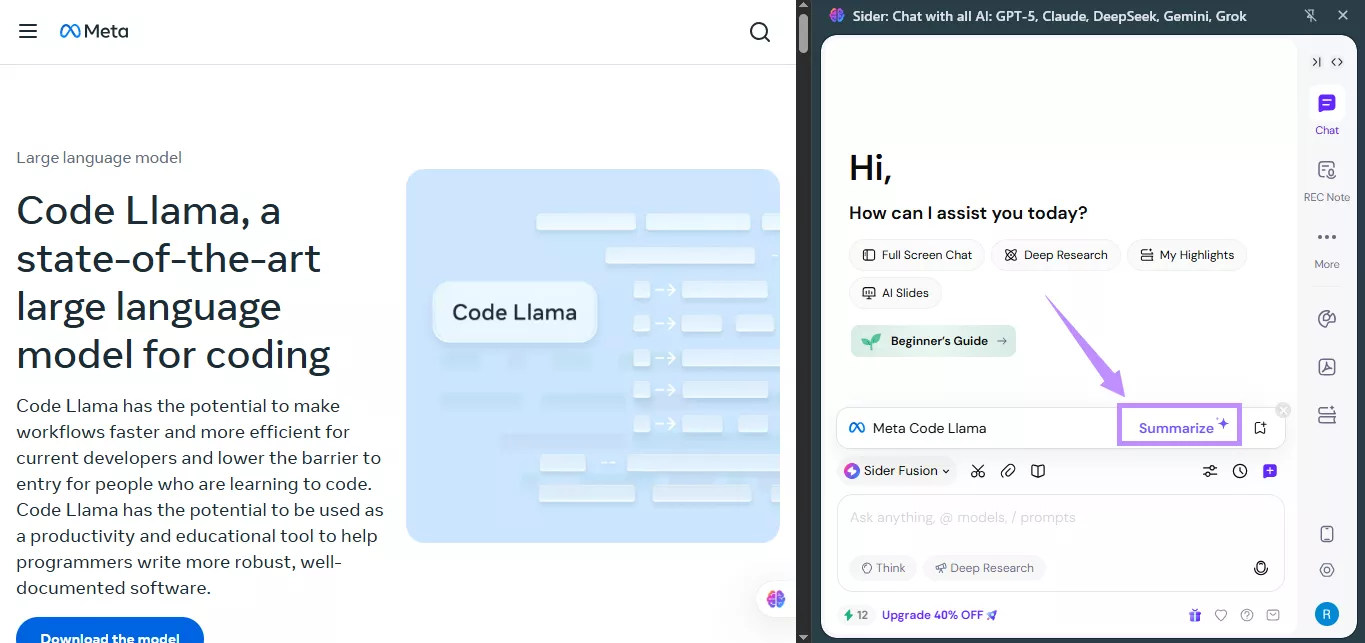
During daily use, Sider AI became a practical companion for my routine tasks. It automatically understands the context of the webpage you're viewing. As a result, I only needed to choose an action from the sidebar to work with it. For example, selecting "Summarize" instantly generates a concise summary of the page content.
In addition, I used Sider to understand unfamiliar ideas while reading technical materials. Instead of switching to another tool, I could highlight the text and select "Explain" from the floating toolbar on the same page.
Verdict: What Sider AI does well?
Sider AI excels in quick AI assistance directly when browsing. It's highly aware of the context of pages, which saves you from designing complex prompts or uploading files. Therefore, it is suitable for everyday tasks such as research, general browsing, and writing.
Part 4. Where Sider AI Feels Limited for Document-Heavy Work
Sider may provide quick assistance when browsing or handling documents. But it falls short in some areas. Here are some of its limitations:
- Limited to Quick AI Tasks: Sider AI extension is mainly focused on web pages and short text snippets.
- Limited Interaction with PDFs: Sider cannot work directly inside PDFs. Moreover, there are no dedicated tools to interact with specific pages or sections of the PDF.
- Lacks Deep Document Analysis: It supports basic literature review via Deep Research. It lacks more nuanced AI analysis for academic and professional documents.
If you're looking for a tool with more advanced document analysis capabilities, UPDF AI Online can be your go-to. It allows professionals and students to review, analyze, and extract insights from complex PDFs. Visit it now to get started!
Part 5. UPDF AI: A Powerful Document-Focused Alternative
UPDF AI Online is a powerful AI assistant designed specifically for deep analysis of PDFs. It allows you to chat with PDFs, summarize, translate, and clarify technical ideas. Moreover, it accurately understands the context of the PDFs. So, you can interact with specific sections and pages to extract key information.
It is also seamlessly integrated into the UPDF app, which offers a complete solution to edit, annotate, and organize your PDFs. So, download UPDF or try UPDF AI Online to handle your documents more productively!
Key Features of UPDF AI Online
- AI Chat: Explore any topic, analyze documents and images, or ask questions for instant answers.
- Summarize Lengthy PDFs: Extracts key takeaways from an entire document, specific pages, or key sections.
- Paper Search: Find academic publications using keywords, DOI, PMID, or title.
- Deep Research: Deep analysis of up to 50 scholarly articles for nuanced and comprehensive insights on any topic.
- Literature Reports: Provides literature review reports with organized sections, references, and citations.
- Create Mind Maps: Convert PDF files into clear mind maps to visually understand the flow of complex processes.
Use Case Examples
1. Reviewing Lengthy Professional PDFs
Business professionals frequently work with reports or technical manuals. They can use UPDF AI to ask questions, extract key points, and translate unfamiliar languages for better review.
Here's how it works.
Step 1. Visit UPDF AI Online and log in to the platform.
Then, select "New Chat" from the left and click the upload button to import your file.
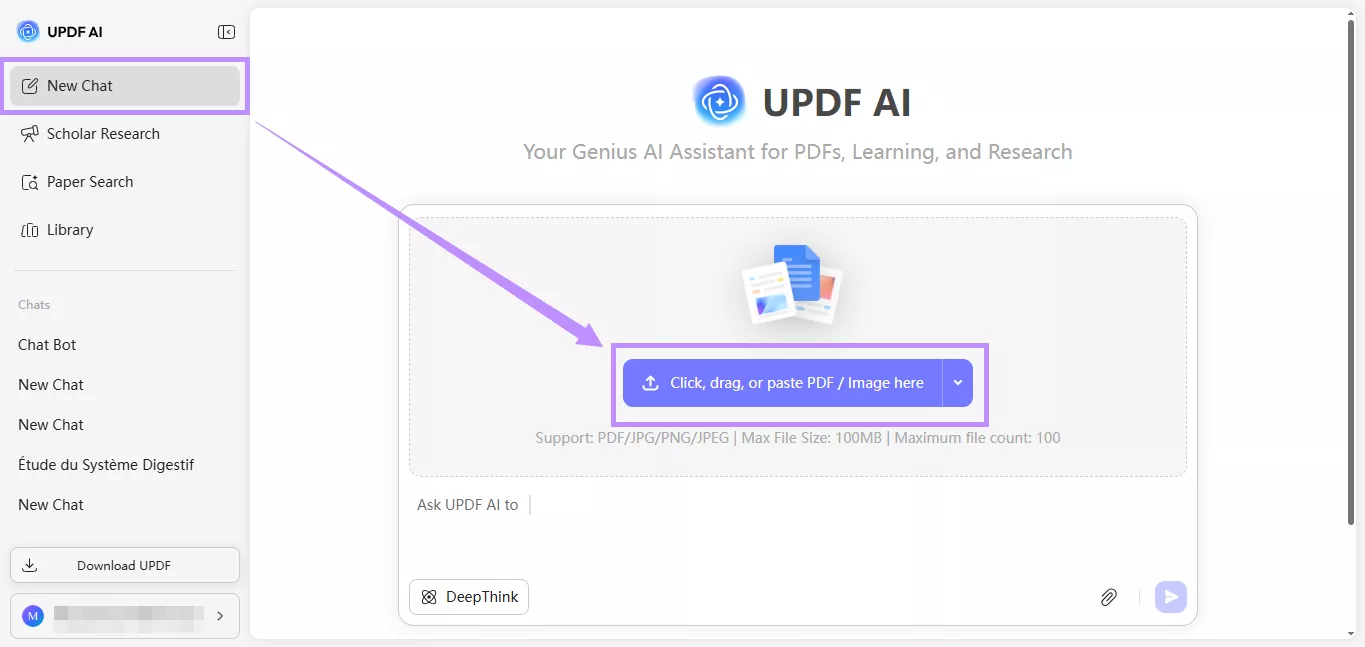
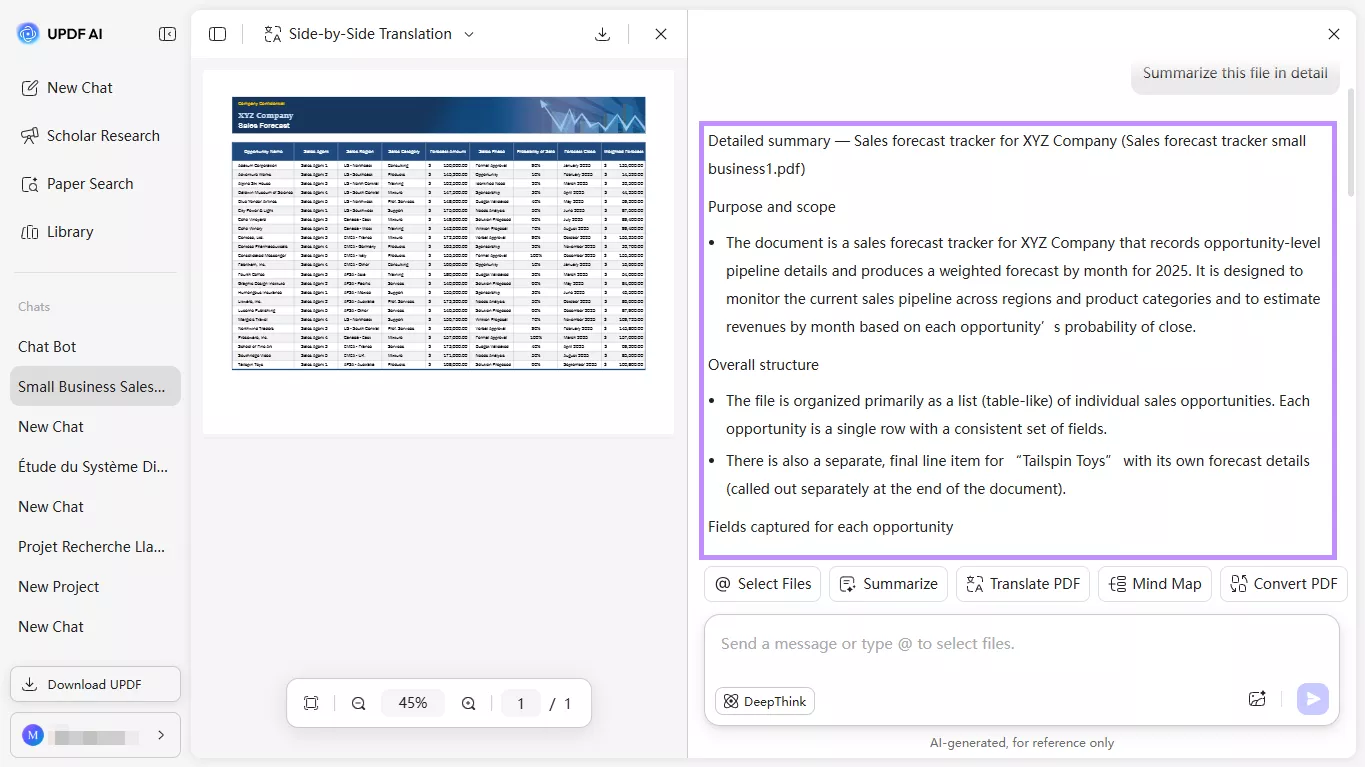
Step 2. Ask UPDF AI to "Summarize this file in detail" and hit "Enter" to send it. UPDF AI will give you a detailed overview of the file.
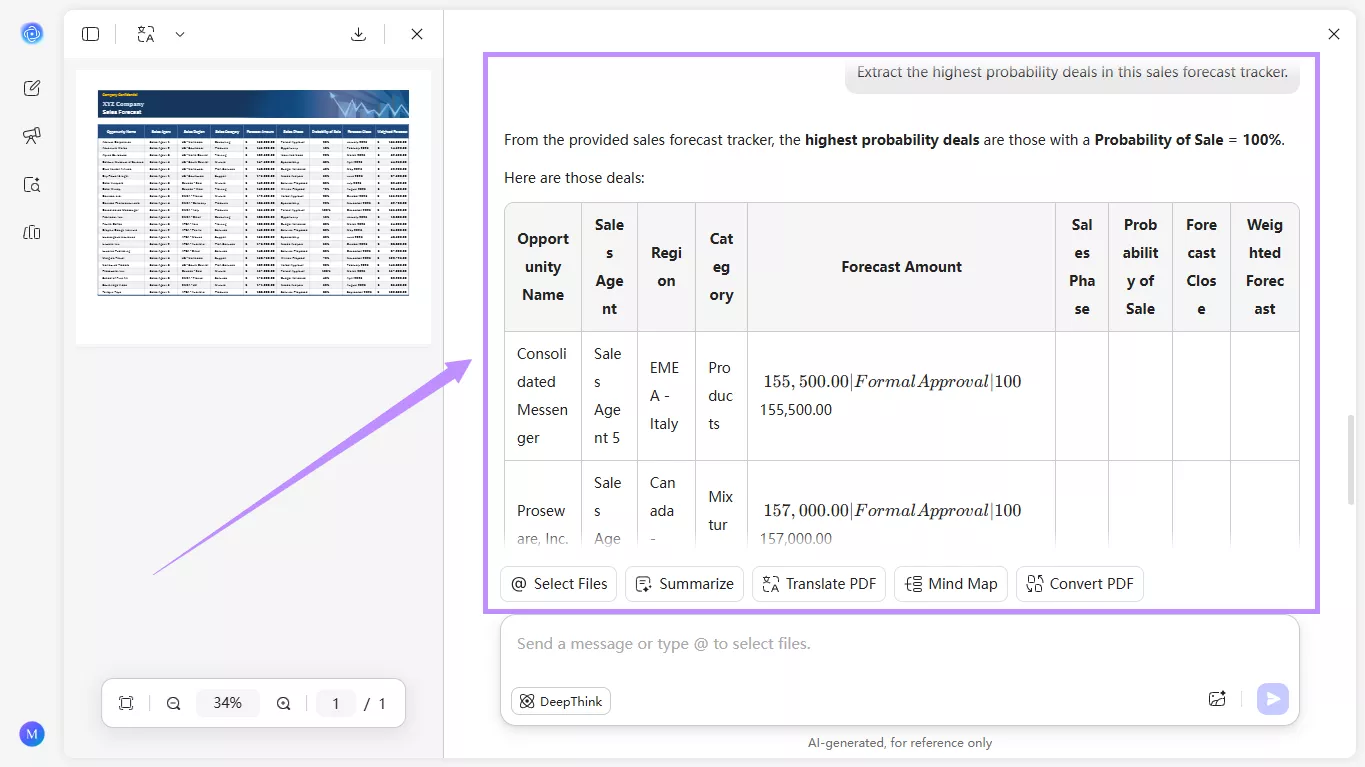
Step 3. If you want to extract a key point, ask specific questions about the file. For example, "Extract the highest probability deals in this sales forecast tracker."
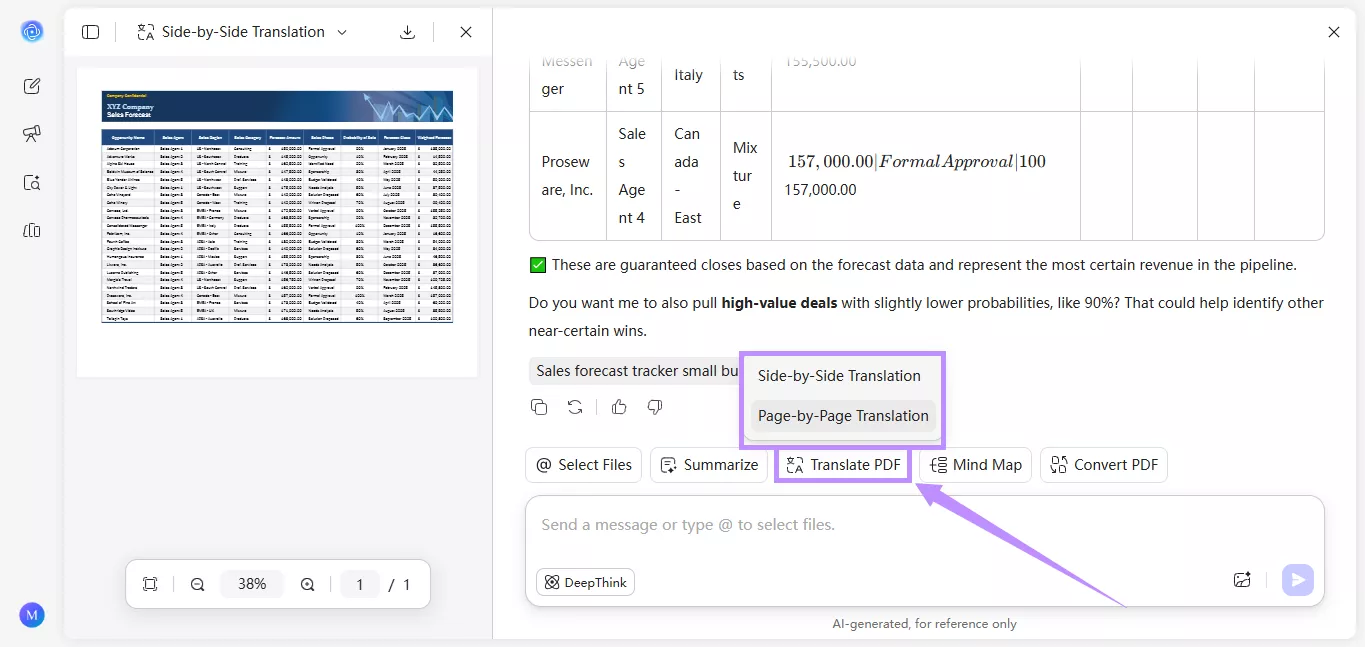
Step 4. To translate the PDF, click "Translate PDF" in the chat interface. Then, choose "Side by Side Translation" to translate the entire document. Otherwise, select "Page by Page Translation" and select a page range to translate.
Graduate or PhD students need to constantly research and review literature for their dissertations. They can use UPDF AI to find relevant papers and review multiple articles at once. It can extract important findings and summarize them in an organized report.
Here are the steps.
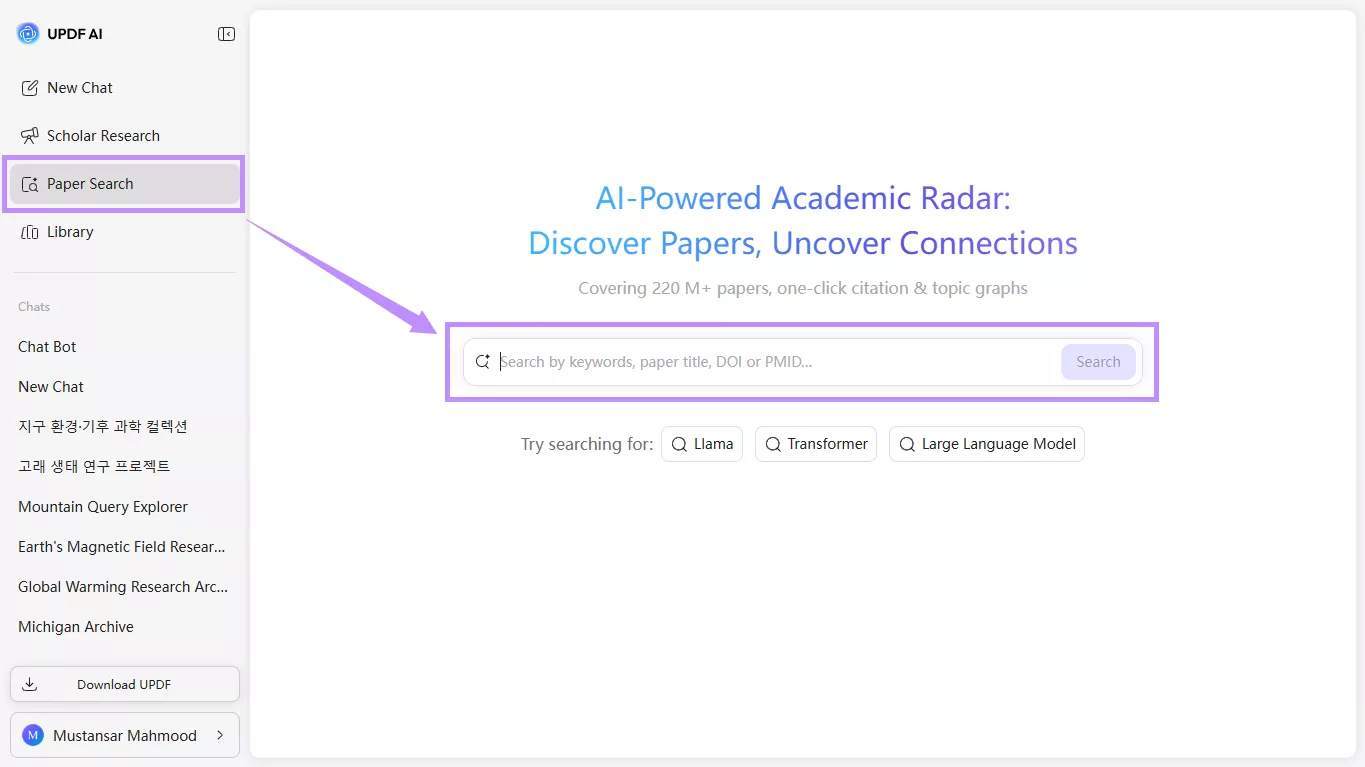
Step 1. Select "Paper Search" from the left. Then, type the keyword, title, DOI, or PMID for a paper and click "Search."
Step 2. Click the paper title you want to view. Below the details, you will see several options.
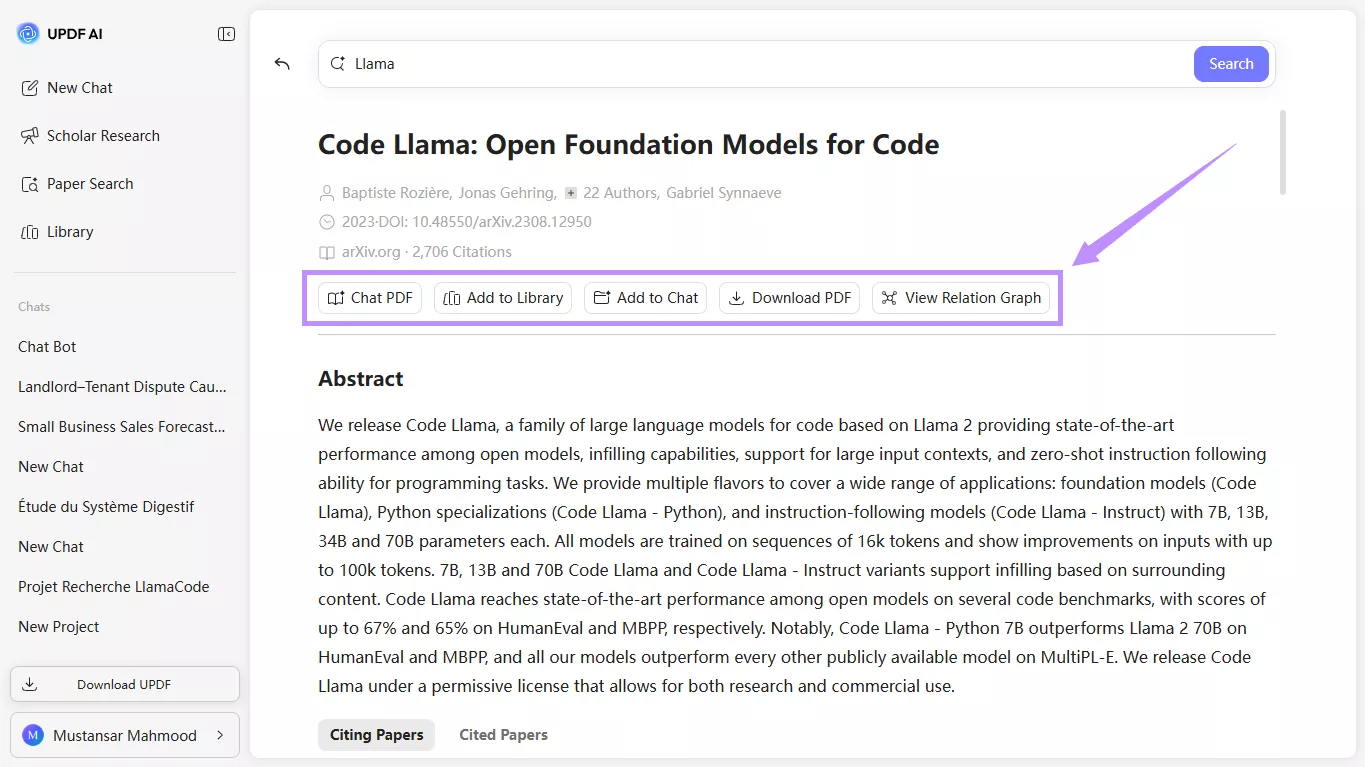
Step 3. Click "Chat PDF" from the options. Then, click "Get Started" to ask questions about the document and extract the key findings.
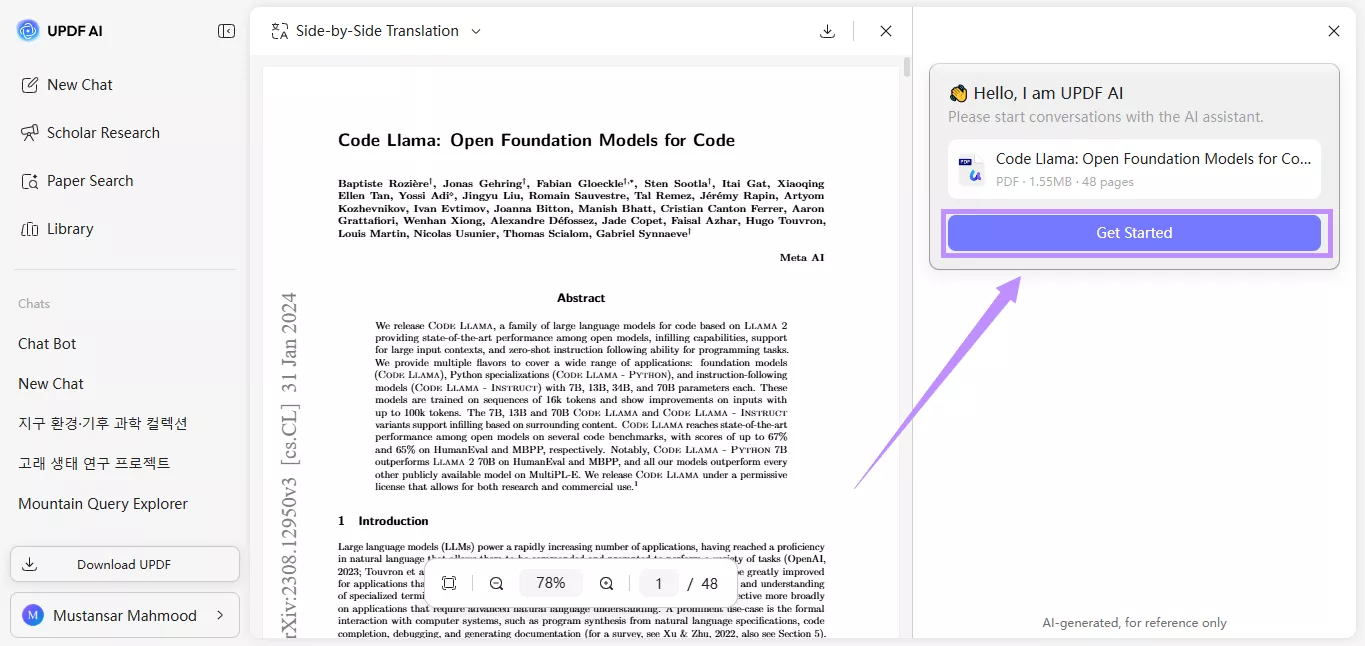
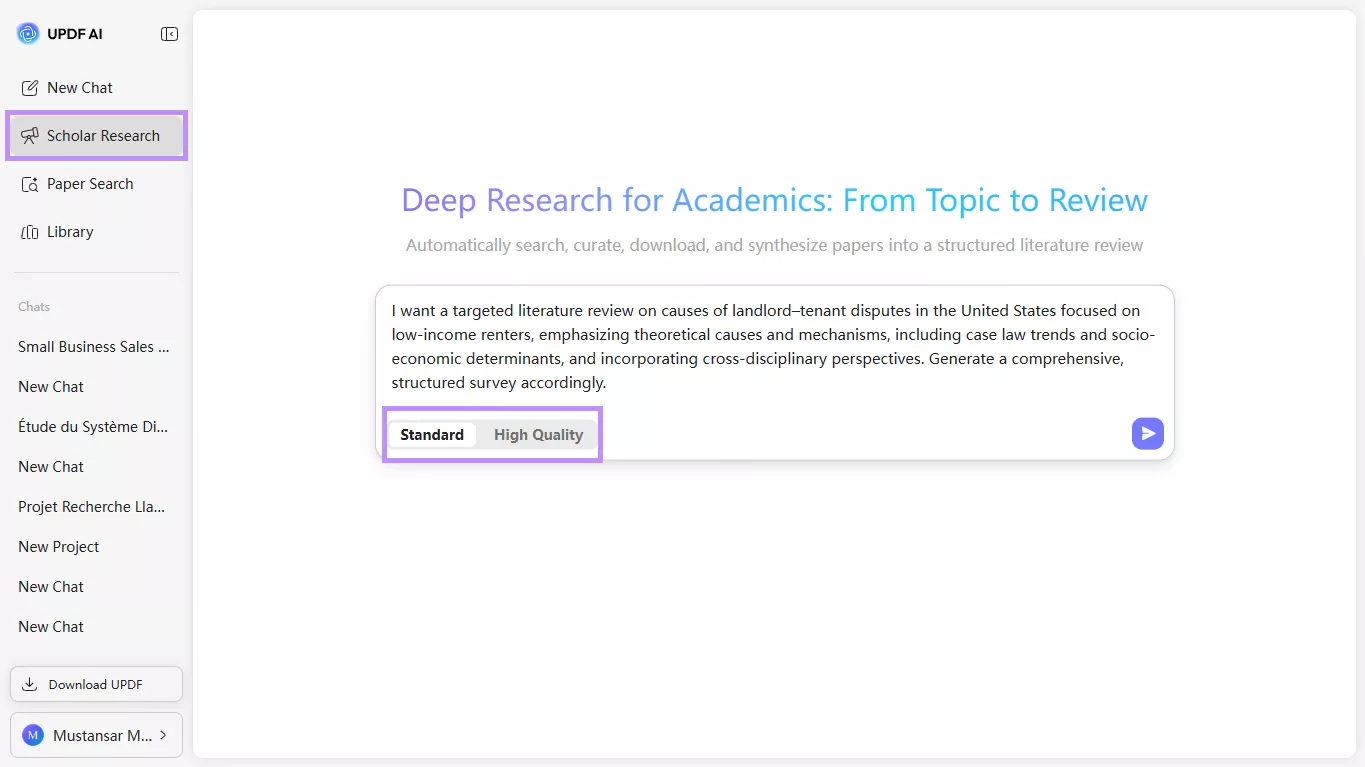
Step 4. If you want to conduct a full literature review, select "Scholar Research" from the left. Then:
- Choose "Standard" for a medium-depth report from 10 papers.
- Select "High-Quality" mode for a high-depth report covering 50 papers.
Next, write a topic to research and hit "Enter."
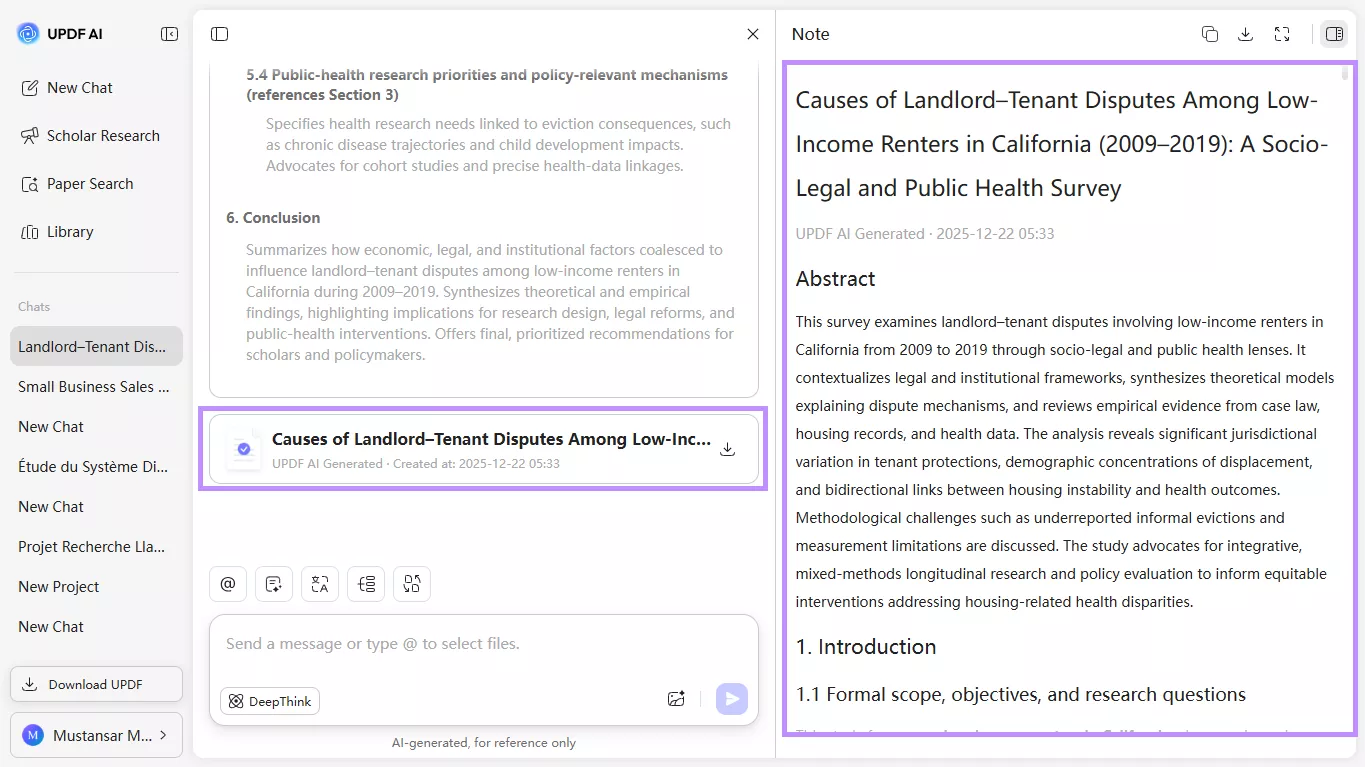
Step 5. Answer the questions AI to narrow down the research. Once the research is completed, it will provide a comprehensive report for you to view or download.
Or you can watch the video to learn how to use the Paper Search tool:
Part 6. Sider AI vs Document-Centered AI Tools: Which Should You Choose?
If you're wondering, which AI tool would better serve your needs, here's a quick comparison to help you decide.
| Feature / Use Case | Sider AI | UPDF AI |
| Primary focus | General-purpose AI for browsing and writing | Document- and research-focused AI |
| Best for | Quick research, summarization, and drafting content | Deep analysis of PDFs, academic papers, and long documents |
| Platform | Browser extension, Web, Desktop, Mobile | Integrated in UPDF PDF editor + UPDF AI Online |
| Work directly inside PDFs | Limited | Yes |
| Chat & Q&A on long PDFs | Limited | Yes |
| Section/chapter summaries | Basic | Accurate, document-based |
| Literature review support | Basic | Strong (AI-assisted summarization + Q&A) |
| Research workflow support | Quick reference & summarization | Designed for faster idea verification and reduced info overload |
In short, both Sider and UPDF AI have their own unique strengths. Sider AI is suitable for use as a general-purpose AI when browsing online. Meanwhile, UPDF AI is an excellent platform to analyze documents, conduct deep research, and get more nuanced answers to your queries.
Conclusion
To sum up, Sider AI helps you analyze webpages and documents, conduct research, and write content. But if you're looking for an AI tool designed especially for documents, UPDF AI Online can be your go-to. It offers advanced PDF analysis, so you can have full command over your professional and academic documents. Plus, you can get started with 100 free prompts. So, don't wait. Visit UPDF AI Online now!









 Enola Miller
 Lizzy Lozano