UPDF
UPDF
 UPDF for Windows
 UPDF for Mac
 UPDF for iPhone/iPad
 UPDF for Android
 UPDF AI Online
 UPDF Sign
 IvyCraft
 Edit PDF
 Annotate PDF
 Create PDF
 PDF Form
 Edit links
 Convert PDF
 OCR
OCR PDF to Word
 PDF to Image
 PDF to Excel
 Organize PDF
 Merge PDF
 Split PDF
 Crop PDF
 Rotate PDF
 Protect PDF
 Sign PDF
 Redact PDF
 Sanitize PDF
 Remove Security
 Read PDF
 UPDF Cloud
 Compress PDF
 Print PDF
 Batch Process
 About UPDF AI
 UPDF AI Solutions
 AI User Guide
 FAQ about UPDF AI
 Summarize PDF
 Translate PDF
 Chat with PDF
 Chat with AI
 Chat with image
 PDF to Mind Map
 Explain PDF
 PDF AI Tools
 Image AI Tools
 AI Chat Tools
 AI Writing Tools
 AI Study Tools
 AI Working Tools
 Other AI Tools
 AI Bookmark Generation
 AI Bookmark Summary
 AI Watermark Generation
 AI Background Generation
 AI Sticker Generation
 AI Stamp Generation
 AI Editing Suite
 UPDF Copilot
 AI Page Management
 AI Semantic Search
 PDF to Word
 PDF to Excel
 PDF to PowerPoint
 Enterprise Solution
 Enterprise Sign
 Enterprise AI
 Enterprise Plan
 Enterprise User Guide
 Enterprise Webinar
 Banking
 Healthcare
 Insurance
 Legal
Legal Manufacturing
 Government
 Education Solution
 Customer Stories
 User Guide
 UPDF Tricks
 FAQs
FAQs UPDF Reviews
 Download Center
 Blog
Blog Newsroom
 Tech Spec
 Updates
 UPDF vs. Adobe Acrobat
 UPDF vs. Foxit
 UPDF vs. PDF Expert

In high-risk labs and industrial plants, teams rely on clear documents to keep every shift safe and prepared. When an accident happens, staff must open the correct safety data sheet PDF instead of guessing the next steps. During a real crisis, this document stops being paperwork and becomes a life-saving manual.
SDS files are available online from manufacturer websites and trusted regulatory databases around the world. Managing a full library of complex chemical documents, however, requires more than a basic viewer. This is where UPDF helps EHS teams organize, search, and work with these files. Now, we will explain how downloading UPDF for free helps EHS teams understand these files with AI-powered clarity.
- Clear SDS documents guide staff during spills, leaks, and sudden exposure incidents in busy workplaces.
- UPDF helps teams quickly store, search, and summarize key SDS information for faster, safer decisions.
- AI support changes long technical text into short, clear guidance for busy safety teams.
Windows • macOS • iOS • Android 100% secure
Part 1. Industry Standards: Navigating the 16 Sections
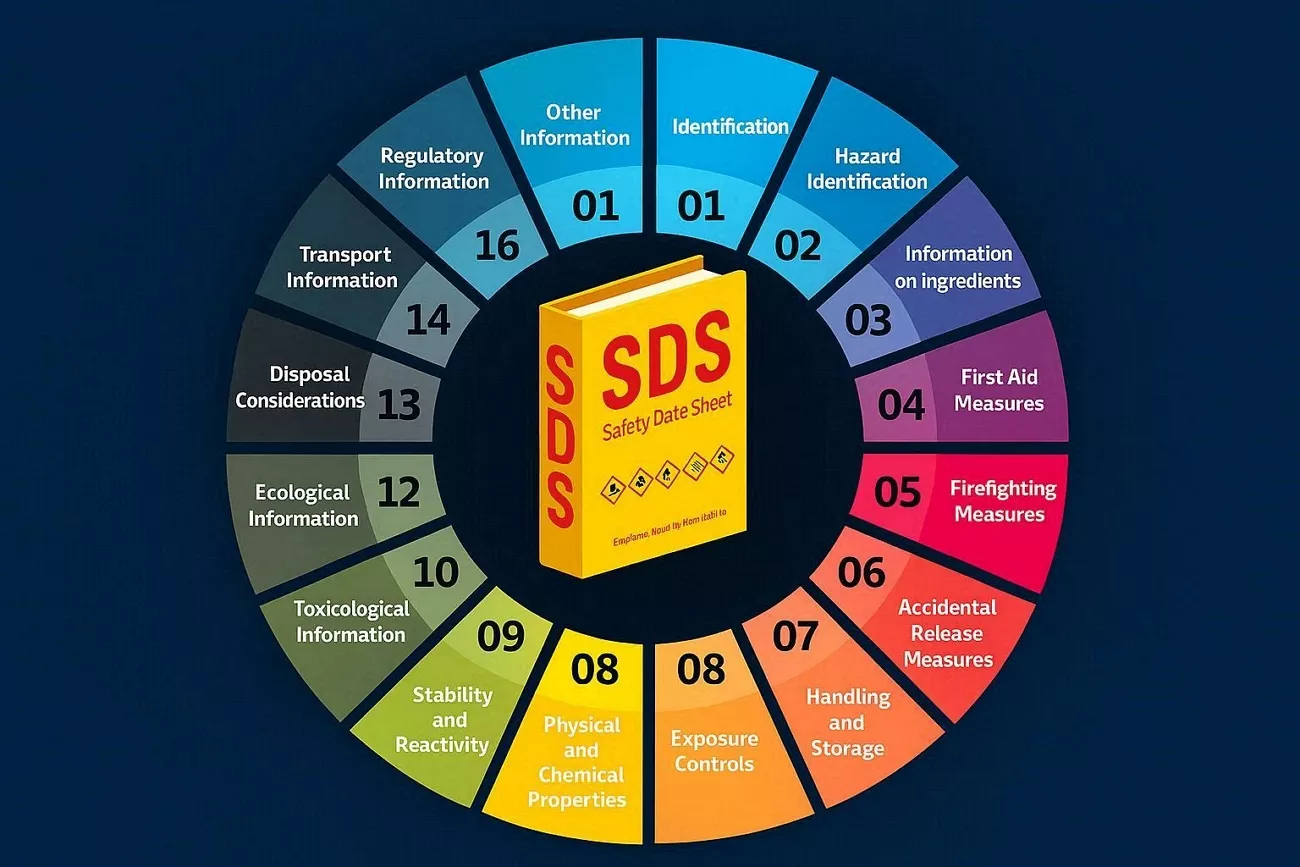
Modern rules require SDS documents to follow a standard 16-section format in the same clear order worldwide. This structure makes a chemical safety data sheet PDF easier to scan for hazards, first aid, and safe handling. Look at the table below to see each section name and its basic purpose:
| Name | Purpose |
| Identification | Says what the chemical is and who supplies it. |
| Hazard Identification | Explains main dangers and warning symbols. |
| Composition/Ingredients | List what is inside the product. |
| First-aid Measures | Tells what to do if someone is exposed. |
| Fire-fighting Measures | Guides how to fight a fire involving this chemical. |
| Accidental Release Measures | Explains how to handle spills or leaks safely. |
| Handling and Storage | Gives rules for safe use. |
| Exposure Controls/Personal Protection | Describes PPE limits. |
| Chemical Properties | Shows key properties like appearance and boiling point. |
| Stability and Reactivity | Says when the chemical can react or break down. |
| Toxicological Information | Explains health effects from short or long exposure. |
| Ecological Information | Describes effects on the environment. |
| Disposal Considerations | Gives guidance for safe disposal and waste handling. |
| Transport Information | List shipping details and transport hazards. |
| Regulatory Information | Summarizes key laws that apply. |
| Other Information | Includes revision dates and any extra safety notes. |
This 16-section structure helps workers find the same type of safety information on every sheet. It also helps tools and EHS teams compare and review chemical details, reducing the risk of dangerous mistakes.
Part 2. Sourcing Reliable Safety Data Sheet PDF Samples
Finding a safety data sheet PDF sample online is easy, but quality and accuracy really matter. Trusted sources help you avoid outdated, incomplete, or unsafe information for your lab or industrial team. Let's explore some reliable websites where you can quickly download sample SDS documents for common chemicals.
- Sigma-Aldrich: Global chemical supplier offering detailed SDS downloads by product number.
- Fisher Scientific: Large lab supplier with a searchable SDS center for many industrial products.
- NIOSH Pocket Guide: An American government resource providing chemical hazard data and downloadable reference documents.
- Chemicals.co.uk: Supplier-hosted SDS library covering a wide range of common laboratory chemicals.
- ChemicalSafety SDS Database: Free online SDS search tool to aggregate documents from manufacturers.
Remember to check that the supplier matches your exact chemical before trusting them. Moreover, confirm the listed concentration, so the hazards and instructions fit your situation.
The "Search vs. Accuracy" Gap
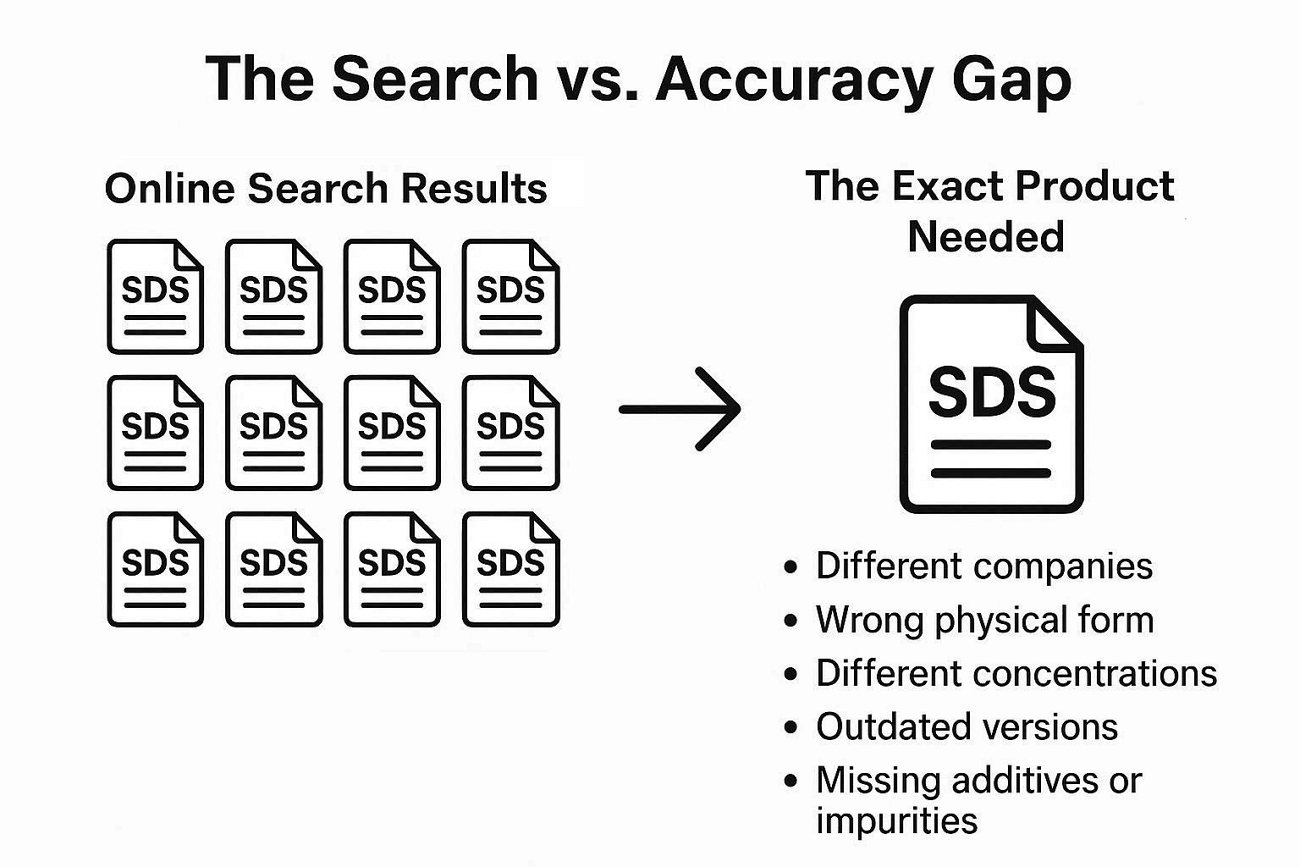
Online searches quickly show many SDS samples, so most users feel the job is already done. Matching those files to one exact product, with the right strength and form, is much harder. The real challenge is obtaining information that truly fits your chemical, as discussed in detail below.
- Results often show products from different companies, with different ingredients and internal quality standards.
- Many samples describe another physical form, like powder or gas, instead of a liquid or solution.
- Concentration levels often change, which also affects how dangerous the chemical is and the handling steps.
- Some sheets are old versions, so hazard statements and regulatory markings may be out of date.
- Generic templates may omit special additives or impurities that are relevant to your specific workplace risks.
Part 3. Generating Custom SDS with IvyCraft AI
Generic SDS samples often miss custom mixtures, special concentrations, or private formulas used by many teams. Many users then waste time opening different SDS files that still do not match. This is where IvyCraft comes in and helps turn research into custom SDS drafts faster.
It uses existing search samples and uploaded references to create content based on real source materials. This makes each chemical safety data sheet PDF more useful for special products and internal formulas. IvyCraft can also create slides, videos, audio, or images from sources and written prompts.
How To Generate SDS Slides With IvyCraft
Users can turn SDS source content into clear, structured slides for review and presentation. Follow the steps below to upload materials, apply SDS sections, and draft technical language:
Step 1. Upload Source Materials
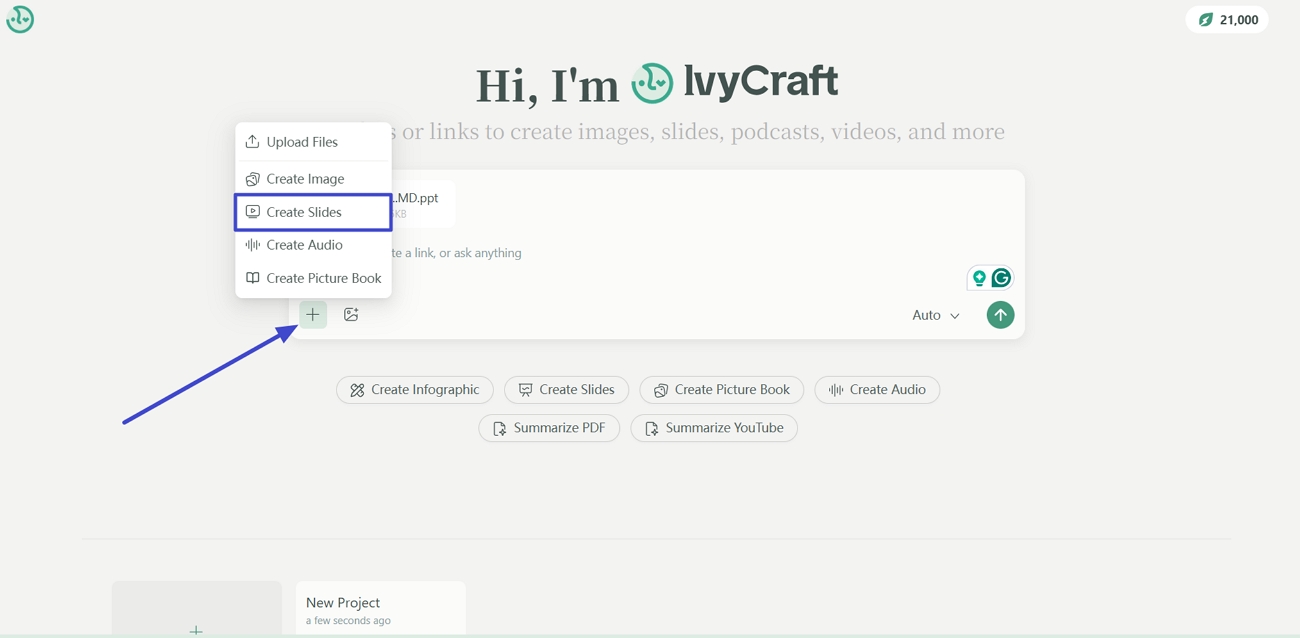
Once you enter IvyCraft's main interface, drag and drop the source materials. Afterward, click the "+" icon and press the "Create Slides" option to select the PPT creation mode.
Step 2. Customize Slides and Enter a Prompt
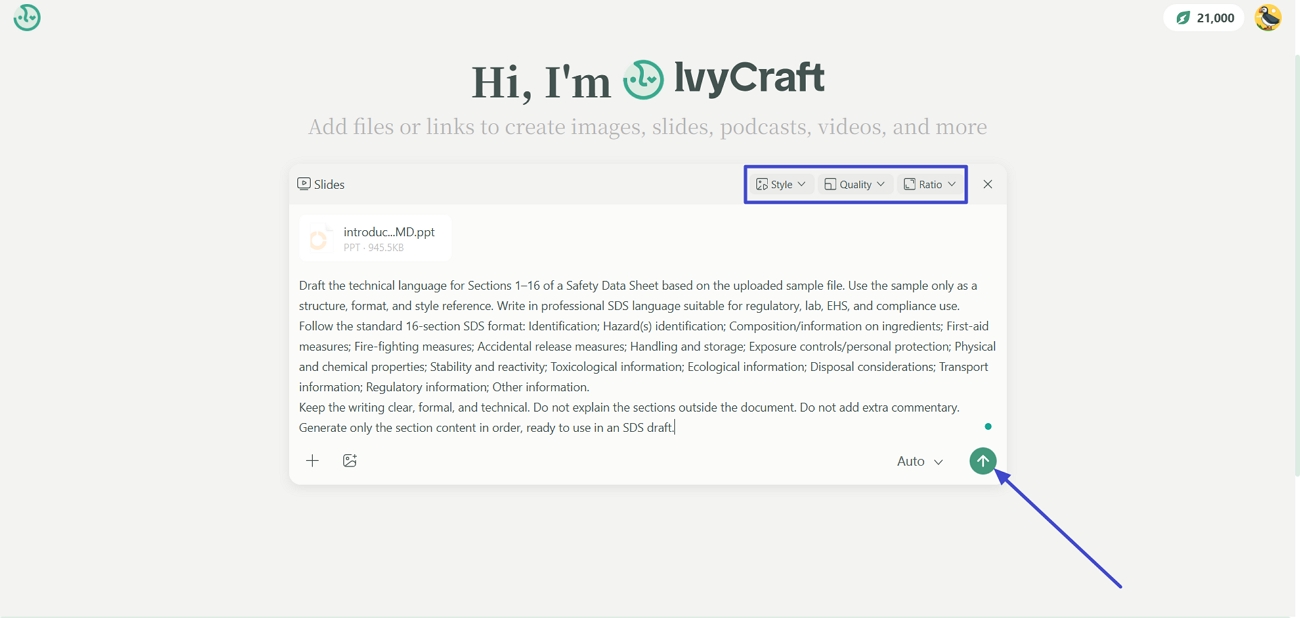
Now, enter the detailed description in the text box, including the requirements. For further customizations, set the required "Style," "Quality," and "Ratio." After that, simply click the "Send" button.
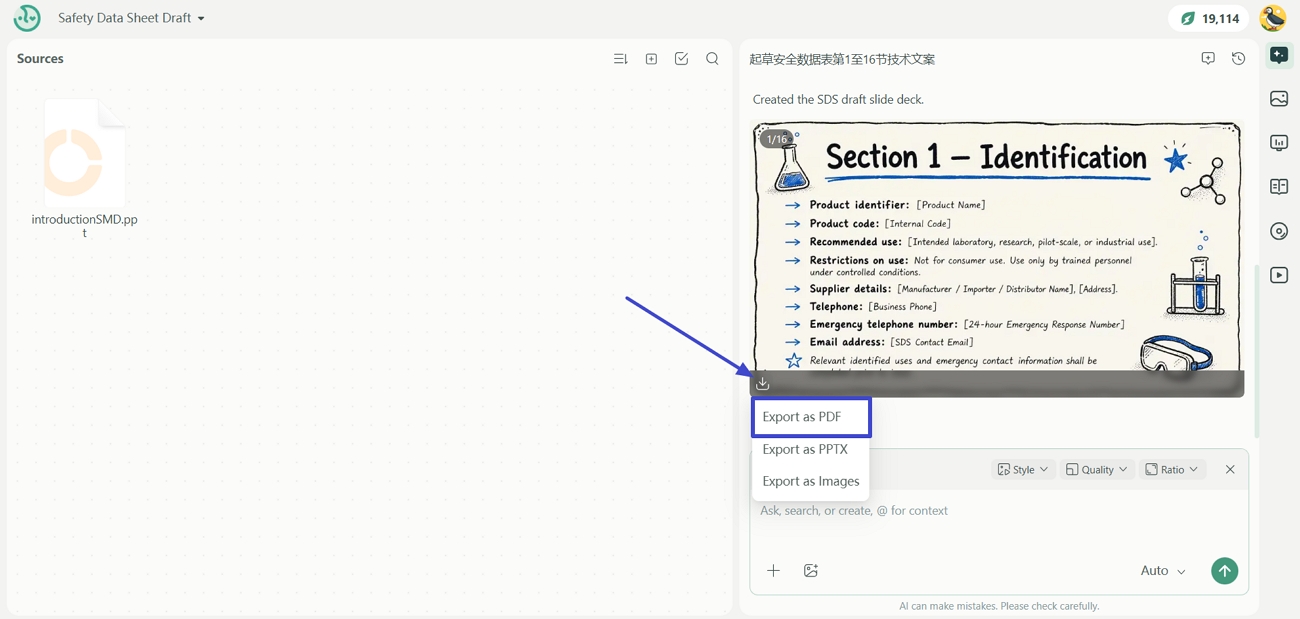
Step 3. Export Generated Slides as PDF
After the PPT is generated, review it and click the "Download" icon. Next, click the "Export as PDF" option to download the PDF.
Why Teams Choose IvyCraft
- Source-backed drafting helps users trace content clearly and review information with more confidence.
- One workspace combines source review, drafting, and slide creation for smoother document workflows.
- An editable output makes it easier to refine wording, structure, and presentation afterward.
- Faster content generation helps teams spend less time building slides from source materials.
Part 4. Practical Workflows for EHS, Lab, and Logistics Professionals
Many teams handle long, complex safety data sheet PDF documents while under time pressure and strict rules. Important details hide inside dense pages, so people often struggle to find the right information when needed. UPDF helps professionals understand documents and prepare focused material for audits, incidents, and routine operations.
Users can review content faster, create clearer summaries, and reduce manual effort in their daily document tasks. Different roles benefit in different ways, which the next sections explain with simple, real-world scenarios and actions.
1. EHS Leaders (Compliance And Audits)
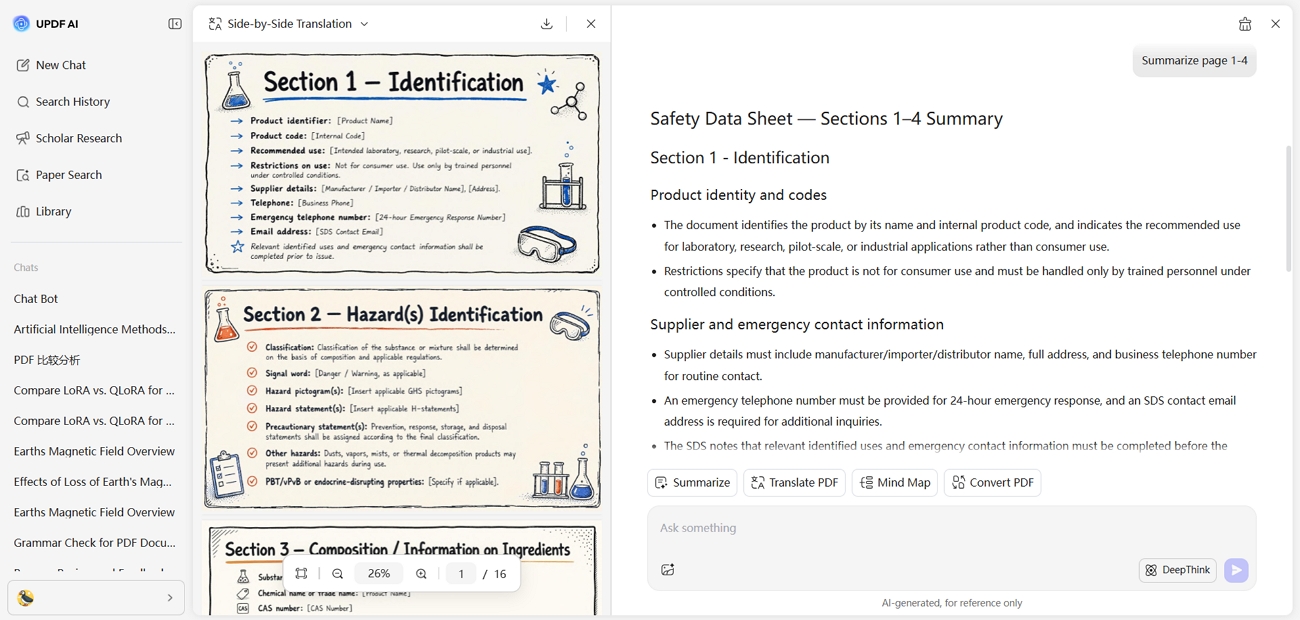
Leaders must prepare clear documentation before inspections and prove that safety information is up to date. Here, UPDF AI Online helps them summarize long SDS files into short, focused hazard summaries for easier review. These summaries support audits, improve communication on the factory floor, and reduce last-minute compliance stress.
2. Lab Personnel (Immediate Response)
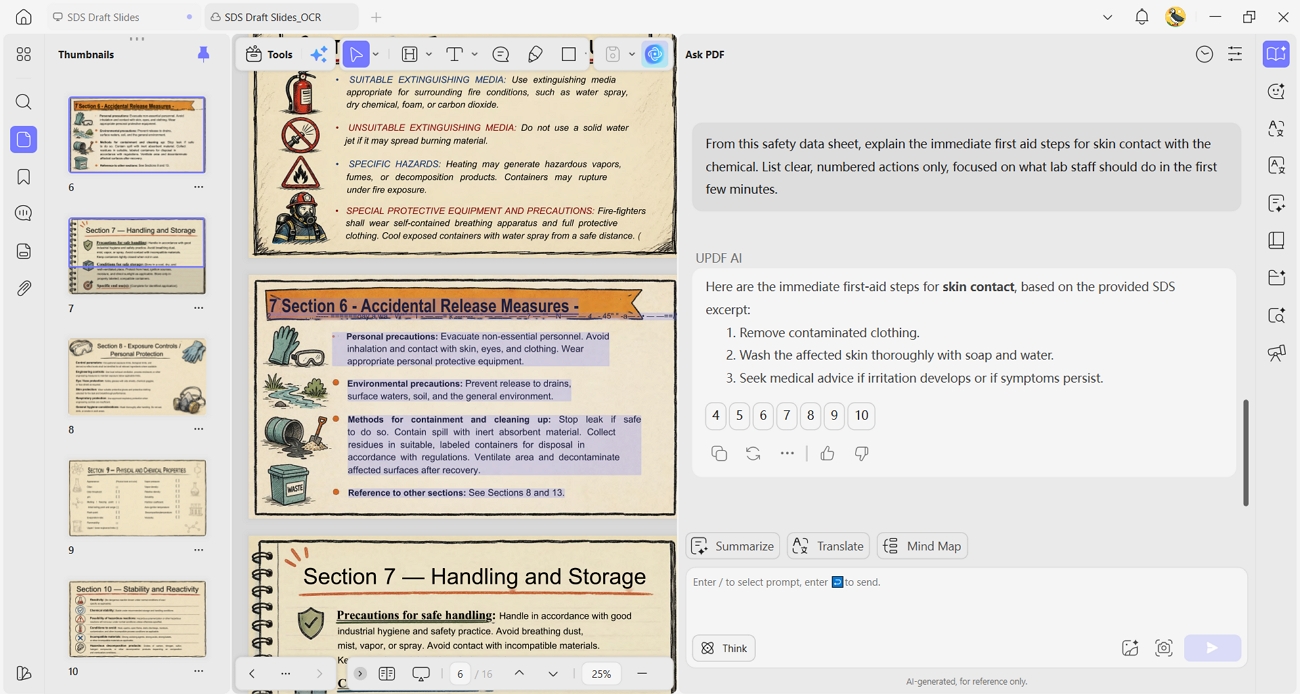
Lab staff need quick, reliable answers when incidents happen, especially where chemicals and health risks are involved. UPDF AI's Explain feature lets them ask direct questions from the SDS, without searching through many confusing pages. This faster access supports safer first responses and gives teams more confidence during urgent laboratory situations.
3. Warehouse And Logistics (Data Extraction)
These teams often work with old, scanned labels and documents that are difficult to reuse. UPDF OCR turns scanned SDS pages into editable text, so key information becomes searchable and reusable. The Extract tools then pull hazard details into new labels, reducing manual copying effort and typing errors.
Windows • macOS • iOS • Android 100% secure
4. Cross-Border Logistics (Instant Technical Translation)
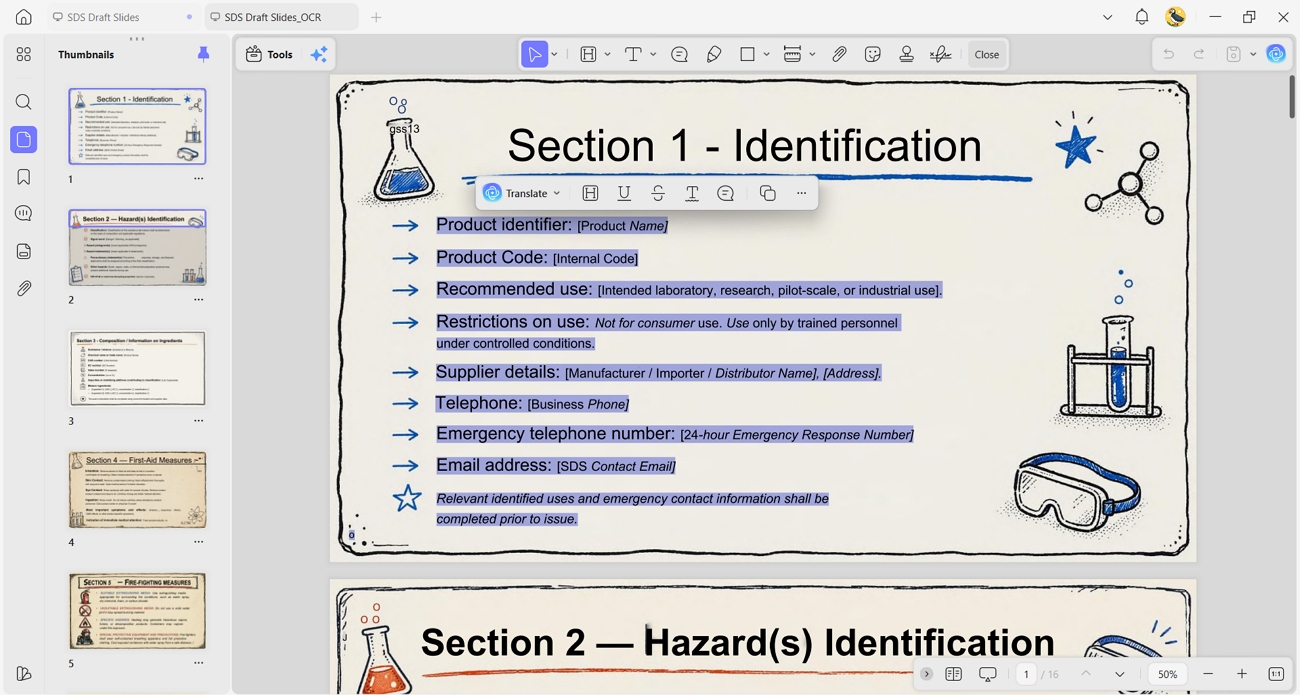
In international trade, chemical substances often arrive with documentation in German, Japanese, or Chinese. For warehouse staff or safety officers, a language barrier is a major safety risk.
Action: Use UPDF AI's technical translation to convert a foreign safety data sheet PDF into your local language while maintaining the original 16-section formatting. Unlike standard translators, UPDF AI understands specific chemical terminology, ensuring that critical safety warnings aren't lost in translation. This facilitates seamless collaboration between global suppliers and local teams.
Part 5. The "Silent Operator" Security Check
Many professionals worry about data privacy when editing or analyzing sensitive technical PDFs with AI tools. Safety teams know that a chemical safety data sheet PDF is also a legal record of compliance. Users often fear that their proprietary formulas might leak during editing and processing. Let's explore how UPDF addresses these concerns in a security-focused way:
- Holds ISO 27001 certification and keeps proprietary chemical formulas protected during editing and AI analysis.
- Uses secure infrastructure and encryption to help protect documents during storage and AI-supported work.
- Keeps AI-assisted document workflows inside a controlled environment to reduce exposure to untrusted external tools.
- Follows audited security practices and helps professionals handle confidential material in a controlled way.
Pricing Options For Professional Use
UPDF provides paid plans and discounts to support education and teams working under tight budgets. Review the pricing table below to compare plans and pick the most suitable option:
| Plan | Price |
| UPDF Pro | $49.99/year |
| UPDF Enterprise | $79/year |
| AI Add-on | $79/year |
FAQ: SDS Compliance in 2026
Can I make my own safety data sheet?
Yes, you can make your own Safety Data Sheet if you already have complete chemical data. Professional review is still recommended because SDS documents must stay accurate, clear, and legally compliant.
Can I edit an SDS PDF if the supplier's info changes?
Yes, you can edit an SDS PDF when supplier details change, but legal accuracy matters. UPDF's Edit feature helps update text clearly, while the final content should still be reviewed carefully.
How do I translate a foreign SDS?
For foreign SDS documents, translating them first makes review and local use easier. UPDF AI can handle translation into 26 languages and help teams understand safety information.
Conclusion
For foreign SDS documents, translating them first makes review and local use easier. UPDF AI can handle translation into 26 languages and help teams understand safety information.
Windows • macOS • iOS • Android 100% secure





 Enid Brown
 Enrica Taylor
 Delia Meyer