 UPDF
UPDF
 UPDF for Windows
 UPDF for Mac
 UPDF for iPhone/iPad
 UPDF for Android
 Nomostar
 UPDF AI Online
 UPDF Sign
 IvyCraft
 Edit PDF
 Annotate PDF
 Create PDF
 PDF Form
 Edit links
 Convert PDF
 OCR
OCR PDF to Word
 PDF to Image
 PDF to Excel
 Organize PDF
 Merge PDF
 Split PDF
 Crop PDF
 Rotate PDF
 Protect PDF
 Sign PDF
 Redact PDF
 Sanitize PDF
 Remove Security
 Read PDF
 UPDF Cloud
 Compress PDF
 Print PDF
 Batch Process
 About UPDF AI
 UPDF AI Solutions
 AI User Guide
 FAQ about UPDF AI
 Summarize PDF
 Translate PDF
 Chat with PDF
 Chat with AI
 Chat with image
 PDF to Mind Map
 Explain PDF
 PDF AI Tools
 Image AI Tools
 AI Chat Tools
 AI Writing Tools
 AI Study Tools
 AI Working Tools
 Other AI Tools
 AI Bookmark Generation
 AI Bookmark Summary
 AI Watermark Generation
 AI Background Generation
 AI Sticker Generation
 AI Stamp Generation
 AI Editing Suite
 UPDF Copilot
 AI Page Management
 AI Semantic Search
 PDF to Word
 PDF to Excel
 PDF to PowerPoint
 Enterprise Solution
 Enterprise Sign
 Enterprise AI
 Enterprise Plan
 Enterprise User Guide
 Enterprise Webinar
 IT
IT Education
 Construction
 Financial Service
 Healthcare
 Insurance
 Legal
Legal Manufacturing
 Government
 Researchers & PhDs
 Solopreneurs & Freelancers
 Lawyers & Legal Professionals
 Real Estate Agents & Brokers
 Education Solution
 Customer Stories
 User Guide
 UPDF Tricks
 FAQs
FAQs UPDF Reviews
 Download Center
 Blog
Blog Newsroom
 Tech Spec
 Updates
 UPDF vs. Adobe Acrobat
 UPDF vs. Foxit
 UPDF vs. PDF Expert

I have been in the proposal trenches long enough to remember when responding to an RFP meant printing a 200-page PDF and scribbling in the margins. Afterward, there used to be a phase of copy-pasting answers between a dozen Word documents with a worry that something would get missed. That era is over.
The 2025-2026 landscape has fundamentally shifted. RFP response is no longer about a manual copy-paste exercise. It's an AI-driven RFP software backed by a data-precise workflow where speed and accuracy determine who wins the contract.
According to Loopio's 2025 research report, 51% of RFPs are now submitted through web portals, which represents a growth of over 24% since 2020. Teams that do not use RFP software in 2026 and rely on shared drives and email chains are becoming invisible to buyers.
So, what is RFP software? Request for Proposal (RFP) is a platform used to manage proposals through the centralized company's knowledge. It automates drafting proposal responses with pre-approved content and manages collaboration among stakeholders, so your team can respond to more opportunities in less time.
Despite an AI hub managing our library, we still need a professional PDF tool to handle the intake of complex, multi-page PDF tenders. I have tackled this by making UPDF part of my workflow, which acts as an all-in-one PDF tool to read/analyze documents with AI and redact sensitive information.
Download UPDF to analyze your next RFP tender instantly.
Windows • macOS • iOS • Android 100% secure
Part 1. Top 3 AI RFP Software for 2026
When there are dozens of RFP 2026 software tools to choose from, your time should not be wasted on testing every tool. So, I have narrowed down the best AI RFP software you can consider in 2026:
1up.ai (The Knowledge Specialist)
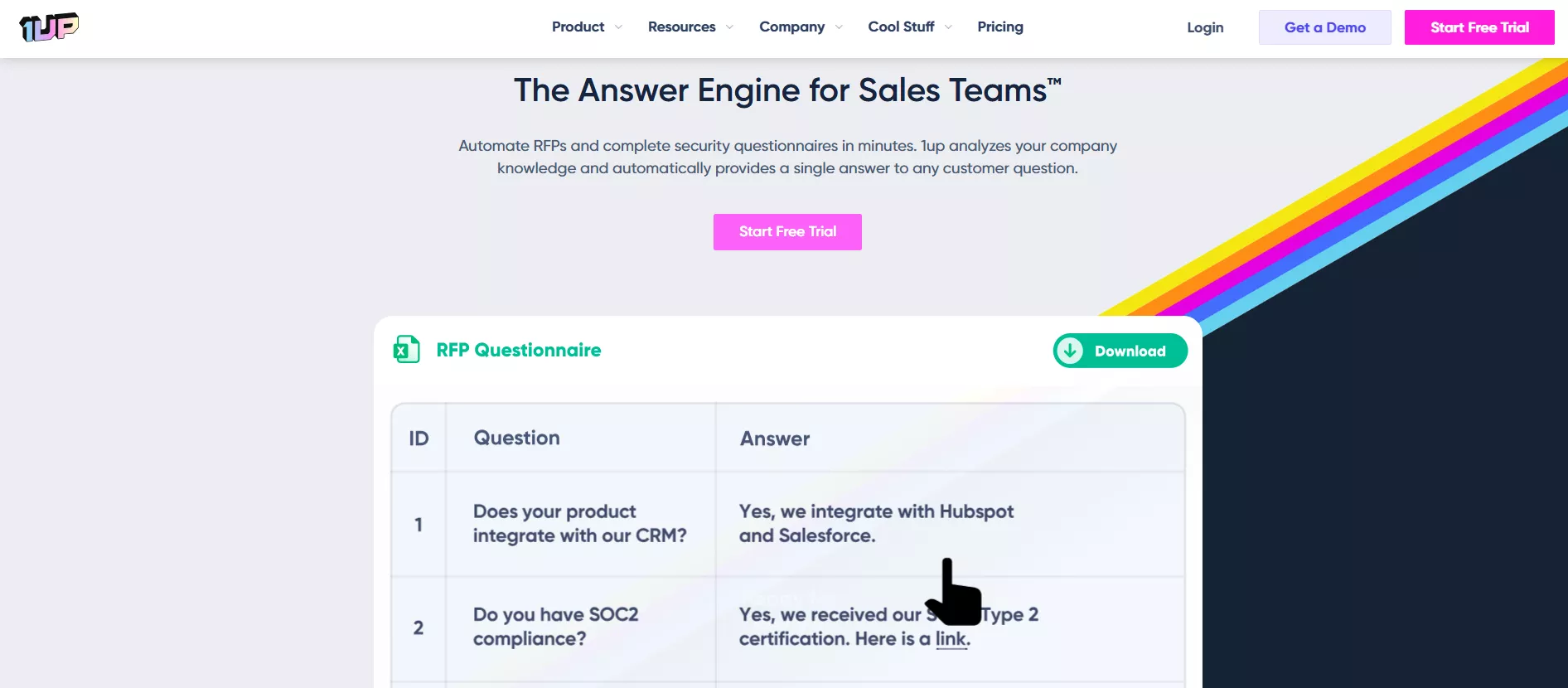
1up.ai is an AI knowledge automation platform for sales and proposal teams that need to respond faster without sacrificing accuracy. It ingests what the team already has (websites, Notion pages, Confluence wikis, Google Drive, and previous RFPs) and turns it into a queryable knowledge engine.
Key Features
- Generates a complete knowledge base using your company's website and data sources.
- Auto-generates answers to RFP questions by pulling from all connected knowledge sources simultaneously.
- Native integrations with Slack, Notion, Microsoft Teams, and Google Chat so teams get answers without switching tools
- Collaborative review workflows with role-based access control and approval routing.
- SOC 2 Type II compliant and AES-256 encryption with a strict no-training-on-your-data policy.
- Automatically proofreads responses for grammar/spelling/formatting before submission.
- The browser extension generates responses on any web-based questionnaire portal.
My experience: During my test, the way 1up.ai indexed our team's scattered Notion pages into a cohesive response library was remarkably fast. I had a working knowledge base pulling from documentation within a single session. Our solutions engineers could query 1up directly in a channel without ever switching tools, which collapsed what used to be a two-day SME email loop into about twenty minutes.
Pros:
- Ease of use
- Centralized information management
- Pulls the most current source data
- Exceptional customer support
Cons:
- Less suited for long-form narrative proposals, as it excels primarily at Q&A-style responses
- Response quality scales directly with the quality of your underlying knowledge base
Loopio (The Enterprise Giant)
Loopio is the most established name in enterprise RFP software. It is trusted by over 1,700 organizations worldwide, including Fortune 500 companies across regulated industries.
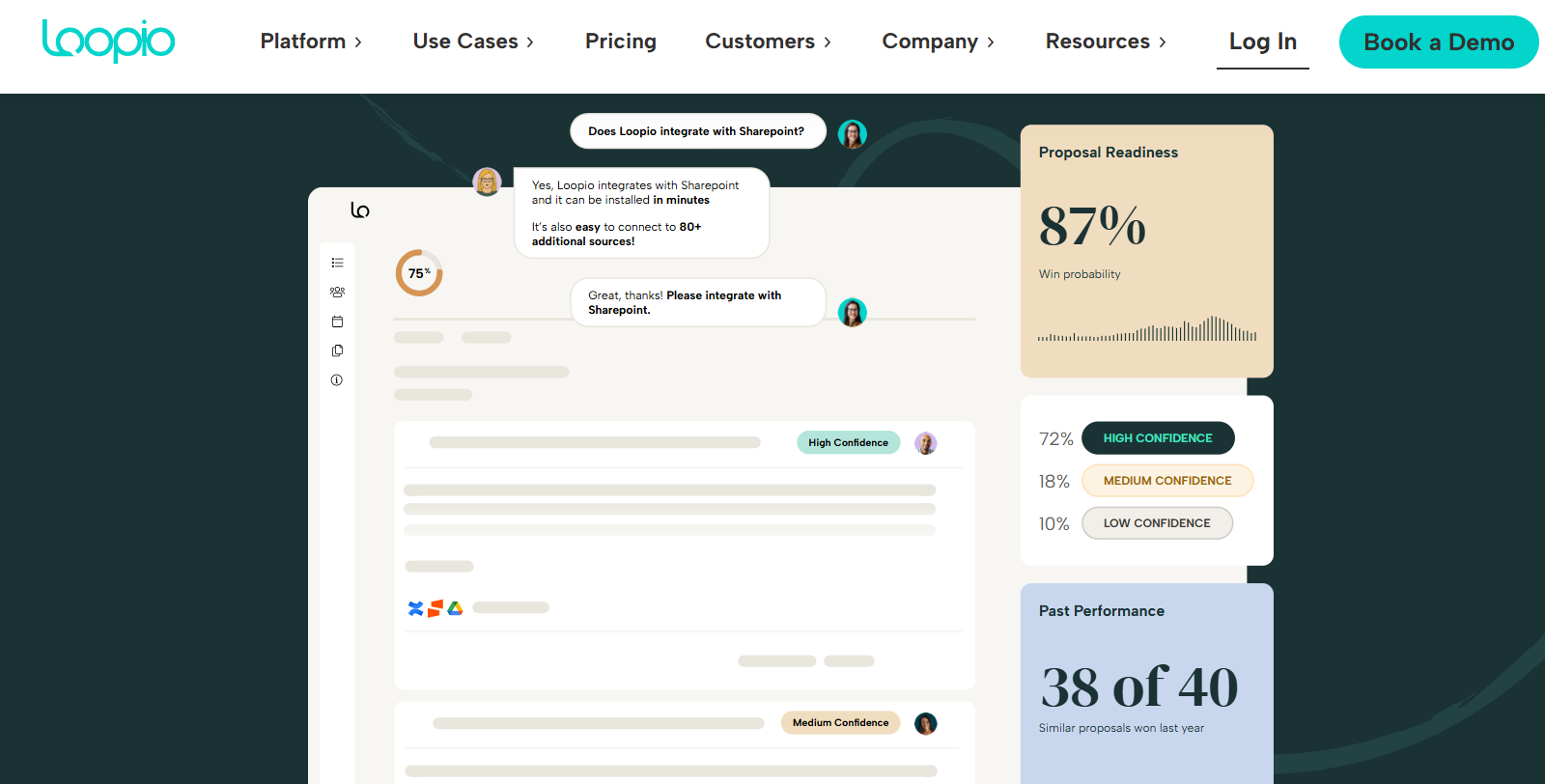
Loopio has consistently led the market in enterprise governance features, such as audit logs, section-level approvals, field-level redline tracking, and more. It is best for organizations managing dozens of concurrent bids over multiple business units.
Key Features
- Centralized and structured content library with scheduled re-validation cycles to keep answers current.
- "Magic" feature auto-fills RFP answers by matching incoming questions against your approved library.
- Real-time project dashboard tracks task status and deadlines across simultaneous bids.
- SmartScan for Portals is the industry's first AI-powered browser extension for fully automated portal-based RFP submissions.
- Integrations with Salesforce, Microsoft 365 Copilot, Google Drive, SharePoint, Slack, and 80+ additional connectors.
- Section-level approval workflows, field-level redline tracking, and full audit logs for regulated environments.
My experience:
When I used Loopio for a multi-stakeholder bid, the project tracking dashboard effectively eliminated the "email-chasing" nightmare. Every question was assigned, and every deadline was visible. Plus, every SME knew exactly what sat in their queue. I didn't have to send a single follow-up email during the entire project cycle. The platform managed it all through automated reminders and status updates.
Pros:
- Fast and easy to use
- Audit logs and approval workflows
- SmartScan for Portals is a genuine breakthrough
- Excellent customer support
Cons:
- Starting price of $20,000/year puts it out of reach for smaller or growing teams
- Initial library setup is time-intensive and requires significant upfront planning
- AI capabilities need to improve
- Formatting can be lost when exporting responses
- Magic AI can struggle with nuanced or complex questions
Responsive (Formerly RFPIO - The Automation King)
Responsive is the most technically sophisticated platform in the RFP 2026 software category. It is a full Strategic Response Management suite, built for organizations operating in complex technology environments with large integration stacks and global teams. Today, 2,000+ organizations rely on it to manage RFPs, RFIs, DDQs, and security questionnaires.
Key Features
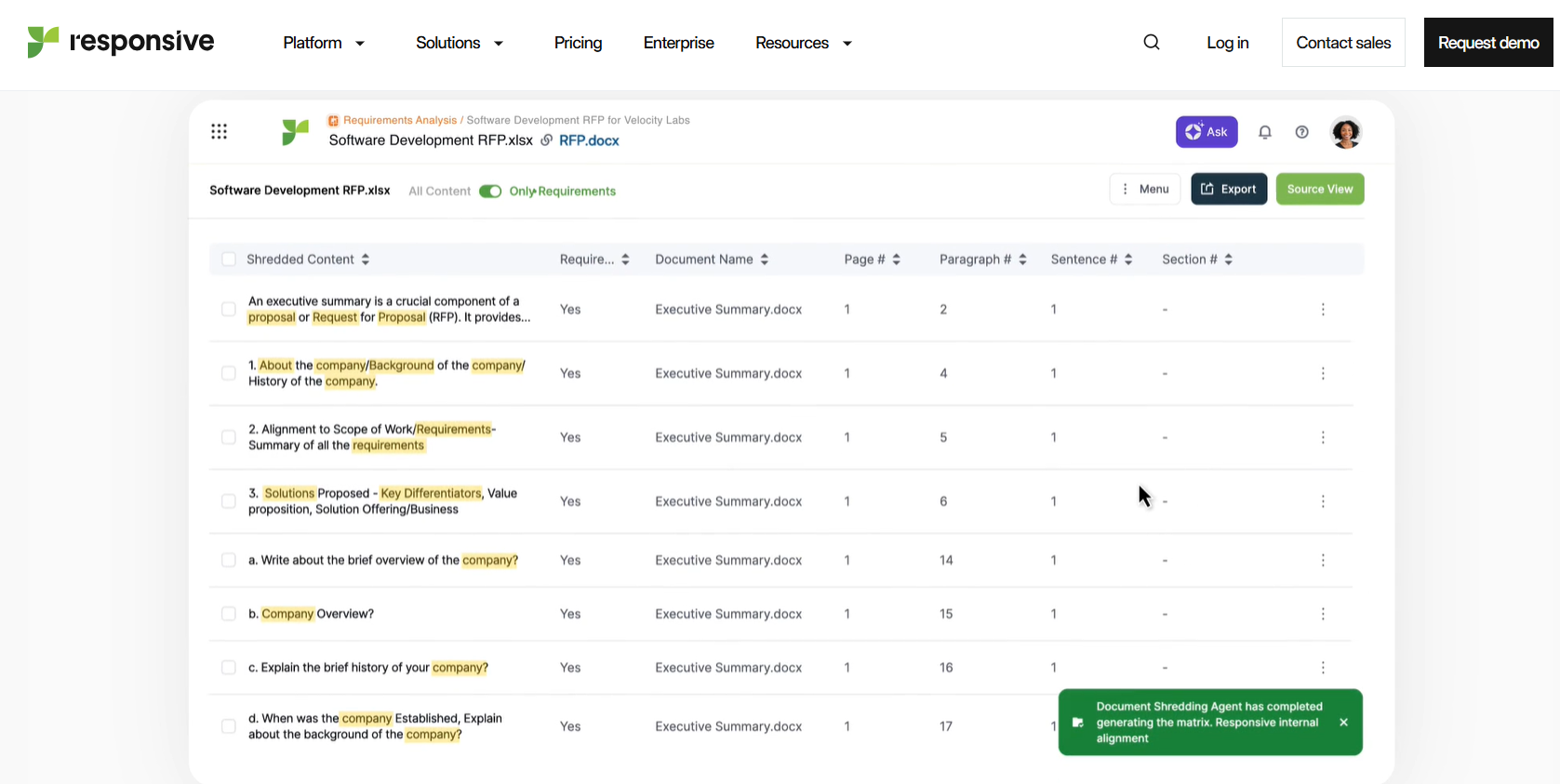
- Patented import technology automatically detects and maps every section and requirement from Word, Excel, or PDF RFPs on upload.
- AI recommendation engine contextualizes and suggests semantically relevant responses.
- Requirement analysis reviews incoming documents and highlights strategic fit before your team commits to a bid.
- 20+ native integrations and 75+ API connections.
- 10 built-in analytics report templates covering response velocity, content usage, win rates, and bottlenecks.
- Translation capabilities for global teams responding in multiple languages.
My experience:
What sets Responsive apart is its AI RFP software's ability to anticipate your needs before you have articulated them. The recommendation engine felt intuitive. It suggested answers for about 60% of our technical questions before I even started typing.
It draws from past RFPs and approved content with contextual precision that goes beyond simple keyword retrieval. That kind of pre-population is the difference between a two-week sprint and a three-day push for a dense technical bid with hundreds of questions.
Pros:
- Requirement analysis helps teams make smarter bid/no-bid decisions before investing time
- Unlimited content storage and scales well for organizations managing 20+ RFPs monthly
- Translation capabilities
Cons:
- Named-user licensing means even occasional reviewers require a paid seat
- Steeper learning curve than 1up.ai or Loopio for new users
- Heavy reliance on library maintenance
- Admin and reporting tasks feel complex
Part 2. The Essential Document Processor: UPDF AI Online & UPDF App
Every piece of RFP software covered above assumes that our RFP has already been digested into structured questions. However, anyone who's worked in bid management knows that's rarely how a tender actually arrives.
Most come as multi-part PDF bundles, such as a main requirements document, a pricing annex, a technical specification, and a compliance matrix. Each has its own file with inconsistent formatting. So, the question is how to make sense of it all without losing hours to manual cross-referencing. That's the gap UPDF fills.
Phase 1: Multi-Doc Intelligence with UPDF AI Online
UPDF AI Online offers a crucial feature for bid teams called Chat Project. This feature lets us upload multiple PDFs simultaneously and interrogate them all in a single conversation.
As I mentioned above, RFP tenders come in multiple pieces. I uploaded all of them to UPDF AI Online's Chat Project and in one chat asked: "What are the combined insurance and bonding requirements across all these files?" The system synthesized the answer across three documents within seconds.
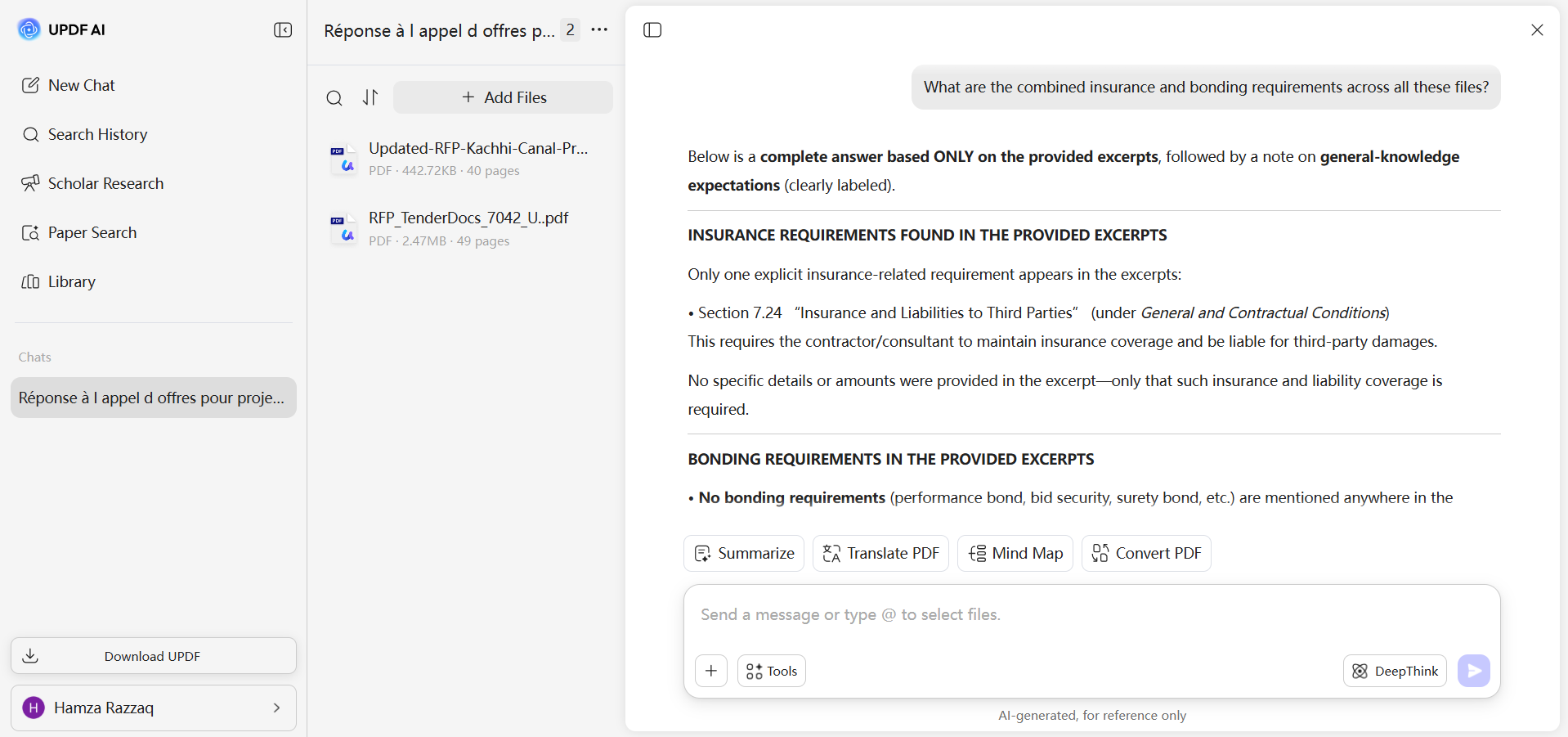
This saved me from jumping between tabs for hours and eliminated the risk of missing a requirement buried in an annex nobody thought to re-read. This is now the first step in my workflow for initial tender intake.
Phase 2: Final Compliance & Editing with UPDF (The All-in-One Editor)
Other than the online UPDF AI assistant, I am also regularly using UPDF software. It is a feature-packed PDF editing suite with AI capabilities integrated directly into the editing environment.
Windows • macOS • iOS • Android 100% secure
After drafting responses in my AI knowledge tool, I bring the original tender PDF into UPDF for three critical final steps:
1. Deep Semantic Analysis for Accuracy
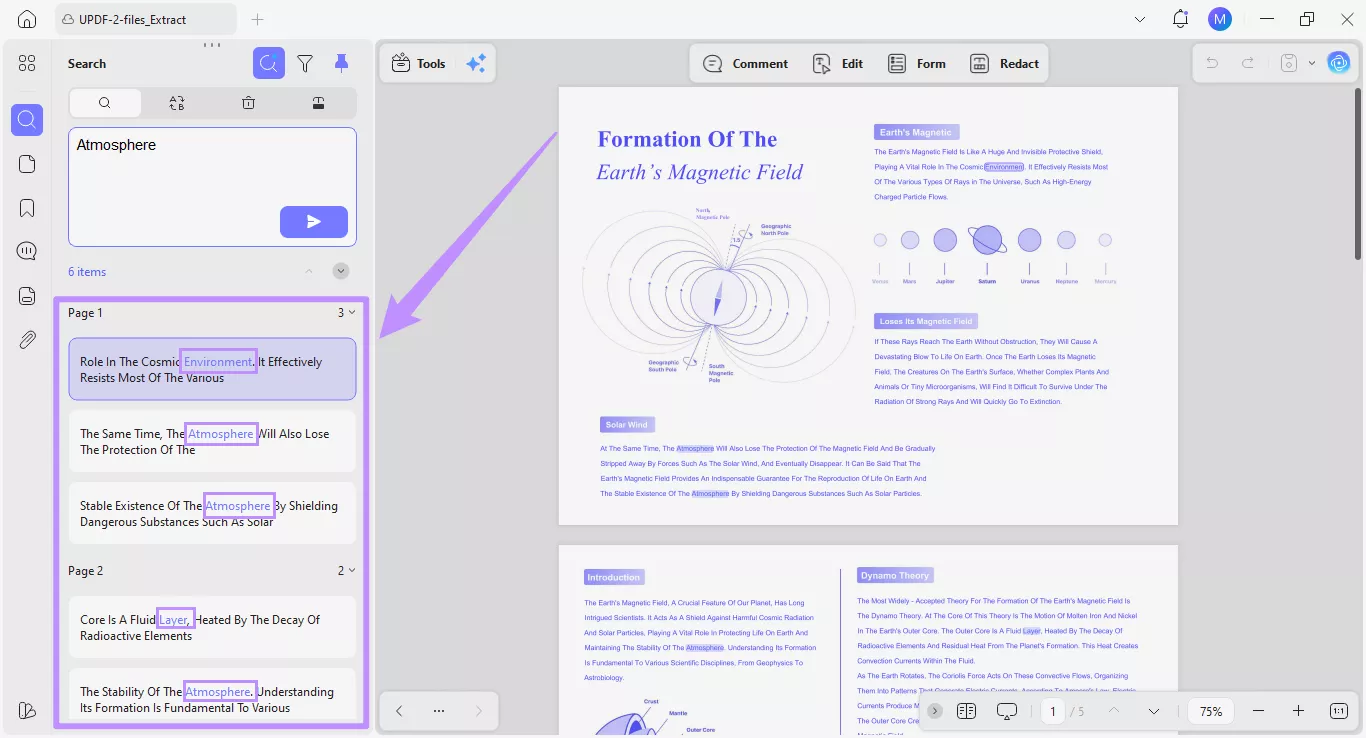
I use UPDF's integrated AI semantic analysis agent to double-check my drafted responses against the original PDF requirement by requirement. This ensures 99.99% accuracy before submission. It's a compliance safety net that catches the gaps a tired human reviewer will miss at 11 pm before a deadline.
2. Redaction for Security Compliance
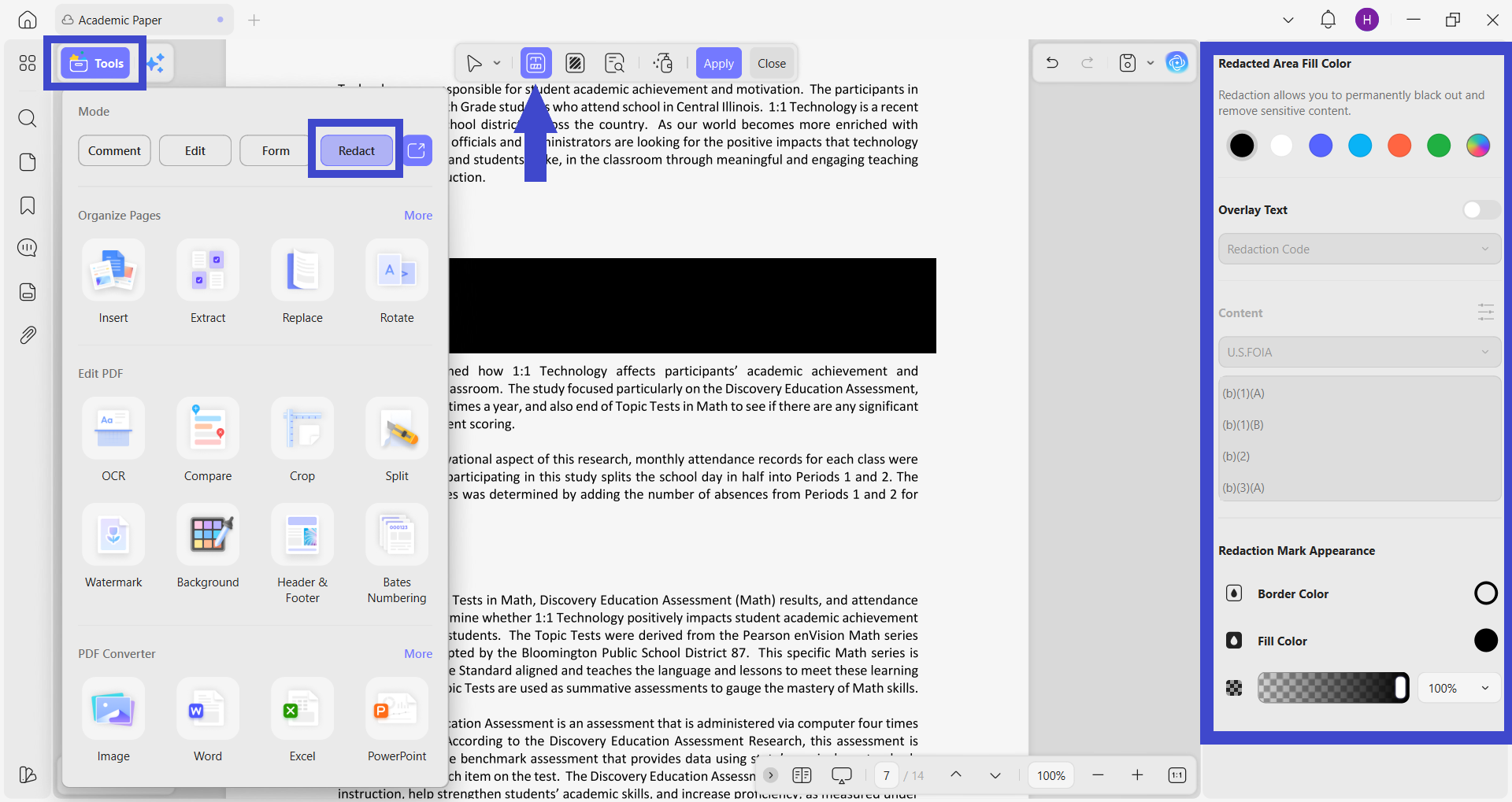
Before final submission, I use UPDF's Redaction feature to permanently scrub internal margin calculations and proprietary methodology notes from the document. It's a mandatory practice for teams operating under ISO 27001 and GDPR frameworks. The Semantic Search function makes finding sensitive strings fast and precise, so nothing slips through the cracks.
3. Bates Numbering for Professional Submissions
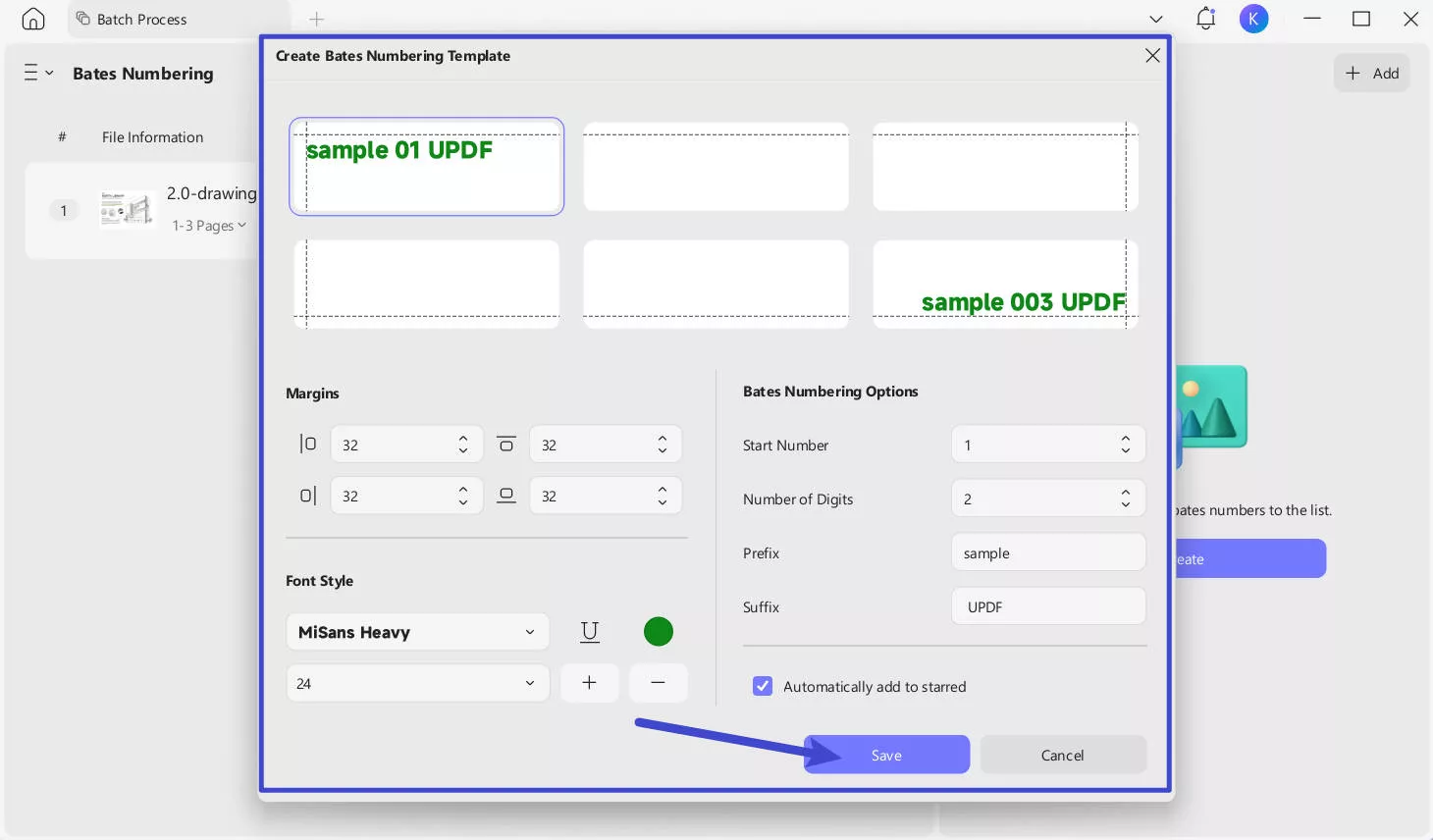
For a 200-page submission bundle, I use UPDF's Bates Numbering feature to ensure our trial-style response looks organized and professionally presented. This kind of document hygiene signals seriousness to evaluators in regulated procurement environments.
Feel impressed? Download UPDF and try its all-in-one PDF editor and AI assistant in your next bid.
Windows • macOS • iOS • Android 100% secure
Part 3. Comparison Table: Speed, Security, and Experience
| Feature | 1up.ai | Loopio | UPDF |
| Onboarding Time | Hours (auto-ingests existing content) | Days–Weeks (manual library setup) | Minutes (no setup required) |
| Analysis Capability | Unified knowledge base Q&A | Structured Q&A library | Multi-PDF simultaneous chat |
| Security Certifications | SOC 2 Type II | SOC 2 Type II; enterprise audit logs | ISO 27001; local redaction processing |
| Best For | Knowledge automation & Q&A RFPs | Enterprise multi-stakeholder bids | Tender intake, compliance, and final editing |
| Pricing From | starting from $250/mo | starting from $20,000/year | UPDF AI: $79/year UPDF: $49.99/year |
FAQs: Insights from the Field
Can AI truly handle complex technical RFPs?
Yes, as a first draft assistant. Responsive and 1up.ai can cover 60-80% of a technical questionnaire on the first pass. However, expert review remains essential. AI doesn't understand contract risk or the subtle language choices that win evaluators over. So, use it to compress the drafting phase only.
Why use UPDF AI Online if I have the app?
The UPDF app gives you a powerful single-document editing and AI analysis environment. UPDF AI Online's Chat Project is a different capability entirely. It lets you upload and cross-reference multiple PDF sources simultaneously in one conversation. This multi-document intelligence is crucial for RFP intake, where requirements are spread across several documents.
How does UPDF ensure bid confidentiality?
UPDF's redaction tool processes documents locally, so sensitive content never leaves your environment in recoverable form. Plus, the platform's ISO 27001 certification reflects a security management framework that aligns with enterprise and government procurement standards.
How much does RFP software cost?
RFP software platforms vary widely in cost. For example, 1up.ai offers a free entry point, with paid plans starting at $250/month. Loopio starts at $20,000/year and is targeted at enterprise teams. Responsive uses custom pricing negotiated on user count and RFP volume.
Conclusion
We require two things to work in tandem to win bids in 2026. The first is an AI knowledge engine that drafts fast. The second is a document processor that handles the messy reality of how tenders actually arrive.
The three AI RFP software platforms discussed above dominate in distinct contexts. 1up.ai in knowledge speed, Loopio in enterprise governance, and Responsive in automation depth. However, it's UPDF that delivers at the document layer through multi-PDF intelligence and security-grade redaction with professional document control. Therefore, it's time to pick the right RFP 2026 software and download UPDF to build the right stack and turn every bid into your most competitive one yet.
Windows • macOS • iOS • Android 100% secure








 Enrica Taylor
 Engelbert White