 UPDF
UPDF
 UPDF for Windows
 UPDF for Mac
 UPDF for iPhone/iPad
 UPDF for Android
 UPDF AI Online
 UPDF Sign
 Edit PDF
 Annotate PDF
 Create PDF
 PDF Form
 Edit links
 Convert PDF
 OCR
OCR PDF to Word
 PDF to Image
 PDF to Excel
 Organize PDF
 Merge PDF
 Split PDF
 Crop PDF
 Rotate PDF
 Protect PDF
 Sign PDF
 Redact PDF
 Sanitize PDF
 Remove Security
 Read PDF
 UPDF Cloud
 Compress PDF
 Print PDF
 Batch Process
 About UPDF AI
 UPDF AI Solutions
 AI User Guide
 FAQ about UPDF AI
 Summarize PDF
 Translate PDF
 Chat with PDF
 Chat with AI
 Chat with image
 PDF to Mind Map
 Explain PDF
 PDF AI Tools
 Image AI Tools
 AI Chat Tools
 AI Writing Tools
 AI Study Tools
 AI Working Tools
 Other AI Tools
 PDF to Word
 PDF to Excel
 PDF to PowerPoint
 Enterprise Solution
 Enterprise Sign
 Enterprise AI
 Enterprise Plan
 Enterprise User Guide
 Enterprise Webinar
 Banking
 Healthcare
 Insurance
 Legal
Legal Manufacturing
 Government
 Education Solution
 Customer Stories
 User Guide
 UPDF Tricks
 FAQs
FAQs UPDF Reviews
 Download Center
 Blog
Blog Newsroom
 Tech Spec
 Updates
 UPDF vs. Adobe Acrobat
 UPDF vs. Foxit
 UPDF vs. PDF Expert

Print a PDF on Windows
UPDF for Windows makes PDF printing easy with a variety of customizable print settings. In this guide, we'll walk you through how to print PDFs and configure these settings.
For a visual walkthrough, you can also watch the comprehensive video guide below.
To print a PDF document with UPDF for Windows, please follow the instructions below:
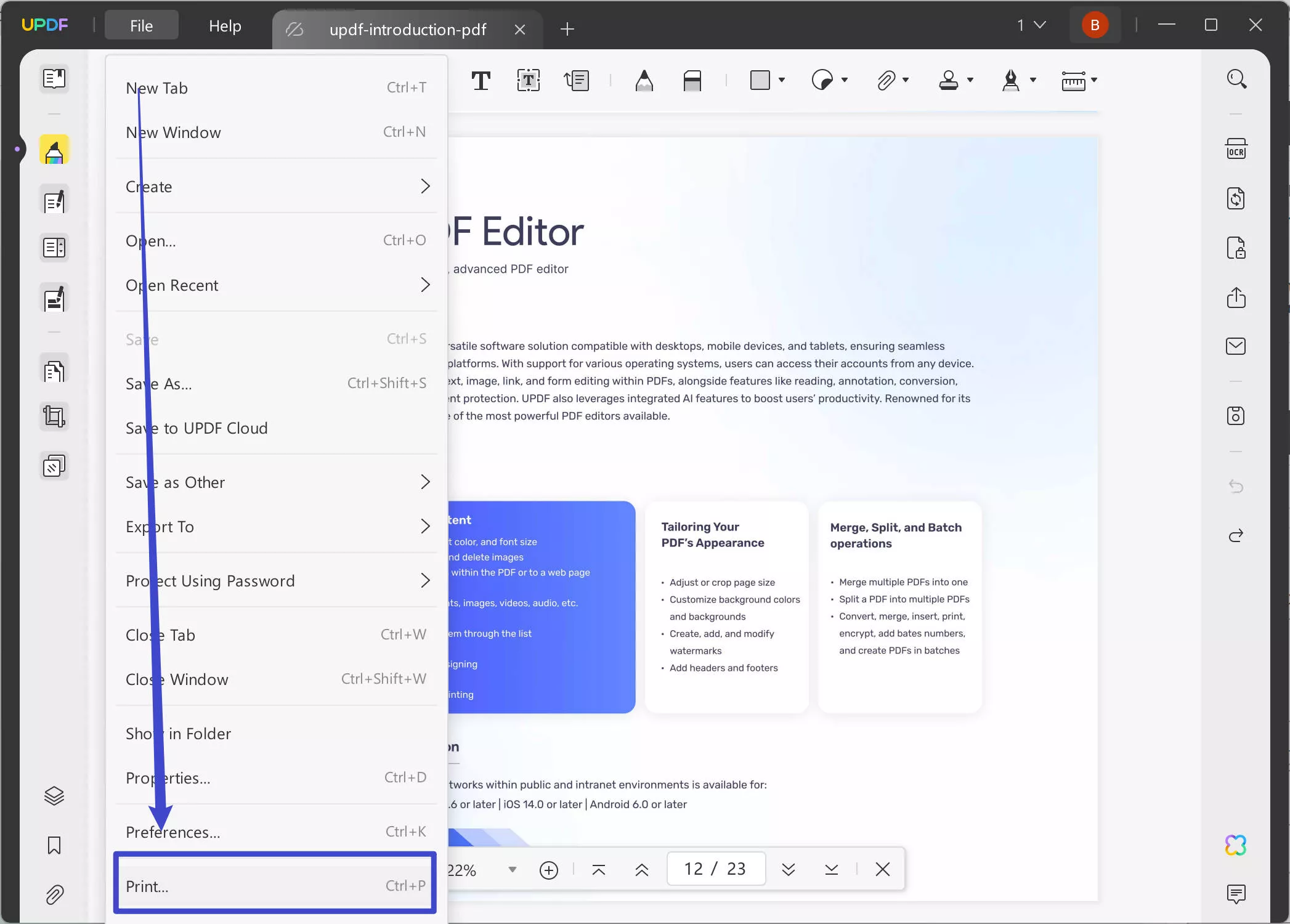
- Simply click the "File" icon in the top-left corner, then select "Print." Alternatively, you can press Ctrl + P to open the printing window.
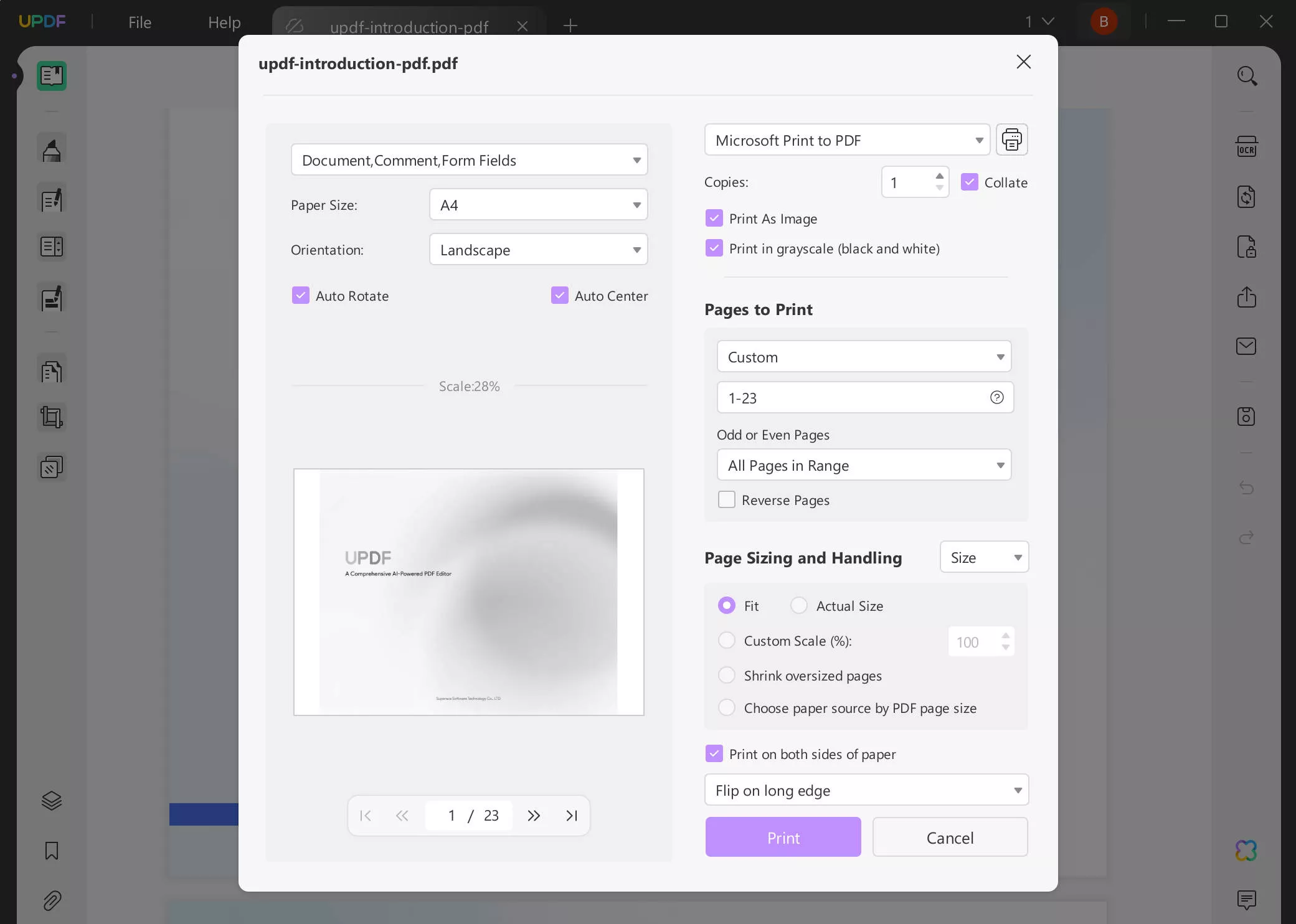
- In the pop-up window, set the properties for printing, including the Printer, Print with or without Comments, Page Size, Orientation, Copies, Pages to Print, Page Sizing & Handling, Print on both sides of paper, etc.
- After selecting the properties, hit the Print button.
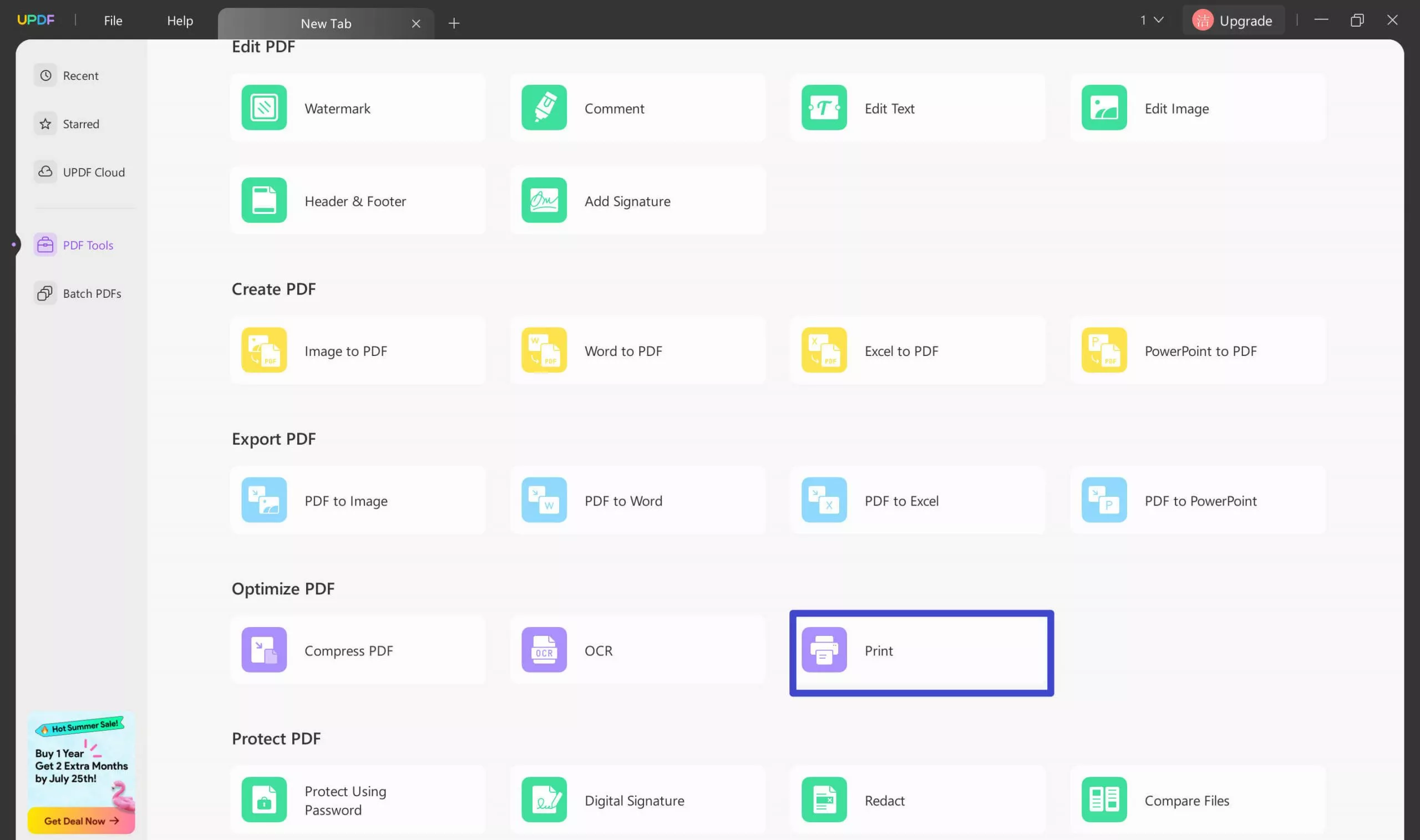
Except for the above method to access the print option in UPDF, there is another convenient method to do so: Click "PDF tools", find the "Optimize PDF" category, and choose "Print". UPDF will then prompt you to select a PDF file to print.
Print settings:
You will find the following options while printing a PDF document:
- Document, Comment, Form Fields: This feature allows you to choose to print with or without comments/form fields presented on your document.
- Page Size: Page Size allows you to choose the best possible page size according to your paper. The page sizes include "Letter," "Legal," "A3," A4," and more.
- Orientation: The orientation option in print settings allows you to change the orientation of your page, i.e., "Portrait" and "Landscape."
- Printer: The "Printer" option allows you to select a particular printer you wish to use. Multiple printers can be attached and installed on your PC. Sometimes various printers are installed and configured over the LAN (Local Area Network.)
- Copies: The Copies option in Print Settings determines the number of copies you want to print your document.
- Options: This feature includes two parts, i.e., "Print in grayscale(black and white)" and "Print As Image." The "Print in grayscale(black and white)" allows you to print the opposite background and forefront colors. For example, a white background including black font would be printed as a white font and black background. Whereas "Print As Image" alternates the processing by sending the request as a simple image instead of the document.
- Pages to Print: This setting allows you to choose how many pages you want to print. You can select single or multiple pages, or specify specific page numbers. Additionally, there is a "Reverse Pages" option under "Pages to Print." This feature is particularly useful for PDFs with multiple pages, as it reverses the page order, allowing you to print in an organized sequence from last to first.
- Page Sizing & Handling: Page Sizing and Handling gives you the upper hand in handling page sizes according to your needs. It includes three options, "Size," "Multiple," and "Booklet."
- Fit/Actual Size/Custom Scale: You can also set the printing scale from Fit, Actual Size, Custom Scale, Shrink oversized pages, and Choose paper source by PDF page size. The Fit option is one of the page sizing features that automatically resize the document according to your page margins.
- Print on both sides of paper: When you turn on this feature, you can make your PDF files print double-sided, which means that there is coherent content on both sides of a piece of paper.
