UPDF
UPDF
 UPDF for Windows
 UPDF for Mac
 UPDF for iPhone/iPad
 UPDF for Android
 Nomostar
 UPDF AI Online
 UPDF Sign
 IvyCraft
 Edit PDF
 Annotate PDF
 Create PDF
 PDF Form
 Edit links
 Convert PDF
 OCR
OCR PDF to Word
 PDF to Image
 PDF to Excel
 Organize PDF
 Merge PDF
 Split PDF
 Crop PDF
 Rotate PDF
 Protect PDF
 Sign PDF
 Redact PDF
 Sanitize PDF
 Remove Security
 Read PDF
 UPDF Cloud
 Compress PDF
 Print PDF
 Batch Process
 About UPDF AI
 UPDF AI Solutions
 AI User Guide
 FAQ about UPDF AI
 Summarize PDF
 Translate PDF
 Chat with PDF
 Chat with AI
 Chat with image
 PDF to Mind Map
 Explain PDF
 PDF AI Tools
 Image AI Tools
 AI Chat Tools
 AI Writing Tools
 AI Study Tools
 AI Working Tools
 Other AI Tools
 AI Bookmark Generation
 AI Bookmark Summary
 AI Watermark Generation
 AI Background Generation
 AI Sticker Generation
 AI Stamp Generation
 AI Editing Suite
 UPDF Copilot
 AI Page Management
 AI Semantic Search
 PDF to Word
 PDF to Excel
 PDF to PowerPoint
 Enterprise Solution
 Enterprise Sign
 Enterprise AI
 Enterprise Plan
 Enterprise User Guide
 Enterprise Webinar
 Banking
 Healthcare
 Insurance
 Legal
Legal Manufacturing
 Government
 Researchers & PhDs
 Solopreneurs & Freelancers
 Lawyers & Legal Professionals
 Real Estate Agents & Brokers
 Education Solution
 Customer Stories
 User Guide
 UPDF Tricks
 FAQs
FAQs UPDF Reviews
 Download Center
 Blog
Blog Newsroom
 Tech Spec
 Updates
 UPDF vs. Adobe Acrobat
 UPDF vs. Foxit
 UPDF vs. PDF Expert

 UPDF AI
Free & Reliable AI Technical Manual Translation
Drowning in technical jargon, broken formatting, and endless translation revisions? UPDF AI Technical Manual Translator helps you instantly translate complex manuals, preserve layouts, and generate professional multilingual documentation with ease.
Powered by
 GPT-4.1 |
 DeepSeek R1
5000+ Reviews
 4.8
4.8
UPDF AI available on


 Desktop & mobile app

4M+ Users, 17M+ Technical Documents Translated. Trusted by Leading Media:






How to Translate Technical Manuals Online for Free?
-
Step 1: Upload your Technical Manuals (As PDF or Image)
-
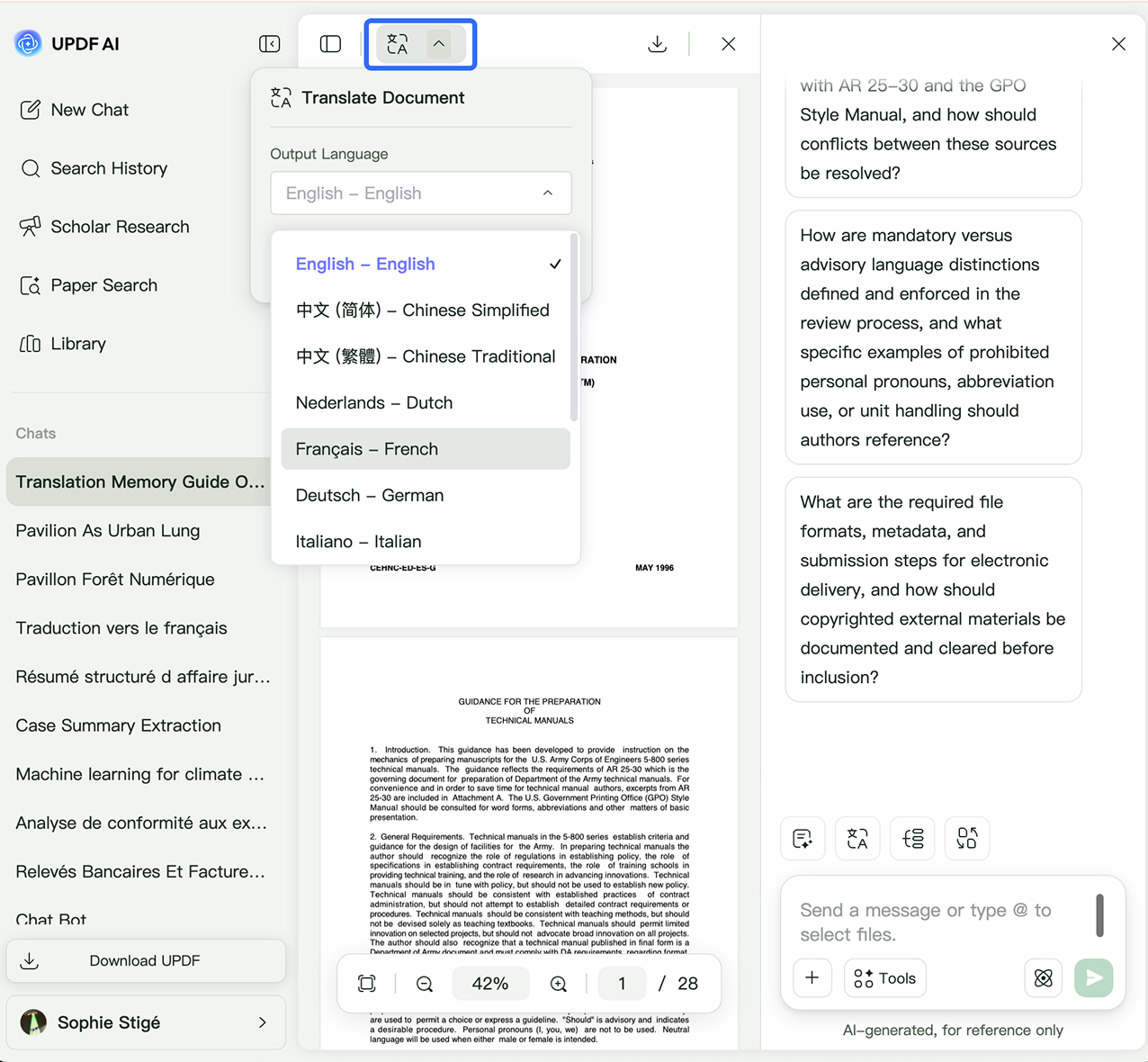
Step 2: Choose Your Translation Method
UPDF AI supports two different translation workflows depending on your needs:
· Option 1: AI Chat Translation (Flexible & Fast)
You can directly ask UPDF AI in the chat box using prompts.
This method is ideal for quickly understanding content, generating editable translations, or translating selected sections.
· Option 2: Side-by-Side Translation (Keeps Original Layout)
After entering the interface of chatting with your PDFs, click the “Side-by-Side Translation” mode in the upper-left corner.

Why Use UPDF AI for Technical Manual Translation?
Stop Losing Meaning in Technical Translation
Drowning in dense technical terminology, complex specifications, and industry jargon? Traditional translation tools often translate manuals too literally, resulting in confusing instructions and inaccurate terminology that engineers struggle to understand. UPDF AI understands technical context to deliver translations that are clearer, more accurate, and easier for engineers to understand.

No More Reformatting for Hours
After translating with ordinary translation tools, tables often break, diagrams become misaligned, and numbered instructions turn messy—forcing teams to spend hours reformatting the document manually. With UPDF AI’s Side-by-Side Translation workflow, you can preserve much of the original formatting automatically, reducing manual cleanup and helping teams move from translation to publishing much faster.

One Tool for Every Technical Team
Different teams often require completely different translation approaches. Engineering teams focus on technical accuracy, IT teams need consistent API terminology, while compliance teams prioritize regulatory language and standards. Whether you're working with engineering manuals, API documentation, medical instructions, manufacturing SOPs, training guides, or compliance documents, UPDF AI adapts to different technical domains and writing styles.

Privacy-First Experience
No data selling and no hidden tracking
Varies by vendor
Large Technical Document Handling

Limited
Image & Screenshot Translation
, with built-in OCR
Free to Try
, 5 free PDFs
Limited or no trial
Batch Processing
, multiple files simultaneously
Usually single-file
AI Engine
ChatGPT-5 & Deepseek R1
ChatGPT-4o/4.1
Formatting Preservation

FAQs About Using UPDF AI Technical Manuals Translation Tool
Q1. How fast can UPDF AI translate technical manuals?
Q2. Can UPDF AI translate scanned manuals or image-based documents?
Q3. Our outsourced translation process takes too long and delays product launches. What can we do?
Q4. We used other translation tools before, but our engineers said the translated manuals were unreadable. How is UPDF AI different?
Other Popular UPDF AI Tools