 UPDF
 UPDF for Windows
 UPDF for Mac
 UPDF for iPhone/iPad
 UPDF for Android
 Nomostar
 UPDF AI Online
 UPDF Sign
 IvyCraft
 Edit PDF
 Annotate PDF
 Create PDF
 PDF Form
 Edit links
 Convert PDF
 OCR
 PDF to Word
 PDF to Image
 PDF to Excel
 Organize PDF
 Merge PDF
 Split PDF
 Crop PDF
 Rotate PDF
 Protect PDF
 Sign PDF
 Redact PDF
 Sanitize PDF
 Remove Security
 Read PDF
 UPDF Cloud
 Compress PDF
 Print PDF
 Batch Process

 About UPDF AI
 UPDF AI Solutions
 AI User Guide
 FAQ about UPDF AI
 Summarize PDF
 Translate PDF
 Chat with PDF
 Chat with AI
 Chat with image
 PDF to Mind Map
 Explain PDF
 PDF AI Tools
 Image AI Tools
 AI Chat Tools
 AI Writing Tools
 AI Study Tools
 AI Working Tools
 Other AI Tools
 AI Bookmark Generation
 AI Bookmark Summary
 AI Watermark Generation
 AI Background Generation
 AI Sticker Generation
 AI Stamp Generation
 AI Editing Suite
 UPDF Copilot
 AI Page Management
 AI Semantic Search
 PDF to Word
 PDF to Excel
 PDF to PowerPoint
 Enterprise Solution
 Enterprise Sign
 Enterprise AI
 Enterprise Plan
 Enterprise User Guide
 Enterprise Webinar
 IT
 Education
 Construction
 Financial Service
 Healthcare
 Insurance
 Legal
 Manufacturing
 Government
 Researchers & PhDs
 Solopreneurs & Freelancers
 Lawyers & Legal Professionals
 Real Estate Agents & Brokers
 Education Solution
 Customer Stories
 User Guide
 UPDF Tricks
 FAQs
 UPDF Reviews
 Download Center
 Blog
 Newsroom
 Tech Spec
 Updates
 UPDF vs. Adobe Acrobat
 UPDF vs. Foxit
 UPDF vs. PDF Expert


 UPDF AI
Free AI Practice Test Generator with Answers
Turn a topic, syllabus, notes, PDF, image, or pasted text into a tailored practice test with your preferred question mix and difficulty. UPDF AI can also provide a separate answer key, concise explanations, and follow-up questions for weak areas.
Powered by
 ChatGPT |
 DeepSeek
5000+ Reviews
 4.8
UPDF AI available on


 Desktop & mobile app

4M+ Users, 11M+ Practice Tests Generated. Trusted by Leading Media:






How to Generate a Practice Test with UPDF AI
Add Your Topic or Study Materials
Enter the subject you want to practise, paste your notes, or upload a syllabus, PDF, image, or study guide. Include the units, learning objectives, or source pages that the test should cover.
Example Prompt: “Create a 20-question practice test from this biology PDF, covering cell structure and respiration.”Set the Test Format and Difficulty
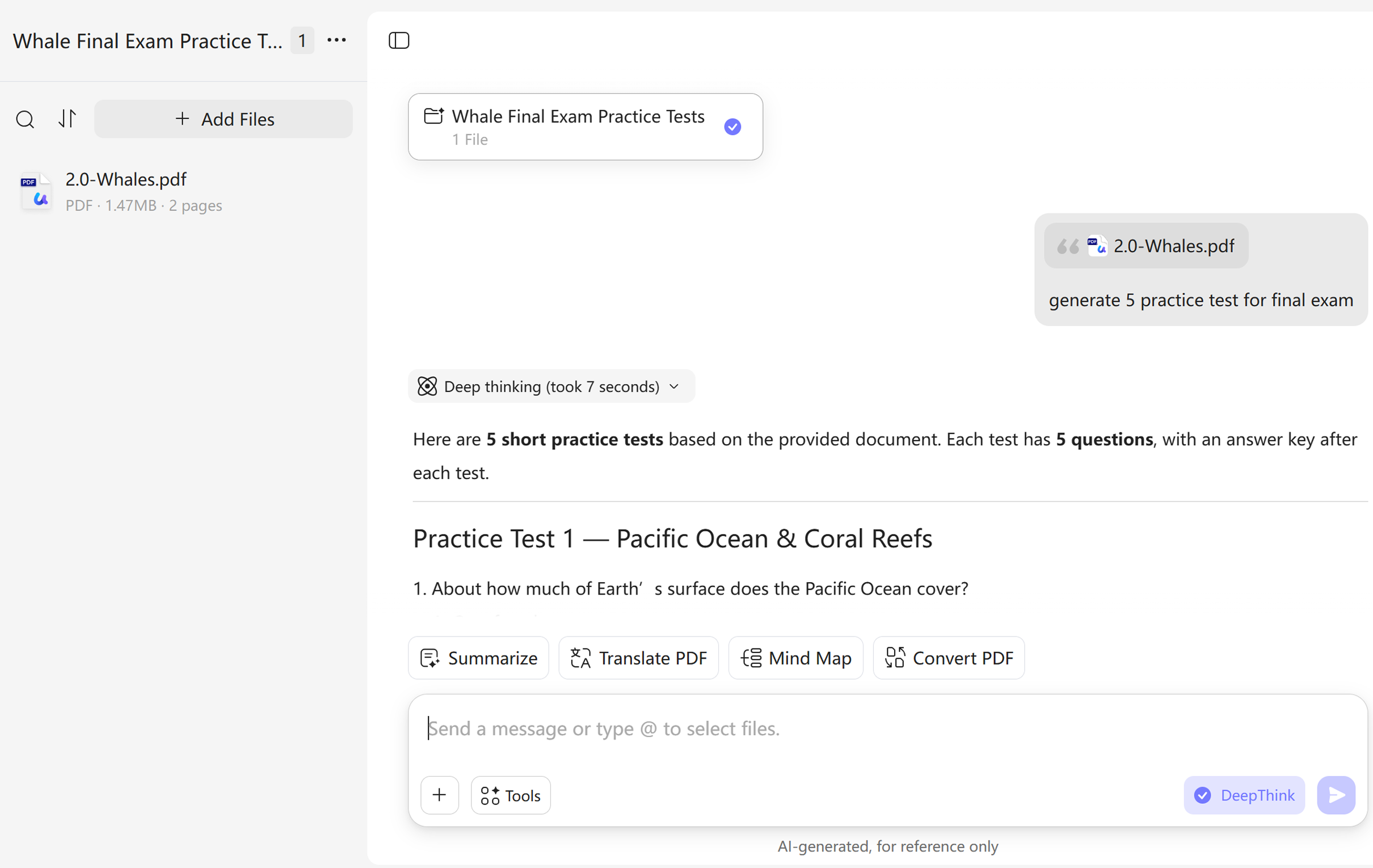
Choose the number of questions, difficulty level, and question mix. Ask for multiple-choice, true-or-false, short-answer, calculation, or scenario-based questions, plus a separate answer key and concise explanations.Generate, Answer, and Review
Complete the test before checking the answers. Then ask UPDF AI to explain missed questions, group weak concepts, and create a fresh practice round focused on those gaps. You can also use the Random Question Generator for additional practice prompts.

Why Choose UPDF AI Practice Test Generator?
Go Beyond Obvious Multiple-Choice Questions
Easy questions and obviously wrong distractors create confidence without revealing much. Ask for questions that require recall, comparison, application, calculation, or multi-step reasoning. You can also require plausible alternatives, one defensible answer, and a brief quality check for ambiguity before the final test is shown.

Learn Why an Answer Is Right or Wrong
A score tells you that something went wrong; an explanation helps you decide what to review. Request a short rationale for the correct answer, the concept being tested, and—when useful—why a tempting alternative fails. Then check the explanation against your source before relying on it.

Turn Weak Areas into the Next Practice Round
One test should shape the next study session. After you finish, tell UPDF AI which questions you missed or found uncertain. Ask it to group the underlying concepts, explain the gaps, and generate a fresh set focused on those areas without simply repeating the original wording. Explore more study workflows on the UPDF education hub.

Input Sources
Topics, prompts, PDFs, notes, and images
Usually text prompts only
Question Types
Multiple-choice, true-or-false, short-answer, calculation, and scenarios
Often limited to one or two formats
Difficulty Control
Set level, reasoning depth, and exam coverage
Basic difficulty labels
Answer Support
Separate answer keys and concise explanations
Answers may lack explanations
Follow-Up Practice
Generate new questions from missed concepts
Often starts a new test from scratch
Document Workflow
Study and review source PDFs in the same AI workflow
Standalone question generation
AI Models
ChatGPT | DeepSeek
Varies by tool
Supported Devices
Online, Windows, Mac, Android, iOS
Usually online only
FAQs About UPDF AI Practice Test Generator
1. What Can I Use to Generate a Practice Test?
2. Can It Create Different Question Types?
3. Can I Choose the Difficulty and Number of Questions?
4. Does It Generate Answers and Explanations?
5. Is UPDF AI Practice Test Generator Free?
Other Popular UPDF AI Tools