 UPDF
 UPDF for Windows
 UPDF for Mac
 UPDF for iPhone/iPad
 UPDF for Android
 Nomostar
 UPDF AI Online
 UPDF Sign
 IvyCraft
 Edit PDF
 Annotate PDF
 Create PDF
 PDF Form
 Edit links
 Convert PDF
 OCR
 PDF to Word
 PDF to Image
 PDF to Excel
 Organize PDF
 Merge PDF
 Split PDF
 Crop PDF
 Rotate PDF
 Protect PDF
 Sign PDF
 Redact PDF
 Sanitize PDF
 Remove Security
 Read PDF
 UPDF Cloud
 Compress PDF
 Print PDF
 Batch Process

 About UPDF AI
 UPDF AI Solutions
 AI User Guide
 FAQ about UPDF AI
 Summarize PDF
 Translate PDF
 Chat with PDF
 Chat with AI
 Chat with image
 PDF to Mind Map
 Explain PDF
 PDF AI Tools
 Image AI Tools
 AI Chat Tools
 AI Writing Tools
 AI Study Tools
 AI Working Tools
 Other AI Tools
 AI Bookmark Generation
 AI Bookmark Summary
 AI Watermark Generation
 AI Background Generation
 AI Sticker Generation
 AI Stamp Generation
 AI Editing Suite
 UPDF Copilot
 AI Page Management
 AI Semantic Search
 PDF to Word
 PDF to Excel
 PDF to PowerPoint
 Enterprise Solution
 Enterprise Sign
 Enterprise AI
 Enterprise Plan
 Enterprise User Guide
 Enterprise Webinar
 IT
 Education
 Construction
 Financial Service
 Healthcare
 Insurance
 Legal
 Manufacturing
 Government
 Researchers & PhDs
 Solopreneurs & Freelancers
 Lawyers & Legal Professionals
 Real Estate Agents & Brokers
 Education Solution
 Customer Stories
 User Guide
 UPDF Tricks
 FAQs
 UPDF Reviews
 Download Center
 Blog
 Newsroom
 Tech Spec
 Updates
 UPDF vs. Adobe Acrobat
 UPDF vs. Foxit
 UPDF vs. PDF Expert


 UPDF AI
Free AI Content Brief Generator
Enter your topic, keywords, and content goals, or upload one or multiple reference PDFs. UPDF AI analyzes your materials and organizes the information into a structured content brief with audience guidance, key messages, and a suggested outline.
Powered by
 ChatGPT |
 DeepSeek
5000+ Reviews
 4.8
UPDF AI available on


 Desktop & mobile app

4M+ Users, 10M+ Content Briefs Generated. Trusted by Leading Media:






How to Generate Content Briefs with UPDF AI?
Enter Details or Upload PDFs
Type or paste your topic, target audience, keywords, and content goals, or upload one or multiple reference PDFs. Tell UPDF AI what the brief should include.
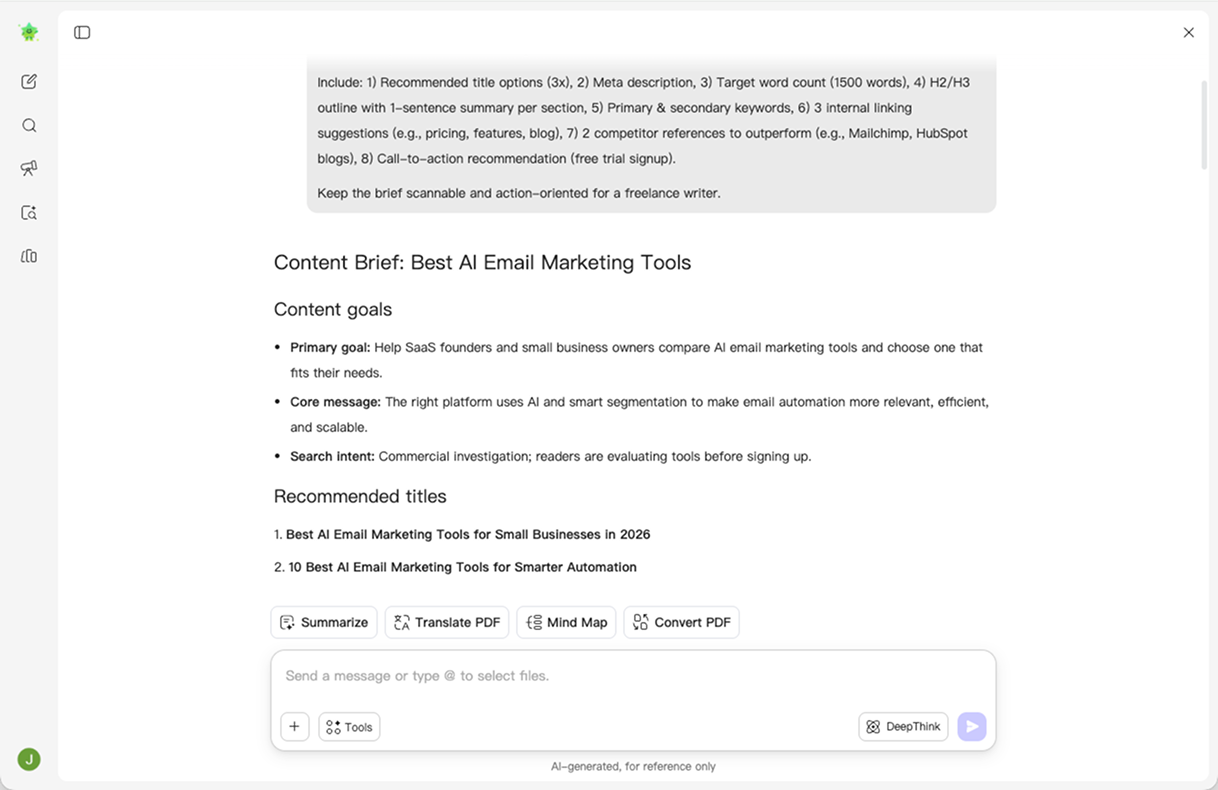
Example Prompt: “Analyze the uploaded PDFs and create a content brief for a blog post about [topic]. Include the target audience, content objective, primary keyword, suggested title, search intent, H2/H3 outline, key talking points, target word count, and CTA. Separate recommendations from source facts, and mark missing information as ‘Not provided.’”Generate and Review
Ask UPDF AI to generate your draft, then check the audience, messaging, outline, and supporting information. Refine the brief with follow-up prompts, and verify any keyword data, source claims, or assumptions before sharing it with your writer. You can also use the AI Outline Generator to explore an alternative structure.

Why Choose UPDF AI Content Brief Generator?
Turn Research into Structured Content Briefs
“Reading source materials and turning them into clear writing instructions takes too much time.”
UPDF AI organizes relevant information into audience guidance, content objectives, key messages, and a suggested H2/H3 outline, giving writers a clearer starting point. For drafting support after planning, see the AI blog writer.

Customize and Refine Every Brief
“A fixed template does not fit every audience, channel, or campaign.”
Use flexible prompts to control the content type, tone, length, language, and level of detail. Ask UPDF AI to adjust the angle, expand the outline, or refine the instructions for your writer. Explore more workflows on the UPDF AI tools pillar page.

Input
Enter a topic, goals, keywords, or upload PDFs
Enter a text prompt or paste content
Using Reference Materials
Analyze multiple reference PDFs together
Paste reference details into a template
Combining Sources
Upload multiple PDFs and analyze them together
Read source files and paste relevant details manually
Brief Structure
Generate audience, objective, keywords, messaging, and outline
Generate a brief from the supplied text and template
Refining the Draft
Refine any section through follow-up prompts
Regenerate sections or edit them manually
PDF Workflow
Upload, analyze, generate, and refine in one app
Switch between separate tools
Language Supported
Generate briefs in multiple languages
Varies by tool
Supported Devices
Online, Windows, Mac, Android, iOS
Online
FAQs About UPDF AI Content Brief Generator
1. What Is a Content Brief?
- Audience and Objective: Who the content should reach and the outcome it should support.
- Topic and Search Intent: The subject, target keywords, and reader needs to address.
- Outline and Key Messages: Suggested headings, important talking points, and supporting information.
- Writing Requirements: Tone of voice, target length, reference materials, and the call to action.
2. What Is the Difference Between a Content Brief and an Outline?
3. Is UPDF AI Content Brief Generator Free?
Other Popular UPDF AI Tools