UPDF
UPDF
 UPDF for Windows
 UPDF for Mac
 UPDF for iPhone/iPad
 UPDF for Android
 Nomostar
 UPDF AI Online
 UPDF Sign
 IvyCraft
 Edit PDF
 Annotate PDF
 Create PDF
 PDF Form
 Edit links
 Convert PDF
 OCR
OCR PDF to Word
 PDF to Image
 PDF to Excel
 Organize PDF
 Merge PDF
 Split PDF
 Crop PDF
 Rotate PDF
 Protect PDF
 Sign PDF
 Redact PDF
 Sanitize PDF
 Remove Security
 Read PDF
 UPDF Cloud
 Compress PDF
 Print PDF
 Batch Process
 About UPDF AI
 UPDF AI Solutions
 AI User Guide
 FAQ about UPDF AI
 Summarize PDF
 Translate PDF
 Chat with PDF
 Chat with AI
 Chat with image
 PDF to Mind Map
 Explain PDF
 PDF AI Tools
 Image AI Tools
 AI Chat Tools
 AI Writing Tools
 AI Study Tools
 AI Working Tools
 Other AI Tools
 AI Bookmark Generation
 AI Bookmark Summary
 AI Watermark Generation
 AI Background Generation
 AI Sticker Generation
 AI Stamp Generation
 AI Editing Suite
 UPDF Copilot
 AI Page Management
 AI Semantic Search
 PDF to Word
 PDF to Excel
 PDF to PowerPoint
 Enterprise Solution
 Enterprise Sign
 Enterprise AI
 Enterprise Plan
 Enterprise User Guide
 Enterprise Webinar
 IT
IT Education
 Construction
 Financial Service
 Healthcare
 Insurance
 Legal
Legal Manufacturing
 Government
 Researchers & PhDs
 Solopreneurs & Freelancers
 Lawyers & Legal Professionals
 Real Estate Agents & Brokers
 Education Solution
 Customer Stories
 User Guide
 UPDF Tricks
 FAQs
FAQs UPDF Reviews
 Download Center
 Blog
Blog Newsroom
 Tech Spec
 Updates
 UPDF vs. Adobe Acrobat
 UPDF vs. Foxit
 UPDF vs. PDF Expert

 UPDF AI
Extract Data from Research Paper PDFs with UPDF AI
Manual data extraction from research PDFs is a significant bottleneck. UPDF AI transforms this tedious task into an instant, accurate process, allowing you to turn unstructured papers into structured, actionable data in seconds.
Powered by
 GPT-5 |
 DeepSeek R1
5000+ Reviews
 4.8
4.8
Use UPDF AI Anywhere:


 Desktop & mobile app

4M+ Users, 5M+ Pieces of Data Extracted, Trusted by Leading Medias:






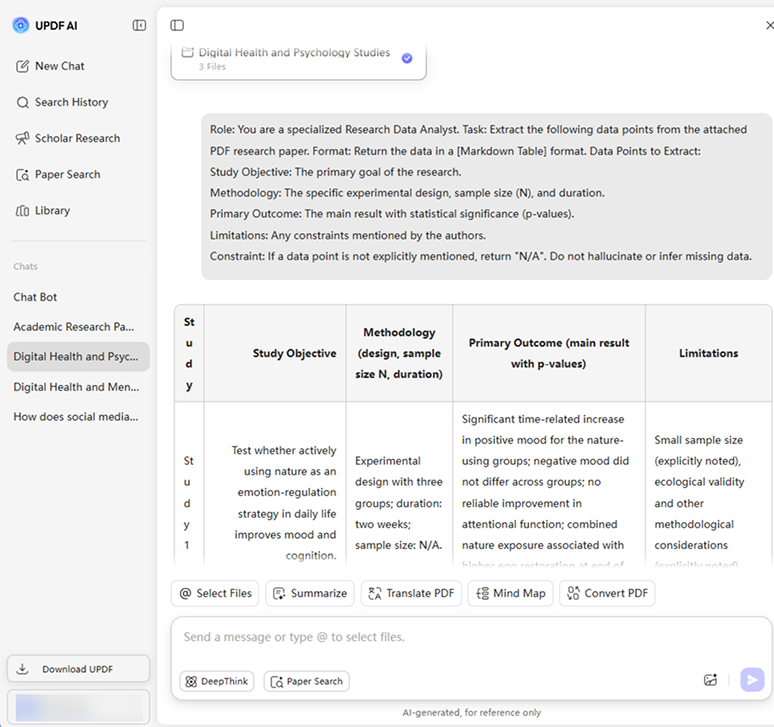
How to Use UPDF AI to Extract Data from Research Paper PDFs Online for free?
-
Upload:
Select and upload the research papers you want to extract data from. Alternatively, use UPDF AI’s Paper Search to find research papers online and add them to chat—no downloads needed. -
Prompt:
Specify the analyst role, required data fields, output format, and strict constraints (such as returning “N/A” for missing data) to help UPDF AI generate precise, well-structured research extraction results. -
Select your AI model:
ChatGPT-5 is selected by default. To switch to DeepSeek R1, click the “DeepThink” button for alternative reasoning and output styles. -
Generate structured research insights:
Click “Send,” and UPDF AI will extract key data from the research paper PDFs and present it in a clear, well-organized summary or table format.

Why Choose UPDF AI for Extracting Data from Research Paper PDFs?
Deep Semantic Understanding
UPDF AI doesn’t just recognize characters—it understands the scientific context of the text. This allows it to distinguish between similar symbols used in different contexts and ensures that the extracted data is contextually accurate, not just a literal string of words.

Mastery of Complex Layouts
Research papers often use multi-column layouts, nested tables, and floating figures that break standard copy-paste. UPDF AI “reads” pages like a human, following text across columns and accurately reconstructing complex tables into clean formats like Markdown, keeping data aligned with headers—even across multiple pages.

Unmatched Speed and Scalability
The biggest benefit is efficiency: UPDF AI can process fifty papers faster than a human can read one abstract, enabling large-scale reviews and database building while eliminating tedious data-entry, so you can focus on analysis.

UPDF AI
vs. Other AI Tools
UPDF AI
Other AI Tools
Batch PDF Upload


Complex Table
Extraction
Custom Data Columns
Structured Export (Markdown)
Multi-Paper Synthesis
Handling Scanned/Old PDFs
AI Model Options
ChatGPT-5 & DeepSeek R1
Limited to one AI model
Language Supported
100+
Less than 20
Platform Supported
Online, Windows, Mac, Android, iOS
Online
FAQs About Using UPDF AI to Extract Data from Research Paper PDFs
Q1. How can I use UPDF AI to generate a systematic review table from multiple research paper PDFs?
Q2. How can I copy the data into Excel with UPDF AI?
Q3. Is UPDF AI able to extract data from scanned research paper PDFs?
Q4. Are there any usage limits when using UPDF AI’s trial version?
Other Popular UPDF AI Tools