UPDF
UPDF
 UPDF for Windows
 UPDF for Mac
 UPDF for iPhone/iPad
 UPDF for Android
 Nomostar
 UPDF AI Online
 UPDF Sign
 IvyCraft
 Edit PDF
 Annotate PDF
 Create PDF
 PDF Form
 Edit links
 Convert PDF
 OCR
OCR PDF to Word
 PDF to Image
 PDF to Excel
 Organize PDF
 Merge PDF
 Split PDF
 Crop PDF
 Rotate PDF
 Protect PDF
 Sign PDF
 Redact PDF
 Sanitize PDF
 Remove Security
 Read PDF
 UPDF Cloud
 Compress PDF
 Print PDF
 Batch Process
 About UPDF AI
 UPDF AI Solutions
 AI User Guide
 FAQ about UPDF AI
 Summarize PDF
 Translate PDF
 Chat with PDF
 Chat with AI
 Chat with image
 PDF to Mind Map
 Explain PDF
 PDF AI Tools
 Image AI Tools
 AI Chat Tools
 AI Writing Tools
 AI Study Tools
 AI Working Tools
 Other AI Tools
 AI Bookmark Generation
 AI Bookmark Summary
 AI Watermark Generation
 AI Background Generation
 AI Sticker Generation
 AI Stamp Generation
 AI Editing Suite
 UPDF Copilot
 AI Page Management
 AI Semantic Search
 PDF to Word
 PDF to Excel
 PDF to PowerPoint
 Enterprise Solution
 Enterprise Sign
 Enterprise AI
 Enterprise Plan
 Enterprise User Guide
 Enterprise Webinar
 IT
IT Education
 Construction
 Financial Service
 Healthcare
 Insurance
 Legal
Legal Manufacturing
 Government
 Researchers & PhDs
 Solopreneurs & Freelancers
 Lawyers & Legal Professionals
 Real Estate Agents & Brokers
 Education Solution
 Customer Stories
 User Guide
 UPDF Tricks
 FAQs
FAQs UPDF Reviews
 Download Center
 Blog
Blog Newsroom
 Tech Spec
 Updates
 UPDF vs. Adobe Acrobat
 UPDF vs. Foxit
 UPDF vs. PDF Expert

 UPDF AI
UPDF AI Case Brief Generator for Clear Legal Case Summaries
Simplify complex legal cases with UPDF AI. It quickly turns lengthy judgments into structured case briefs by extracting key facts, issues, rules, and outcomes—helping you understand and review cases faster with clarity.
Powered by
 GPT-5 |
 DeepSeek R1
5000+ Reviews
 4.8
4.8
UPDF AI available on


 Desktop & mobile app

4M+ Users, 30M+ Case Briefs Generated Trusted by Leading Media:






How to Use UPDF AI for Case Brief Generator?
-
Upload Your Case Files
Upload your legal case or multiple documents to UPDF AI for analysis. Whether it’s court opinions, PDFs, or scanned files, you can review everything in one place. -
Ask AI to Generate a Case Brief
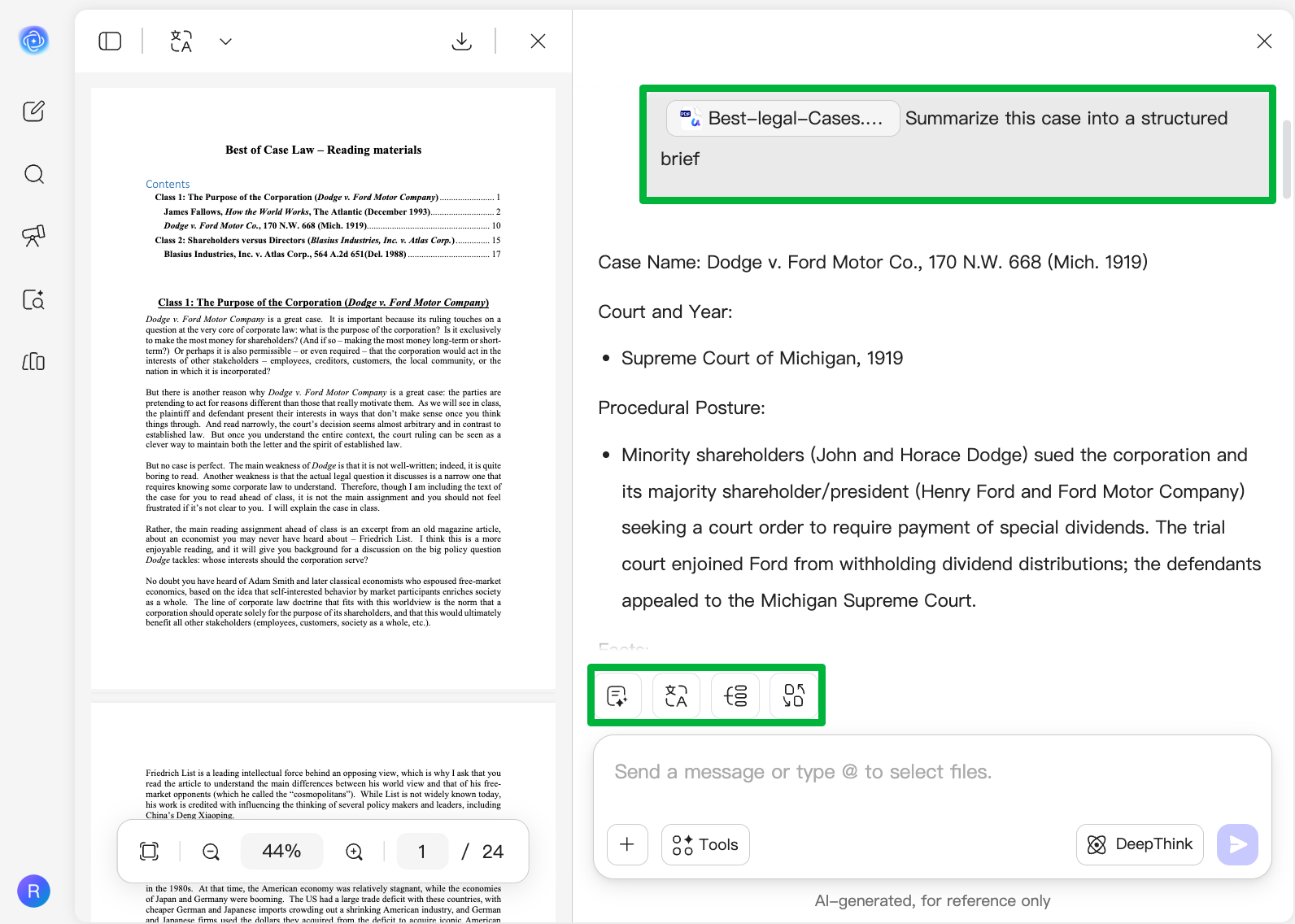
Send a simple prompt like “Summarize this case into a structured brief” or “Identify facts, issues, and rulings.” UPDF AI will instantly break down the case into clear, organized sections. -
Analyze, Convert, and Understand Faster
Go beyond summaries. UPDF AI helps you review key points like facts, issues, rules, and judgments at a glance, while also supporting mind map generation, translation , and multi-document analysis —so you can study, compare, and understand cases more efficiently.

Why Choose UPDF AI for Case Briefs
Flexible Output for Better Learning
Go beyond plain text. Convert case briefs into mind maps, translate them, or refine summaries based on your needs—helping you study, review, and present legal insights more effectively.

Works Across Multiple Case Files
Legal research often involves more than one document. UPDF AI lets you analyze multiple cases together, making it easier to compare, connect insights, and build stronger understanding.

Simplifies Complex Legal Language
Legal terminology can be difficult, especially for beginners. UPDF AI explains complex content in clearer, simpler language, making case analysis more accessible for students and non-experts.

Supporting Multi-Team Collaboration
UPDF is a complete PDF AI workspace that combines reading, annotation, and document management with built-in UPDF AI. While UPDF AI Online supports basic tasks like explanations and summaries, advanced features are fully available in the desktop and mobile apps. There, you can edit, annotate with AI insights, and use semantic search to find information by meaning and connect key points across documents—all in one seamless workflow.

UPDF AI vs. Other AI Tools
UPDF AI
Other AI Tools
Free

Upload Case Files
Unified Legal Case Folder Analysis

Convert Case Files to Mind Maps
Translate PDF
(Full document Translation & Side-by-Side Translation)
Platform Supported
Online, Windows, macOS, iOS, Android
Online
UPDF AI for Case Brief Generator FAQs
1. What is an AI case brief generator and how does UPDF AI work?
2. Can UPDF AI generate accurate and structured case briefs?
3.Is UPDF AI suitable for law students and beginners?
4. What Is the Difference Between the Free and Paid Plans?
Other Popular UPDF AI Tools