UPDF
UPDF
 UPDF for Windows
 UPDF for Mac
 UPDF for iPhone/iPad
 UPDF for Android
 Nomostar
 UPDF AI Online
 UPDF Sign
 IvyCraft
 Edit PDF
 Annotate PDF
 Create PDF
 PDF Form
 Edit links
 Convert PDF
 OCR
OCR PDF to Word
 PDF to Image
 PDF to Excel
 Organize PDF
 Merge PDF
 Split PDF
 Crop PDF
 Rotate PDF
 Protect PDF
 Sign PDF
 Redact PDF
 Sanitize PDF
 Remove Security
 Read PDF
 UPDF Cloud
 Compress PDF
 Print PDF
 Batch Process
 About UPDF AI
 UPDF AI Solutions
 AI User Guide
 FAQ about UPDF AI
 Summarize PDF
 Translate PDF
 Chat with PDF
 Chat with AI
 Chat with image
 PDF to Mind Map
 Explain PDF
 PDF AI Tools
 Image AI Tools
 AI Chat Tools
 AI Writing Tools
 AI Study Tools
 AI Working Tools
 Other AI Tools
 AI Bookmark Generation
 AI Bookmark Summary
 AI Watermark Generation
 AI Background Generation
 AI Sticker Generation
 AI Stamp Generation
 AI Editing Suite
 UPDF Copilot
 AI Page Management
 AI Semantic Search
 PDF to Word
 PDF to Excel
 PDF to PowerPoint
 Enterprise Solution
 Enterprise Sign
 Enterprise AI
 Enterprise Plan
 Enterprise User Guide
 Enterprise Webinar
 Banking
 Healthcare
 Insurance
 Legal
Legal Manufacturing
 Government
 Researchers & PhDs
 Solopreneurs & Freelancers
 Lawyers & Legal Professionals
 Real Estate Agents & Brokers
 Education Solution
 Customer Stories
 User Guide
 UPDF Tricks
 FAQs
FAQs UPDF Reviews
 Download Center
 Blog
Blog Newsroom
 Tech Spec
 Updates
 UPDF vs. Adobe Acrobat
 UPDF vs. Foxit
 UPDF vs. PDF Expert

 UPDF AI
Analyze Balance Sheet with UPDF AI
Analyzing balance sheets in static PDFs is slow and error-prone. UPDF AI instantly turns dense financial reports into visual mind maps, revealing liquidity, asset quality, and hidden footnote risks at a glance.
Powered by
 GPT-5 |
 DeepSeek R1
5000+ Reviews
 4.8
4.8
UPDF AI available on


 Desktop & mobile app

4M+ Users, 23M+ Balance Sheets Analyzed, Trusted by Leading Medias:






How to Use UPDF AI to Analyze Balance Sheet?
-
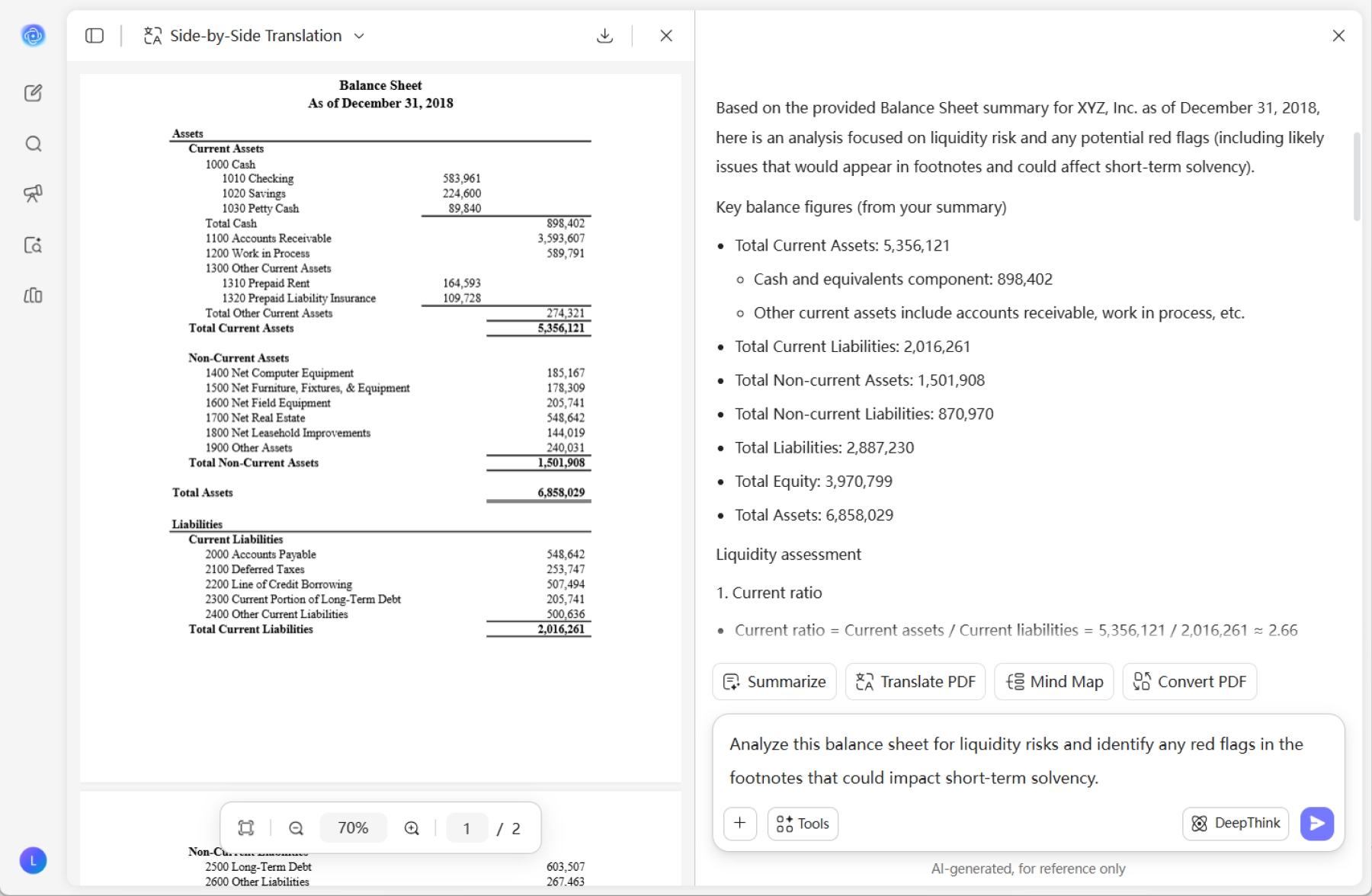
Drag and drop your balance sheet into UPDF AI. Our AI instantly generate an overview of balance sheet, evaluating liquidity ratios, asset quality, and solvency risks, pinpointing critical red flags and areas for structural improvement.
-
You can define your analysis focus by entering specific prompts. Tell UPDF AI exactly which financial dimensions to prioritize, such as: “Analyze this balance sheet for liquidity risks and identify any red flags in the footnotes that could impact short-term solvency or analyze this balance sheet into mind maps.”
-
Refine your analysis by choosing to copy the AI-generated insights or regenerate the results for a deeper dive. Once satisfied, sync the content back to your document for final formatting.

Why Choose UPDF AI to Analyze Balance Sheet?
Eliminate Manual Data Entry Fatigue
In credit reviews or supplier assessments, time is spent on calculation, not just reading. UPDF AI rescues you from the "manual entry trap" by instantly extracting core KPIs—like current assets and liabilities—and calculating essential ratios on the fly. No more copying numbers into Excel; get precise financial insights in seconds, with zero human error.

Uncover "Red Flags" Hidden in the Fine Print
The real risks of a balance sheet often hide in the dense, multi-page footnotes. While manual scanning can easily miss a single line about a pending lawsuit or a hidden debt, UPDF AI acts as your digital forensic expert and security guard with ISO 27001 certification. It penetrates the supplementary notes to flag undisclosed liabilities and asset impairments that could compromise a company’s solvency.
Master Trend Analysis Without the Eye Strain
Static figures tell only half the story. To see where a company is heading, you need to compare periods. By combining UPDF’s Document Compare mode with AI insights, you can stop toggling between windows. The AI automatically pinpoints year-over-year variances and explains the drivers behind significant fluctuations in cash flow or debt levels.
Close the Gap Between Paper and Analysis
Financial reports often arrive as messy scans or unsearchable images. UPDF AI bridges this gap with industrial-grade OCR and bi-directional conversion. Transform a physical scan into a smart PDF or mind maps, let the AI run the analysis, and then export the results back to Excel for your final report. It’s a complete, end-to-end workflow in a single app.

UPDF AI vs. Other AI Tools
UPDF AI
Other AI Tools
Free
 (100 QAs + 5 PDF Uploads)
(Less Than 5 Files Upload)
Supported File Formats
(PDF, Image and Text)
 (Text Input Only)
Multilingual Support
(100+)
(No more than 20)
Data-Driven Drafting
(Extracts insights from files)
(General Summaries Only)
AI Models
ChatGPT-5 & DeepSeek R1
ChatGPT-5
Multiplatform Availability
Online, Windows, Mac, iOS, Android
Online
Data Security
FAQs about Analyzing Balance Sheet with UPDF AI
1. Can UPDF AI identify \"hidden\" financial risks in the footnotes?
2. Is my sensitive data secure when using UPDF AI?
3. Can I analyze balance sheets that are in Excel format?
4. Can UPDF AI analyze scanned balance sheets or image-based financial reports?
Other Popular UPDF AI Tools