 UPDF
 UPDF for Windows
 UPDF for Mac
 UPDF for iPhone/iPad
 UPDF for Android
 Nomostar
 UPDF AI Online
 UPDF Sign
 IvyCraft
 Edit PDF
 Annotate PDF
 Create PDF
 PDF Form
 Edit links
 Convert PDF
 OCR
 PDF to Word
 PDF to Image
 PDF to Excel
 Organize PDF
 Merge PDF
 Split PDF
 Crop PDF
 Rotate PDF
 Protect PDF
 Sign PDF
 Redact PDF
 Sanitize PDF
 Remove Security
 Read PDF
 UPDF Cloud
 Compress PDF
 Print PDF
 Batch Process

 About UPDF AI
 UPDF AI Solutions
 AI User Guide
 FAQ about UPDF AI
 Summarize PDF
 Translate PDF
 Chat with PDF
 Chat with AI
 Chat with image
 PDF to Mind Map
 Explain PDF
 PDF AI Tools
 Image AI Tools
 AI Chat Tools
 AI Writing Tools
 AI Study Tools
 AI Working Tools
 Other AI Tools
 AI Bookmark Generation
 AI Bookmark Summary
 AI Watermark Generation
 AI Background Generation
 AI Sticker Generation
 AI Stamp Generation
 AI Editing Suite
 UPDF Copilot
 AI Page Management
 AI Semantic Search
 PDF to Word
 PDF to Excel
 PDF to PowerPoint
 Enterprise Solution
 Enterprise Sign
 Enterprise AI
 Enterprise Plan
 Enterprise User Guide
 Enterprise Webinar
 IT
 Education
 Construction
 Financial Service
 Healthcare
 Insurance
 Legal
 Manufacturing
 Government
 Researchers & PhDs
 Solopreneurs & Freelancers
 Lawyers & Legal Professionals
 Real Estate Agents & Brokers
 Education Solution
 Customer Stories
 User Guide
 UPDF Tricks
 FAQs
 UPDF Reviews
 Download Center
 Blog
 Newsroom
 Tech Spec
 Updates
 UPDF vs. Adobe Acrobat
 UPDF vs. Foxit
 UPDF vs. PDF Expert


 UPDF AI
AI Executive Summary Generator
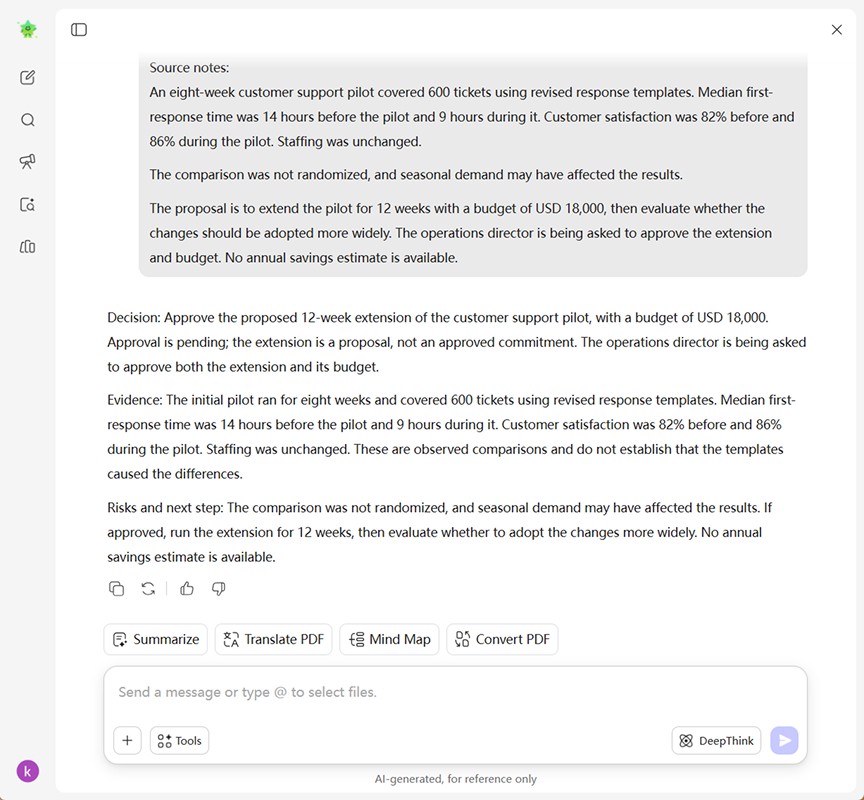
Turn detailed notes, reports, and business plan information into a concise executive summary draft. Tell UPDF AI who will read it and what they need to decide, then ask for the key findings, supporting figures, risks, and proposed next steps.
Powered by
 ChatGPT |
 DeepSeek
5000+ Reviews
 4.8
UPDF AI available on


 Desktop & mobile app

4M+ Users, 10K+ Executive Summaries Generated. Trusted by Leading Media:






How to Generate an Executive Summary Online
Add Your Source Material
Open Chat with AI and paste the notes or relevant report sections you are authorized to share. Include the findings, figures, risks, and any proposed action the summary needs to cover.Define the Brief
Specify the reader, purpose, and target length. Ask for an executive summary based on your material, with the main conclusion first and missing information flagged rather than filled in.Check and Refine
Compare names, numbers, timeframes, and recommendations with your source. Ask for clearer wording or a different emphasis, then copy the reviewed draft into your report, proposal, or business plan. For a related planning workflow, try the AI Content Brief Generator.

Why Use UPDF AI for Executive Summary Drafting?
Bring the Essential Evidence Together
A useful summary connects the main finding with the evidence behind it. Give UPDF AI your source notes and ask it to organize the important figures, implications, and proposed actions into a draft that readers can understand on its own.

Shape the Summary Around Your Reader
A leadership update, a project proposal, and an investor brief need different context. Describe the audience and the decision ahead, then request an emphasis that fits: results and risks, the case for a proposal, or the business facts behind a funding request. You can also clarify a core offer with the Value Proposition Generator.

Refine the Length and Wording
Need a shorter opening or a less technical explanation? Ask for a revision with your preferred length and tone, while keeping the source facts unchanged. Review the revised draft before adding it to the document you will share.

Starting Point
Your source material and instructions
Predefined headings or empty sections
First Draft
Request prose based on your notes
Write the content into each section
Audience and Emphasis
Describe the reader in your prompt
Adapt the content to your reader
Length and Wording
Ask for a shorter or revised draft
Revise the text yourself
Source Checks
You verify facts and recommendations
You verify facts and recommendations
Final Document Layout
Place the reviewed text in your document
Use or adapt the template's layout
AI Models
ChatGPT | DeepSeek
Varies by tool
Supported Devices
Online, Windows, Mac, Android, iOS
Any device with the template
FAQs About UPDF AI Executive Summary Generator
1. What should an executive summary include?
2. How long should an executive summary be?
3. How is an executive summary different from an abstract?
4. Can I create one before the full report or business plan is finished?
Other Popular UPDF AI Tools