UPDF
UPDF
 UPDF for Windows
 UPDF for Mac
 UPDF for iPhone/iPad
 UPDF for Android
 Nomostar
 UPDF AI Online
 UPDF Sign
 IvyCraft
 Edit PDF
 Annotate PDF
 Create PDF
 PDF Form
 Edit links
 Convert PDF
 OCR
OCR PDF to Word
 PDF to Image
 PDF to Excel
 Organize PDF
 Merge PDF
 Split PDF
 Crop PDF
 Rotate PDF
 Protect PDF
 Sign PDF
 Redact PDF
 Sanitize PDF
 Remove Security
 Read PDF
 UPDF Cloud
 Compress PDF
 Print PDF
 Batch Process
 About UPDF AI
 UPDF AI Solutions
 AI User Guide
 FAQ about UPDF AI
 Summarize PDF
 Translate PDF
 Chat with PDF
 Chat with AI
 Chat with image
 PDF to Mind Map
 Explain PDF
 PDF AI Tools
 Image AI Tools
 AI Chat Tools
 AI Writing Tools
 AI Study Tools
 AI Working Tools
 Other AI Tools
 AI Bookmark Generation
 AI Bookmark Summary
 AI Watermark Generation
 AI Background Generation
 AI Sticker Generation
 AI Stamp Generation
 AI Editing Suite
 UPDF Copilot
 AI Page Management
 AI Semantic Search
 PDF to Word
 PDF to Excel
 PDF to PowerPoint
 Enterprise Solution
 Enterprise Sign
 Enterprise AI
 Enterprise Plan
 Enterprise User Guide
 Enterprise Webinar
 IT
IT Education
 Construction
 Financial Service
 Healthcare
 Insurance
 Legal
Legal Manufacturing
 Government
 Researchers & PhDs
 Solopreneurs & Freelancers
 Lawyers & Legal Professionals
 Real Estate Agents & Brokers
 Education Solution
 Customer Stories
 User Guide
 UPDF Tricks
 FAQs
FAQs UPDF Reviews
 Download Center
 Blog
Blog Newsroom
 Tech Spec
 Updates
 UPDF vs. Adobe Acrobat
 UPDF vs. Foxit
 UPDF vs. PDF Expert

 UPDF AI
Academic Translator for PDFs & Text -Side-by-Side with UPDF AI
Powered by ChatGPT-5 and DeepSeek R1, UPDF AI simplifies real estate contracts with speed and accuracy. Upload your property agreements, and UPDF AI delivers clear summaries highlighting key clauses, responsibilities, and potential risks in minutes.
Powered by
 GPT-5 |
 DeepSeek R1
5000+ Reviews
 4.8
4.8
Use UPDF Real Estate Contract Summarizer AI Anywhere:


 Desktop & mobile app

4M+ Users, 46M+ Academic Materials Translated, Trusted by Leading Medias:






How to Translate Your Academic Materials with UPDF AI?
-
Option 1. Translate Academic PDFs
Upload your academic PDF(s) and choose your translation method (see detailed user guide):
Page-by-Page: Translate the whole document or a specific page range in one click.
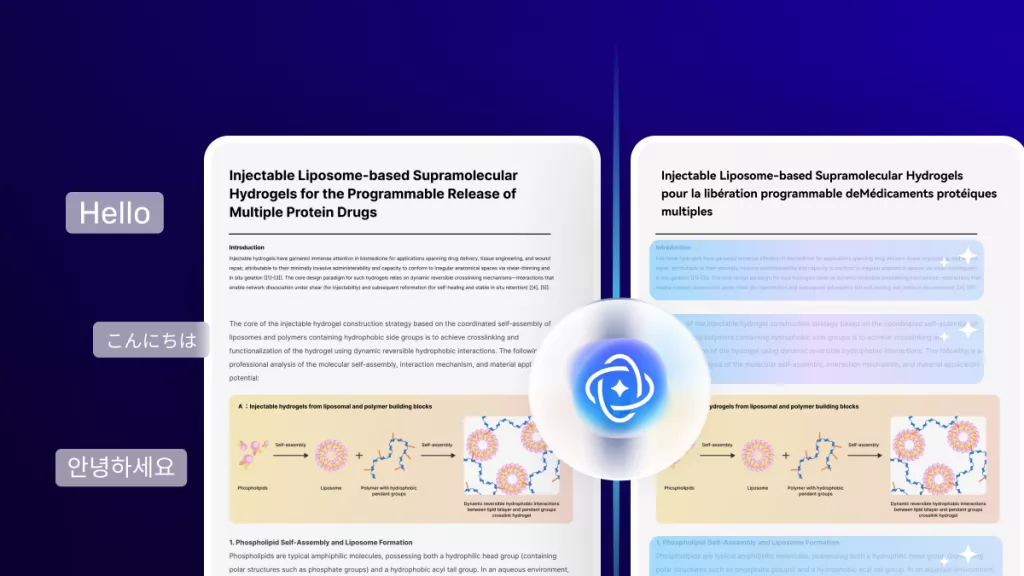
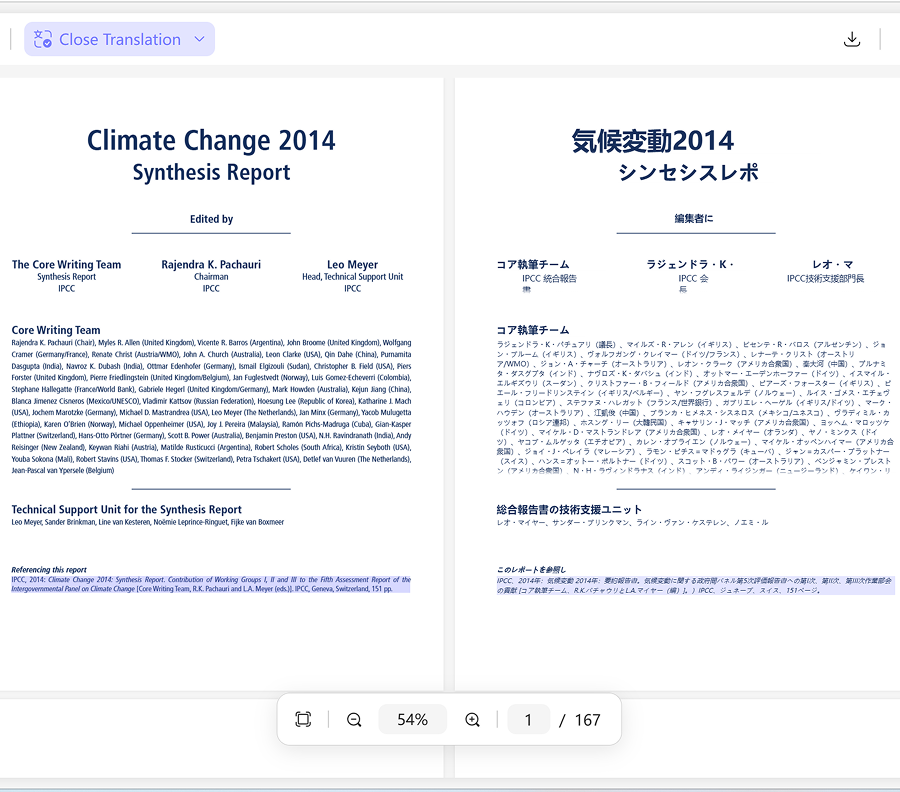
Side-by-Side: View the original and translated version side-by-side. Highlighted text corresponds to the original, and you can download the translated PDF while keeping the formatting intact.
Copy & Paste: Copy text from your PDF into the chat box and translate it instantly. -
Option 2. Translate Academic Pictures
Upload images or screenshots of academic content and ask UPDF AI to translate them. This method supports any language and is perfect for translating content that cannot be copied from PDFs or other sources. -
Option 3. Translate Academic Text
Paste or type your academic text into the chat box and enter your translation request. UPDF AI supports any language and provides accurate, high-quality translations instantly.

Why Choose UPDF AI Academic Translator?
Translate Any Academic Content
Whether you have PDFs, screenshots, images, or plain text, UPDF AI can translate it into any language. Many tools only handle one type of input, forcing you to switch between apps. UPDF AI handles all formats in one place, letting you focus on understanding research without interruptions.

Fast, Accurate, and Academic-Friendly
When deadlines are tight or you need to quickly grasp foreign research, slow or imprecise tools can waste time and risk misinterpretation. UPDF AI delivers instant, high-quality translations that preserve academic terminology, helping you read, analyze, and cite papers efficiently.

Side-by-Side Visual Translation
Reviewing formulas, tables, or complex paragraphs is challenging when the original and translation are separated. UPDF AI shows both versions side-by-side, with highlighted text corresponding automatically, making comparison and verification fast and intuitive.

Preserve PDF Layouts
Academic PDFs often include complex formatting, which can get lost in standard translation tools. UPDF AI keeps the original layout intact, so you can download translated PDFs without any formatting changes, saving time on re-editing.

Page-Range or Full Document Translation
You don’t always need to translate an entire research paper. UPDF AI lets you choose specific pages or translate the whole document with one click, saving time and focusing only on relevant sections.

UPDF AI Academic Translator
vs. Others
UPDF AI
Other Translators
Supported Input
PDF, text, image
Mostly text/Word file only
Language Support
Any language
50–100+ languages
Side-by-Side Translation


Preserve Document Formatting
Page Range or Full Doc
Download Translated Document
(Only available for side-by-side translation)
FAQs About UPDF AI Academic Translator
Q1. Can UPDF AI handle complex academic formulas or tables?
Q2. How accurate is UPDF AI for academic terminology?
Q3. Can I translate multiple papers at once?
Q4. Is UPDF AI suitable for collaborative research or sharing translations?
If you use other translation methods online, the translated text can be copied and shared, but the document cannot be downloaded. However, by using the UPDF desktop or mobile app—which includes the same AI translation features—you can generate a downloadable translated PDF with the original formatting preserved and even choose a bilingual layout for side-by-side comparison.
Q5. Can I edit or annotate translated academic PDFs?
Q6. Are there any limitations when translating images or screenshots?
Other Popular UPDF AI Tools