UPDF
UPDF
 UPDF for Windows
 UPDF for Mac
 UPDF for iPhone/iPad
 UPDF for Android
 Nomostar
 UPDF AI Online
 UPDF Sign
 IvyCraft
 Edit PDF
 Annotate PDF
 Create PDF
 PDF Form
 Edit links
 Convert PDF
 OCR
OCR PDF to Word
 PDF to Image
 PDF to Excel
 Organize PDF
 Merge PDF
 Split PDF
 Crop PDF
 Rotate PDF
 Protect PDF
 Sign PDF
 Redact PDF
 Sanitize PDF
 Remove Security
 Read PDF
 UPDF Cloud
 Compress PDF
 Print PDF
 Batch Process
 About UPDF AI
 UPDF AI Solutions
 AI User Guide
 FAQ about UPDF AI
 Summarize PDF
 Translate PDF
 Chat with PDF
 Chat with AI
 Chat with image
 PDF to Mind Map
 Explain PDF
 PDF AI Tools
 Image AI Tools
 AI Chat Tools
 AI Writing Tools
 AI Study Tools
 AI Working Tools
 Other AI Tools
 AI Bookmark Generation
 AI Bookmark Summary
 AI Watermark Generation
 AI Background Generation
 AI Sticker Generation
 AI Stamp Generation
 AI Editing Suite
 UPDF Copilot
 AI Page Management
 AI Semantic Search
 PDF to Word
 PDF to Excel
 PDF to PowerPoint
 Enterprise Solution
 Enterprise Sign
 Enterprise AI
 Enterprise Plan
 Enterprise User Guide
 Enterprise Webinar
 IT
IT Education
 Construction
 Financial Service
 Healthcare
 Insurance
 Legal
Legal Manufacturing
 Government
 Researchers & PhDs
 Solopreneurs & Freelancers
 Lawyers & Legal Professionals
 Real Estate Agents & Brokers
 Education Solution
 Customer Stories
 User Guide
 UPDF Tricks
 FAQs
FAQs UPDF Reviews
 Download Center
 Blog
Blog Newsroom
 Tech Spec
 Updates
 UPDF vs. Adobe Acrobat
 UPDF vs. Foxit
 UPDF vs. PDF Expert

 UPDF AI
Real Estate Contract Summarizer AI
Powered by ChatGPT-5 and DeepSeek R1, UPDF AI simplifies real estate contracts with speed and accuracy. Upload your property agreements, and UPDF AI delivers clear summaries highlighting key clauses, responsibilities, and potential risks in minutes.
Powered by
 GPT-5 |
 DeepSeek R1
5000+ Reviews
 4.8
4.8
Use UPDF Real Estate Contract Summarizer AI Anywhere:


 Desktop & mobile app

4M+ Users, 12M+ Real Estate Contract Summarized, Trusted by Leading Medias:






How to Use UPDF AI Real Estate Contract Summarizer Online for Free ?
-
Upload Contracts
Click the paperclip icon on the right to upload your files, then select “Start Chat with PDF.” -
Enter Prompt
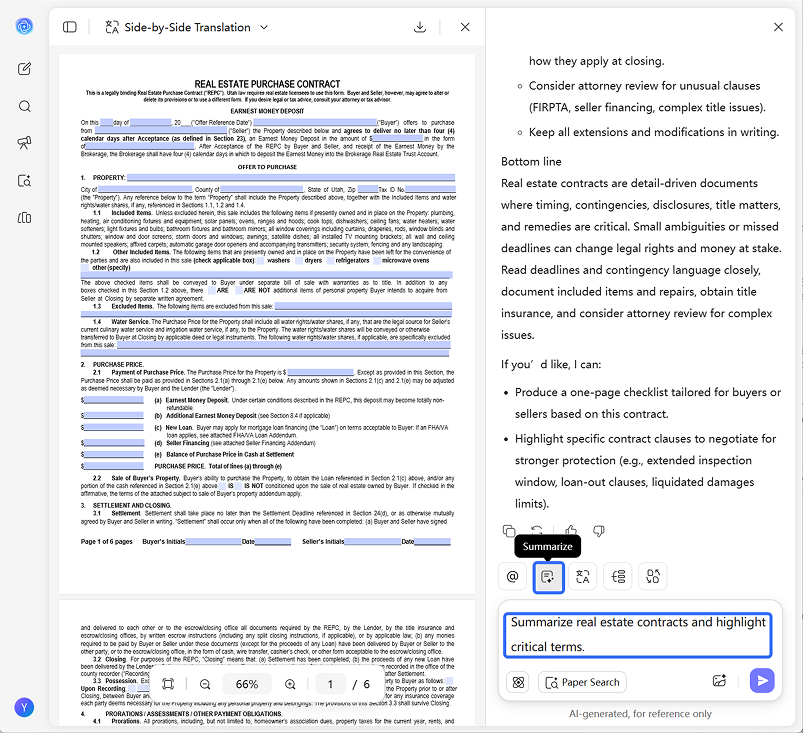
Type prompt like: "Summarize real estate contracts and highlight critical terms." -
Choose the Model
By default, UPDF AI uses ChatGPT-5. For deeper analysis, switch to DeepThink Mode in the bottom left corner (note: this may take slightly longer). -
Get Results
Click Send, and UPDF AI will provide clear, structured summaries of your contracts, highlighting key clauses, obligations, and potential risks. -
Tips:
After starting a chat with your PDF in UPDF AI, you can click the “Summarize” button in the top left corner of the input box, select a page range, and get a summary—no prompt needed.

Why Choose UPDF AI Real Estate Contract Summarizer?
Save Time with Bulk Contract Processing
Real estate professionals often handle multiple contracts at once, and manual review can be tedious and error-prone. UPDF AI can quickly summarize multiple agreements in minutes, allowing you to process large batches efficiently and focus on decision-making rather than reading every detail.

Highlight Critical Terms and Clauses
UPDF AI identifies key clauses, obligations, deadlines, and potential risks in your contracts. Whether it’s rental agreements, purchase contracts, or commercial leases, you’ll always know the important points without missing any detail.

OCR Support for Scanned Documents
Even if your contracts are scanned or image-based, UPDF AI’s OCR technology converts them into searchable and copyable content for seamless analysis.

Edit and Sign Contracts Easily
If a contract contains terms that need adjustment, you can use the UPDF desktop or UPDF mobile app to modify, annotate, and even sign contracts digitally, streamlining the entire workflow from review to execution.

Customizable Summaries and Prompts
You can tailor the AI prompt to focus on what matters most—whether it’s payment terms, termination clauses, maintenance obligations, or any specific legal or financial detail.

UPDF AI Real Estate Contract Summarizer vs. Other AI Tools
UPDF AI
Other AI Tools
Summary Quality
Clear & structured
Often generic
Input Formats
PDF, text, images
Limited formats
Integration Flexibility
Works with PDF + OCR
Works with PDF + OCR
Free to Try
 (100 questions)
(20 questions)
Risk & Compliance Insights
(flags issues)
(always available)
Data Security

AI Model Options
ChatGPT-5 & DeepSeek R1
Limited to one AI model
Language Supported
100+
Less than 20
Platform Supported
Online, Windows, Mac, Android, iOS
Online
FAQs About Using UPDF AI Real Estate Contract Summarizer
Q1. Is my contract data secure?
Q2. Can it handle scanned or image-based contracts?
Q3. Can I edit and sign contracts after summarization?
Q4. Is UPDF AI Real Estate Contract Summarizer free to use?
Other Popular UPDF AI Tools