 UPDF
UPDF
 UPDF for Windows
 UPDF for Mac
 UPDF for iPhone/iPad
 UPDF for Android
 UPDF AI Online
 UPDF Sign
 Edit PDF
 Annotate PDF
 Create PDF
 PDF Form
 Edit links
 Convert PDF
 OCR
OCR PDF to Word
 PDF to Image
 PDF to Excel
 Organize PDF
 Merge PDF
 Split PDF
 Crop PDF
 Rotate PDF
 Protect PDF
 Sign PDF
 Redact PDF
 Sanitize PDF
 Remove Security
 Read PDF
 UPDF Cloud
 Compress PDF
 Print PDF
 Batch Process
 About UPDF AI
 UPDF AI Solutions
 AI User Guide
 FAQ about UPDF AI
 Summarize PDF
 Translate PDF
 Chat with PDF
 Chat with AI
 Chat with image
 PDF to Mind Map
 Explain PDF
 PDF AI Tools
 Image AI Tools
 AI Chat Tools
 AI Writing Tools
 AI Study Tools
 AI Working Tools
 Other AI Tools
 PDF to Word
 PDF to Excel
 PDF to PowerPoint
 Enterprise Solution
 Enterprise Sign
 Enterprise AI
 Enterprise Plan
 Enterprise User Guide
 Enterprise Webinar
 Banking
 Healthcare
 Insurance
 Legal
Legal Manufacturing
 Government
 Education Solution
 Customer Stories
 User Guide
 UPDF Tricks
 FAQs
FAQs UPDF Reviews
 Download Center
 Blog
Blog Newsroom
 Tech Spec
 Updates
 UPDF vs. Adobe Acrobat
 UPDF vs. Foxit
 UPDF vs. PDF Expert

NIH has a triple cycle system for accepting grant applications every year. Each has fixed deadlines for new, resubmitted, and AIDS applications.
If you miss a deadline or submit a PDF with formatting errors, your project can be delayed by 4 to 8 months. So, how do you win? The key is to balance great science with great document management.
This guide explains the exact NIH grant deadlines for common grant types in 2026. You will also learn how to assemble your application without critical mistakes.
Part 1. NIH Grant Deadlines 2026 Calendar
Below is a clear explanation of how the 2026 NIH grant deadlines work and how to plan ahead so you don't miss them.
The Standard Cycle
There are three NIH submission cycles, each almost 4 months apart. The deadlines differ for each grant type and its activity code. Moreover, you must submit all applications by 5 PM local time of your organization on the due date.
That said, here are the submission deadlines for the common grant types.
| Activity Code | Grant Type | Cycle I | Cycle II | Cycle III |
| R01 | Research Grants | February 5 | June 5 | October 5 |
| R21 | Exploratory/Developmental Grants | February 16 | June 16 | October 16 |
| K Series | Career Development Awards | February 12 | June 12 | October 12 |
Resubmissions vs. New Applications
The NIH grant deadlines for resubmissions are one month after the new applications. The reason for this gap is to improve the quality of reviews. Moreover, it allows you to revise and submit your applications in the next cycle without having to wait till next year.
Now, let's look at the 2026 resubmission dates for common types of grants.
| Activity Code | Grant Type | Cycle I | Cycle II | Cycle III |
| R01 | Research Grants | March 5 | July 5 | November 5 |
| R21 | Exploratory/Developmental Grants | March 16 | July 16 | November 16 |
| K Series | Career Development Awards | March 12 | July 12 | November 12 |
AIDS-Related Applications
For many years, the NIH allowed special application deadlines just for AIDS-related research. Recently, the NIH decided to end this policy.
The final AIDS-specific deadline is May 7, 2026 (Cycle 1). After that, starting with the January 2027 Advisory Council Reviews, AIDS applications will use the same standard deadlines as all other NIH applications.
The reason for this change is the massive number of AIDS applications NIH receives each year. Moving to one standard schedule will help reduce confusion while still giving you three chances each year to apply.
The Best Strategy
To avoid problems in the last minutes, you should start preparing your application at least eight weeks before the NIH grant deadlines.
A simple way to plan is to dedicate the first 4 weeks to gathering and preparing all required documents. Then, for the next 4 weeks, you can focus on institutional review, corrections, and approvals. This way, you can easily manage problems that may arise instead of complicating them into emergencies.
Part 2. Pre-Writing Phase: Analyzing FOAs with UPDF AI
Funding Opportunity Announcements (FOAs) are complex PDFs. They contain over 50 pages of legal language. You'll need to read through these files to learn important details and make sure your application aligns with the NIH requirements.
UPDF and its AI assistant make this process much simpler. You can simply upload the PDFs to UPDF's AI chat. It will find the information you need, so you don't have to read through the entire document. Besides this, UPDF's annotation tools allow you to mark critical information. So, you can quickly refer to it during the application assembly process.
Steps to Decode FOAs with UPDF AI
Step 1. Download and install UPDF on your desktop and launch it. Then, click "Open File" to import your FOA document.
Windows • macOS • iOS • Android 100% secure
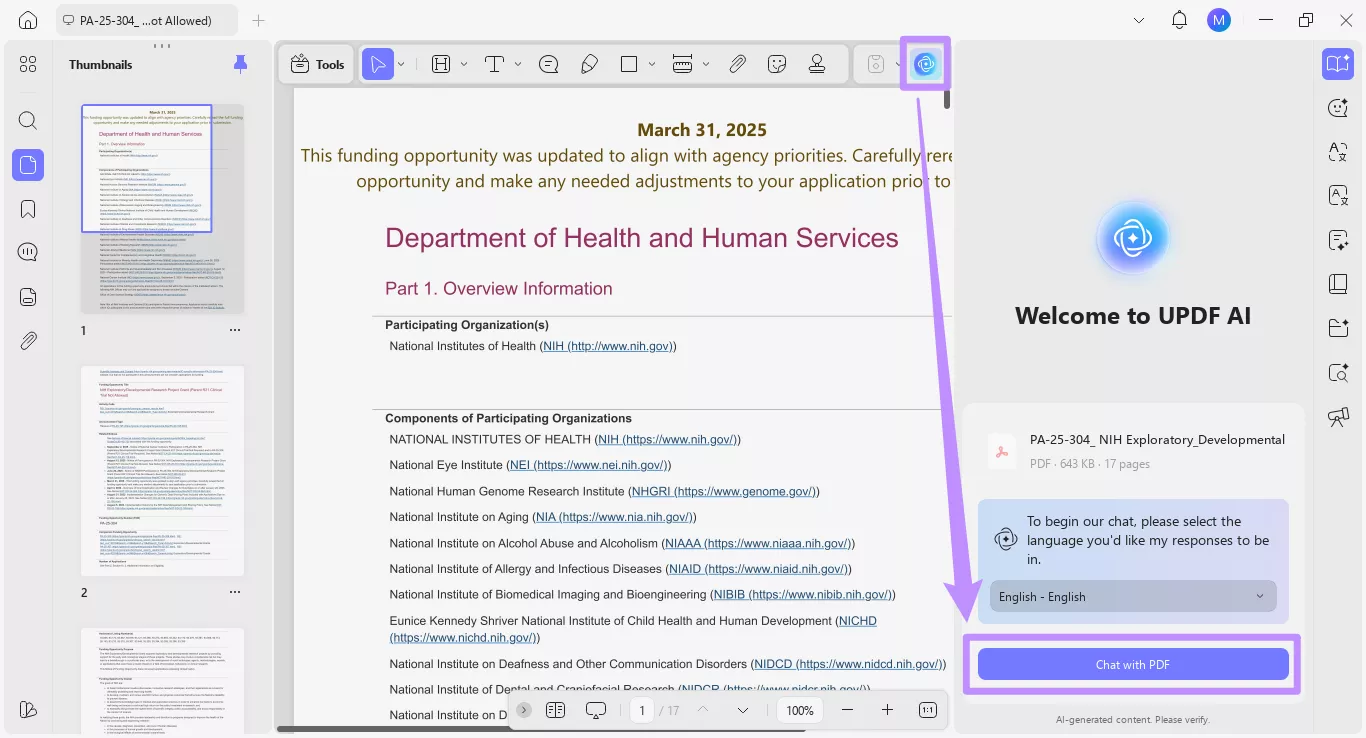
Step 2. Once opened, click the "UPDF AI" button on the top right. Then click "Chat with PDF" to send the PDF to the AI assistant.
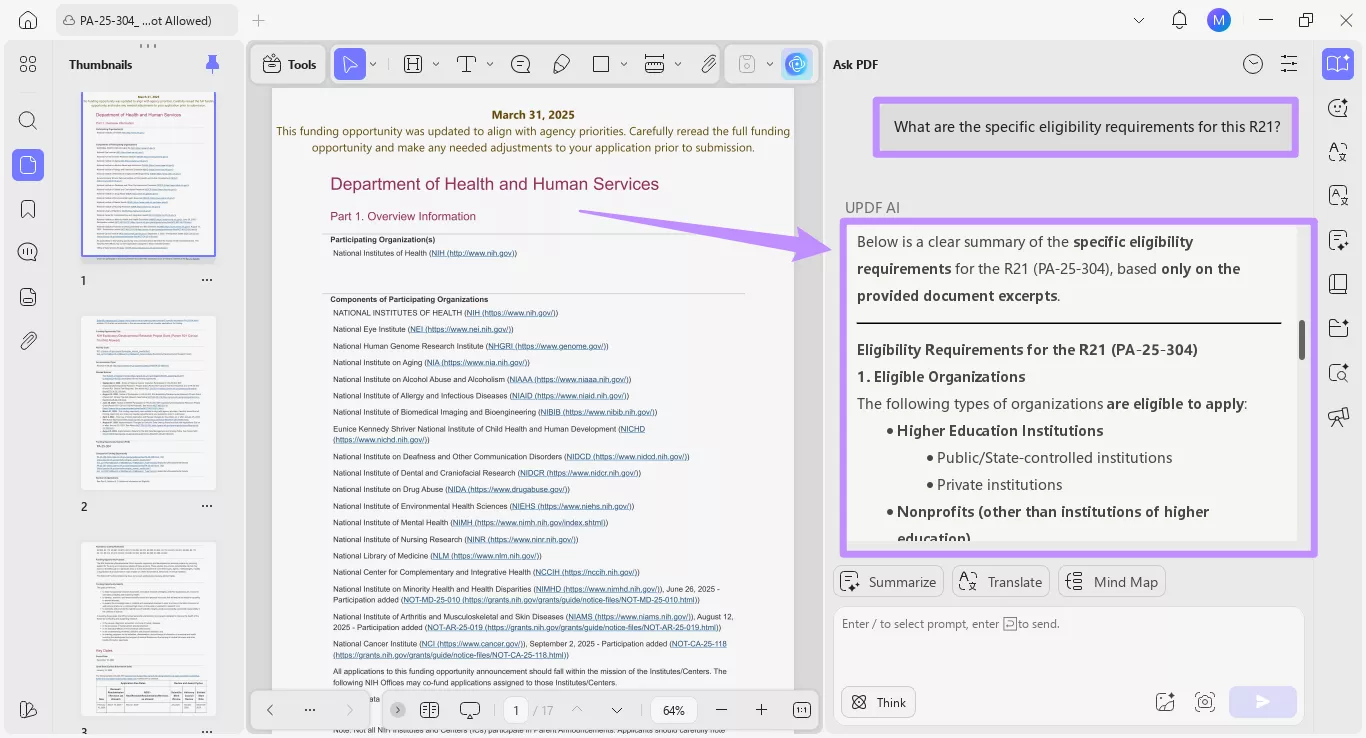
Step 3. Click the text box and ask any questions about the FOA. For example, "What are the specific eligibility requirements for this R21?" or "What is the page limit for the Specific Aims section?" UPDF AI will provide a detailed answer in just seconds.
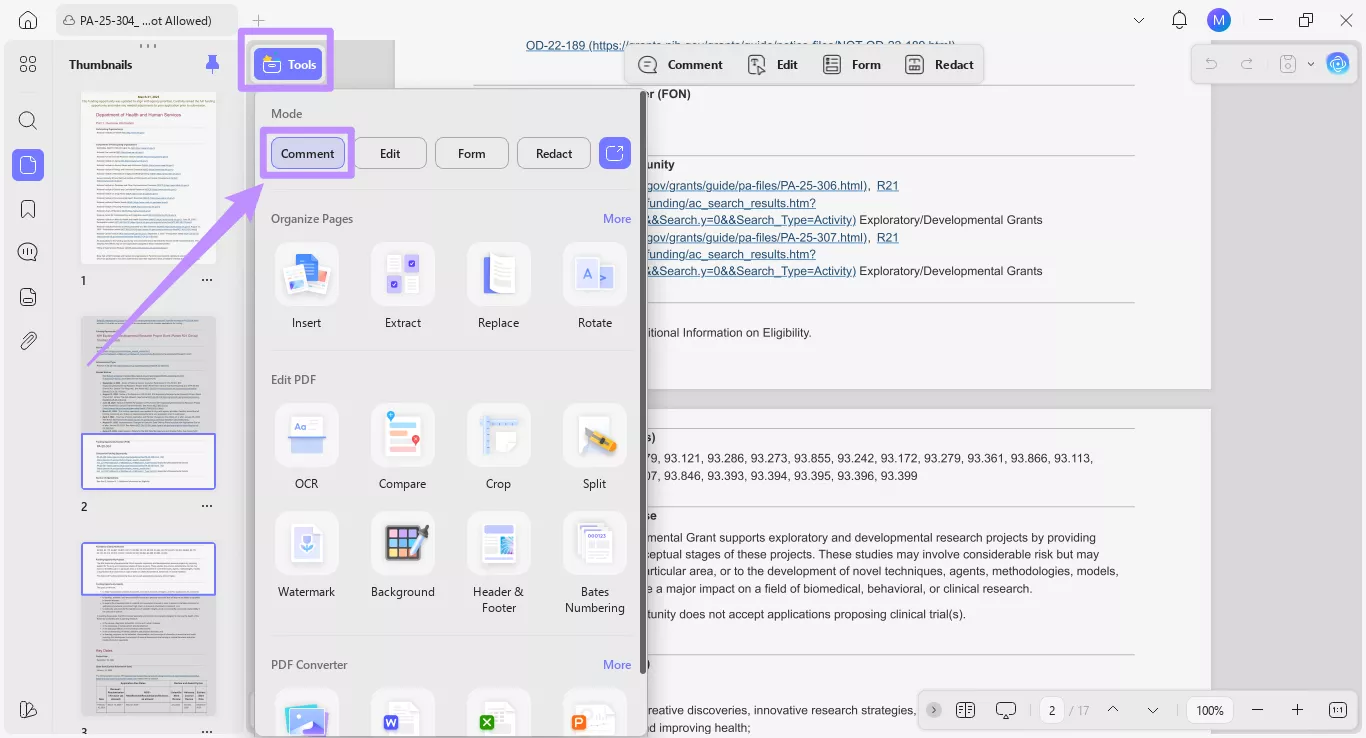
Step 4. To annotate important information like submission dates, click "Tools" from the top. Then, select "Comment."
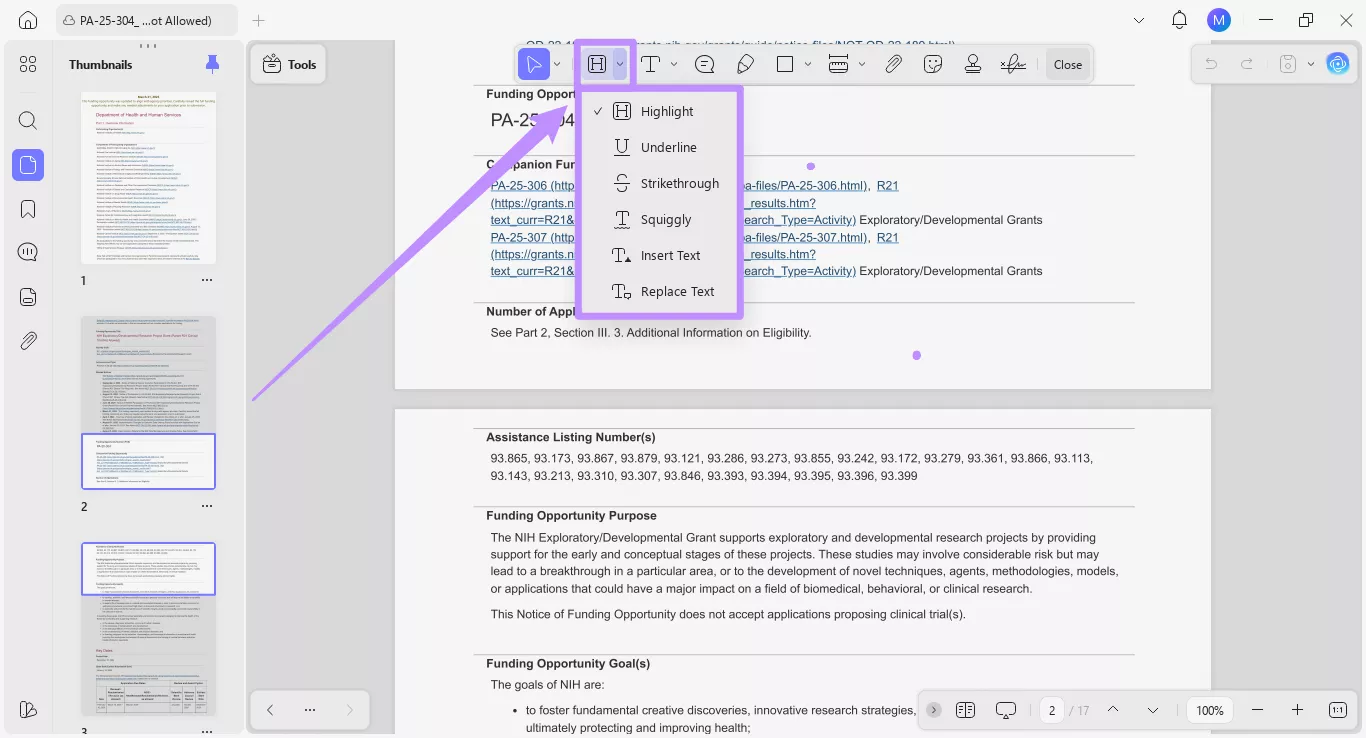
Step 5. From the top toolbar, select the "Highlight" tool to mark text. Otherwise, click the down arrow next to it and switch to "Underline" or "Squiggly." Then, select the text you want to annotate.
Part 3. Assembly Phase: The "Double-Check" Workflow
Once you understand the FOA requirements, you can align your application to these. UPDF makes this process much easier. You can attach files within your application, organize pages, add signatures, and more.
Moreover, you can test all these features for free by installing it. But if you want unlimited access, you can upgrade to UPDF Pro here. The price plans are affordable and can easily fit your budget.
Windows • macOS • iOS • Android 100% secure
Now, here's how to use UPDF to prepare your application.
Step 1. Managing Page Limits:
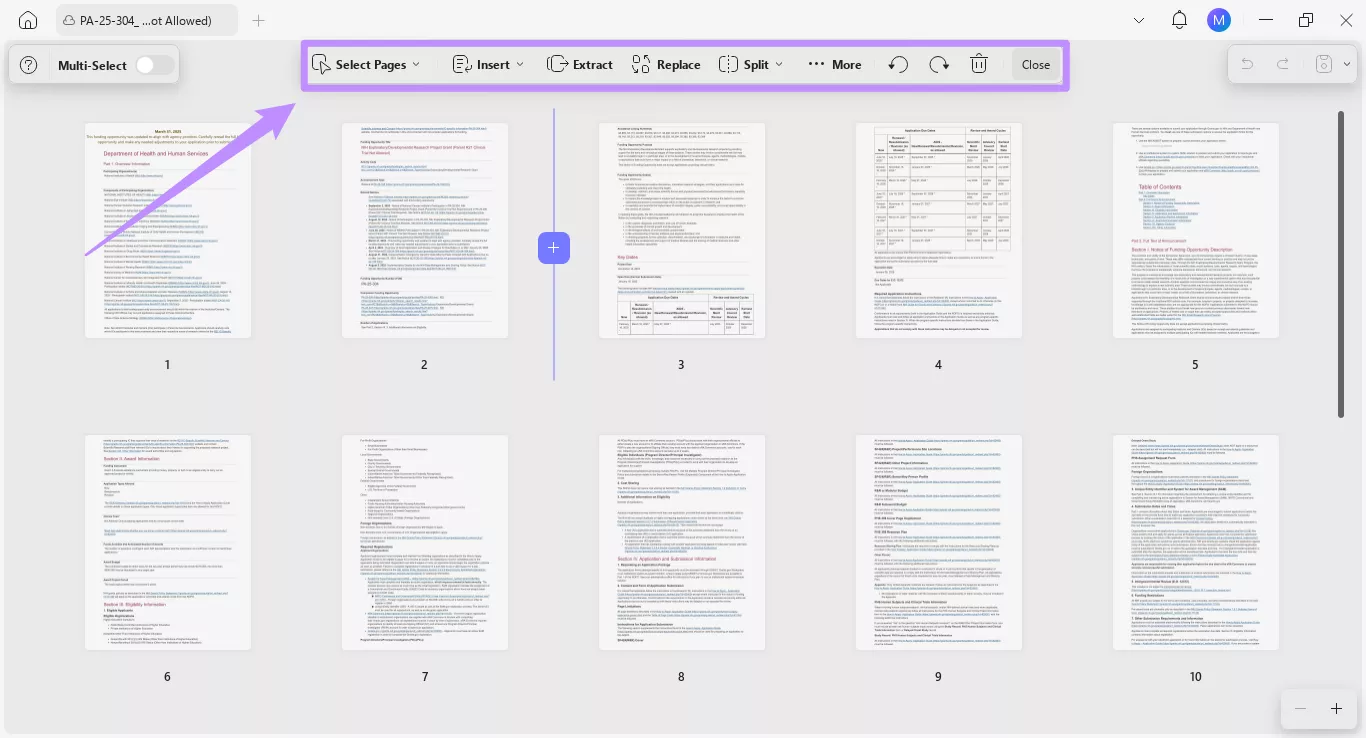
NIH has strict page limits for different types of applications. For example, the research strategy section for R01 must have only 12 pages. Even one page more than this limit can result in rejection of your application. UPDF can help you delete, rearrange pages, or add new ones to meet this requirement.
- Click "Organize Pages" from the left sidebar. Then, select the specific tool you need from the top toolbar.
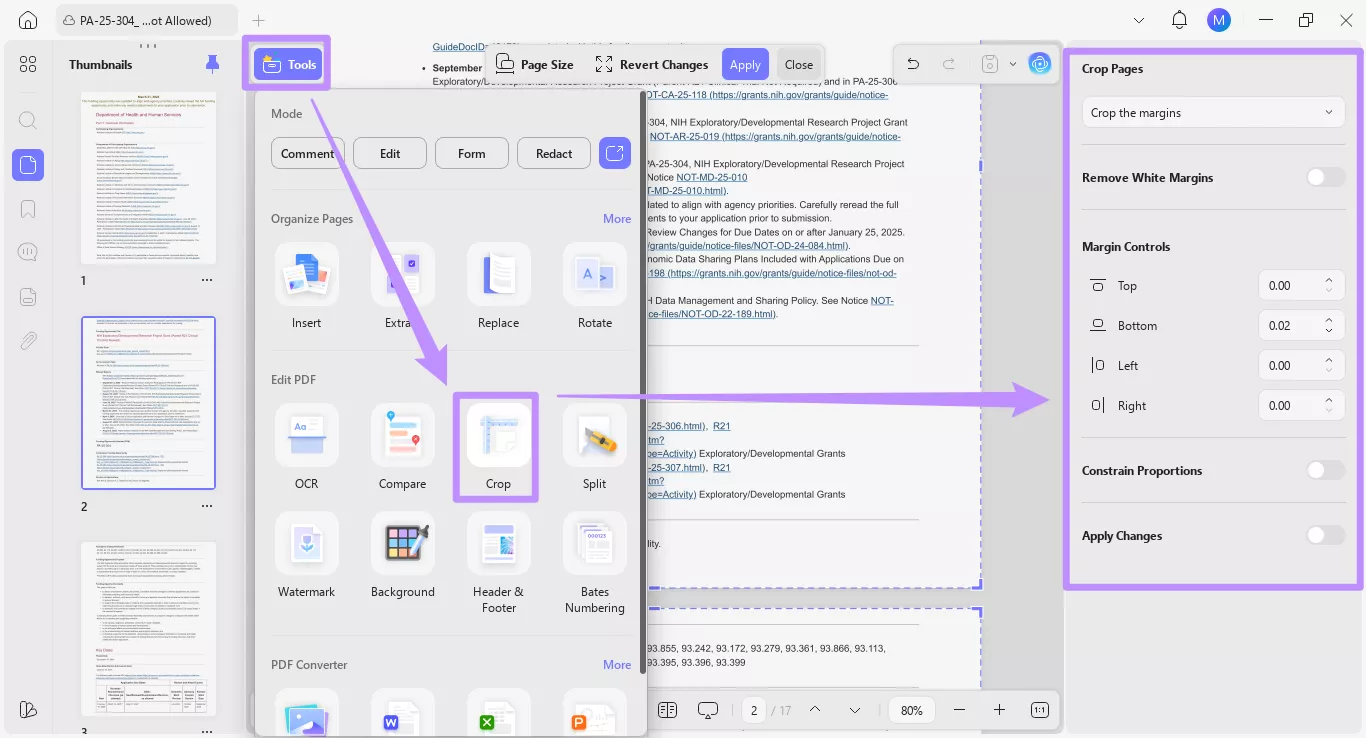
- You can also crop pages and the layout of your PDF. Click on "Tools" and select "Crop" under the Edit PDF section.
Step 2. Combining Attachments:
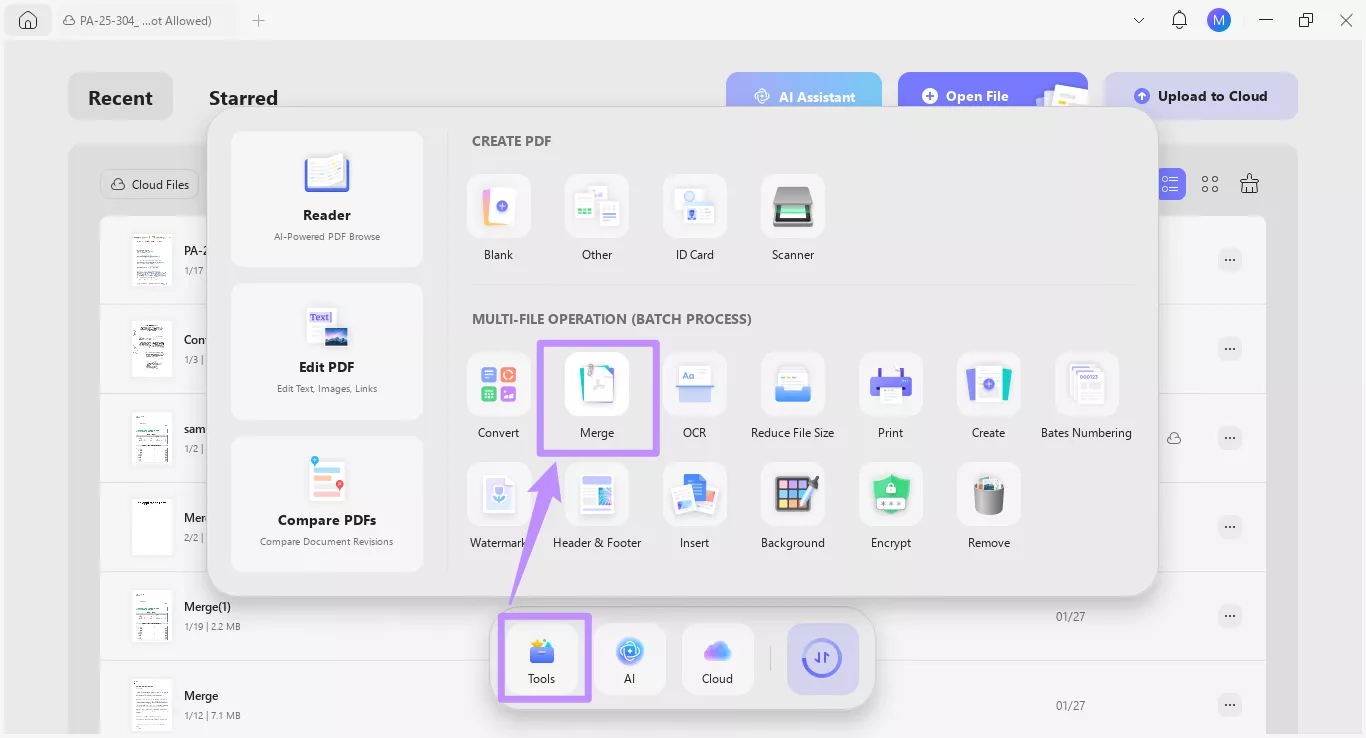
An R01 application includes over 20 separate attachments. These can be letters of support, descriptions of facilities, or data management plans. UPDF helps you combine these documents into a single master copy for easier review.
- Go to "Tools" from the Home screen. Then, choose "Merge" under the Batch Process category.
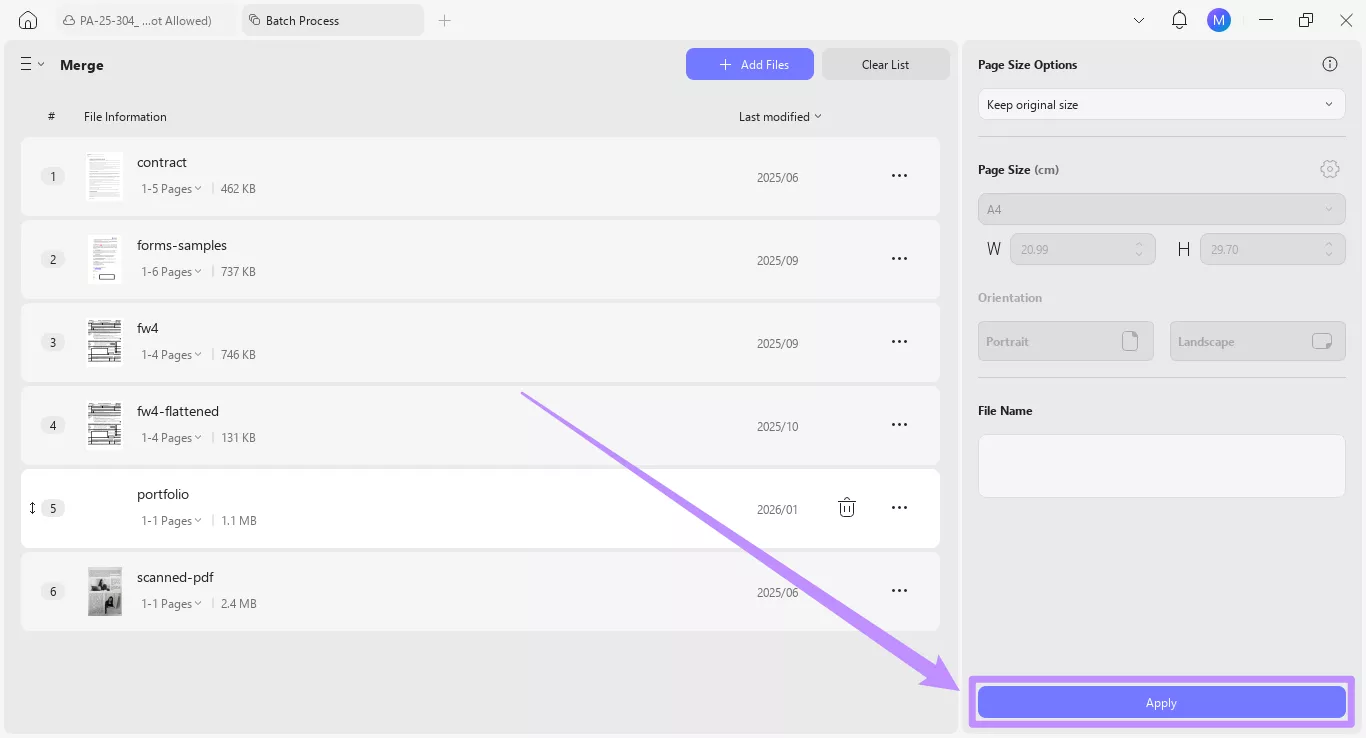
- Click "Add Files" to import the PDFs you want to attach, and then click the "Apply" button on the bottom right.
Step 3. OCR for Historical Data:
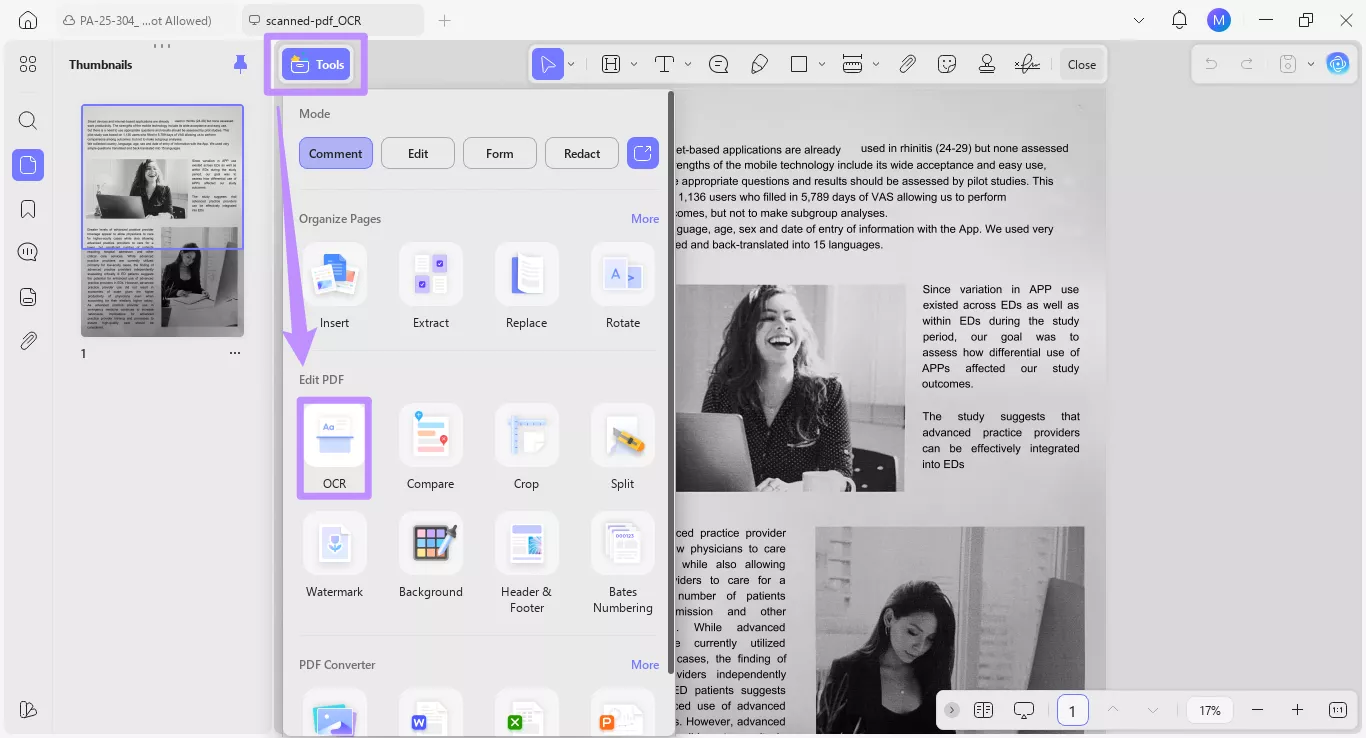
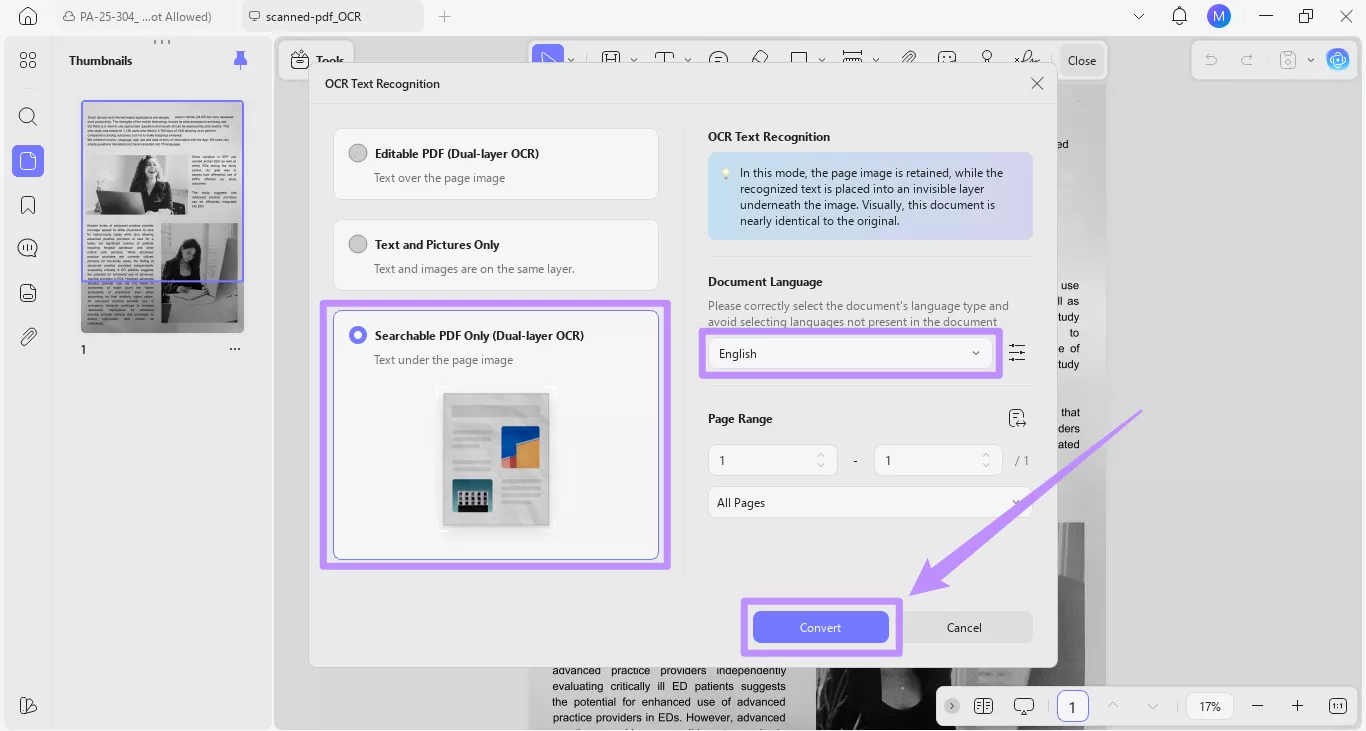
In your NIH application, you may want to cite old lab results or add scanned charts. UPDF's OCR technology converts these static PDFs into searchable text. This helps reviewers read your data clearly and easily search within your supporting documents.
- Click on "Tools" from the top and choose "OCR" under the Edit PDF section.
- Choose the "Searchable PDF" mode and select the document's language from the dropdown. Then, click "Convert."
Step 4. Secure Signatures:
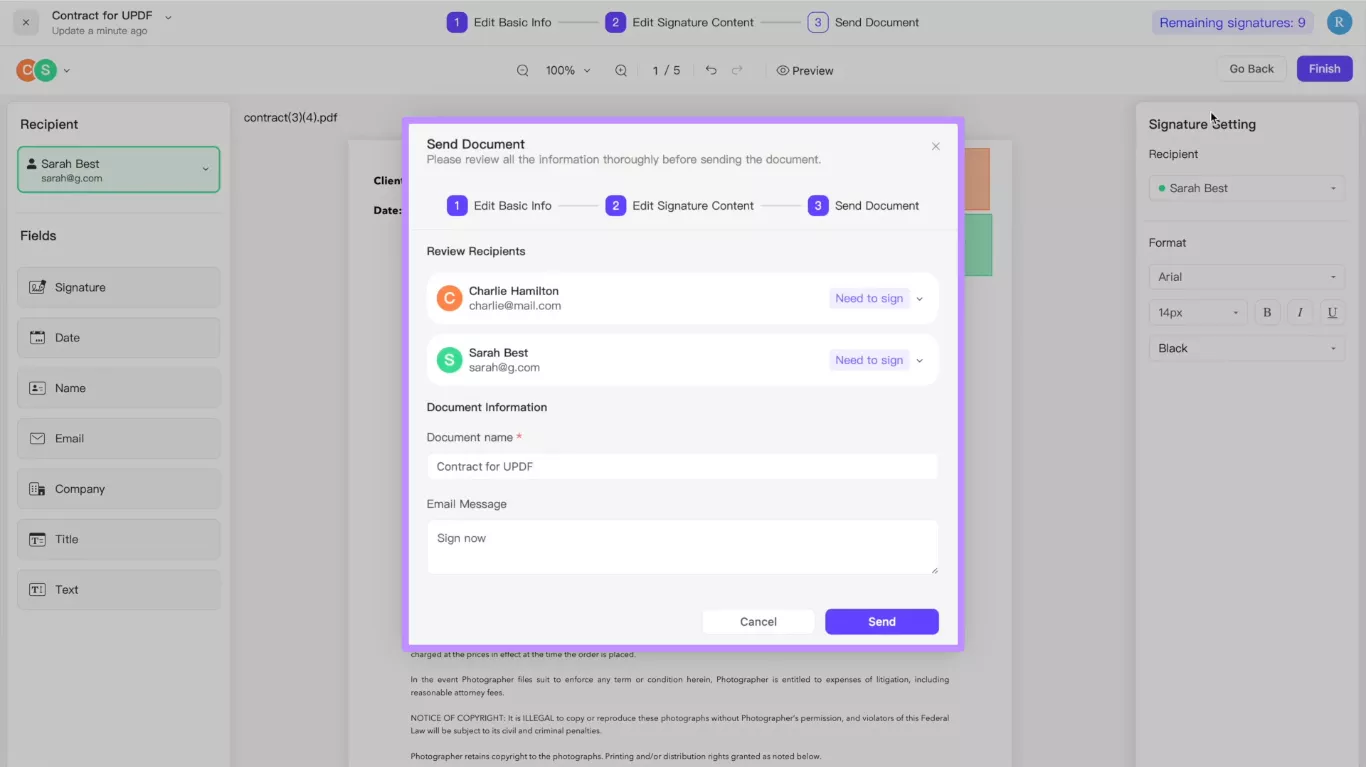
Grant applications require signatures from multiple parties, like institutional officials and collaborators. UPDF Sign streamlines this approval workflow through its online platform. You can upload your documents and send them to recipients in the order they need to sign. The tool also allows you to track where your document still needs approval. If you need to add your own signatures, you can use the Signature tool within the UPDF software.
In short, UPDF can help you avoid critical errors that can ruin your NIH grant applications. If you're ready to simplify your application process, download UPDF now!
Windows • macOS • iOS • Android 100% secure
Part 4. Frequently Asked Questions
Q1. Is NIH still accepting grant applications?
Yes. NIH is still accepting grant applications in 2026. The due dates are the same as the usual submission cycles throughout the year. For example, R01 submission deadlines are February 5, June 5, and October 5.
Q2. What happens if I miss an NIH deadline?
If you miss a deadline, your application won't be accepted for review. There are some exceptions, such as for serious circumstances. These can be a natural disaster or severe illness. In these cases, NIH may accept a late application within two weeks. Otherwise, you'll need to submit in the next cycle.
Q3. Does NIH have a 2-day grace period?
No. NIH does not offer any grace period. However, it does allow two weeks after the deadline during which you can submit late applications, which may be accepted. However, this only applies to specific cases and with a solid explanation.
Q4. How many pages is an NIH R01 grant?
The R01 grant has specific page limits for certain sections. The Research Strategy section must include 12 pages. Moreover, there's a one-page limit for the Specific Aims. Apart from these sections, the entire application can include hundreds of pages.
Conclusion
To sum up, there are different NIH grant deadlines in 2026 for each grant type. You have only three submission opportunities in a year. UPDF helps you plan smart, understand requirements, and get your application right. You can easily assemble your application and gather the signatures you need. Plus, you don't have to print or scan your files. So, don't wait. Download and try UPDF today!






 Engelbert White


 Enrica Taylor