UPDF
UPDF
 UPDF for Windows
 UPDF for Mac
 UPDF for iPhone/iPad
 UPDF for Android
 Nomostar
 UPDF AI Online
 UPDF Sign
 IvyCraft
 Edit PDF
 Annotate PDF
 Create PDF
 PDF Form
 Edit links
 Convert PDF
 OCR
OCR PDF to Word
 PDF to Image
 PDF to Excel
 Organize PDF
 Merge PDF
 Split PDF
 Crop PDF
 Rotate PDF
 Protect PDF
 Sign PDF
 Redact PDF
 Sanitize PDF
 Remove Security
 Read PDF
 UPDF Cloud
 Compress PDF
 Print PDF
 Batch Process
 About UPDF AI
 UPDF AI Solutions
 AI User Guide
 FAQ about UPDF AI
 Summarize PDF
 Translate PDF
 Chat with PDF
 Chat with AI
 Chat with image
 PDF to Mind Map
 Explain PDF
 PDF AI Tools
 Image AI Tools
 AI Chat Tools
 AI Writing Tools
 AI Study Tools
 AI Working Tools
 Other AI Tools
 AI Bookmark Generation
 AI Bookmark Summary
 AI Watermark Generation
 AI Background Generation
 AI Sticker Generation
 AI Stamp Generation
 AI Editing Suite
 UPDF Copilot
 AI Page Management
 AI Semantic Search
 PDF to Word
 PDF to Excel
 PDF to PowerPoint
 Enterprise Solution
 Enterprise Sign
 Enterprise AI
 Enterprise Plan
 Enterprise User Guide
 Enterprise Webinar
 IT
IT Education
 Construction
 Financial Service
 Healthcare
 Insurance
 Legal
Legal Manufacturing
 Government
 Researchers & PhDs
 Solopreneurs & Freelancers
 Lawyers & Legal Professionals
 Real Estate Agents & Brokers
 Education Solution
 Customer Stories
 User Guide
 UPDF Tricks
 FAQs
FAQs UPDF Reviews
 Download Center
 Blog
Blog Newsroom
 Tech Spec
 Updates
 UPDF vs. Adobe Acrobat
 UPDF vs. Foxit
 UPDF vs. PDF Expert

 UPDF AI
Free Online AI Tone Checker
Powered by ChatGPT-5 and DeepSeek R1, enter the sentence with the tone you want to check into the UPDF AI Tone Checker. After you click the button, UPDF AI instantly evaluates the tone of your text and provides suggestions to make your expression better match your style.
Powered by
 GPT-5 |
 DeepSeek R1
5000+ Reviews
 4.8
4.8
UPDF AI available on


 Desktop & mobile app

4M+ Users, 20M+ Texts Tones Checked, Trusted by Leading Medias:






How to Use UPDF AI Tone Checker Online for free?
-
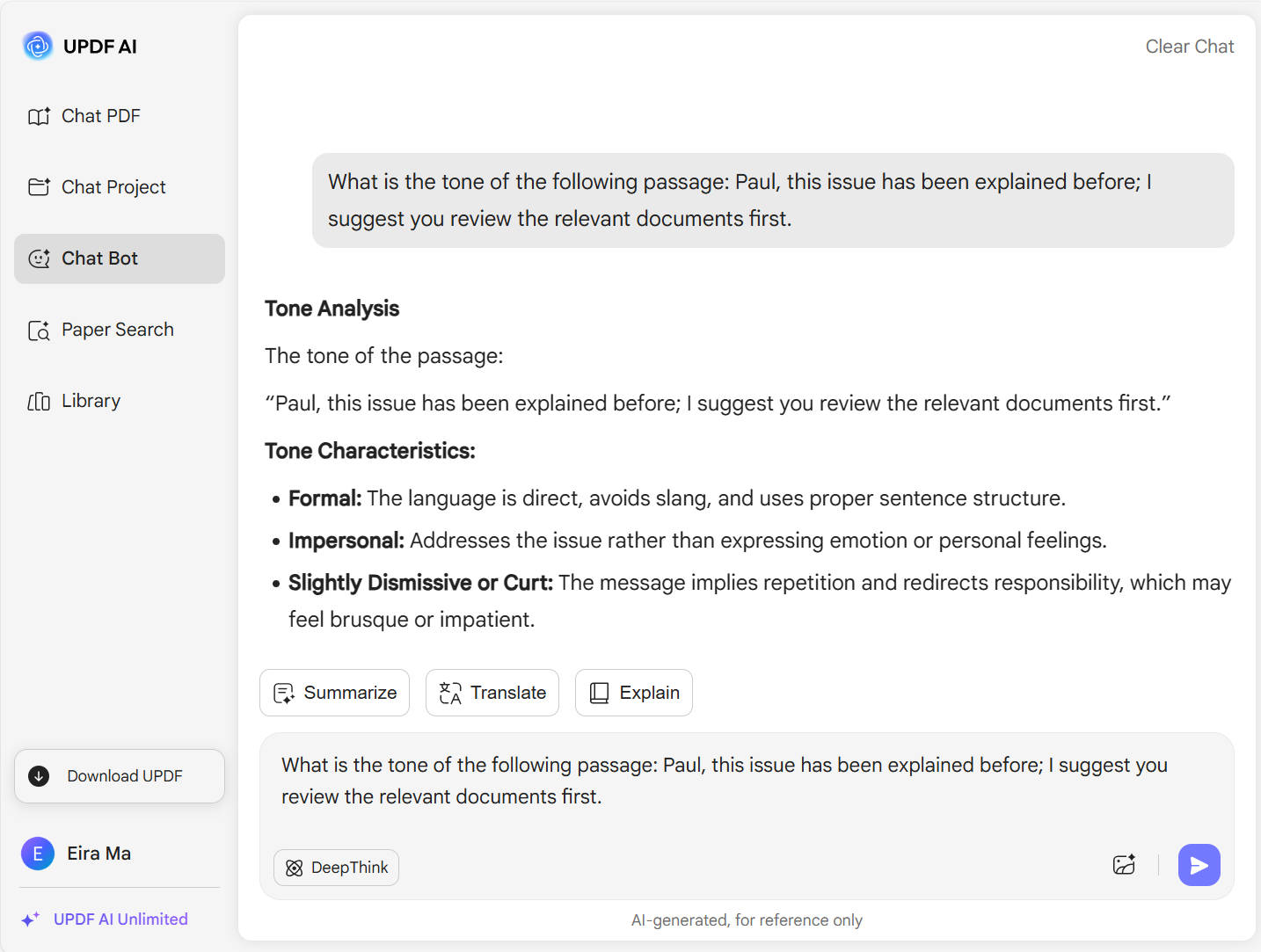
To get started, enter the text whose tone you want to check, and include a prompt at the beginning or end asking. For example: "What is the tone of the following passage: Paul, this issue has been explained before; I suggest you review the relevant documents first."
-
Next, choose your preferred AI model—ChatGPT-5 is the default. To use DeepSeek R1, simply click the "DeepThink" button.
-
Then click the "Generate" button, and the AI will immediately analyze the tone of your text. If you want to change the tone of the text, you can adjust your prompt and regenerate.

Who Should Use UPDF AI Tone Checker?
Customer Support Teams
Struggling to keep replies polite and empathetic? UPDF AI Tone Checker helps you craft responses that soothe and satisfy—no more misunderstandings or angry customers. Keep your support top-notch and your tone just right, every time.

Corporate Communication Teams
Need your emails and PR messages to sound professional and polished? UPDF AI Tone Checker ensures your communication reflects your brand’s voice perfectly—making every message clear, confident, and on point.

Cross-Cultural Communicators
Worried your words might get lost in translation or cause unintended offense? UPDF AI Tone Checker adjusts your tone to fit different cultures and contexts—helping you connect authentically and avoid missteps worldwide.

Why Use UPDF AI Tone Checker?
Save Time on Editing
Instead of repeatedly rewriting your texts to find the right tone, UPDF AI Tone Checker instantly analyzes your writing and suggests improvements, speeding up your workflow.
Privacy and Security First
User data is kept strictly confidential and securely protected to ensure the safety of sensitive information. UPDF AI employs SSL encryption and robust data protection measures to fully safeguard your privacy.
Flexible tone customization
Users can choose from formal, friendly, humorous, and more. The AI delivers personalized suggestions tailored to your specific needs, rather than sticking to a one-size-fits-all approach.
UPDF AI Tone Checker vs. Other AI Tone Checkers
UPDF AI Tone Checker
Other AI Tone Checkers
Free

Originality
99%
85% - 90%
No Word Limits
Flexible Tone Customization
Can specify multiple tones
Usually offers only limited preset tones.
AI Models
ChatGPT-5 &DeepSeek R1
ChatGPT 4.1
Language Supported
100+
20+
Platform Supported
Online, Windows, Mac, Android, iOS
Online
FAQs About Using UPDF AI Tone Checker
1. Will UPDF AI Tone Checker change my content meaning?
2. Can I reanalyze my content after making changes?
3. Can it detect multiple tones within a single content?
4. Is the UPDF AI Tone Checker free?
Other Popular UPDF AI Tools