UPDF
UPDF
 UPDF for Windows
 UPDF for Mac
 UPDF for iPhone/iPad
 UPDF for Android
 Nomostar
 UPDF AI Online
 UPDF Sign
 IvyCraft
 Edit PDF
 Annotate PDF
 Create PDF
 PDF Form
 Edit links
 Convert PDF
 OCR
OCR PDF to Word
 PDF to Image
 PDF to Excel
 Organize PDF
 Merge PDF
 Split PDF
 Crop PDF
 Rotate PDF
 Protect PDF
 Sign PDF
 Redact PDF
 Sanitize PDF
 Remove Security
 Read PDF
 UPDF Cloud
 Compress PDF
 Print PDF
 Batch Process
 About UPDF AI
 UPDF AI Solutions
 AI User Guide
 FAQ about UPDF AI
 Summarize PDF
 Translate PDF
 Chat with PDF
 Chat with AI
 Chat with image
 PDF to Mind Map
 Explain PDF
 PDF AI Tools
 Image AI Tools
 AI Chat Tools
 AI Writing Tools
 AI Study Tools
 AI Working Tools
 Other AI Tools
 AI Bookmark Generation
 AI Bookmark Summary
 AI Watermark Generation
 AI Background Generation
 AI Sticker Generation
 AI Stamp Generation
 AI Editing Suite
 UPDF Copilot
 AI Page Management
 AI Semantic Search
 PDF to Word
 PDF to Excel
 PDF to PowerPoint
 Enterprise Solution
 Enterprise Sign
 Enterprise AI
 Enterprise Plan
 Enterprise User Guide
 Enterprise Webinar
 IT
IT Education
 Construction
 Financial Service
 Healthcare
 Insurance
 Legal
Legal Manufacturing
 Government
 Researchers & PhDs
 Solopreneurs & Freelancers
 Lawyers & Legal Professionals
 Real Estate Agents & Brokers
 Education Solution
 Customer Stories
 User Guide
 UPDF Tricks
 FAQs
FAQs UPDF Reviews
 Download Center
 Blog
Blog Newsroom
 Tech Spec
 Updates
 UPDF vs. Adobe Acrobat
 UPDF vs. Foxit
 UPDF vs. PDF Expert

 UPDF AI
Free Passive to Active Voice Converter
Enhance clarity, tighten sentences, and make your writing more engaging with UPDF AI’s Passive to Active Voice Converter. Simply paste your text, prompt UPDF AI to convert passive to active, and hit “Send”—fast, free, and online.
Powered by
 GPT-5 |
 DeepSeek R1
5000+ Reviews
 4.8
4.8
UPDF AI available on


 Desktop & mobile app

4M+ Users, 13M+ Passive-to-Active Conversions, Trusted by Leading Medias:






How to Use UPDF AI Passive to Active Voice Converter?
-
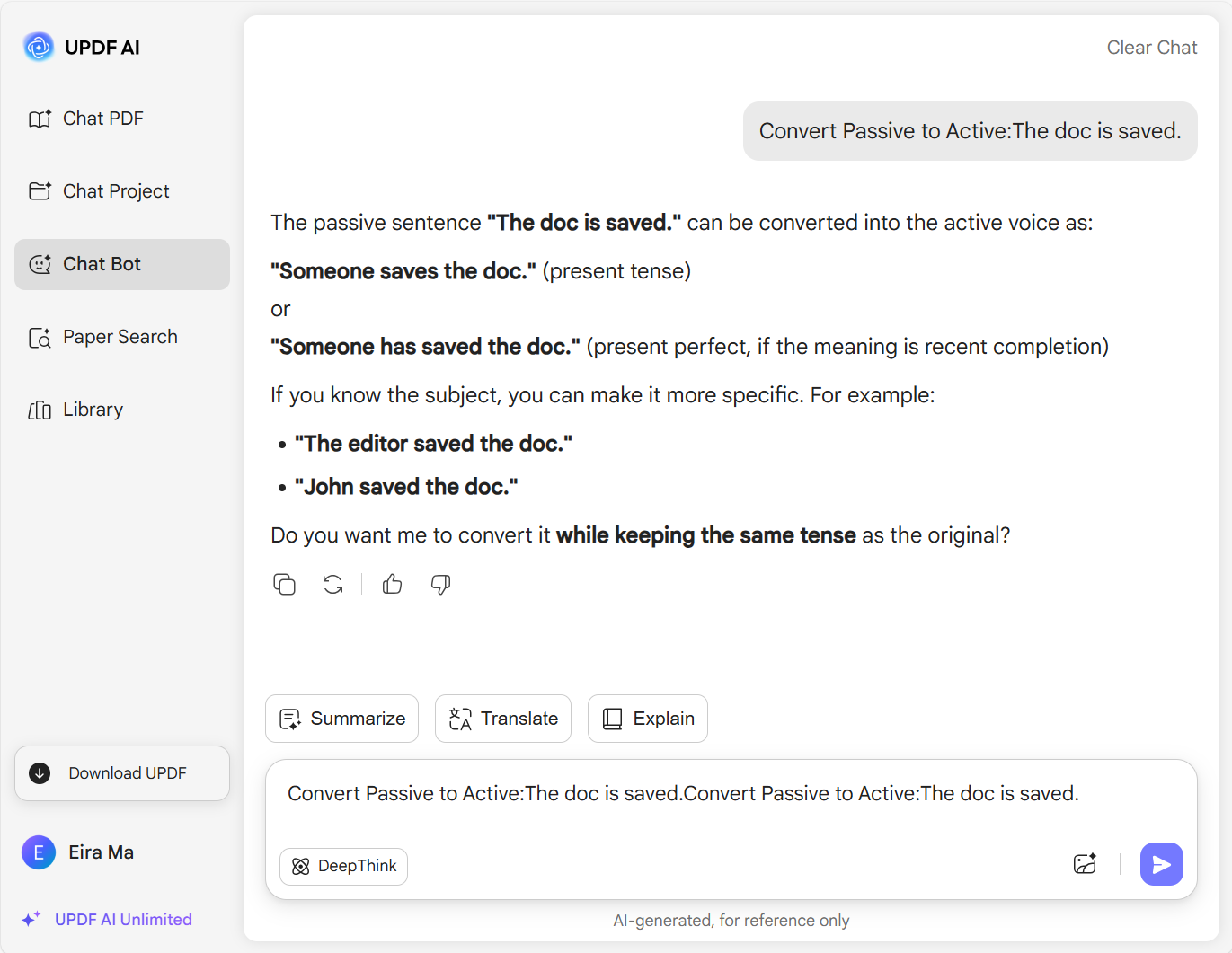
Paste your passive sentences into the UPDF AI chatbox, then enter the prompt: “Convert Passive to Active,” including any requirements such as the number of options you want.
-
Choose your AI model—ChatGPT 5 is the default, or select DeepSeek by clicking “DeepThink.”
-
Click “Send” to convert, and copy the resulting active sentences for any use.

Who Should Use Passive to Active Voice Converter?
Writers and Content Creators
Writers and content creators often rely on passive sentences, which can be hard to control. The Passive to Active Converter helps by quickly transforming entire texts into active voice, making writing clearer, more engaging, and easier to read without manual editing.

Students and Teachers
Students can use the Passive to Active Voice Converter to transform passive sentences in their essays into active ones, while also learning the differences between passive and active voice. Teachers can convert examples to active sentences, improving clarity and teaching efficiency in the classroom.

Journalists
When writing news articles, journalists often convert passive sentences into active voice to make information clearer, more direct, and engaging. Using active constructions ensures that the subject’s actions stand out, improving readability and helping readers quickly understand key points in the story.

Why Use UPDF AI Passive to Active Voice Converter?
More Powerful Than Other Tools
Compared to other Passive to Active Voice Converters, UPDF AI is more powerful, leveraging the latest AI models, ChatGPT 5 and DeepSeek R1. It also offers flexible control over results, allowing users to customize inputs for precise, accurate, and context-aware conversions.
Fewer Restrictions in the Free Version
The free version of UPDF AI Passive to Active Voice Converter does not include word count limits, access to AI models, or customization options. To unlock full features like flexible output, AI model selection, and tailored results, upgrading to the premium version is required.
More Features in Writing
Besides converting passive to active voice, UPDF AI offers features like rewriting, simplifying, shortening, and more. These tools help improve your writing quickly and efficiently, making your content clearer, more engaging, and polished in just a few seconds.
UPDF AI vs. Other Passive to Active Voice Converters
UPDF AI Passive to Active Voice Converter
Other AI Passive to Active Voice Converters
Free Version

Control Output Quantity

Regenerated for The Same Input
AI Models
ChatGPT 5&DeepSeek R1
ChatGPT 3.5/ChatGPT4o
Language Supported
All Languages
Limited
Platform Supported
Online, Windows, Mac, Android, iOS
Online
FAQs About Using UPDF AI Passive to Active Voice Converter
1. Is UPDF AI Passive to Active Voice Converter Free to Use?
2. Is There a Limit to How Much Text I Can Convert at Once?
3. Can Premium Users Generate Unlimited Conversions?
4. Are There Discounts for Students and Teachers?
Other Popular UPDF AI Tools