UPDF
UPDF
 UPDF for Windows
 UPDF for Mac
 UPDF for iPhone/iPad
 UPDF for Android
 Nomostar
 UPDF AI Online
 UPDF Sign
 IvyCraft
 Edit PDF
 Annotate PDF
 Create PDF
 PDF Form
 Edit links
 Convert PDF
 OCR
OCR PDF to Word
 PDF to Image
 PDF to Excel
 Organize PDF
 Merge PDF
 Split PDF
 Crop PDF
 Rotate PDF
 Protect PDF
 Sign PDF
 Redact PDF
 Sanitize PDF
 Remove Security
 Read PDF
 UPDF Cloud
 Compress PDF
 Print PDF
 Batch Process
 About UPDF AI
 UPDF AI Solutions
 AI User Guide
 FAQ about UPDF AI
 Summarize PDF
 Translate PDF
 Chat with PDF
 Chat with AI
 Chat with image
 PDF to Mind Map
 Explain PDF
 PDF AI Tools
 Image AI Tools
 AI Chat Tools
 AI Writing Tools
 AI Study Tools
 AI Working Tools
 Other AI Tools
 AI Bookmark Generation
 AI Bookmark Summary
 AI Watermark Generation
 AI Background Generation
 AI Sticker Generation
 AI Stamp Generation
 AI Editing Suite
 UPDF Copilot
 AI Page Management
 AI Semantic Search
 PDF to Word
 PDF to Excel
 PDF to PowerPoint
 Enterprise Solution
 Enterprise Sign
 Enterprise AI
 Enterprise Plan
 Enterprise User Guide
 Enterprise Webinar
 Banking
 Healthcare
 Insurance
 Legal
Legal Manufacturing
 Government
 Researchers & PhDs
 Solopreneurs & Freelancers
 Lawyers & Legal Professionals
 Real Estate Agents & Brokers
 Education Solution
 Customer Stories
 User Guide
 UPDF Tricks
 FAQs
FAQs UPDF Reviews
 Download Center
 Blog
Blog Newsroom
 Tech Spec
 Updates
 UPDF vs. Adobe Acrobat
 UPDF vs. Foxit
 UPDF vs. PDF Expert

 UPDF AI
Search Paper Free Online
UPDF Paper Search combines traditional keyword-based academic search with an advanced AI Mode that answers your research questions directly from relevant papers. Whether you want to explore literature by keywords, titles, DOI, or quickly validate an idea with a focused AI answer, Paper Search helps you cut through information overload, speed up research iteration, and stay grounded in real academic sources.
Powered by
 GPT-5 |
 DeepSeek R1
5000+ Reviews
 4.8
4.8
UPDF AI available on


 Desktop & mobile app

4M+ Users, 5M+ Academic Papers Searched, Trusted by Leading Medias:






How to Use UPDF AI Paper Search Online for Free?
-
Keyword Mode: Search by Topic or Metadata
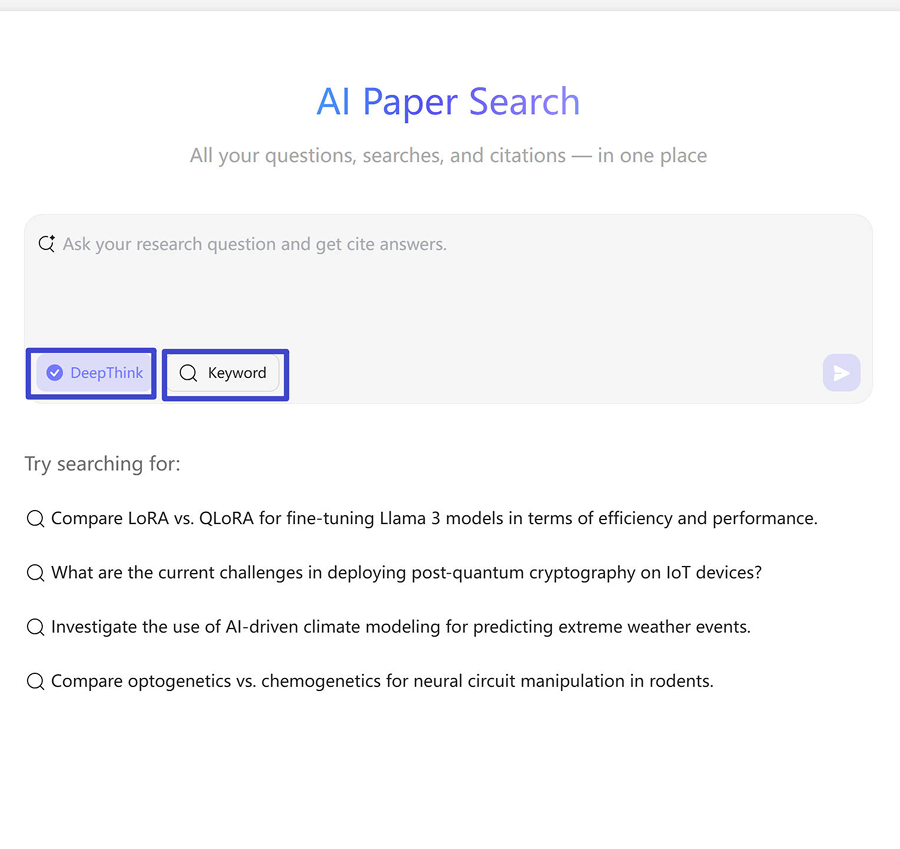
- Choose Keyword mode, enter a keyword, title, DOI, or PMID (e.g., machine learning in healthcare) and press Enter.
- Use Filters to refine by year, relevance, citation counts, or fields of study.
- Interact with results: view abstracts, Chat PDF, download full PDFs, add papers to Library or Project, or explore relation graphs. -
AI Mode: Ask a Research Question
- AI Mode is enabled by default. Enter a research question, e.g.: "Challenges of deploying post-quantum cryptography in IoT systems?" You can also enable DeepThink for deep analysis.
- UPDF AI extracts keywords, searches relevant papers, analyzes them, and gives a concise answer with citations.
- Click a citation to view abstracts, Chat PDF, or download the full paper.

Who Should Use UPDF AI Paper Search?
For Students
Students can use UPDF AI Paper Search to quickly find relevant academic papers, extract key insights, and get concise summaries instead of manually reading dozens of PDFs. Whether you're writing essays, preparing for exams, conducting literature reviews, or working on a thesis, the AI Mode helps you turn research questions into meaningful answers fast.

For Researchers
Researchers rely on UPDF AI Paper Search to efficiently locate peer-reviewed studies, analyze trends across multiple papers, and accelerate comprehensive literature reviews. With both Keyword Mode and AI Mode, you can explore a topic broadly or ask specific research questions and receive direct, citation-supported insights—streamlining your workflow and boosting productivity.

For Professionals
Professionals use UPDF AI Paper Search to stay up to date with industry research, gather data for reports or white papers, and make evidence-based decisions quickly. Whether you're conducting market research or needing to validate technical claims, UPDF's AI-assisted insights help you extract valuable knowledge from academic and technical sources without spending hours sifting through papers.

Why Use UPDF AI Paper Search?
Research-Grounded AI Answers
Unlike general AI tools that generate responses from mixed or unreliable sources, UPDF AI Paper Search is built entirely on peer-reviewed academic papers. Even in AI Mode, every answer is grounded in real research and backed by clear citations you can verify.
From Questions to Insights—Fast
With AI Mode, you can ask a specific research question and instantly receive a direct, concise answer synthesized from multiple relevant papers. No more skimming dozens of PDFs just to validate an idea—UPDF AI extracts the core insights for you.
Designed for Real Research Workflows
UPDF AI Paper Search supports both Keyword Mode for broad exploration and AI Mode for targeted research questions, helping students and researchers move faster from discovery to analysis. Fewer steps, less information overload, and faster research iteration.
UPDF AI Paper Search vs. Other AI Tools
UPDF AI Paper Search
Other AI Tools
Scholarly-Only Sources


Keyword-Based Paper Search
Question-Driven AI Mode
Multi-Paper Synthesis
Citation Traceability
Cross-Paper Connections
Paper-Level Interaction
Research Workflow Focus
UPDF AI Paper Search FAQs
1. How is UPDF AI Paper Search different from traditional academic search engines like Google Scholar?
UPDF AI Paper Search goes beyond listing papers. It combines academic search with AI-powered analysis, allowing you to:
- Ask research questions directly
- Get concise, citation-backed answers generated from multiple papers
- Interact with PDFs through summaries, Chat PDF, and downloads
In short: Google Scholar helps you find papers, while UPDF AI Paper Search helps you understand and use them faster.
2. How does UPDF AI Paper Search compare to SciSpace?
UPDF AI Paper Search focuses on:
- Direct answers to research questions with citations
- Faster idea validation and early-stage research
- End-to-end workflows, including searching, analyzing, chatting with, and managing papers
SciSpace emphasizes paper explanation and reading support, while UPDF AI Paper Search is optimized for research efficiency from question to insight.
3. Can UPDF AI Paper Search answer research questions directly?
This is especially useful for validating ideas, exploring new topics, and quickly understanding complex research areas.
4. Is UPDF AI Paper Search suitable for literature reviews?
- Identifying highly relevant papers
- Highlighting key insights across multiple studies
- Reducing repetitive reading and manual comparison
It is particularly effective for early-stage reviews and topic exploration, helping you build a solid research foundation faster.
5. What types of academic papers can I search for?
- Peer-reviewed journal articles
- Conference papers
- Research theses and academic PDFs
It prioritizes scholarly sources and academic metadata to ensure more relevant and credible research results.
6. Does UPDF AI Paper Search provide full-text access to every paper?
7. Is UPDF AI Paper Search free to use?
Other Popular UPDF AI Tools