UPDF
UPDF
 UPDF for Windows
 UPDF for Mac
 UPDF for iPhone/iPad
 UPDF for Android
 Nomostar
 UPDF AI Online
 UPDF Sign
 IvyCraft
 Edit PDF
 Annotate PDF
 Create PDF
 PDF Form
 Edit links
 Convert PDF
 OCR
OCR PDF to Word
 PDF to Image
 PDF to Excel
 Organize PDF
 Merge PDF
 Split PDF
 Crop PDF
 Rotate PDF
 Protect PDF
 Sign PDF
 Redact PDF
 Sanitize PDF
 Remove Security
 Read PDF
 UPDF Cloud
 Compress PDF
 Print PDF
 Batch Process
 About UPDF AI
 UPDF AI Solutions
 AI User Guide
 FAQ about UPDF AI
 Summarize PDF
 Translate PDF
 Chat with PDF
 Chat with AI
 Chat with image
 PDF to Mind Map
 Explain PDF
 PDF AI Tools
 Image AI Tools
 AI Chat Tools
 AI Writing Tools
 AI Study Tools
 AI Working Tools
 Other AI Tools
 AI Bookmark Generation
 AI Bookmark Summary
 AI Watermark Generation
 AI Background Generation
 AI Sticker Generation
 AI Stamp Generation
 AI Editing Suite
 UPDF Copilot
 AI Page Management
 AI Semantic Search
 PDF to Word
 PDF to Excel
 PDF to PowerPoint
 Enterprise Solution
 Enterprise Sign
 Enterprise AI
 Enterprise Plan
 Enterprise User Guide
 Enterprise Webinar
 IT
IT Education
 Construction
 Financial Service
 Healthcare
 Insurance
 Legal
Legal Manufacturing
 Government
 Researchers & PhDs
 Solopreneurs & Freelancers
 Lawyers & Legal Professionals
 Real Estate Agents & Brokers
 Education Solution
 Customer Stories
 User Guide
 UPDF Tricks
 FAQs
FAQs UPDF Reviews
 Download Center
 Blog
Blog Newsroom
 Tech Spec
 Updates
 UPDF vs. Adobe Acrobat
 UPDF vs. Foxit
 UPDF vs. PDF Expert

 UPDF AI
Free Online Al Humanizer
UPDF AI Humanizer rewrites AI-generated content to sound more natural, relatable, and human-like, going beyond just fixing the words. Perfect for professors, students, and more.
Powered by
 GPT-5 |
 DeepSeek R1
5000+ Reviews
 4.8
4.8
UPDF AI available on


 Desktop & mobile app

4M+ Users, 31M+ AI humanizations, Trusted by Leading Media:






How to Humanize TextOnline for Free?
-
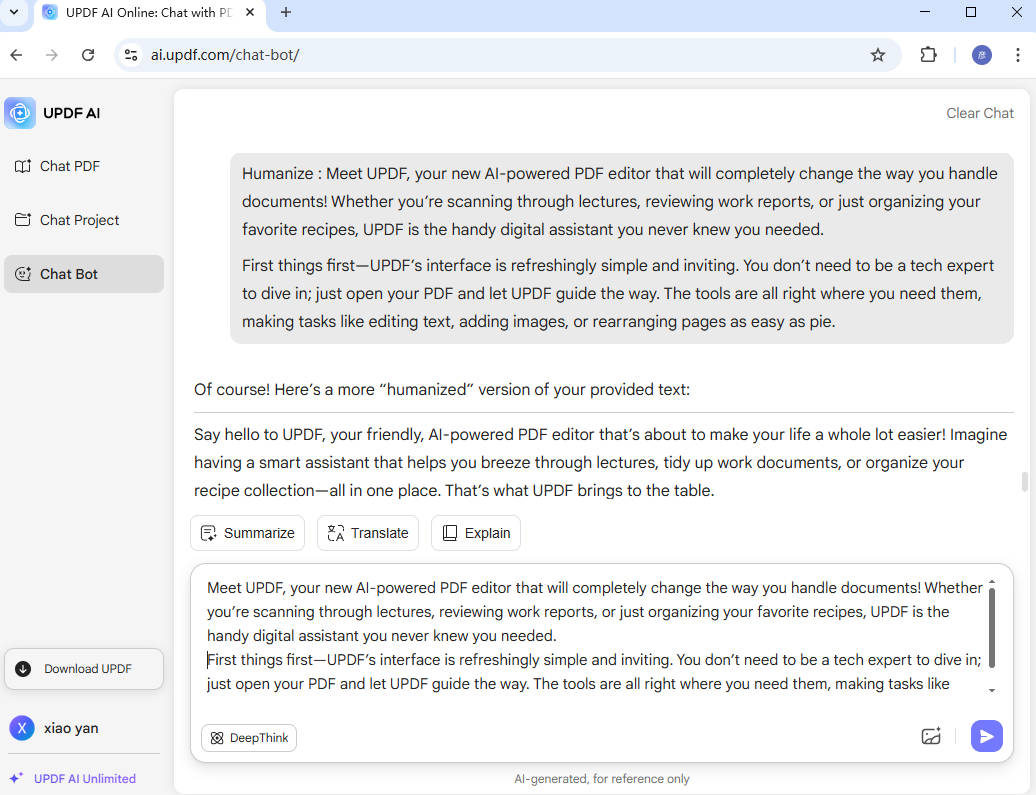
To begin, type a prompt like "Humanize:" followed by your AI-generated or overly formal text.
-
Want it to sound more casual, empathetic, or engaging? Just add a note such as "Make it sound friendly" or "Use a natural conversational tone."
-
Finally, hit "Send" and get smooth, natural, human-like writing, perfect for real audiences - not just algorithms.

Who Should Use UPDF AI Humanizer?
Business Professionals
From client emails to pitch decks, UPDF AI Humanizer helps you refine AI-written content into smooth, professional language that matches your brand voice. Ditch the robotic tone and communicate with clarity, confidence, and a human touch.

HR and Recruiters
From job descriptions to rejection emails, HR content walks a fine line between professional and personal. UPDF AI Humanizer ensures your tone is respectful, clear, and human, even when delivering tough messages.

Content Creators
Whether you're a YouTuber, podcaster, or Instagram caption wizard, UPDF AI Humanizer helps you rewrite robotic AI drafts into fresh, authentic content that truly sounds like you. Keep your voice consistent and your audience engaged - no more bland or generic tones.

Why Use UPDF AI Humanizer?
Support Multiple Languages
UPDF AI Humanizer supports multilingual input and output, helping non-native writers and international teams refine tone and fluency across languages. No matter what language you write in, UPDF makes your message sound natural, polished, and culturally appropriate.
Control Tone and Style
With UPDF AI Humanizer, you can customize your tone - whether friendly, professional, witty, or empathetic, and adjust formality, sentence flow, and personality. Just set your preferences, and the AI will shape your text to match your voice perfectly.
Free Access. No Sign-up Required
UPDF AI lets you instantly humanize sentences for free, with no payment or sign-up needed. With 100 free prompts, you can use its ChatGPT 5 and DeepSeek R1 modes for small tasks and get quick results without any commitment.
UPDF AI Humanizer
vs. Other AI Humanizers
UPDF AI
Humanizer
OtherAI Humanziers
Free

Accuracy
99%
87%
No Word Limits
No Sign-Up
Customized Prompts

Language Supported
100+
Less than 20
Platform Support
Online, Windows, Mac, iOS, Android
Online
FAQs About Using UPDF AI Humanizer
1. Can UPDF AI Humanizer Help Non-native Speakers Sound More Natural?
2. Will UPDF AI Humanizer Change the Original Meaning of My Text?
3. How Does UPDF AI Humanizer Adjust Tone and Style?
4. How Fast Can I Expect Results from UPDF AI Humanizer?
Other Popular UPDF AI Tools