UPDF
UPDF
 UPDF for Windows
 UPDF for Mac
 UPDF for iPhone/iPad
 UPDF for Android
 Nomostar
 UPDF AI Online
 UPDF Sign
 IvyCraft
 Edit PDF
 Annotate PDF
 Create PDF
 PDF Form
 Edit links
 Convert PDF
 OCR
OCR PDF to Word
 PDF to Image
 PDF to Excel
 Organize PDF
 Merge PDF
 Split PDF
 Crop PDF
 Rotate PDF
 Protect PDF
 Sign PDF
 Redact PDF
 Sanitize PDF
 Remove Security
 Read PDF
 UPDF Cloud
 Compress PDF
 Print PDF
 Batch Process
 About UPDF AI
 UPDF AI Solutions
 AI User Guide
 FAQ about UPDF AI
 Summarize PDF
 Translate PDF
 Chat with PDF
 Chat with AI
 Chat with image
 PDF to Mind Map
 Explain PDF
 PDF AI Tools
 Image AI Tools
 AI Chat Tools
 AI Writing Tools
 AI Study Tools
 AI Working Tools
 Other AI Tools
 AI Bookmark Generation
 AI Bookmark Summary
 AI Watermark Generation
 AI Background Generation
 AI Sticker Generation
 AI Stamp Generation
 AI Editing Suite
 UPDF Copilot
 AI Page Management
 AI Semantic Search
 PDF to Word
 PDF to Excel
 PDF to PowerPoint
 Enterprise Solution
 Enterprise Sign
 Enterprise AI
 Enterprise Plan
 Enterprise User Guide
 Enterprise Webinar
 IT
IT Education
 Construction
 Financial Service
 Healthcare
 Insurance
 Legal
Legal Manufacturing
 Government
 Researchers & PhDs
 Solopreneurs & Freelancers
 Lawyers & Legal Professionals
 Real Estate Agents & Brokers
 Education Solution
 Customer Stories
 User Guide
 UPDF Tricks
 FAQs
FAQs UPDF Reviews
 Download Center
 Blog
Blog Newsroom
 Tech Spec
 Updates
 UPDF vs. Adobe Acrobat
 UPDF vs. Foxit
 UPDF vs. PDF Expert

 UPDF AI
Best Free ChatGPT Alternative for Any Task
Meet the best ChatGPT alternative – UPDF AI. Beyond chatting, it helps you chat with PDFs, conduct deep research, and search papers intelligently. Whether you need insights, summaries, or answers, UPDF AI is the smarter way to work and think with AI.
Powered by
 GPT-5 |
 DeepSeek R1
5000+ Reviews
 4.8
4.8
UPDF AI available on


 Desktop & mobile app

4M+ Users, 308 M+ Chats, Trusted by Leading Medias:






How to Use UPDF AI ChatGPT Alternative?
-
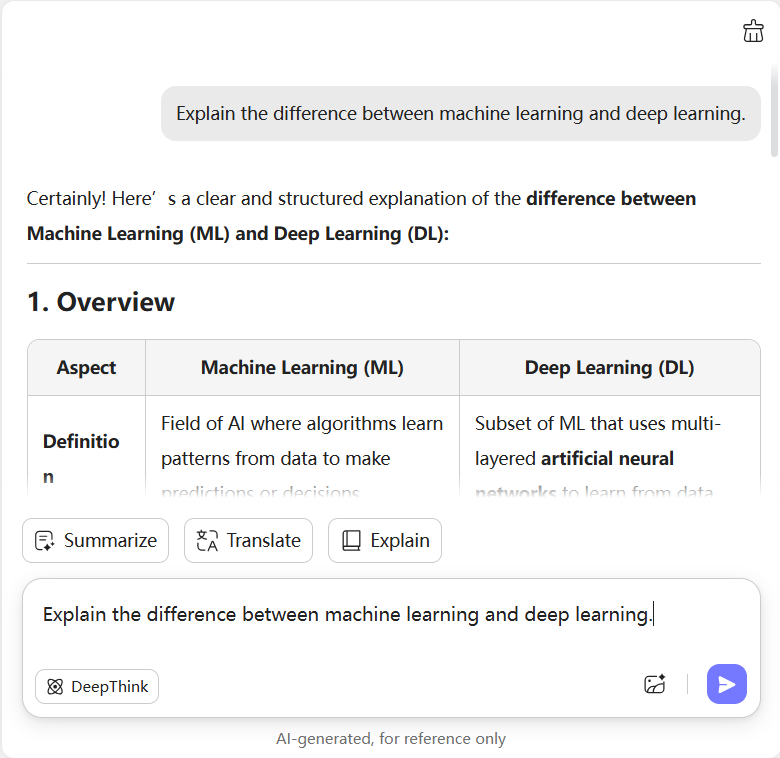
Text Chat: If you just want a quick text-based chat, type your question or command and press Enter. Question example: “Explain the difference between machine learning and deep learning.” For deeper insights, click DeepThink in the lower-left corner of the chat box.
-
PDF Chat: Click the File icon in the lower-right corner to upload your PDF. UPDF AI will instantly generate a summary of your document. You can then ask anything about it, like: “Summarize Chapter 3” or “What are the key arguments in this paper?”
-
Image Chat: Click the Image icon to upload an image, then type your question about it. Example: “Describe the content of this chart and explain the trend.” Press Enter, and UPDF AI will analyze and answer instantly.

Who Should Use UPDF AI ChatGPT Alternative?
Researchers
Researchers spend hours searching and analyzing academic papers. UPDF AI, the best ChatGPT alternative for research, helps conduct deep research, search papers, and generate structured insights in seconds. It saves time and enhances the quality of academic work.

Students
Students often deal with complex textbooks and research papers in PDF format. With UPDF AI – the best free ChatGPT alternative – they can chat with their study materials, summarize key points, and clarify difficult terms instantly. Learning becomes faster, easier, and more effective.

Professionals
Professionals working with reports, contracts, or business documents can rely on UPDF AI – a powerful ChatGPT alternative – to summarize long PDFs, extract insights, and answer specific questions instantly. It streamlines workflows and boosts productivity with AI precision.

Why Use UPDF AI ChatGPT Alternative?
Smarter and More Versatile AI Chat
UPDF AI supports all types of interactions — from text and PDF chats to image understanding and PDF-to-mind-map conversion. It also provides advanced tools like Deep Research and Paper Search, making it the best ChatGPT alternative for learning, research, and daily tasks.
Powered by GPT-5 for More Accurate Answers
Built on the latest GPT-5 technology, UPDF AI delivers more precise, contextual, and human-like responses. Whether you’re analyzing a document, conducting research, or chatting freely, this ChatGPT alternative ensures reliability and depth in every answer.
All-in-One Document Ecosystem
Unlike ChatGPT, UPDF AI is seamlessly integrated into the UPDF app — a powerful all-in-one PDF solution. You can edit, annotate, sign, and manage files while chatting with AI in the same workspace. No switching apps, no copy-paste — just smooth, productive work.
UPDF AI vs. ChatGPT
UPDF AI
ChatGPT
Chat in Any Topic

Chat with PDFs
Chat with Images
Translate PDFs in Bilingual Layout

PDF to Mind Map
Deep Search Mode
Paper Search Mode
Summarize Long Documents Instantly
Platform Supported
Online, Windows, Mac, Android, iOS
Online, Windows, Mac, Linux, iOS, Android
FAQs About Using UPDF AI ChatGPT Alternative
Q1. What makes UPDF AI the best ChatGPT alternative?
Q2. Can UPDF AI help with research papers?
Q3. How can UPDF AI translate PDFs in bilingual layout?
Other Popular UPDF AI Tools