UPDF
UPDF
 UPDF for Windows
 UPDF for Mac
 UPDF for iPhone/iPad
 UPDF for Android
 Nomostar
 UPDF AI Online
 UPDF Sign
 IvyCraft
 Edit PDF
 Annotate PDF
 Create PDF
 PDF Form
 Edit links
 Convert PDF
 OCR
OCR PDF to Word
 PDF to Image
 PDF to Excel
 Organize PDF
 Merge PDF
 Split PDF
 Crop PDF
 Rotate PDF
 Protect PDF
 Sign PDF
 Redact PDF
 Sanitize PDF
 Remove Security
 Read PDF
 UPDF Cloud
 Compress PDF
 Print PDF
 Batch Process
 About UPDF AI
 UPDF AI Solutions
 AI User Guide
 FAQ about UPDF AI
 Summarize PDF
 Translate PDF
 Chat with PDF
 Chat with AI
 Chat with image
 PDF to Mind Map
 Explain PDF
 PDF AI Tools
 Image AI Tools
 AI Chat Tools
 AI Writing Tools
 AI Study Tools
 AI Working Tools
 Other AI Tools
 AI Bookmark Generation
 AI Bookmark Summary
 AI Watermark Generation
 AI Background Generation
 AI Sticker Generation
 AI Stamp Generation
 AI Editing Suite
 UPDF Copilot
 AI Page Management
 AI Semantic Search
 PDF to Word
 PDF to Excel
 PDF to PowerPoint
 Enterprise Solution
 Enterprise Sign
 Enterprise AI
 Enterprise Plan
 Enterprise User Guide
 Enterprise Webinar
 IT
IT Education
 Construction
 Financial Service
 Healthcare
 Insurance
 Legal
Legal Manufacturing
 Government
 Researchers & PhDs
 Solopreneurs & Freelancers
 Lawyers & Legal Professionals
 Real Estate Agents & Brokers
 Education Solution
 Customer Stories
 User Guide
 UPDF Tricks
 FAQs
FAQs UPDF Reviews
 Download Center
 Blog
Blog Newsroom
 Tech Spec
 Updates
 UPDF vs. Adobe Acrobat
 UPDF vs. Foxit
 UPDF vs. PDF Expert

 UPDF AI
Free Online AI Alt Text Generator
Create meaningful, accessible, and SEO-friendly image descriptions in seconds with UPDF AI’s Alt Text Generator. Boost engagement and compliance—no effort, no fluff, just powerful alt text that works.
Powered by
 GPT-5 |
 DeepSeek R1
5000+ Reviews
 4.8
4.8
UPDF AI available on


 Desktop & mobile app

4M+ Users, 33M+ Alt Text Generated, Trusted by Leading Medias:






How to Generate Alt Text Online for Free?
-
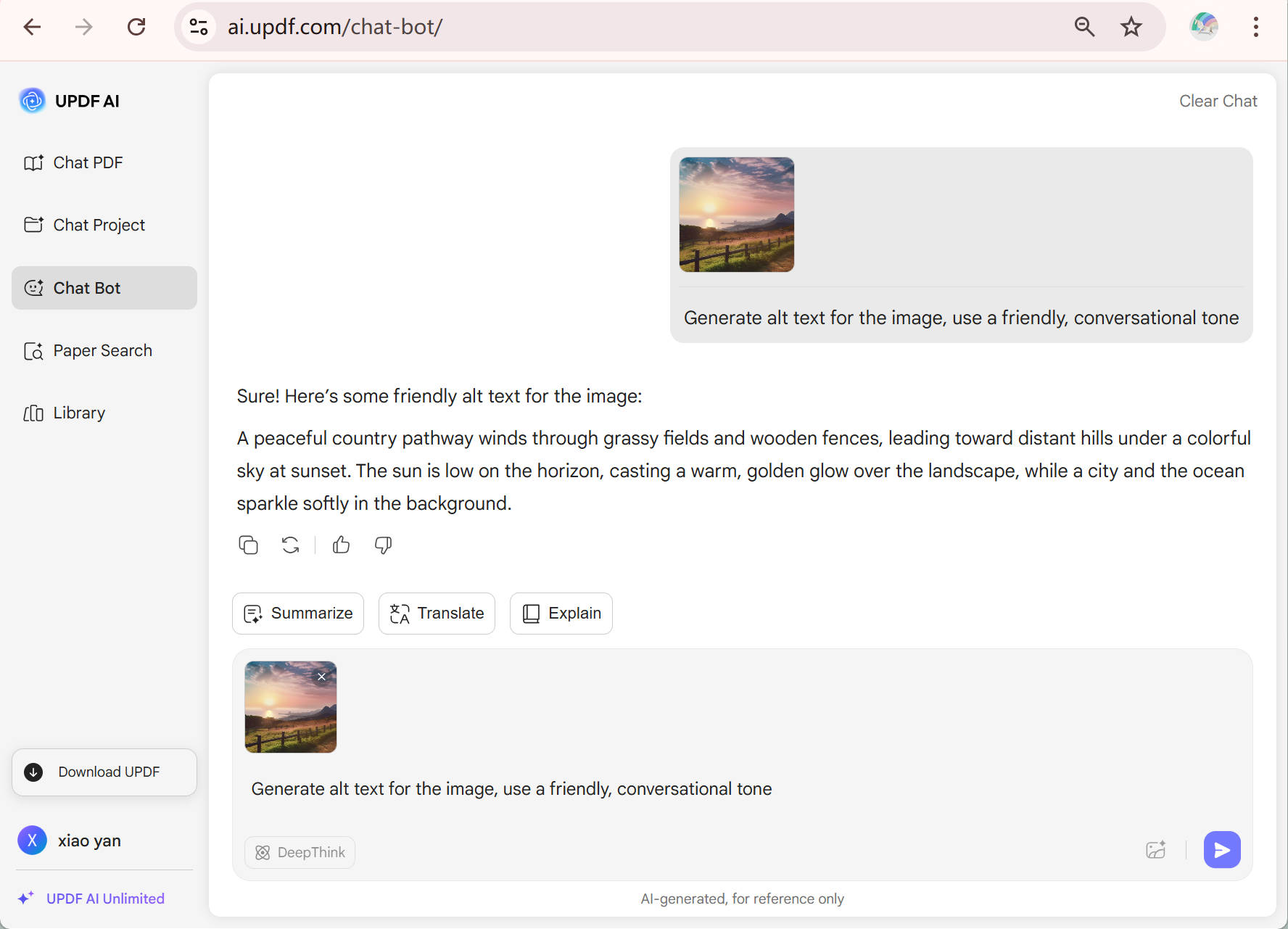
To get started, type a prompt like “Generate alt text:” followed by a brief description of the image—or simply upload the image directly if supported. You can also include specific instructions such as “Use a friendly, conversational tone” to tailor the result to your context.
-
Choose your preferred AI model. By default, UPDF uses ChatGPT-5 for balanced accuracy and fluency. Want more visual nuance? Click the “DeepThink” button to switch to DeepSeek.
-
Finally, click “Send”—and receive clear, descriptive alt text.

What Roles Can UPDF AI Alt Text Generator Plays?
An Accessibility Ally for Web Teams
Whether you're building a website, publishing a blog, or updating an eCommerce store, accessibility isn’t optional—it’s essential. UPDF AI Alt Text Generator ensures every image on your site is screen-reader-friendly, WCAG-compliant, and human-readable, without the manual effort.

A Secret Weapon for Visual Storytellers
Photographers, bloggers, and content creators know—an image may be worth a thousand words, but a well-written alt text tells the right part of that story. UPDF AI helps you describe not just what’s in the frame, but why it matters—giving every image a voice.

A Quiet Hero for SEO Specialists
Alt text is one of SEO’s best-kept secrets. With UPDF AI, writing optimized, relevant, keyword-smart image descriptions becomes second nature. Less time writing, more time ranking—because visibility starts in the details.

Why Use UPDF AI Alt Text Generator?
Contextual Image Descriptions
No more generic “image of a man smiling” nonsense. UPDF AI crafts alt text that captures the essence of the image—what it shows, what it means, and why it matters. Whether it’s a product shot, a candid moment, or a graph in your report, your visuals finally get words that pull their weight.
SEO-Friendly Accessibility
Good alt text isn’t just about accessibility—it’s also about visibility. UPDF AI writes with both users and search engines in mind, helping your content rank better and reach wider. From blog images to eCommerce galleries, every tag becomes a tiny SEO boost.
Tone-Adaptive Output
Want your alt text to sound formal, playful, or brand-specific? Just say the word. UPDF AI adapts to your tone and use case, from minimalist UI copy to storytelling-driven galleries. It’s more than automatic—it’s attuned to your style.
UPDF AI Alt Text Generator
vs. Other AI Generators
UPDF AI
Alt Text Generator
OtherAlt Text Generators
Context-Aware
97%
66%
Culturally Sensitive

SEO-Optimized Descriptions
98%
71%
History Management
No Word Limits
Multi-Language Output
100+
Less than 50
Platform Supported
Online, Windows, Mac, Android, iOS
Online
FAQs About Using UPDF AI Alt Text Generator
1. What Makes UPDF AI Alt Text Generator Different?
2. Is My Image Data Safe When Using the Alt Text Generator?
3. What Types of Images Work Best with UPDF AI Alt Text Generator?
4. Does the AI Understand Context from Surrounding Content?
Other Popular UPDF AI Tools