UPDF
UPDF
 UPDF for Windows
 UPDF for Mac
 UPDF for iPhone/iPad
 UPDF for Android
 UPDF AI Online
 UPDF Sign
 Edit PDF
 Annotate PDF
 Create PDF
 PDF Form
 Edit links
 Convert PDF
 OCR
OCR PDF to Word
 PDF to Image
 PDF to Excel
 Organize PDF
 Merge PDF
 Split PDF
 Crop PDF
 Rotate PDF
 Protect PDF
 Sign PDF
 Redact PDF
 Sanitize PDF
 Remove Security
 Read PDF
 UPDF Cloud
 Compress PDF
 Print PDF
 Batch Process
 About UPDF AI
 UPDF AI Solutions
 AI User Guide
 FAQ about UPDF AI
 Summarize PDF
 Translate PDF
 Chat with PDF
 Chat with AI
 Chat with image
 PDF to Mind Map
 Explain PDF
 PDF AI Tools
 Image AI Tools
 AI Chat Tools
 AI Writing Tools
 AI Study Tools
 AI Working Tools
 Other AI Tools
 AI Bookmark Generation
 AI Bookmark Summary
 AI Watermark Generation
 AI Background Generation
 AI Sticker Generation
 AI Stamp Generation
 AI Editing Suite
 UPDF Copilot
 AI Page Management
 AI Semantic Search
 PDF to Word
 PDF to Excel
 PDF to PowerPoint
 Enterprise Solution
 Enterprise Sign
 Enterprise AI
 Enterprise Plan
 Enterprise User Guide
 Enterprise Webinar
 Banking
 Healthcare
 Insurance
 Legal
Legal Manufacturing
 Government
 Education Solution
 Customer Stories
 User Guide
 UPDF Tricks
 FAQs
FAQs UPDF Reviews
 Download Center
 Blog
Blog Newsroom
 Tech Spec
 Updates
 UPDF vs. Adobe Acrobat
 UPDF vs. Foxit
 UPDF vs. PDF Expert

For a long time, I used PDF Agile as my primary tool for handling PDF files. While it covered basic editing and conversion needs, I gradually noticed limitations in areas like advanced OCR, form creation, and workflow efficiency. As my daily PDF tasks became more complex, I started searching for alternatives with more flexibility and modern features.
That search led me to UPDF, which immediately stood out with its cross-platform support and integrated AI tools. You can click the button below to download. In this guide, I'll carry out a detailed comparison of PDF Agile vs UPDF based on real-world testing, practical features, and performance.
Windows • macOS • iOS • Android 100% secure
Part 1. What is PDF Agile?
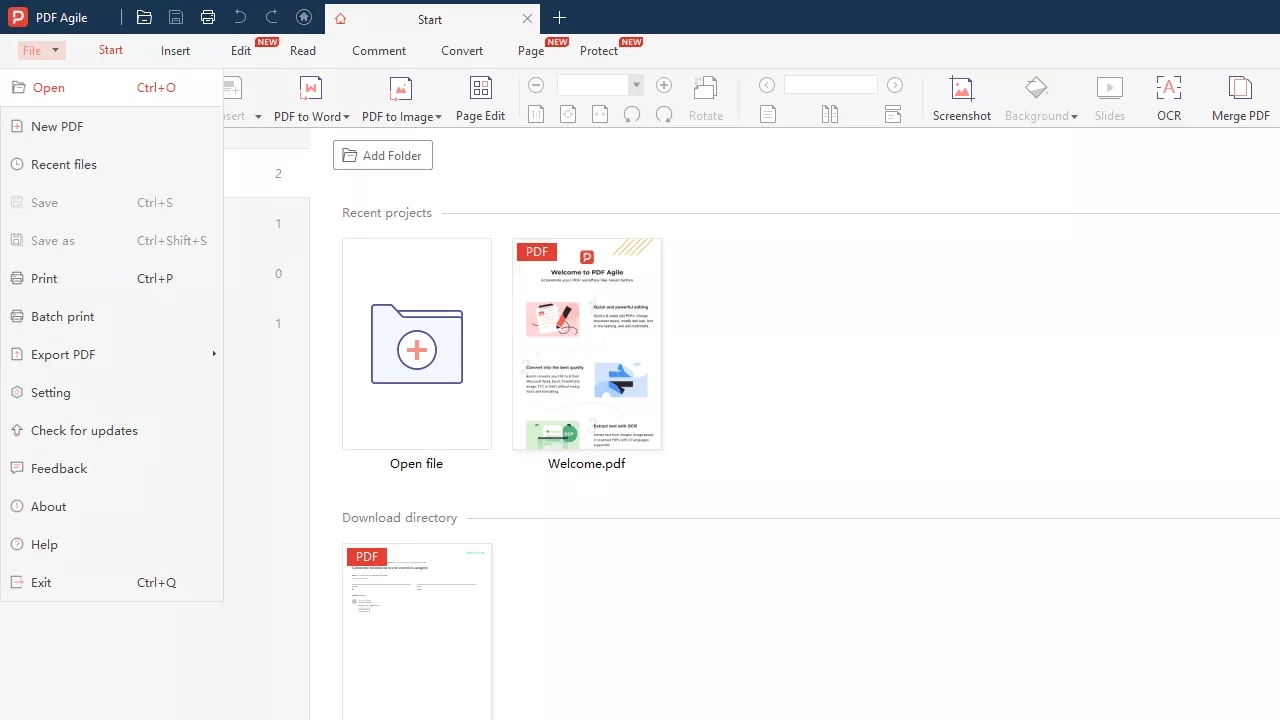
It is a desktop PDF editor developed by DOCUAGILE PTE. launched on June 29, 2022. This tool handles common PDF tasks such as editing text and images and converting documents to Office formats. These characteristics make it a handy tool for both professional and personal use for everyday document management needs without complexity.
The software supports both Windows and macOS platforms, allowing users to work on their preferred device without compatibility issues. One license can be activated on up to two devices, which aligns with standard licensing models for most desktop PDF editors. During my testing, the installation was fast and smooth, and the interface felt intuitive, familiar, and easy to navigate for beginners and experts.
PDF Agile Pricing and Limitations
In terms of pricing, PDF Agile offers monthly, annual, and lifetime plans. The pricing is generally affordable for users who mainly need core PDF editing, converting, and annotating features. However, advanced tools like AI assistance, PDF form creation, or cross-platform syncing are not part of its ecosystem. Look at the table below to see the pricing details and what each plan includes.
| Plan Type | Price | Processing Files Limit |
| Free | $0 | 2 Pages, 5 Tasks |
| Semi-Annual Plan | $39/6-months | Unlimited |
| Annual Plan | $59/Year | Unlimited |
| Lifetime Plan | $295/Lifetime (Campaign price $119) | Unlimited |
Part 2. What Is UPDF: Everything You Need to Know
After exploring PDF Agile, I wanted to test a more modern and versatile PDF tool that could handle both desktop and mobile workflows. That’s when I discovered UPDF tool developed by Superace Software Technologies Co., Ltd. Unlike traditional desktop editors, UPDF offers a suite of tools that work across all platforms to provide a consistent experience wherever I need it. You can click the button below to have a free download.
Windows • macOS • iOS • Android 100% secure
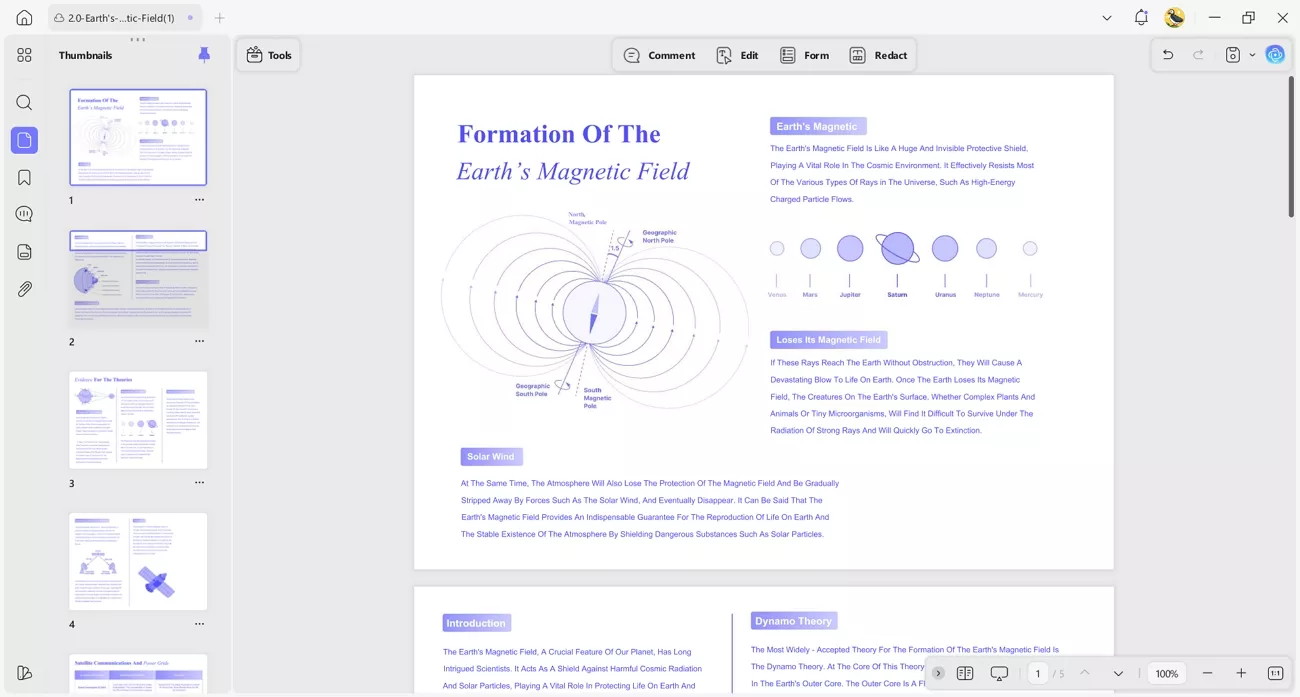
UPDF was launched in January 2022 and offers online suites such as UPDF AI and UPDF Sign without requiring any downloads. The platform provides PDF editing and digital signing in one tool, which improved my PDF workflow. In my testing, I found the interface very intuitive, and it allowed me to complete PDF tasks with its AI quickly.
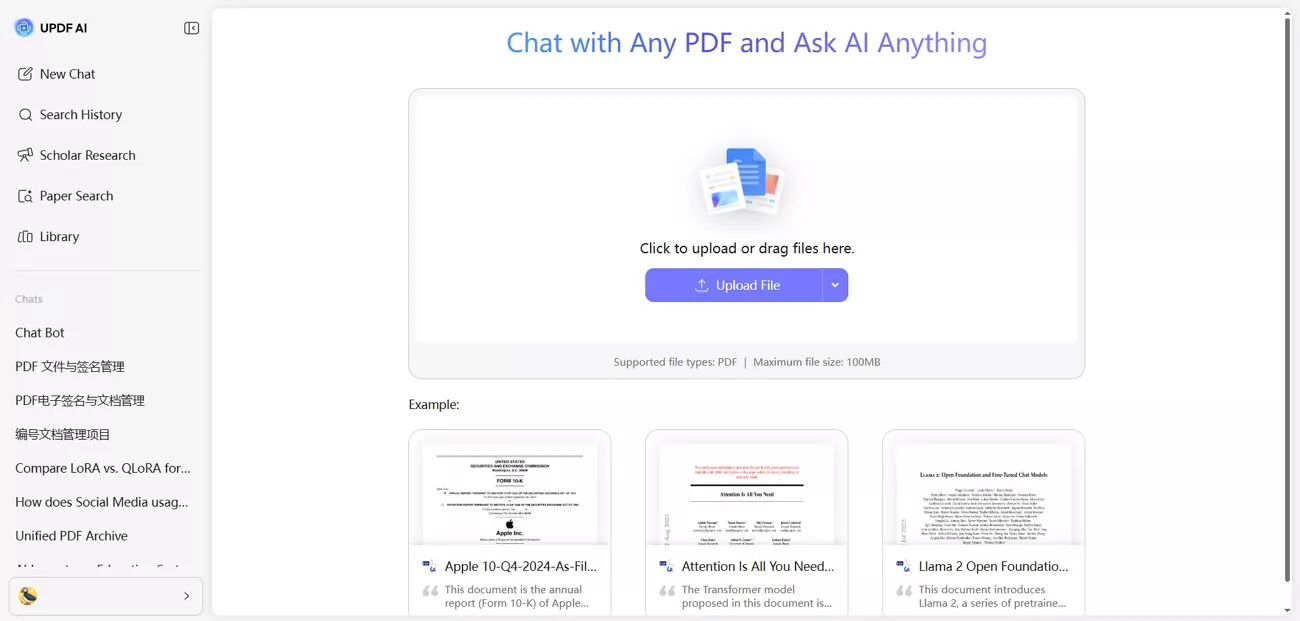
UPDF Pricing and Device Flexibility
I discovered that one UPDF license works on all devices, including Windows, macOS, iOS, and Android, which made switching devices very easy. This setup allowed me to work on any platform without buying multiple licenses, keeping my workflow simple and consistent across all devices. Now, let’s explore the available UPDF pricing plans and see what features each plan provides.
| Plan Type | Pricing | Offerings |
| Free | $0 | Basic PDF editing tools |
| UPDF Pro - Annual | $69.99/Year (Campaign price $39.99) | Full PDF editing, annotation, OCR, conversion, signing, cloud storage (10GB) |
| UPDF Pro - Perpetual | $99.99/Lifetime (Campaign price $69.99) | Lifetime access to all core PDF tools and features |
| UPDF Pro + AI Assistant -Annual | $139.00/Year (Campaign price $79.00) | Includes all Pro features plus AI-powered tools like summarizing, translating, and chat |
| UPDF Sign | $139.00/Year (Campaign price $69.00) | 300 signatures, 20GB cloud storage |
Part 3. My Testing Methodology: How I Compared PDF Agile and UPDF
Before forming an opinion, I tested both tools with the same documents, including scanned PDFs, large reports, fillable forms, and multilingual files. Now, I’ll compare PDF Agile vs. UPDF features by feature to see which tool performs better in real-world use.
| Category | Features | UPDF | PDF Agile |
| Online Tools | Online Convert Tools | PDF to Word, PPT, Excel | PDF to Word, Excel, PPT, Image, DWG, TXTAll formats can be converted to PDF |
| AI-Related Features | Summarize PDF, Translate PDF, Chat with PDF, Chat with AI. Chat with Image, PDF to Mind Map, Explain PDFScholar Research, Paper Search | ||
| Sign PDF | (UPDF Sign) | ||
| Create PDF | Scan to PDF | ||
| PDF from Image | |||
| PDF from Word | |||
| PDF from Excel | |||
| PDF from PPT | |||
| PDF from CAJ | |||
| PDF from Clipboard | |||
| Read PDF | Read Mode | Standard view | Standard view |
| Full Screen Mode | |||
| Slides | |||
| Two Pages | |||
| Annotate PDF | Highlight | ||
| Underline | |||
| Squiggly Underline | |||
| Strikethrough | |||
| Add Stickers | Dedicated sticker library | ||
| Add Stamps | Stamp library | Basic stamps | |
| Add Sticky Note | |||
| Add Text Narkups | Full markups | Basic markups | |
| Draw | |||
| Shapes | Shapes + polygon | Basic shapes | |
| Insert Text Markup | |||
| Replace Text Markup | |||
| Measure PDF | Measurement Tools | Calibrated measure | Simple measure |
| Convert PDF | PDF to Word | ||
| PDF to Excel | |||
| PDF to CSV | |||
| PDF to RTF | |||
| PDF to PPT | |||
| PDF to Image | |||
| PDF to TXT | |||
| PDF to DWG | |||
| Image to PDF | |||
| Word to PDF | |||
| Excel to PDF | |||
| PPT to PDF | |||
| DWG to PDF | |||
| TXT to PDF | |||
| Organize PDF | Extract Pages | ||
| Extract All Images in One Document | |||
| Insert Pages | |||
| Delete Pages | |||
| Rotate Pages | |||
| Split Pages | |||
| Crop Pages | |||
| Merge Pages | |||
| OCR | Multiple Languages | 38+ languages | 20 languages |
| OCR Export Format | Layout‑preserved PDF | TXT, Word | |
| Multi‑Language in one File | Multi‑language OCR | Single‑language | |
| Edit PDF | Edit Text | Layout‑aware text | Block‑level text |
| Edit Image | Object‑level image | Basic image tweaks | |
| Edit Link | |||
| Add Watermark | |||
| Add Signature | Stored personal signatures | ||
| Add Header & Footer | |||
| Add Background | Page‑set backgrounds | ||
| Screenshots Capturing | Capture Screenshots and Save to PDF | Screen‑to‑PDF capture | |
| PDF forms | Fill Forms | Direct interactive fill | Workflow‑style filling |
| Create PDF Forms | Full form designer | Form creation absent | |
| Edit PDF Forms Properties | Advanced field properties | No property editing | |
| Form Fields Recognition | Auto‑detect fields | Basic field detection | |
| Integrated AI | Built-in AI Tools within App | Summarize, Translate, Chat, Generate Mind Map, Explain PDF |
Windows • macOS • iOS • Android 100% secure
Pricing Plans and Device Compatibility Comparison
UPDF and PDF Agile differ in both pricing structure and device coverage, with UPDF often emphasizing cross‑platform bundles and PDF Agile offering separate term‑based licenses. Next, let’s compare both tools in terms of prices and devices supported in the table below.
| Product | Plan Name | Price | Device Compatibility |
| UPDF | Free Trial | 0$ | 2 Desktops + 2 mobiles + 2 webs |
| UPDF Pro Annual | $69.99/Year (Campaign price $39.99) | 2 Desktops + 2 mobiles + 2 webs | |
| Lifetime | $99.99/Lifetime (Campaign price $69.99) | 2 Desktops + 2 mobiles + 2 webs | |
| UPDF Pro + AI | $139.00/Year (Campaign price $79.00) | 2 Desktops + 2 mobiles + 2 webs | |
| PDF Agile | Free Trial | 0$ | 2 Desktops |
| Semi-Annual Plan | $39/6-months | 2 Desktops | |
| Annual Plan | $59/Year | 2 Desktops | |
| Lifetime Plan | $295/Lifetime (Campaign price $119) | 2 Desktops |
Note:
Key Features That Make UPDF Stand Out
After looking at the comparison of PDF Agile vs. UPDF features, let me share why I found UPDF to be the better choice for my PDF workflow.
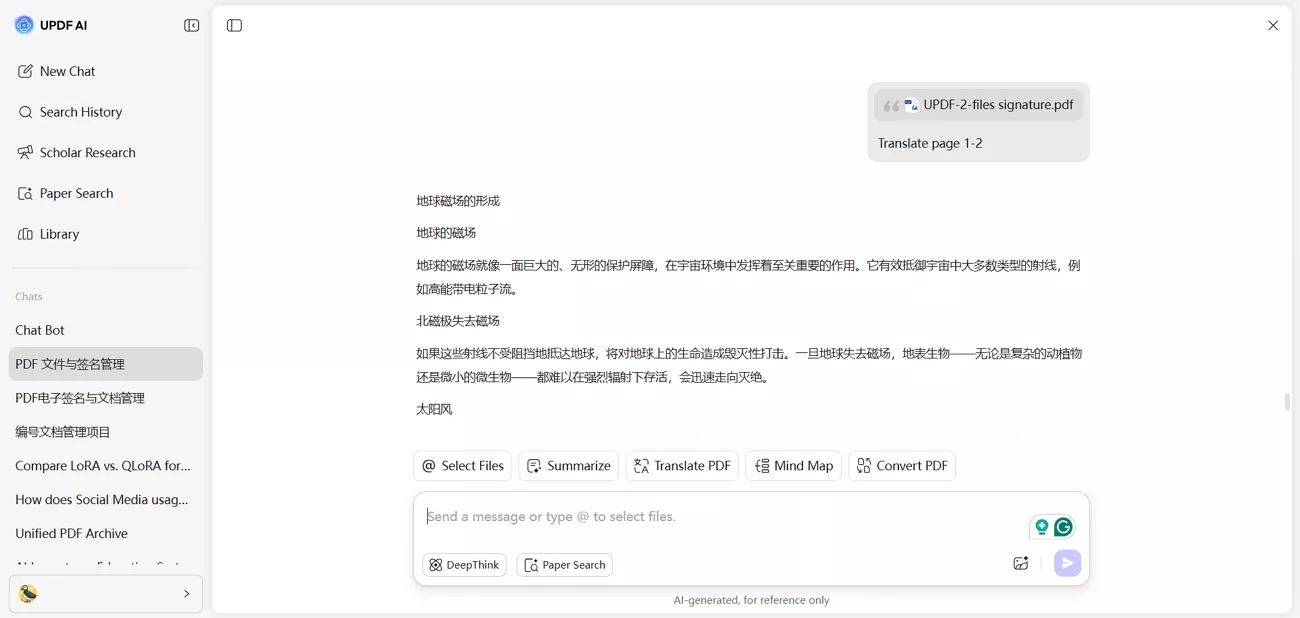
1. UPDF AI: I used UPDF AI to summarize my PDF documents, which helped me quickly understand long reports without reading every page.
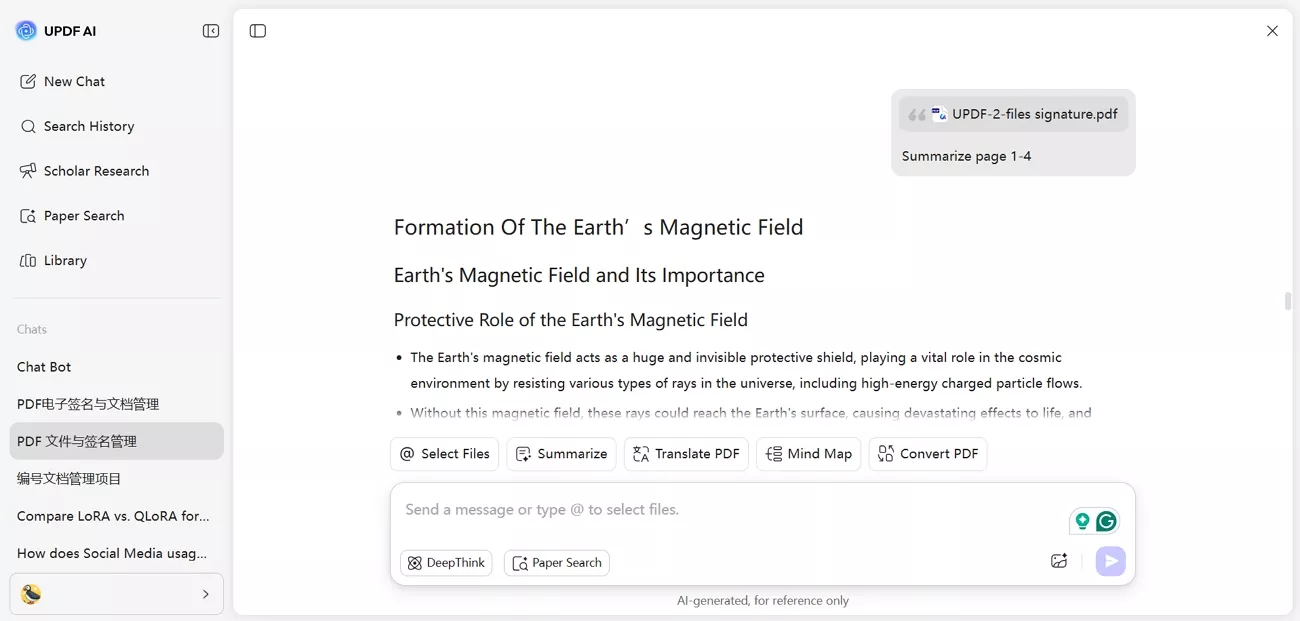
Another feature I tried was generating mind maps from PDFs, which helped me visualize document structure and key ideas much faster.
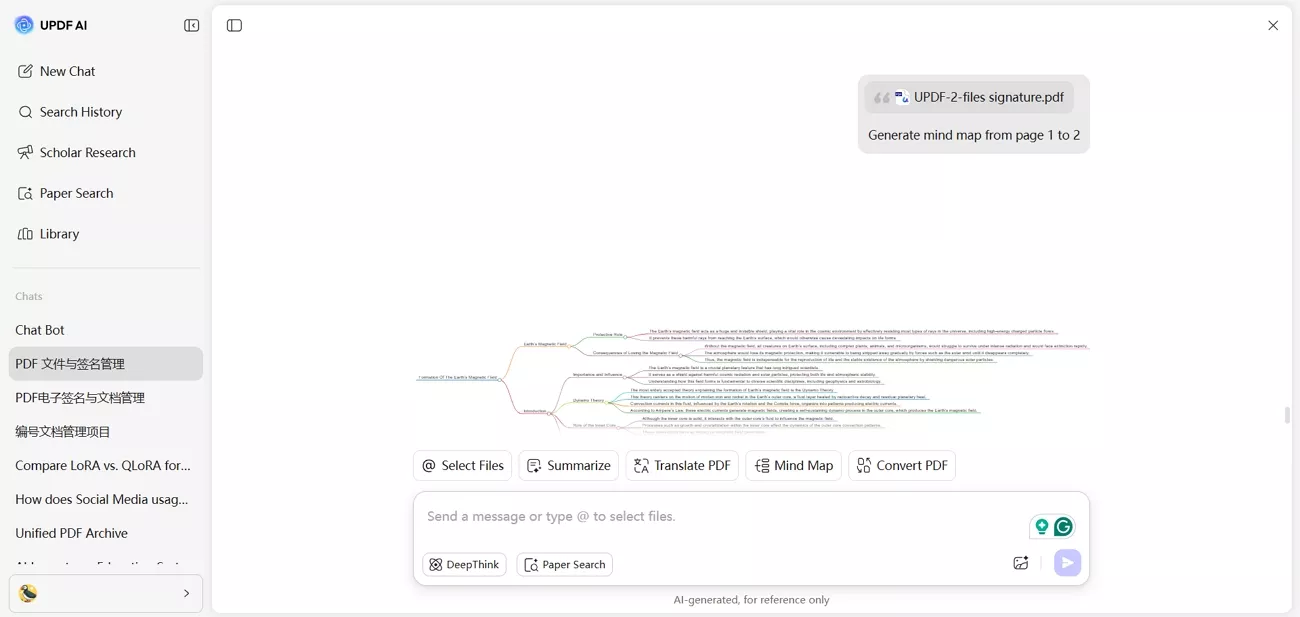
I also used the AI to translate text into 13+ languages in PDFs, making it easy to handle multilingual files and review content in different languages.
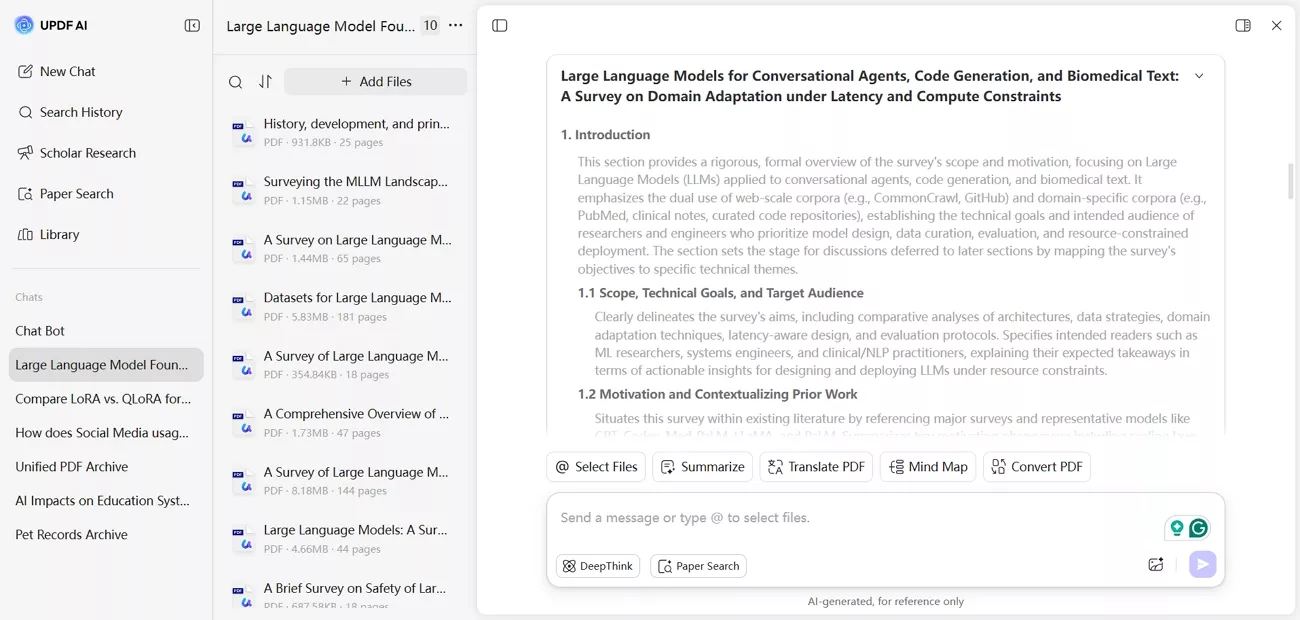
2. Scholar Research: I can search a topic and gather multiple papers quickly using the AI platform. Synthesizing them into a structured literature review is fast and highly efficient.
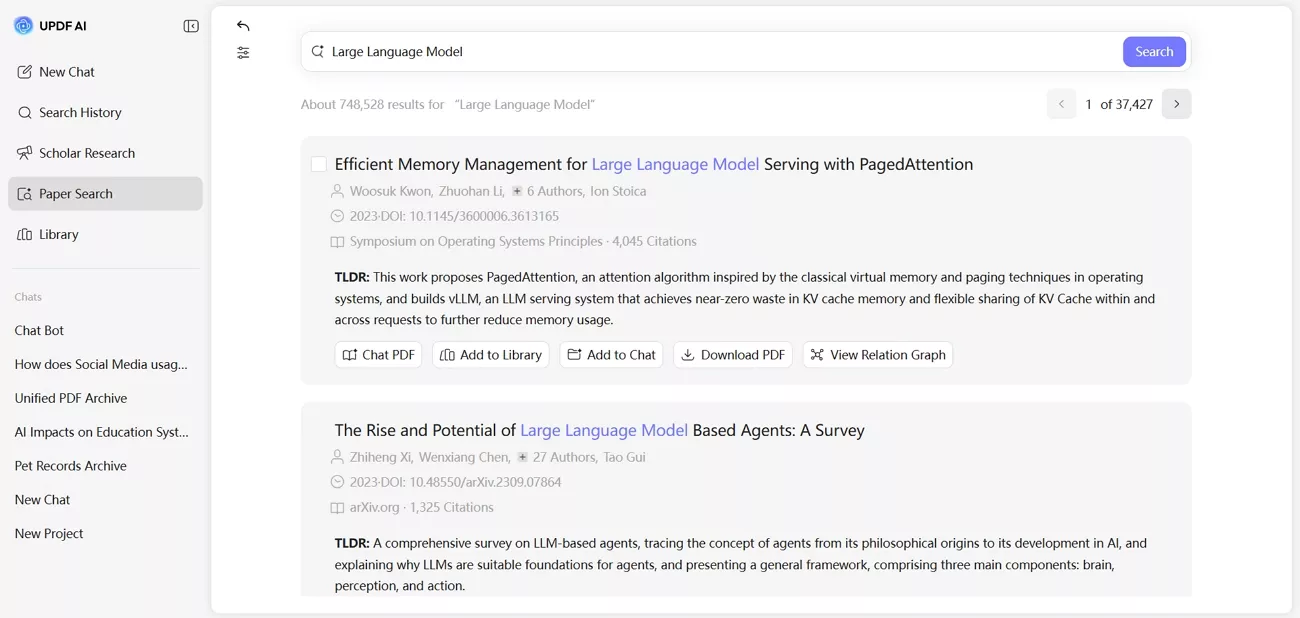
3. Paper Search: The traditional keyword search mode allows me to find relevant papers across multiple academic databases.
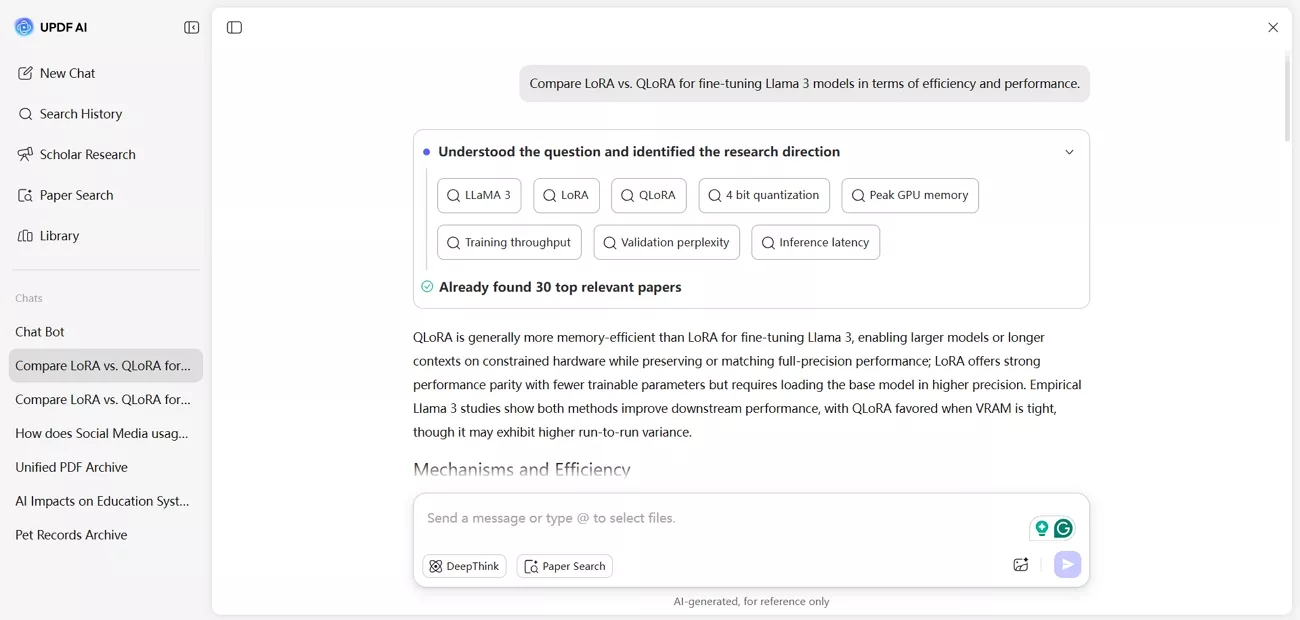
DeepThink mode lets me ask research questions and receive answers backed by citations for faster understanding.
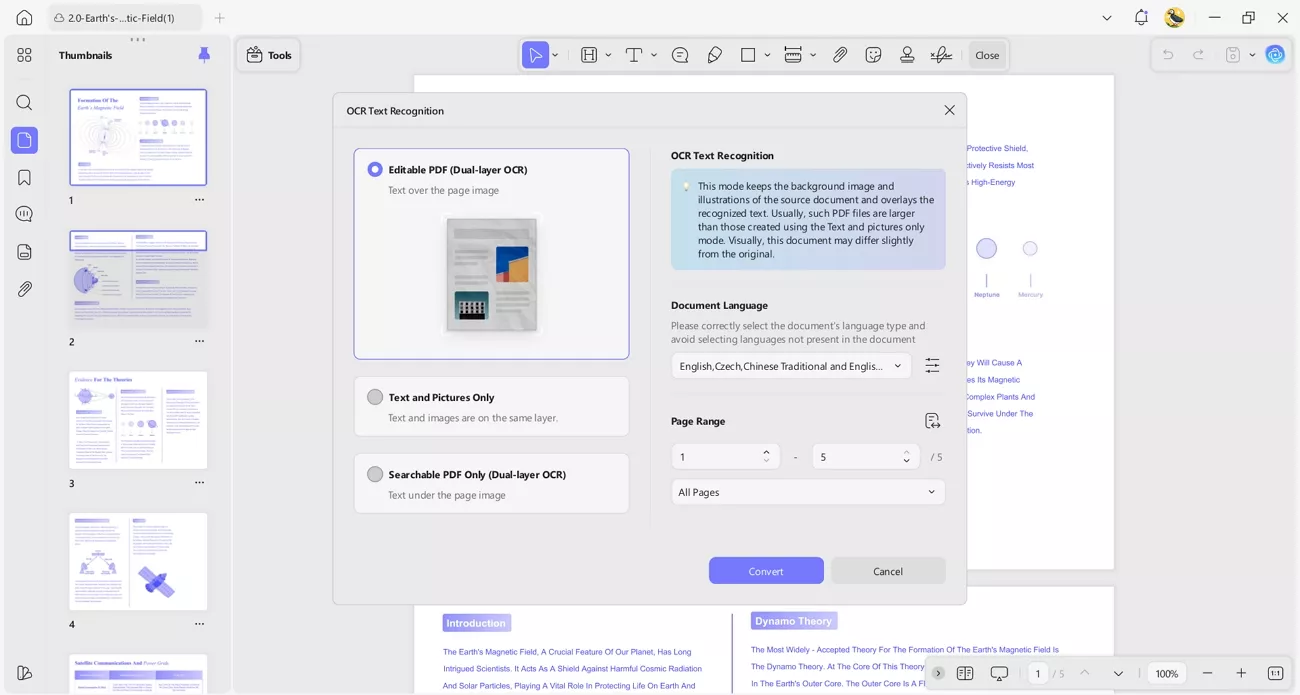
4. OCR PDF: UPDF’s OCR feature allowed me to convert scanned PDFs and image-based documents into searchable and editable text. I tested multiple languages, and it accurately recognized characters in all of them.
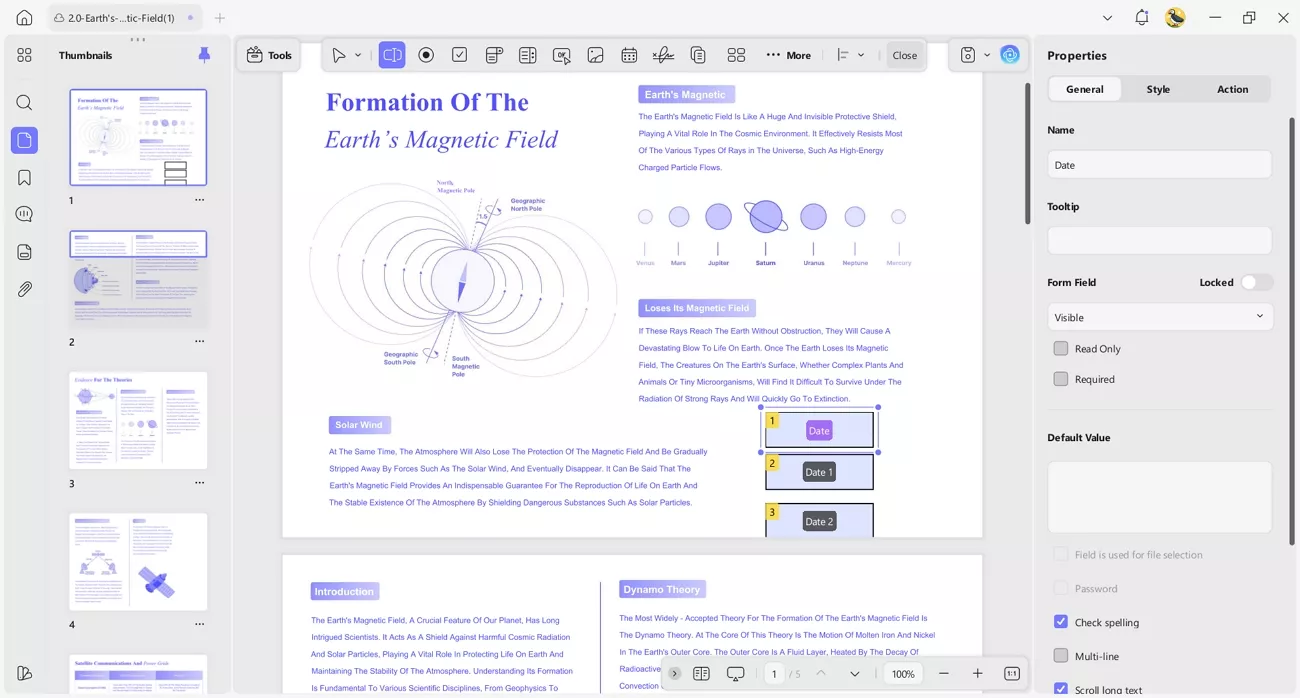
5. PDF Forms: Creating and editing fillable PDF forms with UPDF was straightforward. I quickly built a survey form and tested form fields, which worked flawlessly. The software also recognized existing form fields in documents, letting me edit properties without starting from scratch, which saved me a lot of time and effort.
Windows • macOS • iOS • Android 100% secure
User Experience
When I used PDF Agile, the experience felt stable and familiar for basic desktop PDF tasks. The interface was easy to understand, and the main tools were simple to access. Basic editing, converting, and annotating worked reliably for everyday document needs.
On the other hand, UPDF provided a faster and more flexible experience across multiple devices. The cross-platform support and built-in AI tools reduced the number of steps required to complete tasks. I finished my work more efficiently, which made UPDF better suited for regular and professional PDF use.
Reviews and Ratings of Both Tools
After comparing PDF Agile vs. UPDF, let’s look at the reviews and comments users are providing about both tools.
UPDF
For UPDF, users are saying:
●“I really appreciate the ability to edit PDFs, fill in forms, and the unique color themes UPDF offers. It's easy to edit, and the tutorials are easy to understand, which helps a lot. The low price aspect is a big plus for me too.”
PDF Agile
For PDF Agile, users are saying:
●“It’s mainly focused on Windows. It doesn’t have the same cloud collaboration features that other tools offer.”
Part 4. Final Verdict: Which One Would I Recommend?
Based on my overall comparison, I would recommend UPDF for most users who work with PDF files regularly. PDF Agile performed well for basic desktop tasks and provided a stable experience for simple editing and conversion needs. It suits users who only need standard PDF features on a single desktop platform.
Moreover, UPDF delivered a more flexible and complete experience throughout my evaluation. One license worked across all devices, which made switching between desktop and mobile very convenient. Advanced tools like AI features, OCR, PDF form creation, and online signing helped reduce manual work and save time.
Windows • macOS • iOS • Android 100% secure
Conclusion
In conclusion, this guide compared PDF Agile vs. UPDF to show how each tool supports different PDF workflows. PDF Agile works well for basic desktop editing tasks, but UPDF excels with cross-platform support, AI tools, OCR, and form creation. If you regularly work with complex PDFs or need advanced features across multiple devices, UPDF is the ideal tool to choose.
Windows • macOS • iOS • Android 100% secure
Note: The information on this page is based on UPDF writers' testing and publicly available product details at the time of writing. Features and pricing may change over time. If you notice any inaccuracies, please contact us at [email protected]


 Lizzy Lozano
 Enrica Taylor