UPDF
UPDF
 UPDF for Windows
 UPDF for Mac
 UPDF for iPhone/iPad
 UPDF for Android
 Nomostar
 UPDF AI Online
 UPDF Sign
 IvyCraft
 Edit PDF
 Annotate PDF
 Create PDF
 PDF Form
 Edit links
 Convert PDF
 OCR
OCR PDF to Word
 PDF to Image
 PDF to Excel
 Organize PDF
 Merge PDF
 Split PDF
 Crop PDF
 Rotate PDF
 Protect PDF
 Sign PDF
 Redact PDF
 Sanitize PDF
 Remove Security
 Read PDF
 UPDF Cloud
 Compress PDF
 Print PDF
 Batch Process
 About UPDF AI
 UPDF AI Solutions
 AI User Guide
 FAQ about UPDF AI
 Summarize PDF
 Translate PDF
 Chat with PDF
 Chat with AI
 Chat with image
 PDF to Mind Map
 Explain PDF
 PDF AI Tools
 Image AI Tools
 AI Chat Tools
 AI Writing Tools
 AI Study Tools
 AI Working Tools
 Other AI Tools
 AI Bookmark Generation
 AI Bookmark Summary
 AI Watermark Generation
 AI Background Generation
 AI Sticker Generation
 AI Stamp Generation
 AI Editing Suite
 UPDF Copilot
 AI Page Management
 AI Semantic Search
 PDF to Word
 PDF to Excel
 PDF to PowerPoint
 Enterprise Solution
 Enterprise Sign
 Enterprise AI
 Enterprise Plan
 Enterprise User Guide
 Enterprise Webinar
 IT
IT Education
 Construction
 Financial Service
 Healthcare
 Insurance
 Legal
Legal Manufacturing
 Government
 Researchers & PhDs
 Solopreneurs & Freelancers
 Lawyers & Legal Professionals
 Real Estate Agents & Brokers
 Education Solution
 Customer Stories
 User Guide
 UPDF Tricks
 FAQs
FAQs UPDF Reviews
 Download Center
 Blog
Blog Newsroom
 Tech Spec
 Updates
 UPDF vs. Adobe Acrobat
 UPDF vs. Foxit
 UPDF vs. PDF Expert

 UPDF AI
AI Report Card Comment Generator
Turn your classroom observations into clear, constructive report card comments. Share strengths, areas for growth, and next steps with UPDF AI, then shape the draft to fit your school’s tone and reporting needs.
Powered by
 ChatGPT |
  DeepSeek
5000+ Reviews
 4.8
4.8
UPDF AI available on


 Desktop & mobile app
4M+ Users, 1.6M+ Report Card Comments Generated. Trusted by Leading Media:






How to Generate Now Online
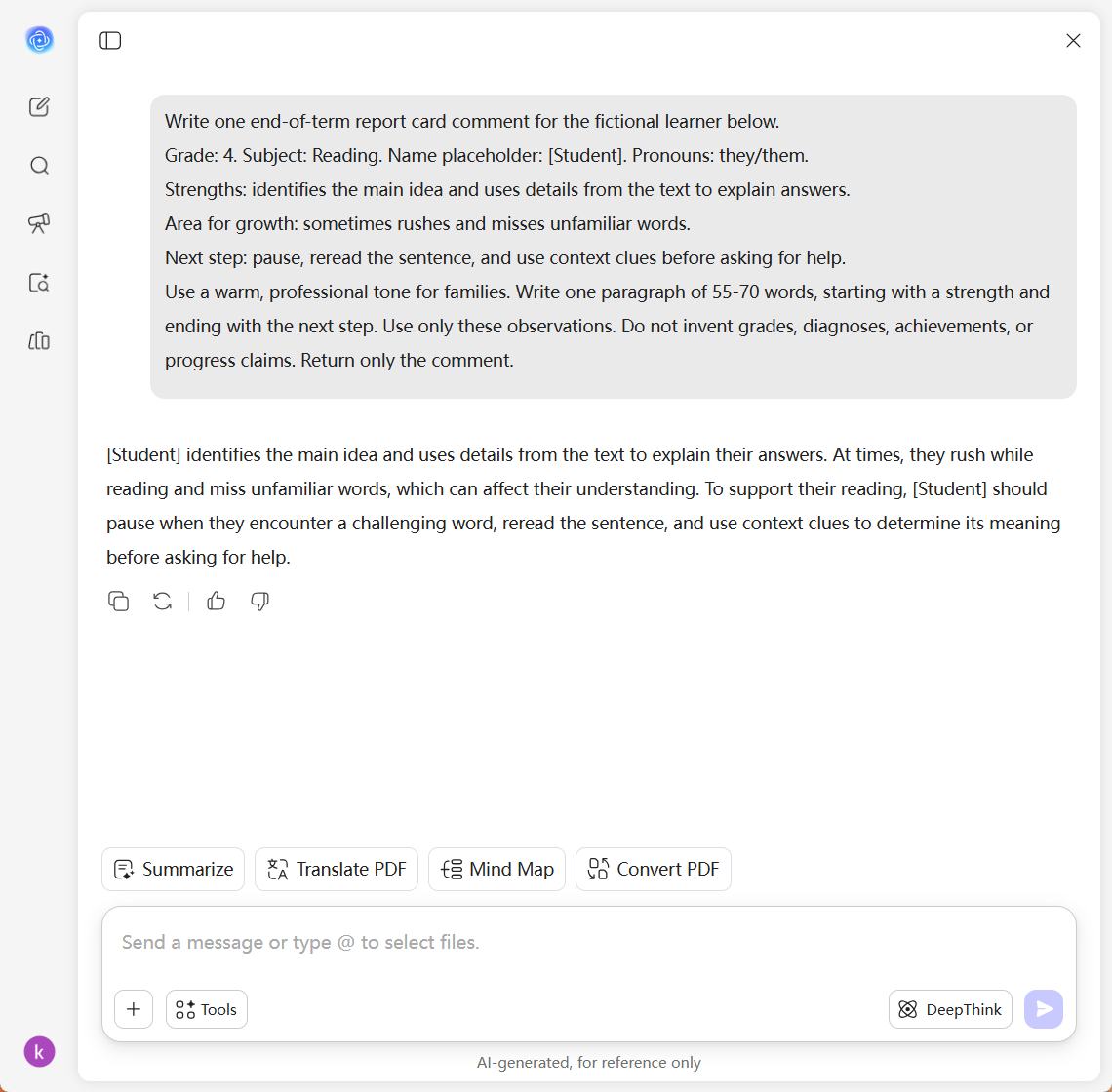
Add Your Observations
Open UPDF AI and enter the grade level, subject, observed strengths, and areas for growth. Use a placeholder instead of a student’s name and leave out identifying details.Describe the Comment You Need
Ask for a report card comment with a clear strength and a practical next step. Specify the tone and target length, then send your request.Review and Refine
Check each statement against your observations and school requirements. Ask for clearer or shorter wording, then make your final edits before adding the comment to a report.

Why Choose UPDF AI for Report Card Comments?
Make Each Comment Specific to the Student
Start with what you have seen in class: a reading skill, a problem-solving strategy, or a contribution to discussion. UPDF AI helps turn those notes into a connected draft. Keep the details that reflect the student’s progress and remove any statement your observations do not support.

Pair Strengths with a Clear Next Step
A useful comment recognizes progress while explaining what to work on next. Provide an observed strength, a specific challenge, and a realistic practice goal. Ask UPDF AI to connect them in constructive language that helps families understand the student’s learning and how to support it.

Find the Right Tone and Length
Need a warm end-of-term message or a concise subject comment? Describe the style and target length in your prompt, then request revisions in the same chat. For an awkward sentence, explore the AI sentence rewriter. Check that the final wording preserves your observations and fits your report form.

UPDF AI vs. Static Report Card Comment Banks
UPDF AI
Static Comment Banks
Starting Point
Your classroom observations
Prewritten phrases
First Draft
Request a connected comment
Select and combine entries
Student-Specific Details
Include them in your prompt
Add them to the selected text
Tone and Length
Describe your preferences
Edit the wording yourself
Revisions
Ask for changes in the chat
Rewrite the selected text
Final Review
Teacher checks facts and school fit
Teacher checks facts and school fit
Frequently Asked Questions
1. What should I include in a report card comment prompt?
2. Can I write comments for different subjects and grade levels?
3. Can I fit a comment into a short report card field?
4. Should I paste real student records into the chat?
Other Popular UPDF AI Tools