UPDF
UPDF
 UPDF for Windows
 UPDF for Mac
 UPDF for iPhone/iPad
 UPDF for Android
 Nomostar
 UPDF AI Online
 UPDF Sign
 IvyCraft
 Edit PDF
 Annotate PDF
 Create PDF
 PDF Form
 Edit links
 Convert PDF
 OCR
OCR PDF to Word
 PDF to Image
 PDF to Excel
 Organize PDF
 Merge PDF
 Split PDF
 Crop PDF
 Rotate PDF
 Protect PDF
 Sign PDF
 Redact PDF
 Sanitize PDF
 Remove Security
 Read PDF
 UPDF Cloud
 Compress PDF
 Print PDF
 Batch Process
 About UPDF AI
 UPDF AI Solutions
 AI User Guide
 FAQ about UPDF AI
 Summarize PDF
 Translate PDF
 Chat with PDF
 Chat with AI
 Chat with image
 PDF to Mind Map
 Explain PDF
 PDF AI Tools
 Image AI Tools
 AI Chat Tools
 AI Writing Tools
 AI Study Tools
 AI Working Tools
 Other AI Tools
 AI Bookmark Generation
 AI Bookmark Summary
 AI Watermark Generation
 AI Background Generation
 AI Sticker Generation
 AI Stamp Generation
 AI Editing Suite
 UPDF Copilot
 AI Page Management
 AI Semantic Search
 PDF to Word
 PDF to Excel
 PDF to PowerPoint
 Enterprise Solution
 Enterprise Sign
 Enterprise AI
 Enterprise Plan
 Enterprise User Guide
 Enterprise Webinar
 IT
IT Education
 Construction
 Financial Service
 Healthcare
 Insurance
 Legal
Legal Manufacturing
 Government
 Researchers & PhDs
 Solopreneurs & Freelancers
 Lawyers & Legal Professionals
 Real Estate Agents & Brokers
 Education Solution
 Customer Stories
 User Guide
 UPDF Tricks
 FAQs
FAQs UPDF Reviews
 Download Center
 Blog
Blog Newsroom
 Tech Spec
 Updates
 UPDF vs. Adobe Acrobat
 UPDF vs. Foxit
 UPDF vs. PDF Expert

 UPDF AI
AI Research Question Generator Online
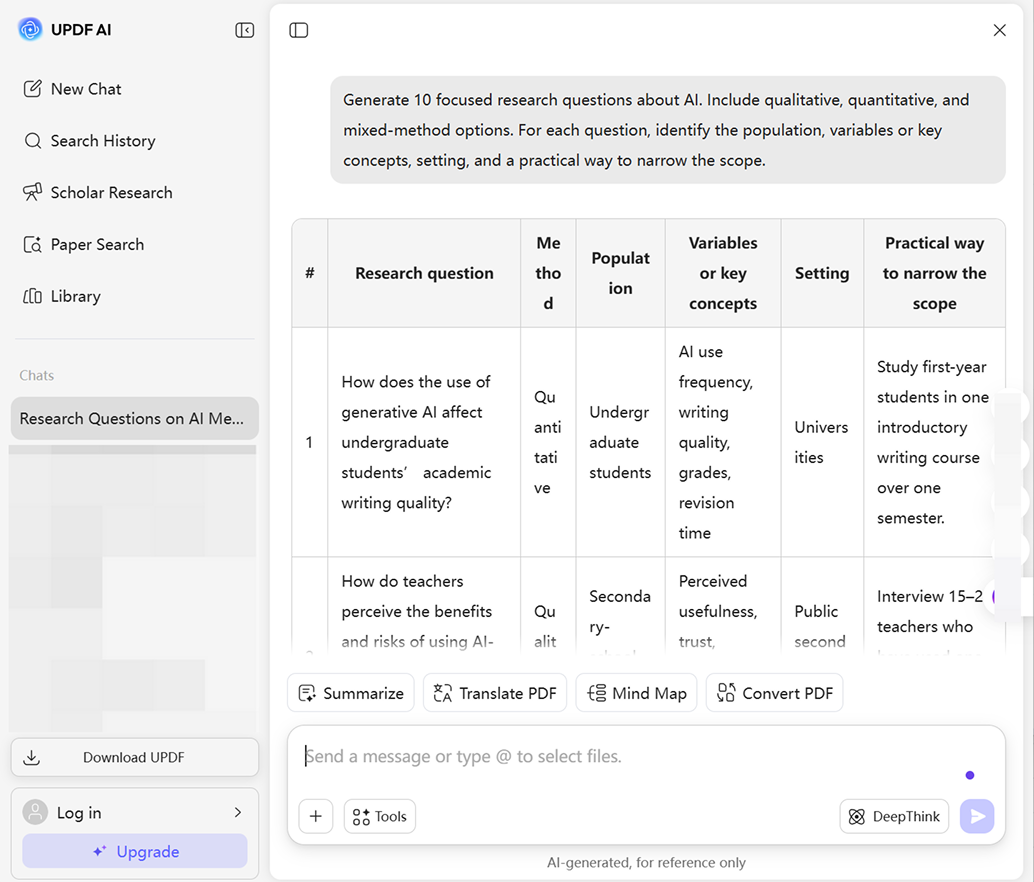
Turn a broad topic into clear, focused, and researchable questions in seconds. UPDF AI helps students and researchers generate qualitative, quantitative, mixed-method, and PICO questions, then refine the scope with relevant academic papers and source PDFs.
Powered by
 GPT-5.6 |
 DeepSeek R1
5000+ Reviews
 4.8
4.8
UPDF AI available on


 Desktop & mobile app

Loved by 4M+ Users, Trusted by Students, Researchers, and Professionals






How to Use UPDF AI Research Question Generator
-
Enter Your Research Topic
Type a broad subject, problem, or keyword in the chatbot. Add your discipline or academic level for more relevant results. -
Choose the Question Type
Select qualitative, quantitative, mixed-method, or PICO questions based on your research needs. -
Add Key Research Details
Include the target population, location, time period, variables, or preferred research method to make the questions more focused. -
Review Your Requirements
Check that the topic and research details are clear. You can adjust the scope if the topic is too broad or too narrow. -
Press Enter to Generate
Once everything is ready, press Enter to generate your research questions. Review the suggestions and choose the one that best fits your project.

Why Use UPDF AI Research Question Generator?
Turn a Broad Topic into a Focused Question
A topic such as “social media and mental health” is too broad for most projects. UPDF AI can add a population, platform, behavior, outcome, location, and time frame, helping you produce a question that fits your assignment and available resources.

Avoid Vague or Unresearchable Questions
Many research questions sound academic but are too broad, unclear, biased, or impossible to answer with available evidence. UPDF AI can flag vague concepts, hidden assumptions, missing variables, and unrealistic scope, then suggest clearer alternatives.

Generate Questions for Different Research Methods
Create qualitative questions about experiences or processes, or quantitative questions about relationships or effects, mixed-method questions that combine patterns with explanations, and comparative questions that evaluate groups, policies, or interventions.

Build PICO Questions for Clinical Research
Use UPDF AI as a PICO research question generator. It can separate Population, Intervention, Comparison, and Outcome, ask for missing details, and transform the elements into a concise, searchable clinical question. Add Time when a PICOT question is required.

UPDF AI vs. Other Research Question Generators
UPDF AI
Other Research Question Generators
Free to Start

,varies by tool
Can Be Used Without Logging In
,for most web tools
Qualitative and Quantitative Questions
Available in some tools
PICO/PICOT Question Generation
, through guided prompts
Primary feature in dedicated PICO tools
Academic Paper Search
, searches 220M+ papers
Not part of most standalone generators
Research Gap Discovery
Usually not available
Chat with Source PDFs
Usually not available
Literature Review Support
, with Scholar Research
Usually limited
FAQs
Q1. Can UPDF AI be used as a PICO research question generator?
Q2. What is the difference between UPDF AI and the boltai research question generator?
Q3. Are AI-generated research questions plagiarism-free?
Q4. Is it safe to upload research papers to UPDF AI?
Other Popular UPDF AI Tools