UPDF
UPDF
 UPDF for Windows
 UPDF for Mac
 UPDF for iPhone/iPad
 UPDF for Android
 Nomostar
 UPDF AI Online
 UPDF Sign
 IvyCraft
 Edit PDF
 Annotate PDF
 Create PDF
 PDF Form
 Edit links
 Convert PDF
 OCR
OCR PDF to Word
 PDF to Image
 PDF to Excel
 Organize PDF
 Merge PDF
 Split PDF
 Crop PDF
 Rotate PDF
 Protect PDF
 Sign PDF
 Redact PDF
 Sanitize PDF
 Remove Security
 Read PDF
 UPDF Cloud
 Compress PDF
 Print PDF
 Batch Process
 About UPDF AI
 UPDF AI Solutions
 AI User Guide
 FAQ about UPDF AI
 Summarize PDF
 Translate PDF
 Chat with PDF
 Chat with AI
 Chat with image
 PDF to Mind Map
 Explain PDF
 PDF AI Tools
 Image AI Tools
 AI Chat Tools
 AI Writing Tools
 AI Study Tools
 AI Working Tools
 Other AI Tools
 AI Bookmark Generation
 AI Bookmark Summary
 AI Watermark Generation
 AI Background Generation
 AI Sticker Generation
 AI Stamp Generation
 AI Editing Suite
 UPDF Copilot
 AI Page Management
 AI Semantic Search
 PDF to Word
 PDF to Excel
 PDF to PowerPoint
 Enterprise Solution
 Enterprise Sign
 Enterprise AI
 Enterprise Plan
 Enterprise User Guide
 Enterprise Webinar
 IT
IT Education
 Construction
 Financial Service
 Healthcare
 Insurance
 Legal
Legal Manufacturing
 Government
 Researchers & PhDs
 Solopreneurs & Freelancers
 Lawyers & Legal Professionals
 Real Estate Agents & Brokers
 Education Solution
 Customer Stories
 User Guide
 UPDF Tricks
 FAQs
FAQs UPDF Reviews
 Download Center
 Blog
Blog Newsroom
 Tech Spec
 Updates
 UPDF vs. Adobe Acrobat
 UPDF vs. Foxit
 UPDF vs. PDF Expert

 UPDF AI
Free & Reliable Online AI PDF Analyzer
Drowning in a sea of PDFs? UPDF AI PDF Analyzer is your lifesaver. Instantly extract information, generate summaries, and get answers from any document. Reclaim your time and boost productivity with pinpoint accuracy.
Powered by
 GPT-5 |
 DeepSeek R1
5000+ Reviews
 4.8
4.8
UPDF AI available on


 Desktop & mobile app

4M+ Users, 170M+ PDFs Analyzed, Trusted by Leading Medias:






How to Analyze PDF(s) Online for Free?
-
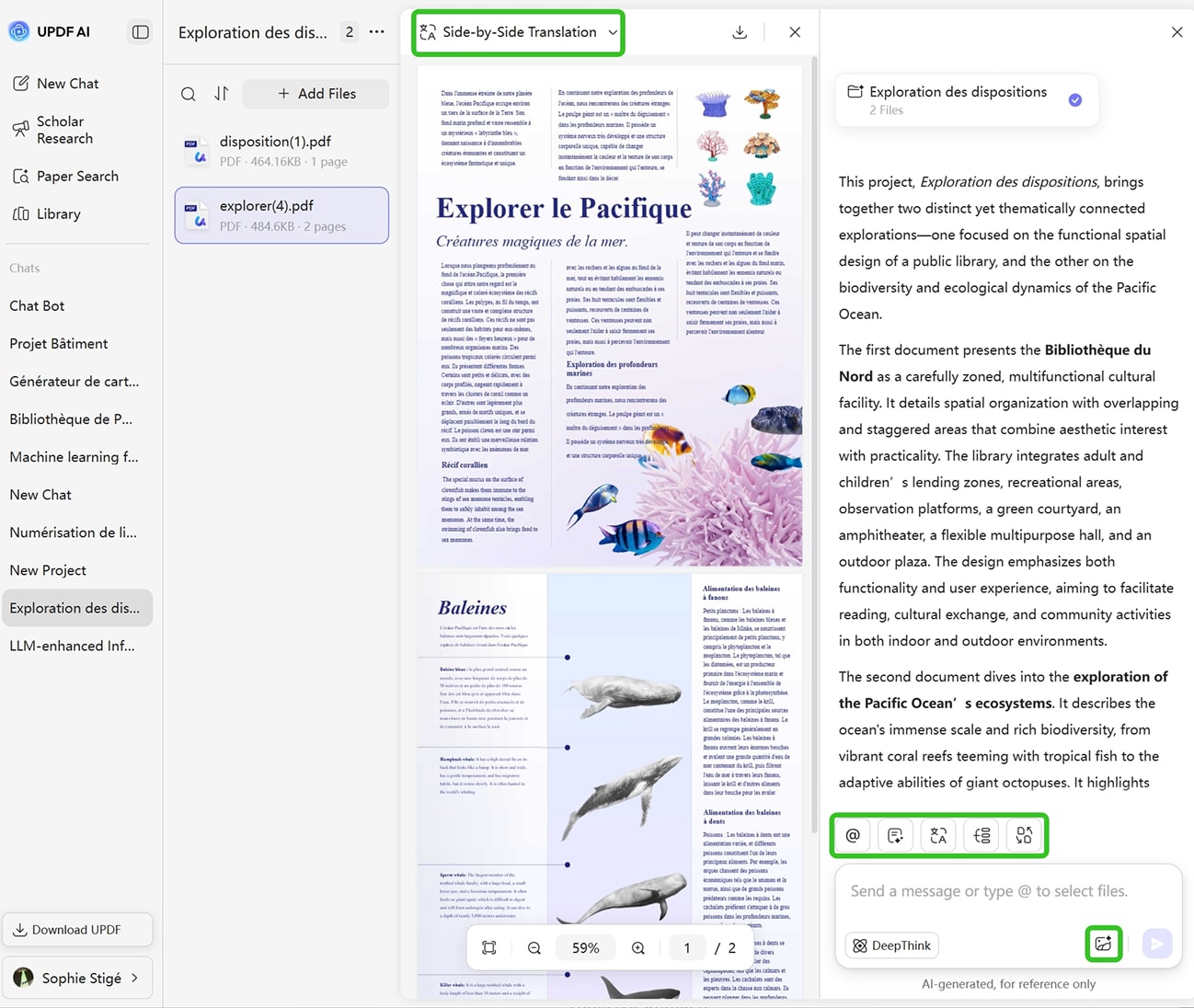
Steps: As soon as the file loads, you can tell the AI what you want to extract or explore. You can enter prompts such as: “Analyze this paper and extract all essential findings” or “Review this report and highlight the key statistics, risks, and insights”. Moreover, you’ll notice a toolbar of quick-action buttons at the bottom of the interface—shortcuts like Summarize, Mind Map, Convert, and Translate, allowing you to launch common analysis tasks instantly.
-
Analyze Images: UPDF AI also supports uploading or pasting screenshots when you need to analyze information embedded in images, charts, or scanned documents—no separate OCR tool required.
-
Tip: Before uploading your PDF, you can also use the quick-action toolbar on the homepage to run commands instantly.

What Are Great Roles of UPDF AI PDF Analyzer?
For Researchers & Academics
Extract theories, methods, datasets, and conclusions with precision. UPDF AI PDF Analyzer can compare multiple papers, generate structured insights, and accelerate literature reviews without manually combing through dozens of PDFs.

For Legal & Compliance Professionals
Long, complex documents shouldn’t slow you down. UPDF AI PDF Analyzer helps you quickly spot the obligations, clauses, exceptions, and compliance-critical details that matter most. It supports your team in catching risks early, staying aligned with regulations, and making confident decisions without drowning in paperwork.

For Business Analysts & Consultants
UPDF AI PDF Analyzer quickly analyzes dense market research reports, competitor filings, and white papers to extract key trends, SWOT factors, and strategic recommendations in seconds. You can hardly understand reports, proposals, legal documents, and technical manuals in seconds without our AI PDF Analyzer.

Why Use UPDF AI PDF Analyzer?
Comprehensive Extraction & Analysis
UPDF AI PDF Analyzer captures tables, figures, formulas, definitions, claims, risks, and relationships—everything essential to understanding the document. You’ll get a complete, structured analysis instead of a patchy overview.
All-in-One Workspace for PDFs
Edit, annotate, organize, and analyze your PDFs in one integrated platform. All the tools you need are seamlessly connected, eliminating the hassle of switching between different applications.
Support for Human-Guided Refinement
Analysis isn’t one-and-done. You can question UPDF AI, request revisions, highlight contradictions, refine structure, or ask for deeper breakdowns. UPDF AI PDF Analyzer adapts to your thinking as you refine your understanding.
UPDF AI vs. Other AI PDF Analyzers
UPDF AI PDF Analyzer
Other AI PDF Analyzers
Privacy-First Experience
No ads, no data selling, and no hidden tracking
Ads disturbing
Context-Aware Intelligence


Image & Screenshot Analysis
With built-in OCR
Free to Try
5 free PDFs analyses
Fast Batch Analysis
AI Engine
ChatGPT-5 & Deepseek R1
ChatGPT-4o/4.1
Research-Focused UI
Equipped with quick-action buttons
FAQs About Using UPDF AI PDF Analyzer
Q1. Is UPDF AI really free to analyze my PDFs?
Q2. How accurate is the analysis?
Q3. Does UPDF AI support multilingual PDF analysis?
Q4. Can I download or export the results?
Other Popular UPDF AI Tools