UPDF
UPDF
 UPDF for Windows
 UPDF for Mac
 UPDF for iPhone/iPad
 UPDF for Android
 Nomostar
 UPDF AI Online
 UPDF Sign
 IvyCraft
 Edit PDF
 Annotate PDF
 Create PDF
 PDF Form
 Edit links
 Convert PDF
 OCR
OCR PDF to Word
 PDF to Image
 PDF to Excel
 Organize PDF
 Merge PDF
 Split PDF
 Crop PDF
 Rotate PDF
 Protect PDF
 Sign PDF
 Redact PDF
 Sanitize PDF
 Remove Security
 Read PDF
 UPDF Cloud
 Compress PDF
 Print PDF
 Batch Process
 About UPDF AI
 UPDF AI Solutions
 AI User Guide
 FAQ about UPDF AI
 Summarize PDF
 Translate PDF
 Chat with PDF
 Chat with AI
 Chat with image
 PDF to Mind Map
 Explain PDF
 PDF AI Tools
 Image AI Tools
 AI Chat Tools
 AI Writing Tools
 AI Study Tools
 AI Working Tools
 Other AI Tools
 AI Bookmark Generation
 AI Bookmark Summary
 AI Watermark Generation
 AI Background Generation
 AI Sticker Generation
 AI Stamp Generation
 AI Editing Suite
 UPDF Copilot
 AI Page Management
 AI Semantic Search
 PDF to Word
 PDF to Excel
 PDF to PowerPoint
 Enterprise Solution
 Enterprise Sign
 Enterprise AI
 Enterprise Plan
 Enterprise User Guide
 Enterprise Webinar
 IT
IT Education
 Construction
 Financial Service
 Healthcare
 Insurance
 Legal
Legal Manufacturing
 Government
 Researchers & PhDs
 Solopreneurs & Freelancers
 Lawyers & Legal Professionals
 Real Estate Agents & Brokers
 Education Solution
 Customer Stories
 User Guide
 UPDF Tricks
 FAQs
FAQs UPDF Reviews
 Download Center
 Blog
Blog Newsroom
 Tech Spec
 Updates
 UPDF vs. Adobe Acrobat
 UPDF vs. Foxit
 UPDF vs. PDF Expert

 UPDF AI
Free AI Instagram Caption Generator
Boost your Instagram game with UPDF AI Caption Generator. Powered by GPT-5 and DeepSeek, it creates captions that attract more views, likes, and engagement—just upload your image or share your topic, ask UPDF AI to generate caption for you.
Powered by
 GPT-5 |
 DeepSeek R1
5000+ Reviews
 4.8
4.8
UPDF AI available on


 Desktop & mobile app

4M+ Users, 209M+ Instagram Captions Generated, Trusted by Leading Medias:






How to Use UPDF AI Instagram Caption Generator?
-
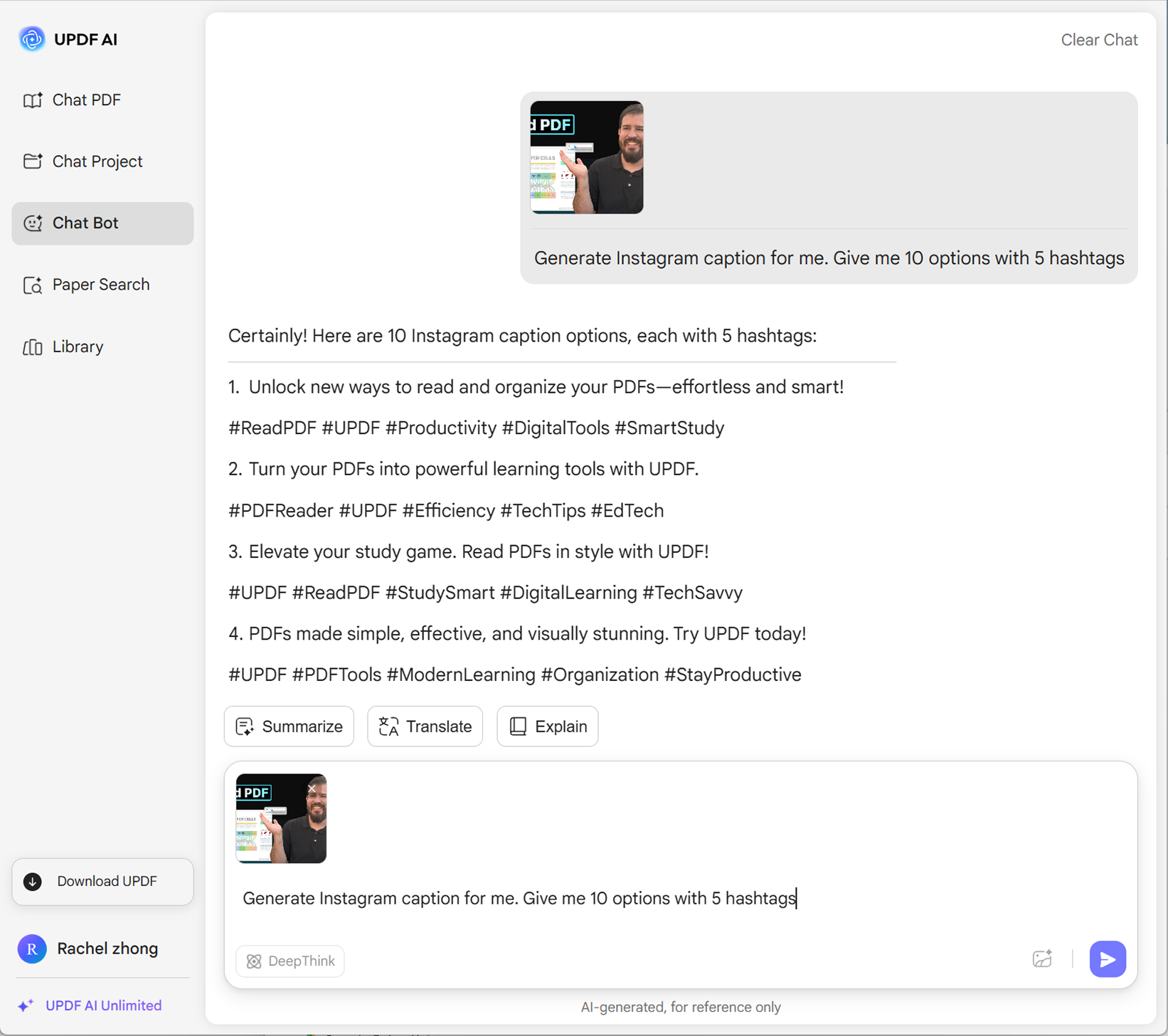
Click the Image icon to upload your photo, or describe your image/video topic. Then, enter a prompt like “Generate Instagram caption for me” and include any extra details—hashtags, emojis, number of options, tone, or word count.
-
When you are entering your topic manually, you can choose your AI model. By default, UPDF AI uses ChatGPT-5, but you can switch to DeepSeek R1 by clicking DeepThink.
-
Finally, hit Send to get your captions. Not satisfied? Refine your prompt, resend, or ask for more options.

Who Should Use AI Instagram Caption Generator?
Social Media Managers
As a social media manager handling multiple Instagram accounts, often in different languages, boosting efficiency is key. Using an AI Instagram Caption Generator helps you quickly create engaging, appropriate captions for every account, saving time while maintaining quality and consistency across posts.

Instagram Influencers
The AI Instagram Caption Generator is perfect for influencers. When posting images or videos, finding the right caption can be challenging. This tool quickly generates creative, engaging captions that attract more viewers, increase likes, and boost overall Instagram performance with minimal effort.

Small Business Owners
As a small business owner new to Instagram, crafting captions that grab attention can be difficult. The AI Instagram Caption Generator helps by creating engaging, creative captions that showcase your brand, attract more viewers, and boost interaction effortlessly, even without prior social media experience.

Why Use UPDF AI Instagram Caption Generator?
Tailored Captions for Every Image or Video
UPDF AI Instagram Caption Generator lets you upload an image so AI can understand its topic and create the perfect caption. For videos, simply enter the topic, and it generates captions tailored to your needs, making social media posting faster and easier.
No Login Required and Free Version Available
UPDF AI Instagram Caption Generator is completely accessible without logging in. It offers 100 free prompts, making it ideal for small tasks or users who don’t want to pay, allowing you to generate creative Instagram captions quickly and effortlessly.
Multi-Language Support
UPDF AI Instagram Caption Generator supports all languages. Simply enter your prompt in the language you want, and the tool will generate captions in that language, making it easy to create engaging, multilingual Instagram captions for any audience quickly and effortlessly.
UPDF AI
vs. Other Instagram Caption Generators
UPDF AI
Instagram Caption Generator
Other AIInstagram Generators
Free Version

Image Uploaded

Enter Topics
Control Tone
Control Word Length
Define Output Language
Control Output Quantity
Language Supported
100+
Less than 20
Platform Supported
Online, Windows, Mac, Android, iOS
Online
FAQs About Using UPDF AI Instagram Caption Generator
1. How Can I Generate a Satisfying Instagram Caption with UPDF?
2. How Many Captions Can I Generate in the Free Version of UPDF AI Instagram Caption Generator?
3. Which AI Model is Better for Creative Captions in UPDF AI Instagram Caption Generator?
4. Can Free Users Access All AI Models in UPDF AI Instagram Caption Generator?
Other Popular UPDF AI Tools