UPDF
UPDF
 UPDF for Windows
 UPDF for Mac
 UPDF for iPhone/iPad
 UPDF for Android
 Nomostar
 UPDF AI Online
 UPDF Sign
 IvyCraft
 Edit PDF
 Annotate PDF
 Create PDF
 PDF Form
 Edit links
 Convert PDF
 OCR
OCR PDF to Word
 PDF to Image
 PDF to Excel
 Organize PDF
 Merge PDF
 Split PDF
 Crop PDF
 Rotate PDF
 Protect PDF
 Sign PDF
 Redact PDF
 Sanitize PDF
 Remove Security
 Read PDF
 UPDF Cloud
 Compress PDF
 Print PDF
 Batch Process
 About UPDF AI
 UPDF AI Solutions
 AI User Guide
 FAQ about UPDF AI
 Summarize PDF
 Translate PDF
 Chat with PDF
 Chat with AI
 Chat with image
 PDF to Mind Map
 Explain PDF
 PDF AI Tools
 Image AI Tools
 AI Chat Tools
 AI Writing Tools
 AI Study Tools
 AI Working Tools
 Other AI Tools
 AI Bookmark Generation
 AI Bookmark Summary
 AI Watermark Generation
 AI Background Generation
 AI Sticker Generation
 AI Stamp Generation
 AI Editing Suite
 UPDF Copilot
 AI Page Management
 AI Semantic Search
 PDF to Word
 PDF to Excel
 PDF to PowerPoint
 Enterprise Solution
 Enterprise Sign
 Enterprise AI
 Enterprise Plan
 Enterprise User Guide
 Enterprise Webinar
 IT
IT Education
 Construction
 Financial Service
 Healthcare
 Insurance
 Legal
Legal Manufacturing
 Government
 Researchers & PhDs
 Solopreneurs & Freelancers
 Lawyers & Legal Professionals
 Real Estate Agents & Brokers
 Education Solution
 Customer Stories
 User Guide
 UPDF Tricks
 FAQs
FAQs UPDF Reviews
 Download Center
 Blog
Blog Newsroom
 Tech Spec
 Updates
 UPDF vs. Adobe Acrobat
 UPDF vs. Foxit
 UPDF vs. PDF Expert

 UPDF AI
Free Chicago Bibliography Generator
Generate Chicago citations in seconds—from bibliography entries and footnotes to annotations for books, websites, journal articles, and more. (Built for the Chicago Manual of Style, 18th edition)
Powered by
 GPT-5.6 |
 DeepSeek R1
5000+ Reviews
 4.8
4.8
UPDF AI available on


 Desktop & mobile app

4M+ Users, 12M+ Chicago Citations Generated. Trusted by Leading Medias:






How to Generate a Chicago Bibliography Online?
-
Add Your Source
Paste the author, title, publisher, date, journal, DOI, URL, or other available source details. You can also upload a PDF. -
Choose the Format
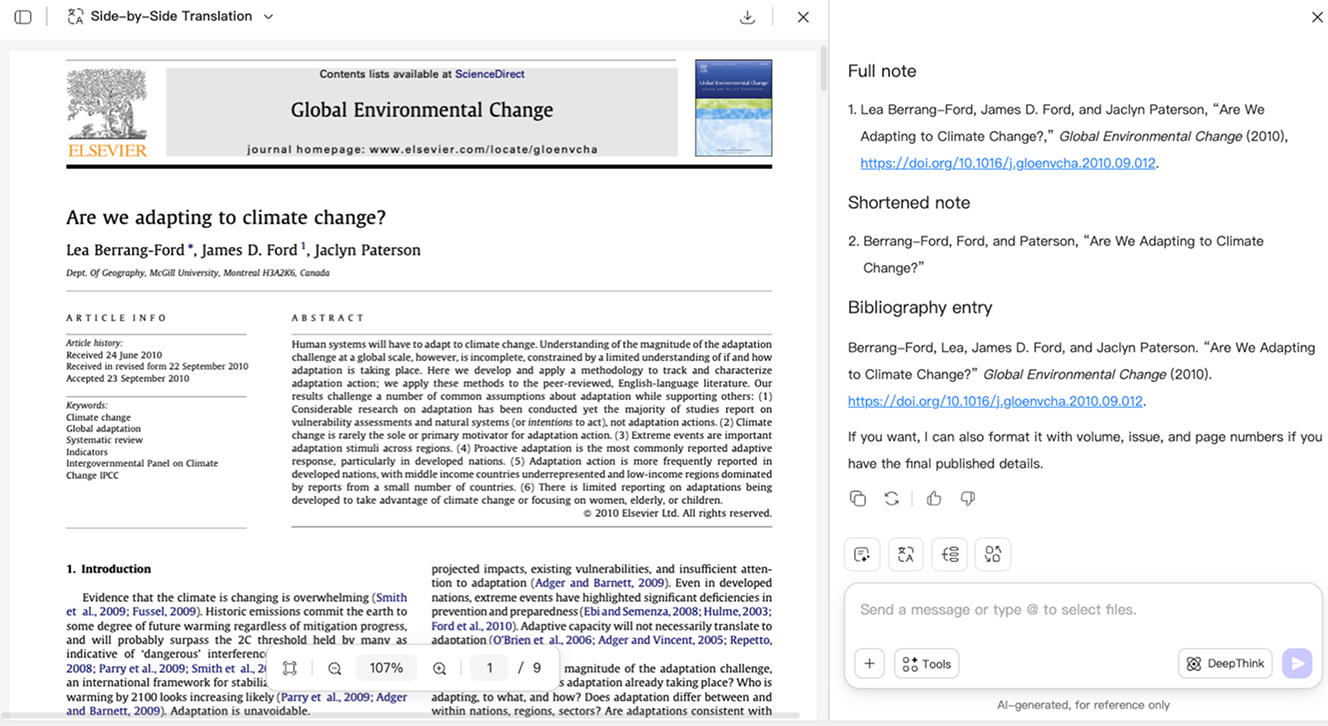
Request Chicago 18th edition and specify a bibliography entry, full note, shortened note, footnote, or annotation. -
Generate and Review
Check names, titles, dates, page numbers, DOI information, and URLs against the original source.

Why Choose UPDF AI for Chicago Bibliography Generation?
Cite Books, Websites, and Journal Articles
Create consistent citations with a Chicago bibliography generator for books. Chicago bibliography generator for website, and Chicago bibliography generator for journal article sources—all in one place. UPDF AI helps adapt the required fields while keeping your bibliography consistent.

Create Bibliography Entries and Footnotes Together
Use one Chicago notes bibliography generator for full notes, shortened notes, and bibliography entries. Its Chicago bibliography generator footnote support helps keep citations consistent throughout long papers.

Build an Annotated Bibliography Faster
Format citations and draft descriptive or evaluative annotations with a Chicago annotated bibliography generator. Get a faster starting point for comparing sources and explaining their relevance to your research.

UPDF AI vs. Basic Citation Generators
UPDF AI
Basic Citation Generators
Chicago 18th-edition instructions

Support may vary
Full and shortened notes
Support may vary
Uploaded document analysis

Annotated bibliography
Custom citation + annotation
AI models
GPT-5.6 and DeepSeek R1
Fixed formatting engine
Platform Supported
Online, Windows, macOS, iOS, Android
Online
Frequently Asked Questions
1. Can UPDF AI create an annotated Chicago bibliography?
2. What is the difference between Notes and Bibliography and Author-Date?
3. What is the difference between a bibliography entry and a footnote?
4. Does UPDF AI guarantee every citation is correct?
Other Popular UPDF AI Tools