UPDF
UPDF
 UPDF for Windows
 UPDF for Mac
 UPDF for iPhone/iPad
 UPDF for Android
 Nomostar
 UPDF AI Online
 UPDF Sign
 IvyCraft
 Edit PDF
 Annotate PDF
 Create PDF
 PDF Form
 Edit links
 Convert PDF
 OCR
OCR PDF to Word
 PDF to Image
 PDF to Excel
 Organize PDF
 Merge PDF
 Split PDF
 Crop PDF
 Rotate PDF
 Protect PDF
 Sign PDF
 Redact PDF
 Sanitize PDF
 Remove Security
 Read PDF
 UPDF Cloud
 Compress PDF
 Print PDF
 Batch Process
 About UPDF AI
 UPDF AI Solutions
 AI User Guide
 FAQ about UPDF AI
 Summarize PDF
 Translate PDF
 Chat with PDF
 Chat with AI
 Chat with image
 PDF to Mind Map
 Explain PDF
 PDF AI Tools
 Image AI Tools
 AI Chat Tools
 AI Writing Tools
 AI Study Tools
 AI Working Tools
 Other AI Tools
 AI Bookmark Generation
 AI Bookmark Summary
 AI Watermark Generation
 AI Background Generation
 AI Sticker Generation
 AI Stamp Generation
 AI Editing Suite
 UPDF Copilot
 AI Page Management
 AI Semantic Search
 PDF to Word
 PDF to Excel
 PDF to PowerPoint
 Enterprise Solution
 Enterprise Sign
 Enterprise AI
 Enterprise Plan
 Enterprise User Guide
 Enterprise Webinar
 IT
IT Education
 Construction
 Financial Service
 Healthcare
 Insurance
 Legal
Legal Manufacturing
 Government
 Researchers & PhDs
 Solopreneurs & Freelancers
 Lawyers & Legal Professionals
 Real Estate Agents & Brokers
 Education Solution
 Customer Stories
 User Guide
 UPDF Tricks
 FAQs
FAQs UPDF Reviews
 Download Center
 Blog
Blog Newsroom
 Tech Spec
 Updates
 UPDF vs. Adobe Acrobat
 UPDF vs. Foxit
 UPDF vs. PDF Expert

 UPDF AI
Master Multiple Client PDFs with UPDF AI
The ultimate AI tool for bulk analysis of professional documents. Seamlessly chat with, summarize, and extract insights from multiple complex financial or legal files simultaneously, transforming raw data into professional business intelligence instantly.
Powered by
 GPT-5 |
 DeepSeek R1
5000+ Reviews
 4.8
4.8
UPDF AI available on


 Desktop & mobile app

4M+ Users, 8M+ Client PDFs Analyzed, Trusted by Leading Medias:






How to Analyze Client PDF Online for free?
-
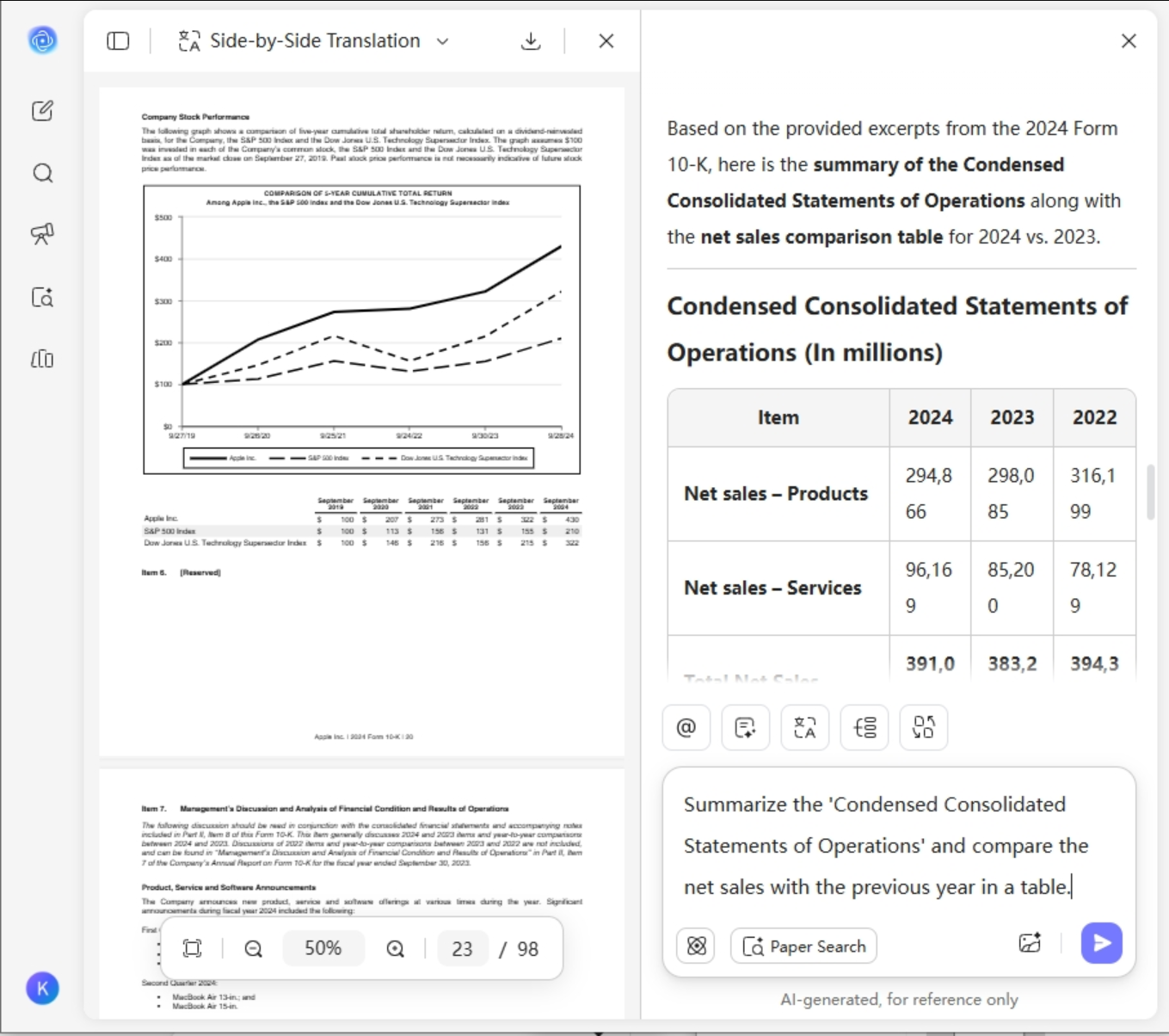
Chat & Summarize:Upload professional documents like 10-Q reports or contracts to this AI tool to analyze client PDFs. Enter your command.
Example: "Summarize the 'Condensed Consolidated Statements of Operations' and compare the net sales with the previous year in a table." -
Switch AI Models: The system defaults to GPT-5 for speed. You can also click "DeepThink" to switch to the DeepSeek R1 model for complex logical reasoning, ensuring this AI tool to analyze client PDFs handles even the most intricate data structures easily.
-
Convert & Visualize: Instantly convert original reports into Mind Maps, PPT, Excel or Word to clarify complex logic. This allows you to transform AI-generated insights into professional visuals and editable documents, ready for your next presentation.

Why Choose UPDF AI to Analyze Client PDFs?
Summarize Multiple Documents
As a powerful AI tool for professional analysis, it excels at summarizing and chatting with multiple documents simultaneously. Powered by GPT-5, it identifies trends and extracts data across various complex financial reports or legal files with pinpoint accuracy.

Enterprise-Grade Security
Your privacy is our priority. This AI tool to analyze client PDFs strictly follows global privacy policies. Your data is never used for training or other purposes, providing a secure environment for handling sensitive client documents.

Global Collaboration & Low Cost
This AI tool to analyze client PDFs supports all major languages, removing barriers for global teams. It is highly cost-effective and works across App and Web platforms, allowing you to access powerful document insights and summaries anywhere.

UPDF AI Analyzing Tool
vs. Other AI Analyzing Tools
UPDF AI
Analyzing Tool
Other AI Analyzing Tools
Multi-file Analysis
Parallel Multi-Document Analysis
Limited to 10 Files; No Cross-File Chat
DeepThink


AI Visualization
Mind Map Visualization
Plain Text Summary Only
Simple Operation
Generation Flexibility
Unlimited Quote Generation per Request
Single-Batch Limits
Advanced AI Models
GPT-5 + DeepSeek R1 (Switchable)
Generic AI Models (Single Function)
Value
Cost-Effective & Cross-Platform
Expensive, Rigid Annual Bundles
Generation Flexibility
Unlimited Quote Generation per Request
Single-Batch Limits
Global Multilingual Support
All languages
Mostly English Only
Common Questions About UPDF AI to Analyze Client PDFs
Q1. What file types and sizes are supported?
Q2. Can I try this AI Tool to Analyze Client PDFs for free?
Q3. Can the AI extract specific financial data from my PDFs?
Q4. Does it offer more than just text summaries?
Other Popular UPDF AI Tools