UPDF
UPDF
 UPDF for Windows
 UPDF for Mac
 UPDF for iPhone/iPad
 UPDF for Android
 Nomostar
 UPDF AI Online
 UPDF Sign
 IvyCraft
 Edit PDF
 Annotate PDF
 Create PDF
 PDF Form
 Edit links
 Convert PDF
 OCR
OCR PDF to Word
 PDF to Image
 PDF to Excel
 Organize PDF
 Merge PDF
 Split PDF
 Crop PDF
 Rotate PDF
 Protect PDF
 Sign PDF
 Redact PDF
 Sanitize PDF
 Remove Security
 Read PDF
 UPDF Cloud
 Compress PDF
 Print PDF
 Batch Process
 About UPDF AI
 UPDF AI Solutions
 AI User Guide
 FAQ about UPDF AI
 Summarize PDF
 Translate PDF
 Chat with PDF
 Chat with AI
 Chat with image
 PDF to Mind Map
 Explain PDF
 PDF AI Tools
 Image AI Tools
 AI Chat Tools
 AI Writing Tools
 AI Study Tools
 AI Working Tools
 Other AI Tools
 AI Bookmark Generation
 AI Bookmark Summary
 AI Watermark Generation
 AI Background Generation
 AI Sticker Generation
 AI Stamp Generation
 AI Editing Suite
 UPDF Copilot
 AI Page Management
 AI Semantic Search
 PDF to Word
 PDF to Excel
 PDF to PowerPoint
 Enterprise Solution
 Enterprise Sign
 Enterprise AI
 Enterprise Plan
 Enterprise User Guide
 Enterprise Webinar
 IT
IT Education
 Construction
 Financial Service
 Healthcare
 Insurance
 Legal
Legal Manufacturing
 Government
 Researchers & PhDs
 Solopreneurs & Freelancers
 Lawyers & Legal Professionals
 Real Estate Agents & Brokers
 Education Solution
 Customer Stories
 User Guide
 UPDF Tricks
 FAQs
FAQs UPDF Reviews
 Download Center
 Blog
Blog Newsroom
 Tech Spec
 Updates
 UPDF vs. Adobe Acrobat
 UPDF vs. Foxit
 UPDF vs. PDF Expert

 UPDF AI
Free Online AI Response Generator
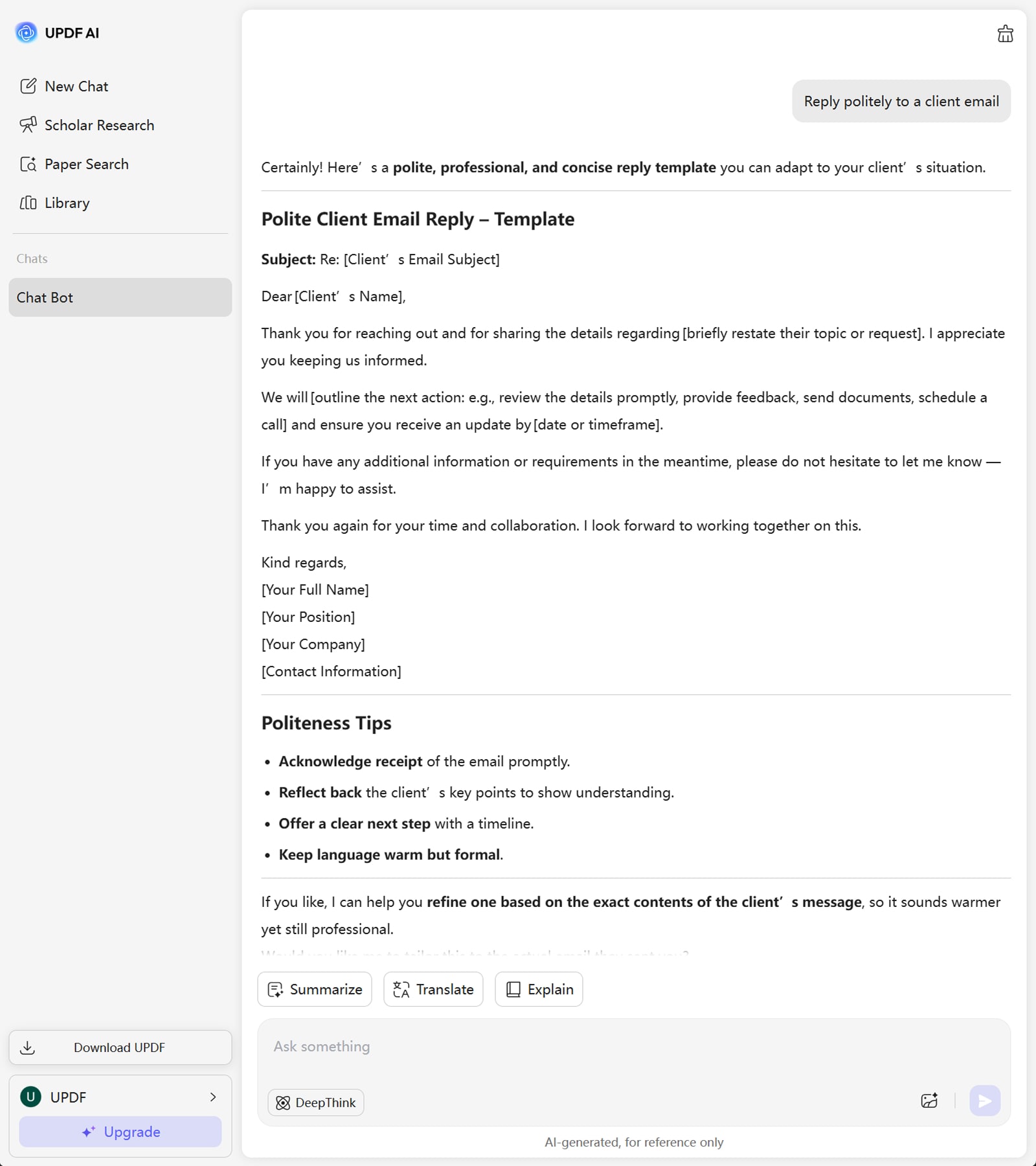
Turn any prompt—like “Reply politely to a client email,” “Craft a friendly social media comment,” or others—into polished, professional responses effortlessly with the UPDF AI Response Generator.
Powered by
 GPT-5 |
 DeepSeek R1
5000+ Reviews
 4.8
4.8
UPDF AI available on


 Desktop & mobile app

5M+ Users, 60M+ Responses Generated, Trusted by Leading Medias:






How to Generate AI Response Online for Free?
-
Step 1: Enter your prompt into UPDF AI, which is the instruction for the response—for example, “Reply politely to a client email” or “Write a friendly comment to a social media follower.” Include the context, the other person’s state, and what you want to achieve, or just describe the situation if you’re unsure.
-
Step 2: Choose the AI model that suits your needs—GPT-5 for creative, engaging, and expressive replies, or DeepThink for precise, analytical, and in-depth responses.
-
Step 3: Click Send and let UPDF AI generate a polished, professional response that you can review, edit if needed, and use for emails, social media, reports, or any communication.

Who Should Use UPDF AI Response Generator?
Professionals and Business Users
Ideal for managers, customer support agents, project coordinators, and entrepreneurs who need to craft emails, client replies, or business communications quickly and professionally.

Non-Expressive Users
Those who struggle to articulate emails, comments, or responses can rely on UPDF AI to turn their ideas into clear, professional, and engaging messages, ensuring their intent is communicated effectively.

Marketers
Social media managers, digital marketers, and content creators who need to craft engaging posts, comments, or captions. With UPDF AI, they can produce audience-focused responses quickly, ensuring higher engagement and consistent brand voice.

Why Use UPDF AI Response Generator?
Reduced Errors
General AI response generators may produce irrelevant or off-topic text due to limited context understanding. UPDF AI prioritizes your prompt and conversation flow to reduce errors and deliver coherent, accurate, and usable replies.
Efficiency
When handling large volumes of emails, social media messages, client feedback, or reports, general AI tools often require manual adjustments to style and format. UPDF AI Response Generator ensures fast, consistent, and professional replies, saving time and maintaining quality across multiple communications.
Multi-Language Support
UPDF AI can generate responses in multiple languages and includes a built-in AI Translator feature, making it suitable for smooth global communication.
UPDF AI vs. Other AI Response Generators
UPDF AI Response Generator
Other AI Response Generators
Free
100 questions
100 questions
AI Modes
GPT-5 & DeepSeek R1
GPT-4
Multi-Scenario
Emails, social media, reports, chats
Email only
Centralized Access To All Generators


Ad-free
Simple
Learning Curve
Beginner-friendly
Harder to navigate
Language Supported
All
20+
Platform Supported
Online, Windows, Mac, Android, iOS
Online
FAQs About Using UPDF AI Response Generator
Q1. Is the tool safe and reliable?
Q2. How accurate are the answers generated by UPDF AI Response Generator?
Q3. How many responses can I generate for free?
Q4. Can I upload the screenshot of an email or a comment to UPDF Al, and let it analyze and draft a response?
Other Popular UPDF AI Tools