UPDF
UPDF
 UPDF for Windows
 UPDF for Mac
 UPDF for iPhone/iPad
 UPDF for Android
 Nomostar
 UPDF AI Online
 UPDF Sign
 IvyCraft
 Edit PDF
 Annotate PDF
 Create PDF
 PDF Form
 Edit links
 Convert PDF
 OCR
OCR PDF to Word
 PDF to Image
 PDF to Excel
 Organize PDF
 Merge PDF
 Split PDF
 Crop PDF
 Rotate PDF
 Protect PDF
 Sign PDF
 Redact PDF
 Sanitize PDF
 Remove Security
 Read PDF
 UPDF Cloud
 Compress PDF
 Print PDF
 Batch Process
 About UPDF AI
 UPDF AI Solutions
 AI User Guide
 FAQ about UPDF AI
 Summarize PDF
 Translate PDF
 Chat with PDF
 Chat with AI
 Chat with image
 PDF to Mind Map
 Explain PDF
 PDF AI Tools
 Image AI Tools
 AI Chat Tools
 AI Writing Tools
 AI Study Tools
 AI Working Tools
 Other AI Tools
 AI Bookmark Generation
 AI Bookmark Summary
 AI Watermark Generation
 AI Background Generation
 AI Sticker Generation
 AI Stamp Generation
 AI Editing Suite
 UPDF Copilot
 AI Page Management
 AI Semantic Search
 PDF to Word
 PDF to Excel
 PDF to PowerPoint
 Enterprise Solution
 Enterprise Sign
 Enterprise AI
 Enterprise Plan
 Enterprise User Guide
 Enterprise Webinar
 IT
IT Education
 Construction
 Financial Service
 Healthcare
 Insurance
 Legal
Legal Manufacturing
 Government
 Researchers & PhDs
 Solopreneurs & Freelancers
 Lawyers & Legal Professionals
 Real Estate Agents & Brokers
 Education Solution
 Customer Stories
 User Guide
 UPDF Tricks
 FAQs
FAQs UPDF Reviews
 Download Center
 Blog
Blog Newsroom
 Tech Spec
 Updates
 UPDF vs. Adobe Acrobat
 UPDF vs. Foxit
 UPDF vs. PDF Expert

 UPDF AI
AI Meeting Minutes Summarizer & Action Item Extractor
Powered by ChatGPT-5 and DeepSeek R1, UPDF AI helps you summarize meeting minutes with clarity and efficiency. Share your meeting notes or transcripts, and UPDF AI delivers clear summaries with key points and action items in minutes.
Powered by
 GPT-5 |
 DeepSeek R1
5000+ Reviews
 4.8
4.8
Use UPDF AI Meeting Minutes Summarizer Anywhere:


 Desktop & mobile app

4M+ Users, 5M+ Meetings Summarized, Trusted by Leading Medias:






How to Use UPDF AI Meeting Minutes Summarizer Online for free?
-
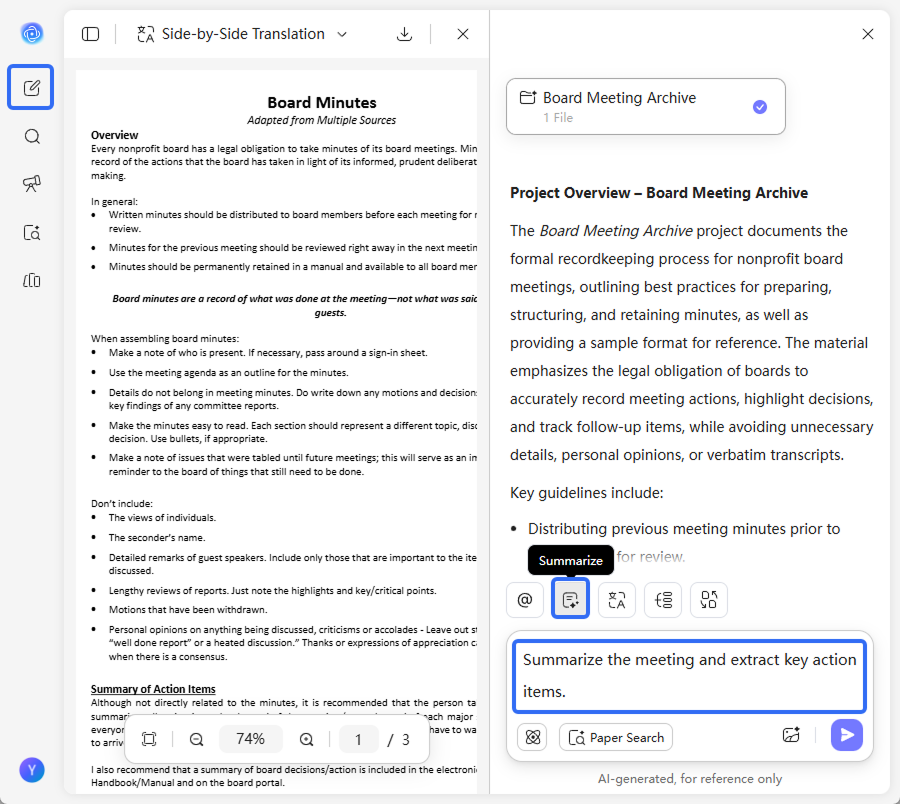
Upload meeting records and add a prompt.
· For PDF:In New Chat, upload your meeting minutes in PDF format. UPDF AI will automatically generate a summary, or you can click the “Summarize” button on the bottom-right.
· For text/images: You can also upload meeting records as text or images, then add a prompt such as: “Summarize the meeting and extract key action items.” -
Select your AI model.
ChatGPT-5 is selected by default. To switch to DeepSeek R1, click the “DeepThink” button for an alternative reasoning style. -
Generate summaries and action items.
Click “Send,” and UPDF AI will produce a clear meeting summary with a structured list of action items. -
Review, refine, and copy.
Edit the summary, adjust action items, or regenerate as needed. Once finalized, copy the results for sharing and follow-up.

Why Choose UPDF AI Meeting Minutes Summarizer?
Instant, Clear Meeting Summaries
UPDF AI quickly turns long meeting notes, transcripts, or PDFs into concise, easy-to-read summaries. This helps teams review discussions faster, align on key points, and reduce time spent revisiting full meeting records.

Automatic Action Item Identification
UPDF AI not only summarizes content but also identifies key action items, decisions, and follow-up tasks. This ensures responsibilities are clearly captured and nothing important is overlooked after the meeting ends.

Works with PDFs, Text, and Images
You can upload meeting minutes as PDFs, text files, or images. UPDF AI processes different formats seamlessly and delivers consistent summaries, regardless of how your meeting records are stored.

Designed for Real Workflows
UPDF AI structures meeting outputs in a practical, business-friendly format. This makes it easy to share summaries with teams, support project tracking, and improve post-meeting communication.

Accurate and Context-Aware Results
Powered by advanced AI models, UPDF AI understands the context of discussions rather than relying on keywords alone. This results in more accurate summaries and action items that reflect the true intent of the meeting.

UPDF AI Meeting Minutes Summarizer
vs. Other AI Tools
UPDF AI
Other AITools
Summary Quality
Clear & structured
Text-heavy
Action Items
Automatically identified
Often manual
Input Formats
PDF, text, images
Limited formats
Context Awareness
High
Moderate
Free to Try
 100 questions

No Word Limits
Data Security
AI Model Options
ChatGPT-5 & DeepSeek R1
Limited to one AI model
Language Supported
100+
Less than 20
Platform Supported
Online, Windows, Mac, Android, iOS
Online
FAQs About Using UPDF AI Meeting Minutes Summarizer
Q1. What types of meetings can UPDF AI Meeting Minutes Summarizer handle?
Q2. Can UPDF AI Meeting Minutes Summarizer handle long or complex meeting minutes?
Q3. Does UPDF AI Meeting Minutes Summarizer work with scanned meeting documents or images?
Q4. Can I control what UPDF AI Meeting Minutes Summarizer focuses on in the summary?
Q5. Is UPDF AI Meeting Minutes Summarizer free to use?
Q6. How does UPDF AI Meeting Minutes Summarizer protect meeting data and confidential information?
Other Popular UPDF AI Tools